Atlas Infinite is a MongoDB Atlas edition, built on an architecture that separates compute from storage into independent layers, designed for mission-critical high-performance use cases, with built-in security controls. This design delivers high performance, scalability, and elasticity: you can scale compute and storage independently and rapidly, recover quickly from failures, and simplify operational workflows.
To learn how this documentation is organized across editions, see About This Documentation.
Architecture
The following diagram shows how Atlas Infinite separates compute from storage.
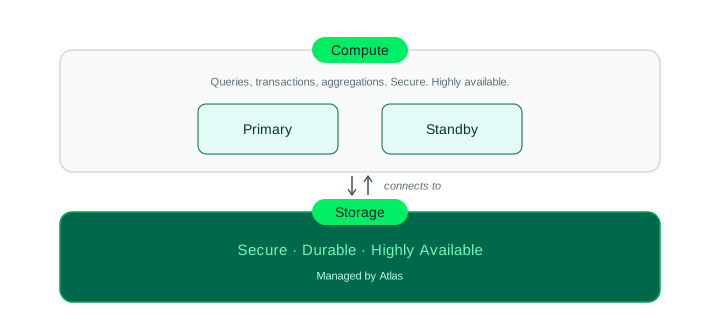
Compute and storage as independent layers in Atlas Infinite
In Atlas Infinite, compute and storage are separate layers. Your application's queries, transactions, and aggregations run on compute nodes. MongoDB manages the storage layer independently of the compute layer, so operations such as scaling the cluster tier, adding read-only nodes, and recovering from a node failure run without moving or replicating data. Your application connects to your Atlas Infinite cluster using MongoDB drivers and other connection methods. You can also access and manage the cluster with MongoDB programmatic tools.
To learn more about the architecture, see MongoDB Atlas Infinite: Architecture.
Benefits
By separating compute from storage, Atlas Infinite lets you:
Scale independently: You scale the cluster tier and storage capacity independently, so scaling the cluster tier doesn't require scaling storage capacity.
Scale quickly: Scaling Atlas Infinite vertically and horizontally is quick, so you don't have to preprovision for peaks or preplan scaling in anticipation of events.
Simplify operations: In Atlas Infinite, you can increase storage capacity without downtime.
Maximize throughput and performance: Atlas Infinite runs backup, restore, and point-in-time recovery at the storage layer, independently of the compute layer. This offloads that work from the compute layer, leaving more capacity to serve your application's workload.
Performance
The Atlas Infinite architecture is optimized for performance. Many workloads achieve high throughput on Atlas Infinite. Performance depends on the workload, so test with your own workload to measure the impact.
Elasticity
Atlas Infinite scales compute and storage independently, so you can add compute capacity for a workload spike without changing storage. Atlas Infinite supports auto-scaling for the cluster tier, and scales up and down in reaction to changes in demand. You can scale horizontally by adding read-only nodes, which read from the storage layer and start serving reads in minutes.
Scalability
Atlas Infinite scales storage independently of compute, so you can increase storage capacity to support growing, enterprise-level applications without scaling the cluster tier.
In Atlas Infinite, you scale your cluster vertically by increasing the cluster tier. A larger tier provides more storage throughput and storage IOPS. When you scale your cluster vertically, Atlas Infinite doesn't move your data.
When you add read-only nodes to an Atlas Infinite cluster, they read from the storage layer and start serving reads in minutes, without an initial sync.
Security
Atlas Infinite is designed to be secure. It always encrypts your data before it leaves the compute node, so the storage layer cannot read your application's data. Encryption is mandatory, and Atlas Infinite supports customer-managed data encryption keys (CMK/BYOK).
Atlas Infinite supports the following security controls:
To learn how Atlas encrypts your data at rest and which security controls apply, see Encryption at Rest on Atlas Infinite.
Resilience and Recovery
In Atlas Infinite, the storage layer keeps your data durable. MongoDB doesn't rely on the compute nodes for the durability of your data. An Atlas Infinite cluster has two electable compute nodes, a primary and a standby. Together they form a highly available shard (HA shard), a unit specific to Atlas Infinite and distinct from a MongoDB shard. If the primary fails or restarts, the standby becomes the primary. The storage layer coordinates the failover from the primary to the standby instead of an election among the cluster's nodes and keeps your recent data readily available. Backup, restore, and point-in-time recovery run at the storage layer.
To learn how replication and failover work on an Atlas Infinite cluster, see Replication and Failover. To learn about backup and restore, see Restore an Atlas Infinite Cluster.
Operational Experience
Your application runs on Atlas Infinite without code changes. Atlas Infinite uses the MongoDB wire protocol and supports the full MongoDB query API, including queries, aggregations, indexes, and transactions.
Atlas Infinite also works with the following tools:
mongoshCompass
Atlas Administration API, with some endpoints specific to Atlas Infinite
Atlas CLI, with some commands specific to Atlas Infinite
Terraform Provider, with some attributes specific to Atlas Infinite
SQL Interface, enabled directly on the cluster
On an Atlas Infinite cluster, you can enable the SQL Interface directly on the cluster rather than through a federated database instance.
Atlas provides alerts specific to Atlas Infinite.
Public Preview Availability
Supported in Public Preview
Atlas Infinite supports the following features in public preview:
For the duration of public preview, Atlas Infinite clusters run the latest MongoDB 9.x version, using the Latest Version With Auto Upgrades release option in the Atlas UI. To learn more, see MongoDB Versions in Atlas.
M10throughM60General replica sets, andM40throughM60Low-CPU replica sets.Storage capacity up to 128 TB (logical) per replica set.
Cloud provider regions: In public preview, Atlas Infinite deploys on AWS only. See the Atlas Infinite Support column in the Amazon Web Services (AWS) regions table. Each cluster deploys in one of these regions.
Customer-managed data encryption keys (CMK/BYOK) through AWS KMS.
Backups, with retention for up to 3 years.
mongodump,mongorestore, andmongoimport. To learn more, see Load Data into an Atlas Infinite Cluster.SQL Interface, enabled directly on the cluster.
The AI Cluster Assistant, which is aware of Atlas Infinite clusters but does not have full context on their capabilities.
Not Supported in Public Preview
Atlas Infinite does not support the following features in public preview. This list is subject to change over time as Atlas Infinite adds support for more features. Check back to see which features are currently supported.
Multi-region clusters: All nodes in an Atlas Infinite cluster deploy in the same region.
Multi-cloud clusters: Atlas Infinite doesn't support multi-cloud clusters in public preview. In public preview, Atlas Infinite clusters deploy on AWS only.
M80+ cluster tiers: Atlas Infinite does not support
M80and larger cluster tiers in public preview, in either the General or the Low-CPU cluster class.Sharded clusters: Atlas Infinite does not support sharded clusters in public preview.
Global clusters: Atlas Infinite does not support global clusters in public preview. Global writes require a global cluster, so they aren't available either.
Atlas Search and Vector Search: Atlas Search and Vector Search are not supported on Atlas Infinite clusters in public preview.
Atlas Online Archive: Atlas Online Archive is not supported on Atlas Infinite clusters in public preview.
Atlas Kubernetes Operator: Atlas Kubernetes Operator doesn't support Atlas Infinite clusters in public preview.
Cross-edition migration and restore: Atlas Infinite doesn't support live migration or backup and restore between Atlas Core and Atlas Infinite clusters.
Importing archived snapshots: Atlas Infinite doesn't support importing archived snapshots in public preview.
NVMe storage: Atlas Infinite does not support locally attached NVMe SSD storage in public preview.
Database edition changes: You can't change the database edition of a cluster after you create it, in either direction between Atlas Core and Atlas Infinite.
No oplog replay: Atlas Infinite doesn't support oplog replay. Don't use the
mongodump --oplogoption or themongorestore --oplogReplayoption with Atlas Infinite clusters.Azure Key Vault and Google Cloud KMS: Atlas Infinite supports customer-managed keys only through AWS KMS in public preview.
Cross-organization restores: MongoDB manages a separate encryption key for each Atlas organization, so you restore a snapshot within the organization that created it. To learn how Atlas manages default encryption keys, see Atlas Infinite Encryption.
Atlas Charts: Atlas Infinite doesn't support MongoDB Charts in public preview.
MongoDB for VS Code: Atlas Infinite doesn't support the MongoDB for VS Code extension in public preview.
MongoDB MCP Server: Atlas Infinite doesn't support the MongoDB MCP Server in public preview.
MongoDB Agent Skills: Atlas Infinite doesn't support MongoDB Agent Skills in public preview.
Log downloads and log syncs: Atlas Infinite doesn't support downloading MongoDB logs or syncing logs to an external service in public preview.
Collection-level restore: Atlas Infinite doesn't support restoring individual collections in public preview.
Snapshot distribution: Atlas Infinite doesn't support copying snapshots to other regions in public preview.
Snapshot downloads and local restores: Atlas Infinite doesn't support downloading a snapshot or restoring one to a local deployment in public preview.
Uptime SLA: Atlas Infinite doesn't carry an uptime SLA in public preview.
Independent and asymmetric shard auto-scaling: Atlas Infinite doesn't support independent or asymmetric shard auto-scaling in public preview.
Database profiler: Atlas Infinite doesn't support enabling the database profiler in public preview.
Compare with Atlas Core
Atlas offers two database editions: Atlas Core, where compute and storage are coupled on the same node, and Atlas Infinite, a decoupled architecture where each layer scales independently. To compare the two editions in detail, see Database Editions.
About This Documentation
Most Atlas documentation applies to both Atlas Core and Atlas Infinite, because the Atlas interface, drivers, APIs, and most operational workflows are the same across editions. Documentation describes which editions each page or section applies to, as follows:
Applies to both editions: Unless a page says otherwise, its content applies to both Atlas Core and Atlas Infinite.
Applies to one edition only: When content applies to a single edition, the page identifies that edition in its title or text.
Not supported on Atlas Infinite: When a feature isn't available on Atlas Infinite during public preview, the page includes a note and links to the supported features.
Behaves differently on Atlas Infinite: When a workflow or option differs between editions, the page or section calls out the difference in place.
This page is the starting point for Atlas Infinite. To find information about a specific feature, go to the Atlas topic for that feature and look for Atlas Infinite callouts.