Atlas Infinite separates compute from storage into two independent layers. Compute nodes run your queries, transactions, and aggregations. The storage layer stores your data durably, maintaining multiple copies for high availability. MongoDB manages the storage layer independently of the compute layer, so scaling and recovery operations run without moving or replicating data.
The following diagram shows how Atlas Infinite fits within Atlas, across the application, compute, and storage layers, with the Atlas management interfaces below.
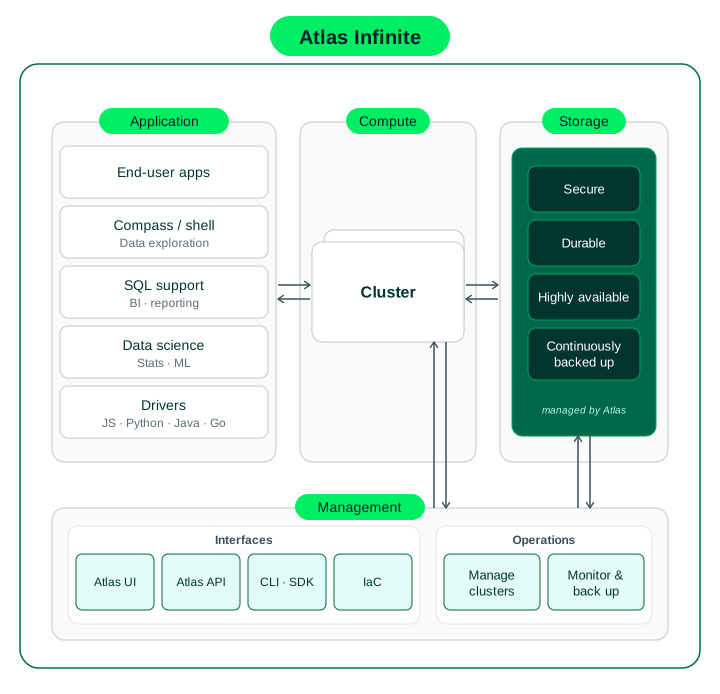
How Atlas Infinite compute and storage fit within the Atlas application and management stack
Compute Layer
Compute nodes are the layer that runs your queries, transactions, and aggregations. Because compute nodes are decoupled from storage, you can scale compute capacity independently of storage. You can add compute capacity as demand grows and scale it back down when demand drops. If you enable auto-scaling, Atlas adjusts compute for you.
In public preview, Atlas deploys your compute nodes in separate availability zones within your cluster's region.
Storage Layer
The storage layer in Atlas Infinite keeps your application's data durable, maintaining multiple copies for high availability. With Atlas Infinite, MongoDB manages storage as an independent layer, separate from the compute nodes that run your application's workload. The storage layer handles replication, serves reads, and provides continuous backups, independent of the compute layer. When you scale the cluster tier, or when a compute node fails and Atlas Infinite performs a failover, your application's data remains available in the storage layer for serving queries. MongoDB doesn't copy it to the new compute nodes.
Security
Atlas Infinite isolates each cluster across storage layers. Atlas mutually authenticates internal traffic with X.509 certificates for communication within the storage layer.
Because the storage layer is shared, each customer's data is encrypted with unique keys that are never shared between customers. To learn how Atlas encrypts Atlas Infinite data, see Atlas Encryption at Rest Overview.
Replication and Failover
An Atlas Infinite cluster has two electable compute nodes: a primary, which serves writes, and a standby, which is the other electable node and takes over when the primary fails or restarts. During public preview, you can add up to five more nodes for workload isolation, giving you up to seven in total. The nodes you add can only serve reads. You can add the following node types:
Read-only nodes serve reads from your operational workload.
Analytics nodes isolate analytic queries from your operational workload.
Search nodes aren't supported on Atlas Infinite clusters in public preview.
The compute nodes don't vote for a primary. The storage layer coordinates failover instead of an election among the cluster's nodes. When the primary fails or restarts, the standby becomes the primary. The storage layer keeps your recent data readily available to every compute node.
Read preference works as it does on an Atlas Core cluster. You can use all read preference modes and pre-defined replica set tags.
Your application's driver sets the read preference. The driver default is primary, so your application sends every read to the primary unless you change the read preference.
An Atlas Infinite cluster has one standby node. When your application reads from a node other than the primary, those reads go to that standby node, unless you add read-only nodes or analytics nodes and set a different read preference. Use the following recommendations:
To serve your application's operational reads from more than one node, add read-only nodes. Read-only nodes serve reads at any read preference except
primary, so each node you add serves part of that traffic. To distribute those reads across the standby and the read-only nodes, set a read preference ofsecondaryPreferred. This keeps your application's reads off the primary and avoids overloading the single standby node. On an Atlas Core cluster, multiple secondaries spread those reads without added nodes.To isolate a workload, such as analytics, from your application's operational reads, add analytics nodes or read-only nodes and use pre-defined replica set tags to direct queries to those nodes.
To give every node more capacity to serve reads, scale the cluster tier.
Backup, restore, and point-in-time recovery operate at the storage layer. To learn about backup and restore, see Restore an Atlas Infinite Cluster.
Write Concern on Atlas Infinite clusters
A write concern describes the level of acknowledgment that you request from MongoDB for a write operation.
This section describes the write concern defaults on an Atlas Infinite cluster, how Atlas handles each write concern field, and how write concern differs from an Atlas Core cluster.
On an Atlas Infinite cluster, the storage layer stores and replicates your data, and Atlas acknowledges your write once the storage layer captures it.
On an Atlas Infinite cluster, the default write concern is w: "majority". Your application sets the write concern in the connection string or for a single write operation. You can't change the default in the Atlas UI.
Atlas accepts any write concern that your application sends and modifies it, where needed, to a value that an Atlas Infinite cluster supports, so your application's write concerns keep working.
On an Atlas Infinite cluster, Atlas handles the write concern fields as follows:
Your application sets the level of write acknowledgment with
w:If your application doesn't set
w, Atlas applies the default,w: "majority". On an Atlas Infinite cluster,"majority"refers to a majority within the storage layer, not a majority of your cluster's nodes. Atlas never rolls back aw: "majority"write.If your application sets
wto0or1, Atlas applies the value that your application sets.w: 0requests no acknowledgment. Aw: 1write returns sooner than aw: "majority"write, but Atlas can roll it back in rare failures.If your application sets
wto2or any number greater than2, Atlas appliesw: "majority".
Your application can set a time limit with
wtimeout(wtimeoutMSin a connection string), in milliseconds.wtimeoutapplies tow: "majority"writes, including writes that use the default:If your application sets
wtimeout, a write that Atlas can't acknowledge returns a write concern error when it reaches thewtimeoutlimit.If your application doesn't set
wtimeout, the write waits indefinitely and blocks your application.
|service| always applies
j: true. The storage layer persists each write outside the node's memory before Atlas acknowledges it. Your application'sjsetting has no effect on this behavior.
Write concern differs between Atlas Infinite clusters and Atlas Core clusters in the following ways:
On an Atlas Infinite cluster, you set
wto0,1, or"majority". Forw: 1andw: "majority", the storage layer guarantees your write. Forw: 0, the storage layer doesn't acknowledge your write. On an Atlas Core cluster, you can also setwto a number, which requests acknowledgment from that many nodes.On an Atlas Infinite cluster, Atlas always applies
j: true, and you can't disable journal acknowledgment. On an Atlas Core cluster, you can turn journal acknowledgment off withj: false.
Oplog on Atlas Infinite clusters
On an Atlas Infinite cluster, the oplog collection, local.oplog.rs, doesn't serve replication, since replication is handled at the storage layer. The collection serves change streams and some internal functions that require a limited history. The collection counts toward your cluster's stored data.
Replication doesn't use the oplog collection. On an Atlas Infinite cluster, replication happens in the storage layer, and Atlas stores the oplog collection,
local.oplog.rs, there as well. Every node reads from the storage layer, so a node that joins or rejoins the cluster can't fall behind the oplog window. To learn more, see Replication and Failover.The oplog collection serves change streams and internal functions.
local.oplog.rsserves change streams and some internal functions that require a limited history. The retention window determines how far back in time an interrupted change stream can resume, but doesn't govern how far back you can restore the cluster itself. For that, use point-in-time restores.How long Atlas keeps entries. Atlas keeps every oplog entry for at least the minimum oplog retention window. Once an entry is older than the window, Atlas deletes it. The default minimum oplog retention window is 24 hours in Atlas Infinite and Atlas Core. You can set the minimum oplog retention window in Additional Settings to determine how much history the cluster keeps.
How the oplog collection affects data size and cost. The oplog collection records every write to the cluster. The oplog collection counts toward the data stored in your cluster and toward your storage costs, the same as on an Atlas Core cluster. History that Atlas keeps for Continuous Cloud Backup is part of backup costs. That history doesn't count toward cluster storage. To learn more, see MongoDB Atlas Infinite Cluster Costs.
Operational Experience
Your application runs on Atlas Infinite without code changes. Atlas Infinite uses the MongoDB wire protocol, so your application connects to your Atlas Infinite cluster using MongoDB drivers and other connection methods. You can also access and manage the cluster with MongoDB programmatic tools.