If the query bar displays the Skip option, you can specify how many documents to skip before returning the result set.
Set Documents to Skip
To specify the number of documents to skip:
In Atlas, go to the Data Explorer page for your project.
If it's not already displayed, select the organization that contains your project from the Organizations menu in the navigation bar.
If it's not already displayed, select your project from the Projects menu in the navigation bar.
In the sidebar, click Data Explorer under the Database heading.
The Data Explorer displays.
IMPORTANT: You can also click the name of a cluster to open the Cluster sidebar, and then click Data Explorer under the Shortcuts heading.
Specify the number of documents to skip.
Select the collection.
In the Query Bar, click Options.
Enter an integer representing the number of documents to skip into the Skip field.
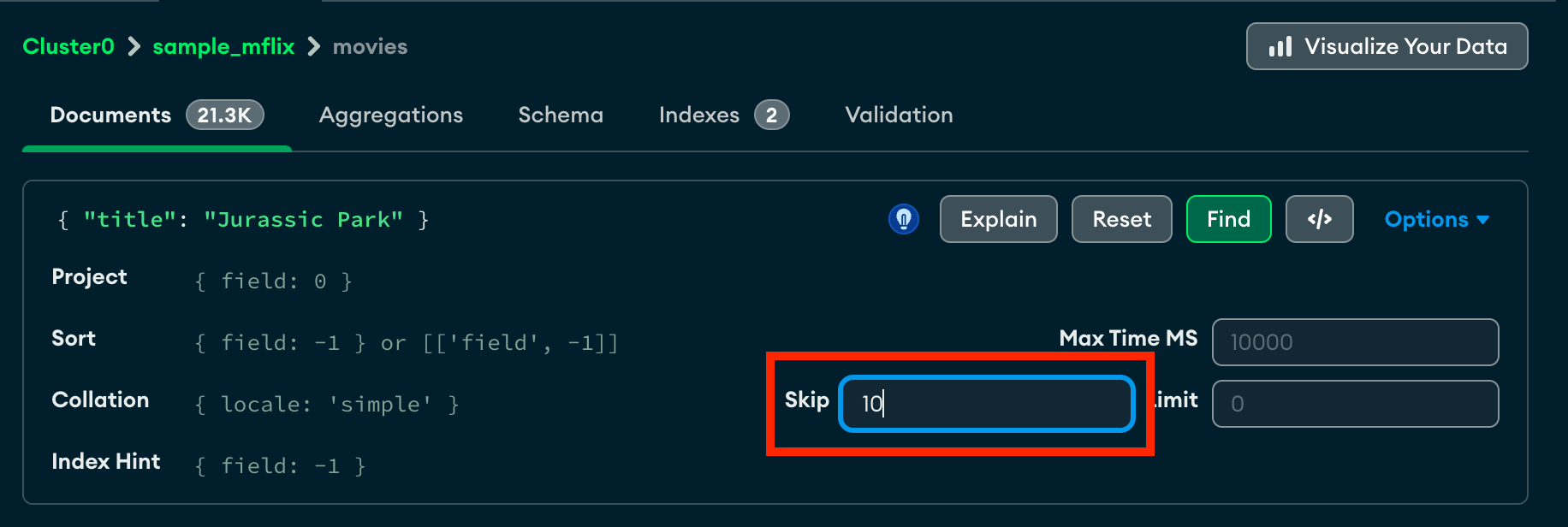 click to enlarge
Click Find to run the query and view the updated results.
Note
For query result sets larger than 1000 documents, Atlas shows a subset of the results. Otherwise, Atlas shows the entire result set.
For details on sampling, see Sampling.
Clear the Query
To clear the query bar and the results of the query, click Reset.
How Does the Atlas Query Compare to MongoDB and SQL Queries?
$skip corresponds to the LIMIT ... OFFSET ... clause in a SQL SELECT statement.
Example
You have a 3,235 articles. You would like to see a list of articles grouped in blocks of 50, starting with the 436th record.
- SQL
SELECT * FROM article LIMIT 50 OFFSET 435; - MongoDB Aggregation
db.article.aggregate( { $limit : 50 }, { $skip : 435 } ); - Atlas Skip Option
$skip : 435
Learn More
See the skip entry in the MongoDB Manual.