You can view up to 20 of the most recent queries for a collection in the recent queries menu. To open the recent queries menu, click the clock icon in the query bar. Click a query in the list to populate the query bar with that query.
In the recent queries menu, you can also hover over a query and perform the following actions:
Click | Action |
|---|---|
Save the query as a favorite. Specify a name for the query and click Save. | |
Copy the query to the clipboard. | |
Remove the query from the Recent list. |
Query Autocomplete Menu
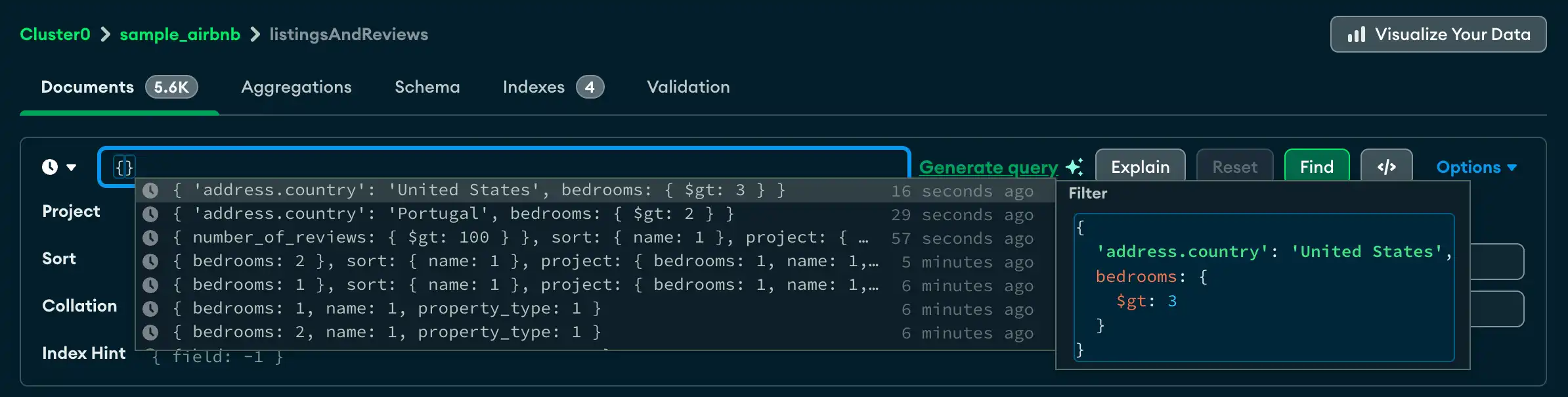
If the query bar is empty, you can click the filter bar to open the
query autocomplete menu and view up to 50 recent or favorite queries. To scroll
through your most recent queries, you can use the up ↑ and down ↓
arrow keys. If a query is highlighted on the menu, it displays a pop-up panel
that shows the filter, project, and sort stages of the query. To select a query
from the autocomplete menu, press Enter, press Tab, or click the
query.
If you start typing into the filter bar, the autocomplete menu filters results to only display recent queries that include the specified string. If you start typing into the other option fields, such as Project or Sort, the autocomplete menu only displays recent queries that include those fields.

Tip
To learn how to write queries to filter your data, see Query Your Data.