This guide describes how to perform semantic search with Voyage AI models. This page includes examples for basic and advanced semantic search use cases, including search with reranking, multilingual, multimodal, contextualized chunk, and large corpus retrieval.
Perform Semantic Search
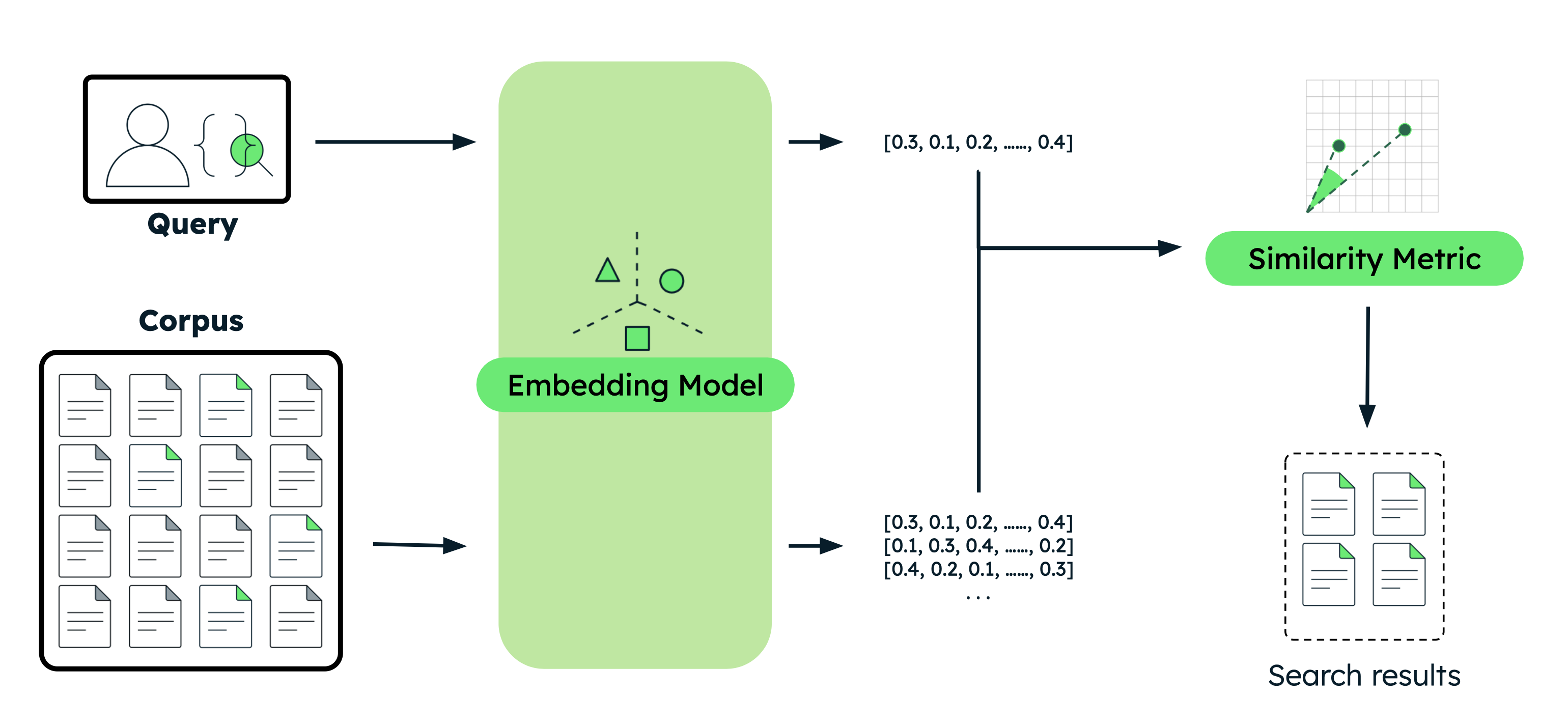
This section provides code examples for various semantic search use cases with different Voyage AI models. For each example, you perform the same basic steps:
Embed the documents: Convert your data into vector embeddings that capture their meaning. This data can be text, images, document chunks, or a large corpus of text.
Embed the query: Transform your search query into the same vector representation as your documents.
Find similar documents: Compare the query vector against your document vectors to identify the most semantically similar results.
Set up your environment.
Before you begin, create a project directory, install libraries, and set your model API key.
Run the following commands in your terminal to create a new directory for this tutorial and install the required libraries:
mkdir voyage-semantic-search cd voyage-semantic-search pip install --upgrade voyageai numpy datasets If you haven't already, follow the steps to create a model API key, then run the following command in your terminal to export it as an environment variable:
export VOYAGE_API_KEY="your-model-api-key"
About The Examples
The following table summarizes the examples on this page:
Example | Model Used | Understanding Results |
|---|---|---|
Basic Semantic Search |
| The Apple conference call document ranks first, significantly higher than unrelated documents, demonstrating accurate semantic matching. |
Semantic Search with Reranker |
| Reranking improves search accuracy by analyzing the full query-document relationship. While embedding similarity alone ranks the correct document first with a moderate score, the reranker significantly boosts its relevance score which better separates it from irrelevant results. |
Multilingual Semantic Search |
| Voyage models perform semantic search effectively across different languages. The example demonstrates three separate searches in English, Spanish, and Chinese, each correctly identifying the most relevant documents about tech company earnings within their respective languages. |
Multimodal Semantic Search |
| The model supports interleaved text, image, and video. It also supports image-only and video-only search. In both cases, pet images (cat and dog) rank significantly higher than the unrelated banana image, demonstrating accurate visual content retrieval. Interleaved inputs with descriptive text produce slightly higher similarity scores than image-only inputs. |
Contextualized Chunk Embeddings |
| The 15% revenue growth chunk ranks first because it's linked to the Leafy Inc. document. The similar 7% growth chunk from Greenery Corp. scores lower, showing how the model accurately considers document context to distinguish between otherwise similar chunks. |
Semantic Search with Large Corpus |
| The ground truth document about user content ranks first among 154 documents, demonstrating effective retrieval at scale despite semantic complexity. |
What is Semantic Search?
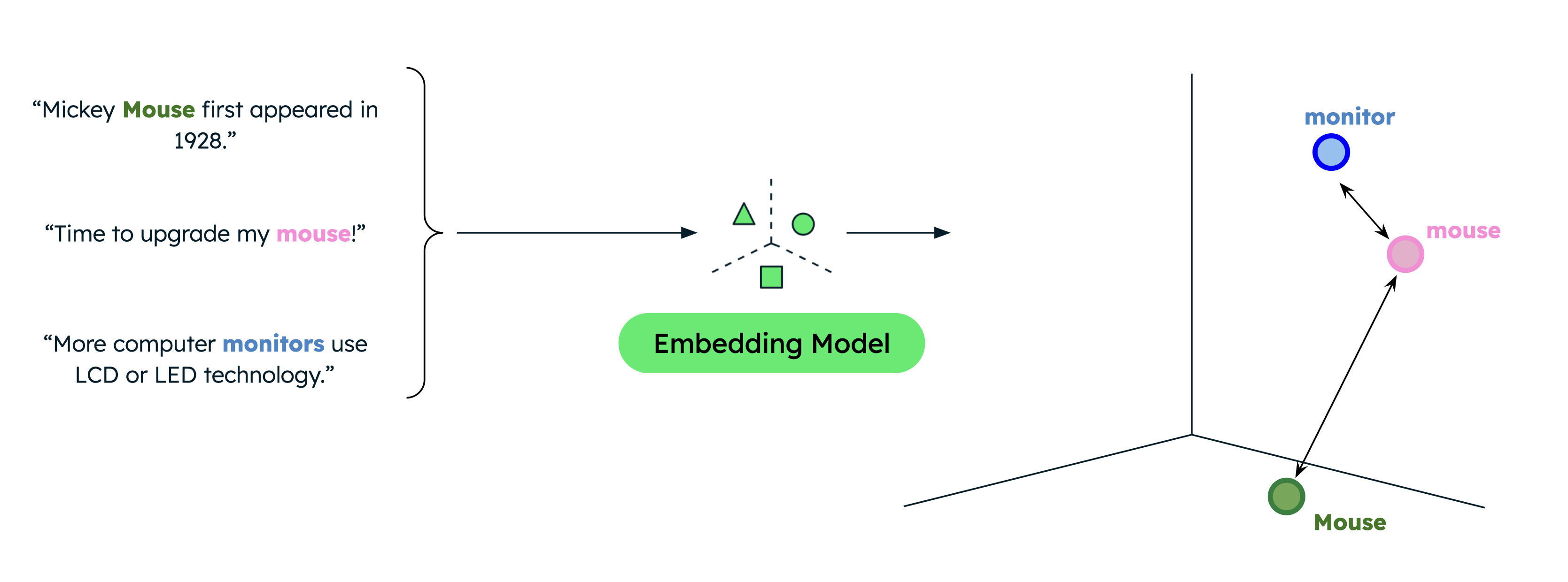
Semantic search is a search method that returns results based on your data's semantic, or underlying, meaning. Unlike traditional full-text search which finds text matches, semantic search finds vectors that are close to your search query in multi-dimensional space. The closer the vectors are to your query, the more similar they are in meaning.
Example
Traditional text search returns only exact matches, limiting results when users search with different terms than those in your data. For example, if your data contains documents about computer mice and animal mice, searching for "mouse" when you intend to find information about computer mice results in incorrect matches.
Semantic search, however, captures the underlying relationship between words or phrases even when there is no lexical overlap. Searching for "mouse" when indicating that you are looking for computer products results in more relevant results. This is because semantic search compares the semantic meaning of the search query against your data to return only the most relevant results, regardless of the exact search terms.
Semantic Search in Production
While storing your vectors in memory and implementing your own search pipelines is suitable for prototyping and experimentation, use a vector database and enterprise search solution for production applications so you can perform efficient retrieval from a larger corpus.
MongoDB has native support for vector storage and retrieval, making it a convenient choice for storing and searching vector embeddings alongside your other data. To complete a tutorial on performing semantic search with MongoDB Vector Search, see MongoDB Vector Search Quick Start Tutorial.
Next Steps
Combine semantic search with an LLM to implement a RAG application.