In MongoDB, a Delete operation consists of deleting documents from a collection. This page provides examples.
You can delete documents in MongoDB using the following methods:
Your programming language's driver.
The MongoDB Atlas UI. To learn more, see Query for Null or Missing Fields with MongoDB Atlas.
➤ Use the Select your language drop-down menu in the upper-right to set the language of the following examples or select MongoDB Compass.
This page uses the following mongosh methods:
The examples on this page use the inventory collection. To populate the inventory collection, run the following:
This page uses MongoDB Compass to delete the documents.
Populate the inventory collection with the following documents:
This page uses the following MongoDB C Driver methods:
The examples on this page use the inventory collection. Connect to a test database in your MongoDB instance then create the inventory collection:
This page uses the following MongoDB .NET/C# Driver methods:
The examples on this page use the inventory collection. Connect to a test database in your MongoDB instance then create the inventory collection:
This page uses the following MongoDB Go Driver functions:
The examples on this page use the inventory collection. Connect to a test database in your MongoDB instance then create the inventory collection:
This page uses the following Java Reactive Streams Driver methods:
The examples on this page use the inventory collection. Connect to a test database in your MongoDB instance then create the inventory collection:
This page uses the following Java Synchronous Driver methods:
The examples on this page use the inventory collection. Connect to a test database in your MongoDB instance then create the inventory collection:
This page uses the following Kotlin Coroutine Driver methods:
The examples on this page use the inventory collection. Connect to a test database in your MongoDB instance then create the inventory collection:
This page uses the following Motor driver methods:
The examples on this page use the inventory collection. Connect to a test database in your MongoDB instance then create the inventory collection:
This page uses the following MongoDB Node.js Driver methods:
The examples on this page use the inventory collection. Connect to a test database in your MongoDB instance then create the inventory collection:
This page uses the following MongoDB PHP Library methods:
The examples on this page use the inventory collection. Connect to a test database in your MongoDB instance then create the inventory collection:
This page uses the following PyMongo Python driver methods:
The examples on this page use the inventory collection. Connect to a test database in your MongoDB instance then create the inventory collection:
This page uses the following MongoDB Ruby Driver methods:
The examples on this page use the inventory collection. Connect to a test database in your MongoDB instance then create the inventory collection:
This page uses the following MongoDB Scala Driver methods:
The examples on this page use the inventory collection. Connect to a test database in your MongoDB instance then create the inventory collection:
db.inventory.insertMany( [ { item: "journal", qty: 25, size: { h: 14, w: 21, uom: "cm" }, status: "A" }, { item: "notebook", qty: 50, size: { h: 8.5, w: 11, uom: "in" }, status: "P" }, { item: "paper", qty: 100, size: { h: 8.5, w: 11, uom: "in" }, status: "D" }, { item: "planner", qty: 75, size: { h: 22.85, w: 30, uom: "cm" }, status: "D" }, { item: "postcard", qty: 45, size: { h: 10, w: 15.25, uom: "cm" }, status: "A" }, ] );
[ { "item": "journal", "qty": 25, "size": { "h": 14, "w": 21, "uom": "cm" }, "status": "A" }, { "item": "notebook", "qty": 50, "size": { "h": 8.5, "w": 11, "uom": "in" }, "status": "P" }, { "item": "paper", "qty": 100, "size": { "h": 8.5, "w": 11, "uom": "in" }, "status": "D" }, { "item": "planner", "qty": 75, "size": { "h": 22.85, "w": 30, "uom": "cm" }, "status": "D" }, { "item": "postcard", "qty": 45, "size": { "h": 10, "w": 15.25, "uom": "cm" }, "status": "A" } ]
For instructions on inserting documents in MongoDB Compass, see Insert Documents.
Note
For complete reference on inserting documents in MongoDB Compass, see the Compass documentation.
mongoc_collection_t *collection; mongoc_bulk_operation_t *bulk; bson_t *doc; bool r; bson_error_t error; bson_t reply; collection = mongoc_database_get_collection (db, "inventory"); bulk = mongoc_collection_create_bulk_operation_with_opts (collection, NULL); doc = BCON_NEW ( "item", BCON_UTF8 ("journal"), "qty", BCON_INT64 (25), "size", "{", "h", BCON_DOUBLE (14), "w", BCON_DOUBLE (21), "uom", BCON_UTF8 ("cm"), "}", "status", BCON_UTF8 ("A")); r = mongoc_bulk_operation_insert_with_opts (bulk, doc, NULL, &error); bson_destroy (doc); if (!r) { MONGOC_ERROR ("%s\n", error.message); goto done; } doc = BCON_NEW ( "item", BCON_UTF8 ("notebook"), "qty", BCON_INT64 (50), "size", "{", "h", BCON_DOUBLE (8.5), "w", BCON_DOUBLE (11), "uom", BCON_UTF8 ("in"), "}", "status", BCON_UTF8 ("P")); r = mongoc_bulk_operation_insert_with_opts (bulk, doc, NULL, &error); bson_destroy (doc); if (!r) { MONGOC_ERROR ("%s\n", error.message); goto done; } doc = BCON_NEW ( "item", BCON_UTF8 ("paper"), "qty", BCON_INT64 (100), "size", "{", "h", BCON_DOUBLE (8.5), "w", BCON_DOUBLE (11), "uom", BCON_UTF8 ("in"), "}", "status", BCON_UTF8 ("D")); r = mongoc_bulk_operation_insert_with_opts (bulk, doc, NULL, &error); bson_destroy (doc); if (!r) { MONGOC_ERROR ("%s\n", error.message); goto done; } doc = BCON_NEW ( "item", BCON_UTF8 ("planner"), "qty", BCON_INT64 (75), "size", "{", "h", BCON_DOUBLE (22.85), "w", BCON_DOUBLE (30), "uom", BCON_UTF8 ("cm"), "}", "status", BCON_UTF8 ("D")); r = mongoc_bulk_operation_insert_with_opts (bulk, doc, NULL, &error); bson_destroy (doc); if (!r) { MONGOC_ERROR ("%s\n", error.message); goto done; } doc = BCON_NEW ( "item", BCON_UTF8 ("postcard"), "qty", BCON_INT64 (45), "size", "{", "h", BCON_DOUBLE (10), "w", BCON_DOUBLE (15.25), "uom", BCON_UTF8 ("cm"), "}", "status", BCON_UTF8 ("A")); r = mongoc_bulk_operation_insert_with_opts (bulk, doc, NULL, &error); bson_destroy (doc); if (!r) { MONGOC_ERROR ("%s\n", error.message); goto done; } /* "reply" is initialized on success or error */ r = (bool) mongoc_bulk_operation_execute (bulk, &reply, &error); if (!r) { MONGOC_ERROR ("%s\n", error.message); }
var documents = new[] { new BsonDocument { { "item", "journal" }, { "qty", 25 }, { "size", new BsonDocument { { "h", 14 }, { "w", 21 }, { "uom", "cm" } } }, { "status", "A" } }, new BsonDocument { { "item", "notebook" }, { "qty", 50 }, { "size", new BsonDocument { { "h", 8.5 }, { "w", 11 }, { "uom", "in" } } }, { "status", "P" } }, new BsonDocument { { "item", "paper" }, { "qty", 100 }, { "size", new BsonDocument { { "h", 8.5 }, { "w", 11 }, { "uom", "in" } } }, { "status", "D" } }, new BsonDocument { { "item", "planner" }, { "qty", 75 }, { "size", new BsonDocument { { "h", 22.85 }, { "w", 30 }, { "uom", "cm" } } }, { "status", "D" } }, new BsonDocument { { "item", "postcard" }, { "qty", 45 }, { "size", new BsonDocument { { "h", 10 }, { "w", 15.25 }, { "uom", "cm" } } }, { "status", "A" } } }; collection.InsertMany(documents);
docs := []any{ bson.D{ {"item", "journal"}, {"qty", 25}, {"size", bson.D{ {"h", 14}, {"w", 21}, {"uom", "cm"}, }}, {"status", "A"}, }, bson.D{ {"item", "notebook"}, {"qty", 50}, {"size", bson.D{ {"h", 8.5}, {"w", 11}, {"uom", "in"}, }}, {"status", "P"}, }, bson.D{ {"item", "paper"}, {"qty", 100}, {"size", bson.D{ {"h", 8.5}, {"w", 11}, {"uom", "in"}, }}, {"status", "D"}, }, bson.D{ {"item", "planner"}, {"qty", 75}, {"size", bson.D{ {"h", 22.85}, {"w", 30}, {"uom", "cm"}, }}, {"status", "D"}, }, bson.D{ {"item", "postcard"}, {"qty", 45}, {"size", bson.D{ {"h", 10}, {"w", 15.25}, {"uom", "cm"}, }}, {"status", "A"}, }, } result, err := coll.InsertMany(context.TODO(), docs)
Publisher<Success> insertManyPublisher = collection.insertMany(asList( Document.parse("{ item: 'journal', qty: 25, size: { h: 14, w: 21, uom: 'cm' }, status: 'A' }"), Document.parse("{ item: 'notebook', qty: 50, size: { h: 8.5, w: 11, uom: 'in' }, status: 'A' }"), Document.parse("{ item: 'paper', qty: 100, size: { h: 8.5, w: 11, uom: 'in' }, status: 'D' }"), Document.parse("{ item: 'planner', qty: 75, size: { h: 22.85, w: 30, uom: 'cm' }, status: 'D' }"), Document.parse("{ item: 'postcard', qty: 45, size: { h: 10, w: 15.25, uom: 'cm' }, status: 'A' }") ));
collection.insertMany(asList( Document.parse("{ item: 'journal', qty: 25, size: { h: 14, w: 21, uom: 'cm' }, status: 'A' }"), Document.parse("{ item: 'notebook', qty: 50, size: { h: 8.5, w: 11, uom: 'in' }, status: 'A' }"), Document.parse("{ item: 'paper', qty: 100, size: { h: 8.5, w: 11, uom: 'in' }, status: 'D' }"), Document.parse("{ item: 'planner', qty: 75, size: { h: 22.85, w: 30, uom: 'cm' }, status: 'D' }"), Document.parse("{ item: 'postcard', qty: 45, size: { h: 10, w: 15.25, uom: 'cm' }, status: 'A' }") ));
collection.insertMany( listOf( Document("item", "journal") .append("qty", 25) .append("size", Document("h", 14).append("w", 21).append("uom", "cm")) .append("status", "A"), Document("item", "notebook") .append("qty", 50) .append("size", Document("h", 8.5).append("w", 11).append("uom", "in")) .append("status", "A"), Document("item", "paper") .append("qty", 100) .append("size", Document("h", 8.5).append("w", 11).append("uom", "in")) .append("status", "D"), Document("item", "planner") .append("qty", 75) .append("size", Document("h", 22.85).append("w", 30).append("uom", "cm")) .append("status", "D"), Document("item", "postcard") .append("qty", 45) .append("size", Document("h", 10).append("w", 15.25).append("uom", "cm")) .append("status", "A"), ) )
await db.inventory.insert_many( [ { "item": "journal", "qty": 25, "size": {"h": 14, "w": 21, "uom": "cm"}, "status": "A", }, { "item": "notebook", "qty": 50, "size": {"h": 8.5, "w": 11, "uom": "in"}, "status": "P", }, { "item": "paper", "qty": 100, "size": {"h": 8.5, "w": 11, "uom": "in"}, "status": "D", }, { "item": "planner", "qty": 75, "size": {"h": 22.85, "w": 30, "uom": "cm"}, "status": "D", }, { "item": "postcard", "qty": 45, "size": {"h": 10, "w": 15.25, "uom": "cm"}, "status": "A", }, ] )
await db.collection('inventory').insertMany([ { item: 'journal', qty: 25, size: { h: 14, w: 21, uom: 'cm' }, status: 'A' }, { item: 'notebook', qty: 50, size: { h: 8.5, w: 11, uom: 'in' }, status: 'P' }, { item: 'paper', qty: 100, size: { h: 8.5, w: 11, uom: 'in' }, status: 'D' }, { item: 'planner', qty: 75, size: { h: 22.85, w: 30, uom: 'cm' }, status: 'D' }, { item: 'postcard', qty: 45, size: { h: 10, w: 15.25, uom: 'cm' }, status: 'A' } ]);
$insertManyResult = $db->inventory->insertMany([ [ 'item' => 'journal', 'qty' => 25, 'size' => ['h' => 14, 'w' => 21, 'uom' => 'cm'], 'status' => 'A', ], [ 'item' => 'notebook', 'qty' => 50, 'size' => ['h' => 8.5, 'w' => 11, 'uom' => 'in'], 'status' => 'P', ], [ 'item' => 'paper', 'qty' => 100, 'size' => ['h' => 8.5, 'w' => 11, 'uom' => 'in'], 'status' => 'D', ], [ 'item' => 'planner', 'qty' => 75, 'size' => ['h' => 22.85, 'w' => 30, 'uom' => 'cm'], 'status' => 'D', ], [ 'item' => 'postcard', 'qty' => 45, 'size' => ['h' => 10, 'w' => 15.25, 'uom' => 'cm'], 'status' => 'A', ], ]);
db.inventory.insert_many( [ { "item": "journal", "qty": 25, "size": {"h": 14, "w": 21, "uom": "cm"}, "status": "A", }, { "item": "notebook", "qty": 50, "size": {"h": 8.5, "w": 11, "uom": "in"}, "status": "P", }, { "item": "paper", "qty": 100, "size": {"h": 8.5, "w": 11, "uom": "in"}, "status": "D", }, { "item": "planner", "qty": 75, "size": {"h": 22.85, "w": 30, "uom": "cm"}, "status": "D", }, { "item": "postcard", "qty": 45, "size": {"h": 10, "w": 15.25, "uom": "cm"}, "status": "A", }, ] )
client[:inventory].insert_many([ { item: 'journal', qty: 25, size: { h: 14, w: 21, uom: 'cm' }, status: 'A' }, { item: 'notebook', qty: 50, size: { h: 8.5, w: 11, uom: 'in' }, status: 'P' }, { item: 'paper', qty: 100, size: { h: 8.5, w: 11, uom: 'in' }, status: 'D' }, { item: 'planner', qty: 75, size: { h: 22.85, w: 30, uom: 'cm' }, status: 'D' }, { item: 'postcard', qty: 45, size: { h: 10, w: 15.25, uom: 'cm' }, status: 'A' }, ])
collection.insertMany(Seq( Document("""{ item: "journal", qty: 25, size: { h: 14, w: 21, uom: "cm" }, status: "A" }"""), Document("""{ item: "notebook", qty: 50, size: { h: 8.5, w: 11, uom: "in" }, status: "A" }"""), Document("""{ item: "paper", qty: 100, size: { h: 8.5, w: 11, uom: "in" }, status: "D" }"""), Document("""{ item: "planner", qty: 75, size: { h: 22.85, w: 30, uom: "cm" }, status: "D" }"""), Document("""{ item: "postcard", qty: 45, size: { h: 10, w: 15.25, uom: "cm" }, status: "A" }""") )).execute()
Delete All Documents
To delete all documents from a collection, pass an empty filter document {} to the db.collection.deleteMany() method.
The following example deletes all documents from the inventory collection:
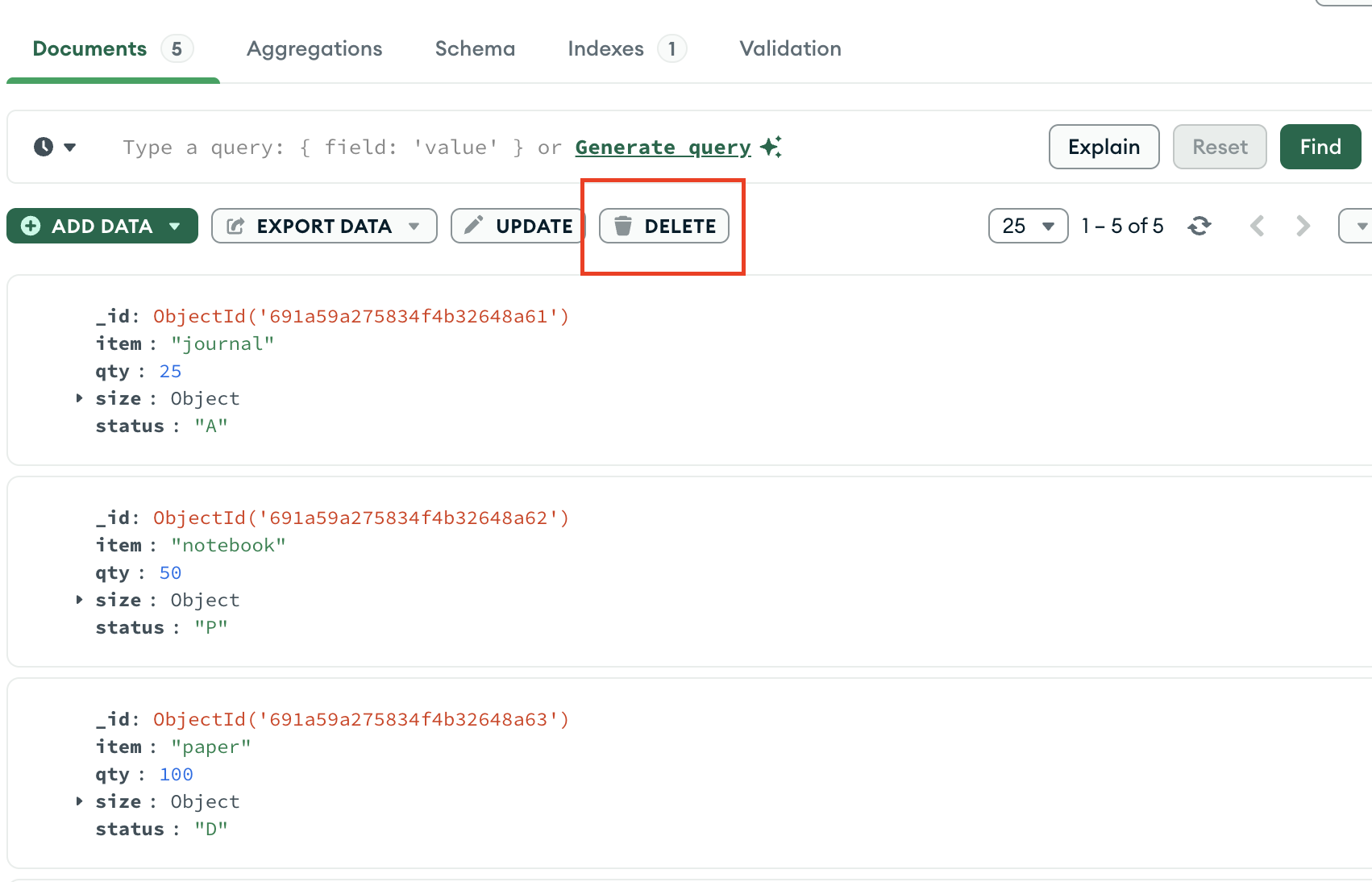
To delete all documents from a collection, click the DELETE button under the Documents tab.
The following example deletes all documents from the inventory collection:
To delete all documents from a collection, pass the mongoc_collection_t and a bson_t that matches all documents to the mongoc_collection_delete_many method.
The following example deletes all documents from the inventory collection:
To delete all documents from a collection, pass an empty filter Builders<BsonDocument>.Filter.Empty to the IMongoCollection.DeleteMany() method.
The following example deletes all documents from the inventory collection:
To delete all documents from a collection, pass an empty filter document to the Collection.DeleteMany function.
The following example deletes all documents from the inventory collection:
To delete all documents from a collection, pass an empty org.bson.Document object as the filter to the com.mongodb.reactivestreams.client.MongoCollection.deleteMany method.
The following example deletes all documents from the inventory collection:
To delete all documents from a collection, pass an empty org.bson.Document object as the filter to the com.mongodb.client.MongoCollection.deleteMany method.
The following example deletes all documents from the inventory collection:
To delete all documents from a collection, pass an empty Bson object as the filter to the MongoCollection.deleteMany() method.
The following example deletes all documents from the inventory collection:
To delete all documents from a collection, pass an empty filter document {} to the motor.motor_asyncio.AsyncIOMotorCollection.delete_many method.
The following example deletes all documents from the inventory collection:
To delete all documents from a collection, pass an empty filter document {} to the Collection.deleteMany() method.
The following example deletes all documents from the inventory collection:
To delete all documents from a collection, pass an empty filter document [] to the MongoDB\\Collection::deleteMany() method.
The following example deletes all documents from the inventory collection:
To delete all documents from a collection, pass an empty filter document {} to the pymongo.collection.Collection.delete_many method.
The following example deletes all documents from the inventory collection:
To delete all documents from a collection, pass an empty filter document {} to the Mongo::Collection#delete_many() method.
The following example deletes all documents from the inventory collection:
To delete all documents from a collection, pass an empty filter Document() to the collection.deleteMany() method.
The following example deletes all documents from the inventory collection:
db.inventory.deleteMany({})
mongoc_collection_t *collection; bson_t *selector; bool r; bson_error_t error; collection = mongoc_database_get_collection (db, "inventory"); selector = BCON_NEW (NULL); r = mongoc_collection_delete_many (collection, selector, NULL, NULL, &error); bson_destroy (selector); if (!r) { MONGOC_ERROR ("%s\n", error.message); goto done; }
var filter = Builders<BsonDocument>.Filter.Empty; var result = collection.DeleteMany(filter);
result, err := coll.DeleteMany(context.TODO(), bson.D{})
Publisher<DeleteResult> deleteManyPublisher = collection.deleteMany(new Document());
collection.deleteMany(new Document());
collection.deleteMany(empty())
await db.inventory.delete_many({})
await db.collection('inventory').deleteMany({});
$deleteResult = $db->inventory->deleteMany([]);
db.inventory.delete_many({})
client[:inventory].delete_many({})
collection.deleteMany(Document()).execute()
The method returns a document with the status of the operation. For more information and examples, see deleteMany().
When you confirm the deletion in the pop-up window that appears when you click DELETE, MongoDB Compass deletes all documents and displays a message indicating how many documents were deleted.
The mongoc_collection_delete_many method returns true if successful, or returns false and sets an error if there are invalid arguments or a server or network error occurs.
Upon successful execution, the IMongoCollection.DeleteMany() method returns an instance of DeleteResult whose DeletedCount property contains the number of documents that matched the filter.
Upon successful execution, the Collection.DeleteMany function returns an instance of DeleteResult whose DeletedCount property contains the number of documents that matched the filter.
com.mongodb.reactivestreams.client.MongoCollection.deleteMany returns a Publisher object of type com.mongodb.client.result.DeleteResult if successful. Returns an instance of com.mongodb.MongoException if unsuccessful.
The com.mongodb.client.MongoCollection.deleteMany method returns an instance of com.mongodb.client.result.DeleteResult with the status of the operation.
The MongoCollection.deleteMany() method returns an instance of com.mongodb.client.result.DeleteResult that describes the status of the operation and count of deleted documents.
The delete_many coroutine asynchronously returns an instance of pymongo.results.DeleteResult with the status of the operation.
Collection.deleteMany() returns a promise that provides a result. The result.deletedCount property contains the number of documents that matched the filter.
Upon successful execution, the deleteMany() method returns an instance of MongoDB\\DeleteResult whose getDeletedCount() method returns the number of documents that matched the filter.
The delete_many method returns an instance of pymongo.results.DeleteResult with the status of the operation.
Upon successful execution, the delete_many() method returns an instance of Mongo::Operation::Result, whose deleted_count attribute contains the number of documents that matched the filter.
Upon successful execution, the collection.deleteMany() method returns an Observable with a single element with a DeleteResult type parameter or with an com.mongodb.MongoException.
Delete All Documents that Match a Condition
You can specify criteria, or filters, that identify the documents to delete. The filters use the same syntax as read operations.
To specify equality conditions, use <field>:<value> expressions in the query filter document:
{ <field1>: <value1>, ... }
To specify equality conditions, use <field>:<value> expressions in the query filter document:
{ <field1>: <value1>, ... }
To specify equality conditions, use <field>:<value> expressions in the query filter document:
{ <field1>: <value1>, ... }
To specify equality conditions, construct a filter using the Eq method:
Builders<BsonDocument>.Filter.Eq(<field>, <value>);
To specify equality conditions, use the bson.D type to create a filter document:
filter := bson.D{{"<field>", <value>}}
To specify equality conditions, use the com.mongodb.client.model.Filters.eq method to create the query filter document:
and(eq( <field1>, <value1>), eq( <field2>, <value2>) ...)
To specify equality conditions, use the com.mongodb.client.model.Filters.eq_ method to create the query filter document:
and(eq( <field1>, <value1>), eq( <field2>, <value2>) ...)
To specify equality conditions, use the Filters.eq() method to create the query filter document:
and(eq(<field1>, <value1>), eq(<field2>, <value2>) ...)
To specify equality conditions, use <field>:<value> expressions in the query filter document:
{ <field1>: <value1>, ... }
To specify equality conditions, use <field>:<value> expressions in the query filter document:
{ <field1>: <value1>, ... }
To specify equality conditions, use <field> => <value> expressions in the query filter document:
[ <field1> => <value1>, ... ]
To specify equality conditions, use <field>:<value> expressions in the query filter document:
{ <field1>: <value1>, ... }
To specify equality conditions, use <field> => <value> expressions in the query filter document:
{ <field1> => <value1>, ... }
To specify equality conditions, use the com.mongodb.client.model.Filters.eq_ method to create the query filter document:
and(equal(<field1>, <value1>), equal(<field2>, <value2>) ...)
A query filter document can use the query operators to specify conditions in the following form:
{ <field1>: { <operator1>: <value1> }, ... }
A query filter document can use the query operators to specify conditions in the following form:
{ <field1>: { <operator1>: <value1> }, ... }
A query filter document can use the query operators to specify conditions in the following form:
{ <field1>: { <operator1>: <value1> }, ... }
In addition to the equality filter, MongoDB provides various query operators to specify filter conditions. Use the FilterDefinitionBuilder methods to create a filter document. For example:
var builder = Builders<BsonDocument>.Filter; builder.And(builder.Eq(<field1>, <value1>), builder.Lt(<field2>, <value2>));
In addition to the equality filter, MongoDB provides various query operators to specify filter conditions. Use the bson package to create query operators for filter documents. For example:
filter := bson.D{ {"$and", bson.A{ bson.D{{"field1", bson.D{{"$eq", value1}}}}, bson.D{{"field2", bson.D{{"$lt", value2}}}}, }}, }
In addition to the equality condition, MongoDB provides various query operators to specify filter conditions. Use the com.mongodb.client.model.Filters helper methods to facilitate the creation of filter documents. For example:
and(gte(<field1>, <value1>), lt(<field2>, <value2>), eq(<field3>, <value3>))
In addition to the equality condition, MongoDB provides various query operators to specify filter conditions. Use the com.mongodb.client.model.Filters helper methods to facilitate the creation of filter documents. For example:
and(gte(<field1>, <value1>), lt(<field2>, <value2>), eq(<field3>, <value3>))
In addition to the equality condition, MongoDB provides various query operators to specify filter conditions. Use the com.mongodb.client.model.Filters helper methods to facilitate the creation of filter documents. For example:
and(gte(<field1>, <value1>), lt(<field2>, <value2>), eq(<field3>, <value3>))
A query filter document can use the query operators to specify conditions in the following form:
{ <field1>: { <operator1>: <value1> }, ... }
A query filter document can use the query operators to specify conditions in the following form:
{ <field1>: { <operator1>: <value1> }, ... }
A query filter document can use the query operators to specify conditions in the following form:
[ <field1> => [ <operator1> => <value1> ], ... ]
A query filter document can use the query operators to specify conditions in the following form:
{ <field1>: { <operator1>: <value1> }, ... }
A query filter document can use the query operators to specify conditions in the following form:
{ <field1> => { <operator1> => <value1> }, ... }
In addition to the equality condition, MongoDB provides various query operators to specify filter conditions. Use the com.mongodb.client.model.Filters_ helper methods to facilitate the creation of filter documents. For example:
and(gte(<field1>, <value1>), lt(<field2>, <value2>), equal(<field3>, <value3>))
To delete all documents that match a deletion criteria, pass a filter parameter to the deleteMany() method.
The following example removes all documents from the inventory collection where the status field equals "A":
You can specify criteria, or filters, that identify the documents to delete. The filters use the same syntax as read operations.
To specify equality conditions, use <field>:<value> expressions in the query filter document:
{ <field1>: <value1>, ... }
To specify equality conditions, use <field>:<value> expressions in the query filter document:
{ <field1>: <value1>, ... }
To specify equality conditions, use <field>:<value> expressions in the query filter document:
{ <field1>: <value1>, ... }
To specify equality conditions, construct a filter using the Eq method:
Builders<BsonDocument>.Filter.Eq(<field>, <value>);
To specify equality conditions, use the bson.D type to create a filter document:
filter := bson.D{{"<field>", <value>}}
To specify equality conditions, use the com.mongodb.client.model.Filters.eq method to create the query filter document:
and(eq( <field1>, <value1>), eq( <field2>, <value2>) ...)
To specify equality conditions, use the com.mongodb.client.model.Filters.eq_ method to create the query filter document:
and(eq( <field1>, <value1>), eq( <field2>, <value2>) ...)
To specify equality conditions, use the Filters.eq() method to create the query filter document:
and(eq(<field1>, <value1>), eq(<field2>, <value2>) ...)
To specify equality conditions, use <field>:<value> expressions in the query filter document:
{ <field1>: <value1>, ... }
To specify equality conditions, use <field>:<value> expressions in the query filter document:
{ <field1>: <value1>, ... }
To specify equality conditions, use <field> => <value> expressions in the query filter document:
[ <field1> => <value1>, ... ]
To specify equality conditions, use <field>:<value> expressions in the query filter document:
{ <field1>: <value1>, ... }
To specify equality conditions, use <field> => <value> expressions in the query filter document:
{ <field1> => <value1>, ... }
To specify equality conditions, use the com.mongodb.client.model.Filters.eq_ method to create the query filter document:
and(equal(<field1>, <value1>), equal(<field2>, <value2>) ...)
A query filter document can use the query operators to specify conditions in the following form:
{ <field1>: { <operator1>: <value1> }, ... }
A query filter document can use the query operators to specify conditions in the following form:
{ <field1>: { <operator1>: <value1> }, ... }
A query filter document can use the query operators to specify conditions in the following form:
{ <field1>: { <operator1>: <value1> }, ... }
In addition to the equality filter, MongoDB provides various query operators to specify filter conditions. Use the FilterDefinitionBuilder methods to create a filter document. For example:
var builder = Builders<BsonDocument>.Filter; builder.And(builder.Eq(<field1>, <value1>), builder.Lt(<field2>, <value2>));
In addition to the equality filter, MongoDB provides various query operators to specify filter conditions. Use the bson package to create query operators for filter documents. For example:
filter := bson.D{ {"$and", bson.A{ bson.D{{"field1", bson.D{{"$eq", value1}}}}, bson.D{{"field2", bson.D{{"$lt", value2}}}}, }}, }
In addition to the equality condition, MongoDB provides various query operators to specify filter conditions. Use the com.mongodb.client.model.Filters helper methods to facilitate the creation of filter documents. For example:
and(gte(<field1>, <value1>), lt(<field2>, <value2>), eq(<field3>, <value3>))
In addition to the equality condition, MongoDB provides various query operators to specify filter conditions. Use the com.mongodb.client.model.Filters helper methods to facilitate the creation of filter documents. For example:
and(gte(<field1>, <value1>), lt(<field2>, <value2>), eq(<field3>, <value3>))
In addition to the equality condition, MongoDB provides various query operators to specify filter conditions. Use the com.mongodb.client.model.Filters helper methods to facilitate the creation of filter documents. For example:
and(gte(<field1>, <value1>), lt(<field2>, <value2>), eq(<field3>, <value3>))
A query filter document can use the query operators to specify conditions in the following form:
{ <field1>: { <operator1>: <value1> }, ... }
A query filter document can use the query operators to specify conditions in the following form:
{ <field1>: { <operator1>: <value1> }, ... }
A query filter document can use the query operators to specify conditions in the following form:
[ <field1> => [ <operator1> => <value1> ], ... ]
A query filter document can use the query operators to specify conditions in the following form:
{ <field1>: { <operator1>: <value1> }, ... }
A query filter document can use the query operators to specify conditions in the following form:
{ <field1> => { <operator1> => <value1> }, ... }
In addition to the equality condition, MongoDB provides various query operators to specify filter conditions. Use the com.mongodb.client.model.Filters_ helper methods to facilitate the creation of filter documents. For example:
and(gte(<field1>, <value1>), lt(<field2>, <value2>), equal(<field3>, <value3>))
To delete all documents that match deletion criteria, write your query filter in the Compass query bar, then click the DELETE button under the Documents tab. The following example deletes all documents where { status: "A" }:
You can specify criteria, or filters, that identify the documents to delete. The filters use the same syntax as read operations.
To specify equality conditions, use <field>:<value> expressions in the query filter document:
{ <field1>: <value1>, ... }
To specify equality conditions, use <field>:<value> expressions in the query filter document:
{ <field1>: <value1>, ... }
To specify equality conditions, use <field>:<value> expressions in the query filter document:
{ <field1>: <value1>, ... }
To specify equality conditions, construct a filter using the Eq method:
Builders<BsonDocument>.Filter.Eq(<field>, <value>);
To specify equality conditions, use the bson.D type to create a filter document:
filter := bson.D{{"<field>", <value>}}
To specify equality conditions, use the com.mongodb.client.model.Filters.eq method to create the query filter document:
and(eq( <field1>, <value1>), eq( <field2>, <value2>) ...)
To specify equality conditions, use the com.mongodb.client.model.Filters.eq_ method to create the query filter document:
and(eq( <field1>, <value1>), eq( <field2>, <value2>) ...)
To specify equality conditions, use the Filters.eq() method to create the query filter document:
and(eq(<field1>, <value1>), eq(<field2>, <value2>) ...)
To specify equality conditions, use <field>:<value> expressions in the query filter document:
{ <field1>: <value1>, ... }
To specify equality conditions, use <field>:<value> expressions in the query filter document:
{ <field1>: <value1>, ... }
To specify equality conditions, use <field> => <value> expressions in the query filter document:
[ <field1> => <value1>, ... ]
To specify equality conditions, use <field>:<value> expressions in the query filter document:
{ <field1>: <value1>, ... }
To specify equality conditions, use <field> => <value> expressions in the query filter document:
{ <field1> => <value1>, ... }
To specify equality conditions, use the com.mongodb.client.model.Filters.eq_ method to create the query filter document:
and(equal(<field1>, <value1>), equal(<field2>, <value2>) ...)
A query filter document can use the query operators to specify conditions in the following form:
{ <field1>: { <operator1>: <value1> }, ... }
A query filter document can use the query operators to specify conditions in the following form:
{ <field1>: { <operator1>: <value1> }, ... }
A query filter document can use the query operators to specify conditions in the following form:
{ <field1>: { <operator1>: <value1> }, ... }
In addition to the equality filter, MongoDB provides various query operators to specify filter conditions. Use the FilterDefinitionBuilder methods to create a filter document. For example:
var builder = Builders<BsonDocument>.Filter; builder.And(builder.Eq(<field1>, <value1>), builder.Lt(<field2>, <value2>));
In addition to the equality filter, MongoDB provides various query operators to specify filter conditions. Use the bson package to create query operators for filter documents. For example:
filter := bson.D{ {"$and", bson.A{ bson.D{{"field1", bson.D{{"$eq", value1}}}}, bson.D{{"field2", bson.D{{"$lt", value2}}}}, }}, }
In addition to the equality condition, MongoDB provides various query operators to specify filter conditions. Use the com.mongodb.client.model.Filters helper methods to facilitate the creation of filter documents. For example:
and(gte(<field1>, <value1>), lt(<field2>, <value2>), eq(<field3>, <value3>))
In addition to the equality condition, MongoDB provides various query operators to specify filter conditions. Use the com.mongodb.client.model.Filters helper methods to facilitate the creation of filter documents. For example:
and(gte(<field1>, <value1>), lt(<field2>, <value2>), eq(<field3>, <value3>))
In addition to the equality condition, MongoDB provides various query operators to specify filter conditions. Use the com.mongodb.client.model.Filters helper methods to facilitate the creation of filter documents. For example:
and(gte(<field1>, <value1>), lt(<field2>, <value2>), eq(<field3>, <value3>))
A query filter document can use the query operators to specify conditions in the following form:
{ <field1>: { <operator1>: <value1> }, ... }
A query filter document can use the query operators to specify conditions in the following form:
{ <field1>: { <operator1>: <value1> }, ... }
A query filter document can use the query operators to specify conditions in the following form:
[ <field1> => [ <operator1> => <value1> ], ... ]
A query filter document can use the query operators to specify conditions in the following form:
{ <field1>: { <operator1>: <value1> }, ... }
A query filter document can use the query operators to specify conditions in the following form:
{ <field1> => { <operator1> => <value1> }, ... }
In addition to the equality condition, MongoDB provides various query operators to specify filter conditions. Use the com.mongodb.client.model.Filters_ helper methods to facilitate the creation of filter documents. For example:
and(gte(<field1>, <value1>), lt(<field2>, <value2>), equal(<field3>, <value3>))
To delete all documents that match a deletion criteria, pass the mongoc_collection_t and a bson_t that matches the documents you want to delete to the mongoc_collection_delete_many method.
You can specify criteria, or filters, that identify the documents to delete. The filters use the same syntax as read operations.
To specify equality conditions, use <field>:<value> expressions in the query filter document:
{ <field1>: <value1>, ... }
To specify equality conditions, use <field>:<value> expressions in the query filter document:
{ <field1>: <value1>, ... }
To specify equality conditions, use <field>:<value> expressions in the query filter document:
{ <field1>: <value1>, ... }
To specify equality conditions, construct a filter using the Eq method:
Builders<BsonDocument>.Filter.Eq(<field>, <value>);
To specify equality conditions, use the bson.D type to create a filter document:
filter := bson.D{{"<field>", <value>}}
To specify equality conditions, use the com.mongodb.client.model.Filters.eq method to create the query filter document:
and(eq( <field1>, <value1>), eq( <field2>, <value2>) ...)
To specify equality conditions, use the com.mongodb.client.model.Filters.eq_ method to create the query filter document:
and(eq( <field1>, <value1>), eq( <field2>, <value2>) ...)
To specify equality conditions, use the Filters.eq() method to create the query filter document:
and(eq(<field1>, <value1>), eq(<field2>, <value2>) ...)
To specify equality conditions, use <field>:<value> expressions in the query filter document:
{ <field1>: <value1>, ... }
To specify equality conditions, use <field>:<value> expressions in the query filter document:
{ <field1>: <value1>, ... }
To specify equality conditions, use <field> => <value> expressions in the query filter document:
[ <field1> => <value1>, ... ]
To specify equality conditions, use <field>:<value> expressions in the query filter document:
{ <field1>: <value1>, ... }
To specify equality conditions, use <field> => <value> expressions in the query filter document:
{ <field1> => <value1>, ... }
To specify equality conditions, use the com.mongodb.client.model.Filters.eq_ method to create the query filter document:
and(equal(<field1>, <value1>), equal(<field2>, <value2>) ...)
A query filter document can use the query operators to specify conditions in the following form:
{ <field1>: { <operator1>: <value1> }, ... }
A query filter document can use the query operators to specify conditions in the following form:
{ <field1>: { <operator1>: <value1> }, ... }
A query filter document can use the query operators to specify conditions in the following form:
{ <field1>: { <operator1>: <value1> }, ... }
In addition to the equality filter, MongoDB provides various query operators to specify filter conditions. Use the FilterDefinitionBuilder methods to create a filter document. For example:
var builder = Builders<BsonDocument>.Filter; builder.And(builder.Eq(<field1>, <value1>), builder.Lt(<field2>, <value2>));
In addition to the equality filter, MongoDB provides various query operators to specify filter conditions. Use the bson package to create query operators for filter documents. For example:
filter := bson.D{ {"$and", bson.A{ bson.D{{"field1", bson.D{{"$eq", value1}}}}, bson.D{{"field2", bson.D{{"$lt", value2}}}}, }}, }
In addition to the equality condition, MongoDB provides various query operators to specify filter conditions. Use the com.mongodb.client.model.Filters helper methods to facilitate the creation of filter documents. For example:
and(gte(<field1>, <value1>), lt(<field2>, <value2>), eq(<field3>, <value3>))
In addition to the equality condition, MongoDB provides various query operators to specify filter conditions. Use the com.mongodb.client.model.Filters helper methods to facilitate the creation of filter documents. For example:
and(gte(<field1>, <value1>), lt(<field2>, <value2>), eq(<field3>, <value3>))
In addition to the equality condition, MongoDB provides various query operators to specify filter conditions. Use the com.mongodb.client.model.Filters helper methods to facilitate the creation of filter documents. For example:
and(gte(<field1>, <value1>), lt(<field2>, <value2>), eq(<field3>, <value3>))
A query filter document can use the query operators to specify conditions in the following form:
{ <field1>: { <operator1>: <value1> }, ... }
A query filter document can use the query operators to specify conditions in the following form:
{ <field1>: { <operator1>: <value1> }, ... }
A query filter document can use the query operators to specify conditions in the following form:
[ <field1> => [ <operator1> => <value1> ], ... ]
A query filter document can use the query operators to specify conditions in the following form:
{ <field1>: { <operator1>: <value1> }, ... }
A query filter document can use the query operators to specify conditions in the following form:
{ <field1> => { <operator1> => <value1> }, ... }
In addition to the equality condition, MongoDB provides various query operators to specify filter conditions. Use the com.mongodb.client.model.Filters_ helper methods to facilitate the creation of filter documents. For example:
and(gte(<field1>, <value1>), lt(<field2>, <value2>), equal(<field3>, <value3>))
To delete all documents that match a deletion criteria, pass a filter parameter to the IMongoCollection.DeleteMany() method.
The following example removes all documents from the inventory collection where the status field equals "A":
You can specify criteria, or filters, that identify the documents to delete. The filters use the same syntax as read operations.
To specify equality conditions, use <field>:<value> expressions in the query filter document:
{ <field1>: <value1>, ... }
To specify equality conditions, use <field>:<value> expressions in the query filter document:
{ <field1>: <value1>, ... }
To specify equality conditions, use <field>:<value> expressions in the query filter document:
{ <field1>: <value1>, ... }
To specify equality conditions, construct a filter using the Eq method:
Builders<BsonDocument>.Filter.Eq(<field>, <value>);
To specify equality conditions, use the bson.D type to create a filter document:
filter := bson.D{{"<field>", <value>}}
To specify equality conditions, use the com.mongodb.client.model.Filters.eq method to create the query filter document:
and(eq( <field1>, <value1>), eq( <field2>, <value2>) ...)
To specify equality conditions, use the com.mongodb.client.model.Filters.eq_ method to create the query filter document:
and(eq( <field1>, <value1>), eq( <field2>, <value2>) ...)
To specify equality conditions, use the Filters.eq() method to create the query filter document:
and(eq(<field1>, <value1>), eq(<field2>, <value2>) ...)
To specify equality conditions, use <field>:<value> expressions in the query filter document:
{ <field1>: <value1>, ... }
To specify equality conditions, use <field>:<value> expressions in the query filter document:
{ <field1>: <value1>, ... }
To specify equality conditions, use <field> => <value> expressions in the query filter document:
[ <field1> => <value1>, ... ]
To specify equality conditions, use <field>:<value> expressions in the query filter document:
{ <field1>: <value1>, ... }
To specify equality conditions, use <field> => <value> expressions in the query filter document:
{ <field1> => <value1>, ... }
To specify equality conditions, use the com.mongodb.client.model.Filters.eq_ method to create the query filter document:
and(equal(<field1>, <value1>), equal(<field2>, <value2>) ...)
A query filter document can use the query operators to specify conditions in the following form:
{ <field1>: { <operator1>: <value1> }, ... }
A query filter document can use the query operators to specify conditions in the following form:
{ <field1>: { <operator1>: <value1> }, ... }
A query filter document can use the query operators to specify conditions in the following form:
{ <field1>: { <operator1>: <value1> }, ... }
In addition to the equality filter, MongoDB provides various query operators to specify filter conditions. Use the FilterDefinitionBuilder methods to create a filter document. For example:
var builder = Builders<BsonDocument>.Filter; builder.And(builder.Eq(<field1>, <value1>), builder.Lt(<field2>, <value2>));
In addition to the equality filter, MongoDB provides various query operators to specify filter conditions. Use the bson package to create query operators for filter documents. For example:
filter := bson.D{ {"$and", bson.A{ bson.D{{"field1", bson.D{{"$eq", value1}}}}, bson.D{{"field2", bson.D{{"$lt", value2}}}}, }}, }
In addition to the equality condition, MongoDB provides various query operators to specify filter conditions. Use the com.mongodb.client.model.Filters helper methods to facilitate the creation of filter documents. For example:
and(gte(<field1>, <value1>), lt(<field2>, <value2>), eq(<field3>, <value3>))
In addition to the equality condition, MongoDB provides various query operators to specify filter conditions. Use the com.mongodb.client.model.Filters helper methods to facilitate the creation of filter documents. For example:
and(gte(<field1>, <value1>), lt(<field2>, <value2>), eq(<field3>, <value3>))
In addition to the equality condition, MongoDB provides various query operators to specify filter conditions. Use the com.mongodb.client.model.Filters helper methods to facilitate the creation of filter documents. For example:
and(gte(<field1>, <value1>), lt(<field2>, <value2>), eq(<field3>, <value3>))
A query filter document can use the query operators to specify conditions in the following form:
{ <field1>: { <operator1>: <value1> }, ... }
A query filter document can use the query operators to specify conditions in the following form:
{ <field1>: { <operator1>: <value1> }, ... }
A query filter document can use the query operators to specify conditions in the following form:
[ <field1> => [ <operator1> => <value1> ], ... ]
A query filter document can use the query operators to specify conditions in the following form:
{ <field1>: { <operator1>: <value1> }, ... }
A query filter document can use the query operators to specify conditions in the following form:
{ <field1> => { <operator1> => <value1> }, ... }
In addition to the equality condition, MongoDB provides various query operators to specify filter conditions. Use the com.mongodb.client.model.Filters_ helper methods to facilitate the creation of filter documents. For example:
and(gte(<field1>, <value1>), lt(<field2>, <value2>), equal(<field3>, <value3>))
To delete all documents that match a deletion criteria, pass a filter parameter to the Collection.DeleteMany function.
The following example removes all documents from the inventory collection where the status field equals "A":
You can specify criteria, or filters, that identify the documents to delete. The filters use the same syntax as read operations.
To specify equality conditions, use <field>:<value> expressions in the query filter document:
{ <field1>: <value1>, ... }
To specify equality conditions, use <field>:<value> expressions in the query filter document:
{ <field1>: <value1>, ... }
To specify equality conditions, use <field>:<value> expressions in the query filter document:
{ <field1>: <value1>, ... }
To specify equality conditions, construct a filter using the Eq method:
Builders<BsonDocument>.Filter.Eq(<field>, <value>);
To specify equality conditions, use the bson.D type to create a filter document:
filter := bson.D{{"<field>", <value>}}
To specify equality conditions, use the com.mongodb.client.model.Filters.eq method to create the query filter document:
and(eq( <field1>, <value1>), eq( <field2>, <value2>) ...)
To specify equality conditions, use the com.mongodb.client.model.Filters.eq_ method to create the query filter document:
and(eq( <field1>, <value1>), eq( <field2>, <value2>) ...)
To specify equality conditions, use the Filters.eq() method to create the query filter document:
and(eq(<field1>, <value1>), eq(<field2>, <value2>) ...)
To specify equality conditions, use <field>:<value> expressions in the query filter document:
{ <field1>: <value1>, ... }
To specify equality conditions, use <field>:<value> expressions in the query filter document:
{ <field1>: <value1>, ... }
To specify equality conditions, use <field> => <value> expressions in the query filter document:
[ <field1> => <value1>, ... ]
To specify equality conditions, use <field>:<value> expressions in the query filter document:
{ <field1>: <value1>, ... }
To specify equality conditions, use <field> => <value> expressions in the query filter document:
{ <field1> => <value1>, ... }
To specify equality conditions, use the com.mongodb.client.model.Filters.eq_ method to create the query filter document:
and(equal(<field1>, <value1>), equal(<field2>, <value2>) ...)
A query filter document can use the query operators to specify conditions in the following form:
{ <field1>: { <operator1>: <value1> }, ... }
A query filter document can use the query operators to specify conditions in the following form:
{ <field1>: { <operator1>: <value1> }, ... }
A query filter document can use the query operators to specify conditions in the following form:
{ <field1>: { <operator1>: <value1> }, ... }
In addition to the equality filter, MongoDB provides various query operators to specify filter conditions. Use the FilterDefinitionBuilder methods to create a filter document. For example:
var builder = Builders<BsonDocument>.Filter; builder.And(builder.Eq(<field1>, <value1>), builder.Lt(<field2>, <value2>));
In addition to the equality filter, MongoDB provides various query operators to specify filter conditions. Use the bson package to create query operators for filter documents. For example:
filter := bson.D{ {"$and", bson.A{ bson.D{{"field1", bson.D{{"$eq", value1}}}}, bson.D{{"field2", bson.D{{"$lt", value2}}}}, }}, }
In addition to the equality condition, MongoDB provides various query operators to specify filter conditions. Use the com.mongodb.client.model.Filters helper methods to facilitate the creation of filter documents. For example:
and(gte(<field1>, <value1>), lt(<field2>, <value2>), eq(<field3>, <value3>))
In addition to the equality condition, MongoDB provides various query operators to specify filter conditions. Use the com.mongodb.client.model.Filters helper methods to facilitate the creation of filter documents. For example:
and(gte(<field1>, <value1>), lt(<field2>, <value2>), eq(<field3>, <value3>))
In addition to the equality condition, MongoDB provides various query operators to specify filter conditions. Use the com.mongodb.client.model.Filters helper methods to facilitate the creation of filter documents. For example:
and(gte(<field1>, <value1>), lt(<field2>, <value2>), eq(<field3>, <value3>))
A query filter document can use the query operators to specify conditions in the following form:
{ <field1>: { <operator1>: <value1> }, ... }
A query filter document can use the query operators to specify conditions in the following form:
{ <field1>: { <operator1>: <value1> }, ... }
A query filter document can use the query operators to specify conditions in the following form:
[ <field1> => [ <operator1> => <value1> ], ... ]
A query filter document can use the query operators to specify conditions in the following form:
{ <field1>: { <operator1>: <value1> }, ... }
A query filter document can use the query operators to specify conditions in the following form:
{ <field1> => { <operator1> => <value1> }, ... }
In addition to the equality condition, MongoDB provides various query operators to specify filter conditions. Use the com.mongodb.client.model.Filters_ helper methods to facilitate the creation of filter documents. For example:
and(gte(<field1>, <value1>), lt(<field2>, <value2>), equal(<field3>, <value3>))
To delete all documents that match a deletion criteria, pass a filter parameter to the com.mongodb.reactivestreams.client.MongoCollection.deleteMany method.
The following example removes all documents from the inventory collection where the status field equals "A":
You can specify criteria, or filters, that identify the documents to delete. The filters use the same syntax as read operations.
To specify equality conditions, use <field>:<value> expressions in the query filter document:
{ <field1>: <value1>, ... }
To specify equality conditions, use <field>:<value> expressions in the query filter document:
{ <field1>: <value1>, ... }
To specify equality conditions, use <field>:<value> expressions in the query filter document:
{ <field1>: <value1>, ... }
To specify equality conditions, construct a filter using the Eq method:
Builders<BsonDocument>.Filter.Eq(<field>, <value>);
To specify equality conditions, use the bson.D type to create a filter document:
filter := bson.D{{"<field>", <value>}}
To specify equality conditions, use the com.mongodb.client.model.Filters.eq method to create the query filter document:
and(eq( <field1>, <value1>), eq( <field2>, <value2>) ...)
To specify equality conditions, use the com.mongodb.client.model.Filters.eq_ method to create the query filter document:
and(eq( <field1>, <value1>), eq( <field2>, <value2>) ...)
To specify equality conditions, use the Filters.eq() method to create the query filter document:
and(eq(<field1>, <value1>), eq(<field2>, <value2>) ...)
To specify equality conditions, use <field>:<value> expressions in the query filter document:
{ <field1>: <value1>, ... }
To specify equality conditions, use <field>:<value> expressions in the query filter document:
{ <field1>: <value1>, ... }
To specify equality conditions, use <field> => <value> expressions in the query filter document:
[ <field1> => <value1>, ... ]
To specify equality conditions, use <field>:<value> expressions in the query filter document:
{ <field1>: <value1>, ... }
To specify equality conditions, use <field> => <value> expressions in the query filter document:
{ <field1> => <value1>, ... }
To specify equality conditions, use the com.mongodb.client.model.Filters.eq_ method to create the query filter document:
and(equal(<field1>, <value1>), equal(<field2>, <value2>) ...)
A query filter document can use the query operators to specify conditions in the following form:
{ <field1>: { <operator1>: <value1> }, ... }
A query filter document can use the query operators to specify conditions in the following form:
{ <field1>: { <operator1>: <value1> }, ... }
A query filter document can use the query operators to specify conditions in the following form:
{ <field1>: { <operator1>: <value1> }, ... }
In addition to the equality filter, MongoDB provides various query operators to specify filter conditions. Use the FilterDefinitionBuilder methods to create a filter document. For example:
var builder = Builders<BsonDocument>.Filter; builder.And(builder.Eq(<field1>, <value1>), builder.Lt(<field2>, <value2>));
In addition to the equality filter, MongoDB provides various query operators to specify filter conditions. Use the bson package to create query operators for filter documents. For example:
filter := bson.D{ {"$and", bson.A{ bson.D{{"field1", bson.D{{"$eq", value1}}}}, bson.D{{"field2", bson.D{{"$lt", value2}}}}, }}, }
In addition to the equality condition, MongoDB provides various query operators to specify filter conditions. Use the com.mongodb.client.model.Filters helper methods to facilitate the creation of filter documents. For example:
and(gte(<field1>, <value1>), lt(<field2>, <value2>), eq(<field3>, <value3>))
In addition to the equality condition, MongoDB provides various query operators to specify filter conditions. Use the com.mongodb.client.model.Filters helper methods to facilitate the creation of filter documents. For example:
and(gte(<field1>, <value1>), lt(<field2>, <value2>), eq(<field3>, <value3>))
In addition to the equality condition, MongoDB provides various query operators to specify filter conditions. Use the com.mongodb.client.model.Filters helper methods to facilitate the creation of filter documents. For example:
and(gte(<field1>, <value1>), lt(<field2>, <value2>), eq(<field3>, <value3>))
A query filter document can use the query operators to specify conditions in the following form:
{ <field1>: { <operator1>: <value1> }, ... }
A query filter document can use the query operators to specify conditions in the following form:
{ <field1>: { <operator1>: <value1> }, ... }
A query filter document can use the query operators to specify conditions in the following form:
[ <field1> => [ <operator1> => <value1> ], ... ]
A query filter document can use the query operators to specify conditions in the following form:
{ <field1>: { <operator1>: <value1> }, ... }
A query filter document can use the query operators to specify conditions in the following form:
{ <field1> => { <operator1> => <value1> }, ... }
In addition to the equality condition, MongoDB provides various query operators to specify filter conditions. Use the com.mongodb.client.model.Filters_ helper methods to facilitate the creation of filter documents. For example:
and(gte(<field1>, <value1>), lt(<field2>, <value2>), equal(<field3>, <value3>))
To delete all documents that match a deletion criteria, pass a filter parameter to the com.mongodb.client.MongoCollection.deleteMany method.
The following example removes all documents from the inventory collection where the status field equals "A":
You can specify criteria, or filters, that identify the documents to delete. The filters use the same syntax as read operations.
To specify equality conditions, use <field>:<value> expressions in the query filter document:
{ <field1>: <value1>, ... }
To specify equality conditions, use <field>:<value> expressions in the query filter document:
{ <field1>: <value1>, ... }
To specify equality conditions, use <field>:<value> expressions in the query filter document:
{ <field1>: <value1>, ... }
To specify equality conditions, construct a filter using the Eq method:
Builders<BsonDocument>.Filter.Eq(<field>, <value>);
To specify equality conditions, use the bson.D type to create a filter document:
filter := bson.D{{"<field>", <value>}}
To specify equality conditions, use the com.mongodb.client.model.Filters.eq method to create the query filter document:
and(eq( <field1>, <value1>), eq( <field2>, <value2>) ...)
To specify equality conditions, use the com.mongodb.client.model.Filters.eq_ method to create the query filter document:
and(eq( <field1>, <value1>), eq( <field2>, <value2>) ...)
To specify equality conditions, use the Filters.eq() method to create the query filter document:
and(eq(<field1>, <value1>), eq(<field2>, <value2>) ...)
To specify equality conditions, use <field>:<value> expressions in the query filter document:
{ <field1>: <value1>, ... }
To specify equality conditions, use <field>:<value> expressions in the query filter document:
{ <field1>: <value1>, ... }
To specify equality conditions, use <field> => <value> expressions in the query filter document:
[ <field1> => <value1>, ... ]
To specify equality conditions, use <field>:<value> expressions in the query filter document:
{ <field1>: <value1>, ... }
To specify equality conditions, use <field> => <value> expressions in the query filter document:
{ <field1> => <value1>, ... }
To specify equality conditions, use the com.mongodb.client.model.Filters.eq_ method to create the query filter document:
and(equal(<field1>, <value1>), equal(<field2>, <value2>) ...)
A query filter document can use the query operators to specify conditions in the following form:
{ <field1>: { <operator1>: <value1> }, ... }
A query filter document can use the query operators to specify conditions in the following form:
{ <field1>: { <operator1>: <value1> }, ... }
A query filter document can use the query operators to specify conditions in the following form:
{ <field1>: { <operator1>: <value1> }, ... }
In addition to the equality filter, MongoDB provides various query operators to specify filter conditions. Use the FilterDefinitionBuilder methods to create a filter document. For example:
var builder = Builders<BsonDocument>.Filter; builder.And(builder.Eq(<field1>, <value1>), builder.Lt(<field2>, <value2>));
In addition to the equality filter, MongoDB provides various query operators to specify filter conditions. Use the bson package to create query operators for filter documents. For example:
filter := bson.D{ {"$and", bson.A{ bson.D{{"field1", bson.D{{"$eq", value1}}}}, bson.D{{"field2", bson.D{{"$lt", value2}}}}, }}, }
In addition to the equality condition, MongoDB provides various query operators to specify filter conditions. Use the com.mongodb.client.model.Filters helper methods to facilitate the creation of filter documents. For example:
and(gte(<field1>, <value1>), lt(<field2>, <value2>), eq(<field3>, <value3>))
In addition to the equality condition, MongoDB provides various query operators to specify filter conditions. Use the com.mongodb.client.model.Filters helper methods to facilitate the creation of filter documents. For example:
and(gte(<field1>, <value1>), lt(<field2>, <value2>), eq(<field3>, <value3>))
In addition to the equality condition, MongoDB provides various query operators to specify filter conditions. Use the com.mongodb.client.model.Filters helper methods to facilitate the creation of filter documents. For example:
and(gte(<field1>, <value1>), lt(<field2>, <value2>), eq(<field3>, <value3>))
A query filter document can use the query operators to specify conditions in the following form:
{ <field1>: { <operator1>: <value1> }, ... }
A query filter document can use the query operators to specify conditions in the following form:
{ <field1>: { <operator1>: <value1> }, ... }
A query filter document can use the query operators to specify conditions in the following form:
[ <field1> => [ <operator1> => <value1> ], ... ]
A query filter document can use the query operators to specify conditions in the following form:
{ <field1>: { <operator1>: <value1> }, ... }
A query filter document can use the query operators to specify conditions in the following form:
{ <field1> => { <operator1> => <value1> }, ... }
In addition to the equality condition, MongoDB provides various query operators to specify filter conditions. Use the com.mongodb.client.model.Filters_ helper methods to facilitate the creation of filter documents. For example:
and(gte(<field1>, <value1>), lt(<field2>, <value2>), equal(<field3>, <value3>))
To delete all documents that match a deletion criteria, pass a filter parameter to the MongoCollection.deleteMany() method.
The following example removes all documents from the inventory collection where the status field equals "A":
You can specify criteria, or filters, that identify the documents to delete. The filters use the same syntax as read operations.
To specify equality conditions, use <field>:<value> expressions in the query filter document:
{ <field1>: <value1>, ... }
To specify equality conditions, use <field>:<value> expressions in the query filter document:
{ <field1>: <value1>, ... }
To specify equality conditions, use <field>:<value> expressions in the query filter document:
{ <field1>: <value1>, ... }
To specify equality conditions, construct a filter using the Eq method:
Builders<BsonDocument>.Filter.Eq(<field>, <value>);
To specify equality conditions, use the bson.D type to create a filter document:
filter := bson.D{{"<field>", <value>}}
To specify equality conditions, use the com.mongodb.client.model.Filters.eq method to create the query filter document:
and(eq( <field1>, <value1>), eq( <field2>, <value2>) ...)
To specify equality conditions, use the com.mongodb.client.model.Filters.eq_ method to create the query filter document:
and(eq( <field1>, <value1>), eq( <field2>, <value2>) ...)
To specify equality conditions, use the Filters.eq() method to create the query filter document:
and(eq(<field1>, <value1>), eq(<field2>, <value2>) ...)
To specify equality conditions, use <field>:<value> expressions in the query filter document:
{ <field1>: <value1>, ... }
To specify equality conditions, use <field>:<value> expressions in the query filter document:
{ <field1>: <value1>, ... }
To specify equality conditions, use <field> => <value> expressions in the query filter document:
[ <field1> => <value1>, ... ]
To specify equality conditions, use <field>:<value> expressions in the query filter document:
{ <field1>: <value1>, ... }
To specify equality conditions, use <field> => <value> expressions in the query filter document:
{ <field1> => <value1>, ... }
To specify equality conditions, use the com.mongodb.client.model.Filters.eq_ method to create the query filter document:
and(equal(<field1>, <value1>), equal(<field2>, <value2>) ...)
A query filter document can use the query operators to specify conditions in the following form:
{ <field1>: { <operator1>: <value1> }, ... }
A query filter document can use the query operators to specify conditions in the following form:
{ <field1>: { <operator1>: <value1> }, ... }
A query filter document can use the query operators to specify conditions in the following form:
{ <field1>: { <operator1>: <value1> }, ... }
In addition to the equality filter, MongoDB provides various query operators to specify filter conditions. Use the FilterDefinitionBuilder methods to create a filter document. For example:
var builder = Builders<BsonDocument>.Filter; builder.And(builder.Eq(<field1>, <value1>), builder.Lt(<field2>, <value2>));
In addition to the equality filter, MongoDB provides various query operators to specify filter conditions. Use the bson package to create query operators for filter documents. For example:
filter := bson.D{ {"$and", bson.A{ bson.D{{"field1", bson.D{{"$eq", value1}}}}, bson.D{{"field2", bson.D{{"$lt", value2}}}}, }}, }
In addition to the equality condition, MongoDB provides various query operators to specify filter conditions. Use the com.mongodb.client.model.Filters helper methods to facilitate the creation of filter documents. For example:
and(gte(<field1>, <value1>), lt(<field2>, <value2>), eq(<field3>, <value3>))
In addition to the equality condition, MongoDB provides various query operators to specify filter conditions. Use the com.mongodb.client.model.Filters helper methods to facilitate the creation of filter documents. For example:
and(gte(<field1>, <value1>), lt(<field2>, <value2>), eq(<field3>, <value3>))
In addition to the equality condition, MongoDB provides various query operators to specify filter conditions. Use the com.mongodb.client.model.Filters helper methods to facilitate the creation of filter documents. For example:
and(gte(<field1>, <value1>), lt(<field2>, <value2>), eq(<field3>, <value3>))
A query filter document can use the query operators to specify conditions in the following form:
{ <field1>: { <operator1>: <value1> }, ... }
A query filter document can use the query operators to specify conditions in the following form:
{ <field1>: { <operator1>: <value1> }, ... }
A query filter document can use the query operators to specify conditions in the following form:
[ <field1> => [ <operator1> => <value1> ], ... ]
A query filter document can use the query operators to specify conditions in the following form:
{ <field1>: { <operator1>: <value1> }, ... }
A query filter document can use the query operators to specify conditions in the following form:
{ <field1> => { <operator1> => <value1> }, ... }
In addition to the equality condition, MongoDB provides various query operators to specify filter conditions. Use the com.mongodb.client.model.Filters_ helper methods to facilitate the creation of filter documents. For example:
and(gte(<field1>, <value1>), lt(<field2>, <value2>), equal(<field3>, <value3>))
To delete all documents that match a deletion criteria, pass a filter parameter to the delete_many method.
The following example removes all documents from the inventory collection where the status field equals "A":
You can specify criteria, or filters, that identify the documents to delete. The filters use the same syntax as read operations.
To specify equality conditions, use <field>:<value> expressions in the query filter document:
{ <field1>: <value1>, ... }
To specify equality conditions, use <field>:<value> expressions in the query filter document:
{ <field1>: <value1>, ... }
To specify equality conditions, use <field>:<value> expressions in the query filter document:
{ <field1>: <value1>, ... }
To specify equality conditions, construct a filter using the Eq method:
Builders<BsonDocument>.Filter.Eq(<field>, <value>);
To specify equality conditions, use the bson.D type to create a filter document:
filter := bson.D{{"<field>", <value>}}
To specify equality conditions, use the com.mongodb.client.model.Filters.eq method to create the query filter document:
and(eq( <field1>, <value1>), eq( <field2>, <value2>) ...)
To specify equality conditions, use the com.mongodb.client.model.Filters.eq_ method to create the query filter document:
and(eq( <field1>, <value1>), eq( <field2>, <value2>) ...)
To specify equality conditions, use the Filters.eq() method to create the query filter document:
and(eq(<field1>, <value1>), eq(<field2>, <value2>) ...)
To specify equality conditions, use <field>:<value> expressions in the query filter document:
{ <field1>: <value1>, ... }
To specify equality conditions, use <field>:<value> expressions in the query filter document:
{ <field1>: <value1>, ... }
To specify equality conditions, use <field> => <value> expressions in the query filter document:
[ <field1> => <value1>, ... ]
To specify equality conditions, use <field>:<value> expressions in the query filter document:
{ <field1>: <value1>, ... }
To specify equality conditions, use <field> => <value> expressions in the query filter document:
{ <field1> => <value1>, ... }
To specify equality conditions, use the com.mongodb.client.model.Filters.eq_ method to create the query filter document:
and(equal(<field1>, <value1>), equal(<field2>, <value2>) ...)
A query filter document can use the query operators to specify conditions in the following form:
{ <field1>: { <operator1>: <value1> }, ... }
A query filter document can use the query operators to specify conditions in the following form:
{ <field1>: { <operator1>: <value1> }, ... }
A query filter document can use the query operators to specify conditions in the following form:
{ <field1>: { <operator1>: <value1> }, ... }
In addition to the equality filter, MongoDB provides various query operators to specify filter conditions. Use the FilterDefinitionBuilder methods to create a filter document. For example:
var builder = Builders<BsonDocument>.Filter; builder.And(builder.Eq(<field1>, <value1>), builder.Lt(<field2>, <value2>));
In addition to the equality filter, MongoDB provides various query operators to specify filter conditions. Use the bson package to create query operators for filter documents. For example:
filter := bson.D{ {"$and", bson.A{ bson.D{{"field1", bson.D{{"$eq", value1}}}}, bson.D{{"field2", bson.D{{"$lt", value2}}}}, }}, }
In addition to the equality condition, MongoDB provides various query operators to specify filter conditions. Use the com.mongodb.client.model.Filters helper methods to facilitate the creation of filter documents. For example:
and(gte(<field1>, <value1>), lt(<field2>, <value2>), eq(<field3>, <value3>))
In addition to the equality condition, MongoDB provides various query operators to specify filter conditions. Use the com.mongodb.client.model.Filters helper methods to facilitate the creation of filter documents. For example:
and(gte(<field1>, <value1>), lt(<field2>, <value2>), eq(<field3>, <value3>))
In addition to the equality condition, MongoDB provides various query operators to specify filter conditions. Use the com.mongodb.client.model.Filters helper methods to facilitate the creation of filter documents. For example:
and(gte(<field1>, <value1>), lt(<field2>, <value2>), eq(<field3>, <value3>))
A query filter document can use the query operators to specify conditions in the following form:
{ <field1>: { <operator1>: <value1> }, ... }
A query filter document can use the query operators to specify conditions in the following form:
{ <field1>: { <operator1>: <value1> }, ... }
A query filter document can use the query operators to specify conditions in the following form:
[ <field1> => [ <operator1> => <value1> ], ... ]
A query filter document can use the query operators to specify conditions in the following form:
{ <field1>: { <operator1>: <value1> }, ... }
A query filter document can use the query operators to specify conditions in the following form:
{ <field1> => { <operator1> => <value1> }, ... }
In addition to the equality condition, MongoDB provides various query operators to specify filter conditions. Use the com.mongodb.client.model.Filters_ helper methods to facilitate the creation of filter documents. For example:
and(gte(<field1>, <value1>), lt(<field2>, <value2>), equal(<field3>, <value3>))
To delete all documents that match a deletion criteria, pass a filter parameter to the deleteMany() method.
The following example removes all documents from the inventory collection where the status field equals "A":
You can specify criteria, or filters, that identify the documents to delete. The filters use the same syntax as read operations.
To specify equality conditions, use <field>:<value> expressions in the query filter document:
{ <field1>: <value1>, ... }
To specify equality conditions, use <field>:<value> expressions in the query filter document:
{ <field1>: <value1>, ... }
To specify equality conditions, use <field>:<value> expressions in the query filter document:
{ <field1>: <value1>, ... }
To specify equality conditions, construct a filter using the Eq method:
Builders<BsonDocument>.Filter.Eq(<field>, <value>);
To specify equality conditions, use the bson.D type to create a filter document:
filter := bson.D{{"<field>", <value>}}
To specify equality conditions, use the com.mongodb.client.model.Filters.eq method to create the query filter document:
and(eq( <field1>, <value1>), eq( <field2>, <value2>) ...)
To specify equality conditions, use the com.mongodb.client.model.Filters.eq_ method to create the query filter document:
and(eq( <field1>, <value1>), eq( <field2>, <value2>) ...)
To specify equality conditions, use the Filters.eq() method to create the query filter document:
and(eq(<field1>, <value1>), eq(<field2>, <value2>) ...)
To specify equality conditions, use <field>:<value> expressions in the query filter document:
{ <field1>: <value1>, ... }
To specify equality conditions, use <field>:<value> expressions in the query filter document:
{ <field1>: <value1>, ... }
To specify equality conditions, use <field> => <value> expressions in the query filter document:
[ <field1> => <value1>, ... ]
To specify equality conditions, use <field>:<value> expressions in the query filter document:
{ <field1>: <value1>, ... }
To specify equality conditions, use <field> => <value> expressions in the query filter document:
{ <field1> => <value1>, ... }
To specify equality conditions, use the com.mongodb.client.model.Filters.eq_ method to create the query filter document:
and(equal(<field1>, <value1>), equal(<field2>, <value2>) ...)
A query filter document can use the query operators to specify conditions in the following form:
{ <field1>: { <operator1>: <value1> }, ... }
A query filter document can use the query operators to specify conditions in the following form:
{ <field1>: { <operator1>: <value1> }, ... }
A query filter document can use the query operators to specify conditions in the following form:
{ <field1>: { <operator1>: <value1> }, ... }
In addition to the equality filter, MongoDB provides various query operators to specify filter conditions. Use the FilterDefinitionBuilder methods to create a filter document. For example:
var builder = Builders<BsonDocument>.Filter; builder.And(builder.Eq(<field1>, <value1>), builder.Lt(<field2>, <value2>));
In addition to the equality filter, MongoDB provides various query operators to specify filter conditions. Use the bson package to create query operators for filter documents. For example:
filter := bson.D{ {"$and", bson.A{ bson.D{{"field1", bson.D{{"$eq", value1}}}}, bson.D{{"field2", bson.D{{"$lt", value2}}}}, }}, }
In addition to the equality condition, MongoDB provides various query operators to specify filter conditions. Use the com.mongodb.client.model.Filters helper methods to facilitate the creation of filter documents. For example:
and(gte(<field1>, <value1>), lt(<field2>, <value2>), eq(<field3>, <value3>))
In addition to the equality condition, MongoDB provides various query operators to specify filter conditions. Use the com.mongodb.client.model.Filters helper methods to facilitate the creation of filter documents. For example:
and(gte(<field1>, <value1>), lt(<field2>, <value2>), eq(<field3>, <value3>))
In addition to the equality condition, MongoDB provides various query operators to specify filter conditions. Use the com.mongodb.client.model.Filters helper methods to facilitate the creation of filter documents. For example:
and(gte(<field1>, <value1>), lt(<field2>, <value2>), eq(<field3>, <value3>))
A query filter document can use the query operators to specify conditions in the following form:
{ <field1>: { <operator1>: <value1> }, ... }
A query filter document can use the query operators to specify conditions in the following form:
{ <field1>: { <operator1>: <value1> }, ... }
A query filter document can use the query operators to specify conditions in the following form:
[ <field1> => [ <operator1> => <value1> ], ... ]
A query filter document can use the query operators to specify conditions in the following form:
{ <field1>: { <operator1>: <value1> }, ... }
A query filter document can use the query operators to specify conditions in the following form:
{ <field1> => { <operator1> => <value1> }, ... }
In addition to the equality condition, MongoDB provides various query operators to specify filter conditions. Use the com.mongodb.client.model.Filters_ helper methods to facilitate the creation of filter documents. For example:
and(gte(<field1>, <value1>), lt(<field2>, <value2>), equal(<field3>, <value3>))
To delete all documents that match a deletion criteria, pass a filter parameter to the deleteMany() method.
The following example removes all documents from the inventory collection where the status field equals "A":
You can specify criteria, or filters, that identify the documents to delete. The filters use the same syntax as read operations.
To specify equality conditions, use <field>:<value> expressions in the query filter document:
{ <field1>: <value1>, ... }
To specify equality conditions, use <field>:<value> expressions in the query filter document:
{ <field1>: <value1>, ... }
To specify equality conditions, use <field>:<value> expressions in the query filter document:
{ <field1>: <value1>, ... }
To specify equality conditions, construct a filter using the Eq method:
Builders<BsonDocument>.Filter.Eq(<field>, <value>);
To specify equality conditions, use the bson.D type to create a filter document:
filter := bson.D{{"<field>", <value>}}
To specify equality conditions, use the com.mongodb.client.model.Filters.eq method to create the query filter document:
and(eq( <field1>, <value1>), eq( <field2>, <value2>) ...)
To specify equality conditions, use the com.mongodb.client.model.Filters.eq_ method to create the query filter document:
and(eq( <field1>, <value1>), eq( <field2>, <value2>) ...)
To specify equality conditions, use the Filters.eq() method to create the query filter document:
and(eq(<field1>, <value1>), eq(<field2>, <value2>) ...)
To specify equality conditions, use <field>:<value> expressions in the query filter document:
{ <field1>: <value1>, ... }
To specify equality conditions, use <field>:<value> expressions in the query filter document:
{ <field1>: <value1>, ... }
To specify equality conditions, use <field> => <value> expressions in the query filter document:
[ <field1> => <value1>, ... ]
To specify equality conditions, use <field>:<value> expressions in the query filter document:
{ <field1>: <value1>, ... }
To specify equality conditions, use <field> => <value> expressions in the query filter document:
{ <field1> => <value1>, ... }
To specify equality conditions, use the com.mongodb.client.model.Filters.eq_ method to create the query filter document:
and(equal(<field1>, <value1>), equal(<field2>, <value2>) ...)
A query filter document can use the query operators to specify conditions in the following form:
{ <field1>: { <operator1>: <value1> }, ... }
A query filter document can use the query operators to specify conditions in the following form:
{ <field1>: { <operator1>: <value1> }, ... }
A query filter document can use the query operators to specify conditions in the following form:
{ <field1>: { <operator1>: <value1> }, ... }
In addition to the equality filter, MongoDB provides various query operators to specify filter conditions. Use the FilterDefinitionBuilder methods to create a filter document. For example:
var builder = Builders<BsonDocument>.Filter; builder.And(builder.Eq(<field1>, <value1>), builder.Lt(<field2>, <value2>));
In addition to the equality filter, MongoDB provides various query operators to specify filter conditions. Use the bson package to create query operators for filter documents. For example:
filter := bson.D{ {"$and", bson.A{ bson.D{{"field1", bson.D{{"$eq", value1}}}}, bson.D{{"field2", bson.D{{"$lt", value2}}}}, }}, }
In addition to the equality condition, MongoDB provides various query operators to specify filter conditions. Use the com.mongodb.client.model.Filters helper methods to facilitate the creation of filter documents. For example:
and(gte(<field1>, <value1>), lt(<field2>, <value2>), eq(<field3>, <value3>))
In addition to the equality condition, MongoDB provides various query operators to specify filter conditions. Use the com.mongodb.client.model.Filters helper methods to facilitate the creation of filter documents. For example:
and(gte(<field1>, <value1>), lt(<field2>, <value2>), eq(<field3>, <value3>))
In addition to the equality condition, MongoDB provides various query operators to specify filter conditions. Use the com.mongodb.client.model.Filters helper methods to facilitate the creation of filter documents. For example:
and(gte(<field1>, <value1>), lt(<field2>, <value2>), eq(<field3>, <value3>))
A query filter document can use the query operators to specify conditions in the following form:
{ <field1>: { <operator1>: <value1> }, ... }
A query filter document can use the query operators to specify conditions in the following form:
{ <field1>: { <operator1>: <value1> }, ... }
A query filter document can use the query operators to specify conditions in the following form:
[ <field1> => [ <operator1> => <value1> ], ... ]
A query filter document can use the query operators to specify conditions in the following form:
{ <field1>: { <operator1>: <value1> }, ... }
A query filter document can use the query operators to specify conditions in the following form:
{ <field1> => { <operator1> => <value1> }, ... }
In addition to the equality condition, MongoDB provides various query operators to specify filter conditions. Use the com.mongodb.client.model.Filters_ helper methods to facilitate the creation of filter documents. For example:
and(gte(<field1>, <value1>), lt(<field2>, <value2>), equal(<field3>, <value3>))
To delete all documents that match a deletion criteria, pass a filter parameter to the delete_many method.
The following example removes all documents from the inventory collection where the status field equals "A":
You can specify criteria, or filters, that identify the documents to delete. The filters use the same syntax as read operations.
To specify equality conditions, use <field>:<value> expressions in the query filter document:
{ <field1>: <value1>, ... }
To specify equality conditions, use <field>:<value> expressions in the query filter document:
{ <field1>: <value1>, ... }
To specify equality conditions, use <field>:<value> expressions in the query filter document:
{ <field1>: <value1>, ... }
To specify equality conditions, construct a filter using the Eq method:
Builders<BsonDocument>.Filter.Eq(<field>, <value>);
To specify equality conditions, use the bson.D type to create a filter document:
filter := bson.D{{"<field>", <value>}}
To specify equality conditions, use the com.mongodb.client.model.Filters.eq method to create the query filter document:
and(eq( <field1>, <value1>), eq( <field2>, <value2>) ...)
To specify equality conditions, use the com.mongodb.client.model.Filters.eq_ method to create the query filter document:
and(eq( <field1>, <value1>), eq( <field2>, <value2>) ...)
To specify equality conditions, use the Filters.eq() method to create the query filter document:
and(eq(<field1>, <value1>), eq(<field2>, <value2>) ...)
To specify equality conditions, use <field>:<value> expressions in the query filter document:
{ <field1>: <value1>, ... }
To specify equality conditions, use <field>:<value> expressions in the query filter document:
{ <field1>: <value1>, ... }
To specify equality conditions, use <field> => <value> expressions in the query filter document:
[ <field1> => <value1>, ... ]
To specify equality conditions, use <field>:<value> expressions in the query filter document:
{ <field1>: <value1>, ... }
To specify equality conditions, use <field> => <value> expressions in the query filter document:
{ <field1> => <value1>, ... }
To specify equality conditions, use the com.mongodb.client.model.Filters.eq_ method to create the query filter document:
and(equal(<field1>, <value1>), equal(<field2>, <value2>) ...)
A query filter document can use the query operators to specify conditions in the following form:
{ <field1>: { <operator1>: <value1> }, ... }
A query filter document can use the query operators to specify conditions in the following form:
{ <field1>: { <operator1>: <value1> }, ... }
A query filter document can use the query operators to specify conditions in the following form:
{ <field1>: { <operator1>: <value1> }, ... }
In addition to the equality filter, MongoDB provides various query operators to specify filter conditions. Use the FilterDefinitionBuilder methods to create a filter document. For example:
var builder = Builders<BsonDocument>.Filter; builder.And(builder.Eq(<field1>, <value1>), builder.Lt(<field2>, <value2>));
In addition to the equality filter, MongoDB provides various query operators to specify filter conditions. Use the bson package to create query operators for filter documents. For example:
filter := bson.D{ {"$and", bson.A{ bson.D{{"field1", bson.D{{"$eq", value1}}}}, bson.D{{"field2", bson.D{{"$lt", value2}}}}, }}, }
In addition to the equality condition, MongoDB provides various query operators to specify filter conditions. Use the com.mongodb.client.model.Filters helper methods to facilitate the creation of filter documents. For example:
and(gte(<field1>, <value1>), lt(<field2>, <value2>), eq(<field3>, <value3>))
In addition to the equality condition, MongoDB provides various query operators to specify filter conditions. Use the com.mongodb.client.model.Filters helper methods to facilitate the creation of filter documents. For example:
and(gte(<field1>, <value1>), lt(<field2>, <value2>), eq(<field3>, <value3>))
In addition to the equality condition, MongoDB provides various query operators to specify filter conditions. Use the com.mongodb.client.model.Filters helper methods to facilitate the creation of filter documents. For example:
and(gte(<field1>, <value1>), lt(<field2>, <value2>), eq(<field3>, <value3>))
A query filter document can use the query operators to specify conditions in the following form:
{ <field1>: { <operator1>: <value1> }, ... }
A query filter document can use the query operators to specify conditions in the following form:
{ <field1>: { <operator1>: <value1> }, ... }
A query filter document can use the query operators to specify conditions in the following form:
[ <field1> => [ <operator1> => <value1> ], ... ]
A query filter document can use the query operators to specify conditions in the following form:
{ <field1>: { <operator1>: <value1> }, ... }
A query filter document can use the query operators to specify conditions in the following form:
{ <field1> => { <operator1> => <value1> }, ... }
In addition to the equality condition, MongoDB provides various query operators to specify filter conditions. Use the com.mongodb.client.model.Filters_ helper methods to facilitate the creation of filter documents. For example:
and(gte(<field1>, <value1>), lt(<field2>, <value2>), equal(<field3>, <value3>))
To delete all documents that match a deletion criteria, pass a filter parameter to the delete_many() method.
The following example removes all documents from the inventory collection where the status field equals "A":
You can specify criteria, or filters, that identify the documents to delete. The filters use the same syntax as read operations.
To specify equality conditions, use <field>:<value> expressions in the query filter document:
{ <field1>: <value1>, ... }
To specify equality conditions, use <field>:<value> expressions in the query filter document:
{ <field1>: <value1>, ... }
To specify equality conditions, use <field>:<value> expressions in the query filter document:
{ <field1>: <value1>, ... }
To specify equality conditions, construct a filter using the Eq method:
Builders<BsonDocument>.Filter.Eq(<field>, <value>);
To specify equality conditions, use the bson.D type to create a filter document:
filter := bson.D{{"<field>", <value>}}
To specify equality conditions, use the com.mongodb.client.model.Filters.eq method to create the query filter document:
and(eq( <field1>, <value1>), eq( <field2>, <value2>) ...)
To specify equality conditions, use the com.mongodb.client.model.Filters.eq_ method to create the query filter document:
and(eq( <field1>, <value1>), eq( <field2>, <value2>) ...)
To specify equality conditions, use the Filters.eq() method to create the query filter document:
and(eq(<field1>, <value1>), eq(<field2>, <value2>) ...)
To specify equality conditions, use <field>:<value> expressions in the query filter document:
{ <field1>: <value1>, ... }
To specify equality conditions, use <field>:<value> expressions in the query filter document:
{ <field1>: <value1>, ... }
To specify equality conditions, use <field> => <value> expressions in the query filter document:
[ <field1> => <value1>, ... ]
To specify equality conditions, use <field>:<value> expressions in the query filter document:
{ <field1>: <value1>, ... }
To specify equality conditions, use <field> => <value> expressions in the query filter document:
{ <field1> => <value1>, ... }
To specify equality conditions, use the com.mongodb.client.model.Filters.eq_ method to create the query filter document:
and(equal(<field1>, <value1>), equal(<field2>, <value2>) ...)
A query filter document can use the query operators to specify conditions in the following form:
{ <field1>: { <operator1>: <value1> }, ... }
A query filter document can use the query operators to specify conditions in the following form:
{ <field1>: { <operator1>: <value1> }, ... }
A query filter document can use the query operators to specify conditions in the following form:
{ <field1>: { <operator1>: <value1> }, ... }
In addition to the equality filter, MongoDB provides various query operators to specify filter conditions. Use the FilterDefinitionBuilder methods to create a filter document. For example:
var builder = Builders<BsonDocument>.Filter; builder.And(builder.Eq(<field1>, <value1>), builder.Lt(<field2>, <value2>));
In addition to the equality filter, MongoDB provides various query operators to specify filter conditions. Use the bson package to create query operators for filter documents. For example:
filter := bson.D{ {"$and", bson.A{ bson.D{{"field1", bson.D{{"$eq", value1}}}}, bson.D{{"field2", bson.D{{"$lt", value2}}}}, }}, }
In addition to the equality condition, MongoDB provides various query operators to specify filter conditions. Use the com.mongodb.client.model.Filters helper methods to facilitate the creation of filter documents. For example:
and(gte(<field1>, <value1>), lt(<field2>, <value2>), eq(<field3>, <value3>))
In addition to the equality condition, MongoDB provides various query operators to specify filter conditions. Use the com.mongodb.client.model.Filters helper methods to facilitate the creation of filter documents. For example:
and(gte(<field1>, <value1>), lt(<field2>, <value2>), eq(<field3>, <value3>))
In addition to the equality condition, MongoDB provides various query operators to specify filter conditions. Use the com.mongodb.client.model.Filters helper methods to facilitate the creation of filter documents. For example:
and(gte(<field1>, <value1>), lt(<field2>, <value2>), eq(<field3>, <value3>))
A query filter document can use the query operators to specify conditions in the following form:
{ <field1>: { <operator1>: <value1> }, ... }
A query filter document can use the query operators to specify conditions in the following form:
{ <field1>: { <operator1>: <value1> }, ... }
A query filter document can use the query operators to specify conditions in the following form:
[ <field1> => [ <operator1> => <value1> ], ... ]
A query filter document can use the query operators to specify conditions in the following form:
{ <field1>: { <operator1>: <value1> }, ... }
A query filter document can use the query operators to specify conditions in the following form:
{ <field1> => { <operator1> => <value1> }, ... }
In addition to the equality condition, MongoDB provides various query operators to specify filter conditions. Use the com.mongodb.client.model.Filters_ helper methods to facilitate the creation of filter documents. For example:
and(gte(<field1>, <value1>), lt(<field2>, <value2>), equal(<field3>, <value3>))
To delete all documents that match a deletion criteria, pass a filter parameter to the deleteMany() method.
The following example removes all documents from the inventory collection where the status field equals "A":
db.inventory.deleteMany({ status : "A" })
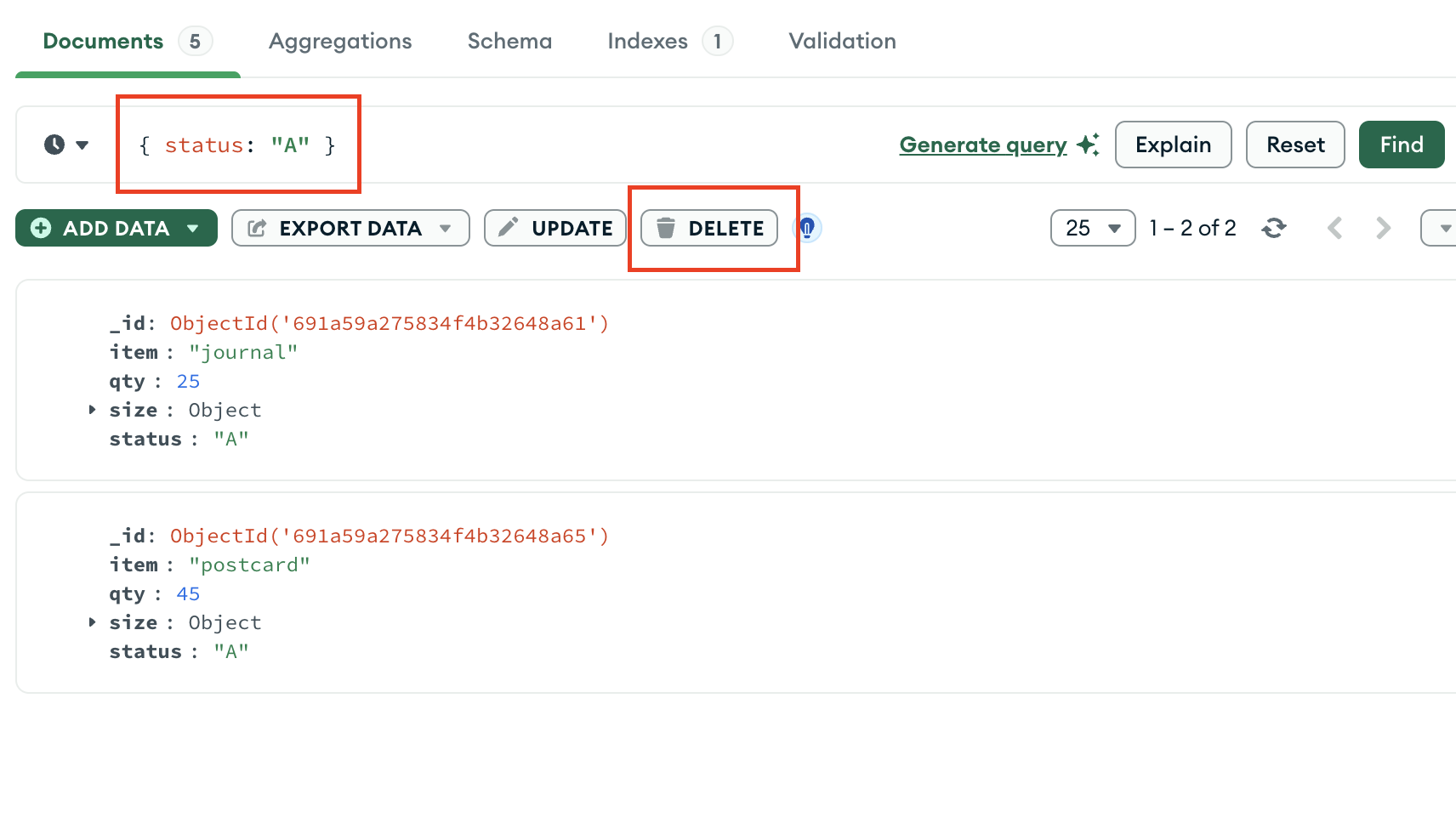
mongoc_collection_t *collection; bson_t *selector; bool r; bson_error_t error; collection = mongoc_database_get_collection (db, "inventory"); selector = BCON_NEW ("status", BCON_UTF8 ("A")); r = mongoc_collection_delete_many (collection, selector, NULL, NULL, &error); bson_destroy (selector); if (!r) { MONGOC_ERROR ("%s\n", error.message); goto done; }
var filter = Builders<BsonDocument>.Filter.Eq("status", "A"); var result = collection.DeleteMany(filter);
result, err := coll.DeleteMany( context.TODO(), bson.D{ {"status", "A"}, }, )
deleteManyPublisher = collection.deleteMany(eq("status", "A"));
collection.deleteMany(eq("status", "A"));
collection.deleteMany(eq("status", "A"));
await db.inventory.delete_many({"status": "A"})
await db.collection('inventory').deleteMany({ status: 'A' });
$deleteResult = $db->inventory->deleteMany(['status' => 'A']);
db.inventory.delete_many({"status": "A"})
client[:inventory].delete_many(status: 'A')
collection.deleteMany(equal("status", "A")).execute()
The method returns a document with the status of the operation. For more information and examples, see deleteMany().
When you confirm the deletion in the pop-up window that appears when you click DELETE, MongoDB Compass deletes all documents and displays a message indicating how many documents were deleted.
The mongoc_collection_delete_many method returns true if successful, or returns false and sets an error if there are invalid arguments or a server or network error occurs.
Upon successful execution, the IMongoCollection.DeleteMany() method returns an instance of DeleteResult whose DeletedCount property contains the number of documents that matched the filter.
Upon successful execution, the Collection.DeleteMany function returns an instance of DeleteResult whose DeletedCount property contains the number of documents that matched the filter.
com.mongodb.reactivestreams.client.MongoCollection.deleteMany returns a Publisher object of type com.mongodb.client.result.DeleteResult if successful. Returns an instance of com.mongodb.MongoException if unsuccessful.
The com.mongodb.client.MongoCollection.deleteMany method returns an instance of com.mongodb.client.result.DeleteResult with the status of the operation.
The MongoCollection.deleteMany() method returns an instance of com.mongodb.client.result.DeleteResult that describes the status of the operation and count of deleted documents.
The delete_many coroutine asynchronously returns an instance of pymongo.results.DeleteResult with the status of the operation.
Collection.deleteMany() returns a promise that provides a result. The result.deletedCount property contains the number of documents that matched the filter.
Upon successful execution, the deleteMany() method returns an instance of MongoDB\\DeleteResult whose getDeletedCount() method returns the number of documents that matched the filter.
The delete_many method returns an instance of pymongo.results.DeleteResult with the status of the operation.
Upon successful execution, the delete_many() method returns an instance of Mongo::Operation::Result, whose deleted_count attribute contains the number of documents that matched the filter.
Upon successful execution, the collection.deleteMany() method returns an Observable with a single element with a DeleteResult type parameter or with an com.mongodb.MongoException.
Delete Only One Document that Matches a Condition
To delete at most a single document that matches a specified filter (even though multiple documents may match the specified filter) use the db.collection.deleteOne() method.
The following example deletes the first document where status is "D":
To delete a single document that matches a specified filter:
Write your query filter in ther Compass query bar and click Find.
Hover your mouse over the document you want to delete.
Click the button on the right side of your document.
The following example deletes a document with { status: "A" } from the inventory collection:
To delete a single document from a collection, pass the mongoc_collection_t and a bson_t that matches the document you want to delete to the mongoc_collection_delete_one method.
The following example deletes the first document where status is "D":
To delete at most a single document that matches a specified filter (even though multiple documents may match the specified filter) use the IMongoCollection.DeleteOne() method.
The following example deletes the first document where status is "D":
To delete at most a single document that matches a specified filter (even though multiple documents may match the specified filter) use the Collection.DeleteOne function.
The following example deletes the first document where status is "D":
To delete at most a single document that matches a specified filter (even though multiple documents may match the specified filter) use the com.mongodb.reactivestreams.client.MongoCollection.deleteMany method.
The following example deletes the first document where status is "D":
To delete at most a single document that matches a specified filter (even though multiple documents may match the specified filter) use the com.mongodb.client.MongoCollection.deleteOne method.
The following example deletes the first document where status is "D":
To delete at most a single document that matches a specified filter, even if multiple documents match the specified filter, you can use the MongoCollection.deleteOne() method.
To delete at most a single document that matches a specified filter (even though multiple documents may match the specified filter) use the motor.motor_asyncio.AsyncIOMotorCollection.delete_one method.
The following example deletes the first document where status is "D":
To delete at most a single document that matches a specified filter (even though multiple documents may match the specified filter) use the Collection.deleteOne() method.
The following example deletes the first document where status is "D":
To delete at most a single document that matches a specified filter (even though multiple documents may match the specified filter) use the MongoDB\\Collection::deleteOne() method.
The following example deletes the first document where status is "D":
To delete at most a single document that matches a specified filter (even though multiple documents may match the specified filter) use the pymongo.collection.Collection.delete_one method.
The following example deletes the first document where status is "D":
To delete at most a single document that matches a specified filter (even though multiple documents may match the specified filter) use the Mongo::Collection#delete_one() method.
The following example deletes the first document where status is "D":
To delete at most a single document that matches a specified filter (even though multiple documents may match the specified filter) use the collection.deleteOne() method.
The following example deletes the first document where status is "D":
db.inventory.deleteOne( { status: "D" } )
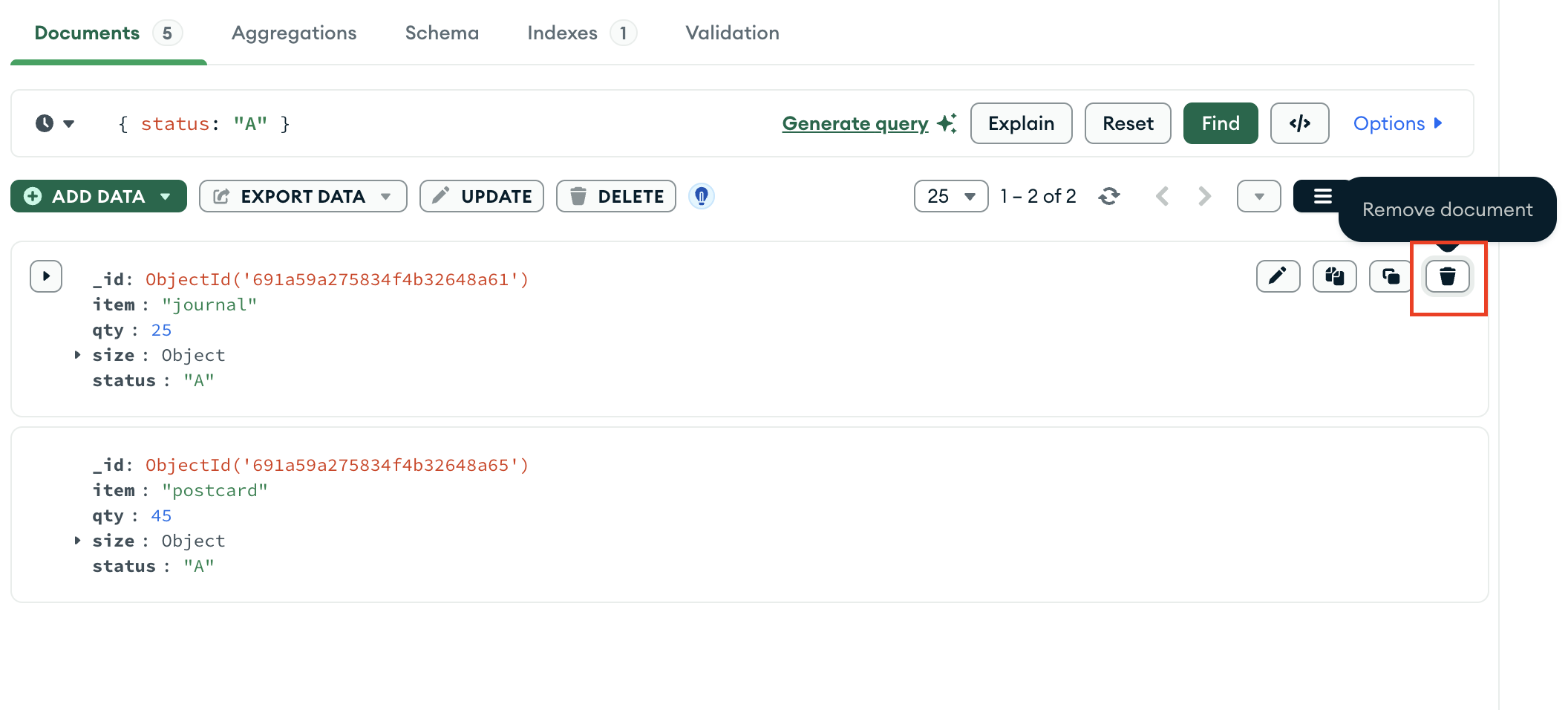
mongoc_collection_t *collection; bson_t *selector; bool r; bson_error_t error; collection = mongoc_database_get_collection (db, "inventory"); selector = BCON_NEW ("status", BCON_UTF8 ("D")); r = mongoc_collection_delete_one (collection, selector, NULL, NULL, &error); bson_destroy (selector); if (!r) { MONGOC_ERROR ("%s\n", error.message); goto done; }
Clean up any open resources by calling the following methods, as appropriate:
var filter = Builders<BsonDocument>.Filter.Eq("status", "D"); var result = collection.DeleteOne(filter);
result, err := coll.DeleteOne( context.TODO(), bson.D{ {"status", "D"}, }, )
Publisher<DeleteResult> deleteOnePublisher = collection.deleteOne(eq("status", "D"));
collection.deleteOne(eq("status", "D"));
The following example deletes the first document where status is "D":
await db.inventory.delete_one({"status": "D"})
await db.collection('inventory').deleteOne({ status: 'D' });
$deleteResult = $db->inventory->deleteOne(['status' => 'D']);
db.inventory.delete_one({"status": "D"})
client[:inventory].delete_one(status: 'D')
collection.deleteOne(equal("status", "D")).execute()
Delete a Document with MongoDB Atlas
Note
You can delete only one document at a time in the MongoDB Atlas UI. To delete multiple documents, connect to your Atlas deployment from mongosh or a MongoDB driver and follow the examples on this page for your preferred method.
The example in this section uses the sample movies dataset. To learn how to load the sample dataset into your MongoDB Atlas deployment, see Load Sample Data.
To delete a document in MongoDB Atlas, follow these steps:
In the MongoDB Atlas UI, go to the Clusters page for your project.
If it's not already displayed, select the organization that contains your desired project from the Organizations menu in the navigation bar.
If it's not already displayed, select your project from the Projects menu in the navigation bar.
In the sidebar, click Clusters under the Database heading.
The Clusters page displays.
Specify a query filter document.
Optionally, you can specify a query filter document in the Filter field. A query filter document uses query operators to specify search conditions.
Copy the following query filter document into the Filter search bar and click Apply:
{ genres: "Action", rated: { $in: [ "PG", "PG-13" ] } }
This query filter returns all documents in the sample_mflix.movies collection where genres equals Action and rated equals either PG or PG-13.
To learn more, see Create, View, Update, and Delete Documents.
Delete Behavior
Indexes
Delete operations do not drop indexes, even if deleting all documents from a collection.
Note
Atomicity and Write Acknowledgement
MongoDB write operations are atomic on the level of a single document. For more information, see Atomicity and Transactions.
You can also use write concerns to specify the level of acknowledgment requested from MongoDB for write operations. For more information, see Write Concern.