A MongoDB Vector Search query takes the form of an aggregation pipeline that uses $vectorSearch as the first stage. This page explains the syntax, options, and behavior of the $vectorSearch stage.
支持的客户端
语法
字段
$vectorSearch 阶段采用包含以下字段的文档:
向量搜索类型
When you define a $vectorSearch stage, you can use the exact field to specify whether to run an ANN or ENN search.
Considerations
$vectorSearch 必须是其所在的任何管道中的第一阶段。
限制
$vectorSearch can't be used in view definition and the following pipeline stages:
$facet管道阶段
| [1] | You can pass the results of $vectorSearch to this stage. |
过载保护
当查询到达的速度超过搜索进程运行它们的速度时, Atlas会对多余的查询进行排队,并可以拒绝查询并返回 489 错误。要学习;了解更多信息,请参阅查询减载和查询拒绝。
MongoDB Vector Search 索引
要学习;了解有关这些MongoDB Vector Search字段类型的更多信息,请参阅如何为向量搜索的字段创建索引。
MongoDB Vector Search 评分
MongoDB Vector Search 为其返回的每个文档分配一个分数,该分数在 0 到 1 之间的固定范围内(其中 0 表示低相似度,1 表示高相似度)。
注意
Pre-filtering your data doesn't affect the score that MongoDB Vector Search returns using vectorSearchScore for $vectorSearch queries.
MongoDB 向量搜索过滤器
MongoDB 向量搜索支持数据过滤器。您可以:
Pre-filter your data by using the
filteroption in your MongoDB Vector Search query.post-filter the results of your MongoDB Vector Search query by using
$matchand other supported aggregation pipeline stages.
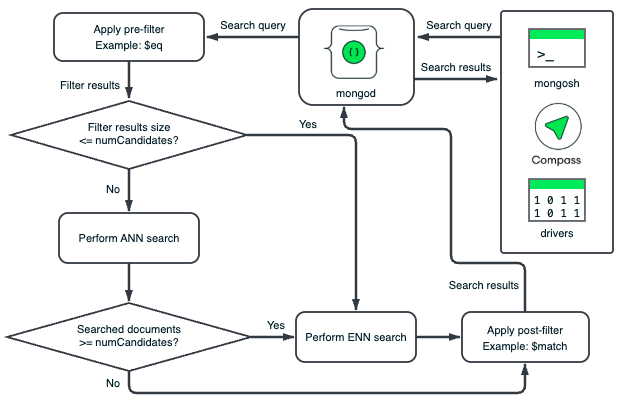
MongoDB 向量搜索对数据段进行独立的预过滤器和帖子过滤器操作。每个段的 HNSW 图表仅基于该段中的向量。MongoDB 向量搜索将过滤器应用于每个段的文档,以消除不符合过滤条件的文档。预过滤器可确保在 MongoDB 向量搜索遍历 HNSW 图表之前消除文档,帖子过滤器可确保从向量搜索结果中消除文档中的不相关文档或字段。
预过滤搜索数据
您可以使用过滤器预先筛选数据,以缩小语义搜索的范围,并确保只考虑相关向量进行比较。当使用 filter 选项对数据进行预过滤时,MongoDB 向量搜索仅对数据的子集合执行语义搜索,这可提高搜索结果的准确性。
预过滤可能过于限制,因为预过滤可能会排除与预过滤不完全匹配的数据,但在向量搜索过程中,该数据与您要考虑的查询在语义上相似。为了缓解这一问题,我们建议设置广泛的过滤器条件,以确保您的查询包含以下内容:
包含尽可能多的相关结果。
从结果中排除不相关数据。
返回结果中请求的文档数量。
重要
筛选后的查询通常比其他等效的未筛选查询慢。
帖子-过滤器搜索结果
If your index size isn't optimal for pre-filtering or if you set broad pre-filtering criteria, you can post-filter your vector search results to return only relevant data. To filter the results of your vector search, you can use any supported aggregation pipeline stage, such as the $match stage, after the $vectorSearch stage. To learn more, see Additional Performance Recommendations.
To select the fields to return in the results, use the $project stage unless you need all the fields in the results. We recommend excluding the vector field in the $project stage to improve query performance.
For example, you can use the $project stage to include the vectorSearchScore and then use the $match stage to return only documents above a certain score threshold.
过滤器注意事项
MongoDB Vector Search supports the short form of
$eq. In the short form, you don't need to specify$eqin the query.例如,考虑以下带有
$eq的过滤器:"filter": { "_id": { "$eq": ObjectId("5a9427648b0beebeb69537a5") } 这相当于以下过滤器,它使用
$eq的简写形式:"filter": { "_id": ObjectId("5a9427648b0beebeb69537a5") } You can use the
$andMQL operator to specify an array of filters in a single query.例如,考虑以下预过滤器,用于
genres字段等于Action和year字段值为1999、2000或2001的文档:"filter": { "$and": [ { "genres": "Action" }, { "year": { "$in": [ 1999, 2000, 2001 ] } } ] } For advanced filtering capabilities such as fuzzy search, phrase matching, location filtering, and other analyzed text, use the vectorSearch operator in a
$searchstage.
示例
先决条件
在运行这些示例之前,请执行以下操作:
Add the sample dataset used in the query to your cluster.
为集合创建 MongoDB 向量搜索索引。有关说明,请参阅创建 MongoDB 向量搜索索引过程,并以所需语言为示例查询配置索引。
查询
了解详情
以下教程演示了 $vectorSearch 阶段的其他使用案例。