定义
兼容性
此方法可用于以下环境中托管的部署:
- MongoDB Atlas: The fully managed service for MongoDB deployments in the cloud
注意
This command is supported in all MongoDB Atlas clusters. For information on Atlas support for all commands, see Unsupported Commands.
MongoDB Enterprise:基于订阅、自我管理的 MongoDB 版本
MongoDB Community:源代码可用、免费使用且可自行管理的 MongoDB 版本
语法
该方法采用以下参数:
Parameter | 类型 | 说明 |
|---|---|---|
| 字符串 | 要针对该字段返回非重复值。 |
| 文档 | 指定要从中检索非重复值的文档的查询。 |
| 文档 | Optional. A document that specifies the options. See Options. |
注意
结果不得大于最大 BSON 大小。如果您的结果超出最大 BSON 大小,请使用聚合管道通过 $group 操作符检索非重复值,如使用聚合管道检索非重复值中所述。
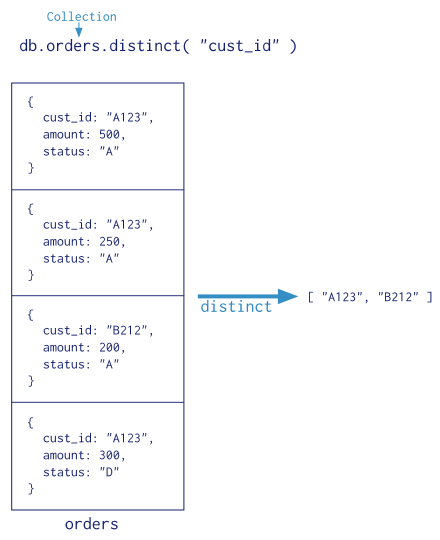
下图显示了 distinct() 调用的示例。
选项
{ collation: <document> }
字段 | 类型 | 说明 | ||||||||||
|---|---|---|---|---|---|---|---|---|---|---|---|---|
| 文档 | 可选。 可选。指定用于操作的排序规则。 排序规则允许用户为字符串比较指定特定于语言的规则,例如字母大小写和重音符号规则。 排序规则选项的语法如下: 指定排序规则时, 如果未指定排序规则,但集合具有默认排序规则(请参阅 如果没有为收集或操作指定排序规则,MongoDB 将使用先前版本中使用的简单二进制比较来进行字符串比较。 您不能为一个操作指定多个排序规则。例如,您不能为每个字段指定不同的排序规则,或者如果执行带排序的查找,则不能使用一种排序规则进行查找而另一种排序规则进行排序。 |
行为
对于时间序列集合, distinct 命令无法有效利用索引。相反,使用 $group 聚合按不同的值对文档进行分组。有关详细信息,请参阅时间序列限制。
数组字段
If the value of the specified field is an array, db.collection.distinct() considers each element of the array as a separate value.
For instance, if a field has as its value [ 1, [1], 1 ], then db.collection.distinct() considers 1, [1], and 1 as separate values.
For an example, see Return Distinct Values for an Array Field.
索引使用
When possible, db.collection.distinct() operations can use indexes.
Indexes can also cover db.collection.distinct() operations. See Run Covered Queries for more information on queries covered by indexes.
事务
如要在事务中执行不同的操作:
For unsharded collections, you can use the
db.collection.distinct()method/thedistinctcommand as well as the aggregation pipeline with the$groupstage.For sharded collections, you cannot use the
db.collection.distinct()method or thedistinctcommand.
重要
在大多数情况下,与单文档写入操作相比,分布式事务会产生更高的性能成本,并且分布式事务的可用性不应取代有效的模式设计。在许多情况下,非规范化数据模型(嵌入式文档和数组)仍然是数据和使用案例的最佳选择。换言之,对于许多场景,适当的数据建模将最大限度地减少对分布式事务的需求。
有关其他事务使用注意事项(如运行时间限制和 oplog 大小限制),另请参阅生产注意事项。
客户端断开连接
如果发出 distinct() 的客户端在操作完成之前断开连接,则MongoDB使用killOp将 distinct() 标记为终止。
副本集节点状态限制
要在副本集成员上运行,distinct 操作需要成员处于 PRIMARY 或 SECONDARY 状态。如果节点处于其他状态,如 STARTUP2,则操作错误。
示例
这些示例使用包含以下文档的 inventory 集合:
db.inventory.insertMany( [ { _id: 1, dept: "A", item: { sku: "111", color: "red" }, sizes: [ "S", "M" ] }, { _id: 2, dept: "A", item: { sku: "111", color: "blue" }, sizes: [ "M", "L" ] }, { _id: 3, dept: "B", item: { sku: "222", color: "blue" }, sizes: "S" }, { _id: 4, dept: "A", item: { sku: "333", color: "black" }, sizes: [ "S" ] } ] )
返回字段的非重复值
以下示例为 dept字段返回非重复值:
db.inventory.distinct( "dept" )
该操作返回:
[ "A", "B" ]
返回嵌入式字段的非重复值
以下示例为嵌入式 item.sku字段返回非重复值:
db.inventory.distinct( "item.sku" )
该操作返回:
[ "111", "222", "333" ]
提示
用于获取有关访问嵌入式文档内字段的信息的点符号
返回数组字段的非重复值
以下示例返回 sizes数组字段的非重复值:
db.inventory.distinct( "sizes" )
该操作返回:
[ "M", "S", "L" ]
For information on distinct() and array fields, see the Behavior section.
使用以下项指定查询: distinct
以下示例为嵌入式 item.sku字段返回不同的值,其中 dept 等于 "A":
db.inventory.distinct( "item.sku", { dept: "A" } )
该操作返回:
[ "111", "333" ]
指定排序规则
排序规则允许用户为字符串比较指定特定于语言的规则,例如字母大小写和重音符号规则。
集合 myColl 包含以下文档:
db.myColl.insertMany( [ { _id: 1, category: "café", status: "A" }, { _id: 2, category: "cafe", status: "a" }, { _id: 3, category: "cafE", status: "a" } ] )
以下聚合操作包括排序规则选项:
db.myColl.distinct( "category", {}, { collation: { locale: "fr", strength: 1 } } )
有关排序规则字段的说明,请参阅排序规则文档。