MongoDB将数据记录作为文档(BSON文档)存储在集合中。数据库包含一个或多个集合。
您可以使用 Atlas UI、数据库和集合、mongosh或 MongoDB Compass 管理。本页介绍Atlas 用户界面过程。对于自管理部署,请使用 mongosh 或MongoDB Compass。
选择您的客户端:
MongoDB Shellmongosh 是一个JavaScript和 Node.js REPL 环境,用于与MongoDB部署进行交互。要学习;了解更多信息,请参阅mongosh。
MongoDB Compass 是一个功能强大的 GUI,用于在可视化环境中查询、聚合和分析 MongoDB 数据。 要了解更多信息,请参阅MongoDB Compass。
Databases
use myDB .. tab:: MongoDB Compass :tabid: compass .. procedure:: :style: normal .. step:: Start |compass| and connect to your cluster. To learn more, see :compass:`Connect to MongoDB </connect/>`. .. step:: Select :guilabel:`Databases`. The :guilabel:`Databases` tab lists the existing databases for your deployment.
创建数据库
use myNewDB db.myNewCollection1.insertOne( { x: 1 } ) :method:`~db.collection.insertOne()` creates both the database ``myNewDB`` and the collection ``myNewCollection1`` if they do not already exist. Be sure that both names follow MongoDB :ref:`restrictions-on-db-names`. .. tab:: MongoDB Compass :tabid: compass .. procedure:: :style: normal .. step:: Open the :guilabel:`Databases` tab. .. step:: Click :guilabel:`Create database`. .. step:: Enter the database and collection names. .. step:: Click :guilabel:`Create Database`.
集合
MongoDB 将文档存储在集合中。集合类似于关系数据库中的表。
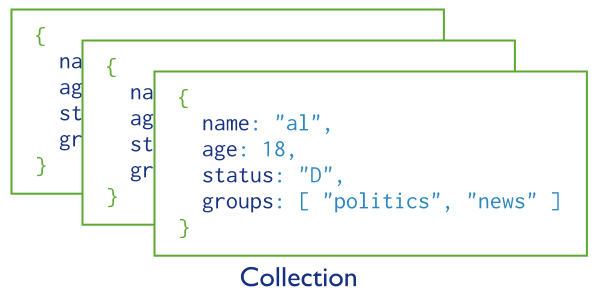
点击放大
创建集合
如果集合不存在,MongoDB 会在您首次存储该集合的数据时创建该集合。
db.myNewCollection2.insertOne( { x: 1 } ) db.myNewCollection3.createIndex( { y: 1 } ) Both :method:`~db.collection.insertOne()` and :method:`~db.collection.createIndex()` create their respective collection if it does not already exist. Be sure the collection name follows MongoDB :ref:`restrictions-on-db-names`. .. tab:: MongoDB Compass :tabid: compass .. procedure:: :style: normal .. step:: In the left navigation, click the database name. .. step:: Click :guilabel:`+` next to the database name. .. step:: Enter a name in :guilabel:`Create Collection`. .. step:: Click :guilabel:`Create Collection`.
显式创建
使用 db.createCollection() 可使用最大大小或验证规则等选项显式创建集合。如果没有这些选项, MongoDB会在您首次存储数据时自动创建集合。
要修改这些集合选项,请参阅collMod。
模式验证
默认下,集合中的文档不股票模式。字段和数据类型可能因文档而异。
您可以在插入和更新操作期间实施模式验证规则。
对于MongoDB Atlas部署,Performance Advisor和MongoDB Atlas用户界面会检测常见模式设计问题,并建议遵循MongoDB最佳实践的修改建议。要学习;了解更多信息,请参阅模式建议。
修改文档结构
要在集合的文档中添加、删除或重新键入字段,更新现有文档。
Unique Identifiers
为集合分配一个不可变的 UUID,该 UUID 在所有副本集成员和分片中保持一致。