다음 섹션에서는 Atlas에서 MongoDB 벡터 검색 배포서버 옵션을 설명합니다.
사전 프로덕션 또는 프로덕션 환경의 요구 사항을 충족하기 위해 다양한 배포서버 유형, cloud 제공자, 클러스터 계층으로 클러스터 구성할 수 있습니다. 이러한 권장 사항을 사용하여 벡터 검색 수행하기 위한 배포서버 유형, cloud 제공자 및 리전, 클러스터 및 검색 계층을 선택합니다.
환경 | 배포 유형 | 클러스터 계층 | 클라우드 제공자 리전 | 노드 아키텍처 |
|---|---|---|---|---|
쿼리 테스트 | Flex 클러스터, 전용 클러스터 | 무료 클러스터 또는 그 이상 계층 | 모든 | MongoDB 및 Atlas Search 프로세스는 동일한 노드에서 실행됩니다. |
프로토타입 애플리케이션 | 전용 클러스터 | Flex 클러스터, | 모두 | MongoDB 및 Atlas Search 프로세스는 동일한 노드에서 실행됩니다. |
프로덕션 | 별도의 검색 노드가 있는 전용 클러스터 |
| AWS and Azure in some regions or Google Cloud in all regions | MongoDB 와 Atlas Search 프로세스는 서로 다른 노드에서 실행됩니다. |
커뮤니티 에디션 | 자체 관리형 배포서버. 스스로 | N/A. 자체 hardware 또는 클라우드 인스턴스를 제공합니다. | N/A. 자체 인프라를 선택할 수 있습니다. | MongoDB 및 검색 프로세스는 단일 또는 별도 자체 관리형 호스트에서 실행됩니다. |
이러한 배포 모델에 대해 자세히 알아보려면 다음 섹션을 검토하세요.
리소스 사용량
벡터 인덱싱을 위한 메모리 요구 사항
MongoDB Vector Search는 메모리에 전체 인덱스 보유하므로 데이터 세트에 전체 정밀도 벡터가 포함된 경우 MongoDB Vector Search 인덱스 및 JVM 에 충분한 메모리가 있는지 확인해야 합니다. 각 인덱스 인덱싱되는 벡터와 추가 메타데이터 의 조합입니다. 인덱스 크기는 주로 인덱싱 하는 벡터의 크기에 따라 결정되며, 메타데이터 공간은 일반적으로 상대적으로 명목입니다.
양자화를 사용하지 않는 경우, MongoDB Vector Search는 전체 충실도 벡터를 메모리에 저장합니다. 자동 양자화를 활성화 MongoDB Vector Search는 훨씬 적은 리소스를 필요로 하는 양자화된 벡터를 메모리에 저장하고 전체 충실도 벡터를 디스크에 저장합니다. Atlas UI MongoDB Search 페이지에서 Size 및 Required Memory 열을 확인하여 벡터 인덱스에 대한 디스크 및 메모리 요구 사항 간의 차이를 확인할 수 있습니다.
단일 벡터 에 대해 다음 요구 사항을 고려하세요.
임베딩 모델 | 벡터 차원 | 공간 요구 사항 |
|---|---|---|
Voyage AI | 2048 | 8kb ( |
OpenAI | 1536 | 6kb |
Google | 768 | 3kb |
Cohere | 1024 | 4kb ( |
BinData quantized vectors. To learn more, see Ingest Quantized Vectors.
The required space scales linearly with the number of vectors that you are indexing and with the vector dimensionality. You can also use the Search Index Size metric to determine the amount of space and memory you need on your Search Nodes.
벡터의 스토리지 요구 사항
If you use BinData or quantized vectors, you significantly reduce resource requirements compared to not using binData or quantized vectors. You will notice:
binData벡터 사용 시mongod에서 벡터의 디스크 스토리지가 66% 감소합니다.자동 벡터 양자화 또는 양자화된 벡터 수집 사용 시 벡터 압축으로 인해
mongot에서 벡터 RAM 사용량이 3.75배(스칼라) 또는 24배(바이너리) 감소합니다.
자동 양자화를 사용할 때, Atlas는 리스코어링 또는 정확한 검색을 위해 고정밀 벡터를 디스크에 저장하고, 리스코어링을 위한 RAM 및 캐시 사용을 최소화합니다.
MongoDB 벡터 검색 인덱스 정의에서 자동 양자화를 활성화하는 경우, 클러스터 크기를 조정할 때 디스크 공간도 고려해야 합니다. 이는 MongoDB 벡터 검색이 등가 최근접 이웃 검색을 위해, 그리고 자동 양자화를 구성한 경우 리스코어링을 위해 고정밀 벡터를 디스크에도 저장하기 때문입니다. 따라서 사용하는 hardware의 디스크 대 RAM 비율이 적절한지 확인하세요. 스칼라 양자화를 위해 저장 대 RAM 비율이 대략 4:1 인 검색 노드를 구성하거나, 바이너리 양자화를 위해 저장 대 RAM 비율이 대략 24:1 인 검색 노드를 구성하는 것을 고려하십시오.
예시
이 예시는 my-embeddings라는 필드에 저장된 Voyage 의 10,000만 개 1024 차원 임베딩에 대해 바이너리 양자화를 구성하는 방법을 설명합니다.
{ "fields":[ { "type": "vector", "path": "my-embeddings", "numDimensions": 1024, "similarity": "euclidean", "quantization": "binary" } ] }
다음 공식을 사용하여 리스코어링을 포함한 바이너리 양자화 활성화 인덱스의 디스크 공간을 대략적으로 계산합니다.
Original index size * (25/24)
여기서 분모의 24는 분수를 더 쉽게 표현하기 위해 24부분으로 분할된 원래 인덱스 크기를 나타냅니다. 분자의 25는 바이너리 벡터를 저장하는 데 필요한 추가 데이터에 대해 원래 인덱스 크기의 약 1/24에 해당하는 추가 공간 할당을 나타냅니다. 원래 인덱스와 Hierarchical Navigable Small Worlds 그래프는 여전히 디스크에 저장되어 있습니다. HNSW 그래프가 압축되지 않았기 때문에 크기 초과 계수는 1/32가 아닌 1/24입니다.
예시
원래 인덱스 크기가 1GB라고 가정해 보겠습니다. 아래와 같이 리스코어링을 사용하여 바이너리 양자화된 인덱스 크기를 계산할 수 있습니다.
1 GB * (25/24) = 1.042 GB
중요
Atlas UI 에서 Atlas 전체 인덱스 크기를 표시하지만, Atlas RAM 과 디스크에 저장된 인덱스 내의 데이터 구조를 세분화하여 표시하지 않기 때문에 클 수 있습니다. MongoDB Search 지표 자동 양자화를 활성화 때 메모리에 보관되는 훨씬 더 작은 인덱스 표시합니다.
자동 양자화를 구성한 벡터의 경우, 예상 인덱스 크기의 125%에 해당하는 여유 디스크 공간을 할당하는 것이 좋습니다.
테스트 및 프로토타입 제작 환경
벡터 검색 쿼리를 테스트하고 애플리케이션의 프로토타입을 만들려면 다음 구성을 권장합니다.
배포 유형
MongoDB Vector Search 쿼리를 테스트하기 위해 Flex 클러스터, 전용 클러스터 배포 하거나 로컬 Atlas 배포서버 사용할 수 있습니다.
Cluster Tiers
Free 클러스터는 비용이 발생하지 않는 클러스터 유형입니다. Flex 클러스터는 MongoDB를 학습하거나 소규모 개념 증명 애플리케이션을 개발하는 팀에 적합한 저비용 클러스터 유형입니다. Atlas Flex 클러스터로 프로젝트를 시작하고 나중에 프로덕션 지원 전용 클러스터 계층으로 업그레이드할 수 있습니다.
이러한 저비용 클러스터 유형은 MongoDB Vector Search 쿼리를 테스트하는 데 사용할 수 있습니다. 그러나 Flex 클러스터에서는 리소스 경합과 쿼리 지연 시간 발생할 수 있습니다. Flex 클러스터 로 프로젝트 시작하는 경우, 애플리케이션 프로덕션할 준비가 되면 상위 계층 으로 업그레이드하는 것이 좋습니다.
Dedicated clusters include M10 and higher tiers. The M10 and M20 tiers are suitable for prototyping your application. You can scale to higher tiers to handle large datasets or deploy dedicated Search Nodes for workload isolation when your application is ready for production.
클라우드 제공자 및 리전
선택한 클라우드 공급자와 리전은 클러스터 계층에 사용할 수 있는 구성 옵션과 클러스터 실행 비용에 영향을 미칩니다.
All the cluster tiers are available in all the supported cloud provider regions
로컬에서 MongoDB Vector Search 쿼리를 테스트하려는 경우, Atlas CLI 사용하여 로컬 컴퓨터에서 호스팅되는 단일 노드 복제본 세트 배포 수 있습니다. 시작하려면 MongoDB 벡터 검색 빠른 시작 튜토리얼 을 완료하고 로컬 배포서버 탭 선택합니다.
When your application is ready for production, migrate your local Atlas deployment to a production environment by using Live Migration. Local deployments are limited by the CPU, memory, and storage resources of your local machine.
노드 아키텍처
테스트 및 프로토타입 환경의 경우, MongoDB 프로세스와 MongoDB Search 프로세스가 동일한 노드 에서 실행 노드 아키텍처를 권장합니다. 이 배포서버 모델의 다음 다이어그램에서 MongoDB Search mongot 프로세스 Atlas cluster 의 각 노드 에서 mongod 와 함께 실행되며 동일한 리소스를 주식 .
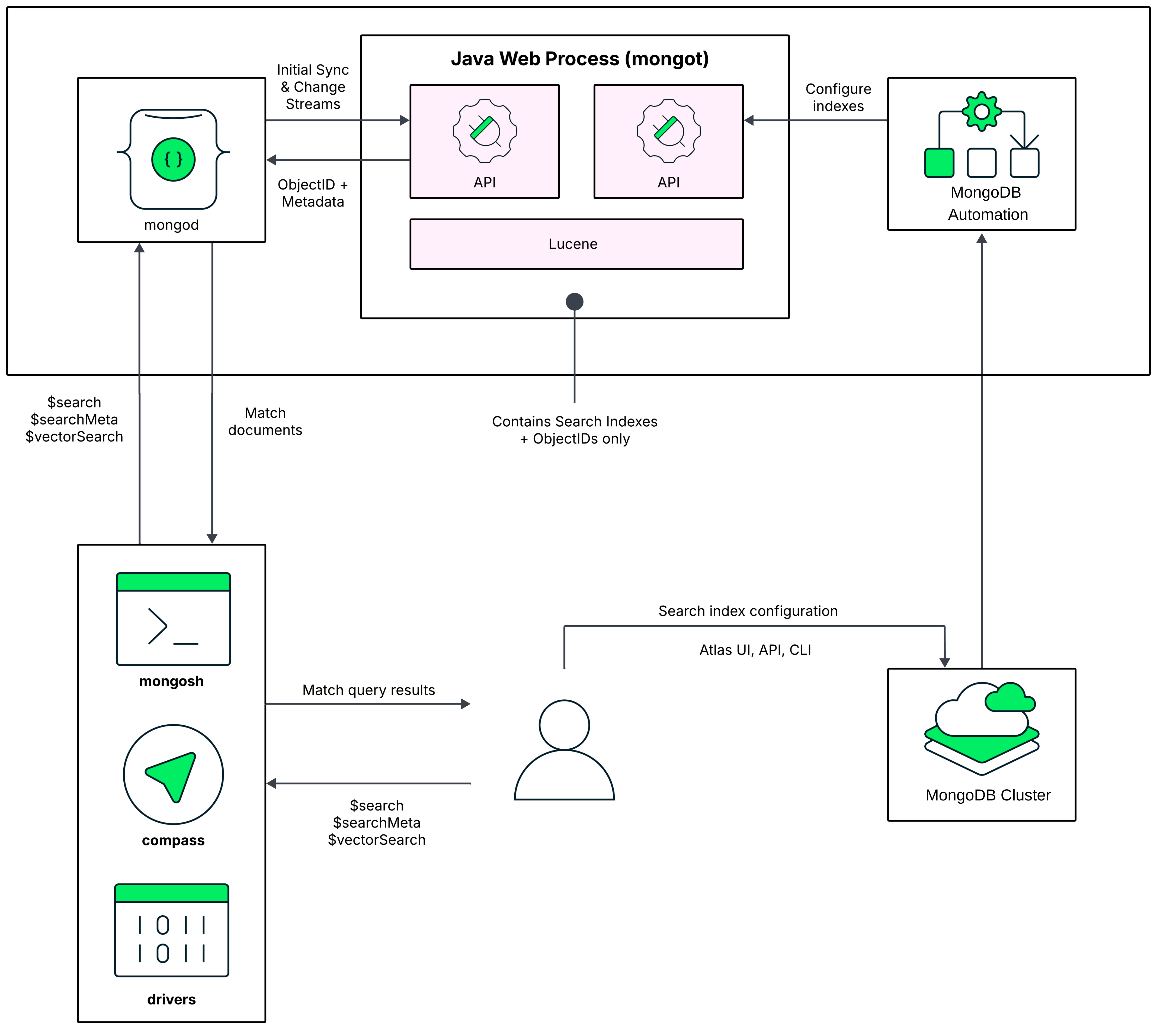
기본값 으로 Atlas 첫 번째 MongoDB Vector Search 인덱스 생성할 때 mongod 프로세스 실행하는 동일한 노드 에서 MongoDB Search mongot 프로세스 활성화합니다.
When you run a query, MongoDB Search uses the configured read preference to identify the node on which to run the query. The query first goes to the MongoDB process, which is mongod for a replica set cluster or mongos for a sharded cluster.
For a replica set cluster, the mongod process routes the query to the mongot on the same node. For sharded clusters, your cluster data is partitioned across mongod instances (shards) and each mongot process can only access the data on the mongod instance on the same node. Therefore, you can't run MongoDB Search queries that target a particular shard. mongos routes the query to all shards, making these scatter gather queries. If you use zones to distribute a sharded collection over a subset of the shards in the cluster, MongoDB Search routes the query to the zone that contains the shards for the collection that you are querying and runs your $search queries on just the shards where the collection is located.
After the query is routed to a MongoDB Search mongot process, the mongot process performs the search and scoring and returns the document IDs and other search metadata for the matching results to its corresponding mongod process. The mongod process then performs a full document lookup implicitly for the matching results and returns the results to the client. If you use the $search concurrent option in your query, MongoDB Search enables intra-query parallelism. To learn more, see Parallelize Query Execution Across Segments.
To learn more about the mongot process, see Query Processing.
애플리케이션 프로토타입을 위한 클러스터 크기 조정
Atlas 동일한 노드 에서 데이터베이스 와 검색 워크로드를 실행하는 경우, MongoDB 저장 노드의 사용 가능한 메모리(RAM) 중 일정 비율을 차지하며, 나머지는 MongoDB Vector Search 인덱스 와 mongot 프로세스 위해 남겨둡니다.
계층 | 총 메모리 (GB) | MongoDB 벡터 검색에 사용할 수 있는 메모리 인덱스(GB) |
|---|---|---|
| 2 | 1 |
| 4 | 2 |
| 8 | 4 |
M10, M20 및 M30 클러스터 계층의 경우 25%는 MongoDB 위해 예약되고 나머지 75%는 MongoDB Vector Search 인덱스 포함한 다른 작업을 위해 예약됩니다. M40개 이상의 클러스터 계층의 경우, 50%는 MongoDB 위해 예약되고 나머지는 MongoDB Vector Search 인덱스 포함한 다른 작업을 위해 예약됩니다.
제한 사항
You might experience resource contention between the database mongod and the search mongot processes. This could negatively impact the performance of your index and latency of your queries. We recommend this deployment model for only testing and prototyping environments. For production-ready applications and associated search workloads, we recommend migrating to dedicated Search Nodes.
프로덕션 환경
프로덕션용 애플리케이션의 경우 다음과 같은 클러스터 구성을 권장합니다.
배포 유형
For production-ready applications, you need a dedicated cluster with separate Search Nodes for Workload Isolation.
Cluster Tiers
Dedicated clusters include M10 and higher tiers. The M10 and M20 tiers are suitable for development and for production environments. However, the higher tiers can handle large datasets and production workloads. We recommend that you also deploy dedicated Search Nodes for your search workload. This allows you to scale your search deployment independently and appropriately.
클라우드 제공자 및 리전
Search Nodes are available in all the regions for Google Cloud but are only available in a subset of AWS and Azure regions. You must select a cloud provider and region where Search Nodes are available for your deployment.
모든 클러스터 계층은 지원되는 클라우드 공급자 리전에서 사용할 수 있습니다. 선택한 클라우드 공급자와 지역은 클러스터에 사용할 수 있는 구성 옵션과 검색 계층, 그리고 클러스터 실행 비용에 영향을 미칩니다.
노드 아키텍처
For production environments, we recommend a node architecture in which MongoDB processes and MongoDB Search processes run on separate nodes. To deploy separate Search Nodes, see Migrate to Dedicated Search Nodes.
이 배포서버 모델의 다음 다이어그램에서 MongoDB Search mongot 프로세스 mongod 프로세스 실행되는 클러스터 노드와는 별도의 전용 검색 노드에서 실행됩니다.
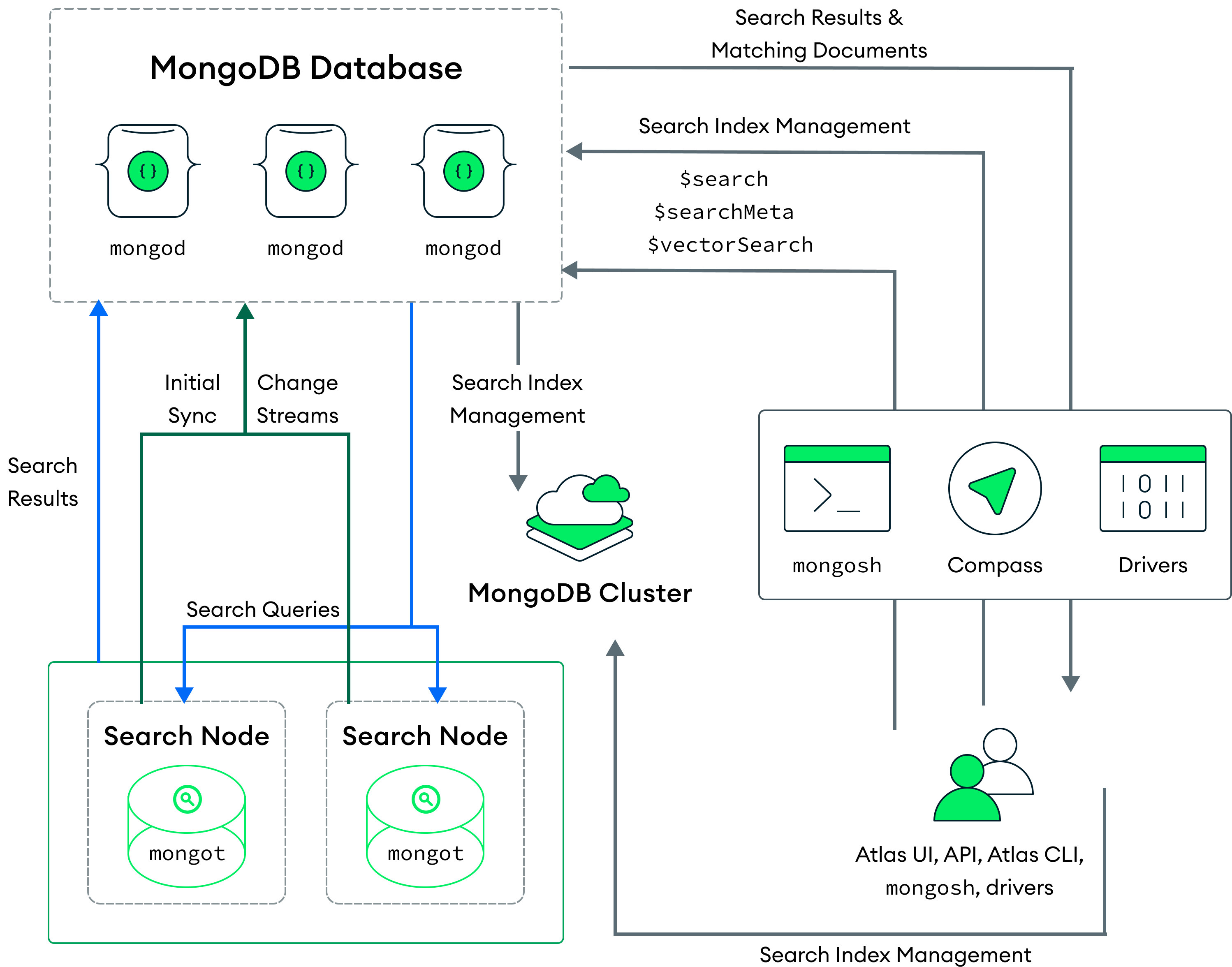
Atlas는 각 클러스터 또는 클러스터의 각 샤드에 대해 검색 노드를 배포합니다. 예를 들어 샤드가 3개인 클러스터에 검색 노드 2개를 배포하면, Atlas는 검색 노드를 6개(샤드당 2개) 배포합니다. 또한 검색 노드 수와 각 검색 노드에 프로비저닝된 리소스의 양을 구성할 수도 있습니다.
When you deploy separate Search Nodes, Atlas automatically assigns a mongod for each mongot for indexing. The mongot communicates with the mongod to listen for and sync index changes for the indexes that it stores. MongoDB Vector Search indexes and processes your queries similar to a deployment where both the mongod and mongot processes run on the same node. To learn more, see How to Index Fields for Vector Search and Run Vector Search ANN and ENN Queries. To learn more about deploying Search Nodes separately, see Search Nodes for Workload Isolation.
검색 노드로 마이그레이션할 때, Atlas는 검색 노드를 배포하지만 검색 노드에서 클러스터의 모든 인덱스를 성공적으로 구축할 때까지 해당 노드에서 쿼리를 제공하지 않습니다. Atlas가 새로운 노드에서 인덱스를 구축하는 동안 클러스터 노드에 있는 인덱스를 사용하여 계속해서 쿼리를 제공합니다. Atlas는 검색 노드에서 인덱스를 성공적으로 구축하고 클러스터 노드에서 인덱스를 제거한 후에만 검색 노드에서 쿼리를 제공하기 시작합니다.
참고
Scaling your cluster by adding search nodes or by changing the search tier triggers a rebuild of the full MongoDB Search index. However, if your cluster on AWS or Azure has dedicated search nodes for which you haven't enabled Encryption at Rest using Customer Key Management, Atlas provides the following optimizations:
검색 노드를 확장할 때 Atlas는 새 노드에서 전체 MongoDB Search 인덱스를 다시 구축하는 대신, S3 또는 Azure Blob Storage에 있는 인덱스의 최신 복사본을 사용합니다.
기존 노드의 경우, Atlas는 주기적으로 새로운 인덱스 파일의 증분 목록을 생성하고 업로드합니다. Atlas는 최대 14일 동안 인덱스 파일을 보관합니다.
Google Cloud의 전용 검색 노드가 있는 클러스터에서는 아직 사용할 수 없습니다.
When you run a query, the query routes to the mongod based on the configured read preference. The mongod process routes the search query through a load balancer on the same node, which distributes the requests across all of the mongot processes.
The MongoDB Search mongot process performs the search and scoring and returns the document IDs and metadata for the matching results to mongod. The mongod then performs a full document lookup for the matching results and returns the results to the client. If you use the $search concurrent option in your query, MongoDB Search enables intra-query parallelism. To learn more, see Parallelize Query Execution Across Segments.
If you delete all the Search Nodes on your cluster, there will be an interruption in processing your search query results. To learn more, see Modify a Cluster. If you delete your Atlas cluster, Atlas pauses and then deletes all associated MongoDB Vector Search deployments (mongot processes).
혜택
이 배포 모델은 다음과 같은 이점을 제공합니다.
Atlas Search 워크로드에 대한 리소스의 고가용성을 보장하면서 리소스를 효율적으로 활용하세요.
데이터베이스 배포와 독립적으로 Atlas Search 배포의 크기를 조정하고 확장할 수 있습니다.
MongoDB Vector Search 쿼리를 동시에 자동으로 프로세스 특히 대규모 데이터 세트의 응답 시간을 개선합니다. 자세한 학습 은 세그먼트 간 병렬 쿼리 실행을 참조하세요.
프로덕션을 위한 검색 노드 크기 조정
MongoDB 벡터 검색는 전체 인덱스를 메모리에 저장하므로 MongoDB 벡터 검색 인덱스와 JVM에 충분한 메모리가 있는지 확인해야 합니다. 검색 노드는 데이터 격리 없이 워크로드를 격리할 수 있으며, RAM 할당량의 거의 90%를 벡터 데이터와 인덱스를 메모리에 저장하는 데 사용할 수 있고, 나머지는 JVM에 사용됩니다.
Each index is a combination of the vectors being indexed and additional metadata. The index size is primarily determined by the size of the vectors that you are indexing, with metadata space typically being relatively nominal. To learn more, see Memory Requirements for Indexing Vectors.
When you deploy dedicated Search Nodes, you can choose from different search tiers. Each search tier has a default RAM capacity, storage capacity, and CPU. This allows you to size and scale your cluster independently from your database deployment. To scale your search deployment separately, you can make the following changes to your cluster configuration at any time:
클러스터의 검색 노드 수를 조정합니다.
Atlas Search 계층을 변경하여 노드의 CPU, RAM 및 스토리지를 조정합니다.
참고
검색 노드와 검색 계층 비용에 대해 자세히 알아보려면 MongoDB 가격 페이지에서 View all plan features를 확장하고 MongoDB Vector Search를 클릭하세요.
노드 에는 MongoDB Vector Search 인덱스의 총 크기보다 최소 10% 더 큰 RAM 있는 것이 좋습니다. 또한 사용 가능한 CPU가 충분한지 확인하는 것이 좋습니다. 쿼리 지연 시간 사용 가능한 CPU 수에 따라 달라지며, 이는 쿼리 성능을 가속화하는 내부 동시성 수준에 상당한 영향 수 있습니다.
예시
크기가 약 3GB인 1M 768차원 벡터가 있다고 가정해 보겠습니다. S30(저 CPU) 및 S20(고 CPU) 검색 계층 모두 인덱스를 지원하기에 충분한 RAM을 갖추고 있습니다. S20(고 CPU) 검색 계층에는 쿼리를 동시에 실행하는 데 사용할 수 있는 CPU가 더 많으므로 S30(저 CPU) 검색 계층에 배포하는 것보다 S20(고 CPU) 검색 계층에 배포하는 것이 좋습니다.
미사용 데이터 암호화 활성화
By default, MongoDB and search processes run on the same nodes. With this architecture, customer-managed encryption applies to your database data, but it does not apply to search indexes.
When you enable dedicated Search Nodes, search processes run on separate nodes. This allows you to enable Search Node Data Encryption, so you can encrypt both database data and search indexes with the same customer-managed keys for comprehensive encryption coverage.
참고
Database nodes and Search Nodes use different encryption methods with the same customer-managed keys. Database nodes use the WiredTiger Encrypted Storage Engine, while Search Nodes use encryption at the disk level.
To learn more, see Enable Customer Key Management for Search Nodes.
전용 Atlas Search 노드로 마이그레이션
전용 검색 노드를 사용하면 클러스터와 별도로 검색 배포의 크기를 조정하고 확장할 수 있습니다. 또한 동일한 노드에서 데이터베이스와 검색 프로세스를 모두 실행하는 클러스터에서 발생할 수 있는 리소스 경합을 제거합니다.
전용 검색 노드로 마이그레이션하려면 배포를 다음과 같이 변경합니다.
If your deployment is currently using a Free cluster or a Flex cluster, upgrade your cluster to a higher tier. Dedicated Search Nodes are supported only for
M10and higher cluster tiers. To learn more about migrating to a different cluster tier, see Modify the Cluster Tier.Dedicated Search Nodes are available on a subset of the AWS and Azure regions and in all supported Google Cloud regions. Make sure to deploy your cluster in regions where Search Nodes are also available. If your existing cluster is in regions where Search Nodes are not available, migrate your cluster to regions where Search Nodes are available. To learn more, see Cloud Provider Regions.
Enable Search Nodes for workload isolation and configure Search Nodes. To learn more, see Add Search Nodes.
MongoDB Community 에디션
If you run MongoDB Vector Search on MongoDB Community Edition or another self-managed deployment, Atlas does not manage mongot for you. Instead, you install, configure, and operate mongot yourself. The following sections summarize the available architecture patterns and sizing options. For complete deployment and sizing guidance, see MongoDB Search and MongoDB Vector Search on Self-Managed Deployments and Introduction to mongot Deployment Sizing.
아키텍처 패턴
As with MongoDB Vector Search on Atlas, self-managed deployments use one of the same two architecture patterns: co-located or dedicated. The only exception is that on self-managed deployments, you provision and manage the hosts yourself.
크기 조정
Unlike Atlas, self-managed deployments have no predefined cluster or search tiers. You provision your own hardware or cloud instances. To choose a starting configuration and refine it based on your workload, see Introduction to mongot Deployment Sizing.