注意
Vertex AI 拡張機能はプレビュー版であり、今後変更される可能性があります。この機能へのアクセス方法については、Google Cloud の担当者にお問い合わせください。
MongoDB ベクトル検索で Vertex AIを使用して RG を実装するだけでなく、Vertex AI拡張機能 を使用して、Vertex AIモデルを使用して Atlas とやり取りする方法をさらにカスタマイズできます。このチュートリアルでは、 自然言語を使用して Atlas 内のデータをリアルタイムでクエリできる Vertex AI拡張機能を作成します。
バックグラウンド
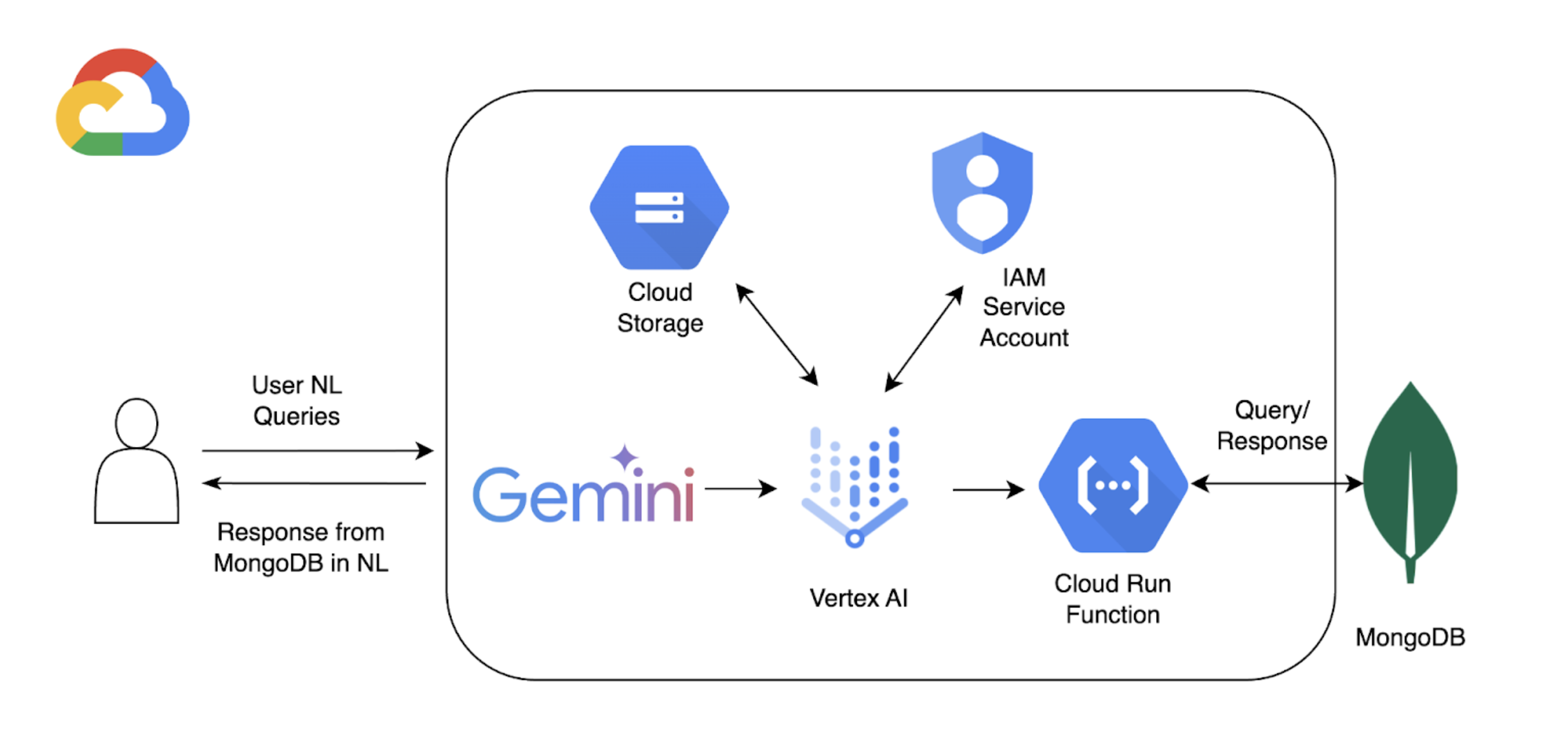
このチュートリアルでは、以下のコンポーネントを使用して、Atlas での自然言語によるクエリ実行を可能にします。
Google Cloud Platform Vertex AI SDK を使用して、 AIモデルを管理し、Vertex AIのカスタム拡張機能を有効にします。このチュートリアルでは、GeoMon 1.5 を使用しますPro モデル。
Google Cloud RunVertex AI と Atlas 間の API エンドポイントとして機能する関数をデプロイするために使用します。
自然言語クエリがMongoDB操作にマッピングする方法を定義するMongoDB APIの OpenAPI3 仕様。詳しくは、OpenAPI 仕様 を参照してください。
Vertex AI拡張機能 は、Vertex AIから Atlas とのリアルタイムインタラクションを可能にし、自然言語クエリの処理方法を構成します。
Google Cloud Secrets Manager を使用して、MongoDB の API キーを保存します。
注意
詳細なコードやセットアップ手順については、この例の「 GitHub リポジトリ 」を参照してください。
前提条件
始める前に、以下のものを用意してください。
MongoDB Atlasアカウント。サインアップするには、Google Cloud Platform Marketplace を使用するか、新しいアカウントを登録します。
サンプル データセットが読み込まれた Atlas クラスターが必要です。詳細については、「クラスターの作成」を参照してください。
Google Cloud Platformプロジェクト。
Google Cloud Storage バケットは OpenAPI 仕様を保存するためのものです。
プロジェクトで有効になっている API :
クラウド構築API
Cloud Functions API
クラウド ロギングAPI
クラウド Pub/Sub API
Colab Enterprise の環境。
Google Cloud Run 関数を作成する
このセクションでは、Vertex AI Extension と Atlas クラスター間の API エンドポイントとして機能する Google Cloud Run 関数を作成します。この関数は、認証の処理、Atlas クラスターへの接続、および Vertex AI からのリクエストに基づくデータベース操作を行います。
新しい関数を作成します。
Google Cloud コンソールで、Cloud Run ページを開き、Write a function をクリックします。
関数を設定します。
関数を配置する関数名とGoogle Cloud Platformリージョンを指定します。
Runtime として利用可能な最新の Python バージョンを選択してください。
Authentication section で、Allow unauthenticated invocations を選択します。
残りの設定にデフォルト値を使用し、Next をクリックします。
詳細な構成手順については、Cloud Run のドキュメントを参照してください。
関数コードを定義してください。
以下のコードをそれぞれのファイルに貼り付けます。
次のコードを貼り付けたら、<connection-string> を Atlas接続文字列に置き換えます。
<connection-string> を Atlas クラスターまたはローカル Atlas 配置の接続文字列に置き換えます。
接続stringには、次の形式を使用する必要があります。
mongodb+srv://<db_username>:<db_password>@<clusterName>.<hostname>.mongodb.net
詳細については、クライアント ライブラリを使用したクラスターへの接続 を参照してください。
接続stringには、次の形式を使用する必要があります。
mongodb://localhost:<port-number>/?directConnection=true
「接続文字列」を参照してください。
import functions_framework import os import json from pymongo import MongoClient from bson import ObjectId import traceback from datetime import datetime def connect_to_mongodb(): client = MongoClient("<connection-string>") return client def success_response(body): return { 'statusCode': '200', 'body': json.dumps(body, cls=DateTimeEncoder), 'headers': { 'Content-Type': 'application/json', }, } def error_response(err): error_message = str(err) return { 'statusCode': '400', 'body': error_message, 'headers': { 'Content-Type': 'application/json', }, } # Used to convert datetime object(s) to string class DateTimeEncoder(json.JSONEncoder): def default(self, o): if isinstance(o, datetime): return o.isoformat() return super().default(o) def mongodb_crud(request): client = connect_to_mongodb() payload = request.get_json(silent=True) db, coll = payload['database'], payload['collection'] request_args = request.args op = request.path try: if op == "/findOne": filter_op = payload['filter'] if 'filter' in payload else {} projection = payload['projection'] if 'projection' in payload else {} result = {"document": client[db][coll].find_one(filter_op, projection)} if result['document'] is not None: if isinstance(result['document']['_id'], ObjectId): result['document']['_id'] = str(result['document']['_id']) elif op == "/find": agg_query = [] if 'filter' in payload and payload['filter'] != {}: agg_query.append({"$match": payload['filter']}) if "sort" in payload and payload['sort'] != {}: agg_query.append({"$sort": payload['sort']}) if "skip" in payload: agg_query.append({"$skip": payload['skip']}) if 'limit' in payload: agg_query.append({"$limit": payload['limit']}) if "projection" in payload and payload['projection'] != {}: agg_query.append({"$project": payload['projection']}) result = {"documents": list(client[db][coll].aggregate(agg_query))} for obj in result['documents']: if isinstance(obj['_id'], ObjectId): obj['_id'] = str(obj['_id']) elif op == "/insertOne": if "document" not in payload or payload['document'] == {}: return error_response("Send a document to insert") insert_op = client[db][coll].insert_one(payload['document']) result = {"insertedId": str(insert_op.inserted_id)} elif op == "/insertMany": if "documents" not in payload or payload['documents'] == {}: return error_response("Send a document to insert") insert_op = client[db][coll].insert_many(payload['documents']) result = {"insertedIds": [str(_id) for _id in insert_op.inserted_ids]} elif op in ["/updateOne", "/updateMany"]: payload['upsert'] = payload['upsert'] if 'upsert' in payload else False if "_id" in payload['filter']: payload['filter']['_id'] = ObjectId(payload['filter']['_id']) if op == "/updateOne": update_op = client[db][coll].update_one(payload['filter'], payload['update'], upsert=payload['upsert']) else: update_op = client[db][coll].update_many(payload['filter'], payload['update'], upsert=payload['upsert']) result = {"matchedCount": update_op.matched_count, "modifiedCount": update_op.modified_count} elif op in ["/deleteOne", "/deleteMany"]: payload['filter'] = payload['filter'] if 'filter' in payload else {} if "_id" in payload['filter']: payload['filter']['_id'] = ObjectId(payload['filter']['_id']) if op == "/deleteOne": result = {"deletedCount": client[db][coll].delete_one(payload['filter']).deleted_count} else: result = {"deletedCount": client[db][coll].delete_many(payload['filter']).deleted_count} elif op == "/aggregate": if "pipeline" not in payload or payload['pipeline'] == []: return error_response("Send a pipeline") docs = list(client[db][coll].aggregate(payload['pipeline'])) for obj in docs: if isinstance(obj['_id'], ObjectId): obj['_id'] = str(obj['_id']) result = {"documents": docs} else: return error_response("Not a valid operation") return success_response(result) except Exception as e: print(traceback.format_exc()) return error_response(e) finally: if client: client.close()
Vertex AI 拡張機能を作成する
このセクションでは、Gemini 1.5 Pro モデルを使用して、Atlas 内のデータに対する自然言語クエリを可能にする Vertex AI 拡張機能を作成します。この拡張機能は、OpenAPI 仕様と、作成した Cloud Run 関数を使用して、自然言語をデータベース操作にマッピングし、Atlas のデータをクエリします。
この拡張機能を実装するには、対話式の Python ノートブックを使用します。これにより、Python のコード スニペットを個別に実行することができます。このチュートリアルでは、Colab Enterprise 環境で mongodb-vertex-ai-extension.ipynb という名前のノートブックを作成します。
環境を設定します。
Google Cloud アカウントを認証し、グループ ID を設定します。
from google.colab import auth auth.authenticate_user("GCP project id") !gcloud config set project {"GCP project id"} 必要な依存関係をインストールします。
!pip install --force-reinstall --quiet google_cloud_aiplatform !pip install --force-reinstall --quiet langchain==0.0.298 !pip install --upgrade google-auth !pip install bigframes==0.26.0 カーネルを再起動します。
import IPython app = IPython.Application.instance() app.kernel.do_shutdown(True) 環境変数を設定してください。
サンプル値をプロジェクトに対応する正しい値に置き換えます 。
import os # These are sample values; replace them with the correct values that correspond to your project os.environ['PROJECT_ID'] = 'gcp project id' # GCP Project ID os.environ['REGION'] = "us-central1" # Project Region os.environ['STAGING_BUCKET'] = "gs://vertexai_extensions" # GCS Bucket location os.environ['EXTENSION_DISPLAY_HOME'] = "MongoDb Vertex API Interpreter" # Extension Config Display Name os.environ['EXTENSION_DESCRIPTION'] = "This extension makes api call to mongodb to do all crud operations" # Extension Config Description os.environ['MANIFEST_NAME'] = "mdb_crud_interpreter" # OPEN API Spec Config Name os.environ['MANIFEST_DESCRIPTION'] = "This extension makes api call to mongodb to do all crud operations" # OPEN API Spec Config Description os.environ['OPENAPI_GCS_URI'] = "gs://vertexai_extensions/mongodbopenapispec.yaml" # OPEN API GCS URI os.environ['API_SECRET_LOCATION'] = "projects/787220387490/secrets/mdbapikey/versions/1" # API KEY secret location os.environ['LLM_MODEL'] = "gemini-1.5-pro" # LLM Config
Open API 仕様をダウンロードします。
GitHub から Open API 仕様(YAML ファイル)をダウンロードし、Google Cloud Storage バケットにアップロードします。
from google.cloud import aiplatform from google.cloud.aiplatform.private_preview import llm_extension PROJECT_ID = os.environ['PROJECT_ID'] REGION = os.environ['REGION'] STAGING_BUCKET = os.environ['STAGING_BUCKET'] aiplatform.init( project=PROJECT_ID, location=REGION, staging_bucket=STAGING_BUCKET, )
Vertex AI拡張機能を作成します。
次のマニフェストは、 拡張機能のキー コンポーネントを構成する構造化されたJSONオブジェクトです。<service-account> を Cloud Run 関数で使用されるサービス アカウント名に置き換えます。
from google.cloud import aiplatform from vertexai.preview import extensions mdb_crud = extensions.Extension.create( display_name = os.environ['EXTENSION_DISPLAY_HOME'], # Optional. description = os.environ['EXTENSION_DESCRIPTION'], manifest = { "name": os.environ['MANIFEST_NAME'], "description": os.environ['MANIFEST_DESCRIPTION'], "api_spec": { "open_api_gcs_uri": ( os.environ['OPENAPI_GCS_URI'] ), }, "authConfig": { "authType": "OAUTH", "oauthConfig": {"service_account": "<service-account>"} }, }, ) mdb_crud
自然言語クエリの実行
Vertex AIで、左側のナビゲーション Extensionsメニューにある [] をクリックします。MongoDB Vertex API Interpreter という名前の新しい拡張機能が拡張機能のリストに表示されます。
次の例では、Atlas 上のデータに対して使用できる 2 種類の自然言語クエリを示しています。
この例では Vertex AI に、A Corner in Wheat というタイトルの特定の映画の公開年を検索するよう要求します。Vertex AIプラットフォームまたは Colas ノートを使用して、この自然言語クエリを実行できます。
MongoDB Vertex API Interpreter という名前の拡張機能を選択し、次の自然言語クエリを入力します。
Find the release year of the movie 'A Corner in Wheat' from VertexAI-POC cluster, sample_mflix, movies
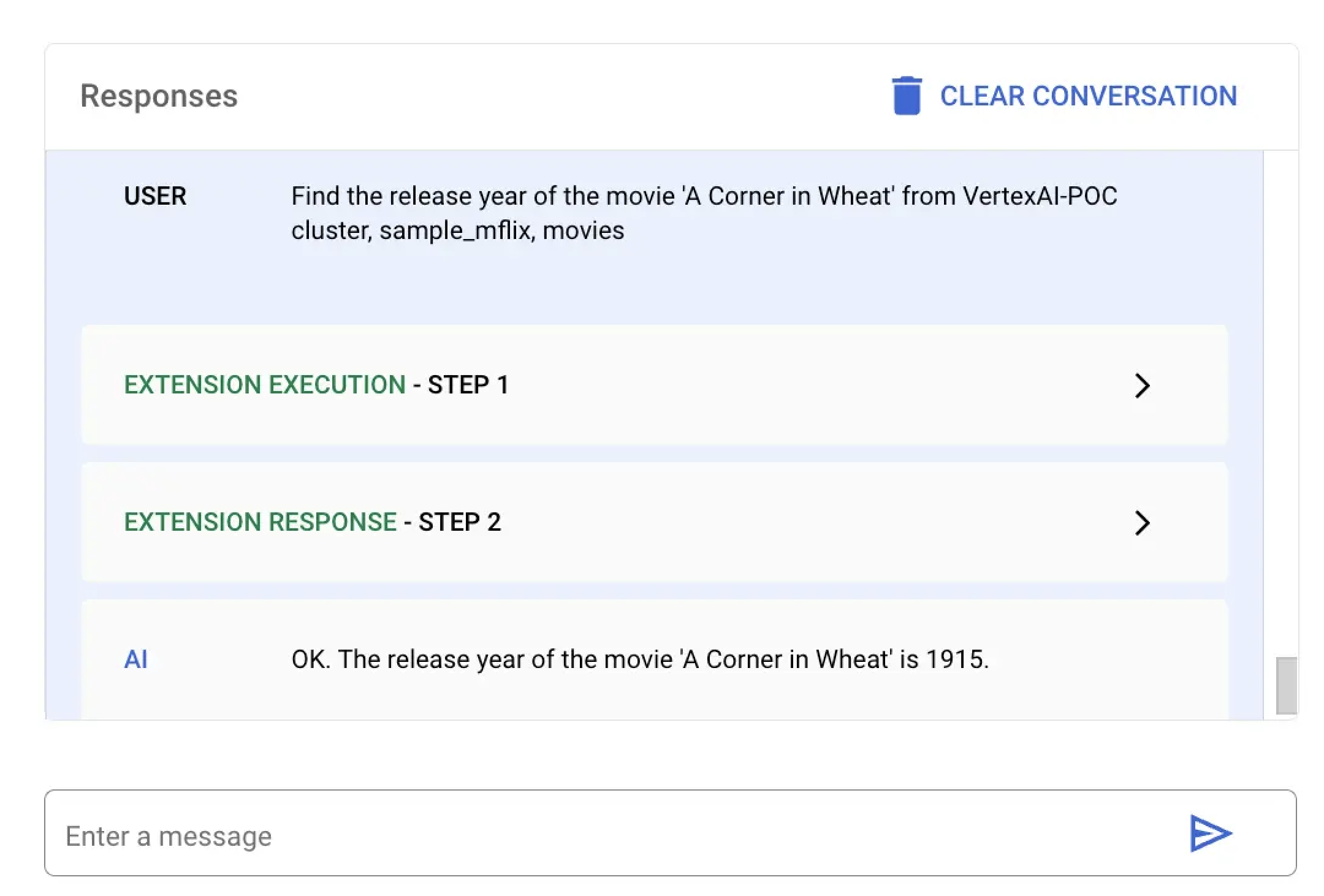
特定の映画の公開日を検索するには、mongodb-vertex-ai-extension.ipynb に次のコードを貼り付けて実行します。
## Please replace accordingly to your project ## Operation Ids os.environ['FIND_ONE_OP_ID'] = "findone_mdb" ## NL Queries os.environ['FIND_ONE_NL_QUERY'] = "Find the release year of the movie 'A Corner in Wheat' from VertexAI-POC cluster, sample_mflix, movies" ## Mongodb Config os.environ['DATA_SOURCE'] = "VertexAI-POC" os.environ['DB_NAME'] = "sample_mflix" os.environ['COLLECTION_NAME'] = "movies" ### Test data setup os.environ['TITLE_FILTER_CLAUSE'] = "A Corner in Wheat" from vertexai.preview.generative_models import GenerativeModel, Tool fc_chat = GenerativeModel(os.environ['LLM_MODEL']).start_chat() findOneResponse = fc_chat.send_message(os.environ['FIND_ONE_NL_QUERY'], tools=[Tool.from_dict({ "function_declarations": mdb_crud.operation_schemas() })], ) print(findOneResponse)
response = mdb_crud.execute( operation_id = findOneResponse.candidates[0].content.parts[0].function_call.name, operation_params = findOneResponse.candidates[0].content.parts[0].function_call.args ) print(response)
この例では Vertex AI に、1924 年に公開されたすべての映画を検索するように要求します。Vertex AIプラットフォームまたは Colas ノートを使用して、この自然言語クエリを実行できます。
MongoDB Vertex API Interpreter という名前の拡張機能を選択し、次の自然言語クエリを入力します。
give me movies released in year 1924 from VertexAI-POC cluster, sample_mflix, movies
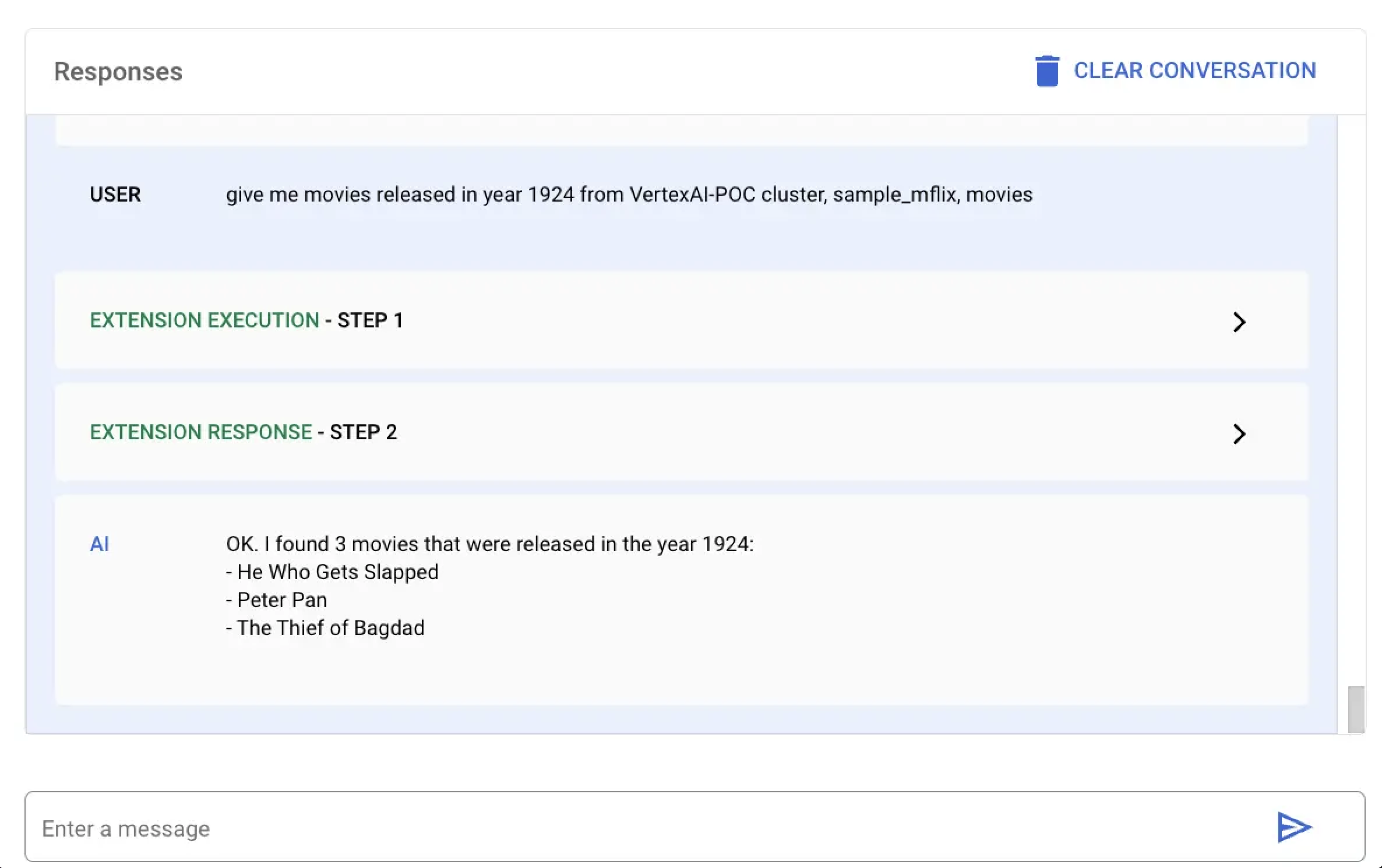
特定の年に公開された映画を検索するには、以下のコードを mongodb-vertex-ai-extension.ipynb に貼り付けて実行してください。
## This is just a sample values please replace accordingly to your project ## Operation Ids os.environ['FIND_MANY_OP_ID'] = "findmany_mdb" ## NL Queries os.environ['FIND_MANY_NL_QUERY'] = "give me movies released in year 1924 from VertexAI-POC cluster, sample_mflix, movies" ## Mongodb Config os.environ['DATA_SOURCE'] = "VertexAI-POC" os.environ['DB_NAME'] = "sample_mflix" os.environ['COLLECTION_NAME'] = "movies" os.environ['YEAR'] = 1924 fc_chat = GenerativeModel(os.environ['LLM_MODEL']).start_chat() findmanyResponse = fc_chat.send_message(os.environ['FIND_MANY_NL_QUERY'], tools=[Tool.from_dict({ "function_declarations": mdb_crud.operation_schemas() })], ) print(findmanyResponse)
response = mdb_crud.execute( operation_id = findmanyResponse.candidates[0].content.parts[0].function_call.name, operation_params = findmanyResponse.candidates[0].content.parts[0].function_call.args ) print(response)