Note
If you are running a self-managed deployment, see Transition
from Embedded to Dedicated Config Server to learn how to transition your config server type using the transitionToDedicatedConfigServer database command.
When a sharded cluster uses an embedded config server, called a config shard, Atlas or a user may transition the cluster to use a dedicated config server. With an embedded config server, the config shard stores both cluster metadata and user data. With a dedicated config server, the config node stores only metadata. Atlas transitions clusters from embedded to dedicated config servers automatically under certain conditions. You can also initiate the transition manually.
Before You Start
The transition from an embedded to a dedicated config server is an online operation that requires moving all user data off the config shard. For clusters with large amounts of data on the config shard, the process can take hours to days. Before initiating the transition, confirm the following:
Your destination shards have headroom. During the migration, shards that receive data from the config shard see elevated CPU, memory, and I/O. While the transition runs, Atlas cannot scale the cluster tier or modify storage because only one long-running plan can run at a time. If the receiving shards are near capacity, scale them up before starting the transition.
Your cluster uses only supported features. MongoDB Search, MongoDB Vector Search, unsharded time-series collections, and unsharded queryable encryption collections on the config shard block automatic transitions. For a full list of blocking features, see Limitations and Exceptions.
Drop
system.profilebefore transitioning on earlier MongoDB versions. The system.profile collection on the config shard can block the transition. If profiling is enabled, dropsystem.profilebefore initiating the transition, or upgrade to MongoDB 8.2.7 or later.
Start the Transition
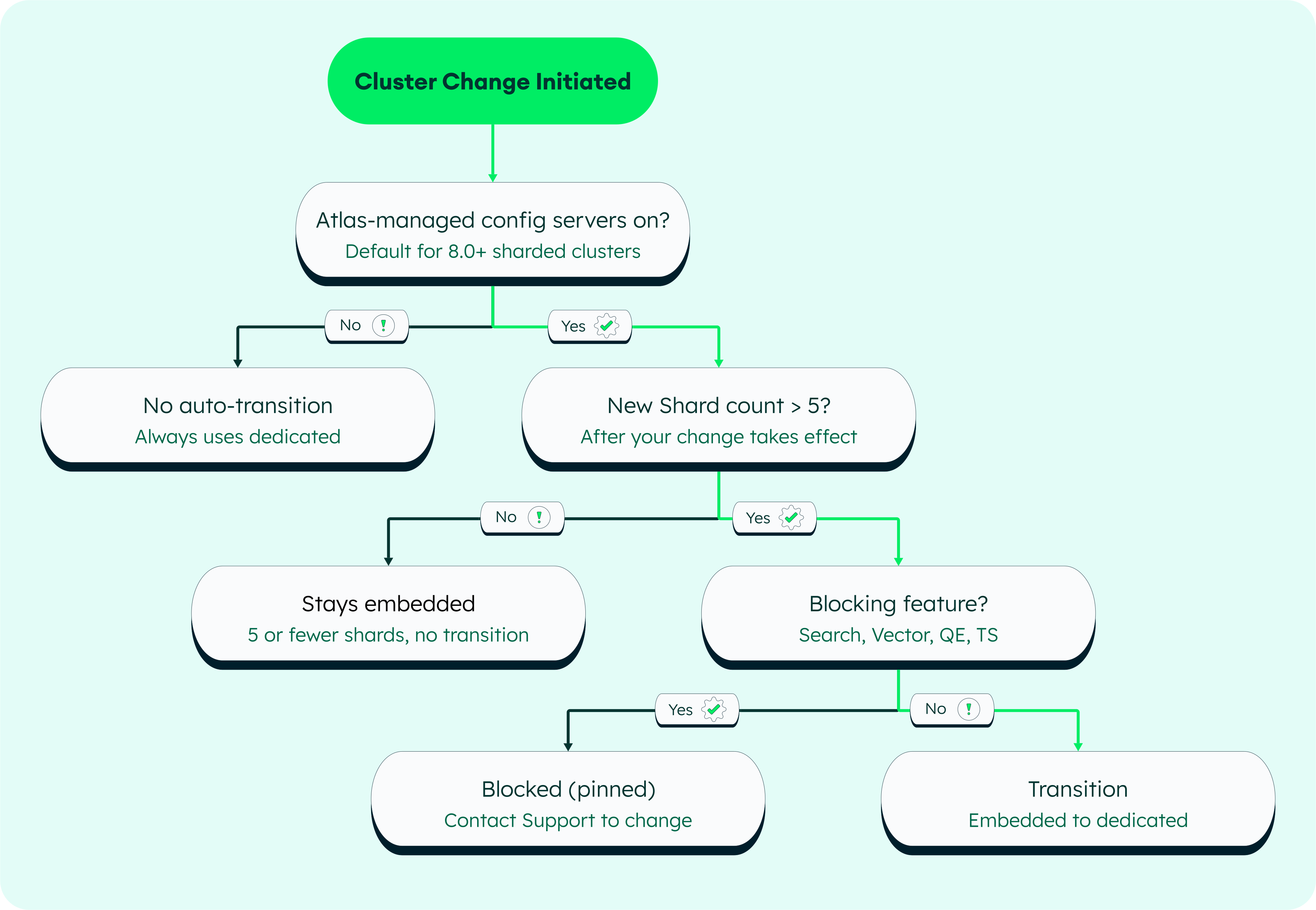
Atlas automatically manages transitions between embedded and dedicated config servers when Atlas-Managed Config Servers is enabled. The following diagram shows when Atlas triggers each transition:
Atlas-Managed Transitions
Atlas enables Atlas-Managed Config Servers by default for all 8.0 clusters. When enabled, Atlas automatically transitions your cluster between config server types based on shard count:
When the shard count increases beyond 5, Atlas transitions from an embedded config server to a dedicated config server.
When the shard count decreases to 5 or fewer, Atlas transitions from a dedicated config server to an embedded config server.
Note
When you upgrade a sharded cluster from MongoDB 7.0 to 8.0, Atlas turns on Atlas-Managed Config Servers but doesn't change the cluster's existing config server type. Starting with MongoDB 8.0, Atlas-managed config servers are on by default, and these criteria apply to shard-count changes only. To move a cluster to an embedded config server, contact MongoDB Support.
Manually Transition to Dedicated Config Server
To manually trigger the transition to a dedicated config server, complete the following steps:
In Atlas, go to the Clusters page for your project.
If it's not already displayed, select the organization that contains your desired project from the Organizations menu in the navigation bar.
If it's not already displayed, select your desired project from the Projects menu in the navigation bar.
In the sidebar, click Clusters under the Database heading.
The Clusters page displays.
Turn off the Atlas-Managed Configuration Servers toggle.
Under Additional Settings > More Configuration Options, turn off the Atlas-Managed Configuration Servers toggle.
During the Transition
MongoDB cannot move config metadata, so Atlas must first drain all user data off the config shard, config-0, before it can transition to a dedicated config server. As part of the transition, Atlas adds a replacement shard to maintain your target shard count because config-0 no longer serves user data.
Example Transition Process
The following table shows the steps Atlas performs when you add a sixth shard to a 5-shard cluster with Atlas-Managed Config Servers enabled, which initiates the transition.
Step | Action | Effective Shard Count |
|---|---|---|
Start | 5-shard cluster with embedded config server ( | 5 |
1 | Atlas adds | 6 |
2 | Atlas runs | 6 (drain in progress) |
3 | Atlas waits for | 6 (cleanup in progress) |
4 |
| 6 |
5 | Atlas scales down | 6 |
Duration
The transition duration depends on the amount of user data on the config shard. Draining the config shard involves chunk migrations for sharded collections and moveCollection operations for unsharded collections, both of which move data across the network. The duration varies based on dataset size:
Small datasets (a few GB): minutes to a small number of hours
Large datasets (hundreds of GB to multiple TB): hours to days
Note
If your cluster has a large volume of data on the config shard, perform the transition during a low-traffic period.
Operational Impact
Transitioning from an embedded to a dedicated config server has the following operational impacts on your cluster:
No downtime. The transition is online. Your application continues reading and writing throughout.
Elevated resource usage on receiving shards. Shards absorbing data from the config shard may see higher CPU, memory, and I/O during migration. Application latency on affected shards may increase modestly.
Atlas plan lock. While the transition runs, Atlas cannot execute other long-running plans on the cluster, such as scaling the cluster tier, changing storage, or adding or removing other shards. Only one long-running plan can run at a time.
Warning
Do not cancel the transition after it has started.
Do not cancel via the Atlas UI or by reducing the shard count while the transition is in progress. If cancellation is necessary, contact MongoDB Support.
Monitor Progress
The following diagram shows the methods available to monitor the transition progress:
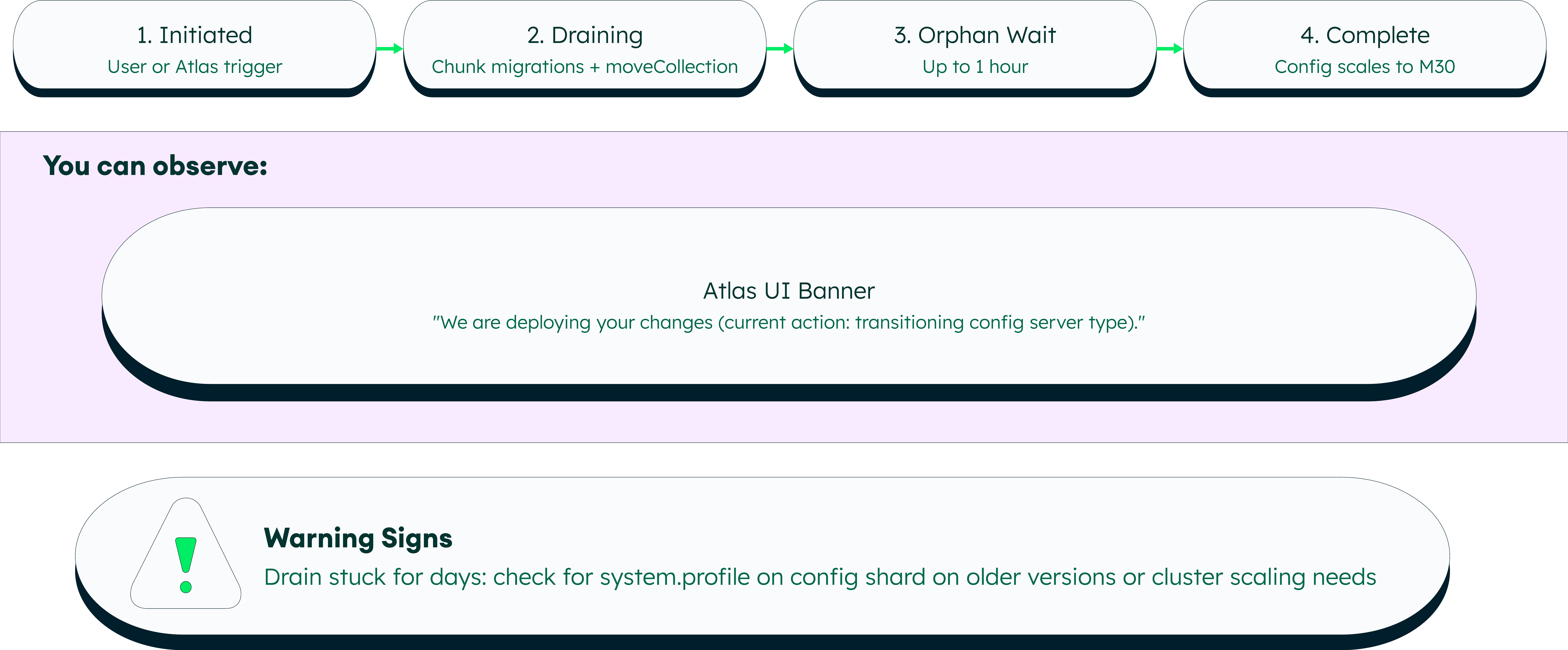
While the transition is in progress, Atlas displays the following banner on the cluster page:
We are deploying your changes (current action: transitioning config server type).
Limitations and Exceptions
Atlas does not automatically transition config servers for clusters that use the following features. If your cluster uses one of these features and needs a config server type change, contact MongoDB Support:
Feature | Auto-transition | Resolution |
|---|---|---|
MongoDB Search / Vector Search Atlas pins the config server type to what it was when Search was enabled. The restriction applies on both sharded and unsharded collections. | Blocked (pinned) | Contact MongoDB Support or live migration |
Unsharded time series MongoDB Server lifted the underlying restriction in version 8.0.10, but Atlas has not yet adopted this change. | Blocked | Contact MongoDB Support |
Unsharded queryable encryption
| Blocked | Contact MongoDB Support |
Global Clusters Do not support embedded config servers. | N/A | Always dedicated |
Replica Set to sharded cluster conversion When you convert a replica set to a sharded cluster in Atlas, the resulting cluster always uses a dedicated config server regardless of the Atlas-Managed Configuration Servers setting. | N/A | Contact MongoDB Support |
None of the above | Allowed | Proceeds online |