您可以使用解释结果,确定有关查询的以下信息:
完成查询所需的时间
查询是否使用索引
为完成查询而扫描的文档和索引键的数量
注意
查询的解释计划结果可能会在各个 MongoDB 版本之间发生变化。
cursor.explain("executionStats") 和 db.collection.explain("executionStats") 方法提供了有关查询性能的统计信息。这些统计信息可用于衡量查询是否索引以及是如何使用该索引的。有关详细信息,请参阅 db.collection.explain()。
MongoDB Compass提供“解释计划”标签页,显示有关查询性能的统计信息。 这些统计信息可用于衡量查询是否以及如何使用索引。
评估查询性能
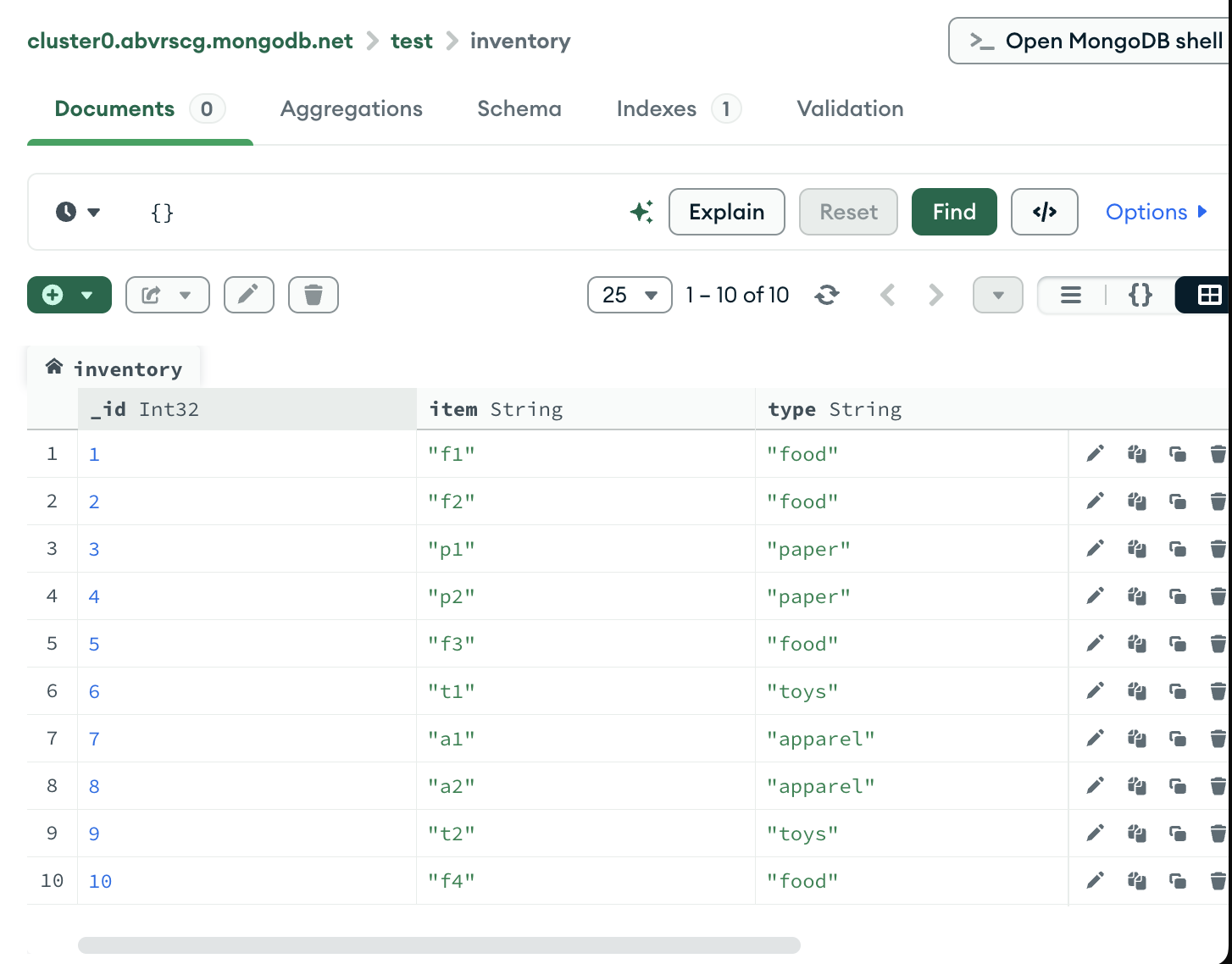
请考虑包含以下文档的集合 inventory:
db.inventory.insertMany ( [ { _id: 1, item: "f1", type: "food", quantity: 500 }, { _id: 2, item: "f2", type: "food", quantity: 100 }, { _id: 3, item: "p1", type: "paper", quantity: 200 }, { _id: 4, item: "p2", type: "paper", quantity: 150 }, { _id: 5, item: "f3", type: "food", quantity: 300 }, { _id: 6, item: "t1", type: "toys", quantity: 500 }, { _id: 7, item: "a1", type: "apparel", quantity: 250 }, { _id: 8, item: "a2", type: "apparel", quantity: 400 }, { _id: 9, item: "t2", type: "toys", quantity: 50 }, { _id: 10, item: "f4", type: "food", quantity: 75 }] )这些文档在 MongoDB Compass 中显示如下:
无索引查询
以下查询检索 quantity 字段的值在 100 和 200(含)之间的文档:
db.inventory.find( { quantity: { $gte: 100, $lte: 200 } } )该查询返回以下文档:
{ "_id" : 2, "item" : "f2", "type" : "food", "quantity" : 100 }{ "_id" : 3, "item" : "p1", "type" : "paper", "quantity" : 200 }{ "_id" : 4, "item" : "p2", "type" : "paper", "quantity" : 150 }要查看选定的查询计划,请将 cursor.explain("executionStats") 游标方法链接到 find 命令的末尾:
db.inventory.find( { quantity: { $gte: 100, $lte: 200 } }).explain("executionStats")explain() 返回以下结果:
{ queryPlanner: { ... winningPlan: { queryPlan: { stage: 'COLLSCAN', ... } } }, executionStats: { executionSuccess: true, nReturned: 3, executionTimeMillis: 0, totalKeysExamined: 0, totalDocsExamined: 10, executionStages: { stage: 'COLLSCAN', ... }, ... }, ...}queryPlanner.winningPlan.queryPlan.stage显示COLLSCAN,表示会进行集合扫描。集合扫描表明
mongod必须对整个集合的文档进行逐份扫描才能识别结果。此项操作通常成本高昂,可能会降低查询速度。executionStats.nReturned显示3,以指示获胜查询计划返回三个文档。executionStats.totalKeysExamined显示0,表示该查询未使用索引。executionStats.totalDocsExamined显示10,以表明 MongoDB 必须扫描 10 个文档(即集合中的所有文档),以查找三个匹配的文档。
以下查询检索 quantity 字段的值在 100 和 200(含)之间的文档:
将以下过滤器复制到 Compass 查询栏中,然后单击 Find:
{ quantity: { $gte: 100, $lte: 200 } }该查询返回以下文档:
要查看所选的查询计划:
单击
test.inventory集合的Explain Plan标签页。单击 Explain(连接)。
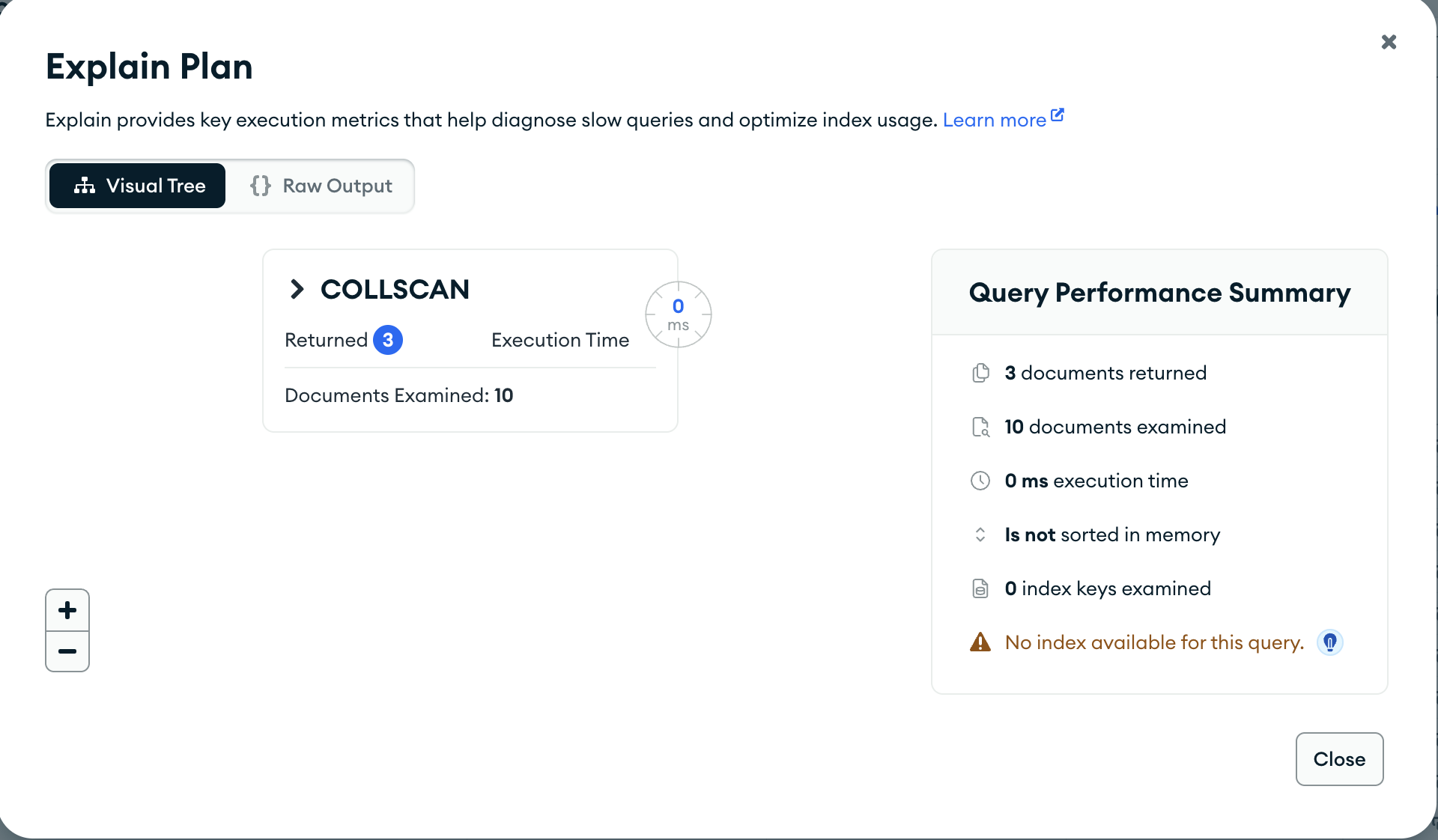
MongoDB Compass 显示查询计划,如下所示:
注意
在本教程中,我们使用的数据集很小,因此,即使我们没有使用索引,Actual Query Execution Time 也会显示 0 秒。
在较大的数据集中,索引查询与非索引查询之间的查询执行时间差异会更加显著。
可视化树
Query Performance Summary 显示查询的执行统计信息:
Documents Returned 显示
3,以指示获胜查询计划返回三个文档。Index Keys Examined 显示
0表明该查询未使用索引。Documents Examined 显示
10表明 MongoDB 必须扫描 10 个文档(即集合中的所有文档),以查找三个匹配的文档。
在 Query Performance Summary 下方,MongoDB Compass 显示
COLLSCAN查询阶段,表示此查询使用了集合扫描。集合扫描表明
mongod必须对整个集合的文档进行逐份扫描才能识别结果。此项操作通常成本高昂,可能会降低查询速度。
Raw JSON
您还可以通过单击查询栏下方的 Raw JSON 以原始 JSON 格式查看解释详细信息:
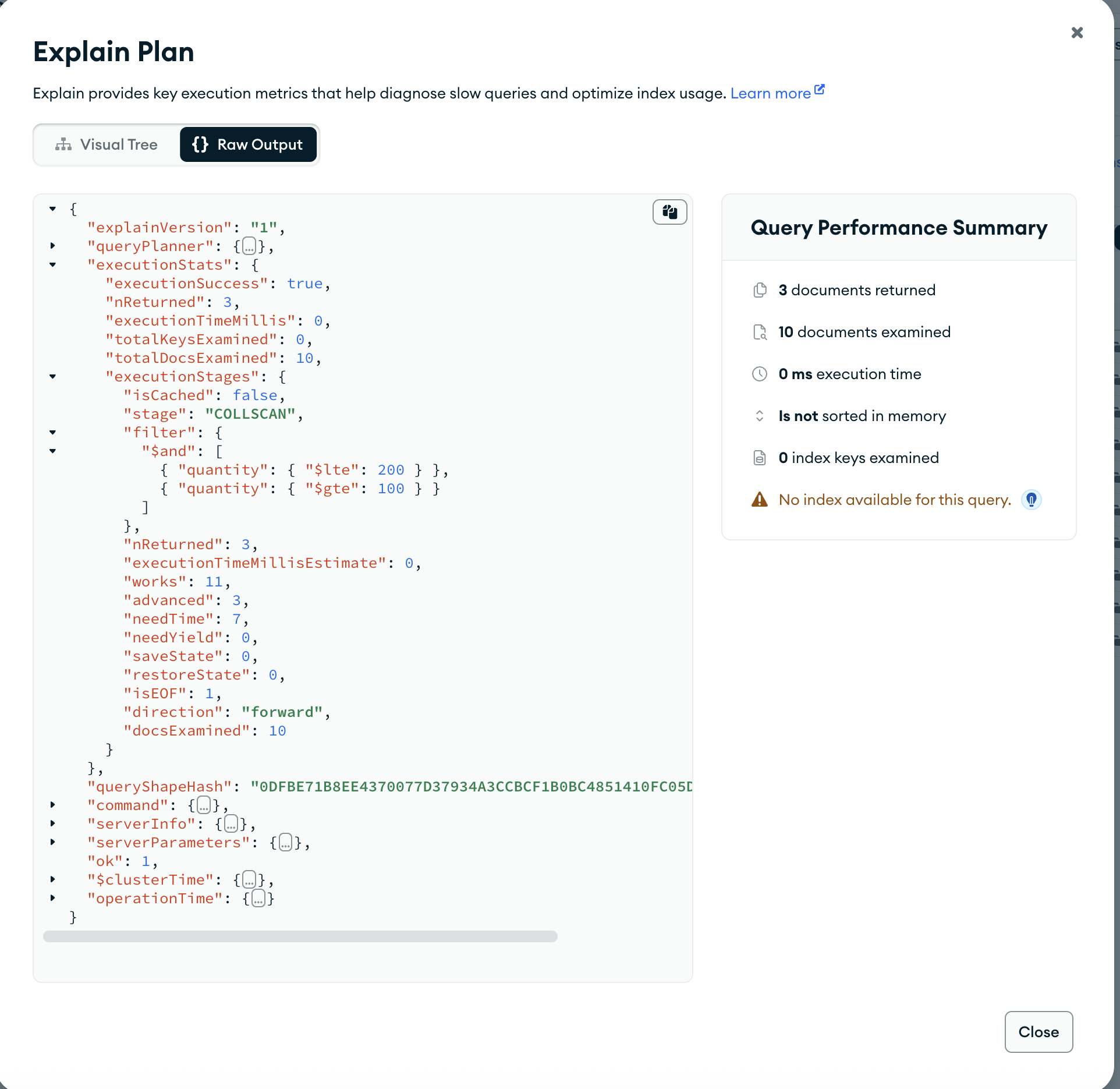
匹配文档和已检查文档之间的数量差异可能表明,使用索引可能有助于提高查询效率。
带索引的查询
要支持对 quantity 字段的查询,请对 quantity 字段添加索引:
db.inventory.createIndex( { quantity: 1 } )要查看查询计划的统计信息,请使用 explain() 方法:
db.inventory.find( { quantity: { $gte: 100, $lte: 200 } }).explain("executionStats")explain() 方法返回以下结果:
{ queryPlanner: { ... winningPlan: { queryPlan: { stage: 'FETCH', inputStage: { stage: 'IXSCAN', keyPattern: { quantity: 1 }, ... } } }, rejectedPlans: [ ] }, executionStats: { executionSuccess: true, nReturned: 3, executionTimeMillis: 0, totalKeysExamined: 3, totalDocsExamined: 3, executionStages: { ... }, ... }, ...}queryPlanner.winningPlan.queryPlan.inputStage.stage显示IXSCAN,表示使用索引。executionStats.nReturned显示3,以指示获胜查询计划返回三个文档。executionStats.totalKeysExamined显示3,以表明 MongoDB 扫描了三个索引条目。检查的密钥数量与返回的文档数量相匹配,这意味着mongod只需检查索引键即可返回结果。mongod不必扫描所有文档,只需将三个匹配的文档拉取到内存中。这会大幅提升查询效率。executionStats.totalDocsExamined显示3,以表明 MongoDB 扫描了三个文档。
单击
test.inventory集合的Indexes标签页。单击 Create Index(连接)。
从 Select a field name 下拉列表中选择
quantity。从类型下拉列表中选择
1 (asc)。单击 Create(连接)。
注意
将索引名称字段留空会导致 MongoDB Compass 为索引创建默认名称。
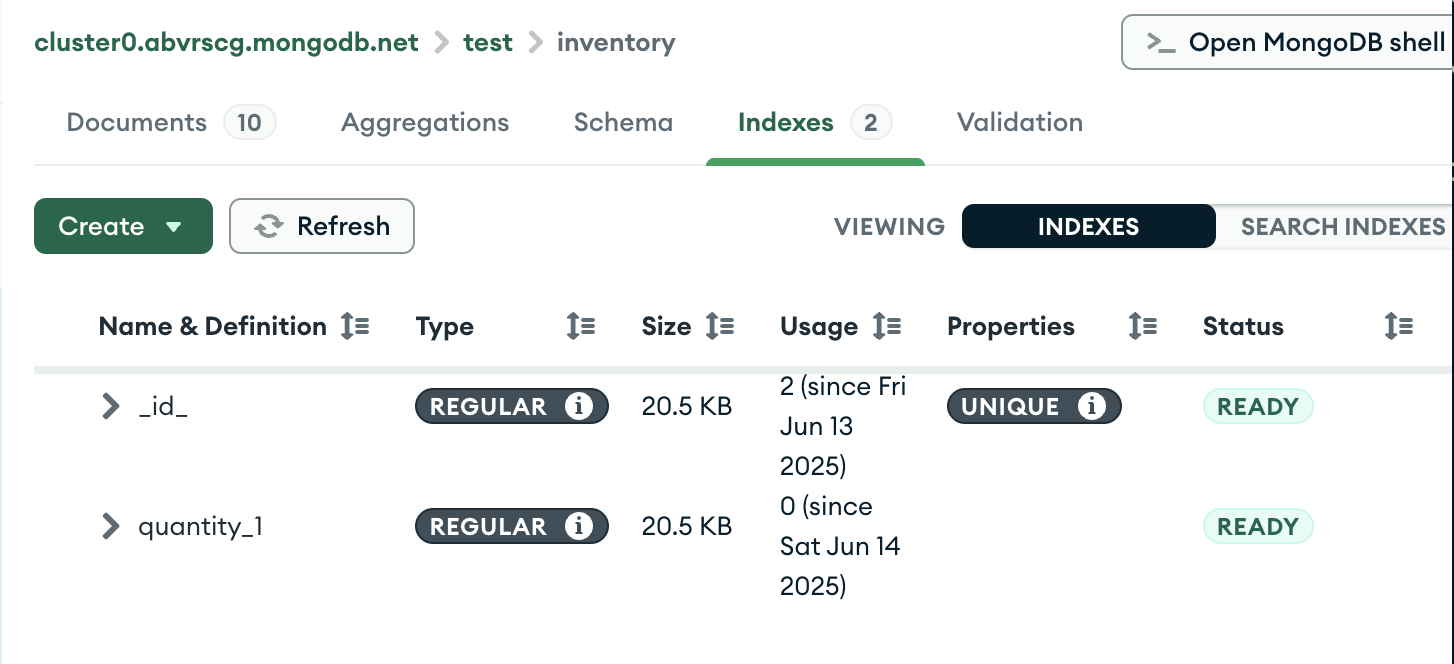
现在,您可以在 Indexes 标签页中看到新创建的索引:
返回到 inventory 集合的 Explain Plan 标签页,然后重新运行上一步中的查询:
{ quantity: { $gte: 100, $lte: 200 } }MongoDB Compass 显示查询计划,如下所示:
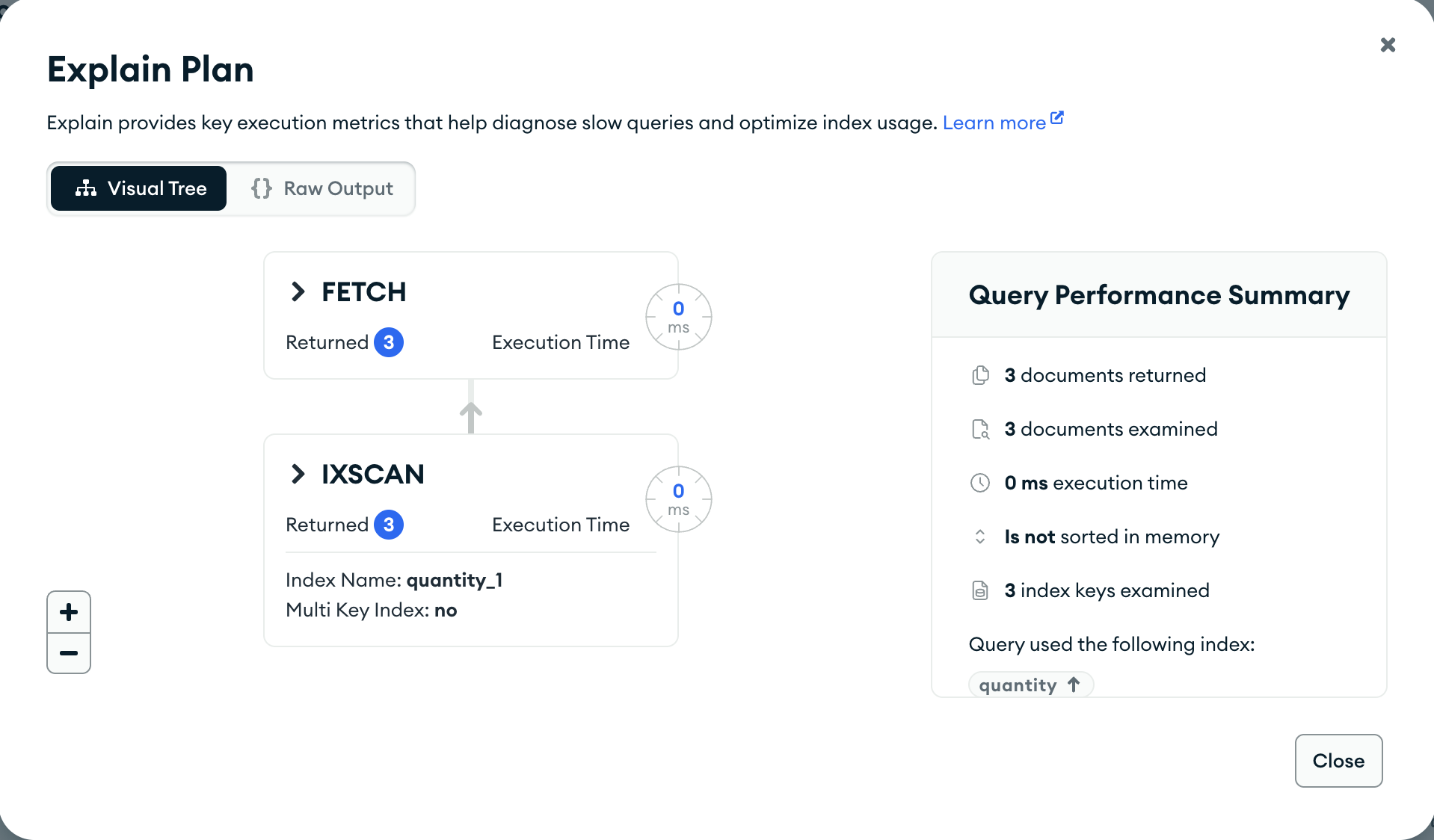
可视化树
Query Performance Summary 显示查询的执行统计信息:
Documents Returned 显示
3,以指示获胜查询计划返回三个文档。Documents Examined 显示
3表明 MongoDB 扫描了三个文档。在 Query Performance Summary的右侧,MongoDB Compass 显示查询使用了
quantity索引。
在 Query Performance Summary 下方,MongoDB Compass 显示查询阶段
FETCH和IXSCAN。IXSCAN表示在执行FETCH阶段并检索文档之前,mongod使用了索引来满足查询。
Raw JSON
您还可以通过单击查询栏下方的 Raw JSON 以原始 JSON 格式查看解释详细信息:
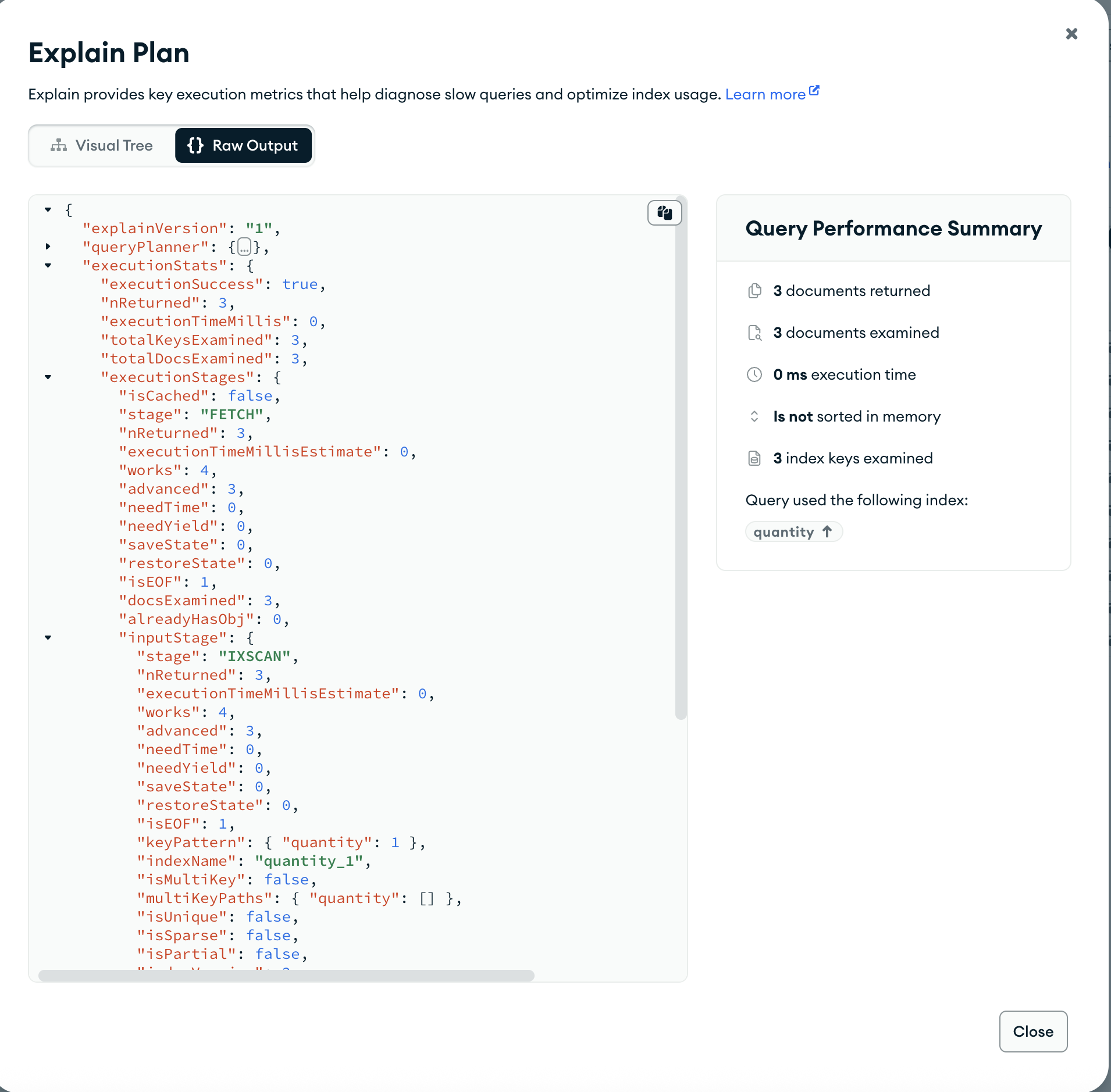
如果没有索引,此查询则会扫描整个 10 文档集合以返回 3 个匹配的文档。此查询还须扫描每个文档的全部,因而可能会将其拉取到内存中。此举会导致查询操作成本高昂且可能缓慢。
使用索引运行时,此查询已扫描 3 个索引条目和 3 个文档以返回 3 个匹配的文档,从而提升查询效率。
比较索引性能
如要手动比较使用多个索引的查询性能,您可以结合使用 hint() 方法和 explain() 方法。
考虑以下查询:
db.inventory.find( { quantity: { $gte: 100, $lte: 300 }, type: "food"} )该查询返回以下文档:
{ "_id" : 2, "item" : "f2", "type" : "food", "quantity" : 100 }{ "_id" : 5, "item" : "f3", "type" : "food", "quantity" : 300 }为支持查询,请添加复合索引。在复合索引中,字段的顺序很重要。
例如,添加以下两个复合索引。第一个索引首先按 quantity 字段排序,然后按 type 字段排序。第二个索引首先按 type 排序,然后按 quantity 字段排序。
db.inventory.createIndex( { quantity: 1, type: 1 } )db.inventory.createIndex( { type: 1, quantity: 1 } )评估第一个索引对查询的影响:
db.inventory.find( { quantity: { $gte: 100, $lte: 300 }, type: "food" }).hint({ quantity: 1, type: 1 }).explain("executionStats")explain() 方法返回以下输出:
{ queryPlanner: { ... winningPlan: { queryPlan: { stage: 'FETCH', inputStage: { stage: 'IXSCAN', keyPattern: { quantity: 1, type: 1 }, ... } } } }, rejectedPlans: [ ] }, executionStats: { executionSuccess: true, nReturned: 2, executionTimeMillis: 0, totalKeysExamined: 5, totalDocsExamined: 2, executionStages: { ... } }, ...}MongoDB扫描了5个索引键 (executionStats.totalKeysExamined) 以返回 2 个匹配的文档 (executionStats.nReturned)。
评估第二个索引对查询的影响:
db.inventory.find( { quantity: { $gte: 100, $lte: 300 }, type: "food" }).hint({ type: 1, quantity: 1 }).explain("executionStats")explain() 方法返回以下输出:
{ queryPlanner: { ... queryPlan: { winningPlan: { stage: 'FETCH', inputStage: { stage: 'IXSCAN', keyPattern: { type: 1, quantity: 1 }, ... } } }, rejectedPlans: [ ] }, executionStats: { executionSuccess: true, nReturned: 2, executionTimeMillis: 0, totalKeysExamined: 2, totalDocsExamined: 2, executionStages: { ... } }, ...}MongoDB扫描了2个索引键 (executionStats.totalKeysExamined) 以返回 2 个匹配的文档 (executionStats.nReturned)。
因此,第二个复合索引 { type: 1, quantity: 1 } 是支持示例查询的更高效索引,因为 MongoDB 服务器只需扫描 2 个 index keys 来查找所有匹配文档,而使用复合索引 { quantity: 1, type: 1 } 时需要扫描 5 个。