You can type MongoDB filter documents into the query bar to display only documents which match the specified criteria. To learn more about querying documents, see Query Documents in the MongoDB manual.
设置查询筛选器
AtlasGoData Explorer在Atlas中,Go项目的 页面。
如果尚未显示,请从导航栏上的 Organizations 菜单中选择包含项目的组织。
如果尚未显示,请从导航栏的 Projects 菜单中选择您的项目。
在侧边栏中,单击 Database 标题下的 Data Explorer。
The Data Explorer displays.
重要提示:您还可以单击集群的名称以打开 Cluster侧边栏,然后单击Data Explorer Shortcuts标题下的 。
设置查询筛选条件
选择集合。
In the Filter field, enter a filter document between the curly braces. You can use all the MongoDB query operators except the
$textand$exproperators.例子
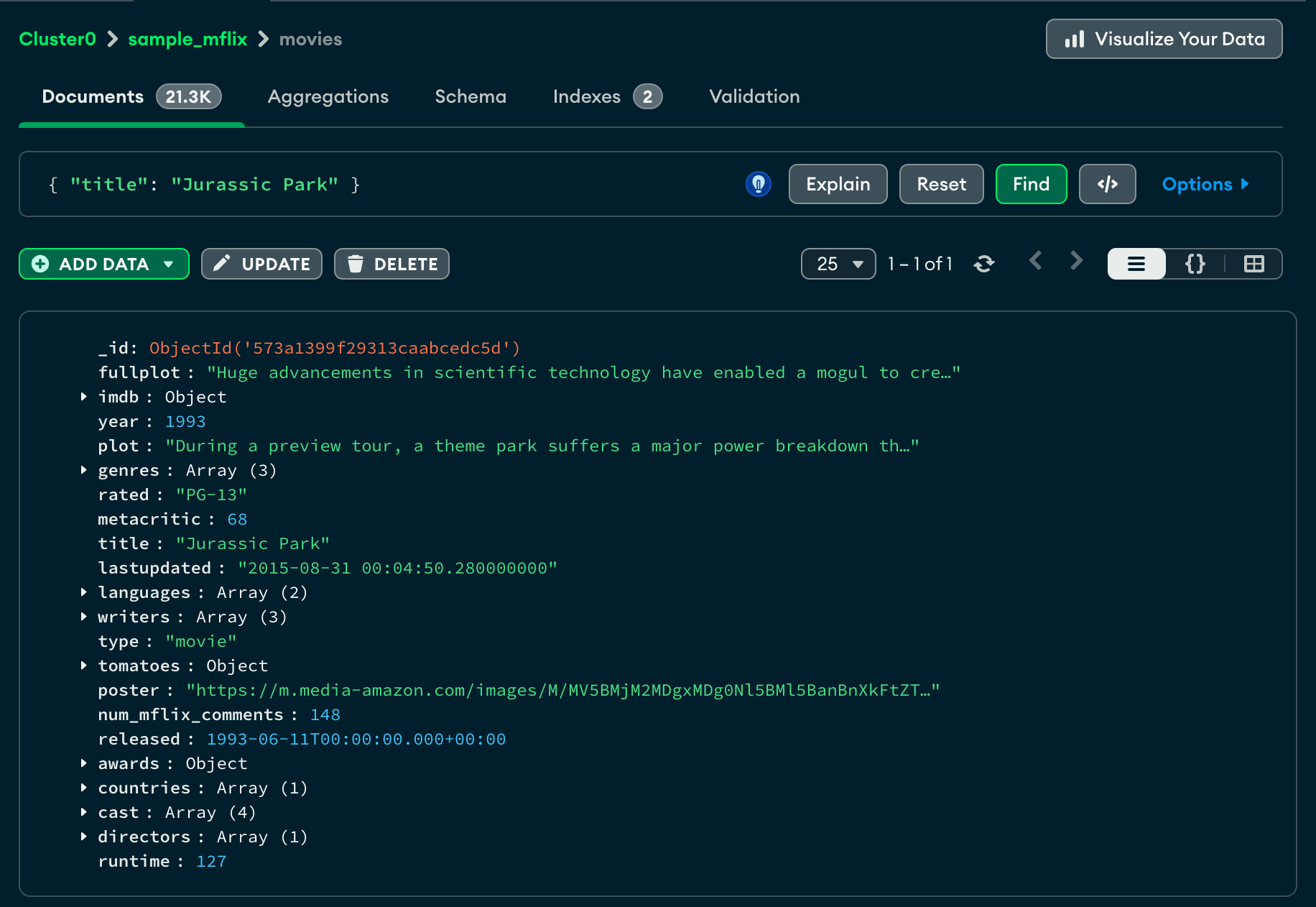
以下筛选器返回
title值为Jurassic Park的文档:{ "title": "Jurassic Park" } 单击 Find(查找)运行查询,查看更新的结果。
示例
本页上的示例使用的是一个小型示例数据集。要将样本数据导入到 MongoDB 部署中,请执行以下步骤:
将以下文档复制到剪贴板:
[ { "name": "Andrea Le", "email": "andrea_le@fake-mail.com", "school": { "name": "Northwestern" }, "version": 5, "scores": [ 85, 95, 75 ], "dateCreated": { "$date": "2003-03-26" } }, { "email": "no_name@fake-mail.com", "version": 4, "scores": [ 90, 90, 70 ], "dateCreated": { "$date": "2001-04-15" } }, { "name": "Greg Powell", "email": "greg_powell@fake-mail.com", "version": 1, "scores": [ 65, 75, 80 ], "dateCreated": { "$date": "1999-02-10" } } ] 在Atlas中,使用左侧导航面板选择要导入数据的数据库和集合。
单击 Documents 标签页。
单击 Add Data(添加数据)并选择 Insert Document(插入文档)。
将 View(视图)设置为 JSON (
{})。将剪贴板中的 JSON 文档粘贴到模态窗口中。
单击 Insert(连接)。
注意
If you do not have a MongoDB deployment or if you want to query a larger sample data set, see Sample Data for Atlas Clusters for instructions on creating a free cluster with sample data. The following example queries filter the sample documents provided on this page.
按单个条件匹配
以下查询筛选器查找 name 值为“Andrea Le”的所有文档:
{ name: "Andrea Le" }
该查询返回以下文档:
{ "_id": { "$oid": "5e349915cebae490877d561d" }, "name": "Andrea Le", "email": "andrea_le@fake-mail.com", "school": { "name": "Northwestern" }, "version": 5, "scores": [ 85, 95, 75 ], "dateCreated": { "$date": "2003-03-26" } }
按多个条件匹配 ($and)
以下查询筛选器查找 scores 数组包含值 75 且name 为 Greg Powell 的所有文档:
{ $and: [ { scores: 75, name: "Greg Powell" } ] }
该查询返回以下文档:
{ "_id": { "$oid":"5a9427648b0beebeb69579cf" }, "name": "Greg Powell", "email": "greg_powell@fake-mail.com", "version": 1, "scores": [ 65, 75, 80 ], "dateCreated": { "$date": "1999-02-10" } }
按多个可能条件匹配 ($or)
The following query filter uses the $or operator to find documents where version is 4, or name is Andrea Le:
{ $or: [ { version: 4 }, { name: "Andrea Le" } ] }
该查询返回以下文档:
[ { "_id": { "$oid": "5e349915cebae490877d561d" }, "name": "Andrea Le", "email": "andrea_le@fake-mail.com", "school": { "name": "Northwestern" }, "version": 5, "scores": [ 85, 95, 75 ], "dateCreated": { "$date": "2003-03-26" } }, { "_id": { "$oid":"5e349915cebae490877d561e" }, "email": "no_name@fake-mail.com", "version": 4, "scores": [ 90, 90, 70 ], "dateCreated": { "$date": "2001-04-15" } } ]
按排除匹配 ($not)
The following query filter uses the $not operator to find all documents where the value of the name field is not equal to "Andrea Le", or the name field does not exist:
{ name: { $not: { $eq: "Andrea Le" } } }
该查询返回以下文档:
[ { "_id": { "$oid":"5e349915cebae490877d561e" }, "email": "no_name@fake-mail.com", "version": 4, "scores": [ 90, 90, 70 ], "dateCreated": { "$date": "2001-04-15" } }, { "_id": { "$oid":"5a9427648b0beebeb69579cf" }, "name": "Greg Powell", "email": "greg_powell@fake-mail.com", "version": 1, "scores": [ 65, 75, 80 ], "dateCreated": { "$date": "1999-02-10" } } ]
提示
For a complete list of logical query operators, see Logical Query Operators.
使用比较操作符进行匹配
The following query filter uses the $lte operator to find all documents where version is less than or equal to 4:
{ version: { $lte: 4 } }
该查询返回以下文档:
[ { "_id": { "$oid":"5e349915cebae490877d561e" }, "email": "no_name@fake-mail.com", "version": 4, "scores": [ 90, 90, 70 ], "dateCreated": { "$date": "2001-04-15" } }, { "_id": { "$oid":"5a9427648b0beebeb69579cf" }, "name": "Greg Powell", "email": "greg_powell@fake-mail.com", "version": 1, "scores": [ 65, 75, 80 ], "dateCreated": { "$date": "1999-02-10" } } ]
提示
有关比较操作符的完整列表,请参阅比较查询操作符。
按日期匹配
The following query filter uses the $gt operator and Date() method to find all documents where the dateCreated field value is later than June 22nd, 2000:
{ dateCreated: { $gt: new Date('2000-06-22') } }
该查询返回以下文档:
[ { "_id": { "$oid": "5e349915cebae490877d561d" }, "name": "Andrea Le", "email": "andrea_le@fake-mail.com", "school": { "name": "Northwestern" }, "version": 5, "scores": [ 85, 95, 75 ], "dateCreated": { "$date": "2003-03-26" } }, { "_id": { "$oid": "5e349915cebae490877d561e" }, "email": "no_name@fake-mail.com", "version": 4, "scores": [ 90, 90, 70 ], "dateCreated": { "$date": "2001-04-15" } } ]
按数组条件匹配
The following query filter uses the $elemMatch operator to find all documents where at least one value in the scores array is greater than 80 and less than 90:
{ scores: { $elemMatch: { $gt: 80, $lt: 90 } } }
由于 scores 数组中的一个值为 85,查询返回以下文档:
{ "_id": { "$oid": "5e349915cebae490877d561d" }, "name": "Andrea Le", "email": "andrea_le@fake-mail.com", "school": { "name": "Northwestern" }, "version": 5, "scores": [ 85, 95, 75 ], "dateCreated": { "$date": "2003-03-26" } }
更多查询示例,请参阅 MongoDB 手册中的查询文档。
按子字符串匹配
The following query filter uses the $regex operator to find all documents where the value of email includes the term "andrea_le":
{ email: { $regex: "andrea_le" } }
该查询返回以下文档:
{ "_id": { "$oid": "5e349915cebae490877d561d" }, "name": "Andrea Le", "email": "andrea_le@fake-mail.com", "school": { "name": "Northwestern" }, "version": 5, "scores": [ 85, 95, 75 ], "dateCreated": { "$date": "2003-03-26" } }
按嵌入式字段匹配
以下查询过滤器查找 school.name 子字段为“Northwest”的文档:
{ "school.name": "Northwestern" }
该查询返回以下文档:
{ "_id": { "$oid": "5e349915cebae490877d561d" }, "name": "Andrea Le", "email": "andrea_le@fake-mail.com", "school": { "name": "Northwestern" }, "version": 5, "scores": [ 85, 95, 75 ], "dateCreated": { "$date": "2003-03-26" } }
更多查询示例,请参阅 MongoDB 手册中的查询文档。
查询栏支持的数据类型
The Atlas Filter supports using the mongosh representation of the MongoDB Extended JSON BSON data types.
例子
以下筛选器返回 start_date 大于 BSON Date 2017-05-01 的文档:
{ "start_date": {$gt: new Date('2017-05-01')} }
通过在 start_date 和 $gt操作符中指定 Date 类型, Atlas会按时间顺序执行 greater than 比较,返回 start_date 晚于 2017-05-01 的文档。
如果没有 Date 类型规范, Atlas会将 start_dates 作为字符串按字典顺序进行比较,而不是按时间顺序比较值。
清除查询
要清除查询栏和查询结果,请单击 Reset。
Atlas查询与MongoDB和SQL查询相比如何?
$filter corresponds to the WHERE clause in a SQL SELECT statement.
例子
现有 3,235 篇文章。您想阅读 Joe Bloggs 撰写的 所有文章。
- Atlas筛选器选项
{ author : { $eq : "Joe Bloggs" } } - MongoDB 聚合
db.article.aggregate( { $match: { "author": "Joe Bloggs" } } ) - SQL
SELECT * FROM article WHERE author = "Joe Bloggs";