A MongoDB Vector Search query takes the form of an aggregation pipeline that uses $vectorSearch as the first stage. This page explains the syntax, options, and behavior of the $vectorSearch stage.
지원되는 클라이언트
구문
필드
$vectorSearch 단계에서는 다음 필드가 있는 문서를 사용합니다.
벡터 검색 유형
When you define a $vectorSearch stage, you can use the exact field to specify whether to run an ANN or ENN search.
고려 사항
$vectorSearch 표시되는 파이프라인의 첫 번째 단계에 있어야 합니다.
제한 사항
$vectorSearch can't be used in view definition and the following pipeline stages:
$facet파이프라인 단계
| [1] | You can pass the results of $vectorSearch to this stage. |
과부하 보호
검색 프로세스 실행 수 있는 것보다 쿼리가 빠르게 도착하면 Atlas 초과 쿼리를 대기열에 추가하고 489 오류로 쿼리를 거부할 수 있습니다. 자세한 학습 은 쿼리 부하 차단 및 쿼리 거부를 참조하세요.
MongoDB Vector Search 인덱싱
이러한 MongoDB 벡터 검색 필드 유형에 대해 자세히 학습하려면 벡터 검색을 위해 필드를 인덱싱하는 방법을 참조하세요.
MongoDB Vector Search 점수
MongoDB Vector Search는 반환하는 모든 문서 에 0 ~ 1 (여기서 0 는 낮은 유사성을 나타내고 1 은 높은 유사성을 나타냅니다)까지 고정된 범위 의 점수를 할당합니다.
참고
Pre-filtering your data doesn't affect the score that MongoDB Vector Search returns using vectorSearchScore for $vectorSearch queries.
MongoDB 벡터 검색 필터
MongoDB Vector Search는 데이터 필터링을 지원합니다. 다음을 수행할 수 있습니다.
Pre-filter your data by using the
filteroption in your MongoDB Vector Search query.post-filter the results of your MongoDB Vector Search query by using
$matchand other supported aggregation pipeline stages.
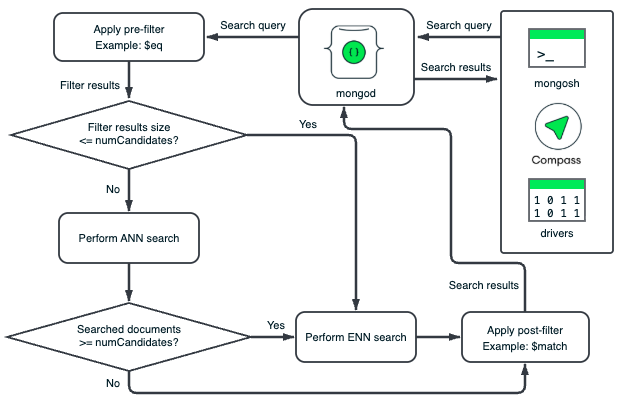
MongoDB 벡터 검색는 데이터 세그먼트에 대해 사전 필터 및 게시 필터 작업을 독립적으로 수행합니다. 각 세그먼트의 HNSW 그래프는 해당 세그먼트의 벡터에만 기반합니다. MongoDB Vector Search는 각 세그먼트의 문서에 필터를 적용하여 필터 기준을 충족하지 않는 문서를 제거합니다. 사전 필터링은 MongoDB Vector Search가 HNSW 그래프를 트래버스하기 전에 문서가 제거되도록 하고 게시 필터링은 문서에서 관련 없는 문서 또는 필드가 벡터 검색 결과에서 제거되도록 합니다.
검색 데이터 사전 필터
데이터를 사전 필터링하여 시맨틱 검색의 범위를 족피고 비교 대상으로 관련 벡터만 고려하도록 할 수 있습니다. filter 옵션을 사용하여 데이터를 사전 필터링하면 MongoDB 벡터 검색은 데이터의 하위 집합에서만 시맨틱 검색을 수행하여 검색 결과의 정확도를 높입니다.
사전 필터링은 사전 필터가 사전 필터와 정확히 일치하지 않지만 벡터 검색 동안 고려하려는 쿼리와 의미적으로 유사한 데이터를 제외할 수 있으므 너무 제한적일 수 있습니다. 이를 완화하려면 쿼리가 다음을 수행하도록 넓은 필터 기준을 설정하는 것이 좋습니다.
가능한 한 많은 개의 관련 결과를 포함합니다.
결과에서 무관한 데이터를 제외합니다.
결과에서 요청한 수의 문서를 반환합니다.
중요
필터링된 쿼리는 일반적으로 이에 상응하는 필터링되지 않은 쿼리 보다 느립니다.
검색 결과 게시 필터
If your index size isn't optimal for pre-filtering or if you set broad pre-filtering criteria, you can post-filter your vector search results to return only relevant data. To filter the results of your vector search, you can use any supported aggregation pipeline stage, such as the $match stage, after the $vectorSearch stage. To learn more, see Additional Performance Recommendations.
To select the fields to return in the results, use the $project stage unless you need all the fields in the results. We recommend excluding the vector field in the $project stage to improve query performance.
For example, you can use the $project stage to include the vectorSearchScore and then use the $match stage to return only documents above a certain score threshold.
필터 고려 사항
MongoDB Vector Search supports the short form of
$eq. In the short form, you don't need to specify$eqin the query.예를 들어,
$eq가 포함된 다음 필터를 가정하겠습니다."filter": { "_id": { "$eq": ObjectId("5a9427648b0beebeb69537a5") } 이는
$eq의 짧은 형식을 사용하는 다음 필터와 동일합니다."filter": { "_id": ObjectId("5a9427648b0beebeb69537a5") } You can use the
$andMQL operator to specify an array of filters in a single query.예를 들어
genres필드가Action이고year필드가1999,2000또는2001인 문서에 대해 다음과 같은 사전 필터를 사용한다고 가정해 보겠습니다."filter": { "$and": [ { "genres": "Action" }, { "year": { "$in": [ 1999, 2000, 2001 ] } } ] } For advanced filtering capabilities such as fuzzy search, phrase matching, location filtering, and other analyzed text, use the vectorSearch operator in a
$searchstage.
예시
전제 조건
이 예시를 실행하기 전에 다음 작업을 수행하세요.
Add the sample dataset used in the query to your cluster.
컬렉션에 대한 MongoDB Vector Search 인덱스를 생성합니다. 지침은 MongoDB 벡터 검색 인덱스 생성 절차를 참조하여 원하는 언어로 샘플 쿼리에 대한 인덱스를 구성합니다.
쿼리
자세히 알아보기
다음 튜토리얼에서는 $vectorSearch 단계의 추가 사용 사례를 설명합니다.