A MongoDB Vector Search query takes the form of an aggregation pipeline that uses $vectorSearch as the first stage. This page explains the syntax, options, and behavior of the $vectorSearch stage.
サポートされているクライアント
構文
フィールド
$vectorSearchステージは、次のフィールドを持つドキュメントを取得します。
ベクトル検索のタイプ
When you define a $vectorSearch stage, you can use the exact field to specify whether to run an ANN or ENN search.
Considerations
$vectorSearch は、それが表示されるすべてのパイプラインの最初のステージである必要があります。
制限
$vectorSearch can't be used in view definition and the following pipeline stages:
$facetパイプライン ステージ
| [1] | You can pass the results of $vectorSearch to this stage. |
過負荷保護
クエリ プロセスが検索プロセスで実行できるよりも速く到達した場合、Atlas は超過クエリをキューに入れ、489 エラーでクエリを拒否することができます。詳細については、「 クエリ ロード シェル と クエリの拒否 」を参照してください。
MongoDB ベクトル検索 インデックスの作成
これらのMongoDB ベクトル検索フィールドタイプの詳細については、「 ベクトル検索のフィールドにインデックスを作成する方法 」を参照してください。
MongoDB ベクトル検索 Score
MongoDB ベクトル検索 は、返されるすべてのドキュメントに、0 から 1 までの固定範囲のスコアを割り当てます(0 は類似性が低く、1 は類似性が高いことを示します)。
注意
Pre-filtering your data doesn't affect the score that MongoDB Vector Search returns using vectorSearchScore for $vectorSearch queries.
MongoDB ベクトル検索フィルター
MongoDB ベクトル検索はデータのフィルターをサポートします。次の作業が可能です。
Pre-filter your data by using the
filteroption in your MongoDB Vector Search query.post-filter the results of your MongoDB Vector Search query by using
$matchand other supported aggregation pipeline stages.
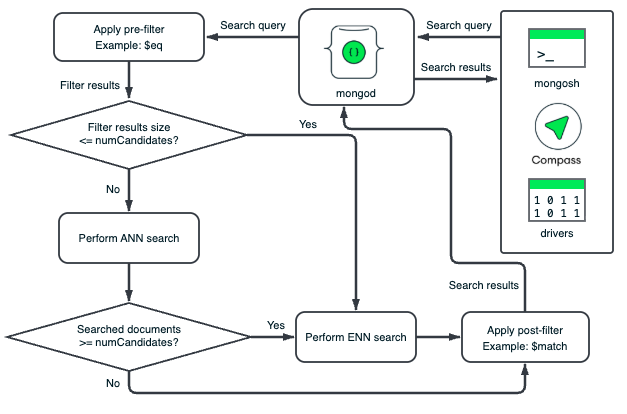
MongoDB ベクトル検索は、データのセグメントに対してプレフィルター操作と書き込みフィルター操作を独立して実行します。各セグメントの HNSW グラフは、そのセグメント内のベクトルのみに基づいています。MongoDB ベクトル検索は、フィルター条件を満たさないドキュメントを除外するために、各セグメントのドキュメントにフィルターを適用します。プレフィルターにより、MongoDB ベクトル検索が HNSW グラフをトラバースする前にドキュメントが除外され、書き込みフィルターにより、ドキュメント内の関連のないドキュメントまたはフィールドがベクトル検索結果から除外されます。
事前フィルター検索データ
データを事前フィルターすることで、セマンティック検索の範囲を絞り込み、比較対象として関連するベクトルのみが考慮されるようにできます。filter オプションを使用してデータを事前フィルターすると、MongoDBベクトル検索はデータのサブセットのみでセマンティック検索を実行し、検索結果の精度が向上します。
プレフィルターは制限が厳しすぎる可能性があります。プレフィルターはプレフィルターと正確に一致しないデータを除外する可能性がありますが、そのデータはベクトル検索中に考慮するクエリと意味的に類似しています。これを軽減するには、広範なフィルター条件を設定して、クエリが次のことを実行するようにすることをお勧めします。
可能な限り多くの関連する結果が含まれます。
結果から関係のないデータを除外します。
結果におけるリクエストされた数のドキュメントを返します。
重要
フィルターされたクエリは通常、同等のフィルターされていないクエリよりも遅くなります。
フィルター書き込みの検索結果
If your index size isn't optimal for pre-filtering or if you set broad pre-filtering criteria, you can post-filter your vector search results to return only relevant data. To filter the results of your vector search, you can use any supported aggregation pipeline stage, such as the $match stage, after the $vectorSearch stage. To learn more, see Additional Performance Recommendations.
To select the fields to return in the results, use the $project stage unless you need all the fields in the results. We recommend excluding the vector field in the $project stage to improve query performance.
For example, you can use the $project stage to include the vectorSearchScore and then use the $match stage to return only documents above a certain score threshold.
フィルターに関する考慮事項
MongoDB Vector Search supports the short form of
$eq. In the short form, you don't need to specify$eqin the query.$eqの付いた次のフィルターを例に挙げます。"filter": { "_id": { "$eq": ObjectId("5a9427648b0beebeb69537a5") } これは、
$eqの短縮形を使用する次のフィルターと同等です。"filter": { "_id": ObjectId("5a9427648b0beebeb69537a5") } You can use the
$andMQL operator to specify an array of filters in a single query.たとえば、
genresフィールドがActionに等しく、かつyearフィールドの値が1999、2000、または2001に等しいドキュメントの次のプレフィルターを考えてみましょう。"filter": { "$and": [ { "genres": "Action" }, { "year": { "$in": [ 1999, 2000, 2001 ] } } ] } For advanced filtering capabilities such as fuzzy search, phrase matching, location filtering, and other analyzed text, use the vectorSearch operator in a
$searchstage.
例
前提条件
これらの例を実行する前に、次のアクションを実行する必要があります。
Add the sample dataset used in the query to your cluster.
コレクションの MongoDB ベクトル検索インデックスを作成します。手順については、MongoDB ベクトル検索インデックスの作成手順を参照し、希望する言語のサンプル クエリに合わせてインデックスを構成します。
クエリ
詳細
次のチュートリアルでは、$vectorSearch ステージのその他のユースケースを示します。