次のセクションでは、Atlas 上での MongoDB ベクトル検索の配置オプションについて説明します。
本番前または本番環境のニーズに合わせて、さまざまな配置タイプ、クラウドプロバイダー、およびクラスター階層を使用してクラスターを構造化できます。これらの推奨事項を使用して、配置タイプ、クラウドプロバイダーとリージョン、およびベクトル検索を実行するためのクラスターと検索階層を選択します。
environment | 配置タイプ | クラスター階層 | クラウドプロバイダーのリージョン | ノード アーキテクチャ |
|---|---|---|---|---|
クエリのテスト | フレックス クラスター、専有クラスター | 無料クラスターまたはそれ以上の階層 | すべて | MongoDB と Search プロセスは同じノード上で実行されます。 |
アプリケーションのプロトタイプ作成 | 専用クラスター | Flex クラスター、 | すべて | MongoDB と Search プロセスは同じノード上で実行されます。 |
本番環境 | 個別の検索ノードを持つ専用クラスター |
| AWS and Azure in some regions or Google Cloud in all regions | MongoDB と Search プロセスは異なるノードで実行されます。 |
Community Edition | 自己管理型配置。お客様がご自身で | N/A.ハードウェアまたはクラウド インスタンスをお客様ご自身でご用意いただきます。 | N/A.お客様のお好みのインフラストラクチャーを選択できます。 | MongoDB と Search プロセスは、単一の自己管理型ホストまたは別々の自己管理型ホスト上で実行されます。 |
これらの配置モデルの詳細については、次のセクションを確認してください。
リソース使用
ベクトルのインデックス作成におけるメモリ要件
MongoDB ベクトル検索 はインデックス全体をメモリに保持するため、データセットに完全な精度のベクトルが含まれている場合は、 MongoDB ベクトル検索インデックスとJVMに十分なメモリがあることを確認する必要があります。各インデックスは、インデックスが作成されるベクトルと追加のメタデータの組み合わせです。インデックスのサイズは主にインデックスを作成するベクトルのサイズによって決まり、メタデータ領域は通常比較的少数含まれます。
量子化を使用しない場合、 MongoDB ベクトル検索 は完全な忠実度ベクトルをメモリに保存します。自動量化を有効にすると、 MongoDB ベクトル検索 は必要なリソースが大幅に少ない量化されたベクトルをメモリに保存し、完全な忠実度ベクトルをディスクに保存します。Atlas UI MongoDB Search ページの Size 列と Required Memory 列を表示すると、ベクトルインデックスのディスクとメモリ要件の違いを確認できます。
単一のベクトルの次の要件を考慮してください。
埋め込みモデル | ベクトル次元 | スペース要件 |
|---|---|---|
Voyage AI | 2048 | 8kb( |
OpenAI | 1536 | 6kb |
Google | 768 | 3kb |
Cohere | 1024 | 4kb( |
BinData quantized vectors. To learn more, see Ingest Quantized Vectors.
The required space scales linearly with the number of vectors that you are indexing and with the vector dimensionality. You can also use the Search Index Size metric to determine the amount of space and memory you need on your Search Nodes.
ベクトルのストレージ要件
If you use BinData or quantized vectors, you significantly reduce resource requirements compared to not using binData or quantized vectors. You will notice:
mongod上のベクトルのディスクストレージは、binDataベクトルを使用することで 66% 減少します。mongot上のベクトルの RAM 使用量は、自動ベクトル量子化または量子化ベクトル取り込みを使用することで、ベクトル圧縮により 3.75倍 (スカラー) または 24倍 (バイナリ) 減少します。
自動量子化を使用すると、Atlasは再スコアリングまたは正確な検索のために全精度ベクトルをディスクに保存し、再スコアリングのためのRAMとキャッシュの使用を最小限に抑えます。
MongoDB ベクトル検索の インデックス定義 で 自動量子化 を有効にする場合、クラスターのサイズを決定する際にはディスク容量も考慮する必要があります。これは、MongoDB ベクトル検索が、厳密最近傍探索 検索および自動量子化を設定した場合の再スコアリングのために、全精度のベクトルをディスクにも保存するためです。したがって、使用するハードウェアにおいて、ディスクと RAM の比率が適切であることを確認してください。スカラー量子化におけるストレージと RAM の比率がおよそ 4:1、またはバイナリ量子化におけるストレージとRAMの比率がおよそ 24:1 に対応できる検索ノードを設定することを検討します。
例
この例は、my-embeddings という名前のフィールドに保存されている Voyage AI の 1000万、1024 次元の埋め込みのバイナリ量子化を構成する方法を示しています。
{ "fields":[ { "type": "vector", "path": "my-embeddings", "numDimensions": 1024, "similarity": "euclidean", "quantization": "binary" } ] }
次の式を使用して、再スコアリングを備えたバイナリ量子化対応インデックスのディスク容量を概算します。
Original index size * (25/24)
ここで、分母の 24 は、元のインデックスサイズを 24 の部分に分けて、分数をより簡単に表現しています。分子の 25 は、バイナリベクトルを格納するために必要な追加データのための、元のインデックスサイズの約 1 / 24 に相当する追加スペース割り当てを示しています。元のインデックスとHierarchical Navigable Small Worlds グラフは依然としてディスクに保存されています。HNSW グラフが圧縮されていないため、特大ファクターは 1/32 ではなく 1/24 です。
例
元のインデックス サイズが 1 GB であると仮定します。以下に示すように、再スコアリングを使用してバイナリ量子化インデックスサイズを計算できます。
1 GB * (25/24) = 1.042 GB
重要
Atlas UIでは、Atlas はインデックスサイズ全体を表示します。これは、 RAMとディスクに保存されているインデックス内のデータ構造を Atlas が表示しないため、サイズが大きくなる可能性があります。MongoDB Search メトリクスでは、自動定量化を有効にすると、メモリに保持されるはるかに小さいインデックスが表示されます。
自動量子化を設定したベクトルには、推定インデックスサイズの 125% に相当する空きディスク容量を割り当てることをお勧めします。
環境のテストとプロトタイプ作成
ベクトル検索クエリをテストし、アプリケーションのプロトタイプ作成には、次の構成が推奨されます。
配置タイプ
MongoDB ベクトル検索クエリをテストするには、 Flex クラスター、専有クラスター、またはローカル Atlas 配置を使用できます。
Cluster Tiers
Free クラスターは、コストのかからないクラスタータイプです。Flex クラスターは、MongoDB を学習しているチームや、小規模な概念実証アプリケーションを開発しているチームに適した低コストのクラスタータイプです。Atlas Flex クラスターでプロジェクトを開始し、将来的に本番対応の Atlas 専有クラスター階層にアップグレードすることができます。
これらの低コストのクラスタータイプは、 MongoDB ベクトル検索クエリをテストするために使用できます。ただし、Flex クラスターではリソース競合とクエリレイテンシが発生する可能性があります。Flex クラスターでプロジェクトを開始した場合は、アプリケーションのアプリケーションが準備できたら、より高い階層にアップグレードすることをお勧めします。
Dedicated clusters include M10 and higher tiers. The M10 and M20 tiers are suitable for prototyping your application. You can scale to higher tiers to handle large datasets or deploy dedicated Search Nodes for workload isolation when your application is ready for production.
クラウドプロバイダーとリージョン
選択したクラウド プロバイダーとリージョンは、クラスター階層で利用可能な構成オプションとクラスターの実行コストに影響します。
All the cluster tiers are available in all the supported cloud provider regions
MongoDB ベクトル検索クエリをローカルでテストしたい場合は、Atlas CLI を使用して、ローカル コンピューターで単一ノードをホストするレプリカセットを配置することができます。開始するには、MongoDB ベクトル検索クイック スタート チュートリアルを完了し、ローカル配置のタブを選択します。
When your application is ready for production, migrate your local Atlas deployment to a production environment by using Live Migration. Local deployments are limited by the CPU, memory, and storage resources of your local machine.
ノード アーキテクチャ
テストおよびプロトタイプ作成環境には、 MongoDBプロセスとMongoDB Search プロセスが 同じノードで実行されるノードアーキテクチャを推奨します。この配置モデルの次の図では、 MongoDB Search mongot プロセスが Atlas クラスター内の各ノードで mongod と並行して実行され、これらは同じリソースを共有しています。
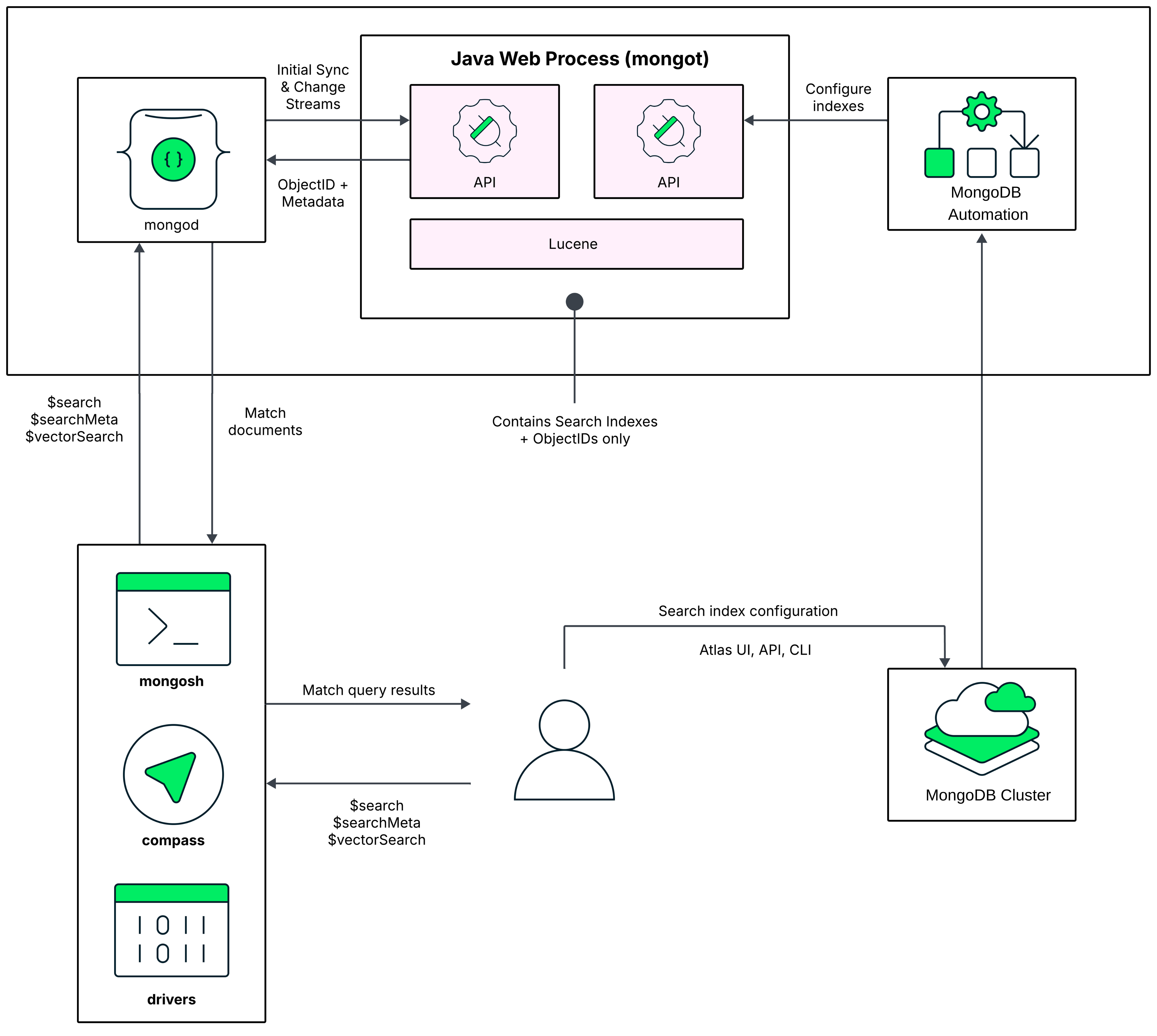
デフォルトでは 、Atlas は 最初のMongoDB ベクトル検索インデックスを作成するときに、mongod プロセスを実行するのと同じノードでMongoDB Search mongot プロセスを有効にします。
When you run a query, MongoDB Search uses the configured read preference to identify the node on which to run the query. The query first goes to the MongoDB process, which is mongod for a replica set cluster or mongos for a sharded cluster.
For a replica set cluster, the mongod process routes the query to the mongot on the same node. For sharded clusters, your cluster data is partitioned across mongod instances (shards) and each mongot process can only access the data on the mongod instance on the same node. Therefore, you can't run MongoDB Search queries that target a particular shard. mongos routes the query to all shards, making these scatter gather queries. If you use zones to distribute a sharded collection over a subset of the shards in the cluster, MongoDB Search routes the query to the zone that contains the shards for the collection that you are querying and runs your $search queries on just the shards where the collection is located.
After the query is routed to a MongoDB Search mongot process, the mongot process performs the search and scoring and returns the document IDs and other search metadata for the matching results to its corresponding mongod process. The mongod process then performs a full document lookup implicitly for the matching results and returns the results to the client. If you use the $search concurrent option in your query, MongoDB Search enables intra-query parallelism. To learn more, see Parallelize Query Execution Across Segments.
To learn more about the mongot process, see Query Processing.
アプリケーションのプロトタイプ作成に合わせたクラスターのサイズ設定
Atlas がデータベースと検索ワークロードを 同じノードで実行すると、 MongoDBストレージはノードの使用可能なメモリ(RAM)の特定のパーセンテージを消費し、残りはMongoDB ベクトル検索インデックスと mongot プロセスに残ります。
階層 | 合計メモリ(GB) | MongoDB ベクトル検索インデックスで使用可能なメモリ(GB) |
|---|---|---|
| 2 | 1 |
| 4 | 2 |
| 8 | 4 |
M10、M20、M30 のクラスター階層の場合、25% はMongoDB用に予約され、残りの 75% はMongoDB ベクトル検索インデックスを含む他の操作用です。M40+ クラスター階層の場合、50% はMongoDBに予約され、残りはMongoDB ベクトル検索インデックスを含む他の操作用に確保されます。
制限
You might experience resource contention between the database mongod and the search mongot processes. This could negatively impact the performance of your index and latency of your queries. We recommend this deployment model for only testing and prototyping environments. For production-ready applications and associated search workloads, we recommend migrating to dedicated Search Nodes.
本番環境
本番環境のアプリケーションには、次のクラスター構成が推奨されます。
配置タイプ
For production-ready applications, you need a dedicated cluster with separate Search Nodes for Workload Isolation.
Cluster Tiers
Dedicated clusters include M10 and higher tiers. The M10 and M20 tiers are suitable for development and for production environments. However, the higher tiers can handle large datasets and production workloads. We recommend that you also deploy dedicated Search Nodes for your search workload. This allows you to scale your search deployment independently and appropriately.
クラウドプロバイダーとリージョン
Search Nodes are available in all the regions for Google Cloud but are only available in a subset of AWS and Azure regions. You must select a cloud provider and region where Search Nodes are available for your deployment.
すべてのクラスター階層は、サポートされているクラウドプロバイダー リージョンで利用できます。選択したクラウド プロバイダーとリージョンは、クラスターで使用できる構成オプションと検索層、およびクラスターの実行コストに影響します。
ノード アーキテクチャ
For production environments, we recommend a node architecture in which MongoDB processes and MongoDB Search processes run on separate nodes. To deploy separate Search Nodes, see Migrate to Dedicated Search Nodes.
この配置モデルの次の図では、 MongoDB Search mongot プロセスは専用の検索ノードで実行されます。このノードは、mongod プロセスが実行されるクラスター ノードとは別です。
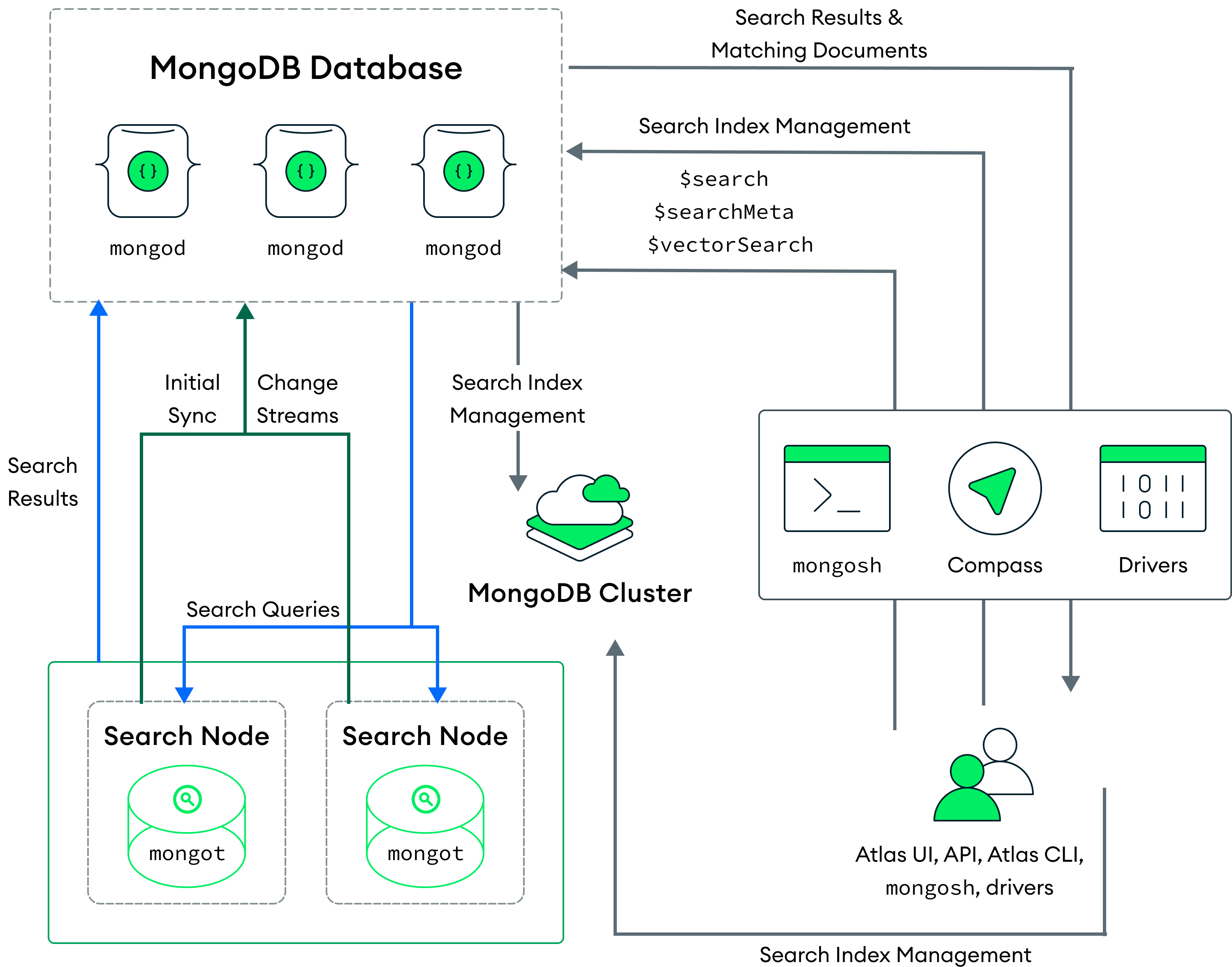
Atlas は、各クラスターまたはクラスター上の各シャードに検索ノードを配置します。たとえば、3 つのシャードを持つクラスターに 2 つの検索ノードを配置すると、Atlas は 6 つの検索ノード(シャードあたり 2 つ)を配置します。また、検索ノードの数と、各検索ノードにプロビジョニングされるリソースの量を構成することもできます。
When you deploy separate Search Nodes, Atlas automatically assigns a mongod for each mongot for indexing. The mongot communicates with the mongod to listen for and sync index changes for the indexes that it stores. MongoDB Vector Search indexes and processes your queries similar to a deployment where both the mongod and mongot processes run on the same node. To learn more, see How to Index Fields for Vector Search and Run Vector Search ANN and ENN Queries. To learn more about deploying Search Nodes separately, see Search Nodes for Workload Isolation.
検索ノードに移行すると、Atlas は検索ノードを配置しますが、検索ノード上のクラスター上のすべてのインデックスが正常に構築されるまで、ノードに対するクエリを処理しません。 Atlas が新しいノードにインデックスをビルドする間も、クラスター ノードのインデックスを使用してクエリを処理し続けます。 Atlas は、検索ノードにインデックスを正常にビルドし、クラスター ノード上のインデックスを削除した後にのみ、検索ノードからクエリの処理を開始します。
注意
Scaling your cluster by adding search nodes or by changing the search tier triggers a rebuild of the full MongoDB Search index. However, if your cluster on AWS or Azure has dedicated search nodes for which you haven't enabled Encryption at Rest using Customer Key Management, Atlas provides the following optimizations:
検索ノードを増やすと、Atlas は新しいノードで MongoDB Search インデックス全体を再構築するのではなく、S3 または Azure Blob Storage のインデックスの最新のコピーを使用します。
既存のノードの場合、Atlas はインデックスファイルの新しい増分リストを定期的に取得してアップロードします。Atlas はインデックスファイルを最大14日間保存します。
これは、Google Cloud の専用検索ノードを持つクラスターではまだ使用できません。
When you run a query, the query routes to the mongod based on the configured read preference. The mongod process routes the search query through a load balancer on the same node, which distributes the requests across all of the mongot processes.
The MongoDB Search mongot process performs the search and scoring and returns the document IDs and metadata for the matching results to mongod. The mongod then performs a full document lookup for the matching results and returns the results to the client. If you use the $search concurrent option in your query, MongoDB Search enables intra-query parallelism. To learn more, see Parallelize Query Execution Across Segments.
If you delete all the Search Nodes on your cluster, there will be an interruption in processing your search query results. To learn more, see Modify a Cluster. If you delete your Atlas cluster, Atlas pauses and then deletes all associated MongoDB Vector Search deployments (mongot processes).
メリット
この配置モデルには、次のメリットがあります。
リソースを効率的に利用しながら、検索ワークロード用にリソースの高可用性を確保します。
検索配置のサイズは、データベース配置とは独立してスケーリングします。
MongoDB ベクトル検索クエリを同時に自動的に処理することで、特に大規模なデータセットでの応答時間が向上します。詳細については、セグメント間での並列クエリ実行 を参照してください。
本番環境の検索ノードのサイズ設定
MongoDB ベクトル検索 はインデックス全体をメモリに保持するので、MongoDB ベクトル検索 インデックスと JVM に十分なメモリがあることを確認する必要があります。検索ノードはデータ分離を行わずにワークロード分離が可能で、RAM 割り当てのほぼ 90% はベクトルデータとインデックスをメモリに保存するために使用され、残りは JVM に使用されます。
Each index is a combination of the vectors being indexed and additional metadata. The index size is primarily determined by the size of the vectors that you are indexing, with metadata space typically being relatively nominal. To learn more, see Memory Requirements for Indexing Vectors.
When you deploy dedicated Search Nodes, you can choose from different search tiers. Each search tier has a default RAM capacity, storage capacity, and CPU. This allows you to size and scale your cluster independently from your database deployment. To scale your search deployment separately, you can make the following changes to your cluster configuration at any time:
クラスター上の検索ノードの数を調整します。
検索階層を変更して、ノードの CPU、RAM、ストレージを調整する。
注意
検索ノードと検索階層のコストの詳細については、[ MongoDB 料金] ページで [ View all plan featuresを展開し、[ MongoDB Vector Search ] をクリックします。
ノードには、 MongoDB ベクトル検索インデックスの合計サイズより少なくとも 10% 大きいRAMがあることをお勧めします。また、使用可能な CPU が十分にあることを確認することをお勧めします。クエリのレイテンシは利用可能な CPU の数によって異なります。これは、クエリのパフォーマンスを向上させる内部同時実行のレベルに大きく影響可能性があります。
例
サイズが約 3 GB の 1M 768 次元ベクトルがあるとします。S30(低 CPU)と S20(高 CPU)検索階層のどちらにも、インデックスをサポートするのに十分な RAM があります。S30(低 CPU)検索階層に配置する代わりに、S20(高 CPU)検索階層に配置することをお勧めします。S20(高 CPU)検索階層ではクエリを同時に実行するために、より多くの CPU が使用できるためです。
保存時の暗号化の有効化
By default, MongoDB and search processes run on the same nodes. With this architecture, customer-managed encryption applies to your database data, but it does not apply to search indexes.
When you enable dedicated Search Nodes, search processes run on separate nodes. This allows you to enable Search Node Data Encryption, so you can encrypt both database data and search indexes with the same customer-managed keys for comprehensive encryption coverage.
注意
Database nodes and Search Nodes use different encryption methods with the same customer-managed keys. Database nodes use the WiredTiger Encrypted Storage Engine, while Search Nodes use encryption at the disk level.
To learn more, see Enable Customer Key Management for Search Nodes.
専用検索ノードへの移行
専用検索ノードを使用すると、クラスターとは別に検索配置のサイズとスケーリングの両方を行うことができます。 また、データベース プロセスと検索プロセスの両方を同じノードで実行するクラスターで発生する可能性のあるリソースの競合も排除されます。
専用検索ノードに移行するには、配置を次の変更で行います。
If your deployment is currently using a Free cluster or a Flex cluster, upgrade your cluster to a higher tier. Dedicated Search Nodes are supported only for
M10and higher cluster tiers. To learn more about migrating to a different cluster tier, see Modify the Cluster Tier.Dedicated Search Nodes are available on a subset of the AWS and Azure regions and in all supported Google Cloud regions. Make sure to deploy your cluster in regions where Search Nodes are also available. If your existing cluster is in regions where Search Nodes are not available, migrate your cluster to regions where Search Nodes are available. To learn more, see Cloud Provider Regions.
Enable Search Nodes for workload isolation and configure Search Nodes. To learn more, see Add Search Nodes.
MongoDB コミュニティ エディション
If you run MongoDB Vector Search on MongoDB Community Edition or another self-managed deployment, Atlas does not manage mongot for you. Instead, you install, configure, and operate mongot yourself. The following sections summarize the available architecture patterns and sizing options. For complete deployment and sizing guidance, see MongoDB Search and MongoDB Vector Search on Self-Managed Deployments and Introduction to mongot Deployment Sizing.
アーキテクチャパターン
As with MongoDB Vector Search on Atlas, self-managed deployments use one of the same two architecture patterns: co-located or dedicated. The only exception is that on self-managed deployments, you provision and manage the hosts yourself.
サイズ設定
Unlike Atlas, self-managed deployments have no predefined cluster or search tiers. You provision your own hardware or cloud instances. To choose a starting configuration and refine it based on your workload, see Introduction to mongot Deployment Sizing.