MongoDB は、 AIエージェントを構築するためのいくつかの機能を提供します。ベクトルデータベースとドキュメントデータベースの両方として、 MongoDB はエージェント的 RG のさまざまな検索方法、また、短期間および長期のエージェントメモリのために同じデータベースにエージェントインタラクションを保存します。
AIエージェントとは何ですか?
生成系AI の文脈において、AI エージェントとは、通常、AI モデルを組み合わせて、LLM などを用いながら、あらかじめ定義されたツール群を使ってタスクを自律的または半自律的に実行できるシステムを指します。
AI エージェントはツールを使用してコンテキストを収集し、外部システムとやり取りし、アクションを実行できます。エージェントは独自の実行フロー(プランニング)を定義し、前のインタラクションを記憶して応答(メモリ)を通知できます。したがって、AI エージェントは、推論、計画、意思決定を必要とする複雑なタスクに最適です。
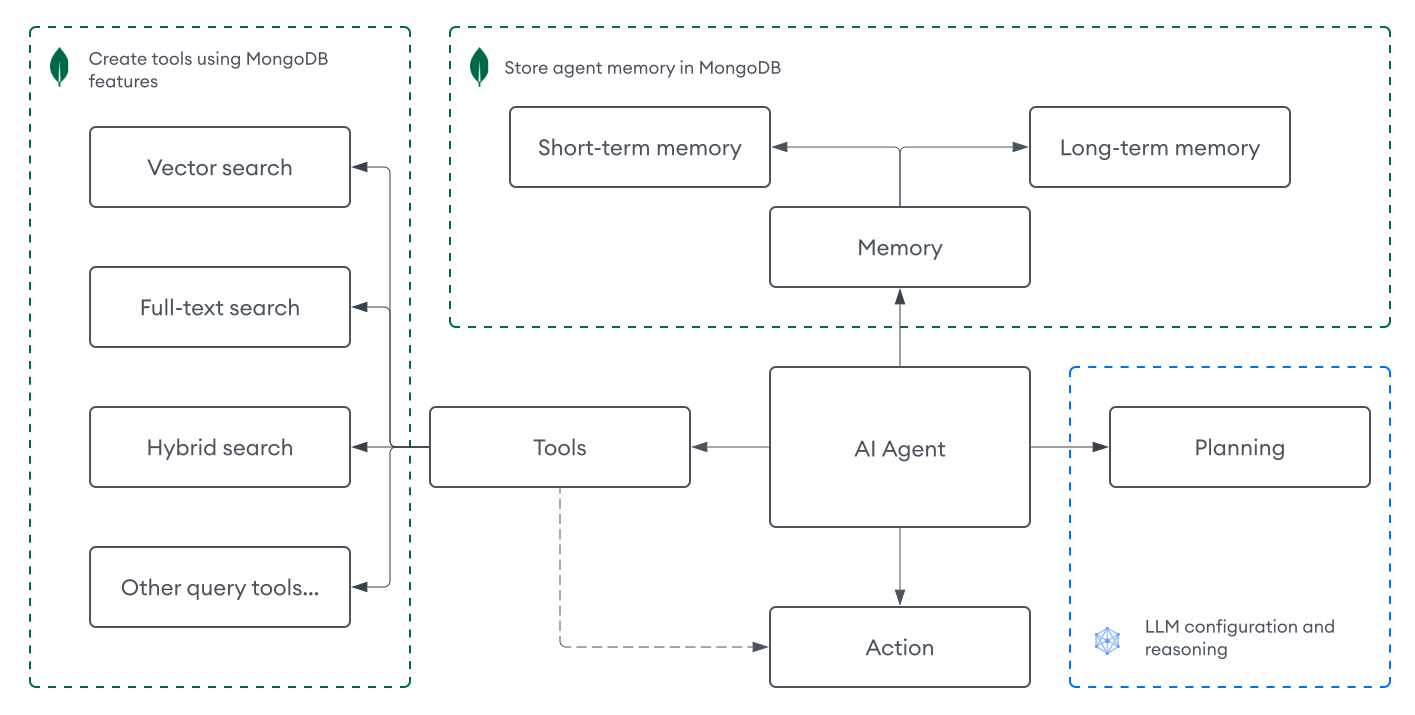
アーキテクチャ
AI エージェントには通常、以下のコンポーネントの組み合わせが含まれます。
認識 | エージェントへの入力。テキスト入力は AI エージェントの最も一般的な知覚メカニズムですが、入力は音声、画像、またはマルチモーダル データであることもあります。 |
プランニング | エージェントが次に何をすべきかをどのように判断するか。このコンポーネントには通常、LLM やプロンプトが含まれ、フィードバック ループやさまざまなプロンプト エンジニアリング技術を用いて構成されます。たとえば、連鎖的思考や reAct などを活用し、LLM が複雑なタスクを論理的に処理できるように支援します。 AI エージェントは、意思決定者としての単一の LLM、複数のプロンプトを備えた LLM、連携して動作する複数の LLM、またはこれらのアプローチの任意の組み合わせで構成できます。 |
ツール | エージェントがタスクのコンテキストを収集する方法。ツールを使用することで、エージェントは外部システムとやり取りし、ベクトル検索、ウェブ検索、他のサービスからの API 呼び出しなどのアクションを実行できます。 |
メモリ | エージェントのやり取りを保存するシステムです。これにより、エージェントは過去の経験から学び、応答に役立てることができます。メモリは短期(現在のセッション用)または長期(セッション間で保持される)にすることができます。 |
注意
AI エージェントは設計パターン、機能、複雑さが異なります。他のエージェント アーキテクチャ(マルチエージェント システムを含む)について詳しくは、「エージェンティックデザインパターン」を参照してください。
MongoDB を使用して AI エージェントをビルドする
MongoDB は、 AIエージェントを構築するための次のコンポーネントをサポートしています。
ツール: MongoDB の検索機能を活用して、エージェントが関連情報を検索し、エージェント型 RAG を実装するためのツールとして使用します。
メモリ: エージェントのインタラクションを短期および長期のメモリの両方の MongoDB コレクションに保存します。
エージェントツール
AI エージェントのコンテキストでは、ツールとは、エージェントがプログラムで定義し、呼び出すことができるものを指します。ツールは、テキストの生成だけでなく、外部システムとのやり取り、情報の検索、アクションの実行など、エージェントの機能を拡張します。ツールは通常、以下を含む特定のインターフェースで定義されます。
エージェントがツールを使用するタイミングを理解するのに役立つ名前と説明。
必須パラメーターとその期待される形式。
呼び出された際に実際の操作を実行する関数です。
エージェントは推論機能を使用して、ユーザーの入力と現在のタスクに基づいて、どのツールを使用するか、いつ使用するか、どのパラメーターを提供するかを決定します。
標準のMongoDBクエリに加えて、 MongoDB はエージェントのツールとして実装できるいくつかの検索機能を提供します。
MongoDB ベクトル検索:ベクトル検索を実行して、セマンティック意味と類似性に基づいて関連するコンテキストを検索します。詳細については、MongoDB ベクトル検索 の概要 を参照してください。
MongoDB Search: キーワード一致と関連性スコアリングに基づいて関連コンテキストを取得するには、全文検索を実行します。詳しくは「 MongoDB Search の概要 」を参照してください。
ハイブリッド検索: MongoDB ベクトル検索とMongoDB Search を組み合わせて、両方のアプローチの長さを活用します。詳しくは、ハイブリッド検索の実行方法 を参照してください。
ツールは、手動で、またはツールの作成と呼び出しのための組み込みの抽象化を提供する LangChain や LangGraph などのフレームワークを使用して定義できます。
ツールは、エージェントが特定のタスクを実行するために呼び出すことができる関数として定義されています。例として、次の構文は、ベクトル検索クエリを実行するツールを定義する方法を示します。
async function vectorSearchTool(query) { const pipeline = [ { $vectorSearch: { // Vector search query pipeline... } } ]; const results = await collection.aggregate(pipeline).toArray(); return results; }
def vector_search_tool(query: str) -> str: pipeline = [ { "$vectorSearch": { # Vector search query pipeline... } } ] results = collection.aggregate(pipeline) array_of_results = [] for doc in results: array_of_results.append(doc) return array_of_results
ツール呼び出しは、エージェントがツールを実行するために使用するものです。エージェント内でツール呼び出しを処理する方法を定義することも、フレームワークを使用してこれを処理することもできます。これらは通常、ツール名とツールに渡すその他の引数を含むJSONオブジェクトとして定義されるため、エージェントは適切なパラメーターを使用してツールを呼び出すことができます。例、次の構文は、エージェントがベクトル検索ツールを呼び出す方法を示しています。
{ "tool": "vector_search_tool", "args": { "query": "What is MongoDB?" }, "id": "call_H5TttXb423JfoulF1qVfPN3m" }
エージェンティック RAG
MongoDB をベクトルデータベースとして使用することで、 エージェント Atlas のサンプル データ セット を作成するための検索ツールを作成できます。これは、 AIエージェントを通じて検索および生成プロセスを動的に統合することができる RG の高度な形式です。
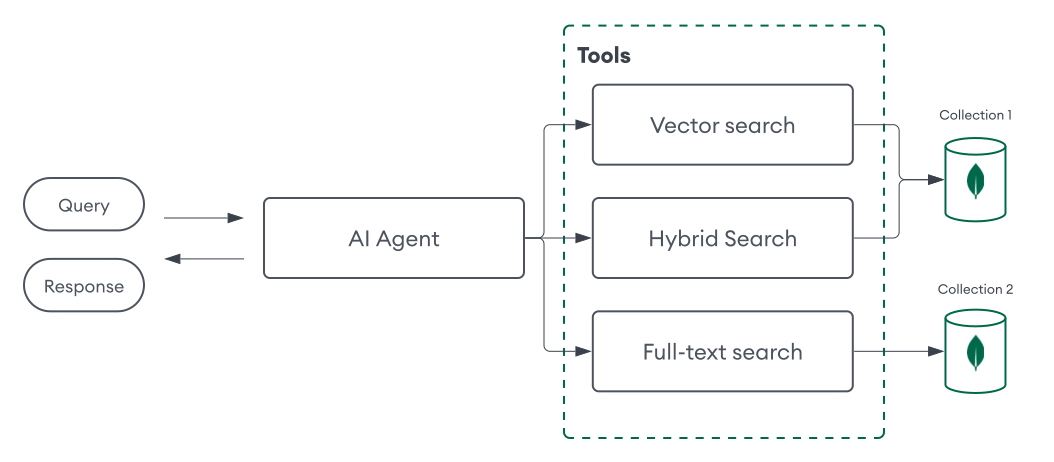
このアプローチにより、より複雑なワークフローとユーザー インタラクションが可能になります。例、セマンティック検索にはMongoDB ベクトル検索を使用し、全文検索にはMongoDB Search を使用するなど、タスクに基づいて最適な取得ツールを決定するようにAIエージェントを構成できます。また、エージェントの取得機能をさらにカスタマイズするために、さまざまなコレクションに対してさまざまな取得ツールを定義することもできます。
エージェント メモリー
エージェントのメモリに以前のやり取りに関する情報を保存することで、エージェントは過去の経験から学ぶことができ、より関連性の高いパーソナライズされた応答を提供できるようになります。これは、文脈を必要とするタスク、例えば会話エージェントにとって特に重要です。こうしたエージェントは、首尾一貫して文脈に適した応答を提供するために、会話の前のターンを記憶しておく必要があります。エージェントメモリには、主に 2 つのタイプがあります。
短期メモリ:最近のやり取りやアクティブなタスクコンテキストなど、現在のセッションの情報を保存します。
長期メモリ:セッション間で情報を保持し、過去の会話や時間の経過に伴うパーソナライズされた設定などを含みます。
MongoDB はドキュメントデータベースでもあるため、 インタラクションをMongoDBコレクションに保存することでエージェントのメモリを実装できます。その後、エージェントは必要に応じてこのコレクションをクエリまたはアップデートできます。MongoDBでエージェントメモリを実装するにはいくつかの方法があります。
短期間メモリを使用する場合は、インタラクションを保存するときに
session_id特定のフィールドを識別し、同じIDを持つインタラクションをクエリして、コンテキストとしてエージェントに渡すことができます。長期メモリの場合、LLM を使用して複数のインタラクションを処理し、ユーザーの好みや重要なコンテキストなどの関連情報を抽出し、その情報をエージェントが必要に応じてクエリできる別のコレクションに保存することができます。
チャット履歴をより効率的かつ複雑に取得できる堅牢なメモリ管理システムを構築するには、 MongoDB Search または MongoDB ベクトル検索 を活用して、セッション全体の重要なインタラクションを保存、インデックス、クエリを実行します。
短期メモリを保存するコレクション内のドキュメントは次のように表示される可能性があります。
{ "session_id": "123", "user_id": "jane_doe", "interactions": [ { "role": "user", "content": "What is MongoDB?", "timestamp": "2025-01-01T12:00:00Z" }, { "role": "assistant", "content": "MongoDB is the world's leading modern database.", "timestamp": "2025-01-01T12:00:05Z" } ] }
長期メモリを保存するコレクション内のドキュメントは次のように表示される可能性があります。
{ "user_id": "jane_doe", "last_updated": "2025-05-22T09:15:00Z", "preferences": { "conversation_tone": "casual", "custom_instructions": [ "I prefer concise answers." ], }, "facts": [ { "interests": ["AI", "MongoDB"], } ] }
次のフレームワークも、MongoDB のエージェントメモリに対する直接的な抽象化を提供します。
フレームワーク | 主な機能 |
|---|---|
LgChuin |
詳細については、チュートリアルを参照してください。 |
LangGraph |
詳細については、LangGraph および LangGraph.js をご覧ください。 |
はじめる
次のチュートリアルでは、エージェントフレームワークなしで、 MongoDBを使用してエージェント用 RAG とメモリ用にAIエージェントを構築する方法を説明します。
➤ このチュートリアルの言語を設定するには、 言語を選択 ドロップダウン メニューを使用します。
このチュートリアルの実行可能なバージョンをPythonノートとして操作します。
前提条件
Atlas の サンプル データ セット からの映画データを含むコレクションを使用します。
次のいずれかのMongoDBクラスター タイプ
MongoDB バージョン 6.0.11、7.0.2、またはそれ以降を実行している Atlas クラスター。IP アドレスが Atlas プロジェクトのアクセスリストに含まれていることを確認する。
Atlas CLI を使用して作成されたローカル Atlas 配置。詳細については、「Atlas 配置のローカル配置の作成」を参照してください。
Search とベクトル検索がインストールされたMongoDB Community または Enterprise クラスター。
Voyage AI API キー。
OpenAI API キー。
注意
このチュートリアルでは、Voyage AI と OpenAI のモデルを使用していますが、コードを変更して、任意のモデルを使用できます。
手順
この AI エージェントを使用して、カスタムデータソースに関する質問に回答し、計算を実行できます。また、前のやり取りを記憶して、応答に反映させることもできます。次のコンポーネントを使用します。
認識:テキスト入力。
計画:タスクを推論するための LLM とさまざまなプロンプト。
ツール:ベクトル検索ツールと計算ツール。
メモリ:インタラクションを MongoDB コレクションに保存。
環境を設定します。
プロジェクトを初期化し、依存関係をインストールします。
新しいプロジェクトディレクトリを作成し、必要な依存関係をインストールします。
mkdir mongodb-ai-agent cd mongodb-ai-agent npm init -y npm install --quiet dotenv mongodb voyageai openai langchain @langchain/community @langchain/core mathjs pdf-parse 注意
プロジェクトでは、次の構造を使用します。
mongodb-ai-agent ├── .env ├── config.js ├── ingest-data.js ├── tools.js ├── memory.js ├── planning.js └── index.js 環境を構成します。
プロジェクトに
.envという名前の環境ファイルを作成します。このファイルには、エージェント、 MongoDB接続文字列、 MongoDBデータベースとコレクションの名前のAPIキーが含まれます。プレースホルダー値をMongoDB接続文字列と、Vyage AIおよび OpenAI APIキーで置き換えます。
MONGODB_URI="<mongodb-connection-string>" VOYAGE_API_KEY="<voyage-api-key>" OPENAI_API_KEY= "<openai-api-key>" 注意
<connection-string>を Atlas クラスターまたはローカル Atlas 配置の接続文字列に置き換えます。接続stringには、次の形式を使用する必要があります。
mongodb+srv://<db_username>:<db_password>@<clusterName>.<hostname>.mongodb.net 詳細については、クライアント ライブラリを使用したクラスターへの接続 を参照してください。
接続stringには、次の形式を使用する必要があります。
mongodb://localhost:<port-number>/?directConnection=true 詳細については、「接続文字列 」を参照してください。
エージェントを構成します。
プロジェクトに config.js という名前のファイルを作成します。このファイルは、環境変数を読み取り、アプリケーションをMongoDBデータベースや OpenAI などのサービスに接続します。
import dotenv from 'dotenv'; import { MongoClient } from 'mongodb'; import OpenAI from "openai"; // Load environment variables from .env file dotenv.config(); // MongoDB cluster configuration export const MONGODB_URI = process.env.MONGODB_URI; export const mongoClient = new MongoClient(MONGODB_URI); export const agentDb = mongoClient.db("ai_agent_db"); export const vectorCollection = agentDb.collection("embeddings"); export const memoryCollection = agentDb.collection("chat_history"); // Model Configuration export const OPENAI_MODEL = "gpt-4o"; export const VOYAGE_MODEL = "voyage-3-large"; export const VOYAGE_API_KEY = process.env.VOYAGE_API_KEY; // Initialize OpenAI Client export const openAIClient = new OpenAI({ apiKey: process.env.OPENAI_API_KEY,});
MongoDB をベクトルデータベースとして使用します。
プロジェクトに ingest-data.js という名前のファイルを作成します。このスクリプトは、 埋め込みモデルを使用して、最近のMongoDB の収益レポートを含むサンプルPDF をMongoDBのコレクションに取り込みます。voyage-3-largeこのコードには、データがまだ存在しない場合にベクトル検索インデックスを作成する関数も含まれています。
詳細については、「取り込み」をご覧ください。
import { PDFLoader } from "@langchain/community/document_loaders/fs/pdf"; import { RecursiveCharacterTextSplitter } from "langchain/text_splitter"; import { vectorCollection } from "./config.js"; import { VOYAGE_API_KEY, VOYAGE_MODEL } from "./config.js"; import { VoyageAIClient } from "voyageai"; import { MONGODB_URI } from "./config.js"; import * as fs from 'fs'; import fetch from 'node-fetch'; console.log("Connecting to MongoDB:", MONGODB_URI); const EMBEDDING_DIMENSIONS = 1024; // Use Voyage AI Client SDK to get embeddings export async function getEmbedding(data, input_type) { if (!VOYAGE_API_KEY) { throw new Error("VOYAGE_API_KEY is not set in environment variables."); } try { const client = new VoyageAIClient({ apiKey: VOYAGE_API_KEY }); const response = await client.embed({ input: [data], model: VOYAGE_MODEL, input_type: input_type // "document" or "query" }); if (response.data && response.data.length > 0) { return response.data[0].embedding; } throw new Error("No embedding data found from Voyage AI response."); } catch (error) { console.error("Error generating Voyage AI embedding:", error); return null; } } // Ingest data from a PDF, generate embeddings, and store in MongoDB export async function ingestData() { try { // download PDF const rawData = await fetch("https://investors.mongodb.com/node/13176/pdf"); const pdfBuffer = await rawData.arrayBuffer(); fs.writeFileSync("investor-report.pdf", Buffer.from(pdfBuffer)); // load and split PDF const loader = new PDFLoader("investor-report.pdf"); const data = await loader.load(); const textSplitter = new RecursiveCharacterTextSplitter({ chunkSize: 400, chunkOverlap: 20, }); const docs = await textSplitter.splitDocuments(data); console.log(`Chunked PDF into ${docs.length} documents.`); // generate embeddings and insert const insertDocuments = await Promise.all(docs.map(async doc => ({ document: doc, embedding: await getEmbedding(doc.pageContent, "document"), }))); const result = await vectorCollection.insertMany(insertDocuments, { ordered: false }); console.log("Inserted documents:", result.insertedCount); } catch (err) { console.error("Ingestion error:", err); } } // Create a vector search index export async function createVectorIndex() { try { // check if the index already exists const existingIndexes = await vectorCollection.listSearchIndexes().toArray(); if (existingIndexes.some(index => index.name === "vector_index")) { console.log("Vector index already exists. Skipping creation."); return; } // define your Vector Search index const index = { name: "vector_index", type: "vectorSearch", definition: { "fields": [ { "type": "vector", "path": "embedding", "numDimensions": EMBEDDING_DIMENSIONS, "similarity": "cosine", } ] } } // run the helper method to ensure the index is created const result = await vectorCollection.createSearchIndex(index); console.log(`New index named ${result} is building.`); // wait for the index to be ready to query console.log("Polling to check if the index is ready. This may take up to a minute.") let isQueryable = false; while (!isQueryable) { const cursor = vectorCollection.listSearchIndexes(); for await (const index of cursor) { if (index.name === result) { if (index.queryable) { console.log(`${result} is ready for querying.`); isQueryable = true; } else { await new Promise(resolve => setTimeout(resolve, 5000)); } } } } } catch (err) { console.error("Error creating vector index:", err); throw err; } }
エージェントのツールを定義します。
プロジェクトに tools.js という名前のファイルを作成します。このファイルは、エージェントが質問に答えるために使用できるツールを定義します。この例では、次のツールを定義します。
vectorSearchTool:ベクトル検索クエリを実行して、コレクションから関連するドキュメントを取得します。calculatorTool: 基本的な数学操作にmathjsライブラリを使用します。
import { getEmbedding } from './ingest-data.js'; import { vectorCollection } from './config.js'; import { evaluate } from 'mathjs'; // Vector search tool export async function vectorSearchTool(userInput) { const queryEmbedding = await getEmbedding(userInput, "query"); const pipeline = [ { $vectorSearch: { index: "vector_index", queryVector: queryEmbedding, path: "embedding", exact: true, limit: 5 } }, { $project: { _id: 0, "document.pageContent": 1 } } ]; const cursor = vectorCollection.aggregate(pipeline); const results = await cursor.toArray(); return results; } // Simple calculator tool export function calculatorTool(userInput) { try { const result = evaluate(userInput); return String(result); } catch (e) { return `Error: ${e.message}`; } }
エージェントにメモリを追加します。
プロジェクトに memory.js という名前のファイルを作成します。このファイルは、エージェントが対話を保存するために使用するシステムを定義します。この例では、次の関数を定義して短期メモリを実装します。
storeChatMessage:インタラクションに関する情報を MongoDB コレクションに保存します。retrieveSessionHistory:session_idフィールドを使用して特定のセッションのすべてのインタラクションを取得するには。
import { memoryCollection } from './config.js'; /** * Store a chat message in the memory collection. * @param {string} sessionId - unique identifier for the chat session * @param {string} role - role of the sender (user or system) * @param {string} content - content of the message */ export async function storeChatMessage(sessionId, role, content) { const message = { session_id: sessionId, role, content, timestamp: new Date(), // use JS date for timestamp }; await memoryCollection.insertOne(message); } /** * Retrieve the chat history for a session. * @param {string} sessionId - unique identifier for the chat session * @returns {Promise<Array<{role: string, content: string}>>} */ export async function retrieveSessionHistory(sessionId) { const cursor = memoryCollection .find({ session_id: sessionId }) .sort({ timestamp: 1 }); const messages = []; await cursor.forEach(msg => { messages.push({ role: msg.role, content: msg.content }); }); return messages; }
エージェントの計画を定義します。
プロジェクトに planning.js という名前のファイルを作成します。このファイルには、エージェントの実行フローを決定するためのさまざまなプロンプトと LLM 呼び出しが含まれます。この例では、次の関数を定義します。
openAIChatCompletion: 応答を生成するために OpenAI APIを呼び出すヘルパー関数。toolSelector:LLMがタスクに適したツールを選択する方法を決定します。generateAnswer: ツールを使用し、LLM を呼び出し、結果をプロセシングすることで、エージェントの実行フローを調整します。getLLMResponse: LLM 応答生成用のヘルパー関数。
import { vectorSearchTool, calculatorTool } from './tools.js'; import { storeChatMessage, retrieveSessionHistory } from './memory.js'; import { openAIClient, OPENAI_MODEL } from './config.js'; // OpenAI chat completion helper export async function openAIChatCompletion(messages) { try { const completion = await openAIClient.chat.completions.create({ model: OPENAI_MODEL, messages, max_tokens: 1024, }); return completion.choices[0].message.content; } catch (error) { console.error("Error in openAIChatCompletion:", error); throw error; } } // Tool selector function to determine which tool to use based on user input and session history export async function toolSelector(userInput, sessionHistory = []) { const systemPrompt = ` Select the appropriate tool from the options below. Consider the full context of the conversation before deciding. Tools available: - vector_search_tool: Retrieve specific context about recent MongoDB earnings and announcements - calculator_tool: For mathematical operations - none: For general questions without additional context Process for making your decision: 1. Analyze if the current question relates to or follows up on a previous vector search query 2. For follow-up questions, incorporate context from previous exchanges to create a comprehensive search query 3. Only use calculator_tool for explicit mathematical operations 4. Default to none only when certain the other tools won't help When continuing a conversation: - Identify the specific topic being discussed - Include relevant details from previous exchanges - Formulate a query that stands alone but preserves conversation context Return a JSON object only: {"tool": "selected_tool", "input": "your_query"} `.trim(); const messages = [ { role: "system", content: systemPrompt }, ...sessionHistory, { role: "user", content: userInput } ]; try { const response = await openAIChatCompletion(messages); let toolCall; try { toolCall = JSON.parse(response); } catch { try { toolCall = eval(`(${response})`); } catch { return { tool: "none", input: userInput }; } } return { tool: toolCall.tool || "none", input: toolCall.input || userInput }; } catch (err) { console.error("Error in toolSelector:", err); return { tool: "none", input: userInput }; } } // Function to get LLM response based on messages and system message content async function getLlmResponse(messages, systemMessageContent) { const systemMessage = { role: "system", content: systemMessageContent }; let fullMessages; if (messages.some(msg => msg.role === "system")) { fullMessages = [...messages, systemMessage]; } else { fullMessages = [systemMessage, ...messages]; } const response = await openAIChatCompletion(fullMessages); return response; } // Function to generate response based on user input export async function generateResponse(sessionId, userInput) { await storeChatMessage(sessionId, "user", userInput); const sessionHistory = await retrieveSessionHistory(sessionId); const llmInput = [...sessionHistory, { role: "user", content: userInput }]; const { tool, input: toolInput } = await toolSelector(userInput, sessionHistory); console.log("Tool selected:", tool); let response; if (tool === "vector_search_tool") { const contextResults = await vectorSearchTool(toolInput); const context = contextResults.map(doc => doc.document?.pageContent || JSON.stringify(doc)).join('\n---\n'); const systemMessageContent = ` Answer the user's question based on the retrieved context and conversation history. 1. First, understand what specific information the user is requesting 2. Then, locate the most relevant details in the context provided 3. Finally, provide a clear, accurate response that directly addresses the question If the current question builds on previous exchanges, maintain continuity in your answer. Only state facts clearly supported by the provided context. If information is not available, say 'I DON'T KNOW'. Context: ${context} `.trim(); response = await getLlmResponse(llmInput, systemMessageContent); } else if (tool === "calculator_tool") { response = calculatorTool(toolInput); } else { const systemMessageContent = "You are a helpful assistant. Respond to the user's prompt as best as you can based on the conversation history."; response = await getLlmResponse(llmInput, systemMessageContent); } await storeChatMessage(sessionId, "system", response); return response; }
エージェントをテストします。
最後に、プロジェクトに「index.js」という名前のファイルを作成します。このファイルはエージェントを実行し、エージェントと交流できるようにします。
import readline from 'readline'; import { mongoClient } from './config.js'; import { ingestData, createVectorIndex } from './ingest-data.js'; import { generateResponse } from './planning.js'; // Prompt for user input async function prompt(question) { const rl = readline.createInterface({ input: process.stdin, output: process.stdout }); return new Promise(resolve => rl.question(question, answer => { rl.close(); resolve(answer); })); } async function main() { try { await mongoClient.connect(); const runIngest = await prompt("Ingest sample data? (y/n): "); if (runIngest.trim().toLowerCase() === 'y') { await ingestData(); console.log("\nAttempting to create/verify Vector Search Index..."); await createVectorIndex(); } else { await createVectorIndex(); // ensure index exists even if not ingesting data } const sessionId = await prompt("Enter a session ID: "); while (true) { const userQuery = await prompt("\nEnter your query (or type 'quit' to exit): "); if (userQuery.trim().toLowerCase() === 'quit') break; if (!userQuery.trim()) { console.log("Query cannot be empty. Please try again."); continue; } const answer = await generateResponse(sessionId, userQuery); console.log("\nAnswer:"); console.log(answer); } } finally { await mongoClient.close(); } } main();
プロジェクトを保存し、次のコマンドを実行します。エージェントを実行する際には以下に従います。
まだ行っていない場合は、エージェントにサンプルデータを取り込むように指示します。
セッションIDを入力して、新しいセッションを開始するか、既存のセッションを続行してください。
質問をしてください。エージェントは、ツール、以前の対話、計画フェーズで定義されたプロンプトに基づいて応答を生成します。
サンプルインタラクションについては、出力例を参照してください。
node index.js
Ingest sample data? (y/n): y Chunked PDF into 100 documents. Inserted documents: 100 Attempting to create/verify Vector Search Index... New index named vector_index is building. Polling to check if the index is ready. This may take up to a minute. vector_index is ready for querying. Enter a session ID: 123 Enter your query (or type 'quit' to exit): What was MongoDB's latest acquisition? Tool selected: vector_search_tool Answer: MongoDB recently acquired Voyage AI, a pioneer in embedding and reranking models that power next-generation AI applications. Enter your query (or type 'quit' to exit): What do they do? Tool selected: vector_search_tool Answer: Voyage AI is a company that specializes in state-of-the-art embedding and reranking models designed to power next-generation AI applications. These technologies help organizations build more advanced and trustworthy AI capabilities. Enter your query (or type 'quit' to exit): What is 123+456? Tool selected: calculator_tool Answer: 579
Tip
Atlasai_agent_db.embeddings を使用している場合は、Atlas UIの 名前空間に移動することで、埋め込みとインタラクションを検証できます。
構築を続けます。
基本的な AI エージェントが完成したので、次の方法で開発を続けることができます:
より高度なプロンプトと呼び出す LLM を使用して計画フェーズを洗練させます。
MongoDB Search とMongoDB ベクトル検索を使用して、セッション間の重要なインタラクションを保存および検索することで、長期メモリおよびより高度なメモリ システムを実装します。
環境を設定します。
プロジェクトを初期化し、依存関係をインストールします。
新しいプロジェクトディレクトリを作成し、必要な依存関係をインストールします。
mkdir mongodb-ai-agent cd mongodb-ai-agent pip install --quiet --upgrade pymongo voyageai openai langchain langchain-mongodb langchain-community python-dotenv 注意
プロジェクトでは、次の構造を使用します。
mongodb-ai-agent ├── .env ├── config.py ├── ingest_data.py ├── tools.py ├── memory.py ├── planning.py ├── main.py 環境を構成します。
プロジェクトに
.envという名前の環境ファイルを作成します。このファイルには、エージェント、 MongoDB接続文字列、 MongoDBデータベースとコレクションの名前のAPIキーが含まれます。プレースホルダー値をMongoDB接続文字列と、Vyage AIおよび OpenAI APIキーで置き換えます。
MONGODB_URI="<mongodb-connection-string>" VOYAGE_API_KEY="<voyage-api-key>" OPENAI_API_KEY= "<openai-api-key>" 注意
<connection-string>を Atlas クラスターまたはローカル Atlas 配置の接続文字列に置き換えます。接続stringには、次の形式を使用する必要があります。
mongodb+srv://<db_username>:<db_password>@<clusterName>.<hostname>.mongodb.net 詳細については、クライアント ライブラリを使用したクラスターへの接続 を参照してください。
接続stringには、次の形式を使用する必要があります。
mongodb://localhost:<port-number>/?directConnection=true 詳細については、「接続文字列 」を参照してください。
エージェントを構成します。
プロジェクトに config.py という名前のファイルを作成します。このファイルは、環境変数を読み取り、アプリケーションをMongoDBデータベースや OpenAI などのサービスに接続します。
from pymongo import MongoClient from openai import OpenAI import voyageai from dotenv import load_dotenv import os # Load environment variables from .env file load_dotenv() # Environment variables (private) MONGODB_URI = os.getenv("MONGODB_URI") VOYAGE_API_KEY = os.getenv("VOYAGE_API_KEY") OPENAI_API_KEY = os.getenv("OPENAI_API_KEY") # MongoDB cluster configuration mongo_client = MongoClient(MONGODB_URI) agent_db = mongo_client["ai_agent_db"] vector_collection = agent_db["embeddings"] memory_collection = agent_db["chat_history"] # Model configuration voyage_client = voyageai.Client(api_key=VOYAGE_API_KEY) client = OpenAI(api_key=OPENAI_API_KEY) VOYAGE_MODEL = "voyage-3-large" OPENAI_MODEL = "gpt-4o"
MongoDB をベクトルデータベースとして使用します。
プロジェクトに ingest_data.py という名前のファイルを作成します。このスクリプトは、 埋め込みモデルを使用して、最近のMongoDB の収益レポートを含むサンプルPDF をMongoDBのコレクションに取り込みます。voyage-3-largeこのコードには、データがまだ存在しない場合にベクトル検索インデックスを作成する関数も含まれています。
詳細については、「取り込み」をご覧ください。
from config import vector_collection, voyage_client, VOYAGE_MODEL from pymongo.operations import SearchIndexModel from langchain_community.document_loaders import PyPDFLoader from langchain_text_splitters import RecursiveCharacterTextSplitter import time # Define a function to generate embeddings def get_embedding(data, input_type = "document"): embeddings = voyage_client.embed( data, model = VOYAGE_MODEL, input_type = input_type ).embeddings return embeddings[0] # --- Ingest embeddings into MongoDB --- def ingest_data(): # Chunk PDF data loader = PyPDFLoader("https://investors.mongodb.com/node/13176/pdf") data = loader.load() text_splitter = RecursiveCharacterTextSplitter(chunk_size=400, chunk_overlap=20) documents = text_splitter.split_documents(data) print(f"Successfully split PDF into {len(documents)} chunks.") # Ingest chunked documents into collection print("Generating embeddings and ingesting documents...") docs_to_insert = [] for i, doc in enumerate(documents): embedding = get_embedding(doc.page_content) if embedding: docs_to_insert.append({ "text": doc.page_content, "embedding": embedding }) if docs_to_insert: result = vector_collection.insert_many(docs_to_insert) print(f"Inserted {len(result.inserted_ids)} documents into the collection.") else: print("No documents were inserted. Check embedding generation process.") # --- Create the vector search index --- index_name = "vector_index" search_index_model = SearchIndexModel( definition = { "fields": [ { "type": "vector", "numDimensions": 1024, "path": "embedding", "similarity": "cosine" } ] }, name=index_name, type="vectorSearch" ) try: vector_collection.create_search_index(model=search_index_model) print(f"Search index '{index_name}' creation initiated.") except Exception as e: print(f"Error creating search index: {e}") return # Wait for initial sync to complete print("Polling to check if the index is ready. This may take up to a minute.") predicate=None if predicate is None: predicate = lambda index: index.get("queryable") is True while True: indices = list(vector_collection.list_search_indexes(index_name)) if len(indices) and predicate(indices[0]): break time.sleep(5) print(index_name + " is ready for querying.")
エージェントのツールを定義します。
プロジェクトに tools.py という名前のファイルを作成します。このファイルは、エージェントが質問に答えるために使用できるツールを定義します。この例では、次のツールを定義します。
vector_search_tool:ベクトル検索クエリを実行して、コレクションから関連するドキュメントを取得します。calculator_tool:基本的な数学操作にeval()関数を使用します。
from config import vector_collection from ingest_data import get_embedding # Define a vector search tool def vector_search_tool(user_input: str) -> str: query_embedding = get_embedding(user_input) pipeline = [ { "$vectorSearch": { "index": "vector_index", "queryVector": query_embedding, "path": "embedding", "exact": True, "limit": 5 } }, { "$project": { "_id": 0, "text": 1 } } ] results = vector_collection.aggregate(pipeline) array_of_results = [] for doc in results: array_of_results.append(doc) return array_of_results # Define a simple calculator tool def calculator_tool(user_input: str) -> str: try: result = eval(user_input) return str(result) except Exception as e: return f"Error: {str(e)}"
エージェントにメモリを追加します。
プロジェクトに memory.py という名前のファイルを作成します。このファイルは、エージェントが対話を保存するために使用するシステムを定義します。この例では、次の関数を定義して短期メモリを実装します。
store_chat_message:インタラクションに関する情報を MongoDB コレクションに保存します。retrieve_session_history:session_idフィールドを使用して特定のセッションのすべてのインタラクションを取得するには。
from config import memory_collection from datetime import datetime from typing import List def store_chat_message(session_id: str, role: str, content: str) -> None: message = { "session_id": session_id, # Unique identifier for the chat session "role": role, # Role of the sender (user or system) "content": content, # Content of the message "timestamp": datetime.now(), # Timestamp of when the message was sent } memory_collection.insert_one(message) def retrieve_session_history(session_id: str) -> List: # Query the collection for messages with a specific "session_id" in ascending order cursor = memory_collection.find({"session_id": session_id}).sort("timestamp", 1) # Iterate through the cursor and return a JSON object with the message role and content if cursor: messages = [{"role": msg["role"], "content": msg["content"]} for msg in cursor] else: messages = [] return messages
エージェントの計画を定義します。
プロジェクトに planning.py という名前のファイルを作成します。このファイルには、エージェントの実行フローを決定するためのさまざまなプロンプトと LLM 呼び出しが含まれます。この例では、次の関数を定義します。
tool_selector:LLMがタスクに適したツールを選択する方法を決定します。generate_answer: ツールを使用し、LLM を呼び出し、結果をプロセシングすることで、エージェントの実行フローを調整します。get_llm_response: LLM 応答生成用のヘルパー関数。
from config import openai_client, OPENAI_MODEL from tools import vector_search_tool, calculator_tool from memory import store_chat_message, retrieve_session_history # Define a tool selector function that decides which tool to use based on user input and message history def tool_selector(user_input, session_history=None): messages = [ { "role": "system", "content": ( "Select the appropriate tool from the options below. Consider the full context of the conversation before deciding.\n\n" "Tools available:\n" "- vector_search_tool: Retrieve specific context about recent MongoDB earnings and announcements\n" "- calculator_tool: For mathematical operations\n" "- none: For general questions without additional context\n" "Process for making your decision:\n" "1. Analyze if the current question relates to or follows up on a previous vector search query\n" "2. For follow-up questions, incorporate context from previous exchanges to create a comprehensive search query\n" "3. Only use calculator_tool for explicit mathematical operations\n" "4. Default to none only when certain the other tools won't help\n\n" "When continuing a conversation:\n" "- Identify the specific topic being discussed\n" "- Include relevant details from previous exchanges\n" "- Formulate a query that stands alone but preserves conversation context\n\n" "Return a JSON object only: {\"tool\": \"selected_tool\", \"input\": \"your_query\"}" ) } ] if session_history: messages.extend(session_history) messages.append({"role": "user", "content": user_input}) response = openai_client.chat.completions.create( model=OPENAI_MODEL, messages=messages ).choices[0].message.content try: tool_call = eval(response) return tool_call.get("tool"), tool_call.get("input") except: return "none", user_input # Define the agent workflow def generate_response(session_id: str, user_input: str) -> str: # Store the user input in the chat history collection store_chat_message(session_id, "user", user_input) # Initialize a list of inputs to pass to the LLM llm_input = [] # Retrieve the session history for the current session and add it to the LLM input session_history = retrieve_session_history(session_id) llm_input.extend(session_history) # Append the user message in the correct format user_message = { "role": "user", "content": user_input } llm_input.append(user_message) # Call the tool_selector function to determine which tool to use tool, tool_input = tool_selector(user_input, session_history) print("Tool selected: ", tool) # Process based on selected tool if tool == "vector_search_tool": context = vector_search_tool(tool_input) # Construct the system prompt using the retrieved context and append it to the LLM input system_message_content = ( f"Answer the user's question based on the retrieved context and conversation history.\n" f"1. First, understand what specific information the user is requesting\n" f"2. Then, locate the most relevant details in the context provided\n" f"3. Finally, provide a clear, accurate response that directly addresses the question\n\n" f"If the current question builds on previous exchanges, maintain continuity in your answer.\n" f"Only state facts clearly supported by the provided context. If information is not available, say 'I DON'T KNOW'.\n\n" f"Context:\n{context}" ) response = get_llm_response(llm_input, system_message_content) elif tool == "calculator_tool": # Perform the calculation using the calculator tool response = calculator_tool(tool_input) else: system_message_content = "You are a helpful assistant. Respond to the user's prompt as best as you can based on the conversation history." response = get_llm_response(llm_input, system_message_content) # Store the system response in the chat history collection store_chat_message(session_id, "system", response) return response # Helper function to get the LLM response def get_llm_response(messages, system_message_content): # Add the system message to the messages list system_message = { "role": "system", "content": system_message_content, } # If the system message should go at the end (for context-based queries) if any(msg.get("role") == "system" for msg in messages): messages.append(system_message) else: # For general queries, put system message at beginning messages = [system_message] + messages # Get response from LLM response = openai_client.chat.completions.create( model=OPENAI_MODEL, messages=messages ).choices[0].message.content return response
エージェントをテストします。
最後に、プロジェクトに「main.py」という名前のファイルを作成します。このファイルはエージェントを実行し、エージェントと交流できるようにします。
from config import mongo_client from ingest_data import ingest_data from planning import generate_response if __name__ == "__main__": try: run_ingest = input("Ingest sample data? (y/n): ") if run_ingest.lower() == 'y': ingest_data() session_id = input("Enter a session ID: ") while True: user_query = input("\nEnter your query (or type 'quit' to exit): ") if user_query.lower() == 'quit': break if not user_query.strip(): print("Query cannot be empty. Please try again.") continue answer = generate_response(session_id, user_query) print("\nAnswer:") print(answer) finally: mongo_client.close()
プロジェクトを保存し、次のコマンドを実行します。エージェントを実行する際には以下に従います。
まだ行っていない場合は、エージェントにサンプルデータを取り込むように指示します。
セッションIDを入力して、新しいセッションを開始するか、既存のセッションを続行してください。
質問をしてください。エージェントは、ツール、以前の対話、計画フェーズで定義されたプロンプトに基づいて応答を生成します。
サンプルインタラクションについては、出力例を参照してください。
python main.py
Ingest sample data? (y/n): y Successfully split PDF into 104 chunks. Generating embeddings and ingesting documents... Inserted 104 documents into the collection. Search index 'vector_index' creation initiated. Polling to check if the index is ready. This may take up to a minute. vector_index is ready for querying. Enter a session ID: 123 Enter your query (or type 'quit' to exit): What was MongoDB's latest acquisition? Tool selected: vector_search_tool Answer: MongoDB's latest acquisition was Voyage AI. Enter your query (or type 'quit' to exit): What do they do? Tool selected: vector_search_tool Answer: Voyage AI is a company that specializes in state-of-the-art embedding and reranking models designed to power next-generation AI applications. These technologies help organizations build more advanced and trustworthy AI capabilities. Enter your query (or type 'quit' to exit): What is 123+456? Tool selected: calculator_tool Answer: 579
Tip
Atlasai_agent_db.embeddings を使用している場合は、Atlas UIの 名前空間に移動することで、埋め込みとインタラクションを検証できます。
構築を続けます。
基本的な AI エージェントが完成したので、次の方法で開発を続けることができます:
より高度なプロンプトと呼び出す LLM を使用して計画フェーズを洗練させます。
MongoDB Search とMongoDB ベクトル検索を使用して、セッション間の重要なインタラクションを保存および検索することで、長期メモリおよびより高度なメモリ システムを実装します。
Tutorials
MongoDB を使用して AI エージェントを構築する詳細なチュートリアルについては、次の表を参照してください。
フレームワーク | |
エンタープライズプラットフォーム | |
ツール | |
追加リソース |