MongoDB Atlas をLingGraph と統合して、 AIエージェントを構築できます。このチュートリアルでは、 MongoDBのサンプルデータに関する質問に応答するAIエージェントを構築する方法を説明します。
具体的には、エージェントは統合を使用して、agentic RAG と agent memory を実装します。これは、セマンティック検索ツールと全文検索ツールを使用して、関連情報を検索する、データに関する質問に答える。また、これは MongoDB を使用して、会話履歴と重要なインタラクションを別々のコレクションに保存することで、短期メモリと長期メモリの両方を実装します。
前提条件
Atlas の サンプル データ セット からの映画データを含むコレクションを使用します。
次のいずれかのMongoDBクラスター タイプ
An Atlas cluster running MongoDB version 6.0.11, 7.0.2, or later. Ensure that your IP address is included in your Atlas project's access list.
PythonとDockerを使用して作成されたローカル Atlas 配置。プログラムでローカル配置を作成および管理するには、
atlas-local-lib-py(pip install atlas-local-lib-py)をインストールします。詳細については、 atlas-local-lib-pyリポジトリを参照してください。Search とベクトル検索がインストールされたMongoDB Community クラスター。
Voyage AI API キー。詳細については、「API キーと Python クライアント」をご覧ください。
OpenAI APIキー。API リクエストに使用できるクレジットがある OpenAI アカウントが必要です。OpenAI のアカウント登録の詳細については、OpenAI API のウェブサイトをご覧ください。
注意
互換性のあるPythonバージョンを使用していることを確認するには、 langgroup-voiceail パッケージの要件を確認してください。
環境を設定する
環境を設定するには、以下の手順を完了します。
プロジェクトを初期化し、依存関係をインストールします。
新しいプロジェクトディレクトリを作成し、必要な依存関係をインストールします。
mkdir langgraph-mongodb-ai-agent cd langgraph-mongodb-ai-agent pip install --quiet --upgrade python-dotenv langgraph "langgraph-checkpoint-mongodb>=0.5.0" "langgraph-store-mongodb>=0.3.0" langchain langchain-mongodb langchain-voyageai langchain-openai pymongo
注意
プロジェクトでは、次の構造を使用します。
langgraph-mongodb-ai-agent ├── .env ├── config.py ├── search-tools.py ├── memory-tools.py ├── agent.py ├── main.py
環境変数を設定してください。
プロジェクトに .envファイルを作成し、次の変数を指定します。プレースホルダー値を有効なAPIキーとMongoDBクラスターの接続文字列に置き換えます。
VOYAGE_API_KEY = "<voyage-api-key>" OPENAI_API_KEY = "<openai-api-key>" MONGODB_URI = "<connection-string>"
注意
<connection-string> を Atlas クラスターまたはローカル Atlas 配置の接続文字列に置き換えます。
接続stringには、次の形式を使用する必要があります。
mongodb+srv://<db_username>:<db_password>@<clusterName>.<hostname>.mongodb.net
詳細については、クライアント ライブラリを使用したクラスターへの接続 を参照してください。
接続stringには、次の形式を使用する必要があります。
mongodb://localhost:<port-number>/?directConnection=true
「接続文字列」を参照してください。
MongoDB をベクトル データベースとして使用
MongoDB をストレージおよび検索用にベクトルデータベースとして構成するには、次の手順を実行します。
サンプル データをロードします。
このチュートリアルでは、サンプルデータセットの 1 つをデータソースとして使用します。サンプルデータを Atlas クラスターにロードする手順をまだ完了していない場合は、完了します。
具体的には、プロットのベクトル埋め込みを含む、映画に関するドキュメントを含む embedded_movies データセット を使用します。
注意
独自のデータを使用する場合は、LangChain を使い始める または ベクトル埋め込みを手動で作成する方法 を参照して、Atlas にベクトル埋め込みを取り込む方法を学んでください。
ベクトルストアとインデックスを設定します。
プロジェクトに config.py という名前のファイルを作成します。このファイルは、 MongoDB をエージェントのベクトルストアとして構成します。また、サンプルデータに対するベクトル検索と全文検索クエリを有効にするためのインデックスも作成します。
import os from pymongo import MongoClient from langchain_mongodb import MongoDBAtlasVectorSearch from langchain_mongodb.index import create_fulltext_search_index from langchain_voyageai import VoyageAIEmbeddings from langchain_openai import ChatOpenAI from dotenv import load_dotenv # Load environment variables load_dotenv() # Get required environment variables MONGODB_URI = os.getenv("MONGODB_URI") if not MONGODB_URI: raise ValueError("MONGODB_URI environment variable is required") # Initialize models embedding_model = VoyageAIEmbeddings( model="voyage-3-large", output_dimension=2048 ) llm = ChatOpenAI("gpt-4o") # MongoDB setup mongo_client = MongoClient(MONGODB_URI) collection = mongo_client["sample_mflix"]["embedded_movies"] # LangChain vector store setup vector_store = MongoDBAtlasVectorSearch.from_connection_string( connection_string=MONGODB_URI, namespace="sample_mflix.embedded_movies", embedding=embedding_model, text_key="plot", embedding_key="plot_embedding_voyage_3_large", relevance_score_fn="dotProduct", ) # Create indexes on startup print("Setting up vector store and indexes...") try: existing_indexes = list(collection.list_search_indexes()) vector_index_exists = any(idx.get('name') == 'vector_index' for idx in existing_indexes) if vector_index_exists: print("Vector search index already exists, skipping creation...") else: print("Creating vector search index...") vector_store.create_vector_search_index( dimensions=2048, # The dimensions of the vector embeddings to be indexed wait_until_complete=60 # Number of seconds to wait for the index to build (can take around a minute) ) print("Vector search index created successfully!") except Exception as e: print(f"Error creating vector search index: {e}") try: fulltext_index_exists = any(idx.get('name') == 'search_index' for idx in existing_indexes) if fulltext_index_exists: print("Search index already exists, skipping creation...") else: print("Creating search index...") create_fulltext_search_index( collection=collection, field="title", index_name="search_index", wait_until_complete=60 # Number of seconds to wait for the index to build (can take around a minute) ) print("Search index created successfully!") except Exception as e: print(f"Error creating search index: {e}")
検索ツールを定義する
search_tools.pyプロジェクトに ファイルを作成します。このファイルでは、エージェントがエージェント RAG を実行するために使用する検索ツールを定義します。
plot_search: このツールはベクトルストアオブジェクトを検索バーとして使用します。フードの下で、検索ドライバーはMongoDB ベクトル検索クエリを実行して、セマンティックに類似したドキュメントを検索します。次に、このツールは検索された映画ドキュメントのタイトルとプロットを返します。title_search: このツールは、全文検索リゾルバーを使用して、指定された映画タイトルに一致する映画ドキュメントを検索します。次に、このツールは指定された映画のプロットを返します。
from langchain.agents import tool from langchain_mongodb.retrievers.full_text_search import MongoDBAtlasFullTextSearchRetriever from config import vector_store, collection def plot_search(user_query: str) -> str: """ Retrieve information on the movie's plot to answer a user query by using vector search. """ retriever = vector_store.as_retriever( search_type="similarity", search_kwargs={"k": 5} # Retrieve top 5 most similar documents ) results = retriever.invoke(user_query) # Concatenate the results into a string context = "\n\n".join([f"{doc.metadata['title']}: {doc.page_content}" for doc in results]) return context def title_search(user_query: str) -> str: """ Retrieve movie plot content based on the provided title by using full-text search. """ # Initialize the retriever retriever = MongoDBAtlasFullTextSearchRetriever( collection=collection, # MongoDB Collection search_field="title", # Name of the field to search search_index_name="search_index", # Name of the MongoDB Search index top_k=1, # Number of top results to return ) results = retriever.invoke(user_query) for doc in results: if doc: return doc.metadata["fullplot"] else: return "Movie not found" # List of search tools SEARCH_TOOLS = [ plot_search, title_search ]
メモリ ツールを定義する
memory_tools.pyプロジェクトに ファイルを作成します。このファイルでは、エージェントがセッション全体の重要なインタラクションを保存および取得して、長期メモリを実装するために使用できるツールを定義します。
store_memory: このツールは LagGraph MongoDBストア を使用して、重要なインタラクションをMongoDBコレクションに保存します。retrieve_memory: このツールは LagGraph MongoDBストアを使用し、セマンティック検索を使用してクエリに基づいて関連するインタラクションを検索します。
from langchain.agents import tool from langgraph.store.mongodb import MongoDBStore, create_vector_index_config from config import embedding_model, MONGODB_URI # Vector search index configuration for memory collection index_config = create_vector_index_config( embed=embedding_model, dims=2048, relevance_score_fn="dotProduct", fields=["content"] ) def save_memory(content: str) -> str: """Save important information to memory.""" with MongoDBStore.from_conn_string( conn_string=MONGODB_URI, db_name="sample_mflix", collection_name="memories", index_config=index_config, auto_index_timeout=60 # Wait a minute for vector index creation ) as store: store.put( namespace=("user", "memories"), key=f"memory_{hash(content)}", value={"content": content} ) return f"Memory saved: {content}" def retrieve_memories(query: str) -> str: """Retrieve relevant memories based on a query.""" with MongoDBStore.from_conn_string( conn_string=MONGODB_URI, db_name="sample_mflix", collection_name="memories", index_config=index_config ) as store: results = store.search(("user", "memories"), query=query, limit=3) if results: memories = [result.value["content"] for result in results] return f"Retrieved memories:\n" + "\n".join(memories) return "No relevant memories found." MEMORY_TOOLS = [save_memory, retrieve_memories]
永続性のあるエージェントの構築
agent.pyプロジェクトに ファイルを作成します。このファイルでは、エージェントのワークフローをオーケストレーションするグラフを構築します。このエージェントは、 MongoDB Checkpointer コンポーネントを使用して短期間メモリを実装し、個別の履歴を持つ複数の同時実行通信を可能にします。
エージェントは、次のワークフローを使用してクエリに応答します。
開始: エージェントはユーザー クエリを受信します。
エージェント ノード : ツールバウンド LM はクエリを分析し、ツールが必要かどうかを判断します。
ツール ノード(必要な場合): 適切な検索またはメモリ ツールを実行します。
終了 : LM は、 ツール の出力を使用して最終応答を生成します。
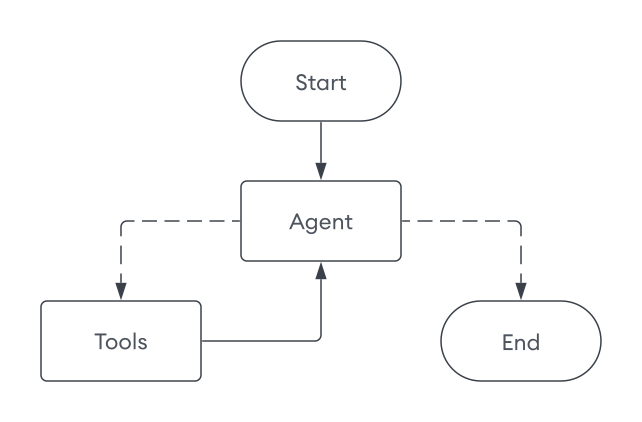
エージェントの実装は、いくつかのコンポーネントで構成されています。
LangGraphAgent: ワークフローをオーケストレーションするメインのエージェントクラスbuild_graph: LingGraph ワークフローを構築し、短期間のメモリ永続化のためにMongoDBSaverチェックポイントを構成しますagent_node: メッセージを処理し、ツールの使用を決定する主要な決定要素tools_node: リクエストされたツールを実行し、結果を返しますroute_tools: ワークフローの方向を決定する条件付きルーティング関数execute: ディスカッション スレッドを追跡するためのthread_idパラメータを受け入れるメインのエントリ点
from typing import Annotated, Dict, List from typing_extensions import TypedDict from langchain_core.prompts import ChatPromptTemplate, MessagesPlaceholder from langchain_core.messages import ToolMessage from langgraph.graph import StateGraph, START, END from langgraph.graph.message import add_messages from langgraph.checkpoint.mongodb import MongoDBSaver from config import llm, mongo_client from search_tools import SEARCH_TOOLS from memory_tools import MEMORY_TOOLS # Define the graph state class GraphState(TypedDict): messages: Annotated[list, add_messages] # Define the LangGraph agent class LangGraphAgent: def __init__(self): # Combine search tools with memory tools self.tools = SEARCH_TOOLS + MEMORY_TOOLS self.tools_by_name = {tool.name: tool for tool in self.tools} # Create prompt template self.prompt = ChatPromptTemplate.from_messages([ ( "system", "You are a helpful AI chatbot." " You are provided with tools to answer questions about movies." " Think step-by-step and use these tools to get the information required to answer the user query." " Do not re-run tools unless absolutely necessary." " If you are not able to get enough information using the tools, reply with I DON'T KNOW." " You have access to the following tools: {tool_names}." ), MessagesPlaceholder(variable_name="messages"), ]) # Provide the tool names to the prompt self.prompt = self.prompt.partial(tool_names=", ".join([tool.name for tool in self.tools])) # Prepare the LLM with tools bind_tools = llm.bind_tools(self.tools) self.llm_with_tools = self.prompt | bind_tools # Build the graph self.app = self._build_graph() def _build_graph(self): """Build and compile the LangGraph workflow.""" # Instantiate the graph graph = StateGraph(GraphState) # Add nodes graph.add_node("agent", self._agent_node) graph.add_node("tools", self._tools_node) # Add edges graph.add_edge(START, "agent") graph.add_edge("tools", "agent") # Add conditional edge graph.add_conditional_edges( "agent", self._route_tools, {"tools": "tools", END: END}, ) # Use the MongoDB checkpointer for short-term memory checkpointer = MongoDBSaver(mongo_client, db_name = "sample_mflix") return graph.compile(checkpointer=checkpointer) def _agent_node(self, state: GraphState) -> Dict[str, List]: """Agent node that processes messages and decides on tool usage.""" messages = state["messages"] result = self.llm_with_tools.invoke(messages) return {"messages": [result]} def _tools_node(self, state: GraphState) -> Dict[str, List]: """Tools node that executes the requested tools.""" result = [] messages = state["messages"] if not messages: return {"messages": result} last_message = messages[-1] if not hasattr(last_message, "tool_calls") or not last_message.tool_calls: return {"messages": result} tool_calls = last_message.tool_calls # Show which tools the agent chose to use tool_names = [tool_call["name"] for tool_call in tool_calls] print(f"🔧 Agent chose to use tool(s): {', '.join(tool_names)}") for tool_call in tool_calls: try: tool_name = tool_call["name"] tool_args = tool_call["args"] tool_id = tool_call["id"] print(f" → Executing {tool_name}") if tool_name not in self.tools_by_name: result.append(ToolMessage(content=f"Tool '{tool_name}' not found", tool_call_id=tool_id)) continue tool = self.tools_by_name[tool_name] observation = tool.invoke(tool_args) result.append(ToolMessage(content=str(observation), tool_call_id=tool_id)) except Exception as e: result.append(ToolMessage(content=f"Tool error: {str(e)}", tool_call_id=tool_id)) return {"messages": result} def _route_tools(self, state: GraphState): """ Uses a conditional_edge to route to the tools node if the last message has tool calls. Otherwise, route to the end. """ messages = state.get("messages", []) if len(messages) > 0: ai_message = messages[-1] else: raise ValueError(f"No messages found in input state to tool_edge: {state}") if hasattr(ai_message, "tool_calls") and len(ai_message.tool_calls) > 0: return "tools" return END def execute(self, user_input: str, thread_id: str) -> str: """Execute the graph with user input.""" input_data = {"messages": [("user", user_input)]} config = {"configurable": {"thread_id": thread_id}} outputs = list(self.app.stream(input_data, config)) # Get the final answer if outputs: final_output = outputs[-1] for _, value in final_output.items(): if "messages" in value and value["messages"]: return value["messages"][-1].content return "No response generated."
このグラフには、次の重要なコンポーネントが含まれます。
エージェントの実行
最後に、プロジェクトに「main.py」という名前のファイルを作成します。このファイルはエージェントを実行し、エージェントと交流できるようにします。
from agent import LangGraphAgent from config import mongo_client def main(): """LangGraph and MongoDB agent with tools and memory.""" # Initialize agent (indexes are created during config import) agent = LangGraphAgent() thread_id = input("Enter a session ID: ").strip() print("Ask me about movies! Type 'quit' to exit.") try: while True: user_query = input("\nYour question: ").strip() if user_query.lower() == 'quit': break # Get response from agent answer = agent.execute(user_query, thread_id) print(f"\nAnswer: {answer}") finally: mongo_client.close() if __name__ == "__main__": main()
プロジェクトを保存し、次のコマンドを実行します。エージェントを実行する際には以下に従います。
エージェントはベクトルストアを初期化し、インデックスがまだ存在しない場合はそれを作成します。
セッションIDを入力して、新しいセッションを開始することも、既存のセッションを続行することもできます。各セッションは保持され、前のセッションはいつでも再開できます。
映画に関する質問をする。エージェントは、ツールと以前のインタラクションに基づいて応答を生成します。
次の出力は、サンプルインタラクションを示しています。
python main.py
Creating vector search index... Vector search index created successfully! Creating search index... Search index created successfully! Enter a session ID: 123 Ask me about movies! Type 'quit' to exit. Your query: What are some movies that take place in the ocean? 🔧 Agent chose to use tool(s): plot_search → Executing plot_search Answer: Here are some movies that take place in the ocean: 1. **20,000 Leagues Under the Sea** - A marine biologist, his daughter, and a mysterious Captain Nemo explore the ocean aboard an incredible submarine. 2. **Deep Rising** - A group of armed hijackers board a luxury ocean liner in the South Pacific Ocean, only to fight man-eating, tentacled sea creatures. ... (truncated) Your query: What is the plot of the Titanic? 🔧 Agent chose to use tool(s): title_search → Executing title_search Answer: The plot of *Titanic* involves the romantic entanglements of two couples aboard the doomed ship's maiden voyage ... (truncated) Your query: What movies are like the movie I just mentioned? 🔧 Agent chose to use tool(s): plot_search → Executing plot_search Answer: Here are some movies similar to *Titanic*: 1. **The Poseidon Adventure** - A group of passengers struggles to survive when their ocean liner capsizes at sea. 2. **Pearl Harbor** - Focused on romance and friendship amidst the backdrop of a historical tragedy, following two best friends and their love lives during wartime. ... (truncated) Your query: I don't like sad movies. 🔧 Agent chose to use tool(s): save_memory → Executing save_memory Answer: Got it—I'll keep that in mind. Let me know if you'd like recommendations that focus more on uplifting or happy themes! (In different session) Enter a session ID: 456 Your query: Recommend me a movie based on what you know about me. 🔧 Agent chose to use tool(s): retrieve_memories → Executing retrieve_memories Answer: Based on what I know about you—you don't like sad movies—I'd recommend a fun, uplifting, or action-packed film. Would you be interested in a comedy, adventure, or family-friendly movie? Your query: Sure! 🔧 Agent chose to use tool(s): plot_search, plot_search, plot_search → Executing plot_search → Executing plot_search → Executing plot_search Answer: Here are some movie recommendations from various uplifting genres that suit your preferences: ### Comedy: 1. **Showtime** (2002): A spoof of buddy cop movies where two very different cops are forced to team up on a new reality-based TV cop show. It's packed with laughs and action! 2. **The Big Bus** (1976): A hilarious disaster film parody featuring a nuclear-powered bus going nonstop from New York to Denver, plagued by absurd disasters. ### Adventure: 1. **Journey to the Center of the Earth** (2008): A scientist, his nephew, and their mountain guide discover a fantastic and dangerous lost world at the earth's core. 2. **Jason and the Argonauts** (1963): One of the most legendary adventures in mythology, brought to life in this epic saga of good versus evil. ### Family-Friendly: 1. **The Incredibles** (2004): A family of undercover superheroes is forced into action to save the world while living in quiet suburban life. 2. **Mary Poppins** (1964): A magical nanny brings joy and transformation to a cold banker's unhappy family. 3. **Chitty Chitty Bang Bang** (1968): A whimsical adventure featuring an inventor, his magical car, and a rescue mission filled with fantasy.