Acompanhar e gerenciar os gastos com nuvem pode ser difícil em uma grande organização. Embora configurações de economia de custos ajudem você a gerenciar os gastos de forma proativa, o Atlas também fornece ferramentas para você visualizar e analisar os gastos. Você pode:
Classifique os recursos do Atlas com base nas necessidades de faturamento da sua organização.
Aproveite os dados de faturamento para visualizar e entender seus gastos com o Atlas .
Extraia dados de faturamento de forma programática para fazer integração com suas ferramentas FinOps para fins de alocação de custos e contabilidade em cada departamento e aplicativo.
Nesta página, saiba como usar as ferramentas integradas do Atlas e os dados de faturamento do Atlas para acompanhar seus gastos com a nuvem.
Apply Resource Tags
You can apply resource tags in Atlas for precise cost allocation by categorizing resources according to departments, projects, or cost centers. You can also group and analyze tagged resources in financial reports, providing a clear and organized view of how various teams or projects contribute to overall cloud spending. To learn more, see Resource Tags.
Acessar dados de faturamento programaticamente
The Atlas Administration API provides a RESTful interface that allows you to programmatically access your billing data for use with external tools and reports. Combine this feature with resource tags to easily categorize your Atlas spending.
You can retrieve all your pending invoices with the Return All Pending Invoices for One Organization API endpoint. The endpoints response body contains the results.lineItems.tags field, which reflect the tags you applied to your resources (such as organizations and clusters). You can then feed this line-item-level billing data into external FinOps tools and reports track your Atlas spending by environment, team, or other tag values.
Habilitar o faturamento entre organizações
O Atlas permite que você compartilhe uma assinatura de faturamento entre várias organizações e pague uma única fatura para todas elas. Ative o faturamento entre organizações para facilitar a visibilidade dos gastos do Atlas em todas as suas organizações.
After you configure a paying organization, you pay invoices for the paying organization that include a list of charges incurred for all linked organizations. To learn more, see Cross-Organization Billing.
After you enable cross-organization billing, you can view linked invoices if you have the Organization Billing Admin role or the Organization Owner role for the paying organization.
Revise sua visualização de custo mensal
Para visualizar seus dados de cobrança mensalmente, navegue até a página Cost Explorer. O Cost Explorer oferece uma visão detalhada do custo com a nuvem em formato de gráficos e tabelas, permitindo que os usuários analisem os custos por clusters, projetos ou equipes. Dados históricos de gastos e filtros personalizáveis ajudam a identificar tendências e ineficiências, possibilitando uma melhor tomada de decisões financeiras e otimização de recursos. Você pode visualizar seu uso nos últimos seis meses e acessar seus dados de cobrança dos últimos 18 meses. Se sua organização usar faturamento entre organizações, você poderá visualizar os dados de faturamento de todas as organizações vinculadas.
The Billing Cost Explorer filters and groups usage data by organization, project, cluster, and service. Each filter contains a Usage chart with stacked columns representing the total cost incurred each month. Underneath, there is a Usage By Month table that displays the billing data shown in the chart. To learn more, see Billing Cost Explorer.
Revise sua visualização de custo anual
Para visualizar seus dados de faturamento anual, navegue até a página Billing Overview. Esta página ajuda você a entender os custos incorridos pelo uso do Atlas pela sua organização por serviço, implementação e projeto. Cada categoria contém um gráfico Usage com colunas empilhadas representando o custo total gerado a cada mês. Para saber mais, consulte Gráfico de Uso acumulado no ano.
Revise a visualização de custos da fatura
Para ver seus dados de cobrança como uma fatura, clique na Invoice Date ou no Invoice Period que deseja ver. Esta página mostra os custos incorridos pelo uso do Atlas durante o período da fatura por meio dos gráficos Total Usage e By Deployment.
No gráfico Total Usage, você pode filtrar seu uso por serviço para visualizar as cobranças incorridas por um serviço Atlas específico. No gráfico By Deployment, você pode visualizar a proporção de uso gerada por cada um dos clusters em todos os seus projetos.
Para visualizar as cobranças de itens de linha, consulte Visualizar e pagar suas faturas anteriores.
Criar dashboards de cobrança
Você pode visualizar seus dados de faturamento em um painel de faturamento do MongoDB Charts para ajudá-lo a otimizar seus gastos com o Atlas . Os painéis de faturamento contêm gráficos pré-incorporados que o ajudam a monitorar seu uso do Atlas em uma organização em diferentes categorias e períodos de tempo, e o MongoDB Charts se integra ao Atlas para inserir dados de faturamento sem problemas.
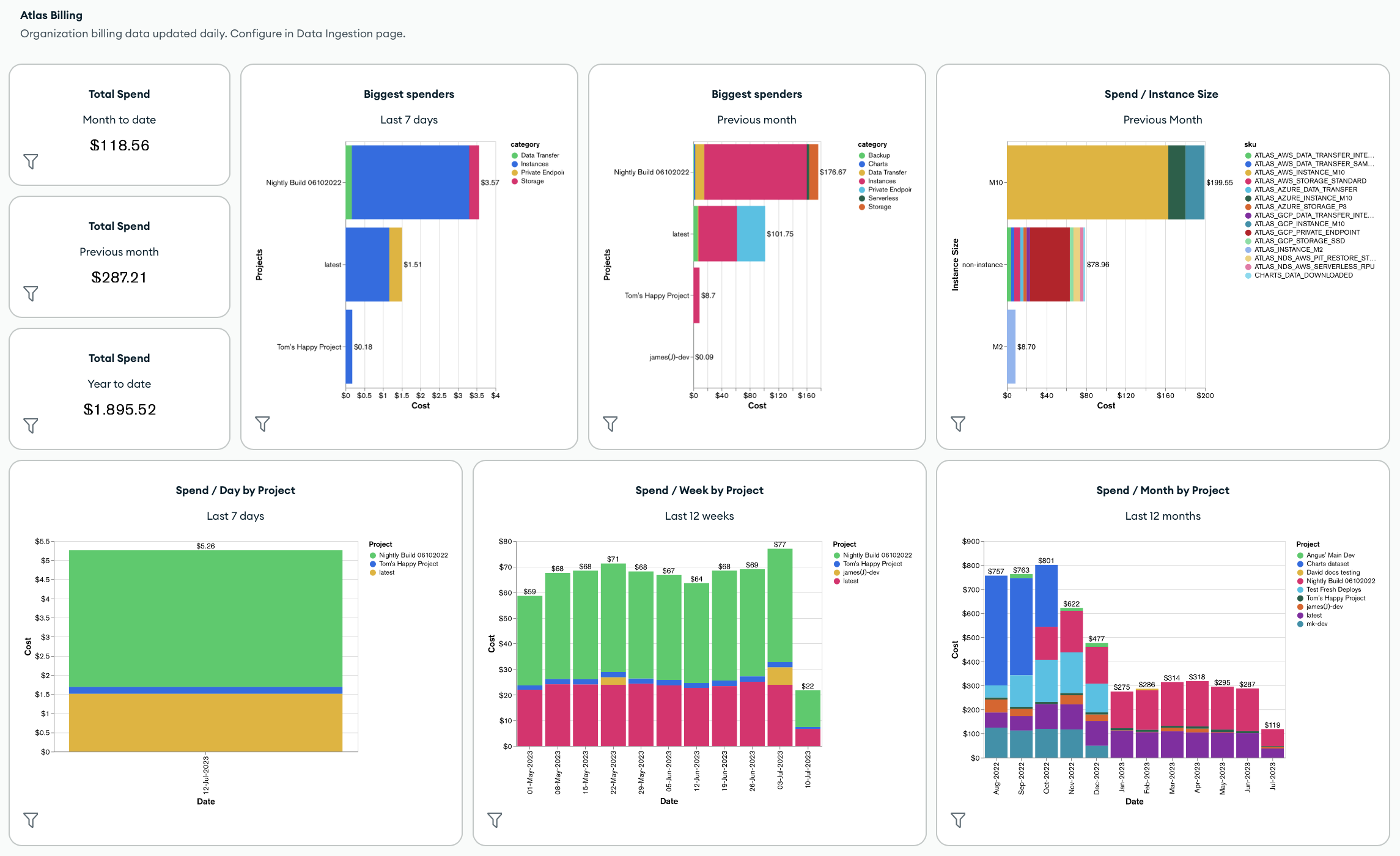
Por padrão, os dashboards de faturamento incluem as seguintes métricas e Atlas Charts:
Total de gastos em toda a organização
Maiores gastadores da organização
Gasta total por tamanho da instância, projeto, cluster, categoria de produto ou SKU
Custo total por categoria de produto
You can also customize your billing dashboard by applying dashboard filters and adding new charts, including any charts that use tags that you've applied to your billing data.
Para criar ou gerenciar um painel de faturamento, consulte Criar e gerenciar painéis de faturamento.
Exemplos de automação: Faturamento Atlas
Os exemplos seguintes mostram como recuperar e baixar dados de faturamento utilizando FERRAMENTAS Atlas para automação.
Antes de autenticar e executar os scripts de exemplo usando o Atlas Go SDK, você deve:
Criar uma conta de serviço do Atlas. Armazene seu ID de cliente e segredo como variáveis de ambiente executando o seguinte comando no terminal:
export MONGODB_ATLAS_SERVICE_ACCOUNT_ID="<insert your client ID here>" export MONGODB_ATLAS_SERVICE_ACCOUNT_SECRET="<insert your client secret here>" Defina as seguintes variáveis de configuração no seu projeto Go:
configs/config.json{ "MONGODB_ATLAS_BASE_URL": "https://cloud.mongodb.com", "ATLAS_ORG_ID": "32b6e34b3d91647abb20e7b8", "ATLAS_PROJECT_ID": "67212db237c5766221eb6ad9", "ATLAS_CLUSTER_NAME": "myCluster", "ATLAS_PROCESS_ID": "myCluster-shard-00-00.ajlj3.mongodb.net:27017" }
Para obter mais informações sobre como autenticar e criar um cliente, consulte o exemplo de projeto completo do Atlas SDK for Go no Github.
Obtenha dados históricos de faturamento
O script de exemplo a seguir demonstra como recuperar dados históricos de faturamento de uma organização e, em seguida, baixar as faturas em um arquivo CSV ou JSON para análise posterior.
// See entire project at https://github.com/mongodb/atlas-architecture-go-sdk package main import ( "context" "fmt" "log" "time" "atlas-sdk-examples/internal/auth" "atlas-sdk-examples/internal/billing" "atlas-sdk-examples/internal/config" "atlas-sdk-examples/internal/data/export" "atlas-sdk-examples/internal/fileutils" "atlas-sdk-examples/internal/orgutils" "github.com/joho/godotenv" "go.mongodb.org/atlas-sdk/v20250219001/admin" ) func main() { envFile := ".env.production" if err := godotenv.Load(envFile); err != nil { log.Printf("Warning: could not load %s file: %v", envFile, err) } secrets, cfg, err := config.LoadAllFromEnv() if err != nil { log.Fatalf("Failed to load configuration %v", err) } ctx := context.Background() client, err := auth.NewClient(ctx, cfg, secrets) if err != nil { log.Fatalf("Failed to initialize authentication client: %v", err) } p := &admin.ListInvoicesApiParams{ OrgId: cfg.OrgID, } fmt.Printf("Fetching historical invoices for organization: %s\n", p.OrgId) // Fetch invoices from the previous six months with the provided options invoices, err := billing.ListInvoicesForOrg(ctx, client.InvoicesApi, p, billing.WithViewLinkedInvoices(true), billing.WithIncludeCount(true), billing.WithDateRange(time.Now().AddDate(0, -6, 0), time.Now())) if err != nil { log.Fatalf("Failed to retrieve invoices: %v", err) } if invoices.GetTotalCount() > 0 { fmt.Printf("Total count of invoices: %d\n", invoices.GetTotalCount()) } else { fmt.Println("No invoices found for the specified date range") return } // Get organization name for more user-friendly filenames orgName, err := orgutils.GetOrganizationName(ctx, client.OrganizationsApi, p.OrgId) if err != nil { // Non-critical error, continue with orgID as name fmt.Printf("Warning: %v\n", err) orgName = p.OrgId } sanitizedOrgName := orgutils.SanitizeForFilename(orgName) // Export invoice data to be used in other systems or for reporting outDir := "invoices" prefix := fmt.Sprintf("historical_%s", sanitizedOrgName) err = exportInvoicesToJSON(invoices, outDir, prefix) if err != nil { log.Fatalf("Failed to export invoices to JSON: %v", err) } err = exportInvoicesToCSV(invoices, outDir, prefix) if err != nil { log.Fatalf("Failed to export invoices to CSV: %v", err) } } func exportInvoicesToJSON(invoices *admin.PaginatedApiInvoiceMetadata, outDir, prefix string) error { jsonPath, err := fileutils.GenerateOutputPath(outDir, prefix, "json") if err != nil { return fmt.Errorf("failed to generate JSON output path: %v", err) } if err := export.ToJSON(invoices.GetResults(), jsonPath); err != nil { return fmt.Errorf("failed to write JSON file: %v", err) } fmt.Printf("Exported invoice data to %s\n", jsonPath) return nil } func exportInvoicesToCSV(invoices *admin.PaginatedApiInvoiceMetadata, outDir, prefix string) error { csvPath, err := fileutils.GenerateOutputPath(outDir, prefix, "csv") if err != nil { return fmt.Errorf("failed to generate CSV output path: %v", err) } // Set the headers and mapped rows for the CSV export headers := []string{"InvoiceID", "Status", "Created", "AmountBilled"} err = export.ToCSVWithMapper(invoices.GetResults(), csvPath, headers, func(invoice admin.BillingInvoiceMetadata) []string { return []string{ invoice.GetId(), invoice.GetStatusName(), invoice.GetCreated().Format(time.RFC3339), fmt.Sprintf("%.2f", float64(invoice.GetAmountBilledCents())/100.0), } }) if err != nil { return fmt.Errorf("failed to write CSV file: %v", err) } fmt.Printf("Exported invoice data to %s\n", csvPath) return nil }
Obter faturas pendentes
O script de exemplo a seguir demonstra como recuperar faturas pendentes de uma organização e, em seguida, baixar as faturas em um arquivo CSV ou JSON para análise posterior.
// See entire project at https://github.com/mongodb/atlas-architecture-go-sdk package main import ( "context" "fmt" "log" "atlas-sdk-examples/internal/auth" "atlas-sdk-examples/internal/billing" "atlas-sdk-examples/internal/config" "atlas-sdk-examples/internal/data/export" "atlas-sdk-examples/internal/fileutils" "atlas-sdk-examples/internal/orgutils" "github.com/joho/godotenv" "go.mongodb.org/atlas-sdk/v20250219001/admin" ) func main() { envFile := ".env.production" if err := godotenv.Load(envFile); err != nil { log.Printf("Warning: could not load %s file: %v", envFile, err) } secrets, cfg, err := config.LoadAllFromEnv() if err != nil { log.Fatalf("Failed to load configuration %v", err) } ctx := context.Background() client, err := auth.NewClient(ctx, cfg, secrets) if err != nil { log.Fatalf("Failed to initialize authentication client: %v", err) } p := &admin.ListInvoicesApiParams{ OrgId: cfg.OrgID, } fmt.Printf("Fetching pending invoices for organization: %s\n", p.OrgId) details, err := billing.CollectLineItemBillingData(ctx, client.InvoicesApi, client.OrganizationsApi, p.OrgId, nil) if err != nil { log.Fatalf("Failed to retrieve pending invoices for %s: %v", p.OrgId, err) } if len(details) == 0 { fmt.Printf("No pending invoices found for organization: %s\n", p.OrgId) return } fmt.Printf("Found %d line items in pending invoices\n", len(details)) // Use organization name from the returned details for more user-friendly filenames orgName := details[0].Org.Name sanitizedOrgName := orgutils.SanitizeForFilename(orgName) // Export invoice data to be used in other systems or for reporting outDir := "invoices" prefix := fmt.Sprintf("pending_%s", sanitizedOrgName) err = exportInvoicesToJSON(details, outDir, prefix) if err != nil { log.Fatalf("Failed to export invoices to JSON: %v", err) } err = exportInvoicesToCSV(details, outDir, prefix) if err != nil { log.Fatalf("Failed to export invoices to CSV: %v", err) } } func exportInvoicesToJSON(details []billing.Detail, outDir, prefix string) error { jsonPath, err := fileutils.GenerateOutputPath(outDir, prefix, "json") if err != nil { return fmt.Errorf("failed to generate JSON output path: %v", err) } if err := export.ToJSON(details, jsonPath); err != nil { return fmt.Errorf("failed to write JSON file: %v", err) } fmt.Printf("Exported billing data to %s\n", jsonPath) return nil } func exportInvoicesToCSV(details []billing.Detail, outDir, prefix string) error { csvPath, err := fileutils.GenerateOutputPath(outDir, prefix, "csv") if err != nil { return fmt.Errorf("failed to generate CSV output path: %v", err) } // Set the headers and mapped rows for the CSV export headers := []string{"Organization", "OrgID", "Project", "ProjectID", "Cluster", "SKU", "Cost", "Date", "Provider", "Instance", "Category"} err = export.ToCSVWithMapper(details, csvPath, headers, func(item billing.Detail) []string { return []string{ item.Org.Name, item.Org.ID, item.Project.Name, item.Project.ID, item.Cluster, item.SKU, fmt.Sprintf("%.2f", item.Cost), item.Date.Format("2006-01-02"), item.Provider, item.Instance, item.Category, } }) if err != nil { return fmt.Errorf("failed to write CSV file: %v", err) } fmt.Printf("Exported billing data to %s\n", csvPath) return nil }
Obter organizações vinculadas
O script de exemplo a seguir demonstra como recuperar uma lista de organizações vinculadas e seus IDs da organização de cobrança .
// See entire project at https://github.com/mongodb/atlas-architecture-go-sdk package main import ( "context" "fmt" "log" "atlas-sdk-examples/internal/auth" "atlas-sdk-examples/internal/billing" "atlas-sdk-examples/internal/config" "github.com/joho/godotenv" "go.mongodb.org/atlas-sdk/v20250219001/admin" ) func main() { envFile := ".env.production" if err := godotenv.Load(envFile); err != nil { log.Printf("Warning: could not load %s file: %v", envFile, err) } secrets, cfg, err := config.LoadAllFromEnv() if err != nil { log.Fatalf("Failed to load configuration %v", err) } ctx := context.Background() client, err := auth.NewClient(ctx, cfg, secrets) if err != nil { log.Fatalf("Failed to initialize authentication client: %v", err) } p := &admin.ListInvoicesApiParams{ OrgId: cfg.OrgID, } fmt.Printf("Fetching linked organizations for billing organization: %s\n", p.OrgId) invoices, err := billing.GetCrossOrgBilling(ctx, client.InvoicesApi, p) if err != nil { log.Fatalf("Failed to retrieve cross-organization billing data for %s: %v", p.OrgId, err) } displayLinkedOrganizations(invoices, p.OrgId) } func displayLinkedOrganizations(invoices map[string][]admin.BillingInvoiceMetadata, primaryOrgID string) { var linkedOrgs []string for orgID := range invoices { if orgID != primaryOrgID { linkedOrgs = append(linkedOrgs, orgID) } } if len(linkedOrgs) == 0 { fmt.Println("No linked organizations found for the billing organization") return } fmt.Printf("Found %d linked organizations:\n", len(linkedOrgs)) for i, orgID := range linkedOrgs { fmt.Printf(" %d. Organization ID: %s\n", i+1, orgID) } }