大規模な組織では、クラウド費の追跡と管理が困難になる場合があります。 のコスト節約構成は支払いを積極的に管理するのに役立ちますが、Atlas は 支出を表示および分析する ためのツールも提供します。ここでは、次の作業が可能です。
組織の請求ニーズに基づいて Atlas リソースを分類。
請求 データを活用して、Atlas の支出を視覚化して理解します。
請求データをプログラムで取得し、FinOps ツールと統合して、各部門およびアプリケーション内でのチャージバックや会計処理を行うために使用。
このページでは、組み込みの Atlas ツールと Atlas 請求データを使用してクラウド費を追跡する方法を学びます。
Apply Resource Tags
Atlas でリソースタグを適用することにより、部門、プロジェクト、またはコストセンターに応じてリソースを分類し、正確なコスト配分を行うことができます。また、財務レポートでタグ付けされたリソースをグループ化して分析することで、さまざまなチームやプロジェクトがクラウド全体の支出をどのように構成しているかを明確かつ整理された形で表示できます。詳細については、 リソースタグをご覧ください。
プログラムによる請求データへのアクセス
Atlas Administration API は、外部ツールやレポートで使用するための請求データに、プログラムでアクセスできる RESTful インターフェースを提供します。この機能をリソースタグと組み合わせることで、Atlas の支出を簡単に分類できます。
1 つの組織のすべての保留中の請求書を返すAPI ポイントを使用して、すべての保留中の請求書を検索できます。エンドポイント レスポンスの本文には、リソース(組織やクラスターなど)に適用したタグを反映する results.lineItems.tagsフィールドが含まれています。次に、この明細項目レベルの請求データを外部の FindOps ツールにフィードし、環境、チーム、またはその他のタグ値ごとに Atlas の支出を追跡できます。
組織間請求を有効化
Atlas を使用すると、多くの組織間で請求サブスクライブを共有し、それらに対して単一の請求書を支払うことができます。組織横断請求を有効にすると、すべての組織の Atlas の支出を簡単に確認できます。
支払い側組織を設定 したら、リンクされたすべての組織で発生した料金のリストを含む支払い側組織の請求書を支払います。詳しくは、「 組織横断請求 」を参照してください。
組織横断請求を有効にすると、支払い組織の Organization Billing Admin ロールまたは Organization Owner ロールを持つ場合、リンクされた請求書を表示できます。
月額コスト可視化の確認
請求データを毎月表示するには、Cost Explorer ページに移動します。Cost Explorer では、クラウド支出をチャートや表形式で粒度のあるビューが提供され、ユーザーはクラスター、プロジェクト、またはチームごとのコストを分析できます。過去の支出データとカスタマイズ可能な フィルター は、傾向や非効率を識別し、財務上の決定とリソースの最適化を改善するのに役立ちます。過去 6 か月間の使用量を表示したり、過去 18 か月までの請求データにアクセスしたりできます。組織横断請求を使用している組織では、リンクされているすべての組織の請求データを表示できます。
Billing Cost Explorer は、使用状況データを組織、プロジェクト、 クラスター、およびサービスごとにフィルタリングしてグループ化します。各フィルターには、各月に発生した合計コストを表す積み上げ縦棒グラフを含む Usageチャートが含まれています。その下には、チャートに表示されている請求データを表示する Usage By Month テーブルがあります。詳しくは、「 Billing Cost Explorer 」を参照してください。
年間コスト可視化の確認
請求データを年間で表示するには、Billing Overview ページに移動します。このページは、組織の Atlas の使用に関連するコストをサービス、配置、プロジェクトごとに理解するのに役立ちます。各カテゴリには、各月に発生した合計コストを表す積み上げ縦棒グラフを含む Usageチャートが含まれています。詳細については、「 年初来の使用状況チャート 」を参照してください。
請求書コスト可視化の確認
請求データを請求書として表示するには、表示したい Invoice Date または Invoice Period をクリックします。このページでは、Total Usage チャートと By Deployment チャートを通じて請求期間中に Atlas の使用によって発生するコストが表示されます。
Total Usageチャートでは、使用状況をサービス別にフィルターして、特定の Atlas サービスによって発生した料金を表示できます。By Deploymentチャートでは、すべてのプロジェクトにわたる各クラスターで発生した使用量の割合を表示できます。
明細項目請求額を確認するには、「 過去の請求書の表示と支払い 」を参照してください。
請求ダッシュボードの作成
MongoDB Charts 請求ダッシュボードで請求データを視覚化すると、Atlas の支出を最適化できます。請求ダッシュボードには、事前に構築されたチャートが含まれており、組織内での Atlas の使用状況をさまざまなカテゴリや期間にわたって監視することができます。MongoDB Charts は Atlas と統合して請求データをシームレスに取り込みます。

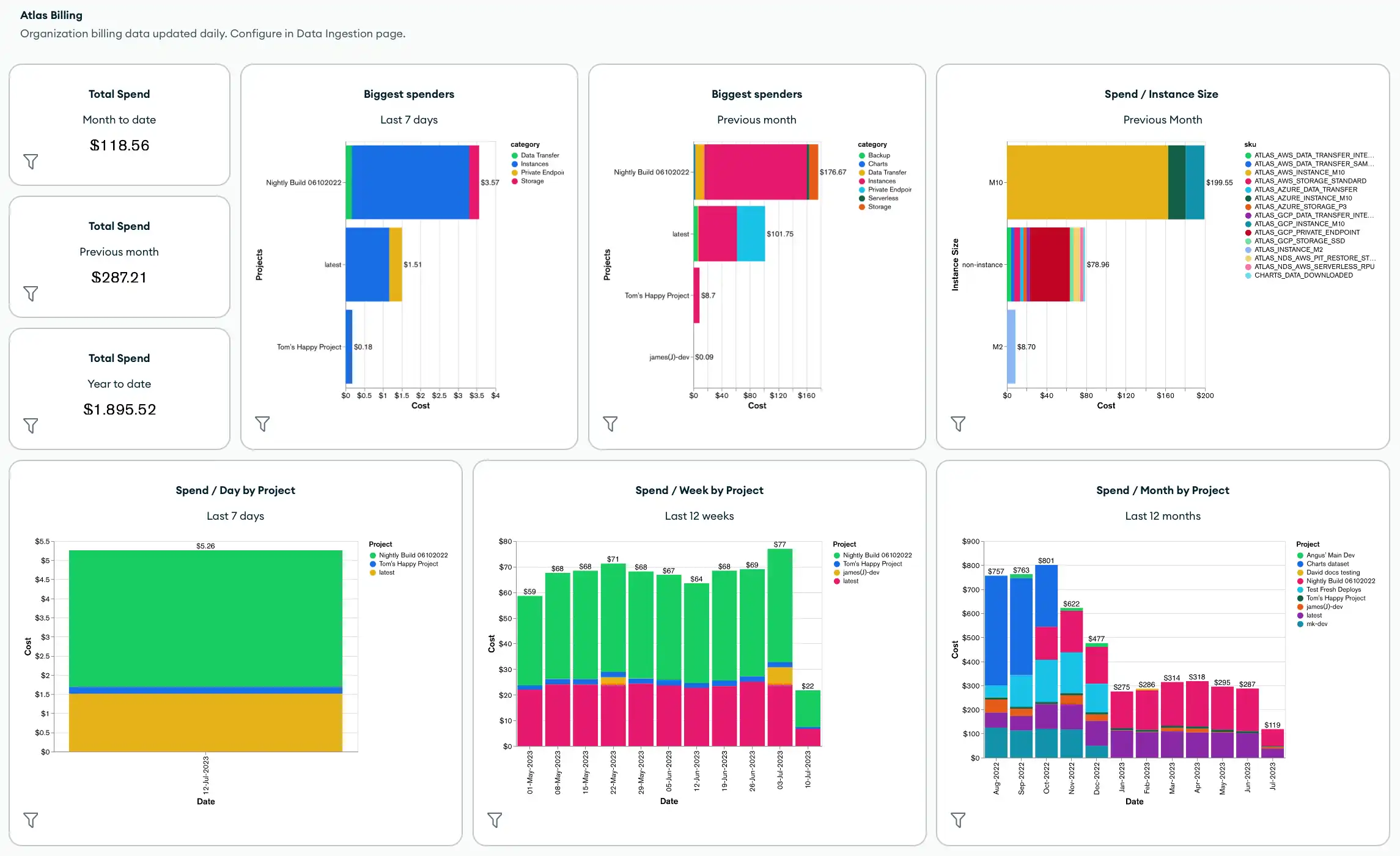
デフォルトでは、請求ダッシュボードには以下のメトリクスとチャートが含まれます。
組織全体の総売上額
組織内で最大の支出
インスタンス サイズ、プロジェクト、クラスター、製品カテゴリ、SKU 別の合計費用
製品カテゴリ別の合計コスト
また、ダッシュボード フィルターを適用し、請求データに適用したタグを使用するチャートを含め、新しいチャートを追加して、請求ダッシュボードをカスタマイズすることもできます。
請求ダッシュボードを作成または管理するには、「請求ダッシュボードの作成と管理」を参照してください。
オートメーションの例: Atlas の請求
次の例は、オートメーション用の Atlas ツール を使用して請求データを検索およびダウンロードする方法を示しています。
Atlas Go SDK を使用して例のスクリプトを認証・実行する前に、次の手順を実行する必要があります。
Atlas サービス アカウントを作成します。ターミナルで次のコマンドを実行して、クライアント ID とシークレットを環境変数として保存します。
export MONGODB_ATLAS_SERVICE_ACCOUNT_ID="<insert your client ID here>" export MONGODB_ATLAS_SERVICE_ACCOUNT_SECRET="<insert your client secret here>" Go プロジェクトで次の構成変数を設定します。
configs/config.json{ "MONGODB_ATLAS_BASE_URL": "https://cloud.mongodb.com", "ATLAS_ORG_ID": "32b6e34b3d91647abb20e7b8", "ATLAS_PROJECT_ID": "67212db237c5766221eb6ad9", "ATLAS_CLUSTER_NAME": "myCluster", "ATLAS_PROCESS_ID": "myCluster-shard-00-00.ajlj3.mongodb.net:27017" }
クライアント の認証と作成の詳細については、 Githubの完全な Atlas SDK for Go例プロジェクトを参照してください。
過去の請求データを取得する
次の例スクリプトは、組織の履歴請求データを取得し、さらに分析するために請求書を CSV またはJSONファイルにダウンロードする方法を示しています。
// See entire project at https://github.com/mongodb/atlas-architecture-go-sdk package main import ( "context" "fmt" "log" "time" "atlas-sdk-examples/internal/auth" "atlas-sdk-examples/internal/billing" "atlas-sdk-examples/internal/config" "atlas-sdk-examples/internal/data/export" "atlas-sdk-examples/internal/fileutils" "atlas-sdk-examples/internal/orgutils" "github.com/joho/godotenv" "go.mongodb.org/atlas-sdk/v20250219001/admin" ) func main() { envFile := ".env.production" if err := godotenv.Load(envFile); err != nil { log.Printf("Warning: could not load %s file: %v", envFile, err) } secrets, cfg, err := config.LoadAllFromEnv() if err != nil { log.Fatalf("Failed to load configuration %v", err) } ctx := context.Background() client, err := auth.NewClient(ctx, cfg, secrets) if err != nil { log.Fatalf("Failed to initialize authentication client: %v", err) } p := &admin.ListInvoicesApiParams{ OrgId: cfg.OrgID, } fmt.Printf("Fetching historical invoices for organization: %s\n", p.OrgId) // Fetch invoices from the previous six months with the provided options invoices, err := billing.ListInvoicesForOrg(ctx, client.InvoicesApi, p, billing.WithViewLinkedInvoices(true), billing.WithIncludeCount(true), billing.WithDateRange(time.Now().AddDate(0, -6, 0), time.Now())) if err != nil { log.Fatalf("Failed to retrieve invoices: %v", err) } if invoices.GetTotalCount() > 0 { fmt.Printf("Total count of invoices: %d\n", invoices.GetTotalCount()) } else { fmt.Println("No invoices found for the specified date range") return } // Get organization name for more user-friendly filenames orgName, err := orgutils.GetOrganizationName(ctx, client.OrganizationsApi, p.OrgId) if err != nil { // Non-critical error, continue with orgID as name fmt.Printf("Warning: %v\n", err) orgName = p.OrgId } sanitizedOrgName := orgutils.SanitizeForFilename(orgName) // Export invoice data to be used in other systems or for reporting outDir := "invoices" prefix := fmt.Sprintf("historical_%s", sanitizedOrgName) err = exportInvoicesToJSON(invoices, outDir, prefix) if err != nil { log.Fatalf("Failed to export invoices to JSON: %v", err) } err = exportInvoicesToCSV(invoices, outDir, prefix) if err != nil { log.Fatalf("Failed to export invoices to CSV: %v", err) } } func exportInvoicesToJSON(invoices *admin.PaginatedApiInvoiceMetadata, outDir, prefix string) error { jsonPath, err := fileutils.GenerateOutputPath(outDir, prefix, "json") if err != nil { return fmt.Errorf("failed to generate JSON output path: %v", err) } if err := export.ToJSON(invoices.GetResults(), jsonPath); err != nil { return fmt.Errorf("failed to write JSON file: %v", err) } fmt.Printf("Exported invoice data to %s\n", jsonPath) return nil } func exportInvoicesToCSV(invoices *admin.PaginatedApiInvoiceMetadata, outDir, prefix string) error { csvPath, err := fileutils.GenerateOutputPath(outDir, prefix, "csv") if err != nil { return fmt.Errorf("failed to generate CSV output path: %v", err) } // Set the headers and mapped rows for the CSV export headers := []string{"InvoiceID", "Status", "Created", "AmountBilled"} err = export.ToCSVWithMapper(invoices.GetResults(), csvPath, headers, func(invoice admin.BillingInvoiceMetadata) []string { return []string{ invoice.GetId(), invoice.GetStatusName(), invoice.GetCreated().Format(time.RFC3339), fmt.Sprintf("%.2f", float64(invoice.GetAmountBilledCents())/100.0), } }) if err != nil { return fmt.Errorf("failed to write CSV file: %v", err) } fmt.Printf("Exported invoice data to %s\n", csvPath) return nil }
保留中の請求書を取得する
次の例スクリプトは、組織の保留中の請求書を取得し、さらに分析するために請求書を CSV またはJSONファイルにダウンロードする方法を示しています。
// See entire project at https://github.com/mongodb/atlas-architecture-go-sdk package main import ( "context" "fmt" "log" "atlas-sdk-examples/internal/auth" "atlas-sdk-examples/internal/billing" "atlas-sdk-examples/internal/config" "atlas-sdk-examples/internal/data/export" "atlas-sdk-examples/internal/fileutils" "atlas-sdk-examples/internal/orgutils" "github.com/joho/godotenv" "go.mongodb.org/atlas-sdk/v20250219001/admin" ) func main() { envFile := ".env.production" if err := godotenv.Load(envFile); err != nil { log.Printf("Warning: could not load %s file: %v", envFile, err) } secrets, cfg, err := config.LoadAllFromEnv() if err != nil { log.Fatalf("Failed to load configuration %v", err) } ctx := context.Background() client, err := auth.NewClient(ctx, cfg, secrets) if err != nil { log.Fatalf("Failed to initialize authentication client: %v", err) } p := &admin.ListInvoicesApiParams{ OrgId: cfg.OrgID, } fmt.Printf("Fetching pending invoices for organization: %s\n", p.OrgId) details, err := billing.CollectLineItemBillingData(ctx, client.InvoicesApi, client.OrganizationsApi, p.OrgId, nil) if err != nil { log.Fatalf("Failed to retrieve pending invoices for %s: %v", p.OrgId, err) } if len(details) == 0 { fmt.Printf("No pending invoices found for organization: %s\n", p.OrgId) return } fmt.Printf("Found %d line items in pending invoices\n", len(details)) // Use organization name from the returned details for more user-friendly filenames orgName := details[0].Org.Name sanitizedOrgName := orgutils.SanitizeForFilename(orgName) // Export invoice data to be used in other systems or for reporting outDir := "invoices" prefix := fmt.Sprintf("pending_%s", sanitizedOrgName) err = exportInvoicesToJSON(details, outDir, prefix) if err != nil { log.Fatalf("Failed to export invoices to JSON: %v", err) } err = exportInvoicesToCSV(details, outDir, prefix) if err != nil { log.Fatalf("Failed to export invoices to CSV: %v", err) } } func exportInvoicesToJSON(details []billing.Detail, outDir, prefix string) error { jsonPath, err := fileutils.GenerateOutputPath(outDir, prefix, "json") if err != nil { return fmt.Errorf("failed to generate JSON output path: %v", err) } if err := export.ToJSON(details, jsonPath); err != nil { return fmt.Errorf("failed to write JSON file: %v", err) } fmt.Printf("Exported billing data to %s\n", jsonPath) return nil } func exportInvoicesToCSV(details []billing.Detail, outDir, prefix string) error { csvPath, err := fileutils.GenerateOutputPath(outDir, prefix, "csv") if err != nil { return fmt.Errorf("failed to generate CSV output path: %v", err) } // Set the headers and mapped rows for the CSV export headers := []string{"Organization", "OrgID", "Project", "ProjectID", "Cluster", "SKU", "Cost", "Date", "Provider", "Instance", "Category"} err = export.ToCSVWithMapper(details, csvPath, headers, func(item billing.Detail) []string { return []string{ item.Org.Name, item.Org.ID, item.Project.Name, item.Project.ID, item.Cluster, item.SKU, fmt.Sprintf("%.2f", item.Cost), item.Date.Format("2006-01-02"), item.Provider, item.Instance, item.Category, } }) if err != nil { return fmt.Errorf("failed to write CSV file: %v", err) } fmt.Printf("Exported billing data to %s\n", csvPath) return nil }
リンクされた組織の取得
次の例スクリプトは、請求組織からリンクされた組織とその ID のリストを取得する方法を示しています。
// See entire project at https://github.com/mongodb/atlas-architecture-go-sdk package main import ( "context" "fmt" "log" "atlas-sdk-examples/internal/auth" "atlas-sdk-examples/internal/billing" "atlas-sdk-examples/internal/config" "github.com/joho/godotenv" "go.mongodb.org/atlas-sdk/v20250219001/admin" ) func main() { envFile := ".env.production" if err := godotenv.Load(envFile); err != nil { log.Printf("Warning: could not load %s file: %v", envFile, err) } secrets, cfg, err := config.LoadAllFromEnv() if err != nil { log.Fatalf("Failed to load configuration %v", err) } ctx := context.Background() client, err := auth.NewClient(ctx, cfg, secrets) if err != nil { log.Fatalf("Failed to initialize authentication client: %v", err) } p := &admin.ListInvoicesApiParams{ OrgId: cfg.OrgID, } fmt.Printf("Fetching linked organizations for billing organization: %s\n", p.OrgId) invoices, err := billing.GetCrossOrgBilling(ctx, client.InvoicesApi, p) if err != nil { log.Fatalf("Failed to retrieve cross-organization billing data for %s: %v", p.OrgId, err) } displayLinkedOrganizations(invoices, p.OrgId) } func displayLinkedOrganizations(invoices map[string][]admin.BillingInvoiceMetadata, primaryOrgID string) { var linkedOrgs []string for orgID := range invoices { if orgID != primaryOrgID { linkedOrgs = append(linkedOrgs, orgID) } } if len(linkedOrgs) == 0 { fmt.Println("No linked organizations found for the billing organization") return } fmt.Printf("Found %d linked organizations:\n", len(linkedOrgs)) for i, orgID := range linkedOrgs { fmt.Printf(" %d. Organization ID: %s\n", i+1, orgID) } }