대규모 조직 에서는 cloud 지출을 추적하고 관리하는 것이 어려울 수 있습니다. 비용 절감 구성 은 지출을 사전에 관리 도움이 되지만, Atlas 지출을 보고 분석 도구도 제공합니다. 다음을 수행할 수 있습니다.
조직의 청구 요구사항에 따라 Atlas 리소스를 분류합니다.
청구 데이터를 활용하여 Atlas 지출을 시각화하고 이해하세요.
각 부서 및 애플리케이션 내에서 비용 청구 및 회계 목적으로 FinOps 도구와 통합하기 위해 프로그램 방식으로 청구 데이터를 가져옵니다.
이 페이지에서는 내장 Atlas 도구와 Atlas 청구 데이터를 사용하여 cloud 지출을 추적 방법을 학습 .
Apply Resource Tags
Atlas에서 리소스 태그를 적용하여 부서, 프로젝트 또는 비용 센터에 따라 리소스를 분류함으로써 정확한 비용 할당이 가능합니다. 또한 재무 보고서에서 태그가 지정된 리소스를 그룹화하고 분석하여 다양한 팀이나 프로젝트가 전체 클라우드 지출에 기여하는 방식에 대한 명확하고 체계적인 보기를 제공할 수 있습니다. 자세한 내용은 리소스 태그를 참조하세요.
프로그래밍 방식으로 청구 데이터에 액세스
Atlas 관리 API는 외부 도구 및 보고서와 함께 사용할 수 있도록 청구 데이터를 프로그래밍 방식으로 액세스할 수 있는 RESTful 인터페이스를 제공합니다. 이 기능을 리소스 태그와 결합하여 Atlas 지출을 쉽게 분류할 수 있습니다.
하나의 조직에 대해 보류 중인 모든 청구서 반환 API 엔드포인트를 사용하여 보류 중인 모든 청구서를 조회 할 수 있습니다. 엔드포인트 응답 본문에는 리소스(예: 조직 및 클러스터)에 적용한 태그를 반영하는 results.lineItems.tags 필드 포함되어 있습니다. 그런 다음 이 항목 수준의 청구 데이터를 외부 재무 운영 도구에 입력하면 보고서에서 환경, 팀 또는 기타 태그를 지정하다 값별로 Atlas 지출을 추적 수 있습니다.
조직 간 청구 기능 활성화
Atlas 사용하면 여러 조직에서 청구 구독 주식 하고 해당 조직에 대한 단일 청구서를 지불할 수 있습니다. 조직 간 청구를 활성화하여 모든 조직의 Atlas 지출을 쉽게 파악할 수 있습니다.
지불 조직 구성한 후에는 연결된 모든 조직에서 발생한 요금 목록이 포함된 지불 조직 의 청구서를 지불하게 됩니다. 자세한 학습 은 조직 간 청구를 참조하세요.
조직 간 청구를 활성화 후 지불 조직에 대해 Organization Billing Admin 역할 또는 Organization Owner 역할 있는 경우 연결된 청구서를 볼 수 있습니다.
월별 비용 시각화 검토
월별 청구 데이터를 보려면 Cost Explorer 페이지로 이동하세요. Cost Explorer는 cloud 지출에 대한 세분화된 보기를 차트 와 표 형식으로 제공하므로 사용자가 클러스터, 프로젝트 또는 팀별로 비용을 분석 할 수 있습니다. 과거 지출 데이터와 사용자 지정 가능한 필터를 통해 추세와 비효율성을 식별하여 더 나은 재무 의사 결정과 리소스 최적화를 수행할 수 있습니다. 지난 6개월 동안의 사용량을 확인하고 지난 18 개월까지의 청구 데이터에 액세스 수 있습니다. 조직 조직 간 청구를 사용하는 경우 연결된 모든 조직의 청구 데이터를 볼 수 있습니다.
청구 비용 탐색기는 조직, 프로젝트, 클러스터 및 서비스별로 사용량 데이터를 필터링하고 그룹화합니다. 각 필터하다 에는 매월 발생한 총 비용 나타내는 누적 열이 있는 Usage 차트 포함되어 있습니다. 그 아래에는 차트 에 표시된 청구 데이터를 표시하는 Usage By Month 테이블이 있습니다. 자세히 학습 청구 비용 탐색기를 참조하세요.
연간 비용 시각화 검토
연간 청구 데이터를 보려면 Billing Overview 페이지로 이동하세요. 이 페이지에서는 서비스, 배포서버, 프로젝트 별로 조직의 Atlas 사용으로 인해 발생한 비용을 이해하는 데 도움이 됩니다. 각 범주에는 매월 발생한 총 비용 나타내는 누적 열이 있는 Usage 차트 포함되어 있습니다. 자세한 내용은 연도별 사용량 차트를 참조하세요.
청구서 비용 시각화 검토
청구 데이터를 청구서로 보려면 확인하려는 Invoice Date 또는 Invoice Period를 클릭하세요. 이 페이지는 Total Usage 및 By Deployment 차트를 통해 청구 기간 동안 Atlas 사용으로 발생한 비용을 보여줍니다.
Total Usage 차트 의 경우 서비스별로 사용량을 필터하다 특정 Atlas 서비스에서 발생한 요금을 볼 수 있습니다. By Deployment 차트 의 경우 모든 프로젝트의 각 클러스터에서 발생한 사용량의 비율을 볼 수 있습니다.
품목별 요금을 보려면 과거 청구서 조회 및 결제를 참조하세요.
청구 대시보드 만들기
MongoDB Charts 청구 대시 대시보드 에서 청구 데이터를 시각화하여 Atlas 지출을 최적화할 수 있습니다. 청구 대시보드에는 다양한 카테고리와 기간에 걸쳐 조직 의 Atlas 사용량을 모니터 도움이 되는 사전 빌드된 차트가 포함되어 있으며, MongoDB Charts Atlas 와 통합되어 청구 데이터를 원활하게 수집합니다.

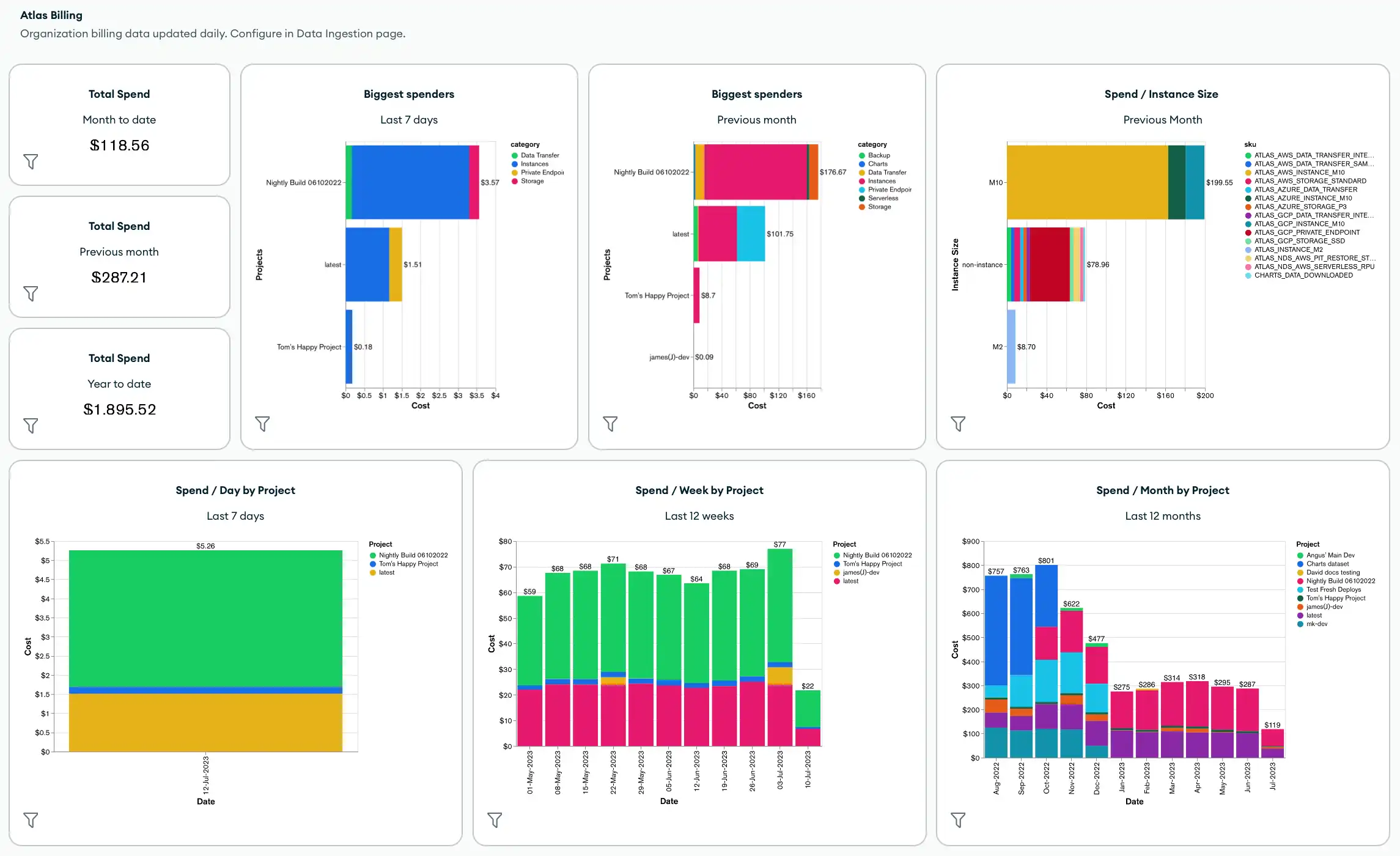
기본적으로 청구 대시보드에는 다음과 같은 지표 및 Atlas Charts가 포함됩니다.
조직 전체의 총 지출
조직 에서 가장 큰 지출을 하는 사람
인스턴스 크기, 프로젝트, cluster, 제품 카테고리 또는 SKU별 총 지출
제품 카테고리별 총 비용
대시보드 필터 를 적용하고 청구 데이터에 적용한 태그 를 사용하는 차트를 포함하여 새 차트를 추가하여 청구 대시보드 를 사용자 지정할 수도 있습니다.
청구 대시보드를 생성하거나 관리하려면 청구 대시보드 생성 및 관리를 참조하세요.
자동화 예제: Atlas 청구
다음 예시는 Atlas 자동화 도구를 사용하여 청구 데이터를 조회하고 다운로드하는 방법을 보여줍니다.
Atlas Go SDK를 사용하여 예시 스크립트를 인증하고 실행하기 전에 다음 단계를 반드시 진행해야 합니다.
Atlas 서비스 계정을 생성하세요. 터미널에서 다음 명령을 실행하여 클라이언트 ID와 비밀 키를 환경 변수로 저장합니다.
export MONGODB_ATLAS_SERVICE_ACCOUNT_ID="<insert your client ID here>" export MONGODB_ATLAS_SERVICE_ACCOUNT_SECRET="<insert your client secret here>" Go 프로젝트에 아래의 환경 변수를 설정하세요.
configs/config.json{ "MONGODB_ATLAS_BASE_URL": "https://cloud.mongodb.com", "ATLAS_ORG_ID": "32b6e34b3d91647abb20e7b8", "ATLAS_PROJECT_ID": "67212db237c5766221eb6ad9", "ATLAS_CLUSTER_NAME": "myCluster", "ATLAS_PROCESS_ID": "myCluster-shard-00-00.ajlj3.mongodb.net:27017" }
클라이언트 인증 및 생성에 대한 자세한 내용은 Github 의 전체 Atlas SDK for 고 (Go) 예시 프로젝트 참조하세요.
과거 청구 데이터 가져오기
다음 예시 스크립트 조직 의 과거 청구 데이터를 조회 한 다음 추가 분석을 위해 청구서를 CSV 또는 JSON 파일 로 다운로드 방법을 보여줍니다.
// See entire project at https://github.com/mongodb/atlas-architecture-go-sdk package main import ( "context" "fmt" "log" "time" "atlas-sdk-examples/internal/auth" "atlas-sdk-examples/internal/billing" "atlas-sdk-examples/internal/config" "atlas-sdk-examples/internal/data/export" "atlas-sdk-examples/internal/fileutils" "atlas-sdk-examples/internal/orgutils" "github.com/joho/godotenv" "go.mongodb.org/atlas-sdk/v20250219001/admin" ) func main() { envFile := ".env.production" if err := godotenv.Load(envFile); err != nil { log.Printf("Warning: could not load %s file: %v", envFile, err) } secrets, cfg, err := config.LoadAllFromEnv() if err != nil { log.Fatalf("Failed to load configuration %v", err) } ctx := context.Background() client, err := auth.NewClient(ctx, cfg, secrets) if err != nil { log.Fatalf("Failed to initialize authentication client: %v", err) } p := &admin.ListInvoicesApiParams{ OrgId: cfg.OrgID, } fmt.Printf("Fetching historical invoices for organization: %s\n", p.OrgId) // Fetch invoices from the previous six months with the provided options invoices, err := billing.ListInvoicesForOrg(ctx, client.InvoicesApi, p, billing.WithViewLinkedInvoices(true), billing.WithIncludeCount(true), billing.WithDateRange(time.Now().AddDate(0, -6, 0), time.Now())) if err != nil { log.Fatalf("Failed to retrieve invoices: %v", err) } if invoices.GetTotalCount() > 0 { fmt.Printf("Total count of invoices: %d\n", invoices.GetTotalCount()) } else { fmt.Println("No invoices found for the specified date range") return } // Get organization name for more user-friendly filenames orgName, err := orgutils.GetOrganizationName(ctx, client.OrganizationsApi, p.OrgId) if err != nil { // Non-critical error, continue with orgID as name fmt.Printf("Warning: %v\n", err) orgName = p.OrgId } sanitizedOrgName := orgutils.SanitizeForFilename(orgName) // Export invoice data to be used in other systems or for reporting outDir := "invoices" prefix := fmt.Sprintf("historical_%s", sanitizedOrgName) err = exportInvoicesToJSON(invoices, outDir, prefix) if err != nil { log.Fatalf("Failed to export invoices to JSON: %v", err) } err = exportInvoicesToCSV(invoices, outDir, prefix) if err != nil { log.Fatalf("Failed to export invoices to CSV: %v", err) } } func exportInvoicesToJSON(invoices *admin.PaginatedApiInvoiceMetadata, outDir, prefix string) error { jsonPath, err := fileutils.GenerateOutputPath(outDir, prefix, "json") if err != nil { return fmt.Errorf("failed to generate JSON output path: %v", err) } if err := export.ToJSON(invoices.GetResults(), jsonPath); err != nil { return fmt.Errorf("failed to write JSON file: %v", err) } fmt.Printf("Exported invoice data to %s\n", jsonPath) return nil } func exportInvoicesToCSV(invoices *admin.PaginatedApiInvoiceMetadata, outDir, prefix string) error { csvPath, err := fileutils.GenerateOutputPath(outDir, prefix, "csv") if err != nil { return fmt.Errorf("failed to generate CSV output path: %v", err) } // Set the headers and mapped rows for the CSV export headers := []string{"InvoiceID", "Status", "Created", "AmountBilled"} err = export.ToCSVWithMapper(invoices.GetResults(), csvPath, headers, func(invoice admin.BillingInvoiceMetadata) []string { return []string{ invoice.GetId(), invoice.GetStatusName(), invoice.GetCreated().Format(time.RFC3339), fmt.Sprintf("%.2f", float64(invoice.GetAmountBilledCents())/100.0), } }) if err != nil { return fmt.Errorf("failed to write CSV file: %v", err) } fmt.Printf("Exported invoice data to %s\n", csvPath) return nil }
보류 중인 청구서 가져오기
다음 예시 스크립트 조직 의 보류 중인 청구서를 조회 한 다음 추가 분석을 위해 청구서를 CSV 또는 JSON 파일 로 다운로드 방법을 보여줍니다.
// See entire project at https://github.com/mongodb/atlas-architecture-go-sdk package main import ( "context" "fmt" "log" "atlas-sdk-examples/internal/auth" "atlas-sdk-examples/internal/billing" "atlas-sdk-examples/internal/config" "atlas-sdk-examples/internal/data/export" "atlas-sdk-examples/internal/fileutils" "atlas-sdk-examples/internal/orgutils" "github.com/joho/godotenv" "go.mongodb.org/atlas-sdk/v20250219001/admin" ) func main() { envFile := ".env.production" if err := godotenv.Load(envFile); err != nil { log.Printf("Warning: could not load %s file: %v", envFile, err) } secrets, cfg, err := config.LoadAllFromEnv() if err != nil { log.Fatalf("Failed to load configuration %v", err) } ctx := context.Background() client, err := auth.NewClient(ctx, cfg, secrets) if err != nil { log.Fatalf("Failed to initialize authentication client: %v", err) } p := &admin.ListInvoicesApiParams{ OrgId: cfg.OrgID, } fmt.Printf("Fetching pending invoices for organization: %s\n", p.OrgId) details, err := billing.CollectLineItemBillingData(ctx, client.InvoicesApi, client.OrganizationsApi, p.OrgId, nil) if err != nil { log.Fatalf("Failed to retrieve pending invoices for %s: %v", p.OrgId, err) } if len(details) == 0 { fmt.Printf("No pending invoices found for organization: %s\n", p.OrgId) return } fmt.Printf("Found %d line items in pending invoices\n", len(details)) // Use organization name from the returned details for more user-friendly filenames orgName := details[0].Org.Name sanitizedOrgName := orgutils.SanitizeForFilename(orgName) // Export invoice data to be used in other systems or for reporting outDir := "invoices" prefix := fmt.Sprintf("pending_%s", sanitizedOrgName) err = exportInvoicesToJSON(details, outDir, prefix) if err != nil { log.Fatalf("Failed to export invoices to JSON: %v", err) } err = exportInvoicesToCSV(details, outDir, prefix) if err != nil { log.Fatalf("Failed to export invoices to CSV: %v", err) } } func exportInvoicesToJSON(details []billing.Detail, outDir, prefix string) error { jsonPath, err := fileutils.GenerateOutputPath(outDir, prefix, "json") if err != nil { return fmt.Errorf("failed to generate JSON output path: %v", err) } if err := export.ToJSON(details, jsonPath); err != nil { return fmt.Errorf("failed to write JSON file: %v", err) } fmt.Printf("Exported billing data to %s\n", jsonPath) return nil } func exportInvoicesToCSV(details []billing.Detail, outDir, prefix string) error { csvPath, err := fileutils.GenerateOutputPath(outDir, prefix, "csv") if err != nil { return fmt.Errorf("failed to generate CSV output path: %v", err) } // Set the headers and mapped rows for the CSV export headers := []string{"Organization", "OrgID", "Project", "ProjectID", "Cluster", "SKU", "Cost", "Date", "Provider", "Instance", "Category"} err = export.ToCSVWithMapper(details, csvPath, headers, func(item billing.Detail) []string { return []string{ item.Org.Name, item.Org.ID, item.Project.Name, item.Project.ID, item.Cluster, item.SKU, fmt.Sprintf("%.2f", item.Cost), item.Date.Format("2006-01-02"), item.Provider, item.Instance, item.Category, } }) if err != nil { return fmt.Errorf("failed to write CSV file: %v", err) } fmt.Printf("Exported billing data to %s\n", csvPath) return nil }
연결된 조직 가져오기
다음 예시 스크립트 청구 조직 에서 연결된 조직 및 해당 ID 목록을 조회 방법을 보여줍니다.
// See entire project at https://github.com/mongodb/atlas-architecture-go-sdk package main import ( "context" "fmt" "log" "atlas-sdk-examples/internal/auth" "atlas-sdk-examples/internal/billing" "atlas-sdk-examples/internal/config" "github.com/joho/godotenv" "go.mongodb.org/atlas-sdk/v20250219001/admin" ) func main() { envFile := ".env.production" if err := godotenv.Load(envFile); err != nil { log.Printf("Warning: could not load %s file: %v", envFile, err) } secrets, cfg, err := config.LoadAllFromEnv() if err != nil { log.Fatalf("Failed to load configuration %v", err) } ctx := context.Background() client, err := auth.NewClient(ctx, cfg, secrets) if err != nil { log.Fatalf("Failed to initialize authentication client: %v", err) } p := &admin.ListInvoicesApiParams{ OrgId: cfg.OrgID, } fmt.Printf("Fetching linked organizations for billing organization: %s\n", p.OrgId) invoices, err := billing.GetCrossOrgBilling(ctx, client.InvoicesApi, p) if err != nil { log.Fatalf("Failed to retrieve cross-organization billing data for %s: %v", p.OrgId, err) } displayLinkedOrganizations(invoices, p.OrgId) } func displayLinkedOrganizations(invoices map[string][]admin.BillingInvoiceMetadata, primaryOrgID string) { var linkedOrgs []string for orgID := range invoices { if orgID != primaryOrgID { linkedOrgs = append(linkedOrgs, orgID) } } if len(linkedOrgs) == 0 { fmt.Println("No linked organizations found for the billing organization") return } fmt.Printf("Found %d linked organizations:\n", len(linkedOrgs)) for i, orgID := range linkedOrgs { fmt.Printf(" %d. Organization ID: %s\n", i+1, orgID) } }