在大型组织中,跟踪和管理云支出可能很困难。节省成本的配置可帮助您主动管理支出, Atlas还为您提供查看和分析支出的工具。您可以:
根据贵组织的计费需求对 Atlas 资源进行分类。
利用账单数据可视化并了解您的Atlas支出。
以编程方式提取计费数据,与 FinOps 工具集成,用于每个部门和应用程序内的费用分摊和会计目的。
在此页面上,学习;了解如何使用内置Atlas工具和Atlas计费数据来追踪云支出。
Apply Resource Tags
您可以在 Atlas 中应用资源标签,以便通过按部门、项目或成本中心对资源进行分类,实现精确的成本分摊。您还可以在财务报告中使用标签对资源进行分组和分析,从而清晰、有序地展示各团队或项目对整体云支出的贡献。要了解更多信息,请参阅 资源标签。
以编程方式访问账单数据
Atlas Administration API 提供了一个 RESTful 接口,允许您以编程方式访问计费数据,以便与外部工具和报告配合使用。将此功能与资源标签结合,即可轻松分类 Atlas 支出。
您可以使用“返回一个组织的所有待处理发票” API端点检索所有待处理发票。端点响应正文包含 results.lineItems.tags字段,该字段反映您应用于资源(例如组织和集群)的标签。然后,您可以将此行项目级账单数据输入外部 FinOps 工具和报告,按环境、团队或其他标签值追踪您的Atlas支出。
启用跨组织计费
Atlas允许您在多个组织之间股票一个计费订阅,并为其支付一张发票。启用跨组织计费,以便轻松了解所有组织的Atlas支出。
配置付款组织后,您可以为付款组织支付发票,其中包括所有关联组织产生的费用列表。要学习;了解更多信息,请参阅跨组织计费。
启用跨组织计费后,如果您具有付款组织的Organization Billing Admin角色或Organization Owner角色,则可以查看链接的发票。
查看每月成本可视化
要查看每月的账单数据,请导航至 Cost Explorer 页面。成本浏览器以图表和表格的形式提供云支出的精细视图,允许用户按集群、项目或团队分析成本。历史支出数据和可自定义的筛选器有助于识别趋势和低效率,从而实现更好的财务决策和资源优化。您可以查看过去六个月的使用情况,并访问权限过去 18 个月的账单数据。如果您的组织使用跨组织计费,则可以查看所有关联组织的账单数据。
Billing Cost Explorer 按组织、项目、集群和 服务 对使用情况数据进行筛选和分组。每个过滤包含一个 Usage图表,其中的堆叠列表示每月产生的总费用。下面是一个 Usage By Month 表,其中显示了图表所示的账单数据。要学习;了解更多信息,请参阅账单成本浏览器。
查看年度成本可视化
要查看每年的账单数据,请导航至 Billing Overview 页面。此页面可帮助您按 服务、部署和项目了解组织使用Atlas所产生的成本。每个类别都包含一个 Usage图表,其中的堆叠列表示每月产生的总费用。要了解更多信息,请参阅年初至今使用量图表。
查看发票成本可视化
要以发票形式查看计费数据,请单击要查看的 Invoice Date 或 Invoice Period。此页面通过 Total Usage 和 By Deployment 图表显示您在发票周期内使用 Atlas 所产生的费用。
对于 Total Usage图表,您可以按服务使用过滤器来筛选使用情况,以查看特定Atlas服务产生的费用。对于 By Deployment(图表,您可以查看每个集群在所有项目中产生的使用量比例。
要查看明细费用,请参阅查看和支付过去的发票。
创建账单仪表盘
您可以在MongoDB Charts计费仪表盘可视化您的计费数据,帮助您优化Atlas支出。计费仪表盘包含预制图表,可帮助您监控组织中不同类别和时间段的Atlas使用情况, MongoDB Charts与Atlas集成以无缝摄取计费数据。

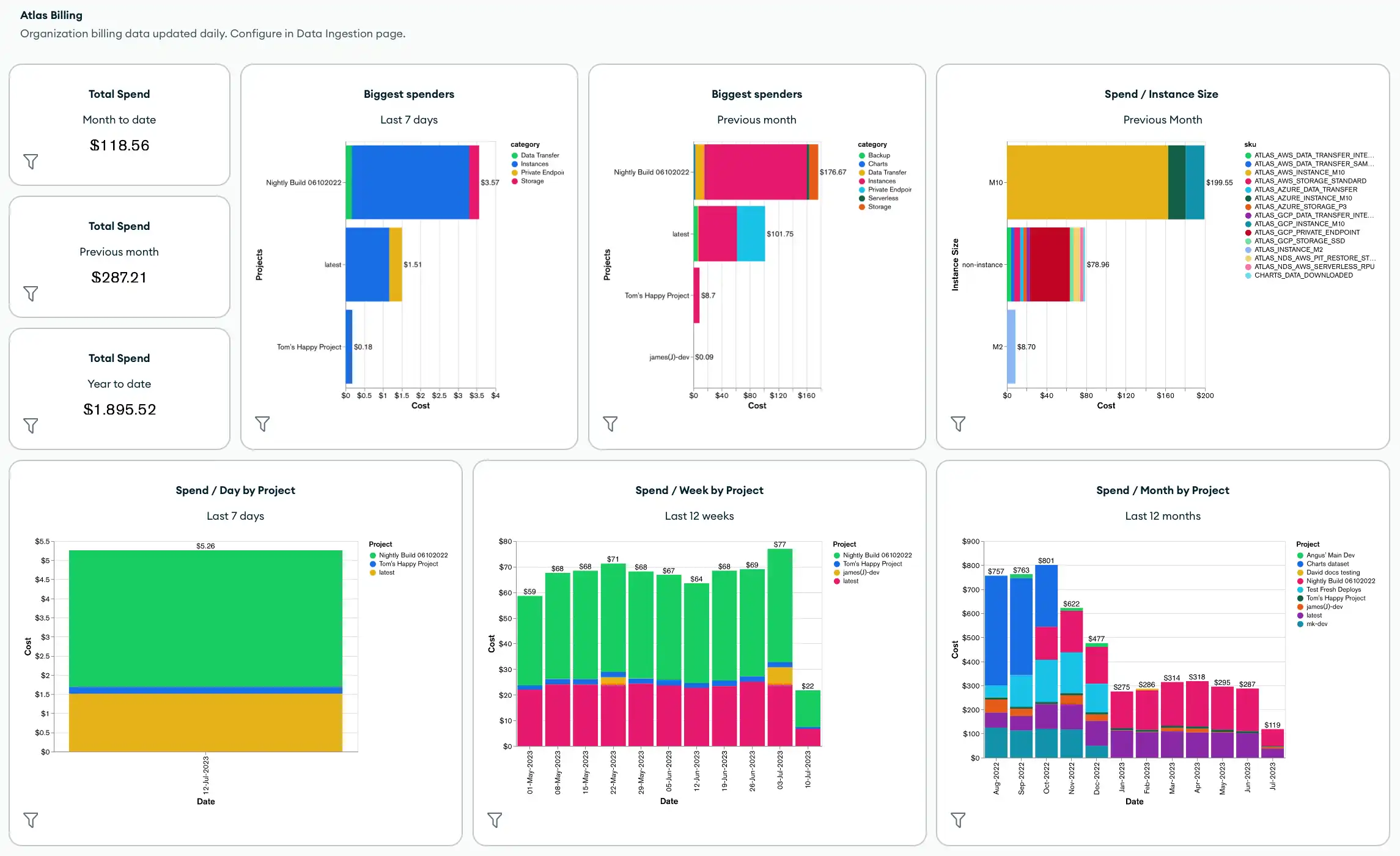
默认情况下,计费仪表盘包含以下指标和Atlas Charts:
整个组织的总支出
组织中支出最多的人
按实例大小、项目、集群、产品类别或 SKU 划分的总支出
按产品类别划分的总成本
您还可以通过应用仪表盘筛选器和添加新图表(包括使用已应用于账单数据的标签的任何图表)来自定义账单仪表盘盘。
要创建或管理计费仪表盘,请参阅创建和管理计费仪表盘。
自动化示例: Atlas 计费
请参阅Atlas架构Go SDK Github存储库中单个项目中的所有Atlas架构中心Go SDK 示例。
以下示例展示了如何使用Atlas 工具检索和下载账单数据以实现自动化。
在您能够使用 Atlas Go SDK 进行身份验证并运行示例脚本之前,您必须:
创建 Atlas 服务帐户。请在终端中运行以下命令,将您的客户端 ID 和密钥存储为环境变量:
export MONGODB_ATLAS_SERVICE_ACCOUNT_ID="<insert your client ID here>" export MONGODB_ATLAS_SERVICE_ACCOUNT_SECRET="<insert your client secret here>" 在您的 Go 项目中设置以下配置变量:
configs/config.json{ "MONGODB_ATLAS_BASE_URL": "https://cloud.mongodb.com", "ATLAS_ORG_ID": "32b6e34b3d91647abb20e7b8", "ATLAS_PROJECT_ID": "67212db237c5766221eb6ad9", "ATLAS_CLUSTER_NAME": "myCluster", "ATLAS_PROCESS_ID": "myCluster-shard-00-00.ajlj3.mongodb.net:27017" }
有关身份验证和创建客户端的更多信息,请参阅Github中完整的Atlas SDK for Go示例项目。
获取历史计费数据
以下示例脚本演示了如何检索组织的历史账单数据,然后将发票下载到逗号分隔值(CSV)或JSON文件以进行进一步分析。
// See entire project at https://github.com/mongodb/atlas-architecture-go-sdk package main import ( "context" "fmt" "log" "time" "atlas-sdk-examples/internal/auth" "atlas-sdk-examples/internal/billing" "atlas-sdk-examples/internal/config" "atlas-sdk-examples/internal/data/export" "atlas-sdk-examples/internal/fileutils" "atlas-sdk-examples/internal/orgutils" "github.com/joho/godotenv" "go.mongodb.org/atlas-sdk/v20250219001/admin" ) func main() { envFile := ".env.production" if err := godotenv.Load(envFile); err != nil { log.Printf("Warning: could not load %s file: %v", envFile, err) } secrets, cfg, err := config.LoadAllFromEnv() if err != nil { log.Fatalf("Failed to load configuration %v", err) } ctx := context.Background() client, err := auth.NewClient(ctx, cfg, secrets) if err != nil { log.Fatalf("Failed to initialize authentication client: %v", err) } p := &admin.ListInvoicesApiParams{ OrgId: cfg.OrgID, } fmt.Printf("Fetching historical invoices for organization: %s\n", p.OrgId) // Fetch invoices from the previous six months with the provided options invoices, err := billing.ListInvoicesForOrg(ctx, client.InvoicesApi, p, billing.WithViewLinkedInvoices(true), billing.WithIncludeCount(true), billing.WithDateRange(time.Now().AddDate(0, -6, 0), time.Now())) if err != nil { log.Fatalf("Failed to retrieve invoices: %v", err) } if invoices.GetTotalCount() > 0 { fmt.Printf("Total count of invoices: %d\n", invoices.GetTotalCount()) } else { fmt.Println("No invoices found for the specified date range") return } // Get organization name for more user-friendly filenames orgName, err := orgutils.GetOrganizationName(ctx, client.OrganizationsApi, p.OrgId) if err != nil { // Non-critical error, continue with orgID as name fmt.Printf("Warning: %v\n", err) orgName = p.OrgId } sanitizedOrgName := orgutils.SanitizeForFilename(orgName) // Export invoice data to be used in other systems or for reporting outDir := "invoices" prefix := fmt.Sprintf("historical_%s", sanitizedOrgName) err = exportInvoicesToJSON(invoices, outDir, prefix) if err != nil { log.Fatalf("Failed to export invoices to JSON: %v", err) } err = exportInvoicesToCSV(invoices, outDir, prefix) if err != nil { log.Fatalf("Failed to export invoices to CSV: %v", err) } } func exportInvoicesToJSON(invoices *admin.PaginatedApiInvoiceMetadata, outDir, prefix string) error { jsonPath, err := fileutils.GenerateOutputPath(outDir, prefix, "json") if err != nil { return fmt.Errorf("failed to generate JSON output path: %v", err) } if err := export.ToJSON(invoices.GetResults(), jsonPath); err != nil { return fmt.Errorf("failed to write JSON file: %v", err) } fmt.Printf("Exported invoice data to %s\n", jsonPath) return nil } func exportInvoicesToCSV(invoices *admin.PaginatedApiInvoiceMetadata, outDir, prefix string) error { csvPath, err := fileutils.GenerateOutputPath(outDir, prefix, "csv") if err != nil { return fmt.Errorf("failed to generate CSV output path: %v", err) } // Set the headers and mapped rows for the CSV export headers := []string{"InvoiceID", "Status", "Created", "AmountBilled"} err = export.ToCSVWithMapper(invoices.GetResults(), csvPath, headers, func(invoice admin.BillingInvoiceMetadata) []string { return []string{ invoice.GetId(), invoice.GetStatusName(), invoice.GetCreated().Format(time.RFC3339), fmt.Sprintf("%.2f", float64(invoice.GetAmountBilledCents())/100.0), } }) if err != nil { return fmt.Errorf("failed to write CSV file: %v", err) } fmt.Printf("Exported invoice data to %s\n", csvPath) return nil }
获取待处理的发票
以下示例脚本演示了如何检索组织的待处理发票,然后将发票下载到逗号分隔值(CSV)或JSON文件以供进一步分析。
// See entire project at https://github.com/mongodb/atlas-architecture-go-sdk package main import ( "context" "fmt" "log" "atlas-sdk-examples/internal/auth" "atlas-sdk-examples/internal/billing" "atlas-sdk-examples/internal/config" "atlas-sdk-examples/internal/data/export" "atlas-sdk-examples/internal/fileutils" "atlas-sdk-examples/internal/orgutils" "github.com/joho/godotenv" "go.mongodb.org/atlas-sdk/v20250219001/admin" ) func main() { envFile := ".env.production" if err := godotenv.Load(envFile); err != nil { log.Printf("Warning: could not load %s file: %v", envFile, err) } secrets, cfg, err := config.LoadAllFromEnv() if err != nil { log.Fatalf("Failed to load configuration %v", err) } ctx := context.Background() client, err := auth.NewClient(ctx, cfg, secrets) if err != nil { log.Fatalf("Failed to initialize authentication client: %v", err) } p := &admin.ListInvoicesApiParams{ OrgId: cfg.OrgID, } fmt.Printf("Fetching pending invoices for organization: %s\n", p.OrgId) details, err := billing.CollectLineItemBillingData(ctx, client.InvoicesApi, client.OrganizationsApi, p.OrgId, nil) if err != nil { log.Fatalf("Failed to retrieve pending invoices for %s: %v", p.OrgId, err) } if len(details) == 0 { fmt.Printf("No pending invoices found for organization: %s\n", p.OrgId) return } fmt.Printf("Found %d line items in pending invoices\n", len(details)) // Use organization name from the returned details for more user-friendly filenames orgName := details[0].Org.Name sanitizedOrgName := orgutils.SanitizeForFilename(orgName) // Export invoice data to be used in other systems or for reporting outDir := "invoices" prefix := fmt.Sprintf("pending_%s", sanitizedOrgName) err = exportInvoicesToJSON(details, outDir, prefix) if err != nil { log.Fatalf("Failed to export invoices to JSON: %v", err) } err = exportInvoicesToCSV(details, outDir, prefix) if err != nil { log.Fatalf("Failed to export invoices to CSV: %v", err) } } func exportInvoicesToJSON(details []billing.Detail, outDir, prefix string) error { jsonPath, err := fileutils.GenerateOutputPath(outDir, prefix, "json") if err != nil { return fmt.Errorf("failed to generate JSON output path: %v", err) } if err := export.ToJSON(details, jsonPath); err != nil { return fmt.Errorf("failed to write JSON file: %v", err) } fmt.Printf("Exported billing data to %s\n", jsonPath) return nil } func exportInvoicesToCSV(details []billing.Detail, outDir, prefix string) error { csvPath, err := fileutils.GenerateOutputPath(outDir, prefix, "csv") if err != nil { return fmt.Errorf("failed to generate CSV output path: %v", err) } // Set the headers and mapped rows for the CSV export headers := []string{"Organization", "OrgID", "Project", "ProjectID", "Cluster", "SKU", "Cost", "Date", "Provider", "Instance", "Category"} err = export.ToCSVWithMapper(details, csvPath, headers, func(item billing.Detail) []string { return []string{ item.Org.Name, item.Org.ID, item.Project.Name, item.Project.ID, item.Cluster, item.SKU, fmt.Sprintf("%.2f", item.Cost), item.Date.Format("2006-01-02"), item.Provider, item.Instance, item.Category, } }) if err != nil { return fmt.Errorf("failed to write CSV file: %v", err) } fmt.Printf("Exported billing data to %s\n", csvPath) return nil }
获取关联组织
以下示例脚本演示了如何从计费组织检索关联组织及其 ID 的列表。
// See entire project at https://github.com/mongodb/atlas-architecture-go-sdk package main import ( "context" "fmt" "log" "atlas-sdk-examples/internal/auth" "atlas-sdk-examples/internal/billing" "atlas-sdk-examples/internal/config" "github.com/joho/godotenv" "go.mongodb.org/atlas-sdk/v20250219001/admin" ) func main() { envFile := ".env.production" if err := godotenv.Load(envFile); err != nil { log.Printf("Warning: could not load %s file: %v", envFile, err) } secrets, cfg, err := config.LoadAllFromEnv() if err != nil { log.Fatalf("Failed to load configuration %v", err) } ctx := context.Background() client, err := auth.NewClient(ctx, cfg, secrets) if err != nil { log.Fatalf("Failed to initialize authentication client: %v", err) } p := &admin.ListInvoicesApiParams{ OrgId: cfg.OrgID, } fmt.Printf("Fetching linked organizations for billing organization: %s\n", p.OrgId) invoices, err := billing.GetCrossOrgBilling(ctx, client.InvoicesApi, p) if err != nil { log.Fatalf("Failed to retrieve cross-organization billing data for %s: %v", p.OrgId, err) } displayLinkedOrganizations(invoices, p.OrgId) } func displayLinkedOrganizations(invoices map[string][]admin.BillingInvoiceMetadata, primaryOrgID string) { var linkedOrgs []string for orgID := range invoices { if orgID != primaryOrgID { linkedOrgs = append(linkedOrgs, orgID) } } if len(linkedOrgs) == 0 { fmt.Println("No linked organizations found for the billing organization") return } fmt.Printf("Found %d linked organizations:\n", len(linkedOrgs)) for i, orgID := range linkedOrgs { fmt.Printf(" %d. Organization ID: %s\n", i+1, orgID) } }