Capture shelf inventory from a photo, store it in MongoDB, and sync updates across connected and offline retail clients.
Use cases: Edge and Mobile, Artificial Intelligence
Industries: Edge and Mobile, Retail
Products: MongoDB Enterprise Advanced
Partners: PowerSync
Solution Overview
Retailers need accurate visibility into shelf inventory. In large facilities, teams often work across areas with inconsistent connectivity and rely on manual checks to identify products that need restocking.
Learn how to convert a single shelf image into a structured inventory record. A vision-language model identifies and counts products, while MongoDB Enterprise Advanced stores the captured images, item counts, and application context.
MongoDB provides the foundation for distributing inventory state across your network. Change streams deliver real-time updates to PowerSync, which synchronizes selected fields to local SQLite databases on client devices. When connectivity drops, client devices continue working offline with local data and synchronize upon reconnecting.
This MongoDB-centered workflow seamlessly integrates image-based capture, flexible document modeling, and synchronized retail applications. It transforms shelf observations into inventory data that teams can use across client applications.
Reference Architectures
MongoDB Enterprise Advanced serves as the operational data layer and source of truth for shelf inventory.
The browser sends a shelf image to the backend application. The backend passes the image to the configured vision-language model, validates the structured response, and writes the resulting inventory document to MongoDB.
Each document stores the capture context alongside detected items. MongoDB stores metadata such as the capture time, device, operator, store, model, item counts, confidence values, and lifecycle status.
When you enable media persistence, the backend stores the raw image in Amazon S3-compatible object storage and keeps the asset reference in MongoDB. This design separates large media objects from operational inventory records while preserving their relationships.
MongoDB change streams publish events that PowerSync uses to synchronize selected inventory fields to client-side SQLite databases. PowerSync supports local application access and synchronization across connectivity interruptions, while MongoDB remains the source of truth.
This architecture separates responsibilities while maintaining a unified data foundation:
MongoDB manages the operational inventory record.
The backend controls write operations.
The VLM (vision-language model) extracts structured data.
Object storage retains raw images.
PowerSync distributes MongoDB-backed state to clients.
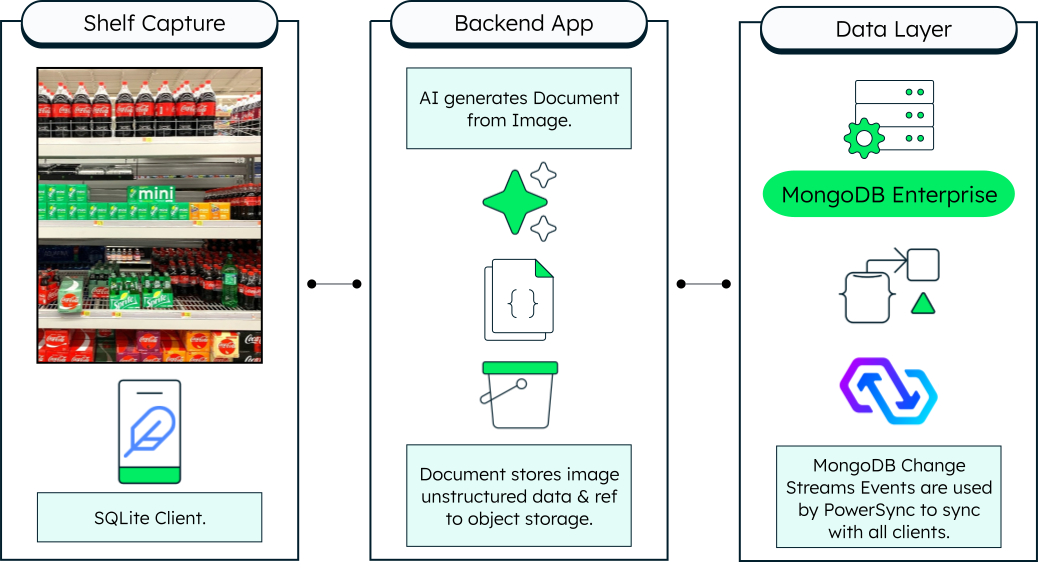
Figure 1. From shelf image to synchronized inventory: The backend uses a vision-language model to create a MongoDB inventory document. MongoDB stores the operational record, object storage retains the raw image, and change streams drive PowerSync synchronization to client-side SQLite.
Data Model Approach
Store each shelf capture as a document in the inventory_captures collection. Keep the capture context and the model-generated inventory result together so your application processes and synchronizes each capture as a single unit.
The document records metadata including:
Capture timestamp and location
Submitting device and operator
Model used for image analysis
The capture’s lifecycle status
Embed the detected products in the items array. Each item contains a product name, detected count, and model confidence:
{ "_id": "108d020b-9d3c-4b36-a651-0e1be2b1e899", "captured_at": "2026-07-02T17:45:08.661249+00:00", "device_id": "web-o0its21v", "operator_id": "demo-operator", "store_id": "store-unknown", "cv_model": "qwen2.5", "items": [ { "name": "Nissin Cup Noodles", "count": 5, "confidence": 0.9 }, { "name": "Popcorn Bag", "count": 1, "confidence": 0.9 }, { "name": "Lays Chips", "count": 3, "confidence": 0.9 } ], "status": "ACTIVE", "asset": null }
Embedding the detected items keeps the model output close to the shelf capture that produced it. The flexible document model of MongoDB enables the application to preserve additional item attributes as the model evolves, eliminating the need for a rigid schema for every possible product.
MongoDB remains the source of truth for the inventory record. PowerSync projects the fields required by client applications into local SQLite databases, while the raw images remain in Amazon S3-compatible object storage when you enable media persistence.
Field explanations
_id: Unique identifier for the shelf capture.captured_at: UTC timestamp generated when the backend receives the capture.device_id: Identifier for the client device that submitted the image.operator_id: Identifier for the operator who submitted the capture.store_id: Identifier for the store associated with the capture.cv_model: Name of the model used to generate the inventory result.items: Embedded array containing detected products, counts, and confidence values.status: Lifecycle state of the capture. When storage is enabled, the flow starts asPENDING_UPLOADand changes toACTIVEafter the raw image uploads.asset: Optional object-storage metadata. This field isnullwhen raw-image storage is disabled.
Build the Solution
Use the retail-stock-take GitHub repository to deploy and explore the solution.
Prerequisites
Prepare a local Kubernetes environment with sufficient resources to run:
MongoDB Enterprise Server managed by MongoDB Ops Manager
PowerSync
FastAPI backend
Next.js web application
Amazon S3-compatible object storage
Ollama and the configured vision-language model
Review the local setup guide in the repository for supported runtime versions, memory requirements, model requirements, and expected setup time.
Capture and verify inventory
Open the web application and submit a shelf image. The backend sends the image to the vision-language model, validates the structured response, and writes the inventory document to MongoDB.
When you enable media persistence, the backend stores the raw image in Amazon S3-compatible object storage and updates the MongoDB document status. MongoDB change streams drive PowerSync synchronization to the client application.
Run the verification workflow to validate the complete capture, storage, and synchronization path:
./scripts/verify.sh
MongoDB serves as the central data layer throughout the workflow. The repository documents:
Deployment components and setup scripts
Vision-language model processing
Object storage workflow
Synchronization path
Key Learnings
Capture shelf inventory from an image: Use a vision-language model to convert a shelf photograph into structured JSON that MongoDB stores and your application processes.
Model inventory data as MongoDB documents: Keep capture metadata and detected items together so each document represents a single shelf check.
Synchronize MongoDB-backed state across client devices: Use MongoDB change streams and PowerSync to distribute selected inventory fields without building custom polling logic.
Separate operational data from raw media: Store inventory data and image references in MongoDB, while storing the raw frame in Amazon S3-compatible object storage when you enable media persistence.
Support disconnected retail workflows: Enable client applications to use locally synchronized data and reconcile their state upon reconnecting.
Authors
Timothy Marland, MongoDB
Alberto Camarena Rodriguez, MongoDB
Daniel Jamir, MongoDB