Discover how MongoDB Atlas and ObjectBox keep a personal wallet, and its AI assistant, working with zero connectivity.
Use cases: Edge and Mobile, Intelligent Search, Payments
Industries: Financial Services
Products and tools: MongoDB Atlas Database, MongoDB Atlas Vector Search, MongoDB MCP Server, MongoDB Search, MongoDB Triggers, Voyage AI
Partners: ObjectBox, LangChain
Solution Overview
Traditional wallet and banking apps often rely on a stable internet connection. When users are in transit systems, rural areas, or places with unreliable mobile networks, they may be unable to view their balance, review transactions, manage contacts, send money, and access their wallet when they need it most.
Users require a wallet that remains useful during brief periods of disconnection. Users should be able to access their wallet and complete financial tasks without being blocked by a temporary network outage. When connectivity returns, the wallet should synchronize the user’s account.
This solution addresses the loss of access to essential wallet functions when connectivity is limited. It keeps wallet data available when the user is offline and allows core interactions, such as reviewing transactions, managing contacts, and sending money, to continue without requiring an immediate network response. It also includes an AI assistant that helps users access wallet information and prepare payment actions both online and offline. Once connectivity is restored, the solution synchronizes the latest changes with the backend. The core value is continuity: users can manage their money and receive assistance during temporary network outages.
MongoDB provides the flexible data foundation for this approach. It models wallet information, including balances, transactions, contacts, payment requests, and pending actions, in a unified data layer. The unified data layer helps the application maintain the wallet state required during disconnection and reconcile updates when the user reconnects. The same data foundation also provides relevant wallet context to the AI assistant, helping it support these interactions in both connected and disconnected states.
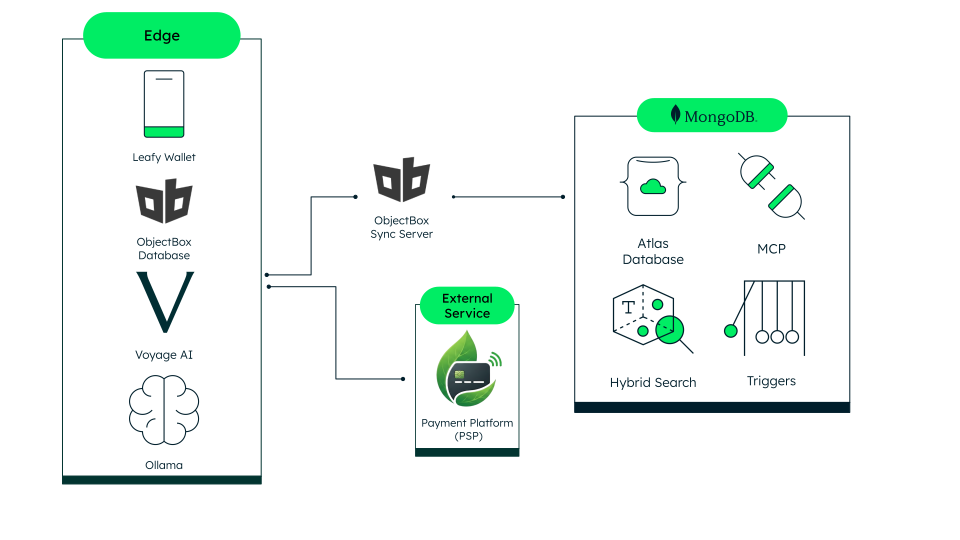
Figure 1. High-level architecture of the solution
Reference Architectures
This solution uses an edge device and MongoDB Atlas as its core components, integrating them with an external PSP. Each component has a clearly defined role in the overall architecture. The edge device supports offline-first interactions, MongoDB Atlas provides centralized persistence and AI-accessible data services, and the PSP handles regulated payment operations.
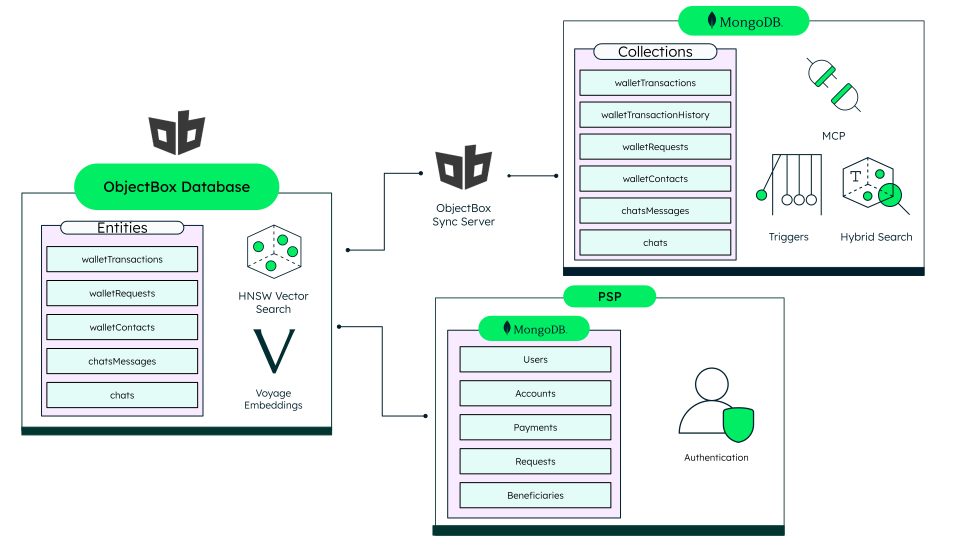
Figure 2. Reference architecture overview
On the edge, the mobile application stores data in a local ObjectBox database and runs Ollama for on-device inference. A Voyage AI model runs alongside it, embedding transaction notes on the device so semantic recall keeps working without a network. ObjectBox Sync Server mirrors the MongoDB Atlas schema, so the application reads and writes the same logical structures online and offline.
MongoDB Atlas holds the operational wallet data: transactions, contacts, requests, notifications, and chats. The following Atlas capabilities sit on top of that data:
MongoDB Atlas Vector Search: retrieves transaction notes by meaning, using Voyage AI embeddings.
Hybrid Search in MongoDB Atlas: fuses the vector results with a lexical search query in a single
$rankFusionpipeline. This arrangement returns the right transaction for an exact merchant name and a vague description.Atlas Triggers: react to every insert and update on the
transactionscollection and upsert a durable history record, keyed by the PSP transfer reference.MongoDB MCP Server: exposes read tools, letting the AI assistant query MongoDB Atlas directly.
The external PSP remains the system of record for payment execution and identity. It authorizes and settles transfers, while the app stores only the references and application data required to support the user experience.
This separation of responsibilities combines local responsiveness, cloud-based intelligence, and secure payment execution.
Architectural Process Flow
These process flows demonstrate how the subsystems interact to deliver architectural resiliency and intelligent assistance. The offline payment flow ensures critical financial operations persist during connectivity loss, maintaining the wallet's reliability. The chatbot-assisted flow leverages local intelligence to simplify interactions, demonstrating that a conversational interface can remain responsive without constant cloud reliance. Together, these processes deliver a consistent user experience in any network environment.
Offline Payment Flow
This flow ensures financial reliability by decoupling user interaction from real-time network availability. By queuing transactions locally, the system maintains a seamless payment experience even in restricted environments, synchronizing with the central platform only when connectivity is restored.
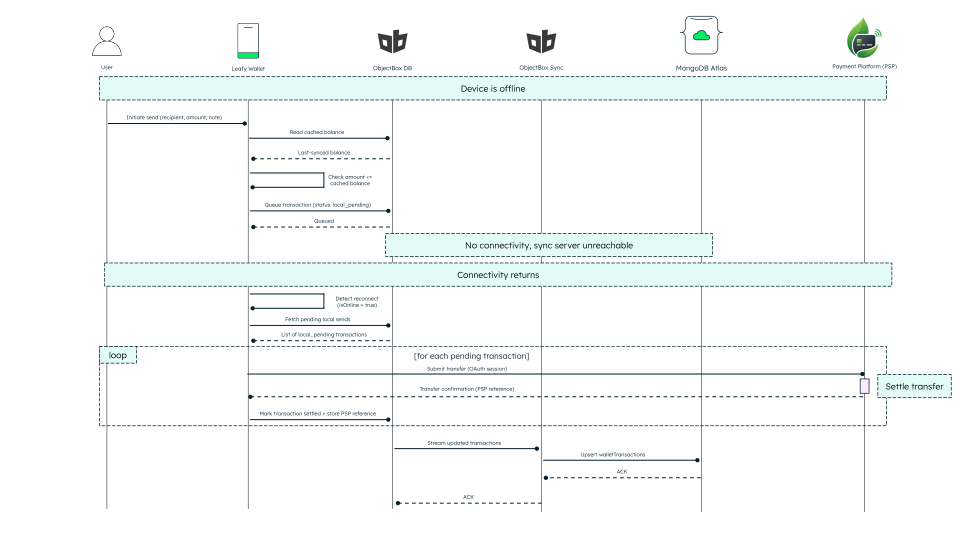
Figure 3. Offline payment sequence
The app keeps working when the device loses connectivity. In an offline payment flow:
The user initiates a payment.
The application validates the amount against the last synchronized balance stored in ObjectBox.
The transaction is queued locally with a
local_pendingstatus.When connectivity returns, the application detects the reconnect and retrieves all pending transactions.
Each pending transaction is submitted to the PSP for settlement.
After settlement, the application stores the PSP reference and marks the transaction as settled.
The ObjectBox Sync Server propagates the updated transaction state to MongoDB Atlas.
This pattern preserves application continuity during connectivity loss while ensuring that payment settlement occurs only through the external PSP.
Chatbot-Assisted Payment Flow
This conversational flow uses local, edge-based AI to provide intelligent assistance without depending on a persistent cloud connection. It processes user intent locally enabling payment drafting and contact resolution, then it securely executes confirmed transactions when the system reconnects.
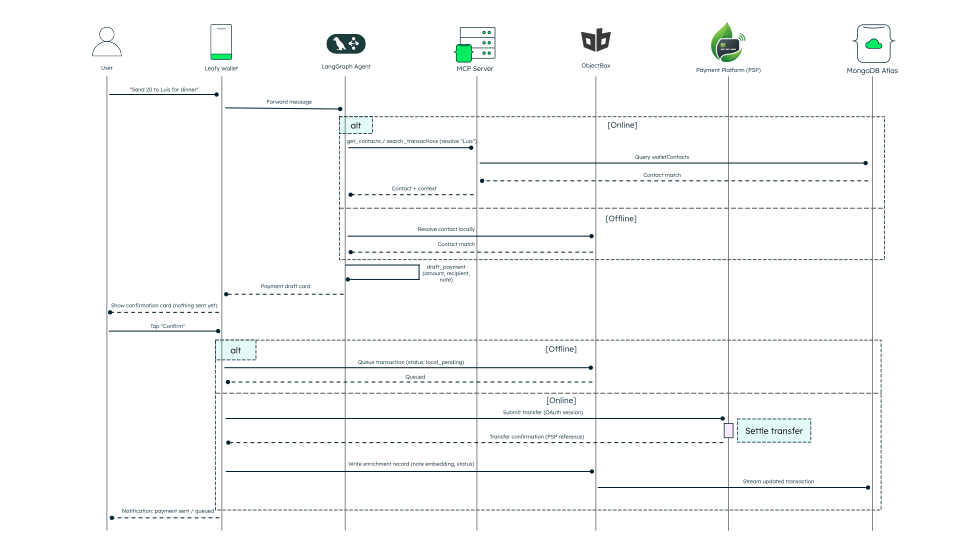
Figure 5. Chatbot-assisted payment sequence
The solution builds the AI-assistant on a LangGraph agent. The workflow for the chat bot operates as follows:
The user sends a request such as Send 20 to Luis for dinner.
The agent resolves the intended contact:
When online, it queries MongoDB Atlas through the MongoDB MCP Server.
When offline, it resolves the contact directly from ObjectBox.
The agent drafts the payment and presents a confirmation card to the user.
Funds don’t move until the user explicitly confirms the transaction.
After confirmation, it executes the following actions:
In online mode, the application submits the transfer to the PSP and writes an enrichment record to MongoDB Atlas.
In offline mode, the application queues the transaction locally for later replay.
The user receives a notification once the payment has been sent or queued.
This interaction model combines natural-language payment initiation with explicit user approval, while preserving the same online and offline execution boundaries defined by the core architecture.
Data Model Approach
This solution uses a mirrored document model. This design pattern maintains the same wallet entities and document structures across MongoDB Atlas and the on-device ObjectBox store. The model supports an offline wallet built on top of a BIAN compliant external PSP.
The PSP remains the system of record for payment execution and identity, while the application stores references and application level enrichment to support the user experience. This enrichment includes notes, semantic embeddings, and synchronization or lifecycle state. Using the same logical schema in MongoDB Atlas and ObjectBox allows the application to work consistently both online and offline.
The collections below show how this solution models its application data to support the offline payment experience.
Collection | Description |
|---|---|
| Stores completed and pending money movements, keyed to the PSP by reference rather than storing balances or credentials directly. |
| Maintains an Atlas only searchable history. An Atlas Trigger upserts every settled transfer here, keyed by PSP reference, so hybrid search runs over a stable corpus that device sync cannot fragment. |
| Represents the people a user can pay or request money from, resolved from PSP arrangement references into wallet friendly contact records. |
| Tracks payment requests throughout their lifecycle, from creation through settlement or dispute. |
| Delivers user facing payment and wallet events, including status updates for queued and completed actions. |
| Stores the AI assistant’s conversation history, scoped to the owning user and linked to the wallet experience. |
Every collection except walletTransactionsHistory mirrors the ObjectBox database. MongoDB Atlas holds the history data and powers the vector and text indexes required for hybrid search.
Below, you find the document model for a wallet transaction, stored in the walletTransactions collection. It represents a single payment sent or received through the external PSP. The document captures the operational data needed to track the transfer and the enrichment data (embeddings, sync state) needed to power search, offline replay, and the AI assistant.
{ "_id": { "$oid": "unique_id" }, "leafyPayTransferReference": "string", "ownerPartyRef": "string", "counterpartyArrangementReference": "string", "amount": "number", "currency": "string", "note": "string", "noteEmbedding": [ "number", "..." ], "direction": "sent | received", "leafyPayStatus": "pending | settled | failed | exception", "localSyncStatus": "local_pending | synced", "createdAt": { "$date": "ISODate" }, "settledAt": { "$date": "ISODate" } }
This model unifies operational context and enrichment, simplifying deployment across cloud and device environments. The application renders pending activity, replays offline writes, and supports AI-assisted transaction retrieval using a single read. You can perform these operations, because the sync state (localSyncStatus), settlement state (leafyPayStatus), and semantic search vector (noteEmbedding) live in the same document.
Sensitive financial execution remains in the PSP, while MongoDB Atlas and ObjectBox store only the wallet application data needed for responsiveness, search, and user experience. In a production system, you can extend these collections with stricter validation, access controls, and audit trails.
Build the Solution
Deploy the solution in two stages to run it locally. First, start the PSP, which handles SSO, consent, and payment execution. Then start Leafy Wallet, which runs the application UI, backend services, ObjectBox, Ollama, Voyage AI, and sync components.
For local deployment, clone both repositories side by side:
Follow the instructions in the GitHub LOCAL DEPLOYMENT
Deploy the model
Deploy the solution as a collection of containerized services to support a resilient, offline-first experience. As shown in the diagram, the frontend, FastAPI backend, and MongoDB Atlas handle the cloud-connected path, while the ObjectBox Sync Server bridges the on-device ObjectBox store to Atlas.
This setup allows the wallet to store data locally for instant responsiveness during disconnection and automatically flush queued transactions to the cloud once connectivity resumes. Use this containerized model to maintain a consistent logical data structure across both the edge device and your Atlas cluster.
Configure the environment
Clone the PSP and Leafy Wallet repositories side by side.
git clone https://github.com/mongodb-industry-solutions/leafy-wallet.git git clone https://github.com/mongodb-industry-solutions/sec-fsi-pci-dss.git
Configure the separate environment files for the frontend and backend before launching. These files manage essential connection strings, API credentials, and service endpoints, enabling secure communication between the frontend, backend, and your external services.
frontend CLIENT_ID=<id> CLIENT_SECRET=<secret> PSP_BASE_URL=http://host.docker.internal:8081 PSP_FRONTEND_URL=http://localhost:8083 APP_BASE_URL=http://localhost:8080 REDIRECT_URI=http://localhost:8080/api/auth/callback LOOKUP_DIGEST_KEY=<key> backend MONGODB_URI="<your-atlas-connection-string>" DATABASE_NAME="<db-name>" APP_NAME=leafy-wallet-backend OLLAMA_BASE_URL=http://localhost:11434 OLLAMA_EMBEDDING_MODEL=nomic-embed-text LOOKUP_DIGEST_KEY="<key>"
The frontend configuration must point PSP_BASE_URL to http://host.docker.internal:8081 so the containerized app can reach the locally running PSP.
Start the Leafy Wallet application
After the PSP is running, create the MongoDB Vector Search index and launch Leafy Wallet with Docker Compose:
cd leafy-wallet/backend uv run python scripts/create_vector_index.py cd .. docker compose up -d --build
Leafy Wallet starts on http://localhost:8080, with backend, ObjectBox, Ollama, and sync services running in containers.
Once both stacks are running, open Leafy Wallet in your browser and continue with SSO.
Key Learnings
Keep wallet features usable when connectivity drops: Treat network access as an enhancement rather than a requirement. A local store backed by MongoDB Atlas keeps balances, transactions, contacts, requests, and chat flows available during short disconnections, then reconciles once the device is online again.
Hold the application context in MongoDB Atlas and leave settlement to the PSP: Atlas stores the aliases, notes, sync state, and embeddings that shape the user experience, while the payment provider stays the system of record for identity, authorization, and settlement. This split keeps the experience layer flexible without pulling regulated execution into it.
Read and write the same logical data model on the device and in the cloud: Mirror MongoDB Atlas collection structures into an embedded store and sync changes in the background. Identical schemas on both sides remove the translation layer that offline features usually need, so application code does not branch on connectivity.
Keep operational context and enrichment together in the document model: Store transfer details, notes, sync state, and embeddings in the same document to simplify reads, support atomic updates, and make the data easier for AI-assisted experiences.
Combine local responsiveness with cloud intelligence: MongoDB Atlas Vector Search, the MongoDB MCP Server, and on-device storage let assistants handle natural-language transaction discovery and payment drafting. Users get the same behavior whether the device is online or not.
Authors
Felipe Trejos, MongoDB
Miguel Aréjula Aísa, MongoDB