在大型组织中,跟踪和管理云支出可能很困难。成本节省配置有助于主动管理支出,Atlas 还为您提供了查看和分析支出的工具。您可以:
根据贵组织的计费需求对 Atlas 资源进行分类。
利用账单数据可视化并了解您的Atlas支出。
以编程方式提取计费数据,与 FinOps 工具集成,用于每个部门和应用程序内的费用分摊和会计目的。
在此页面上,学习;了解如何使用内置Atlas工具和Atlas计费数据来追踪云支出。
Apply Resource Tags
您可以在 Atlas 中应用资源标签,以便通过按部门、项目或成本中心对资源进行分类,实现精确的成本分摊。您还可以在财务报告中使用标签对资源进行分组和分析,从而清晰、有序地展示各团队或项目对整体云支出的贡献。要学习;了解更多信息,请参阅资源标记。
以编程方式访问账单数据
Atlas Administration API提供了一个RESTful 接口,允许您以编程方式访问权限账单数据,以便与外部工具和报告一起使用。将此功能与资源标签相结合,可轻松对Atlas支出进行分类。
You can retrieve all your pending invoices with the Return All Pending Invoices for One Organization API endpoint. The endpoints response body contains the results.lineItems.tags field, which reflect the tags you applied to your resources (such as organizations and clusters). You can then feed this line-item-level billing data into external FinOps tools and reports track your Atlas spending by environment, team, or other tag values.
启用跨组织计费
Atlas允许您在多个组织之间股票一个计费订阅,并为其支付一张发票。启用跨组织计费,以便轻松了解所有组织的Atlas支出。
配置付款组织后,您可以为付款组织支付发票,其中包括所有关联组织产生的费用列表。要学习;了解更多信息,请参阅跨组织计费。
After you enable cross-organization billing, you can view linked invoices if you have the Organization Billing Admin role or the Organization Owner role for the paying organization.
查看每月成本可视化
要查看每月账单数据,请导航至 Cost Explorer 页面。成本浏览器以图表和表格形式提供云支出的详细视图,允许用户按集群、项目或团队分析成本。历史支出数据和可定制的过滤器有助于识别趋势和低效情况,从而实现更佳的财务决策和资源优化。您可以查看过去六个月的使用情况,并访问过去 18 个月的账单数据。如果您的组织使用跨组织账单,您可以查看所有关联组织的账单数据。
Billing Cost Explorer 按组织、项目、集群和 服务 对使用情况数据进行筛选和分组。每个过滤包含一个 Usage图表,其中的堆叠列表示每月产生的总费用。下面是一个 Usage By Month 表,其中显示了图表所示的账单数据。要学习;了解更多信息,请参阅账单成本浏览器。
查看年度成本可视化
要查看每年的账单数据,请导航至 Billing Overview 页面。此页面可帮助您按 服务、部署和项目了解组织使用Atlas所产生的成本。每个类别都包含一个 Usage图表,其中的堆叠列表示每月产生的总费用。要了解更多信息,请参阅年初至今使用量图表。
查看发票成本可视化
要以发票形式查看计费数据,请单击要查看的 Invoice Date 或 Invoice Period。此页面通过 Total Usage 和 By Deployment 图表显示您在发票周期内使用 Atlas 所产生的费用。
对于 Total Usage图表,您可以按服务使用过滤器来筛选使用情况,以查看特定Atlas服务产生的费用。对于 By Deployment(图表,您可以查看每个集群在所有项目中产生的使用量比例。
要查看明细费用,请参阅查看和支付过去的发票。
创建账单仪表盘
您可以在MongoDB Charts计费仪表盘可视化您的计费数据,帮助您优化Atlas支出。计费仪表盘包含预制图表,可帮助您监控组织中不同类别和时间段的Atlas使用情况, MongoDB Charts与Atlas集成以无缝摄取计费数据。
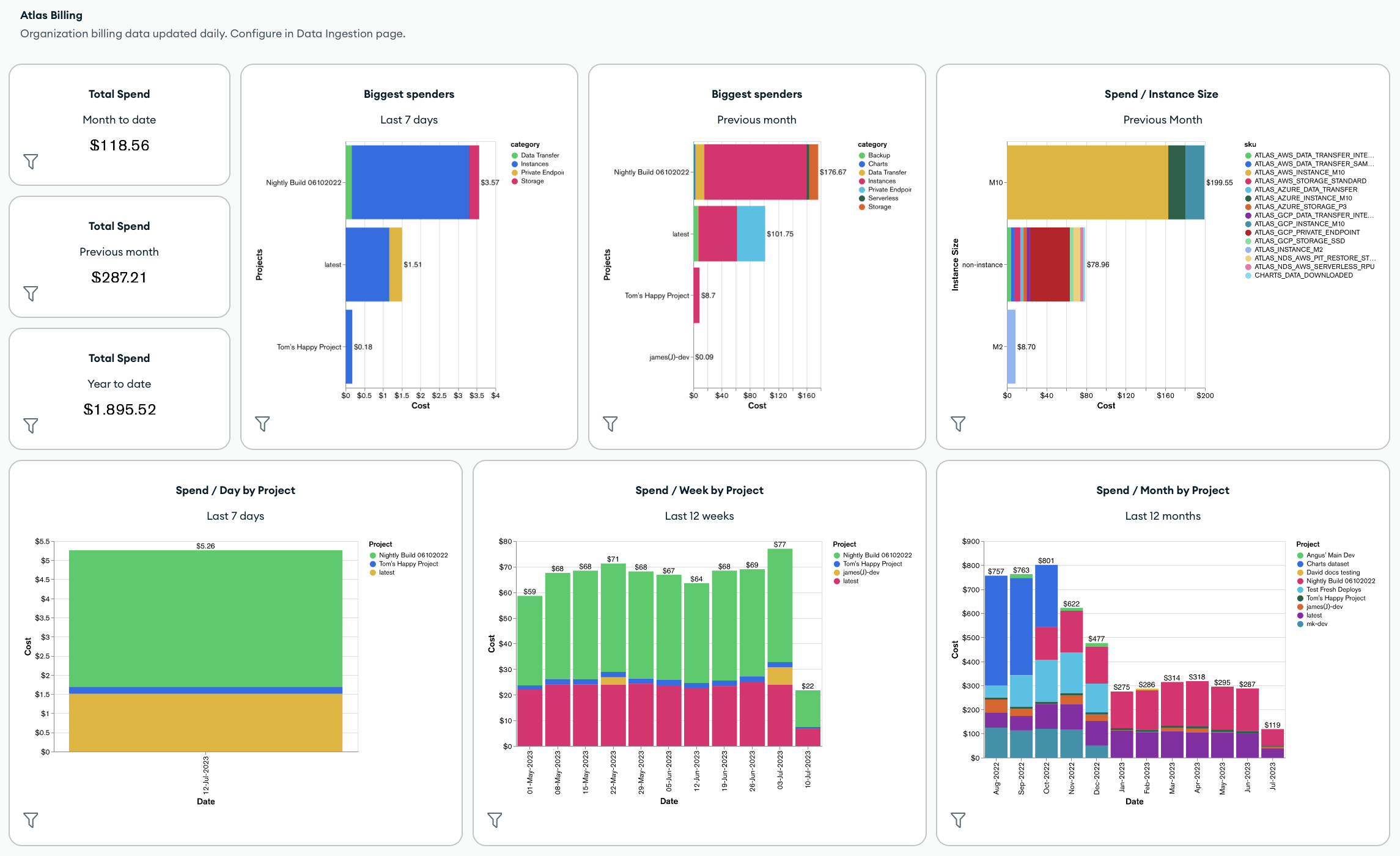
默认情况下,计费仪表盘包含以下指标和Atlas Charts:
整个组织的总支出
组织中支出最多的人
按实例大小、项目、集群、产品类别或 SKU 划分的总支出
按产品类别划分的总成本
您还可以通过应用仪表盘筛选器和添加新图表(包括使用已应用于账单数据的标签的任何图表)来自定义账单仪表盘盘。
要创建或管理计费仪表盘,请参阅创建和管理计费仪表盘。
自动化示例: Atlas 计费
以下示例展示了如何使用Atlas 工具检索和下载账单数据以实现自动化。
在您能够使用 Atlas Go SDK 进行身份验证并运行示例脚本之前,您必须:
创建 Atlas 服务帐户。请在终端中运行以下命令,将您的客户端 ID 和密钥存储为环境变量:
export MONGODB_ATLAS_SERVICE_ACCOUNT_ID="<insert your client ID here>" export MONGODB_ATLAS_SERVICE_ACCOUNT_SECRET="<insert your client secret here>" 在您的 Go 项目中设置以下配置变量:
configs/config.json{ "MONGODB_ATLAS_BASE_URL": "https://cloud.mongodb.com", "ATLAS_ORG_ID": "32b6e34b3d91647abb20e7b8", "ATLAS_PROJECT_ID": "67212db237c5766221eb6ad9", "ATLAS_CLUSTER_NAME": "myCluster", "ATLAS_PROCESS_ID": "myCluster-shard-00-00.ajlj3.mongodb.net:27017" }
有关身份验证和创建客户端的更多信息,请参阅Github中完整的Atlas SDK for Go示例项目。
获取历史计费数据
以下示例脚本演示了如何检索组织的历史账单数据,然后将发票下载到逗号分隔值(CSV)或JSON文件以进行进一步分析。
// See entire project at https://github.com/mongodb/atlas-architecture-go-sdk package main import ( "context" "fmt" "log" "time" "atlas-sdk-examples/internal/auth" "atlas-sdk-examples/internal/billing" "atlas-sdk-examples/internal/config" "atlas-sdk-examples/internal/data/export" "atlas-sdk-examples/internal/fileutils" "atlas-sdk-examples/internal/orgutils" "github.com/joho/godotenv" "go.mongodb.org/atlas-sdk/v20250219001/admin" ) func main() { envFile := ".env.production" if err := godotenv.Load(envFile); err != nil { log.Printf("Warning: could not load %s file: %v", envFile, err) } secrets, cfg, err := config.LoadAllFromEnv() if err != nil { log.Fatalf("Failed to load configuration %v", err) } ctx := context.Background() client, err := auth.NewClient(ctx, cfg, secrets) if err != nil { log.Fatalf("Failed to initialize authentication client: %v", err) } p := &admin.ListInvoicesApiParams{ OrgId: cfg.OrgID, } fmt.Printf("Fetching historical invoices for organization: %s\n", p.OrgId) // Fetch invoices from the previous six months with the provided options invoices, err := billing.ListInvoicesForOrg(ctx, client.InvoicesApi, p, billing.WithViewLinkedInvoices(true), billing.WithIncludeCount(true), billing.WithDateRange(time.Now().AddDate(0, -6, 0), time.Now())) if err != nil { log.Fatalf("Failed to retrieve invoices: %v", err) } if invoices.GetTotalCount() > 0 { fmt.Printf("Total count of invoices: %d\n", invoices.GetTotalCount()) } else { fmt.Println("No invoices found for the specified date range") return } // Get organization name for more user-friendly filenames orgName, err := orgutils.GetOrganizationName(ctx, client.OrganizationsApi, p.OrgId) if err != nil { // Non-critical error, continue with orgID as name fmt.Printf("Warning: %v\n", err) orgName = p.OrgId } sanitizedOrgName := orgutils.SanitizeForFilename(orgName) // Export invoice data to be used in other systems or for reporting outDir := "invoices" prefix := fmt.Sprintf("historical_%s", sanitizedOrgName) err = exportInvoicesToJSON(invoices, outDir, prefix) if err != nil { log.Fatalf("Failed to export invoices to JSON: %v", err) } err = exportInvoicesToCSV(invoices, outDir, prefix) if err != nil { log.Fatalf("Failed to export invoices to CSV: %v", err) } } func exportInvoicesToJSON(invoices *admin.PaginatedApiInvoiceMetadata, outDir, prefix string) error { jsonPath, err := fileutils.GenerateOutputPath(outDir, prefix, "json") if err != nil { return fmt.Errorf("failed to generate JSON output path: %v", err) } if err := export.ToJSON(invoices.GetResults(), jsonPath); err != nil { return fmt.Errorf("failed to write JSON file: %v", err) } fmt.Printf("Exported invoice data to %s\n", jsonPath) return nil } func exportInvoicesToCSV(invoices *admin.PaginatedApiInvoiceMetadata, outDir, prefix string) error { csvPath, err := fileutils.GenerateOutputPath(outDir, prefix, "csv") if err != nil { return fmt.Errorf("failed to generate CSV output path: %v", err) } // Set the headers and mapped rows for the CSV export headers := []string{"InvoiceID", "Status", "Created", "AmountBilled"} err = export.ToCSVWithMapper(invoices.GetResults(), csvPath, headers, func(invoice admin.BillingInvoiceMetadata) []string { return []string{ invoice.GetId(), invoice.GetStatusName(), invoice.GetCreated().Format(time.RFC3339), fmt.Sprintf("%.2f", float64(invoice.GetAmountBilledCents())/100.0), } }) if err != nil { return fmt.Errorf("failed to write CSV file: %v", err) } fmt.Printf("Exported invoice data to %s\n", csvPath) return nil }
获取待处理的发票
以下示例脚本演示了如何检索组织的待处理发票,然后将发票下载到逗号分隔值(CSV)或JSON文件以供进一步分析。
// See entire project at https://github.com/mongodb/atlas-architecture-go-sdk package main import ( "context" "fmt" "log" "atlas-sdk-examples/internal/auth" "atlas-sdk-examples/internal/billing" "atlas-sdk-examples/internal/config" "atlas-sdk-examples/internal/data/export" "atlas-sdk-examples/internal/fileutils" "atlas-sdk-examples/internal/orgutils" "github.com/joho/godotenv" "go.mongodb.org/atlas-sdk/v20250219001/admin" ) func main() { envFile := ".env.production" if err := godotenv.Load(envFile); err != nil { log.Printf("Warning: could not load %s file: %v", envFile, err) } secrets, cfg, err := config.LoadAllFromEnv() if err != nil { log.Fatalf("Failed to load configuration %v", err) } ctx := context.Background() client, err := auth.NewClient(ctx, cfg, secrets) if err != nil { log.Fatalf("Failed to initialize authentication client: %v", err) } p := &admin.ListInvoicesApiParams{ OrgId: cfg.OrgID, } fmt.Printf("Fetching pending invoices for organization: %s\n", p.OrgId) details, err := billing.CollectLineItemBillingData(ctx, client.InvoicesApi, client.OrganizationsApi, p.OrgId, nil) if err != nil { log.Fatalf("Failed to retrieve pending invoices for %s: %v", p.OrgId, err) } if len(details) == 0 { fmt.Printf("No pending invoices found for organization: %s\n", p.OrgId) return } fmt.Printf("Found %d line items in pending invoices\n", len(details)) // Use organization name from the returned details for more user-friendly filenames orgName := details[0].Org.Name sanitizedOrgName := orgutils.SanitizeForFilename(orgName) // Export invoice data to be used in other systems or for reporting outDir := "invoices" prefix := fmt.Sprintf("pending_%s", sanitizedOrgName) err = exportInvoicesToJSON(details, outDir, prefix) if err != nil { log.Fatalf("Failed to export invoices to JSON: %v", err) } err = exportInvoicesToCSV(details, outDir, prefix) if err != nil { log.Fatalf("Failed to export invoices to CSV: %v", err) } } func exportInvoicesToJSON(details []billing.Detail, outDir, prefix string) error { jsonPath, err := fileutils.GenerateOutputPath(outDir, prefix, "json") if err != nil { return fmt.Errorf("failed to generate JSON output path: %v", err) } if err := export.ToJSON(details, jsonPath); err != nil { return fmt.Errorf("failed to write JSON file: %v", err) } fmt.Printf("Exported billing data to %s\n", jsonPath) return nil } func exportInvoicesToCSV(details []billing.Detail, outDir, prefix string) error { csvPath, err := fileutils.GenerateOutputPath(outDir, prefix, "csv") if err != nil { return fmt.Errorf("failed to generate CSV output path: %v", err) } // Set the headers and mapped rows for the CSV export headers := []string{"Organization", "OrgID", "Project", "ProjectID", "Cluster", "SKU", "Cost", "Date", "Provider", "Instance", "Category"} err = export.ToCSVWithMapper(details, csvPath, headers, func(item billing.Detail) []string { return []string{ item.Org.Name, item.Org.ID, item.Project.Name, item.Project.ID, item.Cluster, item.SKU, fmt.Sprintf("%.2f", item.Cost), item.Date.Format("2006-01-02"), item.Provider, item.Instance, item.Category, } }) if err != nil { return fmt.Errorf("failed to write CSV file: %v", err) } fmt.Printf("Exported billing data to %s\n", csvPath) return nil }
获取关联组织
以下示例脚本演示了如何从计费组织检索关联组织及其 ID 的列表。
// See entire project at https://github.com/mongodb/atlas-architecture-go-sdk package main import ( "context" "fmt" "log" "atlas-sdk-examples/internal/auth" "atlas-sdk-examples/internal/billing" "atlas-sdk-examples/internal/config" "github.com/joho/godotenv" "go.mongodb.org/atlas-sdk/v20250219001/admin" ) func main() { envFile := ".env.production" if err := godotenv.Load(envFile); err != nil { log.Printf("Warning: could not load %s file: %v", envFile, err) } secrets, cfg, err := config.LoadAllFromEnv() if err != nil { log.Fatalf("Failed to load configuration %v", err) } ctx := context.Background() client, err := auth.NewClient(ctx, cfg, secrets) if err != nil { log.Fatalf("Failed to initialize authentication client: %v", err) } p := &admin.ListInvoicesApiParams{ OrgId: cfg.OrgID, } fmt.Printf("Fetching linked organizations for billing organization: %s\n", p.OrgId) invoices, err := billing.GetCrossOrgBilling(ctx, client.InvoicesApi, p) if err != nil { log.Fatalf("Failed to retrieve cross-organization billing data for %s: %v", p.OrgId, err) } displayLinkedOrganizations(invoices, p.OrgId) } func displayLinkedOrganizations(invoices map[string][]admin.BillingInvoiceMetadata, primaryOrgID string) { var linkedOrgs []string for orgID := range invoices { if orgID != primaryOrgID { linkedOrgs = append(linkedOrgs, orgID) } } if len(linkedOrgs) == 0 { fmt.Println("No linked organizations found for the billing organization") return } fmt.Printf("Found %d linked organizations:\n", len(linkedOrgs)) for i, orgID := range linkedOrgs { fmt.Printf(" %d. Organization ID: %s\n", i+1, orgID) } }