개요
이 가이드 에서는 update_one() 및 update_many() 메서드를 통해 Rust 드라이버 사용하여 MongoDB 컬렉션 의 문서를 업데이트 방법을 학습 수 있습니다.
업데이트 작업은 다른 필드와 값을 변경하지 않고 유지하면서 지정한 필드를 변경합니다.
문서 패턴 업데이트
MongoDB 에서 업데이트 메서드는 동일한 패턴 따릅니다.
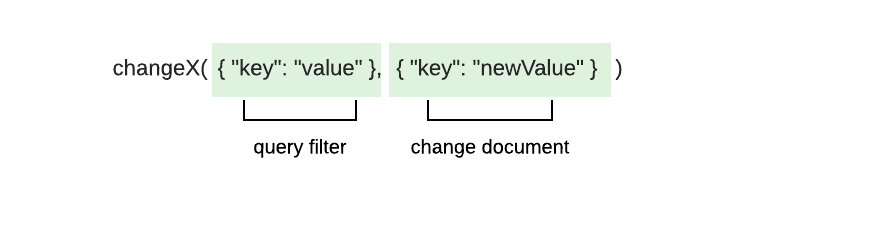
이러한 메서드는 다음 매개 변수를 사용합니다:
업데이트 할 하나 이상의 문서를 일치시키는 쿼리 필터 하다
필드 및 값 변경 사항을 지정하는 문서 업데이트
팁
복합 작업을 사용하여 한 번의 조치로 데이터를 검색하고 수정할 수 있습니다. 자세한 내용은 복합 연산 가이드를 참조하세요.
_id 필드
MongoDB 컬렉션 의 각 문서 에는 고유하고 변경할 수 없는 _id 필드 있습니다. 업데이트 작업을 통해 _id 필드 변경하려고 하면 드라이버 WriteError 를 발생시키고 업데이트를 수행하지 않습니다.
업데이트 작업
다음 방법을 사용하여 업데이트 작업을 수행할 수 있습니다.
update_one(): 검색 조건과 일치하는 첫 번째 문서를 업데이트합니다.update_many()검색 기준과 일치하는 모든 문서를 업데이트합니다.
옵션 빌더 메서드를 이러한 업데이트 작업 메서드에 연결할 수도 있습니다. 업데이트 메서드의 동작 수정에 대해 학습하려면 이 가이드의 업데이트 동작 수정 섹션을 참조하세요.
매개변수
각 메서드는 쿼리 필터와 함께 업데이트 연산자 를 한 개 이상 포함하는 업데이트 문서 를 사용합니다. 업데이트 연산자는 수행할 업데이트 유형을 지정하고 변경 사항을 설명하는 필드와 값을 포함합니다. 업데이트 문서는 다음과 같은 포맷을 사용합니다.
doc! { "<update operator>": doc! { "<field>": <value> } }
하나의 업데이트 문서에 여러 업데이트를 지정하려면 다음 형식을 사용하세요.
doc! { "<update operator>": doc!{"<field>": <value>}, "<update operator>": doc!{"<field>": <value>}, ... }
업데이트 연산자의 전체 목록과 설명은 MongoDB MongoDB Server 매뉴얼을 참조하세요.
참고
업데이트 작업의 집계 파이프라인
집계 파이프라인을 사용하여 업데이트 작업을 수행할 수 있습니다. MongoDB가 지원하는 집계 단계에 대해 자세히 알아보려면 MongoDB Server 매뉴얼의 집계 파이프라인을 사용한 업데이트 튜토리얼을 참조하세요.
반환 값
작업이 성공하면 update_one() 및 update_many() 메서드는 UpdateResult 유형을 반환합니다. UpdateResult 유형에는 작업을 설명하는 다음과 같은 속성이 포함되어 있습니다.
속성 | 설명 |
|---|---|
| 필터하다 와 일치하는 문서 수 |
| 작업으로 수정된 문서 수입니다. |
| 업서트된 문서의 |
update_one() 에 전달한 쿼리 필터와 일치하는 문서가 여러 개 있는 경우 메서드는 첫 번째로 일치하는 문서를 선택하고 업데이트합니다. 쿼리 필터와 일치하는 문서가 없는 경우 업데이트 작업은 변경되지 않습니다.
예시
이 섹션에서는 update_one() 및 update_many() 메서드에 대한 빠른 참조 및 전체 파일 예제를 제공합니다.
업데이트 예시
다음 문서는 회사 직원에 대해 설명합니다.
{ "_id": ObjectId('4337'), "name": "Shelley Olson", "department": "Marketing", "role": "Director", "bonus": 3000 }, { "_id": ObjectId('4902'), "name": "Remi Ibrahim", "department": "Marketing", "role": "Consultant", "bonus": 1800 }
이 예시 update_many() 메서드를 사용하여 업데이트 작업을 수행합니다. update_many() 메서드는 다음 매개 변수를 사용합니다.
department필드 값이"Marketing"인 문서를 일치시키는 쿼리 필터다음 업데이트가 포함된 문서 업데이트합니다.
의 값을 로, 의
$set값을 로 변경하는 연산자department"Business Operations"role"Analytics Specialist"의
$inc값을 만큼 증가시키는 연산자bonus500
let update_doc = doc! { "$set": doc! { "department": "Business Operations", "role": "Analytics Specialist" }, "$inc": doc! { "bonus": 500 } }; let res = my_coll .update_many(doc! { "department": "Marketing" }, update_doc) .await?; println!("Modified documents: {}", res.modified_count);
다음 문서에는 이전 업데이트 작업의 변경 사항이 반영되어 있습니다.
{ "_id": ObjectId('4337'), "name": "Shelley Olson", "department": "Business Operations", "role": "Analytics Specialist", "bonus": 3500 }, { "_id": ObjectId('4902'), "name": "Remi Ibrahim", "department": "Business Operations", "role": "Analytics Specialist", "bonus": 2300 }
ObjectId별 업데이트 예시
다음 문서는 회사 직원에 대해 설명합니다.
{ "_id": ObjectId('4274'), "name": "Jill Millerton", "department": "Marketing", "role": "Consultant" }
이 예시에서는 문서의 고유한 _id 값과 일치하는 쿼리 필터를 지정하여 이전 문서를 쿼리합니다. 그런 다음 update_one() 메서드로 업데이트 작업을 수행합니다. update_one() 메서드는 다음 매개 변수를 사용합니다.
_id필드의 값이ObjectId('4274')인 문서와 일치하는 쿼리 필터name의 값을"Jill Gillison"로 설정하는 지침을 생성하는 문서를 업데이트합니다.
let id = ObjectId::from_str("4274").expect("Could not convert to ObjectId"); let filter_doc = doc! { "_id": id }; let update_doc = doc! { "$set": doc! { "name": "Jill Gillison" } }; let res = my_coll .update_one(filter_doc, update_doc) .await?; println!("Modified documents: {}", res.modified_count);
다음 문서는 이전 업데이트 작업으로 인한 변경 사항을 반영합니다.
{ "_id": ObjectId('4274'), "name": "Jill Gillison", "department": "Marketing", "role": "Consultant" }
팁
_id 필드에 대해 자세히 학습하려면 이 페이지의 _id 필드 섹션 또는 MongoDB Server 매뉴얼의 ObjectId() 메서드 설명서를 참조하세요.
전체 파일 예시: 문서 업데이트
이 예시 sample_restaurants 데이터베이스 의 restaurants 컬렉션 에 있는 문서 업데이트합니다. update_one() 메서드는 name 필드 의 값이 "Spice Market"인 첫 번째 문서 에 price 필드 추가합니다.
restaurants 컬렉션 의 문서에 Document 유형 또는 사용자 지정 데이터 유형 의 인스턴스로 액세스 할 수 있습니다. 컬렉션의 데이터를 나타내는 데이터 유형 지정하려면 강조 표시된 줄의 <T> 유형 매개변수를 다음 값 중 하나로 바꿉니다.
<Document>: 컬렉션 문서를 BSON 문서로 액세스합니다.<Restaurant>: 코드 상단에 정의된Restaurant구조체의 인스턴스로 컬렉션 문서에 액세스합니다.
Asynchronous 또는 Synchronous 탭을 선택하여 각 런타임에 해당하는 코드를 확인합니다.
use std::env; use mongodb::{ bson::{ Document, doc }, Client, Collection }; use serde::{ Deserialize, Serialize }; struct Restaurant { name: String, price: String, } async fn main() -> mongodb::error::Result<()> { let uri = "<connection string>"; let client = Client::with_uri_str(uri).await?; // Replace <T> with the <Document> or <Restaurant> type parameter let my_coll: Collection<T> = client .database("sample_restaurants") .collection("restaurants"); let filter = doc! { "name": "Spice Market" }; let update = doc! { "$set": doc! {"price": "$$$"} }; let res = my_coll.update_one(filter, update).await?; println!("Updated documents: {}", res.modified_count); Ok(()) }
use std::env; use mongodb::{ bson::{ Document, doc }, sync::{ Client, Collection } }; use serde::{ Deserialize, Serialize }; struct Restaurant { name: String, price: String, } fn main() -> mongodb::error::Result<()> { let uri = "<connection string>"; let client = Client::with_uri_str(uri)?; // Replace <T> with the <Document> or <Restaurant> type parameter let my_coll: Collection<T> = client .database("sample_restaurants") .collection("restaurants"); let filter = doc! { "name": "Spice Market" }; let update = doc! { "$set": doc! {"price": "$$$"} }; let res = my_coll.update_one(filter, update).run()?; println!("Updated documents: {}", res.modified_count); Ok(()) }
전체 파일 예시: 여러 문서 업데이트
이 예시 sample_restaurants 데이터베이스 의 restaurants 컬렉션 에 있는 문서 업데이트합니다. update_many() 메서드는 address.street 필드 의 값이 "Sullivan Street" 이고 borough 필드 의 값이 "Manhattan"인 문서에 near_me 필드 추가합니다.
restaurants 컬렉션 의 문서에 Document 유형 또는 사용자 지정 데이터 유형 의 인스턴스로 액세스 할 수 있습니다. 컬렉션의 데이터를 나타내는 데이터 유형 지정하려면 강조 표시된 줄의 <T> 유형 매개변수를 다음 값 중 하나로 바꿉니다.
<Document>: 컬렉션 문서를 BSON 문서로 액세스합니다.<Restaurant>: 코드 상단에 정의된Restaurant구조체의 인스턴스로 컬렉션 문서에 액세스합니다.
Asynchronous 또는 Synchronous 탭을 선택하여 각 런타임에 해당하는 코드를 확인합니다.
use std::env; use mongodb::{ bson::doc, Client, Collection }; use bson::Document; use serde::{ Deserialize, Serialize }; struct Address { street: String, city: String, } struct Restaurant { name: String, borough: String, address: Address, } async fn main() -> mongodb::error::Result<()> { let uri = "<connection string>"; let client = Client::with_uri_str(uri).await?; // Replace <T> with the <Document> or <Restaurant> type parameter let my_coll: Collection<T> = client .database("sample_restaurants") .collection("restaurants"); let filter = doc! { "address.street": "Sullivan Street", "borough": "Manhattan" }; let update = doc! { "$set": doc! { "near_me": true } }; let res = my_coll.update_many(filter, update).await?; println!("Updated documents: {}", res.modified_count); Ok(()) }
use std::env; use mongodb::{ bson::{ Document, doc }, sync::{ Client, Collection } }; use serde::{ Deserialize, Serialize }; struct Address { street: String, city: String, } struct Restaurant { name: String, borough: String, address: Address, } fn main() -> mongodb::error::Result<()> { let uri = "<connection string>"; let client = Client::with_uri_str(uri)?; // Replace <T> with the <Document> or <Restaurant> type parameter let my_coll: Collection<T> = client .database("sample_restaurants") .collection("restaurants"); let filter = doc! { "address.street": "Sullivan Street", "borough": "Manhattan" }; let update = doc! { "$set": doc! { "near_me": true } }; let res = my_coll.update_many(filter, update).run()?; println!("Updated documents: {}", res.modified_count); Ok(()) }
업데이트 동작 수정
UpdateOptions 구조체 필드를 설정하다 옵션 메서드를 호출하여 update_one() 및 update_many() 메서드의 동작을 수정할 수 있습니다.
참고
설정 옵션
옵션 빌더 메서드를 업데이트 메서드 호출에 직접 연결하여 UpdateOptions 필드를 설정하다 수 있습니다. 이전 버전의 드라이버 사용하는 경우 옵션 빌더 메서드를 builder() 메서드에 연결하여 UpdateOptions 인스턴스 구성해야 합니다. 그런 다음 옵션 인스턴스 update_one() 또는 update_many()에 매개 변수로 전달합니다.
다음 표에서는 UpdateOptions 에서 사용할 수 있는 옵션에 대해 설명합니다.
옵션 | 설명 |
|---|---|
| 업데이트가 적용되는 배열 요소를 지정하는 필터 설정입니다. |
|
|
|
|
| 결과를 정렬할 때 사용할 데이터 정렬입니다. 데이터 정렬에 대해 자세히 알아보려면 데이터 정렬 가이드를 참조하세요. |
| 작업에 사용할 인덱스입니다. |
| 작업의 쓰기 고려 (write concern)입니다. 이 옵션을 설정하지 않으면 작업이 컬렉션에 설정된 쓰기 고려 (write concern)를 상속합니다. 쓰기 고려 (write concern)에 대해 자세히 학습하려면 MongoDB Server 매뉴얼의 쓰기 고려 (write concern) 를 참조하세요. |
| 매개변수와 값의 맵입니다. 이러한 매개변수는 집계 표현식에서 변수로 액세스할 수 있습니다. 이 옵션은 MongoDB Server 버전 5.0 이상에 연결할 때에만 사용할 수 있습니다. |
| 데이터베이스 프로파일러, |
다음 코드는 upsert() 메서드를 update_one() 메서드에 연결하여 upsert 필드 를 설정하다 하는 방법을 보여줍니다.
let res = my_coll .update_one(filter_doc, update_doc) .upsert(true) .await?;
추가 정보
이 가이드의 개념에 대한 자세한 내용은 다음 문서를 참조하세요.
업데이트 연산자에 대해 자세히 학습하려면 MongoDB Server 매뉴얼에서 업데이트 연산자 를 참조하세요.
API 문서
이 가이드에서 사용되는 메서드 또는 유형에 대해 자세히 알아보려면 다음 API 문서를 참조하세요.