Overview
在本指南中,您可以学习;了解如何使用Rust驾驶员通过 update_one() 和 update_many() 方法更新MongoDB集合中的文档。
更新操作会修改您指定的字段,而其他字段和值保持不变。
更新文档模式
在MongoDB中,更新方法遵循相同的模式:

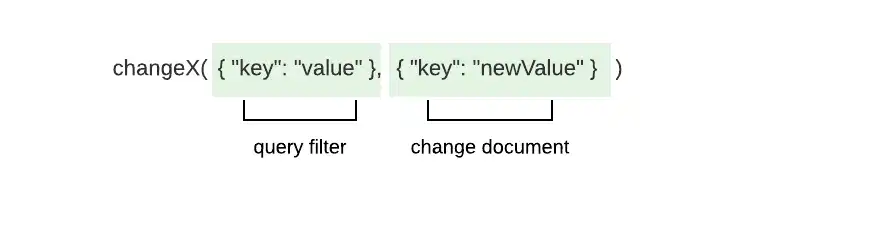
这些方法采用以下参数:
用于匹配要更新的一个或多个文档的查询过滤
更新指定字段和值更改的文档
提示
您可以使用复合操作在一个动作中检索和修改数据。 要学习;了解详情,请参阅复合操作指南。
_id 字段
MongoDB集合中的每个文档都有一个唯一且不可变的 _id字段。如果您尝试通过更新操作更改 _id字段,驾驶员将引发 WriteError 并且不会执行更新。
更新操作
您可以使用以下方法执行更新操作:
update_one(),更新匹配搜索条件的第一个文档update_many(),这会更新所有符合搜索条件的文档
您还可以将选项构建器方法链接到这些更新操作方法。要学习;了解如何修改更新方法的行为,请参阅本指南的 修改更新行为部分。
参数
每种方法都采用一个查询筛选器和一个包含至少一个更新操作符的更新文档。 更新操作符指定要执行的更新类型,并包括描述更改的字段和值。 更新文档使用以下格式:
doc! { "<update operator>": doc! { "<field>": <value> } }
要在一个更新文档中指定多个更新,请使用以下格式:
doc! { "<update operator>": doc!{"<field>": <value>}, "<update operator>": doc!{"<field>": <value>}, ... }
返回值
如果操作成功, update_one()和update_many()方法会返回UpdateResult类型。 UpdateResult类型包含以下描述操作的属性:
属性 | 说明 |
|---|---|
| 过滤匹配的文档数 |
| 操作修改的文档数量 |
| 更新或插入文档的 |
如果多个文档与您传递给update_one()的查询筛选器匹配,则该方法会选择并更新第一个匹配的文档。 如果没有与查询筛选器匹配的文档,则更新操作不会进行更改。
示例
本部分提供 update_one() 和 update_many() 方法的快速参考和完整文件示例。
更新示例
以下文档描述了公司的员工:
{ "_id": ObjectId('4337'), "name": "Shelley Olson", "department": "Marketing", "role": "Director", "bonus": 3000 }, { "_id": ObjectId('4902'), "name": "Remi Ibrahim", "department": "Marketing", "role": "Consultant", "bonus": 1800 }
此示例使用 update_many() 方法执行更新操作。 update_many() 方法采用以下参数:
查询过滤,用于匹配
department字段的值为"Marketing"的文档更新包含以下更新的文档:
$set操作符,用于将department的值更改为"Business Operations"并将role更改为"Analytics Specialist"$inc操作符,用于将bonus的值增加500
let update_doc = doc! { "$set": doc! { "department": "Business Operations", "role": "Analytics Specialist" }, "$inc": doc! { "bonus": 500 } }; let res = my_coll .update_many(doc! { "department": "Marketing" }, update_doc) .await?; println!("Modified documents: {}", res.modified_count);
Modified documents: 2
以下文档反映了前面的更新操作所产生的更改:
{ "_id": ObjectId('4337'), "name": "Shelley Olson", "department": "Business Operations", "role": "Analytics Specialist", "bonus": 3500 }, { "_id": ObjectId('4902'), "name": "Remi Ibrahim", "department": "Business Operations", "role": "Analytics Specialist", "bonus": 2300 }
按 ObjectId 更新示例
以下文档描述了某公司的一名员工:
{ "_id": ObjectId('4274'), "name": "Jill Millerton", "department": "Marketing", "role": "Consultant" }
此示例通过指定查询筛选器以匹配文档的唯一_id值来查询前一个文档。 然后,代码使用update_one()方法执行更新操作。 update_one()方法采用以下参数:
匹配
_id字段值为ObjectId('4274')的文档的查询筛选器更新创建将
name的值设置为"Jill Gillison"的指令的文档
let id = ObjectId::from_str("4274").expect("Could not convert to ObjectId"); let filter_doc = doc! { "_id": id }; let update_doc = doc! { "$set": doc! { "name": "Jill Gillison" } }; let res = my_coll .update_one(filter_doc, update_doc) .await?; println!("Modified documents: {}", res.modified_count);
Modified documents: 1
以下文档反映了上述更新操作导致的变更:
{ "_id": ObjectId('4274'), "name": "Jill Gillison", "department": "Marketing", "role": "Consultant" }
提示
要学习;了解有关_id 字段的更多信息,请参阅本页的_id字段部分或MongoDB Server手册中的 ObjectId() 方法文档。
完整文件示例:更新文档
此示例更新 sample_restaurants数据库的 restaurants集合中的文档。 update_one() 方法将 price字段添加到 name字段值为 "Spice Market" 的第一个文档。
您可以将 restaurants集合中的文档作为 Document 类型或自定义数据类型的实例访问权限。 要指定哪种数据类型表示集合的数据,请将突出显示的行上的 <T> 类型参数替换为以下值之一:
<Document>:将集合文档作为BSON文档进行访问<Restaurant>:将集合文档作为Restaurant结构的实例进行访问,该结构在代码顶部定义
选择 Asynchronous或Synchronous标签页,查看每个运行时的相应代码:
use std::env; use mongodb::{ bson::{ Document, doc }, Client, Collection }; use serde::{ Deserialize, Serialize }; struct Restaurant { name: String, price: String, } async fn main() -> mongodb::error::Result<()> { let uri = "<connection string>"; let client = Client::with_uri_str(uri).await?; // Replace <T> with the <Document> or <Restaurant> type parameter let my_coll: Collection<T> = client .database("sample_restaurants") .collection("restaurants"); let filter = doc! { "name": "Spice Market" }; let update = doc! { "$set": doc! {"price": "$$$"} }; let res = my_coll.update_one(filter, update).await?; println!("Updated documents: {}", res.modified_count); Ok(()) }
Updated documents: 1
use std::env; use mongodb::{ bson::{ Document, doc }, sync::{ Client, Collection } }; use serde::{ Deserialize, Serialize }; struct Restaurant { name: String, price: String, } fn main() -> mongodb::error::Result<()> { let uri = "<connection string>"; let client = Client::with_uri_str(uri)?; // Replace <T> with the <Document> or <Restaurant> type parameter let my_coll: Collection<T> = client .database("sample_restaurants") .collection("restaurants"); let filter = doc! { "name": "Spice Market" }; let update = doc! { "$set": doc! {"price": "$$$"} }; let res = my_coll.update_one(filter, update).run()?; println!("Updated documents: {}", res.modified_count); Ok(()) }
Updated documents: 1
完整文件示例:更新多个文档
此示例更新 sample_restaurants数据库的 restaurants集合中的文档。 update_many() 方法将 near_me字段添加到 address.street字段值为 "Sullivan Street" 且 borough字段为 "Manhattan" 的文档中。
您可以将 restaurants集合中的文档作为 Document 类型或自定义数据类型的实例访问权限。 要指定哪种数据类型表示集合的数据,请将突出显示的行上的 <T> 类型参数替换为以下值之一:
<Document>:将集合文档作为BSON文档进行访问。<Restaurant>:将集合文档作为Restaurant结构的实例进行访问,该结构在代码顶部定义
选择Asynchronous或Synchronous标签页,查看每个运行时的相应代码:
use std::env; use mongodb::{ bson::doc, Client, Collection }; use bson::Document; use serde::{ Deserialize, Serialize }; struct Address { street: String, city: String, } struct Restaurant { name: String, borough: String, address: Address, } async fn main() -> mongodb::error::Result<()> { let uri = "<connection string>"; let client = Client::with_uri_str(uri).await?; // Replace <T> with the <Document> or <Restaurant> type parameter let my_coll: Collection<T> = client .database("sample_restaurants") .collection("restaurants"); let filter = doc! { "address.street": "Sullivan Street", "borough": "Manhattan" }; let update = doc! { "$set": doc! { "near_me": true } }; let res = my_coll.update_many(filter, update).await?; println!("Updated documents: {}", res.modified_count); Ok(()) }
// Your values might differ Updated documents: 22
use std::env; use mongodb::{ bson::{ Document, doc }, sync::{ Client, Collection } }; use serde::{ Deserialize, Serialize }; struct Address { street: String, city: String, } struct Restaurant { name: String, borough: String, address: Address, } fn main() -> mongodb::error::Result<()> { let uri = "<connection string>"; let client = Client::with_uri_str(uri)?; // Replace <T> with the <Document> or <Restaurant> type parameter let my_coll: Collection<T> = client .database("sample_restaurants") .collection("restaurants"); let filter = doc! { "address.street": "Sullivan Street", "borough": "Manhattan" }; let update = doc! { "$set": doc! { "near_me": true } }; let res = my_coll.update_many(filter, update).run()?; println!("Updated documents: {}", res.modified_count); Ok(()) }
// Your values might differ Updated documents: 22
修改更新行为
您可以通过调用设立UpdateOptions 结构体字段的选项方法来修改 update_one() 和 update_many() 方法的行为。
注意
设置选项
您可以通过将选项构建器方法直接链接到更新方法调用来设立UpdateOptions 字段。如果使用的是早期版本的驾驶员,则必须通过将选项构建器方法链接到 builder() 方法来构造 UpdateOptions实例。然后,将选项实例作为参数传递给 update_one() 或 update_many()。
下表描述了UpdateOptions中可用的选项:
选项 | 说明 |
|---|---|
| The set of filters specifying the array elements to which the
update applies. Type: Vec<Document> |
| If true, allows the driver to perform a write that violates
document-level validation. To learn more about validation, see
the guide on Schema Validation.Type: boolDefault: false |
| If true, the operation inserts a document if no documents match
the query filter.Type: bool |
| The collation to use when sorting results. To learn more about collations,
see the Collations guide. Type: CollationDefault: None |
| The index to use for the operation. Type: HintDefault: None |
| The write concern for the operation. If you don't set this
option, the operation inherits the write concern set for
the collection. To learn more about write concerns, see
Write Concern in the
MongoDB Server manual. Type: WriteConcern |
| A map of parameters and values. These parameters can be accessed
as variables in aggregation expressions. This option is available
only when connecting to MongoDB Server versions 5.0 and later. Type: Document |
| An arbitrary Bson value tied to the operation to trace
it through the database profiler, currentOp, and
logs. This option is available only when connecting to
MongoDB Server versions 4.4 and later.Type: BsonDefault: None |
以下代码展示了如何通过将upsert()方法链接到update_one()方法来设立upsert字段:
let res = my_coll .update_one(filter_doc, update_doc) .upsert(true) .await?;
更多信息
有关本指南中概念的更多信息,请参阅以下文档:
要学习;了解有关更新操作符的更多信息,请参阅MongoDB Server手册中的更新操作符。
API 文档
要进一步了解本指南所提及的方法和类型,请参阅以下 API 文档: