Overview
このガイドでは、 Rustドライバーを使用して update_one() メソッドと update_many() メソッドを使用してMongoDBコレクション内のドキュメントを更新する方法を学習できます。
更新操作では、指定したフィールドが変更されますが、他のフィールドと値は変更されません。
ドキュメントパターンの更新
MongoDBでは、更新メソッドは同じパターンに従います。

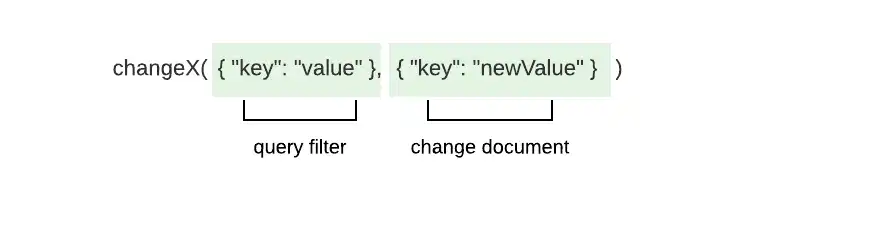
これらのメソッドは、次のパラメーターを取ります。
アップデートする 1 つ以上のドキュメントに一致するクエリフィルター
フィールドと値の変更を指定するドキュメントの更新
Tip
複合操作を使用すると、1 回のアクションでデータを検索して変更できます。 詳しくは、 複合演算子 に関するガイドをご覧ください。
_id フィールド
MongoDBコレクション内の各ドキュメントには、一意かつ不変の _idフィールドがあります。更新操作を通じて _idフィールドを変更しようとすると、ドライバーは WriteError を発生させ、更新を実行しません。
アップデート操作
次の方法を使用して更新操作を実行できます。
update_one()は、検索条件に一致する最初のドキュメントを更新します。update_many()は、検索条件に一致するすべてのドキュメントを更新します
これらの更新操作メソッドにオプション ビルダのメソッドを連鎖させることもできます。更新メソッドの動作の変更の詳細については、このガイドの 「更新動作の変更」セクション を参照してください。
パラメーター
各メソッドは、クエリフィルターと、少なくとも 1 つの更新演算子を含む更新ドキュメントを受け取ります。 更新演算子は、実行する更新のタイプを指定し、変更を説明するフィールドと値を含めます。 更新ドキュメントは、次の形式を使用します。
doc! { "<update operator>": doc! { "<field>": <value> } }
1 つの更新ドキュメントで複数の更新を指定するには、次の形式を使用します。
doc! { "<update operator>": doc!{"<field>": <value>}, "<update operator>": doc!{"<field>": <value>}, ... }
更新演算子と説明の完全なリストについては、 MongoDB MongoDB Server のマニュアルを参照してください。
注意
更新操作における集計パイプライン
集計パイプラインを使用して更新操作を実行できます。 MongoDB がサポートする集計ステージの詳細については、 MongoDB Serverマニュアルの「 集計パイプラインによる更新 」チュートリアルを参照してください。
戻り値
操作が成功した場合、 update_one()メソッドとupdate_many()メソッドはUpdateResultタイプを返します。 UpdateResult型には、操作を記述する次のプロパティが含まれています。
プロパティ | 説明 |
|---|---|
| フィルターに一致するドキュメントの数 |
| 操作によって変更されたドキュメントの数 |
| アップサートされたドキュメントの |
update_one()に渡すクエリフィルターに一致するドキュメントが複数ある場合、メソッドは最初に一致したドキュメントを選択してアップデートします。 クエリフィルターに一致するドキュメントがない場合、アップデート操作では変更は行われません。
例
このセクションでは、update_one() メソッドと update_many() メソッドのクイック参照と完全なファイルの例を示します。
更新例
次のドキュメントは、会社の従業員について説明しています。
{ "_id": ObjectId('4337'), "name": "Shelley Olson", "department": "Marketing", "role": "Director", "bonus": 3000 }, { "_id": ObjectId('4902'), "name": "Remi Ibrahim", "department": "Marketing", "role": "Consultant", "bonus": 1800 }
この例では、 update_many() メソッドを使用して更新操作を実行しています。 update_many() メソッドは次のパラメータを取ります。
departmentフィールドの値が"Marketing"であるドキュメントを一致させるクエリフィルター次の更新を含む更新ドキュメント。
departmentの値を"Business Operations"に、roleの値を"Analytics Specialist"に変更する$set演算子bonusの値を500増やす$inc演算子
let update_doc = doc! { "$set": doc! { "department": "Business Operations", "role": "Analytics Specialist" }, "$inc": doc! { "bonus": 500 } }; let res = my_coll .update_many(doc! { "department": "Marketing" }, update_doc) .await?; println!("Modified documents: {}", res.modified_count);
Modified documents: 2
次のドキュメントは、前回の更新操作によって発生した変更を反映しています。
{ "_id": ObjectId('4337'), "name": "Shelley Olson", "department": "Business Operations", "role": "Analytics Specialist", "bonus": 3500 }, { "_id": ObjectId('4902'), "name": "Remi Ibrahim", "department": "Business Operations", "role": "Analytics Specialist", "bonus": 2300 }
ObjectId による更新の例
次のドキュメントでは、会社の従業員について説明しています。
{ "_id": ObjectId('4274'), "name": "Jill Millerton", "department": "Marketing", "role": "Consultant" }
この例では、ドキュメントの一意の_id値に一致するクエリフィルターを指定して、前述のドキュメントをクエリします。 次に、コードはupdate_one()メソッドを使用して更新操作を実行します。 update_one()メソッドは次のパラメータを取ります。
_idフィールドの値がObjectId('4274')であるドキュメントに一致するクエリフィルターnameの値を"Jill Gillison"に設定する手順を作成する更新ドキュメント
let id = ObjectId::from_str("4274").expect("Could not convert to ObjectId"); let filter_doc = doc! { "_id": id }; let update_doc = doc! { "$set": doc! { "name": "Jill Gillison" } }; let res = my_coll .update_one(filter_doc, update_doc) .await?; println!("Modified documents: {}", res.modified_count);
Modified documents: 1
次のドキュメントには、前述の更新操作によって発生した変更が反映されています。
{ "_id": ObjectId('4274'), "name": "Jill Gillison", "department": "Marketing", "role": "Consultant" }
Tip
_idフィールドの詳細については、このページの「_id フィールド」セクションまたはMongoDB Serverマニュアルの ObjectId() メソッドのドキュメントを参照してください。
完全なファイルの例: ドキュメントの更新
この例では、 sample_restaurantsデータベースの restaurantsコレクション内のドキュメントを更新します。 update_one() メソッドは、nameフィールドの値が "Spice Market" である最初のドキュメントに priceフィールドを追加します。
restaurantsコレクション内のドキュメントには、Document 型またはカスタムデータ型のインスタンスとしてアクセスできます。 コレクションのデータを表すデータ型を指定するには、強調表示された行の <T> 型パラメータを次のいずれかの値に置き換えます。
<Document>:コレクションドキュメントはBSONドキュメントとしてアクセスします<Restaurant>: コードの上部で定義されたRestaurant構造体のインスタンスとしてコレクションドキュメントにアクセスします
AsynchronousSynchronous各実行時に対応するコードを表示するには、 タブまたは タブを選択します。
use std::env; use mongodb::{ bson::{ Document, doc }, Client, Collection }; use serde::{ Deserialize, Serialize }; struct Restaurant { name: String, price: String, } async fn main() -> mongodb::error::Result<()> { let uri = "<connection string>"; let client = Client::with_uri_str(uri).await?; // Replace <T> with the <Document> or <Restaurant> type parameter let my_coll: Collection<T> = client .database("sample_restaurants") .collection("restaurants"); let filter = doc! { "name": "Spice Market" }; let update = doc! { "$set": doc! {"price": "$$$"} }; let res = my_coll.update_one(filter, update).await?; println!("Updated documents: {}", res.modified_count); Ok(()) }
Updated documents: 1
use std::env; use mongodb::{ bson::{ Document, doc }, sync::{ Client, Collection } }; use serde::{ Deserialize, Serialize }; struct Restaurant { name: String, price: String, } fn main() -> mongodb::error::Result<()> { let uri = "<connection string>"; let client = Client::with_uri_str(uri)?; // Replace <T> with the <Document> or <Restaurant> type parameter let my_coll: Collection<T> = client .database("sample_restaurants") .collection("restaurants"); let filter = doc! { "name": "Spice Market" }; let update = doc! { "$set": doc! {"price": "$$$"} }; let res = my_coll.update_one(filter, update).run()?; println!("Updated documents: {}", res.modified_count); Ok(()) }
Updated documents: 1
完全なファイルの例: 複数のドキュメントの更新
この例では、 sample_restaurantsデータベースの restaurantsコレクション内のドキュメントを更新します。 update_many() メソッドは、address.streetフィールドの値が "Sullivan Street" であり、boroughフィールドの値が "Manhattan" であるドキュメントに near_meフィールドを追加します。
restaurantsコレクション内のドキュメントには、Document 型またはカスタムデータ型のインスタンスとしてアクセスできます。 コレクションのデータを表すデータ型を指定するには、強調表示された行の <T> 型パラメータを次のいずれかの値に置き換えます。
<Document>:コレクションドキュメントをBSONドキュメントとしてアクセスします。<Restaurant>: コードの上部で定義されたRestaurant構造体のインスタンスとしてコレクションドキュメントにアクセスします
各実行時に対応するコードを表示するには、 AsynchronousタブまたはSynchronousタブを選択します。
use std::env; use mongodb::{ bson::doc, Client, Collection }; use bson::Document; use serde::{ Deserialize, Serialize }; struct Address { street: String, city: String, } struct Restaurant { name: String, borough: String, address: Address, } async fn main() -> mongodb::error::Result<()> { let uri = "<connection string>"; let client = Client::with_uri_str(uri).await?; // Replace <T> with the <Document> or <Restaurant> type parameter let my_coll: Collection<T> = client .database("sample_restaurants") .collection("restaurants"); let filter = doc! { "address.street": "Sullivan Street", "borough": "Manhattan" }; let update = doc! { "$set": doc! { "near_me": true } }; let res = my_coll.update_many(filter, update).await?; println!("Updated documents: {}", res.modified_count); Ok(()) }
// Your values might differ Updated documents: 22
use std::env; use mongodb::{ bson::{ Document, doc }, sync::{ Client, Collection } }; use serde::{ Deserialize, Serialize }; struct Address { street: String, city: String, } struct Restaurant { name: String, borough: String, address: Address, } fn main() -> mongodb::error::Result<()> { let uri = "<connection string>"; let client = Client::with_uri_str(uri)?; // Replace <T> with the <Document> or <Restaurant> type parameter let my_coll: Collection<T> = client .database("sample_restaurants") .collection("restaurants"); let filter = doc! { "address.street": "Sullivan Street", "borough": "Manhattan" }; let update = doc! { "$set": doc! { "near_me": true } }; let res = my_coll.update_many(filter, update).run()?; println!("Updated documents: {}", res.modified_count); Ok(()) }
// Your values might differ Updated documents: 22
更新動作を変更する
UpdateOptions 構造体フィールドを設定するオプション メソッドを呼び出すことで、update_one() メソッドと update_many() メソッドの動作を変更できます。
注意
設定オプション
オプション ビルダのメソッドをアップデート メソッドの呼び出しに直接連結することで、UpdateOptions フィールドを設定できます。以前のバージョンのドライバーを使用している場合は、オプション ビルダー メソッドを builder() メソッドに連結して UpdateOptionsインスタンスを構築する必要があります。次に、オプションインスタンスをパラメーターとして update_one() または update_many() に渡します。
次の表では、 UpdateOptionsで利用できるオプションについて説明しています。
オプション | 説明 |
|---|---|
| The set of filters specifying the array elements to which the
update applies. Type: Vec<Document> |
| If true, allows the driver to perform a write that violates
document-level validation. To learn more about validation, see
the guide on Schema Validation.Type: boolDefault: false |
| If true, the operation inserts a document if no documents match
the query filter.Type: bool |
| The collation to use when sorting results. To learn more about collations,
see the Collations guide. Type: CollationDefault: None |
| The index to use for the operation. Type: HintDefault: None |
| The write concern for the operation. If you don't set this
option, the operation inherits the write concern set for
the collection. To learn more about write concerns, see
Write Concern in the
MongoDB Server manual. Type: WriteConcern |
| A map of parameters and values. These parameters can be accessed
as variables in aggregation expressions. This option is available
only when connecting to MongoDB Server versions 5.0 and later. Type: Document |
| An arbitrary Bson value tied to the operation to trace
it through the database profiler, currentOp, and
logs. This option is available only when connecting to
MongoDB Server versions 4.4 and later.Type: BsonDefault: None |
次のコードは、 upsert()メソッドをupdate_one()メソッドに連結してupsertフィールドを設定する方法を示しています。
let res = my_coll .update_one(filter_doc, update_doc) .upsert(true) .await?;
詳細情報
このガイドの概念の詳細については、次のドキュメントを参照してください。
複合演算子ガイド
更新演算子の詳細については、 MongoDB Serverマニュアルの「 更新演算子 」を参照してください。
API ドキュメント
このガイドで言及されているメソッドとタイプの詳細については、次のAPIドキュメントを参照してください。