Overview
このガイドでは、更新操作を使用してMongoDB内のドキュメントを更新する方法を学習できます。
更新操作では、指定したフィールドが変更されますが、他のフィールドと値は変更されません。
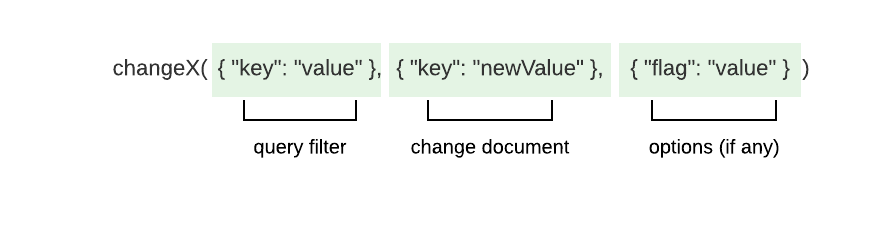
MongoDB では、ドキュメントを変更するためのすべての方法は同じパターンに従います。
注意
プレースホルダー
changeX はプレースホルダーであり、実際のメソッドではありません。
このパターンでは次のことが期待されています。
変更する 1 つ以上のドキュメントに一致するクエリフィルターを指定します。
フィールドと値の変更を指定します。
メソッドの動作を変更する必要がある場合は、オプションを指定します。
ドライバーは、ドキュメントをアップデートするために次のメソッドを提供します。
UpdateByID():_idに基づいて単一のドキュメントを更新します。UpdateOne(): 単一のドキュメントを更新します。UpdateMany(): 複数のドキュメントを更新します。
_id に関する注意事項
MongoDBコレクション内の各ドキュメントには、一意かつ不変の _idフィールドがあります。アップデート操作を使用して _idフィールドを変更することはできません。このフィールドを変更しようとすると、アップデート メソッドは WriteError を返します。
パラメーター
各メソッドは、少なくとも 1 つの更新演算子を含む更新ドキュメントを受け取ります。 更新演算子は、実行する更新のタイプを指定します。 更新ドキュメントには、変更を説明するフィールドと値も含まれます。 更新ドキュメントは、次の形式を使用します。
bson.D{{"<update operator>", bson.D{{"<field>", <value>}, {"<field>", <value>}, ... }}, {"<update operator>", ... }, ... }更新演算子と説明の完全なリストについては、MongoDB サーバーのマニュアルを参照してください。
Tip
UpdateOne() は、指定したクエリフィルターに一致する最初のドキュメントを更新します。正しいドキュメントを確実に更新するには、sort オプションを使用して、この操作でドキュメントが検索される順序を指定します。詳しくは、 UpdateOneOptions APIドキュメント を参照してください。
注意
更新操作における集計パイプライン
更新操作では、集計ステージ のサブセットで構成される集計パイプラインを使用できます。MongoDB が集計パイプラインでサポートしている集計ステージの詳細については、サーバー マニュアルの「集計パイプラインで更新を実行する」チュートリアルを参照してください。
Return Values
UpdateOne()、 UpdateByID() 、 UpdateMany()は、操作が成功した場合、更新操作に関する情報を含むUpdateResultタイプを返します。 UpdateResult型には次のプロパティが含まれています。
プロパティ | 説明 |
|---|---|
| フィルターに一致するドキュメントの数 |
| 操作によって変更されたドキュメントの数 |
| 操作によってアップサートされたドキュメントの数 |
| アップサートされたドキュメントの |
UpdateOne()に渡されたクエリフィルターに一致するドキュメントが複数ある場合、メソッドは最初に一致したドキュメントを選択してアップデートします。 クエリフィルターに一致するドキュメントがない場合、アップデート操作では変更は行われません。
クエリフィルターに一致するドキュメントがない場合に新しいドキュメントを挿入する方法については、 アップサート のガイドを参照してください。
UpdateOne() の例
次の例では、Atlasサンプルデータセット の sample_airbnb データセットの listingsAndReviewsコレクションを使用します。次のドキュメントでは、 Airbnb のリストについて説明します。
{ "_id": "10006546", "listing_url": "https://www.airbnb.com/rooms/10006546", "name": "Ribeira Charming Duplex", "summary": "Fantastic duplex apartment with three bedrooms, located in the historic area of Porto, Ribeira (Cube)...", ... "minimum_nights": "2", "maximum_nights": "30", ... "accommodates": 8, ...}次の例では、 UpdateOne()メソッドを使用して次のことを行います。
_idの値が"10006546"であるドキュメントを一致させます。nameフィールドを"Ribiera River View Duplex"に設定します。accommodatesフィールドの値を1ずつ増加させます。
filter := bson.D{{"_id", "10006546"}}update := bson.D{{"$set", bson.D{{"name", "Ribiera River View Duplex"}}},   {"$inc", bson.D{{"accomodates", 1}}}}
result, err := collection.UpdateOne(context.TODO(), filter, update)fmt.Printf("Documents matched: %v\n", result.MatchedCount)fmt.Printf("Documents updated: %v\n", result.ModifiedCount)以下は、前述の更新操作によって更新されたドキュメントを示しています。
{ "_id": "10006546", "listing_url": "https://www.airbnb.com/rooms/10006546", "name": "Ribeira River View Duplex", "summary": "Fantastic duplex apartment with three bedrooms, located in the historic area of Porto, Ribeira (Cube)...", ... "minimum_nights": "2", "maximum_nights": "30", ... "accommodates": 9, ...}UpdateOne() の例: 完全なファイル
注意
セットアップ例
この例では、接続 URI を使用して MongoDB インスタンスに接続します。MongoDB インスタンスへの接続の詳細については、「MongoClient の作成」を参照してください。この例では、Atlas サンプル データセットに含まれる sample_restaurants データベースの restaurants コレクションも使用します。「Atlas スタートガイド」の手順に従って、MongoDB Atlas の無料クラスターのデータベースにロードできます。
次の例は、restaurantsコレクションに対して次のアクションを実行する完全に実行可能なファイルです。
特定の を持つドキュメントを検索します。
_id一致したドキュメントの
avg_ratingフィールド値を更新します
// Updates the first document that matches a query filter by using the Go driverpackage main
import (	"context"	"fmt"	"log"	"os"
	"github.com/joho/godotenv"	"go.mongodb.org/mongo-driver/v2/bson"	"go.mongodb.org/mongo-driver/v2/mongo"	"go.mongodb.org/mongo-driver/v2/mongo/options")
// Defines a Restaurant struct as a model for documents in the "restaurants" collectiontype Restaurant struct {	ID            bson.ObjectID `bson:"_id"`	Name          string        `bson:"name"`	AverageRating float64       `bson:"avg_rating,omitempty"`}
func main() {	if err := godotenv.Load(); err != nil {		log.Println("No .env file found")	}
	var uri string	if uri = os.Getenv("MONGODB_URI"); uri == "" {		log.Fatal("You must set your 'MONGODB_URI' environment variable. See\n\t https://www.mongodb.com/ja-jp/docs/drivers/go/current/connect/mongoclient/#environment-variable")	}
	client, err := mongo.Connect(options.Client().ApplyURI(uri))	if err != nil {		panic(err)	}	defer func() {		if err = client.Disconnect(context.TODO()); err != nil {			panic(err)		}	}()
	coll := client.Database("sample_restaurants").Collection("restaurants")
	id, _ := bson.ObjectIDFromHex("5eb3d668b31de5d588f4292b")	filter := bson.D{{"_id", id}}
	// Creates instructions to add the "avg_rating" field to documents	update := bson.D{{"$set", bson.D{{"avg_rating", 4.4}}}}
	// Updates the first document that has the specified "_id" value	result, err := coll.UpdateOne(context.TODO(), filter, update)	if err != nil {		panic(err)	}
	// Prints the number of updated documents	fmt.Printf("Documents updated: %v\n", result.ModifiedCount)
// When you run this file for the first time, it should print output similar to the following: // Documents updated: 1}UpdateMany() の例: 完全なファイル
注意
セットアップ例
この例では、接続 URI を使用して MongoDB インスタンスに接続します。MongoDB インスタンスへの接続の詳細については、「MongoClient の作成」を参照してください。この例では、Atlas サンプル データセットに含まれる sample_restaurants データベースの restaurants コレクションも使用します。「Atlas スタートガイド」の手順に従って、MongoDB Atlas の無料クラスターのデータベースにロードできます。
次の例は、restaurantsコレクションに対して次のアクションを実行する完全に実行可能なファイルです。
cuisineフィールド値が"Pizza"で、boroughフィールド値が のドキュメントを検索します"Brooklyn"一致したドキュメントの
avg_ratingフィールド値を更新します
// Updates documents that match a query filter by using the Go driverpackage main
import (	"context"	"fmt"	"log"	"os"
	"github.com/joho/godotenv"	"go.mongodb.org/mongo-driver/v2/bson"	"go.mongodb.org/mongo-driver/v2/mongo"	"go.mongodb.org/mongo-driver/v2/mongo/options")
// Defines a Restaurant struct as a model for documents in the "restaurants" collectiontype Restaurant struct {	ID            bson.ObjectID `bson:"_id"`	Name          string        `bson:"name"`	Cuisine       string        `bson:"cuisine"`	AverageRating float64       `bson:"avg_rating,omitempty"`}
func main() {	if err := godotenv.Load(); err != nil {		log.Println("No .env file found")	}
	var uri string	if uri = os.Getenv("MONGODB_URI"); uri == "" {		log.Fatal("You must set your 'MONGODB_URI' environment variable. See\n\t https://www.mongodb.com/ja-jp/docs/drivers/go/current/connect/mongoclient/#environment-variable")	}
	client, err := mongo.Connect(options.Client().ApplyURI(uri))	if err != nil {		panic(err)	}	defer func() {		if err = client.Disconnect(context.TODO()); err != nil {			panic(err)		}	}()
	coll := client.Database("sample_restaurants").Collection("restaurants")	filter := bson.D{{"cuisine", "Pizza"}, {"borough", "Brooklyn"}}
	// Creates instructions to update the values of the "avg_rating" field	update := bson.D{{"$set", bson.D{{"avg_rating", 4.5}}}}
	// Updates documents in which the value of the "Cuisine"	// field is "Pizza"	result, err := coll.UpdateMany(context.TODO(), filter, update)	if err != nil {		panic(err)	}
	// Prints the number of updated documents	fmt.Printf("Documents updated: %v\n", result.ModifiedCount)	// end updatemany
// When you run this file for the first time, it should print output similar to the following: // Documents updated: 296}詳細情報
上記で説明されている操作の詳細については、次のガイドを参照してください。
配列要素の更新について詳しくは、「 ドキュメント内の配列を更新する 」を参照してください。
API ドキュメント
このガイドで説明したメソッドや型の詳細については、次の API ドキュメントを参照してください。