Overview
在本指南中,您可以学习;了解如何使用更新操作来更新MongoDB中的文档。
更新操作会修改您指定的字段,而其他字段和值保持不变。
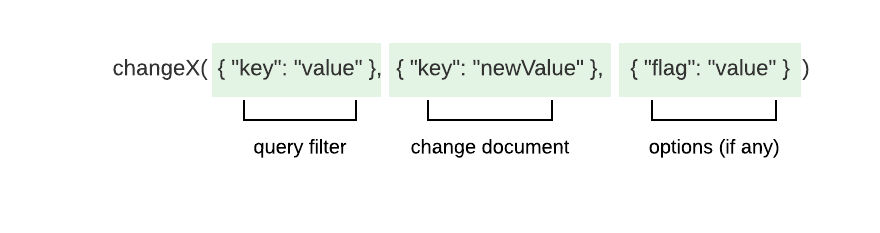
在 MongoDB 中,所有修改文档的方法都遵循相同的模式:
注意
占位符
changeX 是一个占位符,而不是一个真正的方法。
该模式希望您:
指定查询过滤以匹配要修改的一个或多个文档。
指定字段和值的变化。
如果必须修改方法行为,请指定选项。
驱动程序提供以下方法更新文档:
UpdateByID():根据_id更新单个文档。UpdateOne():更新单个文档。UpdateMany():更新多个文档。
关于_id的注意事项
MongoDB集合中的每个文档都有一个唯一且不可变的 _id字段。不能使用更新操作更改 _id字段。如果尝试更改此字段,更新方法将返回 WriteError。
参数
每种方法都采用包含至少一个更新操作符的更新文档。 更新操作符指定要执行的更新类型。 更新文档还包括描述更改的字段和值。更新文档使用以下格式:
bson.D{{"<update operator>", bson.D{{"<field>", <value>}, {"<field>", <value>}, ... }}, {"<update operator>", ... }, ... }有关更新操作符和描述的完整列表,请参阅 MongoDB 服务器手册。
提示
UpdateOne() 更新与您提供的查询过滤匹配的第一个文档。为确保更新正确的文档,可以使用 sort 选项指定操作查找文档的顺序。要学习;了解详情,请参阅 UpdateOneOptions API文档。
Return Values
UpdateOne()、 UpdateByID()和UpdateMany()会在操作成功时返回UpdateResult类型,其中包含有关更新操作的信息。 UpdateResult类型包含以下属性:
属性 | 说明 |
|---|---|
| 过滤匹配的文档数 |
| 操作修改的文档数量 |
| 该操作更新或插入的文档数量 |
| 更新或插入文档的 |
如果多个文档与传递给 UpdateOne() 的查询过滤器匹配,则该方法将选择并更新第一个匹配的文档。如果没有与查询过滤器匹配的文档,更新操作不会进行更改。
请参阅更新或插入(upsert)指南,学习;了解在没有文档与查询过滤匹配的情况下如何插入新文档。
UpdateOne() 示例
以下示例使用Atlas示例数据集的 sample_airbnb 数据集中的 listingsAndReviews集合。以下文档描述了一个 Airbnb 房源:
{ "_id": "10006546", "listing_url": "https://www.airbnb.com/rooms/10006546", "name": "Ribeira Charming Duplex", "summary": "Fantastic duplex apartment with three bedrooms, located in the historic area of Porto, Ribeira (Cube)...", ... "minimum_nights": "2", "maximum_nights": "30", ... "accommodates": 8, ...}以下示例使用UpdateOne()方法:
匹配
_id值为"10006546"的文档。将
name字段设置为"Ribiera River View Duplex"。将
accommodates字段的值增加1。
filter := bson.D{{"_id", "10006546"}}update := bson.D{{"$set", bson.D{{"name", "Ribiera River View Duplex"}}},   {"$inc", bson.D{{"accomodates", 1}}}}
result, err := collection.UpdateOne(context.TODO(), filter, update)fmt.Printf("Documents matched: %v\n", result.MatchedCount)fmt.Printf("Documents updated: %v\n", result.ModifiedCount)以下显示了前面的更新操作产生的更新文档:
{ "_id": "10006546", "listing_url": "https://www.airbnb.com/rooms/10006546", "name": "Ribeira River View Duplex", "summary": "Fantastic duplex apartment with three bedrooms, located in the historic area of Porto, Ribeira (Cube)...", ... "minimum_nights": "2", "maximum_nights": "30", ... "accommodates": 9, ...}UpdateOne() 示例:完整文件
注意
设置示例
该示例使用连接 URI 连接到 MongoDB 实例。如需了解有关连接到 MongoDB 实例的更多信息,请参阅创建 MongoClient。本示例还使用了Atlas 示例数据集中包含的 sample_restaurants 数据库中的 restaurants 集合。您可以按照Atlas 入门指南中的步骤,将它们加载到 MongoDB Atlas 免费集群上的数据库中。
以下示例是一个完全可运行的文件,它对 restaurants集合执行以下操作:
查找具有文档
_id更新匹配文档的
avg_rating字段值
// Updates the first document that matches a query filter by using the Go driverpackage main
import (	"context"	"fmt"	"log"	"os"
	"github.com/joho/godotenv"	"go.mongodb.org/mongo-driver/v2/bson"	"go.mongodb.org/mongo-driver/v2/mongo"	"go.mongodb.org/mongo-driver/v2/mongo/options")
// Defines a Restaurant struct as a model for documents in the "restaurants" collectiontype Restaurant struct {	ID            bson.ObjectID `bson:"_id"`	Name          string        `bson:"name"`	AverageRating float64       `bson:"avg_rating,omitempty"`}
func main() {	if err := godotenv.Load(); err != nil {		log.Println("No .env file found")	}
	var uri string	if uri = os.Getenv("MONGODB_URI"); uri == "" {		log.Fatal("You must set your 'MONGODB_URI' environment variable. See\n\t https://www.mongodb.com/zh-cn/docs/drivers/go/current/connect/mongoclient/#environment-variable")	}
	client, err := mongo.Connect(options.Client().ApplyURI(uri))	if err != nil {		panic(err)	}	defer func() {		if err = client.Disconnect(context.TODO()); err != nil {			panic(err)		}	}()
	coll := client.Database("sample_restaurants").Collection("restaurants")
	id, _ := bson.ObjectIDFromHex("5eb3d668b31de5d588f4292b")	filter := bson.D{{"_id", id}}
	// Creates instructions to add the "avg_rating" field to documents	update := bson.D{{"$set", bson.D{{"avg_rating", 4.4}}}}
	// Updates the first document that has the specified "_id" value	result, err := coll.UpdateOne(context.TODO(), filter, update)	if err != nil {		panic(err)	}
	// Prints the number of updated documents	fmt.Printf("Documents updated: %v\n", result.ModifiedCount)
// When you run this file for the first time, it should print output similar to the following: // Documents updated: 1}UpdateMany() 示例:完整文件
注意
设置示例
该示例使用连接 URI 连接到 MongoDB 实例。如需了解有关连接到 MongoDB 实例的更多信息,请参阅创建 MongoClient。本示例还使用了Atlas 示例数据集中包含的 sample_restaurants 数据库中的 restaurants 集合。您可以按照Atlas 入门指南中的步骤,将它们加载到 MongoDB Atlas 免费集群上的数据库中。
以下示例是一个完全可运行的文件,它对 restaurants集合执行以下操作:
查找
cuisine字段值为"Pizza"且borough字段值为"Brooklyn"的文档更新匹配文档的
avg_rating字段值
// Updates documents that match a query filter by using the Go driverpackage main
import (	"context"	"fmt"	"log"	"os"
	"github.com/joho/godotenv"	"go.mongodb.org/mongo-driver/v2/bson"	"go.mongodb.org/mongo-driver/v2/mongo"	"go.mongodb.org/mongo-driver/v2/mongo/options")
// Defines a Restaurant struct as a model for documents in the "restaurants" collectiontype Restaurant struct {	ID            bson.ObjectID `bson:"_id"`	Name          string        `bson:"name"`	Cuisine       string        `bson:"cuisine"`	AverageRating float64       `bson:"avg_rating,omitempty"`}
func main() {	if err := godotenv.Load(); err != nil {		log.Println("No .env file found")	}
	var uri string	if uri = os.Getenv("MONGODB_URI"); uri == "" {		log.Fatal("You must set your 'MONGODB_URI' environment variable. See\n\t https://www.mongodb.com/zh-cn/docs/drivers/go/current/connect/mongoclient/#environment-variable")	}
	client, err := mongo.Connect(options.Client().ApplyURI(uri))	if err != nil {		panic(err)	}	defer func() {		if err = client.Disconnect(context.TODO()); err != nil {			panic(err)		}	}()
	coll := client.Database("sample_restaurants").Collection("restaurants")	filter := bson.D{{"cuisine", "Pizza"}, {"borough", "Brooklyn"}}
	// Creates instructions to update the values of the "avg_rating" field	update := bson.D{{"$set", bson.D{{"avg_rating", 4.5}}}}
	// Updates documents in which the value of the "Cuisine"	// field is "Pizza"	result, err := coll.UpdateMany(context.TODO(), filter, update)	if err != nil {		panic(err)	}
	// Prints the number of updated documents	fmt.Printf("Documents updated: %v\n", result.ModifiedCount)	// end updatemany
// When you run this file for the first time, it should print output similar to the following: // Documents updated: 296}更多信息
要了解有关提到的操作的更多信息,请参阅以下指南:
要了解有关更新数组元素的详细信息,请参阅更新文档中的数组。
API 文档
要进一步了解本指南所讨论的任何方法或类型,请参阅以下 API 文档: