Multi-cloud is a cloud computing strategy where an organization uses cloud services from more than one cloud provider. Companies may choose multiple cloud environments to avoid dependence on a single vendor, manage costs, and put workloads where they perform best instead of trying to retrofit all of them onto the same system.
Key takeaways
- Multi-cloud is a strategy that uses cloud services from multiple cloud providers instead of relying on a single one.
- Multi-cloud solutions use two or more public providers; hybrid clouds combine public and private. Many companies use both.
- Organizations choose multi-cloud platforms to keep apps running through a provider outage, support disaster recovery, hold costs down, and run each workload where it performs best.
- A multi-cloud approach reduces vendor lock-in—the trap of depending too much on one provider.
- Multi-cloud platforms are now the mainstream approach; most enterprises run more than one cloud rather than relying on a single platform.
Table of contents
- What does a multi-cloud environment include?
- Multi-cloud vs. hybrid cloud
- What are the benefits of multi-cloud?
- What are the challenges of multi-cloud?
- Five steps to building a strong multi-cloud strategy
- How MongoDB supports multi-cloud deployments
- FAQs
- Related resources
What does a multi-cloud environment include?
A multi-cloud environment includes cloud services from two or more public cloud providers such as Amazon Web Services (AWS), Google Cloud, and Microsoft Azure. Instead of running everything on one cloud provider, companies can spread workloads across multiple cloud platforms—each one matched with the provider that fits best.
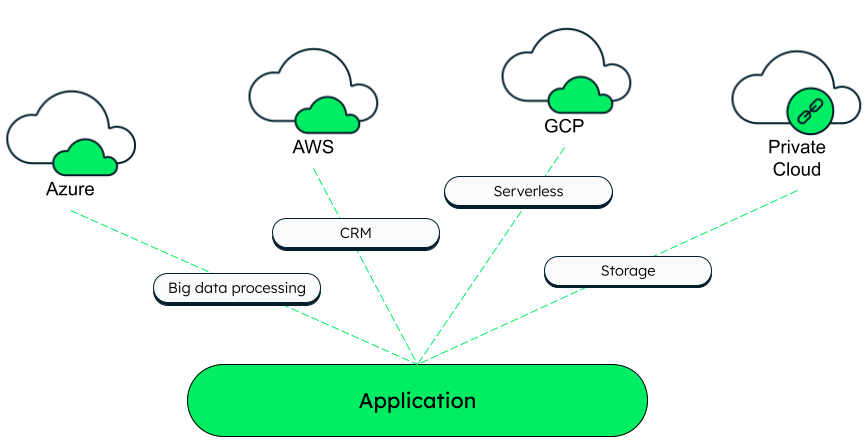
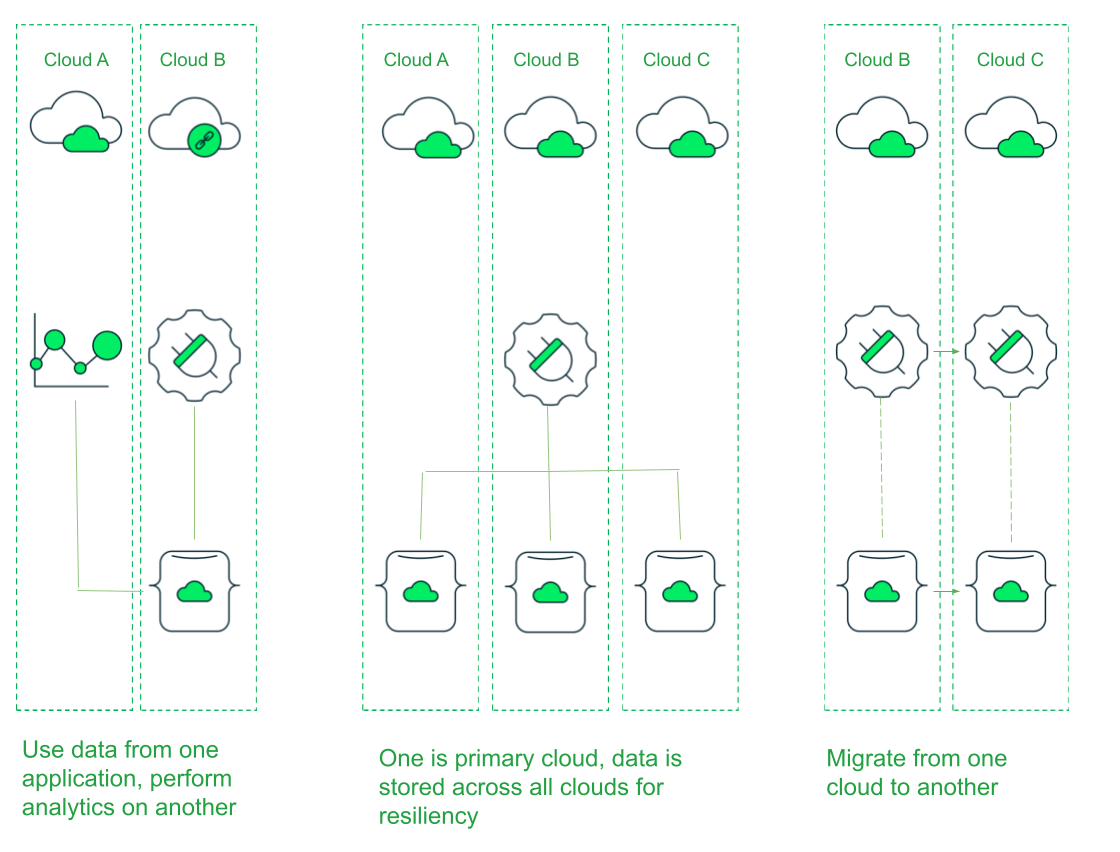
Multi-cloud clusters in MongoDB Atlas let a single application use multiple clouds simultaneously. Data can be distributed across all three, which supports data mobility and resilience without manual replication. With a multi-cloud cluster in MongoDB Atlas, teams can:
- Run an application in one cloud and analyze its data in another.
- Power a single application with data stored across several clouds.
- Move applications between providers more easily.
- Support security and compliance, data governance, disaster recovery, and business continuity across multiple providers.
Multi-cloud vs. hybrid cloud
The difference between multi-cloud and hybrid cloud is straightforward: multi-cloud uses two or more public cloud providers, while hybrid cloud combines public and private cloud environments.
- Multi-cloud (public only): Uses cloud services from two or more public providers. For example, one provider handles application infrastructure, another manages analytics, and a third runs backup and disaster recovery.
- Hybrid cloud (public and private): Combines public and private clouds, often connecting on-premises infrastructure (to handle sensitive data) with public cloud services into one operating model.
As hybrid and multi-cloud continue to grow, single-cloud setups are increasingly the exception. A mixture of cloud environments is now the mainstream approach: Flexera’s 2026 State of the Cloud Report found that 73% of organizations combine public and private cloud instead of relying on one platform.
Related: See how Nationwide implemented a multi-cloud payment setup with MongoDB.
What are the benefits of multi-cloud?
The main benefits of multi-cloud are stronger availability, less vendor lock-in, enhanced performance, better cost control, and stronger data governance.
Increased availability and resilience
With multiple cloud providers, an outage doesn’t take the app down—it keeps running on another one. That makes multi-cloud a strong choice for disaster recovery and for apps that can’t afford downtime, like online banking or an online store during a big sale.
Reduced vendor lock-in
Vendor lock-in happens when a company depends so much on one cloud provider’s tools, pricing, and proprietary services that switching to different cloud platforms is expensive and complex. Running on more than one provider keeps that from happening—the company can move workloads, compare pricing, and negotiate, because no single cloud vendor is its only option.
Enhanced performance
No single cloud provider is best at everything. Their strengths vary—one might have the best analytics tools, another the strongest AI and machine learning services, a third the widest regional reach. Multi-cloud lets teams run each workload where it performs best instead of forcing everything onto one cloud platform and dealing with that platform’s unavoidable weak spots.
Related: See how Trillia implemented a multi-cloud transition, speeding up cluster deployment from 4 hours to just 10 minutes.
Improved cost management
A team running everything on one cloud provider pays that provider’s rates for every workload, even the ones that could run more cheaply elsewhere. Multiple cloud services let teams put each workload where it costs least—like keeping latency-sensitive work close to users while sending batch jobs or backups to a cheaper cloud platform. If that provider later raises prices, the team can move more workloads to the cheaper provider instead of paying the higher price. The tradeoff: costs are harder to track across several cloud service providers and if you implement copies of the same workloads across providers, costs are duplicated there as well.
Stronger data governance
Rules about data governance—how data is handled and stored—can vary by region and industry. Multi-cloud gives teams more control over where their data lives: when a regulation requires certain data to stay inside a specific country or region, the team can keep it with a provider that operates there, while the application still serves users everywhere.
What are the challenges of multi-cloud?
Multi-cloud is more flexible than using one provider, but coordinating the costs, workloads, and security of several platforms can get complicated fast.
Keeping security consistent across providers
Each provider has its own security measures, identity protocols, and reporting tools, but keeping everything secure is a shared responsibility. The provider protects the infrastructure, while the company’s team handles their own data and who can access it. That division isn’t the same everywhere—what one provider secures, another may leave to the team—so if the team assumes they all cover the same things, something can go unprotected.
To minimize these differences, companies can apply the same access controls, identity management, and encryption across every cloud platform rather than configuring each provider separately. Multi-cloud management tools help, too—an integrated dashboard gives teams a single view of what's happening across the whole environment instead of checking each one on its own.
Controlling where data lives
Spreading data across providers and regions makes it harder to track where sensitive data lives and where it travels. Data privacy laws differ by region, so knowing where the data sits—and being able to prove it—is necessary to remain compliant. Teams handle this by classifying data by sensitivity, setting rules for where each type can be stored, and being aware of how it moves between providers.
Finding the right multi-cloud skills
Each provider works differently, so a multi-cloud setup requires technical teams who can operate across all of them. People with cross-provider experience are in short supply, which often limits how quickly a team can add new providers.
Tracking costs across providers
Multi-cloud can lower costs, but it also makes them harder to track because they’re split across several invoices instead of one. If an app stores data with one provider but sends it to another for analytics, the team pays for that data-transfer fee every time—easy to miss until the invoice arrives. Cost-tracking tools can pull these expenses into one view, so the team is never caught off guard when the bill comes.
Connecting workloads across providers
Each provider is unique, with its own tools, APIs, and networking setup, so connecting them can be difficult. Cloud-native tools like containers and Kubernetes can make that easier. A container works like a shipping container for software: it seals an app and everything it needs into a standard box that any provider can run as-is. Kubernetes manages those containers—running, restarting, and scaling them—and because every major provider supports it, teams run things the same way on any cloud.
Five steps to building a strong multi-cloud strategy
To build a strong multi-cloud strategy, you need to define how you select, deploy, and govern services across providers. The five steps below are a good place to start.
STEP 1 — Assess what you already have (with MongoDB in the mix)
Assess current applications, security controls, and cloud accounts — including where MongoDB already runs. For example, inventory:
- Which workloads run on MongoDB Atlas vs. self-managed MongoDB (on VMs or Kubernetes).
- Which regions and cloud providers those clusters sit in (e.g., Atlas on AWS us-east-1, self-managed MongoDB on-prem in your primary data center).
- Where performance or cost is off: e.g., a latency-sensitive API in one region talking to Atlas in another, or an analytics cluster that’s expensive to keep hot 24/7.
Those pain points are candidates to move into Atlas multi-cloud clusters or to rebalance across providers while keeping MongoDB as the common data layer.
STEP 2 — Plan unified security up front (anchored on Atlas controls)
Decide your access, encryption, and compliance model once, then apply it everywhere you run MongoDB. For example:
- Standardize on MongoDB Atlas security defaults, such as IP access lists, per-project roles, and auditing—and mirror those patterns in any self-managed MongoDB deployments.
- Use end-to-end encryption consistently: Choose TLS in transit, encryption at rest (potentially with customer-managed keys), and Queryable Encryption when you need searchable encrypted fields.
- Define a single RBAC pattern for application roles (read/write, read-only, analytics) and reuse it across all clusters, regardless of which cloud provider they’re on.
This way, when you add a second or third cloud, you’re just reapplying a known Atlas-centric security baseline instead of redesigning it per provider.
STEP 3 — Keep portability in mind (cloud native + Kubernetes + MongoDB)
Choose cloud native building blocks that run the same way everywhere:
- Use containers for your application services and package them so they can run on any Kubernetes distribution (EKS, GKE, AKS, on-prem), then point them at MongoDB clusters in each cloud.
- Use the MongoDB Atlas Kubernetes Operator to manage Atlas clusters as Infrastructure as Code from Kubernetes — the Operator talks to Atlas APIs so the same manifests can create or resize clusters on AWS, Google Cloud, or Azure without changing database code.
- When you must run self-managed MongoDB, use the MongoDB Enterprise Operator for Kubernetes so deployment, scaling, and upgrades look the same whether you’re in one cloud, multiple clouds, or on-prem.
STEP 4 — Match workloads to provider strengths (with MongoDB as the common layer)
Map each workload to the cloud that runs it best, while keeping MongoDB as a consistent database platform:
- Run a latency-sensitive transactional app close to users on one provider, while pushing heavy analytics to another provider that has the services you prefer — both reading from MongoDB (e.g., Atlas clusters or Data Federation) as the shared data source.
- Use Atlas’ multi-cloud capabilities so a single MongoDB deployment can span AWS, Google Cloud, and Azure, letting you fail over between them or route reads to the cloud that’s closest to each user base.
- Be deliberate about provider-specific services: it’s fine to use cloud-native AI, queueing, or logging, but keep your system of record in MongoDB so you can move or rebalance workloads without a full data-layer rewrite.
STEP 5 — Build a multi-cloud-ready team (grounded in MongoDB + clouds)
Plan how you’ll staff and skill up before you expand:
- Make sure at least part of the team is comfortable with MongoDB Atlas across all three major clouds, plus the basics of IAM, networking, and billing in each provider.
- Train platform/DevOps folks on Kubernetes + MongoDB Operators so they can provision and manage clusters consistently whether workloads land on-prem, in one cloud, or across many.
- Use MongoDB University and internal runbooks so new team members can follow the same patterns for deploying, securing, and monitoring MongoDB in any environment.
How MongoDB supports multi-cloud deployments
MongoDB Atlas supports multi-cloud by working the same way across AWS, Google Cloud, and Microsoft Azure, so teams manage one database platform instead of a separate one per cloud. That removes a big source of complexity—running a different database setup on each provider—and keeps deployment, scaling, and monitoring consistent as workloads grow.