A MongoDB Vector Search query takes the form of an aggregation pipeline that uses $vectorSearch as the first stage. This page explains the syntax, options, and behavior of the $vectorSearch stage.
Supported Clients
Syntax
Fields
The $vectorSearch stage takes a document with the following fields:
Vector Search Types
When you define a $vectorSearch stage, you can use the exact field to specify whether to run an ANN or ENN search.
Considerations
$vectorSearch must be the first stage of any pipeline where it appears.
Limitations
$vectorSearch can't be used in view definition and the following pipeline stages:
$facetpipeline stage
| [1] | You can pass the results of $vectorSearch to this stage. |
Overload Protection
When queries arrive faster than the search process can run them, Atlas queues the excess queries and can reject queries with a 489 error. To learn more, see Query Load Shedding and Query Rejection.
MongoDB Vector Search Indexing
To learn more about these MongoDB Vector Search field types, see How to Index Fields for Vector Search.
MongoDB Vector Search Scoring
MongoDB Vector Search assigns a score, in a fixed range from 0 to 1 (where 0 indicates low similarity and 1 indicates high similarity), to every document that it returns.
Note
Pre-filtering your data doesn't affect the score that MongoDB Vector Search returns using vectorSearchScore for $vectorSearch queries.
MongoDB Vector Search Filtering
MongoDB Vector Search supports data filtering. You can:
Pre-filter your data by using the
filteroption in your MongoDB Vector Search query.post-filter the results of your MongoDB Vector Search query by using
$matchand other supported aggregation pipeline stages.
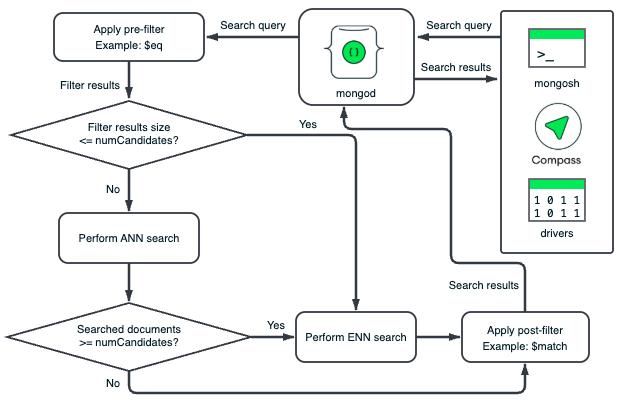
MongoDB Vector Search performs pre-filter and post-filter operations independently on segments of data. The HNSW graph for each segment is based on only the vectors in that segment. MongoDB Vector Search applies the filters to each segment's documents to eliminate documents that don't meet the filter criteria. Pre-filtering ensures that documents are eliminated before MongoDB Vector Search traverses the HNSW graph and post-filtering ensures that irrelevant documents or fields in the documents are eliminated from the vector search results.
Pre-Filter Search Data
You can pre-filter your data to narrow the scope of your semantic search and ensure that only relevant vectors are considered for comparison. When you pre-filter your data by using the filter option, MongoDB Vector Search performs the semantic search on only a subset of your data, which increases the accuracy of your search results.
Pre-filtering can be too restrictive, as the pre-filter may exclude data that doesn't exactly match the pre-filter, but is semantically similar to the query you want to consider during the vector search. To mitigate this, we recommend setting a broad filter criteria to ensure your query does the following:
Includes as many relevant results as possible.
Excludes irrelevant data from the results.
Returns the requested number of documents in the results.
Important
Filtered queries are typically slower than an otherwise equivalent unfiltered query.
Post-Filter Search Results
If your index size isn't optimal for pre-filtering or if you set broad pre-filtering criteria, you can post-filter your vector search results to return only relevant data. To filter the results of your vector search, you can use any supported aggregation pipeline stage, such as the $match stage, after the $vectorSearch stage. To learn more, see Additional Performance Recommendations.
To select the fields to return in the results, use the $project stage unless you need all the fields in the results. We recommend excluding the vector field in the $project stage to improve query performance.
For example, you can use the $project stage to include the vectorSearchScore and then use the $match stage to return only documents above a certain score threshold.
Filtering Considerations
MongoDB Vector Search supports the short form of
$eq. In the short form, you don't need to specify$eqin the query.For example, consider the following filter with
$eq:"filter": { "_id": { "$eq": ObjectId("5a9427648b0beebeb69537a5") } This is equivalent to the following filter, which uses the short form of
$eq:"filter": { "_id": ObjectId("5a9427648b0beebeb69537a5") } You can use the
$andMQL operator to specify an array of filters in a single query.For example, consider the following pre-filter for documents with a
genresfield equal toActionand ayearfield with the value1999,2000, or2001:"filter": { "$and": [ { "genres": "Action" }, { "year": { "$in": [ 1999, 2000, 2001 ] } } ] } For advanced filtering capabilities such as fuzzy search, phrase matching, location filtering, and other analyzed text, use the vectorSearch operator in a
$searchstage.
Examples
Prerequisites
Before you run these examples, perform the following actions:
Add the sample dataset used in the query to your cluster.
Create MongoDB Vector Search indexes for the collection. For instructions, see the Create a MongoDB Vector Search Index procedure and configure the index for the sample queries in your desired language.
Queries
Learn More
The following tutorials demonstrate additional use cases for the $vectorSearch stage.