You can query arrays in MongoDB using the following methods:
Your programming language's driver.
The MongoDB Atlas UI. To learn more, see Query for Null or Missing Fields with MongoDB Atlas.
This page provides examples of query operations on array fields using the db.collection.find() method in mongosh.
The examples on this page use data from the sample_mflix dataset. For details on how to load this dataset into your self-managed MongoDB deployment, see Load the Sample Dataset. If you made any modifications to the sample databases, you may need to drop and recreate the databases to run the examples on this page.
Match an Array
To specify equality condition on an array, use the query document { <field>: <value> } where <value> is the exact array to match, including the order of the elements.
The following example queries for all documents where genres is an array with exactly two elements, "Action" and "Comedy", in the specified order:
db.movies.find( { genres: ["Action", "Comedy"] } )
To find an array that contains both "Action" and "Comedy" regardless of order or other elements in the array, use the $all operator:
db.movies.find( { genres: { $all: ["Action", "Comedy"] } } )
Query an Array for an Element
To query if the array field contains at least one element with the specified value, use the filter { <field>: <value> } where <value> is the element value.
The following example queries for all documents where the genres array contains the string "Short" as one of its elements:
db.movies.find( { genres: "Short" } )
To specify conditions on the elements in the array field, use query operators in the query filter document:
{ <array field>: { <operator1>: <value1>, ... } }
The following example queries for all documents where the cast array contains at least one element that matches the regular expression ^A:
db.movies.find( { cast: { $regex: "^A" } } )
Specify Multiple Conditions for Array Elements
When you specify compound conditions on array elements, you can query for documents where either:
A single array element meets all the specified conditions
Different array elements collectively meet all the conditions, with each element satisfying one or more conditions
Query an Array with Compound Filter Conditions on the Array Elements
The following example queries for documents where the cast array contains elements that in some combination satisfy the query conditions. One element can satisfy the $regex: "^A" condition and another element can satisfy the $ne: "Adam Sandler" condition, or a single element can satisfy both:
db.movies.find( { cast: { $regex: "^A", $ne: "Adam Sandler" } } )
Query for an Array Element that Meets Multiple Criteria
Use the $elemMatch operator to specify multiple criteria on array elements so that at least one array element satisfies all the specified criteria.
The following example queries for documents where the cast array contains at least one element that both matches the regular expression ^A and is not equal to "Adam Sandler":
db.movies.find( { cast: { $elemMatch: { $regex: "^A", $ne: "Adam Sandler" } } } )
Query for an Element by the Array Index Position
Use dot notation to specify query conditions for an element at a particular index or position of the array. The array uses zero-based indexing.
Note
When you query using dot notation, the field and nested field must be inside quotation marks.
The following example queries for all documents where the first element in the array cast equals "Tom Hanks":
db.movies.find( { "cast.0": "Tom Hanks" } )
Query an Array by Array Length
Use the $size operator to query for arrays by number of elements.
The following example selects documents where genres has 3 elements:
db.movies.find( { genres: { $size: 3 } } )
This page provides examples of query operations on array fields using the pymongo.collection.Collection.find method in the PyMongo Python driver.
The examples on this page use the inventory collection. Connect to a test database in your MongoDB instance then create the inventory collection:
db.inventory.insert_many( [ {"item": "journal", "qty": 25, "tags": ["blank", "red"], "dim_cm": [14, 21]}, {"item": "notebook", "qty": 50, "tags": ["red", "blank"], "dim_cm": [14, 21]}, { "item": "paper", "qty": 100, "tags": ["red", "blank", "plain"], "dim_cm": [14, 21], }, {"item": "planner", "qty": 75, "tags": ["blank", "red"], "dim_cm": [22.85, 30]}, {"item": "postcard", "qty": 45, "tags": ["blue"], "dim_cm": [10, 15.25]}, ] )
Match an Array
To specify equality condition on an array, use the query document { <field>: <value> } where <value> is the exact array to match, including the order of the elements.
The following example queries for all documents where tags is an array with exactly two elements, "red" and "blank", in the specified order:
cursor = db.inventory.find({"tags": ["red", "blank"]})
To find an array that contains both "red" and "blank" regardless of order or other elements in the array, use the $all operator:
cursor = db.inventory.find({"tags": {"$all": ["red", "blank"]}})
Query an Array for an Element
To query if the array field contains at least one element with the specified value, use the filter { <field>: <value> } where <value> is the element value.
The following example queries for all documents where the tags array contains the string "red" as one of its elements:
cursor = db.inventory.find({"tags": "red"})
To specify conditions on the elements in the array field, use query operators in the query filter document:
{ <array field>: { <operator1>: <value1>, ... } }
The following example queries for all documents where the array dim_cm contains at least one element whose value is greater than 25:
cursor = db.inventory.find({"dim_cm": {"$gt": 25}})
Specify Multiple Conditions for Array Elements
When you specify compound conditions on array elements, you can query for documents where either:
A single array element meets all the specified conditions
Different array elements collectively meet all the conditions, with each element satisfying one or more conditions
Query an Array with Compound Filter Conditions on the Array Elements
The following example queries for documents where the dim_cm array contains elements that in some combination satisfy the query conditions. One element can satisfy the greater than 15 condition and another element can satisfy the less than 20 condition, or a single element can satisfy both:
cursor = db.inventory.find({"dim_cm": {"$gt": 15, "$lt": 20}})
Query for an Array Element that Meets Multiple Criteria
Use the $elemMatch operator to specify multiple criteria on array elements so that at least one array element satisfies all the specified criteria.
The following example queries for documents where the dim_cm array contains at least one element that is both greater than ($gt) 22 and less than ($lt) 30:
cursor = db.inventory.find({"dim_cm": {"$elemMatch": {"$gt": 22, "$lt": 30}}})
Query for an Element by the Array Index Position
Use dot notation to specify query conditions for an element at a particular index or position of the array. The array uses zero-based indexing.
Note
When you query using dot notation, the field and nested field must be inside quotation marks.
The following example queries for all documents where the second element in the array dim_cm is greater than 25:
cursor = db.inventory.find({"dim_cm.1": {"$gt": 25}})
Query an Array by Array Length
Use the $size operator to query for arrays by number of elements.
The following example selects documents where tags has 3 elements:
cursor = db.inventory.find({"tags": {"$size": 3}})
This page provides examples of query operations on array fields using the pymongo.asynchronous.collection.AsyncCollection.find method in the PyMongo Async API.
The examples on this page use the inventory collection. Connect to a test database in your MongoDB instance then create the inventory collection:
await db.inventory.insert_many( [ {"item": "journal", "qty": 25, "tags": ["blank", "red"], "dim_cm": [14, 21]}, {"item": "notebook", "qty": 50, "tags": ["red", "blank"], "dim_cm": [14, 21]}, { "item": "paper", "qty": 100, "tags": ["red", "blank", "plain"], "dim_cm": [14, 21], }, {"item": "planner", "qty": 75, "tags": ["blank", "red"], "dim_cm": [22.85, 30]}, {"item": "postcard", "qty": 45, "tags": ["blue"], "dim_cm": [10, 15.25]}, ] )
Match an Array
To specify equality condition on an array, use the query document { <field>: <value> } where <value> is the exact array to match, including the order of the elements.
The following example queries for all documents where tags is an array with exactly two elements, "red" and "blank", in the specified order:
cursor = db.inventory.find({"tags": ["red", "blank"]})
To find an array that contains both "red" and "blank" regardless of order or other elements in the array, use the $all operator:
cursor = db.inventory.find({"tags": {"$all": ["red", "blank"]}})
Query an Array for an Element
To query if the array field contains at least one element with the specified value, use the filter { <field>: <value> } where <value> is the element value.
The following example queries for all documents where the tags array contains the string "red" as one of its elements:
cursor = db.inventory.find({"tags": "red"})
To specify conditions on the elements in the array field, use query operators in the query filter document:
{ <array field>: { <operator1>: <value1>, ... } }
The following example queries for all documents where the array dim_cm contains at least one element whose value is greater than 25:
cursor = db.inventory.find({"dim_cm": {"$gt": 25}})
Specify Multiple Conditions for Array Elements
When you specify compound conditions on array elements, you can query for documents where either:
A single array element meets all the specified conditions
Different array elements collectively meet all the conditions, with each element satisfying one or more conditions
Query an Array with Compound Filter Conditions on the Array Elements
The following example queries for documents where the dim_cm array contains elements that in some combination satisfy the query conditions. One element can satisfy the greater than 15 condition and another element can satisfy the less than 20 condition, or a single element can satisfy both:
cursor = db.inventory.find({"dim_cm": {"$gt": 15, "$lt": 20}})
Query for an Array Element that Meets Multiple Criteria
Use the $elemMatch operator to specify multiple criteria on array elements so that at least one array element satisfies all the specified criteria.
The following example queries for documents where the dim_cm array contains at least one element that is both greater than ($gt) 22 and less than ($lt) 30:
cursor = db.inventory.find({"dim_cm": {"$elemMatch": {"$gt": 22, "$lt": 30}}})
Query for an Element by the Array Index Position
Use dot notation to specify query conditions for an element at a particular index or position of the array. The array uses zero-based indexing.
Note
When you query using dot notation, the field and nested field must be inside quotation marks.
The following example queries for all documents where the second element in the array dim_cm is greater than 25:
cursor = db.inventory.find({"dim_cm.1": {"$gt": 25}})
Query an Array by Array Length
Use the $size operator to query for arrays by number of elements.
The following example selects documents where tags has 3 elements:
cursor = db.inventory.find({"tags": {"$size": 3}})
This page provides examples of query operations on array fields using the com.mongodb.client.MongoCollection.find method in the MongoDB Java Synchronous Driver.
Tip
The driver provides com.mongodb.client.model.Filters helper methods to facilitate the creation of filter documents. The examples on this page use these methods to create the filter documents.
The examples on this page use the inventory collection. Connect to a test database in your MongoDB instance then create the inventory collection:
collection.insertMany(asList( Document.parse("{ item: 'journal', qty: 25, tags: ['blank', 'red'], dim_cm: [ 14, 21 ] }"), Document.parse("{ item: 'notebook', qty: 50, tags: ['red', 'blank'], dim_cm: [ 14, 21 ] }"), Document.parse("{ item: 'paper', qty: 100, tags: ['red', 'blank', 'plain'], dim_cm: [ 14, 21 ] }"), Document.parse("{ item: 'planner', qty: 75, tags: ['blank', 'red'], dim_cm: [ 22.85, 30 ] }"), Document.parse("{ item: 'postcard', qty: 45, tags: ['blue'], dim_cm: [ 10, 15.25 ] }") ));
Match an Array
To specify equality condition on an array, use the query document eq( <field>, <value>) where <value> is the exact array to match, including the order of the elements.
The following example queries for all documents where tags is an array with exactly two elements, "red" and "blank", in the specified order:
FindIterable<Document> findIterable = collection.find(eq("tags", asList("red", "blank")));
To find an array that contains both "red" and "blank" regardless of order or other elements in the array, use the $all operator:
findIterable = collection.find(all("tags", asList("red", "blank")));
Query an Array for an Element
To query if the array field contains at least one element with the specified value, use the filter eq( <field>, <value>) where <value> is the element value.
The following example queries for all documents where the tags array contains the string "red" as one of its elements:
findIterable = collection.find(eq("tags", "red"));
To specify conditions on the elements in the array field, use query operators in the query filter document. For example:
and(gte(<array field>, <value1>), lt(<array field>, <value2>) ...)
The following example queries for all documents where the array dim_cm contains at least one element whose value is greater than 25:
findIterable = collection.find(gt("dim_cm", 25));
Specify Multiple Conditions for Array Elements
When you specify compound conditions on array elements, you can query for documents where either:
A single array element meets all the specified conditions
Different array elements collectively meet all the conditions, with each element satisfying one or more conditions
Query an Array with Compound Filter Conditions on the Array Elements
The following example queries for documents where the dim_cm array contains elements that in some combination satisfy the query conditions. One element can satisfy the greater than 15 condition and another element can satisfy the less than 20 condition, or a single element can satisfy both:
findIterable = collection.find(and(gt("dim_cm", 15), lt("dim_cm", 20)));
Query for an Array Element that Meets Multiple Criteria
Use the $elemMatch operator to specify multiple criteria on array elements so that at least one array element satisfies all the specified criteria.
The following example queries for documents where the dim_cm array contains at least one element that is both greater than ($gt) 22 and less than ($lt) 30:
findIterable = collection.find(elemMatch("dim_cm", Document.parse("{ $gt: 22, $lt: 30 }")));
Query for an Element by the Array Index Position
Use dot notation to specify query conditions for an element at a particular index or position of the array. The array uses zero-based indexing.
Note
When you query using dot notation, the field and nested field must be inside quotation marks.
The following example queries for all documents where the second element in the array dim_cm is greater than 25:
findIterable = collection.find(gt("dim_cm.1", 25));
Query an Array by Array Length
Use the $size operator to query for arrays by number of elements.
The following example selects documents where tags has 3 elements:
findIterable = collection.find(size("tags", 3));
This page provides examples of query operations on array fields using the com.mongodb.reactivestreams.client.MongoCollection.find method in the MongoDB Java Reactive Streams Driver.
The examples on this page use the inventory collection. Connect to a test database in your MongoDB instance then create the inventory collection:
Publisher<Success> insertManyPublisher = collection.insertMany(asList( Document.parse("{ item: 'journal', qty: 25, tags: ['blank', 'red'], dim_cm: [ 14, 21 ] }"), Document.parse("{ item: 'notebook', qty: 50, tags: ['red', 'blank'], dim_cm: [ 14, 21 ] }"), Document.parse("{ item: 'paper', qty: 100, tags: ['red', 'blank', 'plain'], dim_cm: [ 14, 21 ] }"), Document.parse("{ item: 'planner', qty: 75, tags: ['blank', 'red'], dim_cm: [ 22.85, 30 ] }"), Document.parse("{ item: 'postcard', qty: 45, tags: ['blue'], dim_cm: [ 10, 15.25 ] }") ));
Match an Array
To specify equality condition on an array, use the query document eq( <field>, <value>) where <value> is the exact array to match, including the order of the elements.
The following example queries for all documents where tags is an array with exactly two elements, "red" and "blank", in the specified order:
FindPublisher<Document> findPublisher = collection.find(eq("tags", asList("red", "blank")));
To find an array that contains both "red" and "blank" regardless of order or other elements in the array, use the $all operator:
findPublisher = collection.find(all("tags", asList("red", "blank")));
Query an Array for an Element
To query if the array field contains at least one element with the specified value, use the filter eq( <field>, <value>) where value is the element value.
The following example queries for all documents where the tags array contains the string "red" as one of its elements:
findPublisher = collection.find(eq("tags", "red"));
To specify conditions on the elements in the array field, use query operators in the query filter document. For example:
and(gte(<array field>, <value1>), lt(<array field>, <value2>) ...)
The following example queries for all documents where the array dim_cm contains at least one element whose value is greater than 25:
findPublisher = collection.find(gt("dim_cm", 25));
Specify Multiple Conditions for Array Elements
When you specify compound conditions on array elements, you can query for documents where either:
A single array element meets all the specified conditions
Different array elements collectively meet all the conditions, with each element satisfying one or more conditions
Query an Array with Compound Filter Conditions on the Array Elements
The following example queries for documents where the dim_cm array contains elements that in some combination satisfy the query conditions. One element can satisfy the greater than 15 condition and another element can satisfy the less than 20 condition, or a single element can satisfy both:
findPublisher = collection.find(and(gt("dim_cm", 15), lt("dim_cm", 20)));
Query for an Array Element that Meets Multiple Criteria
Use the $elemMatch operator to specify multiple criteria on array elements so that at least one array element satisfies all the specified criteria.
The following example queries for documents where the dim_cm array contains at least one element that is both greater than ($gt) 22 and less than ($lt) 30:
findPublisher = collection.find(elemMatch("dim_cm", Document.parse("{ $gt: 22, $lt: 30 }")));
Query for an Element by the Array Index Position
Use dot notation to specify query conditions for an element at a particular index or position of the array. The array uses zero-based indexing.
Note
When you query using dot notation, the field and nested field must be inside quotation marks.
The following example queries for all documents where the second element in the array dim_cm is greater than 25:
findPublisher = collection.find(elemMatch("dim_cm", Document.parse("{ $gt: 22, $lt: 30 }")));
Query an Array by Array Length
Use the $size operator to query for arrays by number of elements.
The following example selects documents where tags has 3 elements:
findPublisher = collection.find(size("tags", 3));
This page provides examples of query operations on array fields by using the MongoCollection.find() method in the MongoDB Kotlin Coroutine Driver.
Tip
The driver provides com.mongodb.client.model.Filters helper methods to facilitate the creation of filter documents. The examples on this page use these methods to create the filter documents.
The examples on this page use the inventory collection. Connect to a test database in your MongoDB instance then create the inventory collection:
collection.insertMany( listOf( Document("item", "journal") .append("qty", 25) .append("tags", listOf("blank", "red")) .append("dim_cm", listOf(14, 21)), Document("item", "notebook") .append("qty", 50) .append("tags", listOf("red", "blank")) .append("dim_cm", listOf(14, 21)), Document("item", "paper") .append("qty", 100) .append("tags", listOf("red", "blank", "plain")) .append("dim_cm", listOf(14, 21)), Document("item", "planner") .append("qty", 75) .append("tags", listOf("blank", "red")) .append("dim_cm", listOf(22.85, 30)), Document("item", "postcard") .append("qty", 45) .append("tags", listOf("blue")) .append("dim_cm", listOf(10, 15.25)), ) )
Match an Array
To specify equality condition on an array, use the query document { <field>: <value> } where <value> is the exact array to match, including the order of the elements.
The following example queries for all documents where tags is an array with exactly two elements, "red" and "blank", in the specified order:
val findFlow = collection .find(eq("tags", listOf("red", "blank")))
To find an array that contains both "red" and "blank" regardless of order or other elements in the array, use the $all operator:
val findFlow = collection .find(all("tags", listOf("red", "blank")))
Query an Array for an Element
To query if the array field contains at least one element with the specified value, use the filter eq( <field>, <value>) where <value> is the element value.
The following example queries for all documents where the tags array contains the string "red" as one of its elements:
val findFlow = collection .find(eq("tags", "red"))
To specify conditions on the elements in the array field, use query operators in the query filter document. For example:
and(gte(<array field>, <value1>), lt(<array field>, <value2>) ...)
The following example queries for all documents where the array dim_cm contains at least one element whose value is greater than 25:
val findFlow = collection .find(gt("dim_cm", 25))
Specify Multiple Conditions for Array Elements
When you specify compound conditions on array elements, you can query for documents where either:
A single array element meets all the specified conditions
Different array elements collectively meet all the conditions, with each element satisfying one or more conditions
Query an Array with Compound Filter Conditions on the Array Elements
The following example queries for documents where the dim_cm array contains elements that in some combination satisfy the query conditions. One element can satisfy the greater than 15 condition and another element can satisfy the less than 20 condition, or a single element can satisfy both:
val findFlow = collection .find(and(gt("dim_cm", 15), lt("dim_cm", 20)))
Query for an Array Element that Meets Multiple Criteria
Use the $elemMatch operator to specify multiple criteria on array elements so that at least one array element satisfies all the specified criteria.
The following example queries for documents where the dim_cm array contains at least one element that is both greater than ($gt) 22 and less than ($lt) 30:
val findFlow = collection .find(elemMatch("dim_cm", Document.parse("{ \$gt: 22, \$lt: 30 }")))
Query for an Element by the Array Index Position
Use dot notation to specify query conditions for an element at a particular index or position of the array. The array uses zero-based indexing.
Note
When you query using dot notation, the field and nested field must be inside quotation marks.
The following example queries for all documents where the second element in the array dim_cm is greater than 25:
val findFlow = collection .find(gt("dim_cm.1", 25))
Query an Array by Array Length
Use the $size operator to query for arrays by number of elements.
The following example selects documents where tags has 3 elements:
val findFlow = collection .find(size("tags", 3))
This page provides examples of query operations on array fields using the Collection.find() method in the MongoDB Node.js Driver.
The examples on this page use the inventory collection. Connect to a test database in your MongoDB instance then create the inventory collection:
await db.collection('inventory').insertMany([ { item: 'journal', qty: 25, tags: ['blank', 'red'], dim_cm: [14, 21] }, { item: 'notebook', qty: 50, tags: ['red', 'blank'], dim_cm: [14, 21] }, { item: 'paper', qty: 100, tags: ['red', 'blank', 'plain'], dim_cm: [14, 21] }, { item: 'planner', qty: 75, tags: ['blank', 'red'], dim_cm: [22.85, 30] }, { item: 'postcard', qty: 45, tags: ['blue'], dim_cm: [10, 15.25] } ]);
Match an Array
To specify equality condition on an array, use the query document { <field>: <value> } where <value> is the exact array to match, including the order of the elements.
The following example queries for all documents where tags is an array with exactly two elements, "red" and "blank", in the specified order:
const cursor = db.collection('inventory').find({ tags: ['red', 'blank'] });
To find an array that contains both "red" and "blank" regardless of order or other elements in the array, use the $all operator:
const cursor = db.collection('inventory').find({ tags: { $all: ['red', 'blank'] } });
Query an Array for an Element
To query if the array field contains at least one element with the specified value, use the filter { <field>: <value> } where <value> is the element value.
The following example queries for all documents where the tags array contains the string "red" as one of its elements:
const cursor = db.collection('inventory').find({ tags: 'red' });
To specify conditions on the elements in the array field, use query operators in the query filter document:
{ <array field>: { <operator1>: <value1>, ... } }
The following example queries for all documents where the array dim_cm contains at least one element whose value is greater than 25:
const cursor = db.collection('inventory').find({ dim_cm: { $gt: 25 } });
Specify Multiple Conditions for Array Elements
When you specify compound conditions on array elements, you can query for documents where either:
A single array element meets all the specified conditions
Different array elements collectively meet all the conditions, with each element satisfying one or more conditions
Query an Array with Compound Filter Conditions on the Array Elements
The following example queries for documents where the dim_cm array contains elements that in some combination satisfy the query conditions. One element can satisfy the greater than 15 condition and another element can satisfy the less than 20 condition, or a single element can satisfy both:
const cursor = db.collection('inventory').find({ dim_cm: { $gt: 15, $lt: 20 } });
Query for an Array Element that Meets Multiple Criteria
Use the $elemMatch operator to specify multiple criteria on array elements so that at least one array element satisfies all the specified criteria.
The following example queries for documents where the dim_cm array contains at least one element that is both greater than ($gt) 22 and less than ($lt) 30:
const cursor = db.collection('inventory').find({ dim_cm: { $elemMatch: { $gt: 22, $lt: 30 } } });
Query for an Element by the Array Index Position
Use dot notation to specify query conditions for an element at a particular index or position of the array. The array uses zero-based indexing.
Note
When you query using dot notation, the field and nested field must be inside quotation marks.
The following example queries for all documents where the second element in the array dim_cm is greater than 25:
const cursor = db.collection('inventory').find({ 'dim_cm.1': { $gt: 25 } });
Query an Array by Array Length
Use the $size operator to query for arrays by number of elements.
The following example selects documents where tags has 3 elements:
const cursor = db.collection('inventory').find({ tags: { $size: 3 } });
This page provides examples of query operations on array fields using the MongoDB\\Collection::find() method in the MongoDB PHP Library.
The examples on this page use the inventory collection. Connect to a test database in your MongoDB instance then create the inventory collection:
$insertManyResult = $db->inventory->insertMany([ [ 'item' => 'journal', 'qty' => 25, 'tags' => ['blank', 'red'], 'dim_cm' => [14, 21], ], [ 'item' => 'notebook', 'qty' => 50, 'tags' => ['red', 'blank'], 'dim_cm' => [14, 21], ], [ 'item' => 'paper', 'qty' => 100, 'tags' => ['red', 'blank', 'plain'], 'dim_cm' => [14, 21], ], [ 'item' => 'planner', 'qty' => 75, 'tags' => ['blank', 'red'], 'dim_cm' => [22.85, 30], ], [ 'item' => 'postcard', 'qty' => 45, 'tags' => ['blue'], 'dim_cm' => [10, 15.25], ], ]);
Match an Array
To specify equality condition on an array, use the query document [ <field> => <value> ] where <value> is the exact array to match, including the order of the elements.
The following example queries for all documents where tags is an array with exactly two elements, "red" and "blank", in the specified order:
$cursor = $db->inventory->find(['tags' => ['red', 'blank']]);
To find an array that contains both "red" and "blank" regardless of order or other elements in the array, use the $all operator:
$cursor = $db->inventory->find(['tags' => ['$all' => ['red', 'blank']]]);
Query an Array for an Element
To query if the array field contains at least one element with the specified value, use the filter [ <field> => <value> ] where <value> is the element value.
The following example queries for all documents where the tags array contains the string "red" as one of its elements:
$cursor = $db->inventory->find(['tags' => 'red']);
To specify conditions on the elements in the array field, use query operators in the query filter document:
[ <array field> => [ <operator1> => <value1>, ... ] ]
The following example queries for all documents where the array dim_cm contains at least one element whose value is greater than 25:
$cursor = $db->inventory->find(['dim_cm' => ['$gt' => 25]]);
Specify Multiple Conditions for Array Elements
When you specify compound conditions on array elements, you can query for documents where either:
A single array element meets all the specified conditions
Different array elements collectively meet all the conditions, with each element satisfying one or more conditions
Query an Array with Compound Filter Conditions on the Array Elements
The following example queries for documents where the dim_cm array contains elements that in some combination satisfy the query conditions. One element can satisfy the greater than 15 condition and another element can satisfy the less than 20 condition, or a single element can satisfy both:
$cursor = $db->inventory->find([ 'dim_cm' => [ '$gt' => 15, '$lt' => 20, ], ]);
Query for an Array Element that Meets Multiple Criteria
Use the $elemMatch operator to specify multiple criteria on array elements so that at least one array element satisfies all the specified criteria.
The following example queries for documents where the dim_cm array contains at least one element that is both greater than ($gt) 22 and less than ($lt) 30:
$cursor = $db->inventory->find([ 'dim_cm' => [ '$elemMatch' => [ '$gt' => 22, '$lt' => 30, ], ], ]);
Query for an Element by the Array Index Position
Use dot notation to specify query conditions for an element at a particular index or position of the array. The array uses zero-based indexing.
Note
When you query using dot notation, the field and nested field must be inside quotation marks.
The following example queries for all documents where the second element in the array dim_cm is greater than 25:
$cursor = $db->inventory->find(['dim_cm.1' => ['$gt' => 25]]);
Query an Array by Array Length
Use the $size operator to query for arrays by number of elements.
The following example selects documents where tags has 3 elements:
$cursor = $db->inventory->find(['tags' => ['$size' => 3]]);
This page provides examples of query operations on array fields using the Mongo::Collection#find() method in the MongoDB Ruby Driver.
The examples on this page use the inventory collection. Connect to a test database in your MongoDB instance then create the inventory collection:
client[:inventory].insert_many([ { item: 'journal', qty: 25, tags: %w[blank red], dim_cm: [ 14, 21 ] }, { item: 'notebook', qty: 50, tags: %w[red blank], dim_cm: [ 14, 21 ] }, { item: 'paper', qty: 100, tags: %w[red blank plain], dim_cm: [ 14, 21 ] }, { item: 'planner', qty: 75, tags: %w[blank red], dim_cm: [ 22.85, 30 ] }, { item: 'postcard', qty: 45, tags: [ 'blue' ], dim_cm: [ 10, 15.25 ] } ])
Match an Array
To specify equality condition on an array, use the query document { <field> => <value> } where <value> is the exact array to match, including the order of the elements.
The following example queries for all documents where tags is an array with exactly two elements, "red" and "blank", in the specified order:
client[:inventory].find(tags: %w[red blank])
To find an array that contains both "red" and "blank" regardless of order or other elements in the array, use the $all operator:
client[:inventory].find(tags: { '$all' => %w[red blank] })
Query an Array for an Element
To query if the array field contains at least one element with the specified value, use the filter { <field> => <value> } where <value> is the element value.
The following example queries for all documents where the tags array contains the string "red" as one of its elements:
client[:inventory].find(tags: 'red')
To specify conditions on the elements in the array field, use query operators in the query filter document:
{ <array field> => { <operator1> => <value1>, ... } }
The following example queries for all documents where the array dim_cm contains at least one element whose value is greater than 25:
client[:inventory].find(dim_cm: { '$gt' => 25 })
Specify Multiple Conditions for Array Elements
When you specify compound conditions on array elements, you can query for documents where either:
A single array element meets all the specified conditions
Different array elements collectively meet all the conditions, with each element satisfying one or more conditions
Query an Array with Compound Filter Conditions on the Array Elements
The following example queries for documents where the dim_cm array contains elements that in some combination satisfy the query conditions. One element can satisfy the greater than 15 condition and another element can satisfy the less than 20 condition, or a single element can satisfy both:
client[:inventory].find(dim_cm: { '$gt' => 15, '$lt' => 20 })
Query for an Array Element that Meets Multiple Criteria
Use the $elemMatch operator to specify multiple criteria on array elements so that at least one array element satisfies all the specified criteria.
The following example queries for documents where the dim_cm array contains at least one element that is both greater than ($gt) 22 and less than ($lt) 30:
client[:inventory].find(dim_cm: { '$elemMatch' => { '$gt' => 22, '$lt' => 30 } })
Query for an Element by the Array Index Position
Use dot notation to specify query conditions for an element at a particular index or position of the array. The array uses zero-based indexing.
Note
When you query using dot notation, the field and nested field must be inside quotation marks.
The following example queries for all documents where the second element in the array dim_cm is greater than 25:
client[:inventory].find('dim_cm.1' => { '$gt' => 25 })
Query an Array by Array Length
Use the $size operator to query for arrays by number of elements.
The following example selects documents where tags has 3 elements:
client[:inventory].find(tags: { '$size' => 3 })
This page provides examples of query operations on array fields using the collection.find() method in the MongoDB Scala Driver.
The examples on this page use the inventory collection. Connect to a test database in your MongoDB instance then create the inventory collection:
collection.insertMany(Seq( Document("""{ item: "journal", qty: 25, tags: ["blank", "red"], dim_cm: [ 14, 21 ] }"""), Document("""{ item: "notebook", qty: 50, tags: ["red", "blank"], dim_cm: [ 14, 21 ] }"""), Document("""{ item: "paper", qty: 100, tags: ["red", "blank", "plain"], dim_cm: [ 14, 21 ] }"""), Document("""{ item: "planner", qty: 75, tags: ["blank", "red"], dim_cm: [ 22.85, 30 ] }"""), Document("""{ item: "postcard", qty: 45, tags: ["blue"], dim_cm: [ 10, 15.25 ] }""") )).execute()
Match an Array
To specify equality condition on an array, use the query document equal( <field>, <value> ) where <value> is the exact array to match, including the order of the elements.
The following example queries for all documents where tags is an array with exactly two elements, "red" and "blank", in the specified order:
var findObservable = collection.find(equal("tags", Seq("red", "blank")))
To find an array that contains both "red" and "blank" regardless of order or other elements in the array, use the $all operator:
findObservable = collection.find(all("tags", "red", "blank"))
Query an Array for an Element
To query if the array field contains at least one element with the specified value, use the filter equal( <field>, <value> ) where <value> is the element value.
The following example queries for all documents where the tags array contains the string "red" as one of its elements:
findObservable = collection.find(equal("tags", "red"))
To specify conditions on the elements in the array field, use query operators in the query filter document:
and(gte(<array field>, <value1>), lt(<array field>, <value2>) ...)
The following example queries for all documents where the array dim_cm contains at least one element whose value is greater than 25:
findObservable = collection.find(gt("dim_cm", 25))
Specify Multiple Conditions for Array Elements
When you specify compound conditions on array elements, you can query for documents where either:
A single array element meets all the specified conditions
Different array elements collectively meet all the conditions, with each element satisfying one or more conditions
Query an Array with Compound Filter Conditions on the Array Elements
The following example queries for documents where the dim_cm array contains elements that in some combination satisfy the query conditions. One element can satisfy the greater than 15 condition and another element can satisfy the less than 20 condition, or a single element can satisfy both:
findObservable = collection.find(and(gt("dim_cm", 15), lt("dim_cm", 20)))
Query for an Array Element that Meets Multiple Criteria
Use the $elemMatch operator to specify multiple criteria on array elements so that at least one array element satisfies all the specified criteria.
The following example queries for documents where the dim_cm array contains at least one element that is both greater than ($gt) 22 and less than ($lt) 30:
findObservable = collection.find(elemMatch("dim_cm", Document("$gt" -> 22, "$lt" -> 30)))
Query for an Element by the Array Index Position
Use dot notation to specify query conditions for an element at a particular index or position of the array. The array uses zero-based indexing.
Note
When you query using dot notation, the field and nested field must be inside quotation marks.
The following example queries for all documents where the second element in the array dim_cm is greater than 25:
findObservable = collection.find(gt("dim_cm.1", 25))
Query an Array by Array Length
Use the $size operator to query for arrays by number of elements.
The following example selects documents where tags has 3 elements:
findObservable = collection.find(size("tags", 3))
This page provides examples of query operations on array fields using the MongoCollection.Find() method in the MongoDB .NET/C# Driver.
The examples on this page use the inventory collection. Connect to a test database in your MongoDB instance then create the inventory collection:
var documents = new[] { new BsonDocument { { "item", "journal" }, { "qty", 25 }, { "tags", new BsonArray { "blank", "red" } }, { "dim_cm", new BsonArray { 14, 21 } } }, new BsonDocument { { "item", "notebook" }, { "qty", 50 }, { "tags", new BsonArray { "red", "blank" } }, { "dim_cm", new BsonArray { 14, 21 } } }, new BsonDocument { { "item", "paper" }, { "qty", 100 }, { "tags", new BsonArray { "red", "blank", "plain" } }, { "dim_cm", new BsonArray { 14, 21 } } }, new BsonDocument { { "item", "planner" }, { "qty", 75 }, { "tags", new BsonArray { "blank", "red" } }, { "dim_cm", new BsonArray { 22.85, 30 } } }, new BsonDocument { { "item", "postcard" }, { "qty", 45 }, { "tags", new BsonArray { "blue" } }, { "dim_cm", new BsonArray { 10, 15.25 } } } }; collection.InsertMany(documents);
Match an Array
To specify equality condition on an array, construct a filter using the Eq method, where <value> is the exact array to match, including the order of the elements:
Builders<BsonDocument>.Filter.Eq(<field>, <value>)
The following example queries for all documents where tags is an array with exactly two elements, "red" and "blank", in the specified order:
var filter = Builders<BsonDocument>.Filter.Eq("tags", new[] { "red", "blank" }); var result = collection.Find(filter).ToList();
To find an array that contains both "red" and "blank" regardless of order or other elements in the array, use the $all operator:
var filter = Builders<BsonDocument>.Filter.All("tags", new[] { "red", "blank" }); var result = collection.Find(filter).ToList();
Query an Array for an Element
To query if the array field contains at least one element with the specified value, construct a filter using the Eq method, where <value> is the element value to match:
Builders<BsonDocument>.Filter.Eq(<field>, <value>)
The following example queries for all documents where the tags array contains the string "red" as one of its elements:
var filter = Builders<BsonDocument>.Filter.Eq("tags", "red"); var result = collection.Find(filter).ToList();
To specify conditions on the elements in the array field, use query operators in the query filter document. For example:
var builder = Builders<BsonDocument>.Filter; builder.And(builder.Eq(<array field>, <value1>), builder.Lt(<array field>, <value2>));
The following example queries for all documents where the array dim_cm contains at least one element whose value is greater than 25:
var filter = Builders<BsonDocument>.Filter.Gt("dim_cm", 25); var result = collection.Find(filter).ToList();
Specify Multiple Conditions for Array Elements
When you specify compound conditions on array elements, you can query for documents where either:
A single array element meets all the specified conditions
Different array elements collectively meet all the conditions, with each element satisfying one or more conditions
Query an Array with Compound Filter Conditions on the Array Elements
The following example queries for documents where the dim_cm array contains elements that in some combination satisfy the query conditions. One element can satisfy the greater than 15 condition and another element can satisfy the less than 20 condition, or a single element can satisfy both:
var builder = Builders<BsonDocument>.Filter; var filter = builder.And(builder.Gt("dim_cm", 15), builder.Lt("dim_cm", 20)); var result = collection.Find(filter).ToList();
Query for an Array Element that Meets Multiple Criteria
Use the $elemMatch operator to specify multiple criteria on array elements so that at least one array element satisfies all the specified criteria.
The following example queries for documents where the dim_cm array contains at least one element that is both greater than ($gt) 22 and less than ($lt) 30:
var filter = Builders<BsonDocument>.Filter.ElemMatch<BsonValue>("dim_cm", new BsonDocument { { "$gt", 22 }, { "$lt", 30 } }); var result = collection.Find(filter).ToList();
Query for an Element by the Array Index Position
Use dot notation to specify query conditions for an element at a particular index or position of the array. The array uses zero-based indexing.
Note
When you query using dot notation, the field and nested field must be inside quotation marks.
The following example queries for all documents where the second element in the array dim_cm is greater than 25:
var filter = Builders<BsonDocument>.Filter.Gt("dim_cm.1", 25); var result = collection.Find(filter).ToList();
Query an Array by Array Length
Use the $size operator to query for arrays by number of elements.
The following example selects documents where tags has 3 elements:
var filter = Builders<BsonDocument>.Filter.Size("tags", 3); var result = collection.Find(filter).ToList();
This page provides examples of query operations on array fields using mongoc_collection_find_with_opts.
The examples on this page use the inventory collection. Connect to a test database in your MongoDB instance then create the inventory collection:
mongoc_collection_t *collection; mongoc_bulk_operation_t *bulk; bson_t *doc; bool r; bson_error_t error; bson_t reply; collection = mongoc_database_get_collection (db, "inventory"); bulk = mongoc_collection_create_bulk_operation_with_opts (collection, NULL); doc = BCON_NEW ( "item", BCON_UTF8 ("journal"), "qty", BCON_INT64 (25), "tags", "[", BCON_UTF8 ("blank"), BCON_UTF8 ("red"), "]", "dim_cm", "[", BCON_INT64 (14), BCON_INT64 (21), "]"); r = mongoc_bulk_operation_insert_with_opts (bulk, doc, NULL, &error); bson_destroy (doc); if (!r) { MONGOC_ERROR ("%s\n", error.message); goto done; } doc = BCON_NEW ( "item", BCON_UTF8 ("notebook"), "qty", BCON_INT64 (50), "tags", "[", BCON_UTF8 ("red"), BCON_UTF8 ("blank"), "]", "dim_cm", "[", BCON_INT64 (14), BCON_INT64 (21), "]"); r = mongoc_bulk_operation_insert_with_opts (bulk, doc, NULL, &error); bson_destroy (doc); if (!r) { MONGOC_ERROR ("%s\n", error.message); goto done; } doc = BCON_NEW ( "item", BCON_UTF8 ("paper"), "qty", BCON_INT64 (100), "tags", "[", BCON_UTF8 ("red"), BCON_UTF8 ("blank"), BCON_UTF8 ("plain"), "]", "dim_cm", "[", BCON_INT64 (14), BCON_INT64 (21), "]"); r = mongoc_bulk_operation_insert_with_opts (bulk, doc, NULL, &error); bson_destroy (doc); if (!r) { MONGOC_ERROR ("%s\n", error.message); goto done; } doc = BCON_NEW ( "item", BCON_UTF8 ("planner"), "qty", BCON_INT64 (75), "tags", "[", BCON_UTF8 ("blank"), BCON_UTF8 ("red"), "]", "dim_cm", "[", BCON_DOUBLE (22.85), BCON_INT64 (30), "]"); r = mongoc_bulk_operation_insert_with_opts (bulk, doc, NULL, &error); bson_destroy (doc); if (!r) { MONGOC_ERROR ("%s\n", error.message); goto done; } doc = BCON_NEW ( "item", BCON_UTF8 ("postcard"), "qty", BCON_INT64 (45), "tags", "[", BCON_UTF8 ("blue"), "]", "dim_cm", "[", BCON_INT64 (10), BCON_DOUBLE (15.25), "]"); r = mongoc_bulk_operation_insert_with_opts (bulk, doc, NULL, &error); bson_destroy (doc); if (!r) { MONGOC_ERROR ("%s\n", error.message); goto done; } /* "reply" is initialized on success or error */ r = (bool) mongoc_bulk_operation_execute (bulk, &reply, &error); if (!r) { MONGOC_ERROR ("%s\n", error.message); }
Match an Array
To specify equality condition on an array, use the query document { <field>: <value> } where <value> is the exact array to match, including the order of the elements.
The following example queries for all documents where tags is an array with exactly two elements, "red" and "blank", in the specified order:
mongoc_collection_t *collection; bson_t *filter; mongoc_cursor_t *cursor; collection = mongoc_database_get_collection (db, "inventory"); filter = BCON_NEW ( "tags", "[", BCON_UTF8 ("red"), BCON_UTF8 ("blank"), "]"); cursor = mongoc_collection_find_with_opts (collection, filter, NULL, NULL);
To find an array that contains both "red" and "blank" regardless of order or other elements in the array, use the $all operator:
mongoc_collection_t *collection; bson_t *filter; mongoc_cursor_t *cursor; collection = mongoc_database_get_collection (db, "inventory"); filter = BCON_NEW ( "tags", "{", "$all", "[", BCON_UTF8 ("red"), BCON_UTF8 ("blank"), "]", "}"); cursor = mongoc_collection_find_with_opts (collection, filter, NULL, NULL);
Query an Array for an Element
To query if the array field contains at least one element with the specified value, use the filter { <field>: <value> } where <value> is the element value.
The following example queries for all documents where the tags array contains the string "red" as one of its elements:
mongoc_collection_t *collection; bson_t *filter; mongoc_cursor_t *cursor; collection = mongoc_database_get_collection (db, "inventory"); filter = BCON_NEW ("tags", BCON_UTF8 ("red")); cursor = mongoc_collection_find_with_opts (collection, filter, NULL, NULL);
To specify conditions on the elements in the array field, use query operators in the query filter document:
{ <array field>: { <operator1>: <value1>, ... } }
The following example queries for all documents where the array dim_cm contains at least one element whose value is greater than 25:
mongoc_collection_t *collection; bson_t *filter; mongoc_cursor_t *cursor; collection = mongoc_database_get_collection (db, "inventory"); filter = BCON_NEW ( "dim_cm", "{", "$gt", BCON_INT64 (25), "}"); cursor = mongoc_collection_find_with_opts (collection, filter, NULL, NULL);
Specify Multiple Conditions for Array Elements
When you specify compound conditions on array elements, you can query for documents where either:
A single array element meets all the specified conditions
Different array elements collectively meet all the conditions, with each element satisfying one or more conditions
Query an Array with Compound Filter Conditions on the Array Elements
The following example queries for documents where the dim_cm array contains elements that in some combination satisfy the query conditions. One element can satisfy the greater than 15 condition and another element can satisfy the less than 20 condition, or a single element can satisfy both:
mongoc_collection_t *collection; bson_t *filter; mongoc_cursor_t *cursor; collection = mongoc_database_get_collection (db, "inventory"); filter = BCON_NEW ( "dim_cm", "{", "$gt", BCON_INT64 (15), "$lt", BCON_INT64 (20), "}"); cursor = mongoc_collection_find_with_opts (collection, filter, NULL, NULL);
Query for an Array Element that Meets Multiple Criteria
Use the $elemMatch operator to specify multiple criteria on array elements so that at least one array element satisfies all the specified criteria.
The following example queries for documents where the dim_cm array contains at least one element that is both greater than ($gt) 22 and less than ($lt) 30:
mongoc_collection_t *collection; bson_t *filter; mongoc_cursor_t *cursor; collection = mongoc_database_get_collection (db, "inventory"); filter = BCON_NEW ( "dim_cm", "{", "$elemMatch", "{", "$gt", BCON_INT64 (22), "$lt", BCON_INT64 (30), "}", "}"); cursor = mongoc_collection_find_with_opts (collection, filter, NULL, NULL);
Query for an Element by the Array Index Position
Use dot notation to specify query conditions for an element at a particular index or position of the array. The array uses zero-based indexing.
Note
When you query using dot notation, the field and nested field must be inside quotation marks.
The following example queries for all documents where the second element in the array dim_cm is greater than 25:
mongoc_collection_t *collection; bson_t *filter; mongoc_cursor_t *cursor; collection = mongoc_database_get_collection (db, "inventory"); filter = BCON_NEW ( "dim_cm.1", "{", "$gt", BCON_INT64 (25), "}"); cursor = mongoc_collection_find_with_opts (collection, filter, NULL, NULL);
Query an Array by Array Length
Use the $size operator to query for arrays by number of elements.
The following example selects documents where tags has 3 elements:
mongoc_collection_t *collection; bson_t *filter; mongoc_cursor_t *cursor; collection = mongoc_database_get_collection (db, "inventory"); filter = BCON_NEW ( "tags", "{", "$size", BCON_INT64 (3), "}"); cursor = mongoc_collection_find_with_opts (collection, filter, NULL, NULL);
Clean up any open resources by calling the following methods, as appropriate:
This page provides examples of query operations on array fields using the Collection.Find function in the MongoDB Go Driver.
The examples on this page use the inventory collection. Connect to a test database in your MongoDB instance then create the inventory collection:
docs := []any{ bson.D{ {"item", "journal"}, {"qty", 25}, {"tags", bson.A{"blank", "red"}}, {"dim_cm", bson.A{14, 21}}, }, bson.D{ {"item", "notebook"}, {"qty", 50}, {"tags", bson.A{"red", "blank"}}, {"dim_cm", bson.A{14, 21}}, }, bson.D{ {"item", "paper"}, {"qty", 100}, {"tags", bson.A{"red", "blank", "plain"}}, {"dim_cm", bson.A{14, 21}}, }, bson.D{ {"item", "planner"}, {"qty", 75}, {"tags", bson.A{"blank", "red"}}, {"dim_cm", bson.A{22.85, 30}}, }, bson.D{ {"item", "postcard"}, {"qty", 45}, {"tags", bson.A{"blue"}}, {"dim_cm", bson.A{10, 15.25}}, }, } result, err := coll.InsertMany(context.TODO(), docs)
Match an Array
To specify equality condition on an array, use the query document { <field>: <value> } where <value> is the exact array to match, including the order of the elements.
The following example queries for all documents where tags is an array with exactly two elements, "red" and "blank", in the specified order:
cursor, err := coll.Find( context.TODO(), bson.D{{"tags", bson.A{"red", "blank"}}}, )
To find an array that contains both "red" and "blank" regardless of order or other elements in the array, use the $all operator:
cursor, err := coll.Find( context.TODO(), bson.D{ {"tags", bson.D{{"$all", bson.A{"red", "blank"}}}}, })
Query an Array for an Element
To query if the array field contains at least one element with the specified value, use the filter eq( <field>, <value>) where <value> is the element value.
The following example queries for all documents where the tags array contains the string "red" as one of its elements:
cursor, err := coll.Find( context.TODO(), bson.D{ {"tags", "red"}, })
To specify conditions on the elements in the array field, use query operators in the query filter document. For example:
filter := bson.D{ {"$and", bson.A{ bson.D{{<array field>, bson.D{{"$eq", <value1>}}}}, bson.D{{<array field>, bson.D{{"$lt", <value2>}}}}, }}, }
The following example queries for all documents where the array dim_cm contains at least one element whose value is greater than 25:
cursor, err := coll.Find( context.TODO(), bson.D{ {"dim_cm", bson.D{ {"$gt", 25}, }}, })
Specify Multiple Conditions for Array Elements
When you specify compound conditions on array elements, you can query for documents where either:
A single array element meets all the specified conditions
Different array elements collectively meet all the conditions, with each element satisfying one or more conditions
Query an Array with Compound Filter Conditions on the Array Elements
The following example queries for documents where the dim_cm array contains elements that in some combination satisfy the query conditions. One element can satisfy the greater than 15 condition and another element can satisfy the less than 20 condition, or a single element can satisfy both:
cursor, err := coll.Find( context.TODO(), bson.D{ {"dim_cm", bson.D{ {"$gt", 15}, {"$lt", 20}, }}, })
Query for an Array Element that Meets Multiple Criteria
Use the $elemMatch operator to specify multiple criteria on array elements so that at least one array element satisfies all the specified criteria.
The following example queries for documents where the dim_cm array contains at least one element that is both greater than ($gt) 22 and less than ($lt) 30:
cursor, err := coll.Find( context.TODO(), bson.D{ {"dim_cm", bson.D{ {"$elemMatch", bson.D{ {"$gt", 22}, {"$lt", 30}, }}, }}, })
Query for an Element by the Array Index Position
Use dot notation to specify query conditions for an element at a particular index or position of the array. The array uses zero-based indexing.
Note
When you query using dot notation, the field and nested field must be inside quotation marks.
The following example queries for all documents where the second element in the array dim_cm is greater than 25:
cursor, err := coll.Find( context.TODO(), bson.D{ {"dim_cm.1", bson.D{ {"$gt", 25}, }}, })
Query an Array by Array Length
Use the $size operator to query for arrays by number of elements.
The following example selects documents where tags has 3 elements:
cursor, err := coll.Find( context.TODO(), bson.D{ {"tags", bson.D{ {"$size", 3}, }}, })
This page provides examples of query operations on array fields using MongoDB Compass.
The examples on this page use the inventory collection. Connect to a test database in your MongoDB instance then create the inventory collection:
[ { "item": "journal", "qty": 25, "tags": ["blank", "red"], "dim_cm": [ 14, 21 ] }, { "item": "notebook", "qty": 50, "tags": ["red", "blank"], "dim_cm": [ 14, 21 ] }, { "item": "paper", "qty": 100, "tags": ["red", "blank", "plain"], "dim_cm": [ 14, 21 ] }, { "item": "planner", "qty": 75, "tags": ["blank", "red"], "dim_cm": [ 22.85, 30 ] }, { "item": "postcard", "qty": 45, "tags": ["blue"], "dim_cm": [ 10, 15.25 ] } ]
For instructions on inserting documents in MongoDB Compass, see Insert Documents.
Match an Array
To specify equality condition on an array, use the query document { <field>: <value> } where <value> is the exact array to match, including the order of the elements.
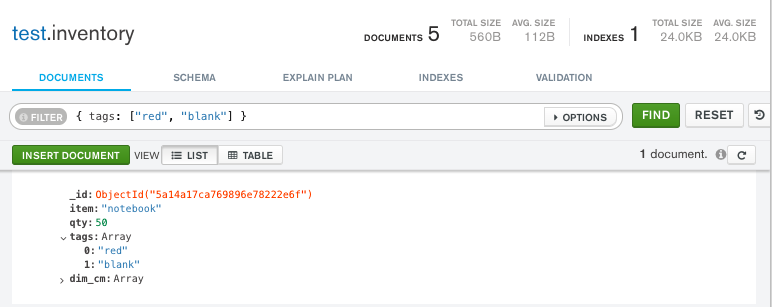
The following example queries for all documents where tags is an array with exactly two elements, "red" and "blank", in the specified order:
Copy the following filter into the Compass query bar and click Find:
{ tags: ["red", "blank"] }
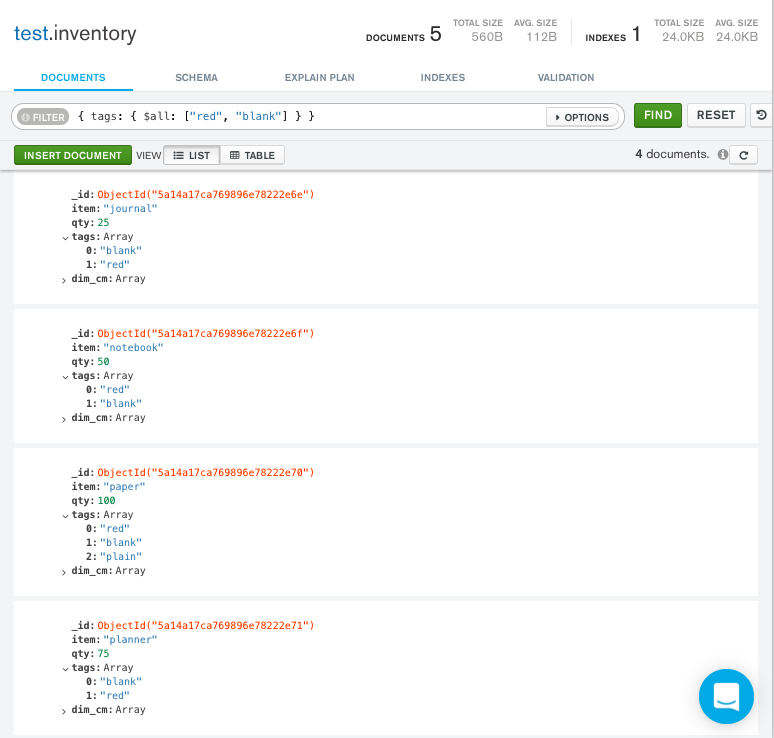
To find an array that contains both "red" and "blank" regardless of order or other elements in the array, use the $all operator:
Copy the following filter into the Compass query bar and click Find:
{ tags: { $all: ["red", "blank"] } }
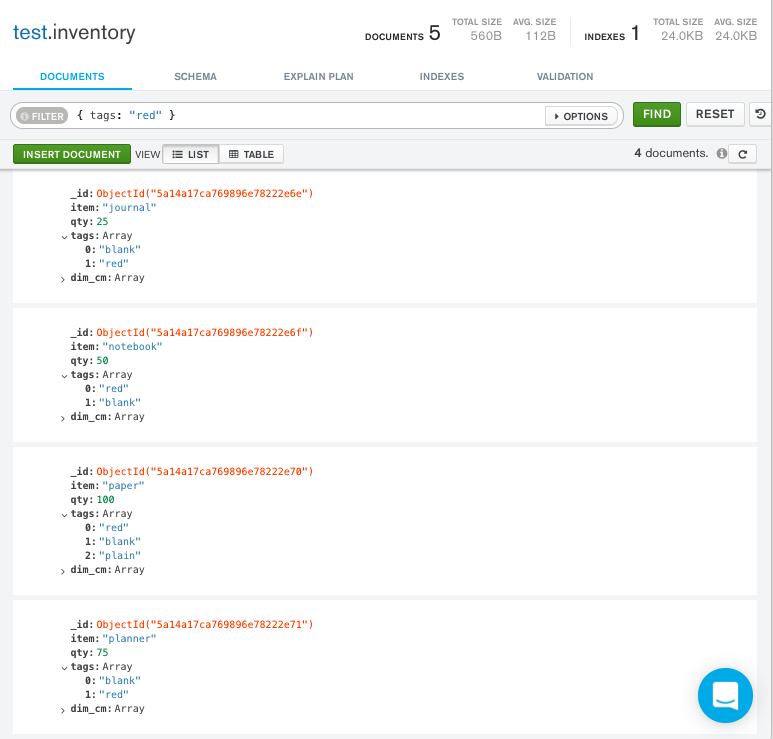
Query an Array for an Element
To query if the array field contains at least one element with the specified value, use the filter { <field>: <value> } where <value> is the element value.
The following example queries for all documents where the tags array contains the string "red" as one of its elements:
Copy the following filter into the Compass query bar and click Find:
{ tags: "red" }
To specify conditions on the elements in the array field, use query operators in the query filter document:
{ <array field>: { <operator1>: <value1>, ... } }
The following example queries for all documents where the array dim_cm contains at least one element whose value is greater than 25:
Copy the following filter into the Compass query bar and click Find:
{ dim_cm: { $gt: 25 } }
Specify Multiple Conditions for Array Elements
When you specify compound conditions on array elements, you can query for documents where either:
A single array element meets all the specified conditions
Different array elements collectively meet all the conditions, with each element satisfying one or more conditions
Query an Array with Compound Filter Conditions on the Array Elements
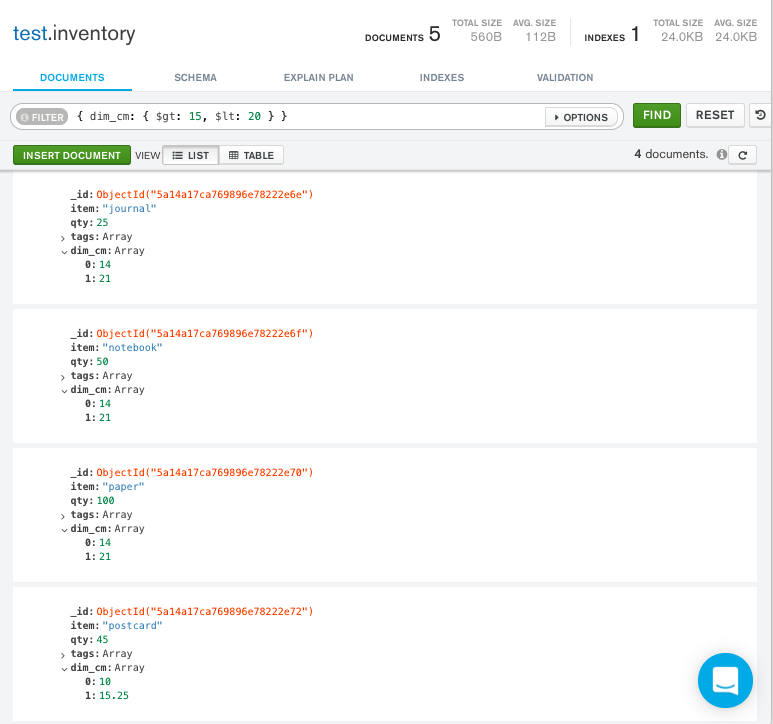
The following example queries for documents where the dim_cm array contains elements that in some combination satisfy the query conditions. One element can satisfy the greater than 15 condition and another element can satisfy the less than 20 condition, or a single element can satisfy both:
Copy the following filter into the Compass query bar and click Find:
{ dim_cm: { $gt: 15, $lt: 20 } }
Query for an Array Element that Meets Multiple Criteria
Use the $elemMatch operator to specify multiple criteria on array elements so that at least one array element satisfies all the specified criteria.
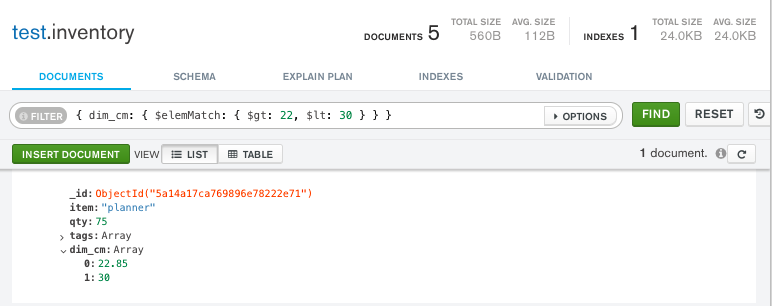
The following example queries for documents where the dim_cm array contains at least one element that is both greater than ($gt) 22 and less than ($lt) 30:
Copy the following filter into the Compass query bar and click Find:
{ dim_cm: { $elemMatch: { $gt: 22, $lt: 30 } } }
Query for an Element by the Array Index Position
Use dot notation to specify query conditions for an element at a particular index or position of the array. The array uses zero-based indexing.
Note
When you query using dot notation, the field and nested field must be inside quotation marks.
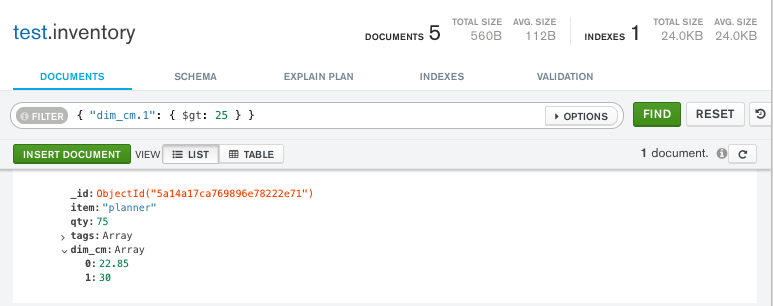
The following example queries for all documents where the second element in the array dim_cm is greater than 25:
Copy the following filter into the Compass query bar and click Find:
{ "dim_cm.1": { $gt: 25 } }
Query an Array by Array Length
Use the $size operator to query for arrays by number of elements.
The following example selects documents where tags has 3 elements:
Copy the following filter into the Compass query bar and click Find:
{ "tags": { $size: 3 } }
Query an Array with MongoDB Atlas
The example in this section uses the sample movies dataset. To learn how to load the sample dataset into your MongoDB Atlas deployment, see Load Sample Data.
To query an array in MongoDB Atlas, follow these steps:
In the MongoDB Atlas UI, go to the Clusters page for your project.
If it's not already displayed, select the organization that contains your desired project from the Organizations menu in the navigation bar.
If it's not already displayed, select your project from the Projects menu in the navigation bar.
In the sidebar, click Clusters under the Database heading.
The Clusters page displays.
Specify a query filter document.
To query a document that contains an array, specify a query filter document. A query filter document uses query operators to specify search conditions. Use the following example documents to query array fields in the sample_mflix.movies collection.
To apply a query filter, copy an example document into the Filter search bar and click Apply.
Match an Array
To specify an equality condition on an array, use the query document { <field>: <value> } where <value> is the exact array to match, including the order of the elements. The following example finds documents where genres contains the ["Action", "Comedy"] array in the specified order:
{ genres: ["Action", "Comedy"] }
To find an array that contains both Action and Comedy regardless of order or other elements in the array, use the $all operator:
{ genres: { $all: ["Action", "Comedy"] } }
Query an Array for an Element
To query if the array field contains at least one element with the specified value, use the filter { <field>: <value> } where <value> is the element value.
The following example queries for all documents where the genres field contains the string Short as one of its elements:
{ genres: "Short" }
To specify conditions on the elements in the array field, use query operators in the query filter document:
{ <array field>: { <operator1>: <value1>, ... } }
The following example uses the $nin operator to query for all documents where the genres field does not contain Drama:
{ genres: { $nin: ["Drama"] } }
Specify Multiple Conditions for Array Elements
When you specify compound conditions on array elements, you can query for documents where either:
A single array element meets all the specified conditions
Different array elements collectively meet all the conditions, with each element satisfying one or more conditions
Query an Array with Compound Filter Conditions on the Array Elements
The following example queries for documents where the cast array contains elements that in some combination satisfy the query conditions. The following filter uses the $regex and $eq operators to return documents where a single array element ends in Olsen and another element equals Mary-Kate Olsen or a single element that satisfies both conditions:
{ cast: { $regex: "Olsen$", $eq: "Mary-Kate Olsen" } }
This query filter returns movies that include Mary-Kate Olsen in their cast, and movies that include both Mary-Kate Olsen and Ashley Olsen in their cast.
Query for an Array Element that Meets Multiple Criteria
Use the $elemMatch operator to specify multiple criteria on array elements so that at least one array element satisfies all the specified criteria.
The following example uses the $elemMatch and $ne operators to query for documents where languages contains at least one element that is both not null and does not equal English:
{ languages: { $elemMatch: { $ne: null, $ne: "English" } } }
Query for an Element by the Array Index Position
Use dot notation to specify query conditions for an element at a particular index or position of the array. The array uses zero-based indexing.
Note
When you query using dot notation, the field and nested field must be inside quotation marks.
The following example uses the $ne operator to query for all documents where the first element in the countries array is not equal to USA:
{ "countries.0": { $ne: "USA" } }
Query an Array by Array Length
Use the $size operator to query for arrays by number of elements.
The following example selects documents where genres has 3 elements:
{ genres: { $size: 3 } }
Additional Query Tutorials
For additional query examples, see: