The /docs command provides MongoDB-specific information, supplemented by links to MongoDB Documentation. The MongoDB Extension for Github Copilot uses Retrieval-Augmented Generation (RAG) to generate responses based on the latest version of MongoDB Documentation.
Examples
The rest of this page illustrates example use cases for the /docs command:
Instructional Questions
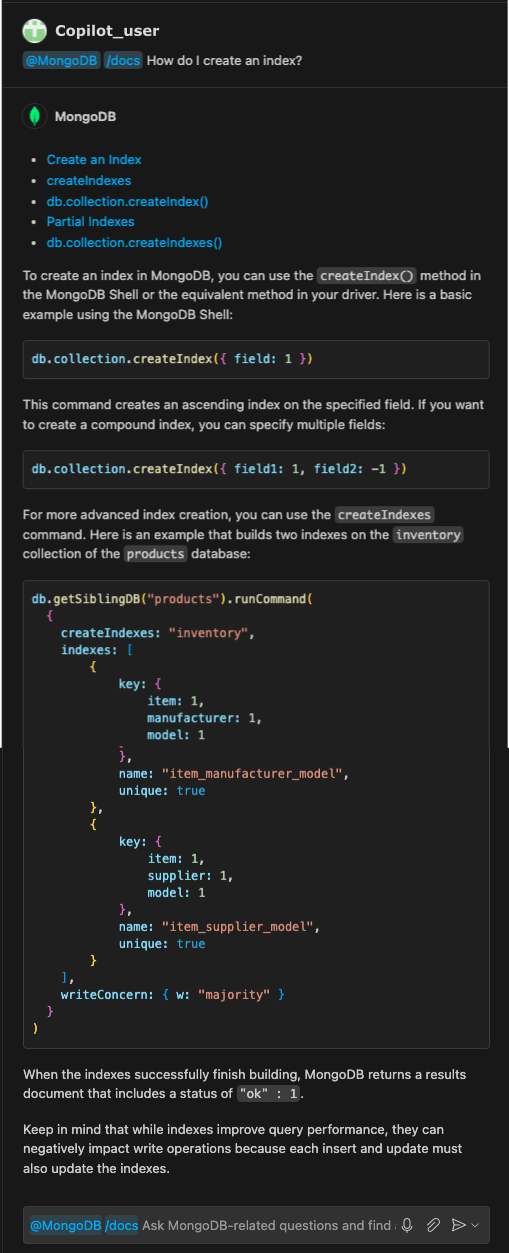
You can use the /docs command to ask how to perform specific operations. The following prompt asks for information on creating an index:
@MongoDB /docs How do I create an index?
The MongoDB Extension for Github Copilot first provides the following MongoDB documentation:
The generated response also contains information about creating an index and code examples:
Strategic Questions
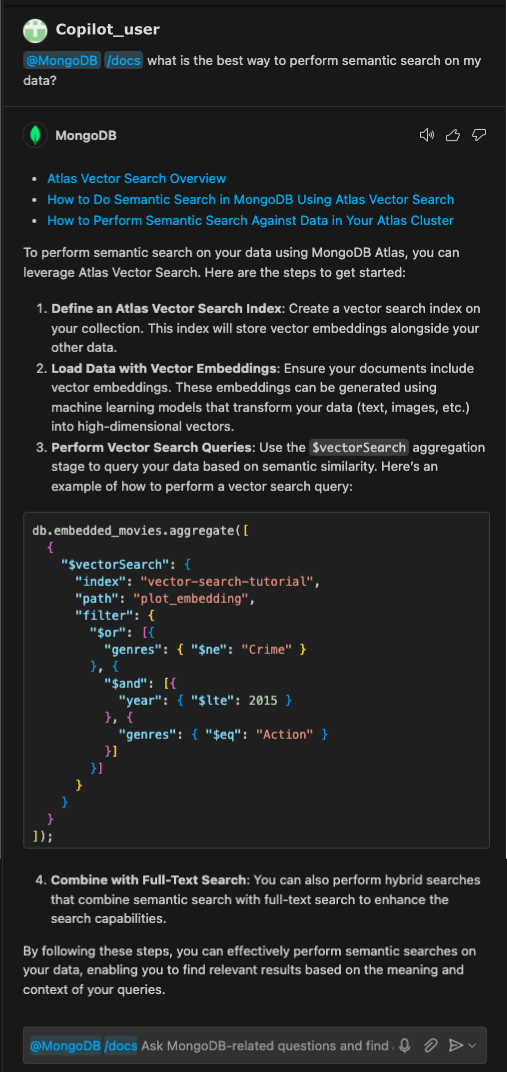
You can also use the /docs command to ask for operation recommendations. The following prompt asks the MongoDB Extension for Github Copilot for a recommendation on the best way to perform semantic search:
@MongoDB /docs what is the best way to perform semantic search on my data?
The generated response recommends using Atlas Vector Search and provides the following links to MongoDB documentation:
The response also includes steps to get started with Atlas Vector Search, with a code example: