You can deploy MongoDB Search and Vector Search in your Kubernetes cluster to build powerful search experiences directly within your applications. Using MongoDB Search and Vector Search, you can build both traditional text search and AI-powered vector search capabilities that automatically sync with an on-premises MongoDB database. This approach eliminates the need to maintain separate systems in sync while providing advanced search features. To learn more, see:
To enable the search capabilities such as full-text and semantic search in on-prem deployments, you must deploy the MongoDB Search and Vector Search process (mongot) and connect it with your MongoDB database deployment (mongod). Deployment of mongot is optional and is needed only if you plan to use the search features it offers.
The MongoDB Database process (mongod) acts as the proxy for all search queries for mongot. The mongod forwards the query to mongot, which processes the query. The mongot returns the query results to the mongod, which then forwards the results to you. You never interact directly with the mongot.
Each mongot process has its own persistent volume that is not shared with the database or other search nodes. Storage is used to maintain indexes that are built from the data continuously sourced from the database. The index definitions (metadata) are stored in the database itself.
The mongot performs the following actions:
Manages the index.
The
mongotis responsible for updating the index definitions in the database.Sources the data from the database.
The
mongotnodes establish permanent connections to the database in real time.Processes search queries.
When
mongodreceives a$search,$searchMeta, or$vectorSearchquery, it directs the query to one of themongotnodes. Themongotthat receives the query processes the query, aggregates the data, and returns the results tomongod, which it forwards to the user.
The mongot components are tightly coupled with a single MongoDB replica set and cannot be shared across multiple databases or replica sets. For a replica set deployment, one group of dedicated search nodes serve the replica set. For a sharded cluster, each shard maintains its own independent group of mongot nodes. Shards do not share mongot instances.
Network connectivity between mongot and mongod goes in both directions:
mongotestablishes connection to the replica set to source the data used to build indexes and run queries.mongodconnects tomongotto forward search-related operations such as index management and querying the data.
The spec.clusters[].replicas field controls how many mongot instances the Kubernetes Operator deploys. For a replica set source, spec.clusters[].replicas sets the total number of mongot pods. For a sharded cluster source, spec.clusters[].replicas sets the number of mongot pods per shard.
If you set spec.clusters[].replicas to a value greater than 1, you must place an L7 load balancer between mongod and the mongot pods. The mongod process opens a single long-lived TCP connection to mongot, so an L4 load balancer cannot distribute queries across multiple mongot instances — all traffic flows over that one connection. An L7 load balancer understands HTTP/2 and gRPC, which allows it to distribute individual gRPC streams across mongot pods while pinning each stream to a single mongot for the duration of the query cursor.
MongoDB Search and Vector Search Deployment
The search deployment architecture differs little with or without the Kubernetes Operator. The Kubernetes Operator simplifies the steps required to deploy fully functioning search nodes, especially when the database is also managed by the Kubernetes Operator.
To deploy, you apply the MongoDBSearch Custom Resource (CR), which the Kubernetes Operator picks up and starts deploying mongot pods and requests persistent storage specified in the spec. MongoDB Search and Vector Search deployed through the Kubernetes Operator can target a MongoDB replica set or sharded cluster deployed by the Kubernetes Operator inside the same Kubernetes cluster, or a completely independent external MongoDB deployment (replica set or sharded cluster). To learn how to deploy and configure mongot to use:
A MongoDB replica set in Kubernetes, see Install and use With MongoDB Community Edition or Install and Use Search With MongoDB Enterprise Edition
An external MongoDB replica set, see Install and Use MongoDB Search and Vector Search With External MongoDB Enterprise Edition.
Prerequisites
To use MongoDB Search and Vector Search in your:
MongoDB Community deployment, you must have a fully functional MongoDB 8.3 or later replica set or sharded cluster deployed inside a Kubernetes cluster using the Kubernetes Operator.
MongoDB Enterprise deployment, you must have a fully functional MongoDB 8.3 or later replica set or sharded cluster deployed in one of the following ways:
Inside a Kubernetes cluster using the Kubernetes Operator
Outside a Kubernetes cluster
Cloud Manager or Ops Manager Instance
Before you begin, consider the following:
You must have a working
StorageClassfor the creation of persistent volumes in the Kubernetes cluster. Without this, yourPersistentVolumeClaimsmight remain pending and MongoDB might not have durable storage.You must have a correctly configured cluster networking. Services such as ClusterIP, NodePort, or LoadBalancer must be able to route traffic. If external clients need access, set up an ingress or load balancer.
Your database and search nodes must have enough CPU, memory, and disk space allocated because MongoDB database, and MongoDB Search and Vector Search workloads are resource-intensive. MongoDB recommends using requests and limits in your Pod specs to avoid eviction or throttling.
Your Kubernetes version must be supported by the MongoDB operator or Helm chart you want to use. Some CRDs or APIs differ across versions. To learn more, see MongoDB Controllers for Kubernetes Operator Compatibility.
You must create any required RBAC roles and role bindings so that the Kubernetes Operator and processes running within the Pods can manage resources.
If you want multiple
mongotinstances (spec.clusters[].replicasgreater than1), you need a load balancer. The Kubernetes Operator can deploy and manage an Envoy proxy automatically (spec.clusters[].loadBalancer.managed: {}), or you can provide your own L7 load balancer (spec.clusters[].loadBalancer.unmanaged).If you want a sharded cluster with multiple
mongotinstances, ensure that you have sufficient cluster resources for the total number of pods across all shards. Each shard gets its own independent group ofmongotpods. The load balancer dispatches traffic to the correctmongotgroup. It reads the TLS SNI field on incoming traffic to identify the originating shard and routes the traffic tomongotpods that belong to that shard. Therefore, you must configure each shard with a distinct search hostname.
Configuration Tasks
The following table shows the configuration tasks that the Kubernetes Operator automatically performs and the actions that you must take to successfully deploy MongoDB Search and Vector Search in Kubernetes and connect to a MongoDB replica set or sharded cluster in Kubernetes or an external MongoDB deployment.
Task | (Inside Kubernetes) Performed by | (External MongoDB) Performed by |
|---|---|---|
Deploy Ops Manager inside Kubernetes | Kubernetes Operator | Kubernetes Operator |
Deploy Cloud Manager or Ops Manager outside Kubernetes | You | You |
Deploy MongoDB replica set or sharded cluster | Kubernetes Operator | You |
Create MongoDBSearch custom resource | You | You |
Provide connection string to MongoDB deployment | Kubernetes Operator | You |
Create | Kubernetes Operator | Kubernetes Operator |
Set necessary replica set parameters in each | Kubernetes Operator | You |
Create user for | Kubernetes Operator and you by applying MongoDBUser resource | You |
Configure MongoDB replica set with a user that has necessary permissions to query search | You | You |
Create MongoDB Search and Vector Search indexes | You | You |
Expose search pods or load balancer externally for connecting from each | Not necessary | You |
Expose | Not necessary | You |
Configure managed load balancer (when | Kubernetes Operator | Kubernetes Operator |
Configure unmanaged load balancer (when | You | You |
Provision per-shard TLS certificates (sharded clusters with TLS) | You | You |
Expose load balancer externally (External MongoDB + Managed LB) | Not necessary | You |
The following diagram shows the deployment architecture of a single MongoDB Search and Vector Search instance with a MongoDB Enterprise replica set in a Kubernetes cluster.
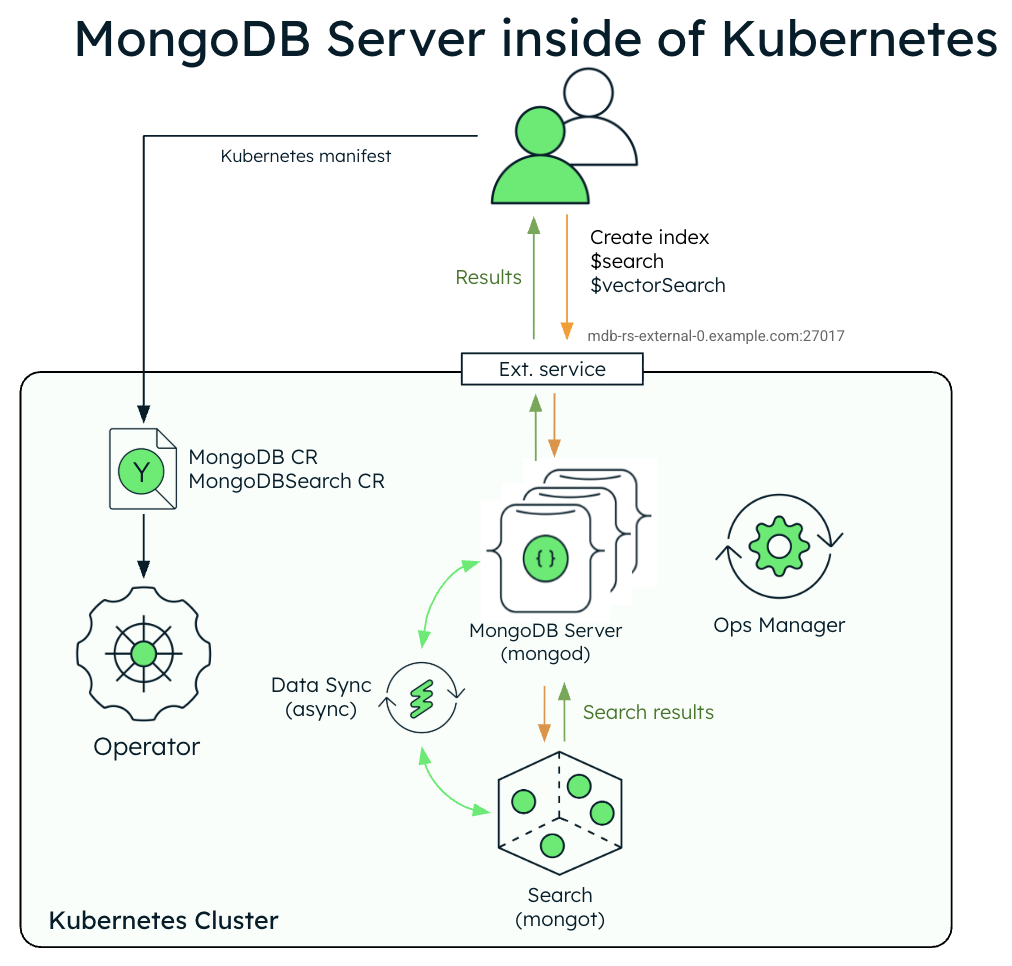
The following diagram shows the components that the Kubernetes Operator deploys in a Kubernetes cluster for MongoDB Search and Vector Search with a MongoDB Enterprise Edition replica set.
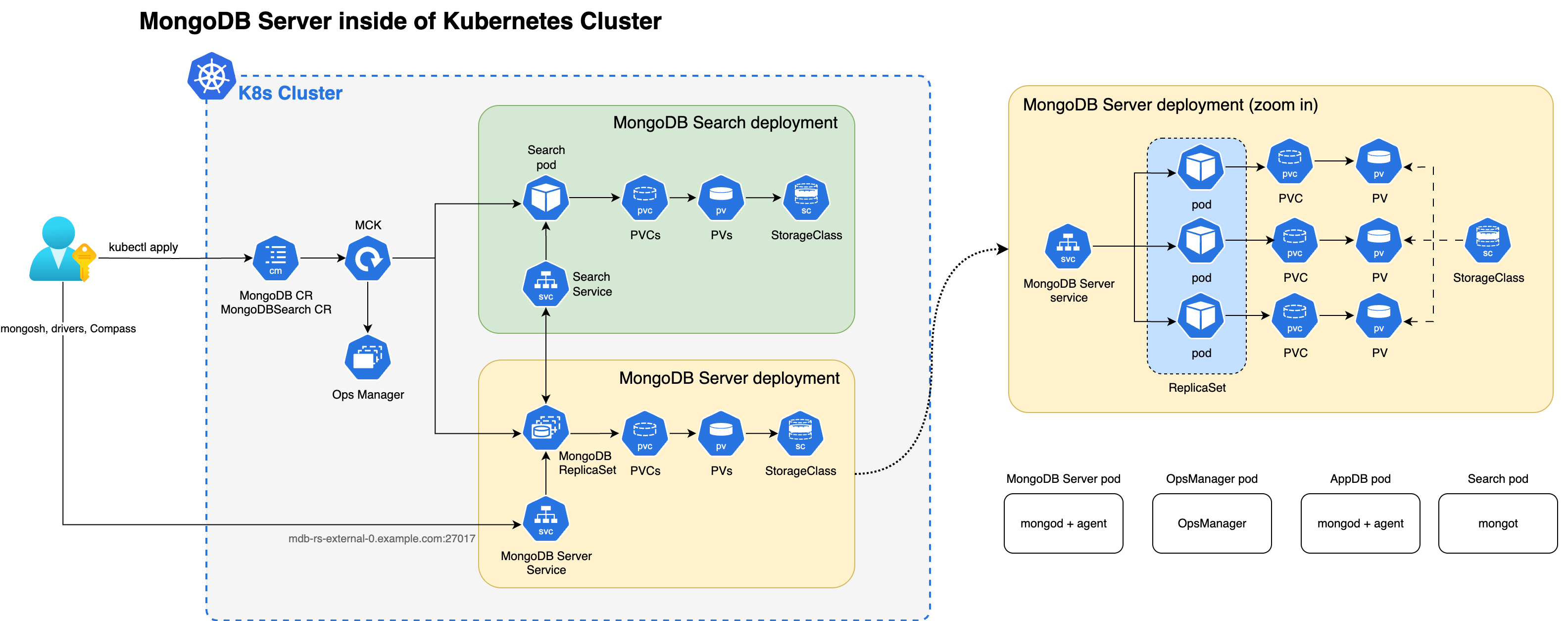
When both the mongot and mongod processes are deployed inside the Kubernetes cluster, the Kubernetes Operator performs configuration for both processes automatically. Specifically, the Kubernetes Operator performs the following operations:
Finds the MongoDB CR referenced by MongoDBSearch using
spec.source.mongodbResourceRef, or by a naming convention by looking for MongoDB CR with the same name as MongoDBSearch. For sharded clusters, the Kubernetes Operator auto-discovers the shard topology (shard names, replica set members, and mongos routers) from the referencedMongoDBresource.Generates
mongotconfiguration in a YAML file and saves it to a config map named<MongoDBSearch.metadata.name>-search-config.The Config map is mounted by the search pods and the YAML configuration is used by
mongot's process on startup. The generated YAML contains all the information about how to connect to the replica set, TLS settings, and so on.Deploys MongoDB Search and Vector Search stateful set named
<MongoDBSearch.metadata.name>-searchwith storage and resource requirements configured according to thespec.clusters[].persistenceandspec.clusters[].resourceRequirementssettings in the CR. For sharded cluster sources, the Kubernetes Operator creates one StatefulSet per shard. Each StatefulSet uses the naming pattern<name>-search-0-<shardName>and containsspec.clusters[].replicaspods, which defaults to1. The0in the naming pattern is the cluster index, which is0in single-cluster deployments. In multi-cluster deployments, the Kubernetes Operator uses each cluster'sspec.clusters[].indexvalue in that cluster's StatefulSet names.Deploys a single Envoy proxy Deployment for the MongoDB cluster if you need a load balancer (
spec.clusters[].loadBalancer.managed). The Envoy proxy handles L7 routing, mTLS termination, and gRPC stream pinning betweenmongodandmongotpods.Updates configuration of every
mongodprocess by adding the necessarysetParameteroptions, including the hostnames and port numbers of themongothosts. When you configure a load balancer,mongotHostandsearchIndexManagementHostAndPortpoint to the load balancer endpoint instead of themongotpods. For sharded clusters, each shard'smongodprocesses receive the load balancer endpoint for that shard.
You must perform the following actions:
Create a user in the replica set using a
MongoDBUsercustom resource. Themongotuses the credentials of this user to connect to the replica set to source the data:The user name is arbitrary (the examples use
search-sync-source-user), but it must have thesearchCoordinatorrole set.The username and password of this user are passed in
MongoDBSearch.spec.source.usernameandMongoDBSearch.spec.source.passwordSecretRefrespectively.The password secret can refer to the same secret containing user password that was used to create
MongoDBUserspec (inMongoDBUser.spec.source.passwordSecretKeyRef).
Configure and apply the MongoDBSearch custom resource.
To learn more about the CR settings for the mongot process, see MongoDB Search and Vector Search Settings.
The following diagram shows the deployment architecture of MongoDB Search and Vector Search in a Kubernetes cluster using an external MongoDB Enterprise Edition replica set.
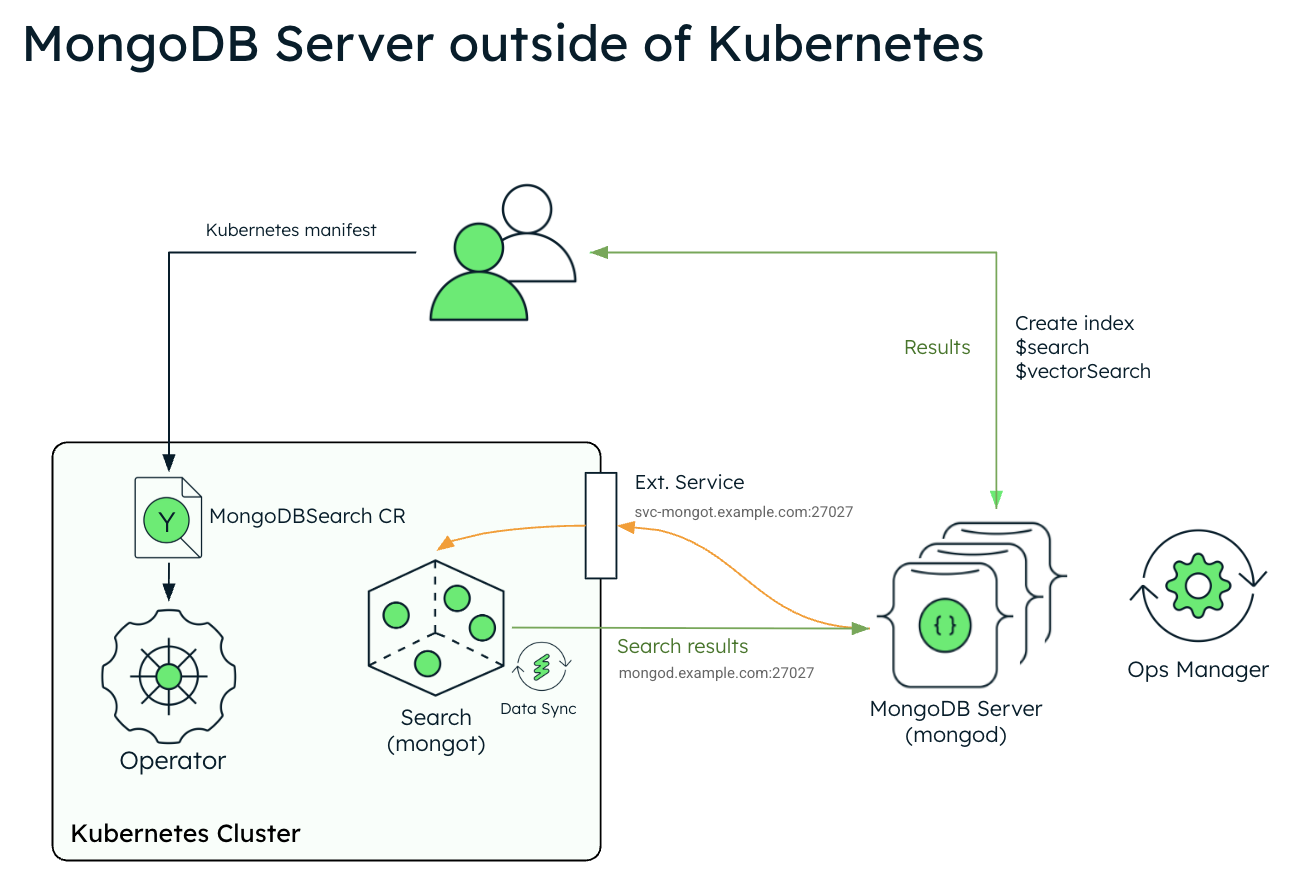
The following diagram shows the components that the Kubernetes Operator deploys in a Kubernetes cluster for MongoDB Search and Vector Search.
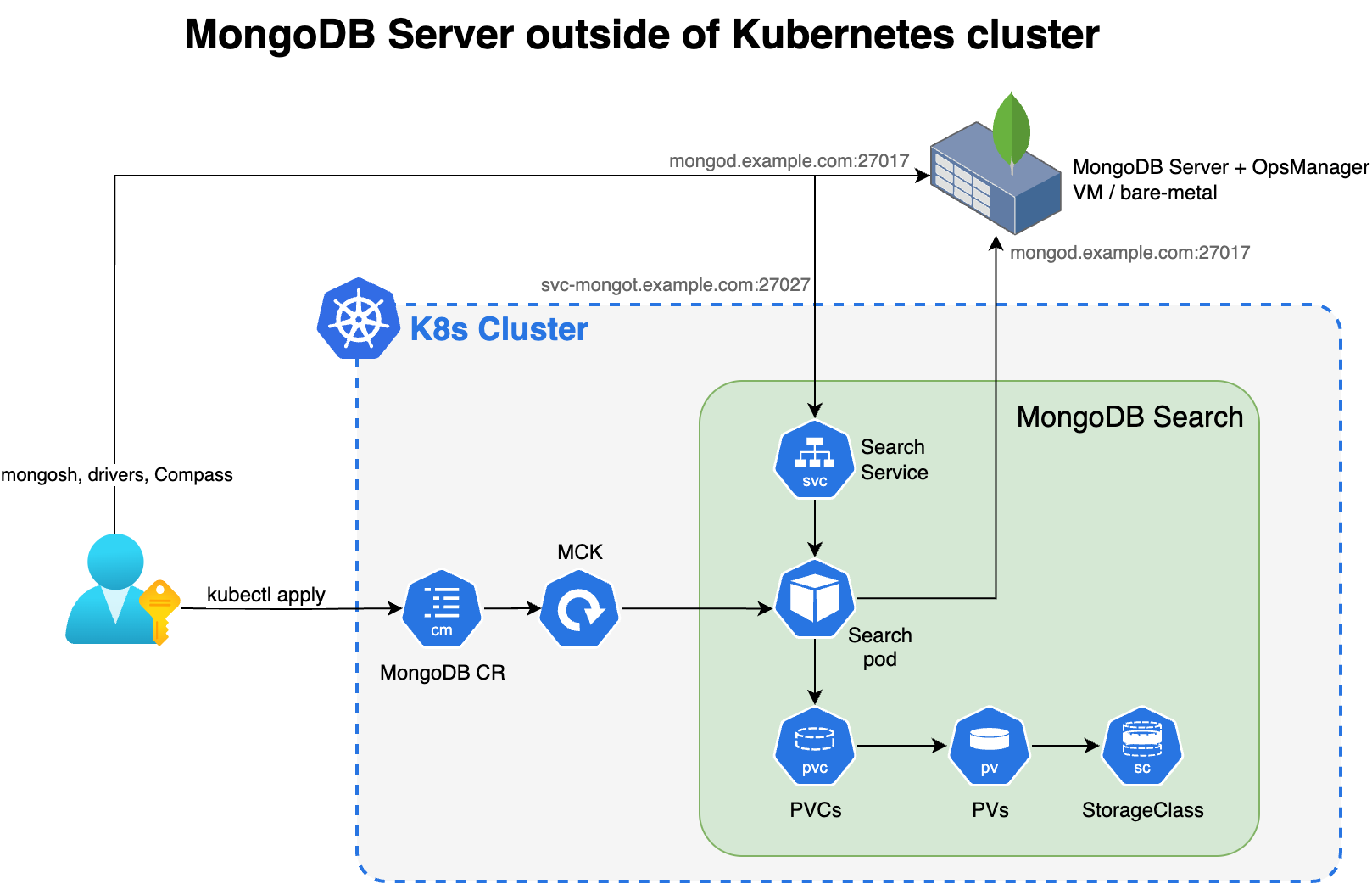
To use MongoDB Search and Vector Search when you have your MongoDB deployment outside Kubernetes, deploy mongot using the Kubernetes Operator and perform some steps manually. The Kubernetes Operator handles configuration of the search pods. However, when the MongoDB deployment is outside Kubernetes, you must reconfigure your MongoDB nodes and the networking.
You are responsible for the following manual configurations:
External Replica Set Configuration
Configure the following parameter using
setParameteron everymongodprocess in your external replica set. When configuring, replace<search-service-hostname>:27028with the actual resolvable hostname and port of your MongoDBSearch service.setParameter: mongotHost: "<search-service-hostname>:27028" searchIndexManagementHostAndPort: "<search-service-hostname>:27028" skipAuthenticationToSearchIndexManagementServer: false searchTLSMode: "disabled" # or "requireTLS" for TLS deployments useGrpcForSearch: true For a single
mongotinstance (no load balancer),mongotHostpoints directly to themongotservice hostname (<name>-search-0-svc:27028).For multiple
mongotinstances with a load balancer,mongotHostpoints to the load balancer endpoint instead.For managed load balancers, the Kubernetes Operator configures the
mongotHostautomatically usingspec.source.mongodbResourceRef.For external MongoDB deployments, you must set
mongotHostto the load balancer endpoint that you specified inspec.clusters[].loadBalancer.managed.externalHostnameorspec.clusters[].loadBalancer.unmanaged.endpoint.
Create a user in the external replica set for the search synchronization process. This user must have the
searchCoordinatorrole.- userName: "search-sync-source" password: "<your-search-sync-password>" database: "admin" roles: - role: "searchCoordinator" db: "admin"
External Sharded Cluster Configuration
Important
In a standard MongoDB sharded cluster deployment, clients connect only to mongos routers and never directly to shard replica sets. However, when you deploy mongot, the mongot processes in each shard group connect to both mongos routers and all mongod processes in that shard. Therefore, you must expose each shard's replica set directly to mongot processes. Ensure that your network and firewall rules allow direct connectivity from the Kubernetes cluster to each shard's mongod instances, not only to the mongos routers.
The shardName values you specify in spec.source.external.shardedCluster.shards must follow Kubernetes naming rules:
Contain only lowercase alphanumeric characters,
-, or..Start with an alphabetic character and end with an alphanumeric character.
Not contain underscores. If your MongoDB shard names use underscores, replace them with dashes.
The combined length of
MongoDBSearch.metadata.nameandshardNamemust be less than 50 characters.
The shardName does not need to match the exact shard name in MongoDB. The Kubernetes Operator uses it only for naming Kubernetes resources.
When you connect MongoDBSearch to an external sharded cluster, you must:
Configure
spec.source.external.shardedClusterin the MongoDBSearch CR with themongosrouter hosts and per-shard replica set hosts.Set the
mongotHostandsearchIndexManagementHostAndPortparameters on each shard'smongodprocesses. Point each shard to its ownmongotgroup (or its own load balancer endpoint if you use multiplemongotinstances).Ensure bidirectional network connectivity between:
Each shard's
mongodnodes and the correspondingmongotpods (or load balancer).The
mongotpods and themongosrouters (for query routing).The
mongotpods and each shard'smongodnodes (for data synchronization).
If you use a managed load balancer with an external sharded cluster, specify spec.clusters[].loadBalancer.managed.externalHostname with a {shardName} placeholder (for example, {shardName}.search-lb.example.com). Expose the Envoy service externally so that each shard's mongod nodes can reach it using a hostname unique to that shard. The load balancer reads the TLS SNI field from incoming connections to determine which shard the traffic originates from and dispatches it to the mongot pods that belong to that shard. This SNI-based routing is the only mechanism the load balancer uses to distinguish traffic between shards, which is why each shard must connect through a different hostname.
Kubernetes Configuration
Configure and apply the MongoDBSearch CR with
spec.source.externalpointing to your external MongoDB hosts.Create a Kubernetes secret for the search synchronization user's password.
apiVersion: v1 kind: Secret metadata: name: search-sync-source-password stringData: password: "your-search-sync-password" Configure networking and DNS to ensure bidirectional connectivity between your external MongoDB and the search pods. Your external MongoDB environment must be able to resolve your search service hostname (
<search-service-hostname>).
To learn more about the CR settings for the mongot process to connect to an external mongod process, see MongoDB Search and Vector Search Settings.
Security
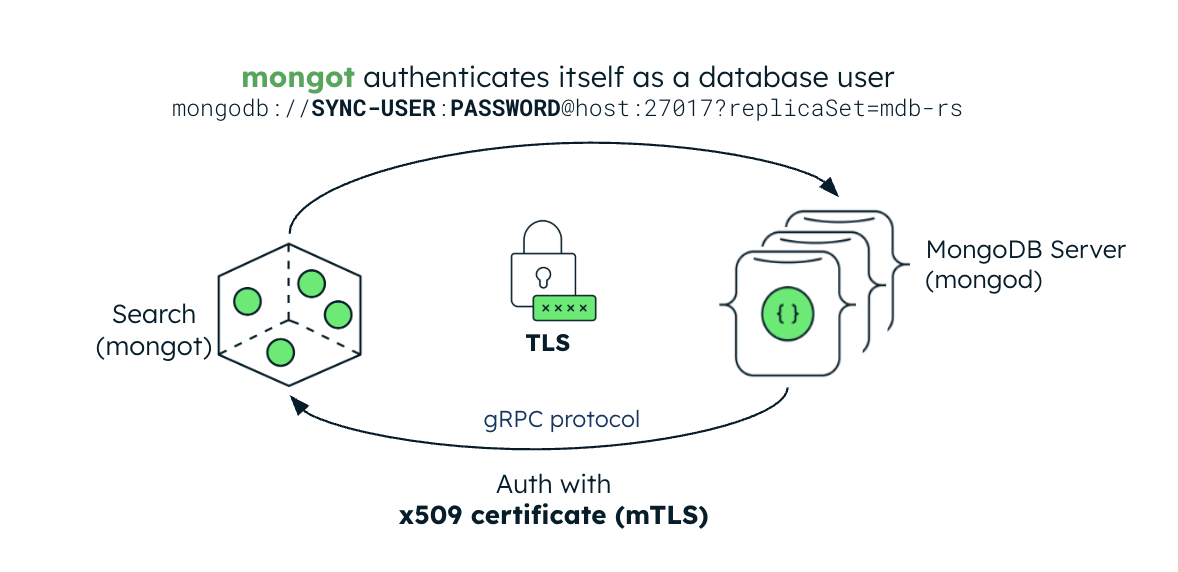
The following image illustrates the security configuration for the mongot process. If the MongoDB deployment is inside the Kubernetes cluster, the Kubernetes Operator automatically sets up keyfile authentication for MongoDB Search and Vector Search. If the MongoDB deployment is external, you must create a Kubernetes Secret containing the replica set's keyfile credential and reference it in the MongoDBSearch CR.
Authentication
The mongot process authenticates mongod connections using mTLS. When you enable TLS, the mongot process uses the MongoDB deployment's TLS certificate as the client certificate for authentication. This certificate is verified against the CA certificate that mongot is configured with. For authentication to work properly, you must configure both mongot and mongod with TLS enabled.
When configured to index a MongoDB resource within the same Kubernetes cluster, the Kubernetes Operator automatically propagates the mongod CA certificate to mongot and enables mTLS for search query connections if both the MongoDB and MongoDBSearch resources are configured for TLS. If the MongoDB replica set is deployed outside Kubernetes, you must create a Kubernetes Secret containing the replica set's CA certificate and reference it in the MongoDBSearch.spec.source.external.tls.ca field to enable mTLS authentication for search query requests.
Transport Layer Security
MongoDBSearch can protect data and credentials in transit using TLS. For index management commands and search queries, set the spec.security.tls field and provide a TLS certificate. You can set this field to an empty object ({}) to enable TLS with default settings.
Deprecated since version 1.8.0: spec.security.tls.certificateKeySecretRef is deprecated. For replica set deployments, the Kubernetes Operator still supports certificateKeySecretRef, but you should migrate to spec.security.tls.certsSecretPrefix. For sharded cluster deployments, you cannot use certificateKeySecretRef because the Kubernetes Operator reads a separate mongot server certificate secret for each shard.
spec.security.tls.certsSecretPrefix is an optional field. When you specify it, the Kubernetes Operator prepends <certsSecretPrefix>- to all certificate secret names it reads. The Kubernetes Operator reads the following certificate secrets:
mongot Certificates
Cluster Topology | mongot Certificate |
|---|---|
Replica set |
|
Sharded cluster |
|
Load Balancer Certificates
If you set spec.clusters[].loadBalancer.managed, the load balancer client certificate is [<certsSecretPrefix>-]<name>-search-lb-0-client-cert. The following table shows the load balancer server certificates:
Cluster Topology | Certificate |
|---|---|
Replica set |
|
Sharded cluster |
|
The TLS certificate must be issued and signed by the same CA that issued the CA certificate that the MongoDB replica set uses.
When both MongoDBSearch and MongoDB are deployed by the Kubernetes Operator, the underlying mongot and mongod configuration is largely handled by the Kubernetes Operator itself. If you deploy the MongoDB replica set outside the Kubernetes cluster:
.spec.source.external.tlsfield must be populated with a Kubernetes Secret containing the same CA certificate that you used to configure themongod.searchTLSModeparameter must be set torequireTLSin themongodconfiguration.
Load Balancer mTLS
Without a load balancer, mongod connects directly to mongot using mTLS. The mongod presents its own client certificate, and mongot validates it against a trusted CA.
If you configure a managed load balancer (spec.clusters[].loadBalancer.managed), the Envoy proxy terminates the mTLS connection from mongod and establishes a new mTLS connection to mongot. Because the load balancer terminates and re-establishes the connection, it uses its own client certificate when connecting to mongot, not the original mongod certificate. The mongot CA must trust the certificate authority that issued the load balancer's client certificate. The Kubernetes Operator manages the Envoy TLS configuration automatically. It requires the following certificates:
Server certificate for the Envoy proxy, which
mongodconnects to. The load balancer uses this certificate to terminate the incoming mTLS connection.Client certificate for the Envoy proxy, which the load balancer presents to
mongotwhen establishing the upstream mTLS connection.
Provision these certificates as Kubernetes Secrets following the naming convention that spec.security.tls.certsSecretPrefix defines. See MongoDB Search and Vector Search Settings for the full naming pattern.
Diagnostic Data
Each mongot pod continuously writes FTDC files to /mongot/data/diagnostic.data/ inside the pod. FTDC is a binary diagnostic stream that captures detailed mongot internal state and is the primary artifact MongoDB Support uses to diagnose Search issues. FTDC is enabled by default. To learn how to copy FTDC files for a support case, see Troubleshoot mongot Deployment.
The Kubernetes Operator mounts a PersistentVolumeClaim on each mongot pod at /mongot/data using a volumeClaimTemplate on the search StatefulSet, and mongot writes its FTDC files to /mongot/data/diagnostic.data/ on that volume. Because the data resides on a PersistentVolumeClaim, it survives pod restarts and rescheduling: when the StatefulSet replaces a pod, it reattaches the same PersistentVolumeClaim. You configure this volume with the spec.clusters[].persistence setting on the MongoDBSearch resource.