MongoDB provides several features for building AI agents. As both a vector and document database, MongoDB supports various search methods for agentic RAG, as well as storing agent interactions in the same database for short and long-term agent memory.
Get StartedWhat is an AI agent?
In the context of generative AI, an AI agent typically refers to a system that can complete a task autonomously or semi-autonomously by combining AI models such as LLMs with a set of pre-defined tools.
AI agents can use tools to gather context, interact with external systems, and perform actions. They can define their own execution flow (planning) and remember previous interactions to inform their responses (memory). Therefore, AI agents are best suited for complex tasks that require reasoning, planning, and decision-making.
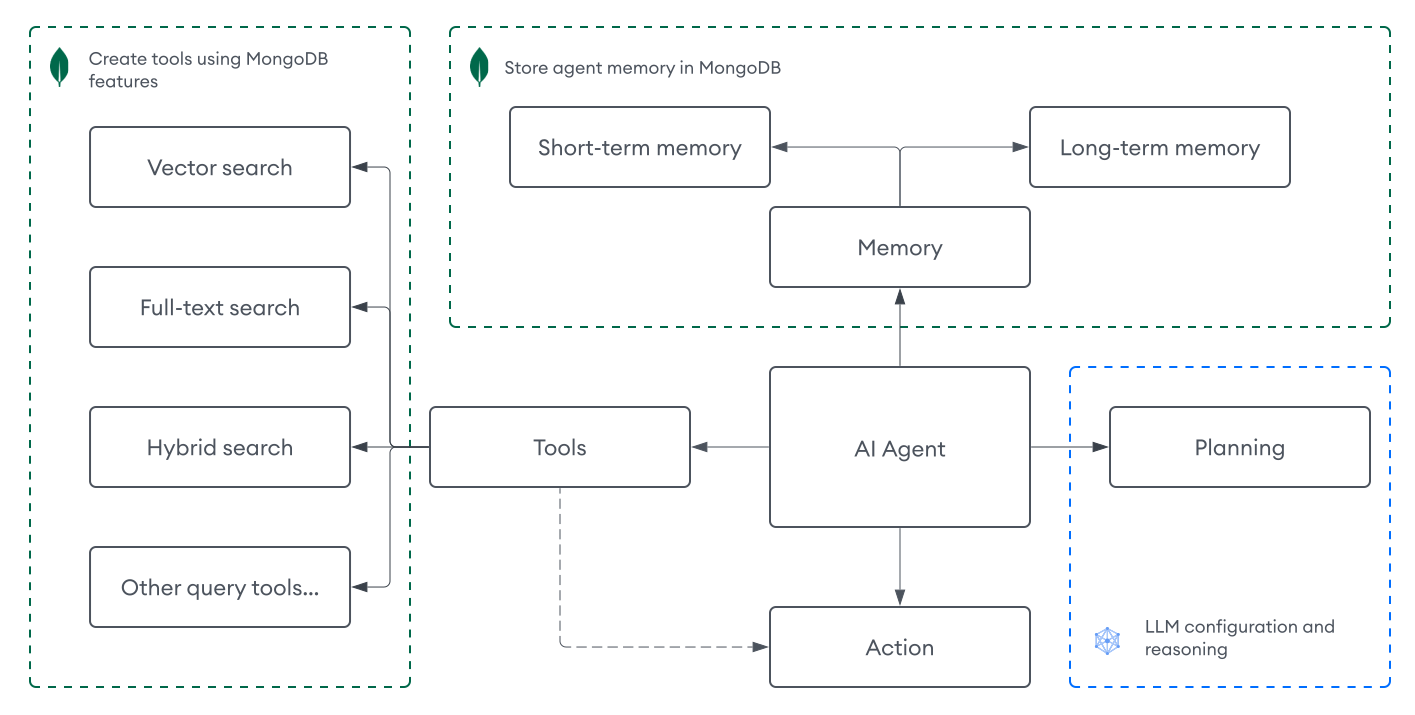
Architecture
An AI agent typically includes a combination of the following components:
Perception | Your input for the agent. Text inputs are the most common perception mechanism for AI agents, but inputs can also be audio, images, or multimodal data. |
Planning | How the agent determines what to do next. This component typically includes LLMs and prompts, using feedback loops and various prompt engineering techniques such as chain-of-thought and reAct, to help the LLM reason through complex tasks. AI agents can consist of a single LLM as the decision maker, LLM with multiple prompts, multiple LLMs working together, or any combination of these approaches. |
Tools | How the agent gathers context for a task. Tools allow agents to interact with external systems and perform actions such as vector search, web search, or calling APIs from other services. |
Memory | A system for storing agent interactions, so the agent can learn from past experiences to inform its responses. Memory can be short-term (for the current session) or long-term (persisted across sessions). |
Note
AI agents vary in design pattern, function, and complexity. To learn about other agent architectures, including multi-agent systems, see Agentic Design Patterns.
Build AI Agents with MongoDB
MongoDB supports the following components for building AI agents:
Tools: Leverage MongoDB search features as tools for your agent to retrieve relevant information and implement agentic RAG.
Memory: Store agent interactions in MongoDB collections for both short and long-term memory.
Agent Tools
In the context of AI agents, a tool is anything that can be programmatically defined and invoked by the agent. Tools extend the agent's capabilities beyond generating text, allowing it to interact with external systems, retrieve information, and take actions. Tools are typically defined with a specific interface that includes:
A name and description that help the agent understand when to use the tool.
Required parameters and their expected formats.
A function that performs the actual operation when invoked.
The agent uses its reasoning capabilities to determine which tool to use, when to use it, and what parameters to provide, based on the user's input and the task at hand.
In addition to standard MongoDB queries, MongoDB provides several search capabilities that you can implement as tools for your agent.
MongoDB Vector Search: Perform vector search to retrieve relevant context based on semantic meaning and similarity. To learn more, see MongoDB Vector Search Overview.
MongoDB Search: Perform full-text search to retrieve relevant context based on keyword matching and relevance scoring. To learn more, see MongoDB Search Overview.
Hybrid Search: Combine MongoDB Vector Search with MongoDB Search to leverage the strengths of both approaches. To learn more, see How to Perform Hybrid Search.
You can define tools manually or by using frameworks such as LangChain and LangGraph, which provide built-in abstractions for tool creation and calling.
Tool definition
Tools are defined as functions that the agent can call to perform specific tasks. For example, the following syntax illustrates how you might define a tool that runs a vector search query:
Tool call
Tool calls are what the agent uses to execute the tools. You can define how to process tool calls in your agent, or use a framework to handle this for you. These are typically defined as JSON objects that include the tool name and other arguments to pass to the tool, so the agent can call the tool with the appropriate parameters. For example, the following syntax illustrates how an agent might call the vector search tool:
{ "tool": "vector_search_tool", "args": { "query": "What is MongoDB?" }, "id": "call_H5TttXb423JfoulF1qVfPN3m" }
Agentic RAG
By using MongoDB as a vector database, you can create retrieval tools that implement agentic RAG, which is an advanced form of RAG that allows you to dynamically orchestrate the retrieval and generation process through an AI agent.
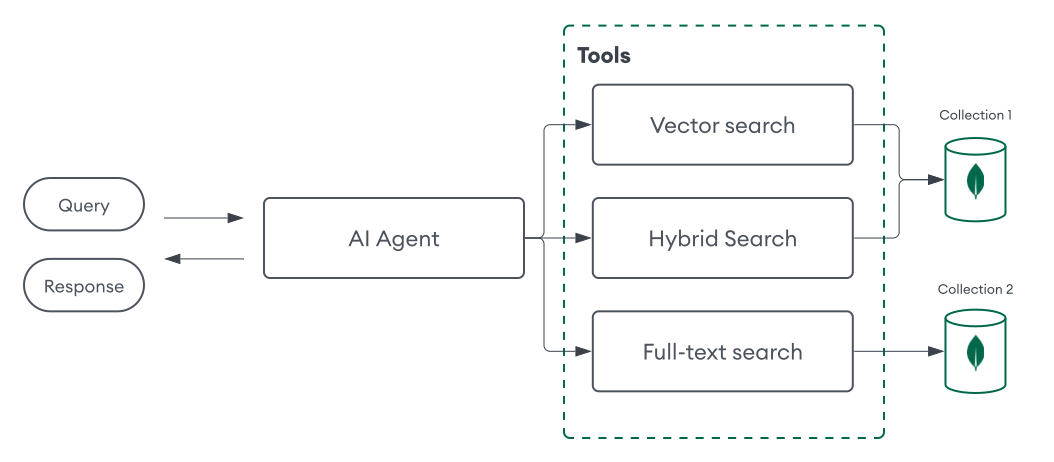
This approach enables more complex workflows and user interactions. For example, you can configure your AI agent to determine the optimal retrieval tool based on the task, such as using MongoDB Vector Search for semantic search and MongoDB Search for full-text search. You can also define different retrieval tools for different collections to further customize the agent's retrieval capabilities.
Agent Memory
Memory for agents involves storing information about previous interactions, so that the agent can learn from past experiences and provide more relevant and personalized responses. This is particularly important for tasks that require context, such as conversational agents, where the agent needs to remember previous turns in the conversation to provide coherent and contextually relevant responses. There are two primary types of agent memory:
Short-term Memory: Stores information for the current session, like recent conversation turns and active task context.
Long-term Memory: Persists information across sessions, which can include past conversations and personalized preferences over time.
Since MongoDB is also a document database, you can implement memory for agents by storing its interactions in a MongoDB collection. The agent can then query or update this collection as needed. There are several ways to implement agent memory with MongoDB:
For short-term memory, you might include a
session_idfield to identify a specific session when storing interactions, and then query for interactions with the same ID to pass to the agent as context.For long-term memory, you might process several interactions with an LLM to extract relevant information such as user preferences or important context, and then store this information in a separate collection that the agent can query when needed.
To build robust memory management systems that enable more efficient and complex retrieval of conversation histories, leverage MongoDB Search or MongoDB Vector Search to store, index, and query important interactions across sessions.
A document in a collection that stores short-term memory might resemble the following:
{ "session_id": "123", "user_id": "jane_doe", "interactions": [ { "role": "user", "content": "What is MongoDB?", "timestamp": "2025-01-01T12:00:00Z" }, { "role": "assistant", "content": "MongoDB is the world's leading modern database.", "timestamp": "2025-01-01T12:00:05Z" } ] }
A document in a collection that stores long-term memory might resemble the following:
{ "user_id": "jane_doe", "last_updated": "2025-05-22T09:15:00Z", "preferences": { "conversation_tone": "casual", "custom_instructions": [ "I prefer concise answers." ], }, "facts": [ { "interests": ["AI", "MongoDB"], } ] }
The following frameworks also provide direct abstractions for agent memory with MongoDB:
Framework | Features |
|---|---|
LangChain |
To learn more, see the tutorial. |
LangGraph |
To learn more, see LangGraph and LangGraph.js. |
Get Started
The following tutorial demonstrates how to build an AI agent using MongoDB for agentic RAG and memory, without an agent framework.
Prerequisites
To complete this tutorial, you must have the following:
One of the following MongoDB cluster types:
An Atlas cluster running MongoDB version 6.0.11, 7.0.2, or later. Ensure that your IP address is included in your Atlas project's access list.
A local Atlas deployment created using Python and Docker. Install
atlas-local-lib-py(pip install atlas-local-lib-py) to programmatically create and manage local deployments. To learn more, see the atlas-local-lib-py repository.A MongoDB Community or Enterprise cluster with Search and Vector Search installed.
A Voyage AI API key.
An OpenAI API key.
Note
This tutorial uses models from Voyage AI and OpenAI, but you can modify the code to use your models of choice.
Procedure
This AI agent can be used to answer questions about a custom data source and perform calculations. It can also remember previous interactions to inform its responses. It uses the following components:
Perception: Text inputs.
Planning: An LLM and various prompts to reason through the task.
Tools: A vector search tool and calculator tool.
Memory: Stores the interactions in a MongoDB collection.
Tutorials
For more tutorials on building AI agents with MongoDB, refer to the following table:
Frameworks | |
Enterprise platforms | |
Tools | |
Additional resources |