You can integrate MongoDB Atlas with LangGraph to build AI agents. This tutorial demonstrates how to build an AI agent that answers questions about sample data in MongoDB.
Specifically, the agent uses the integration to implement agentic RAG and agent memory. It uses semantic search and full-text search tools to retrieve relevant information and answer questions about the data. It also implements both short and long-term memory using MongoDB by storing conversation history and important interactions in separate collections.
Prerequisites
To complete this tutorial, you must have the following:
One of the following MongoDB cluster types:
An Atlas cluster running MongoDB version 6.0.11, 7.0.2, or later. Ensure that your IP address is included in your Atlas project's access list.
A local Atlas deployment created using Python and Docker. Install
atlas-local-lib-py(pip install atlas-local-lib-py) to programmatically create and manage local deployments. To learn more, see the atlas-local-lib-py repository.A MongoDB Community cluster with Search and Vector Search installed.
A Voyage AI API key. To learn more, see API Key and Python Client.
An OpenAI API Key. You must have an OpenAI account with credits available for API requests. To learn more about registering an OpenAI account, see the OpenAI API website.
Note
Check the requirements of the langchain-voyageai package to ensure you're using a compatible Python version.
Set Up the Environment
To set up the environment, complete the following steps:
Initialize the project and install dependencies.
Create a new project directory, then install the required dependencies:
mkdir langgraph-mongodb-ai-agent cd langgraph-mongodb-ai-agent pip install --quiet --upgrade python-dotenv langgraph "langgraph-checkpoint-mongodb>=0.5.0" "langgraph-store-mongodb>=0.3.0" langchain langchain-mongodb langchain-voyageai langchain-openai pymongo
Note
Your project will use the following structure:
langgraph-mongodb-ai-agent ├── .env ├── config.py ├── search-tools.py ├── memory-tools.py ├── agent.py ├── main.py
Set environment variables.
Create a .env file in your project and specify the following variables. Replace the placeholder values with valid API keys and your MongoDB cluster's connection string.
VOYAGE_API_KEY = "<voyage-api-key>" OPENAI_API_KEY = "<openai-api-key>" MONGODB_URI = "<connection-string>"
Note
Replace <connection-string> with the connection string for your Atlas cluster or local Atlas deployment.
Your connection string should use the following format:
mongodb+srv://<db_username>:<db_password>@<clusterName>.<hostname>.mongodb.net
IMPORTANT: Ensure that your connection string includes your database user's credentials. To learn more about finding your connection string, see Connect to a Cluster via Client Libraries.
Your connection string should use the following format:
mongodb://localhost:<port-number>/?directConnection=true
To learn more, see Connection Strings.
Use MongoDB as a Vector Database
To configure MongoDB as a vector database for storage and retrieval, complete the following steps:
Load the sample data.
For this tutorial, you use one of our sample datasets as the data source. If you haven't already, complete the steps to load sample data into your Atlas cluster.
Specifically, you will use the embedded_movies dataset, which contains documents about movies, including the vector embeddings of their plots.
Note
If you want to use your own data, see LangChain Get Started or How to Create Vector Embeddings Manually to learn how to ingest vector embeddings into Atlas.
Set up the vector store and indexes.
Create a file named config.py in your project. This file configures MongoDB as the vector store for your agent. It also creates the indexes to enable vector search and full-text search queries on the sample data.
import os from pymongo import MongoClient from langchain_mongodb import MongoDBAtlasVectorSearch from langchain_mongodb.index import create_fulltext_search_index from langchain_voyageai import VoyageAIEmbeddings from langchain_openai import ChatOpenAI from dotenv import load_dotenv # Load environment variables load_dotenv() # Get required environment variables MONGODB_URI = os.getenv("MONGODB_URI") if not MONGODB_URI: raise ValueError("MONGODB_URI environment variable is required") # Initialize models embedding_model = VoyageAIEmbeddings( model="voyage-3-large", output_dimension=2048 ) llm = ChatOpenAI("gpt-4o") # MongoDB setup mongo_client = MongoClient(MONGODB_URI) collection = mongo_client["sample_mflix"]["embedded_movies"] # LangChain vector store setup vector_store = MongoDBAtlasVectorSearch.from_connection_string( connection_string=MONGODB_URI, namespace="sample_mflix.embedded_movies", embedding=embedding_model, text_key="plot", embedding_key="plot_embedding_voyage_3_large", relevance_score_fn="dotProduct", ) # Create indexes on startup print("Setting up vector store and indexes...") try: existing_indexes = list(collection.list_search_indexes()) vector_index_exists = any(idx.get('name') == 'vector_index' for idx in existing_indexes) if vector_index_exists: print("Vector search index already exists, skipping creation...") else: print("Creating vector search index...") vector_store.create_vector_search_index( dimensions=2048, # The dimensions of the vector embeddings to be indexed wait_until_complete=60 # Number of seconds to wait for the index to build (can take around a minute) ) print("Vector search index created successfully!") except Exception as e: print(f"Error creating vector search index: {e}") try: fulltext_index_exists = any(idx.get('name') == 'search_index' for idx in existing_indexes) if fulltext_index_exists: print("Search index already exists, skipping creation...") else: print("Creating search index...") create_fulltext_search_index( collection=collection, field="title", index_name="search_index", wait_until_complete=60 # Number of seconds to wait for the index to build (can take around a minute) ) print("Search index created successfully!") except Exception as e: print(f"Error creating search index: {e}")
Define Search Tools
Create a search_tools.py file in your project. In this file, you define the search tools that the agent uses to perform agentic RAG.
plot_search: This tool uses the vector store object as a retriever. Under the hood, the retriever runs a MongoDB Vector Search query to retrieve semantically similar documents. The tool then returns the titles and plots of the retrieved movie documents.title_search: This tool uses the full-text search retriever to retrieve movie documents that match the specified movie title. Then, the tool returns the plot of the specified movie.
from langchain.agents import tool from langchain_mongodb.retrievers.full_text_search import MongoDBAtlasFullTextSearchRetriever from config import vector_store, collection def plot_search(user_query: str) -> str: """ Retrieve information on the movie's plot to answer a user query by using vector search. """ retriever = vector_store.as_retriever( search_type="similarity", search_kwargs={"k": 5} # Retrieve top 5 most similar documents ) results = retriever.invoke(user_query) # Concatenate the results into a string context = "\n\n".join([f"{doc.metadata['title']}: {doc.page_content}" for doc in results]) return context def title_search(user_query: str) -> str: """ Retrieve movie plot content based on the provided title by using full-text search. """ # Initialize the retriever retriever = MongoDBAtlasFullTextSearchRetriever( collection=collection, # MongoDB Collection search_field="title", # Name of the field to search search_index_name="search_index", # Name of the MongoDB Search index top_k=1, # Number of top results to return ) results = retriever.invoke(user_query) for doc in results: if doc: return doc.metadata["fullplot"] else: return "Movie not found" # List of search tools SEARCH_TOOLS = [ plot_search, title_search ]
Note
You can define any tool that you need to perform a specific task. You can also define tools for other retrieval methods, such as hybrid search or parent-document retrieval.
Define Memory Tools
Create a memory_tools.py file in your project. In this file, you define the tools that the agent can use to store and retrieve important interactions across sessions to implement long-term memory.
store_memory: This tool uses the LangGraph MongoDB store to store important interactions in a MongoDB collection.retrieve_memory: This tool uses the LangGraph MongoDB store to retrieve relevant interactions based on the query by using semantic search.
from langchain.agents import tool from langgraph.store.mongodb import MongoDBStore, create_vector_index_config from config import embedding_model, MONGODB_URI # Vector search index configuration for memory collection index_config = create_vector_index_config( embed=embedding_model, dims=2048, relevance_score_fn="dotProduct", fields=["content"] ) def save_memory(content: str) -> str: """Save important information to memory.""" with MongoDBStore.from_conn_string( conn_string=MONGODB_URI, db_name="sample_mflix", collection_name="memories", index_config=index_config, auto_index_timeout=60 # Wait a minute for vector index creation ) as store: store.put( namespace=("user", "memories"), key=f"memory_{hash(content)}", value={"content": content} ) return f"Memory saved: {content}" def retrieve_memories(query: str) -> str: """Retrieve relevant memories based on a query.""" with MongoDBStore.from_conn_string( conn_string=MONGODB_URI, db_name="sample_mflix", collection_name="memories", index_config=index_config ) as store: results = store.search(("user", "memories"), query=query, limit=3) if results: memories = [result.value["content"] for result in results] return f"Retrieved memories:\n" + "\n".join(memories) return "No relevant memories found." MEMORY_TOOLS = [save_memory, retrieve_memories]
Build the Agent with Persistence
Create a agent.py file in your project. In this file, you build the graph that orchestrates the agent's workflow. This agent uses the MongoDB Checkpointer component to implement short-term memory, allowing for multiple concurrent conversations with separate histories.
The agent uses the following workflow to respond to queries:
Start: The agent receives a user query.
Agent Node: The tool-bound LLM analyzes the query and determines if tools are needed.
Tools Node (if needed): Executes the appropriate search or memory tools.
End: The LLM generates a final response using the output from the tools.
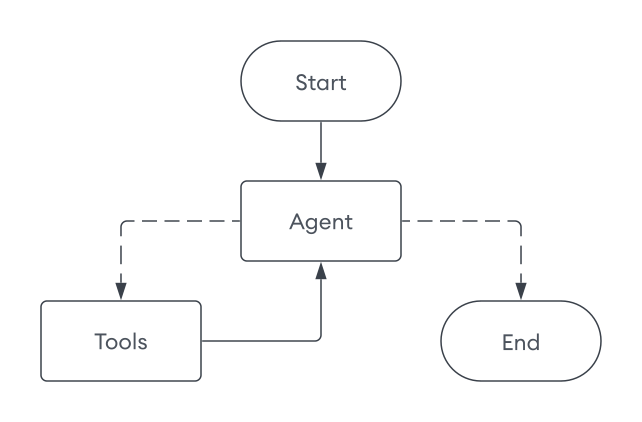
The agent implementation consists of several components:
LangGraphAgent: Main agent class that orchestrates the workflowbuild_graph: Constructs the LangGraph workflow and configures theMongoDBSavercheckpointer for short-term memory persistenceagent_node: Main decision-maker that processes messages and determines tool usagetools_node: Executes requested tools and returns resultsroute_tools: Conditional routing function that determines workflow directionexecute: Main entry point that accepts athread_idparameter for conversation thread tracking
from typing import Annotated, Dict, List from typing_extensions import TypedDict from langchain_core.prompts import ChatPromptTemplate, MessagesPlaceholder from langchain_core.messages import ToolMessage from langgraph.graph import StateGraph, START, END from langgraph.graph.message import add_messages from langgraph.checkpoint.mongodb import MongoDBSaver from config import llm, mongo_client from search_tools import SEARCH_TOOLS from memory_tools import MEMORY_TOOLS # Define the graph state class GraphState(TypedDict): messages: Annotated[list, add_messages] # Define the LangGraph agent class LangGraphAgent: def __init__(self): # Combine search tools with memory tools self.tools = SEARCH_TOOLS + MEMORY_TOOLS self.tools_by_name = {tool.name: tool for tool in self.tools} # Create prompt template self.prompt = ChatPromptTemplate.from_messages([ ( "system", "You are a helpful AI chatbot." " You are provided with tools to answer questions about movies." " Think step-by-step and use these tools to get the information required to answer the user query." " Do not re-run tools unless absolutely necessary." " If you are not able to get enough information using the tools, reply with I DON'T KNOW." " You have access to the following tools: {tool_names}." ), MessagesPlaceholder(variable_name="messages"), ]) # Provide the tool names to the prompt self.prompt = self.prompt.partial(tool_names=", ".join([tool.name for tool in self.tools])) # Prepare the LLM with tools bind_tools = llm.bind_tools(self.tools) self.llm_with_tools = self.prompt | bind_tools # Build the graph self.app = self._build_graph() def _build_graph(self): """Build and compile the LangGraph workflow.""" # Instantiate the graph graph = StateGraph(GraphState) # Add nodes graph.add_node("agent", self._agent_node) graph.add_node("tools", self._tools_node) # Add edges graph.add_edge(START, "agent") graph.add_edge("tools", "agent") # Add conditional edge graph.add_conditional_edges( "agent", self._route_tools, {"tools": "tools", END: END}, ) # Use the MongoDB checkpointer for short-term memory checkpointer = MongoDBSaver(mongo_client, db_name = "sample_mflix") return graph.compile(checkpointer=checkpointer) def _agent_node(self, state: GraphState) -> Dict[str, List]: """Agent node that processes messages and decides on tool usage.""" messages = state["messages"] result = self.llm_with_tools.invoke(messages) return {"messages": [result]} def _tools_node(self, state: GraphState) -> Dict[str, List]: """Tools node that executes the requested tools.""" result = [] messages = state["messages"] if not messages: return {"messages": result} last_message = messages[-1] if not hasattr(last_message, "tool_calls") or not last_message.tool_calls: return {"messages": result} tool_calls = last_message.tool_calls # Show which tools the agent chose to use tool_names = [tool_call["name"] for tool_call in tool_calls] print(f"🔧 Agent chose to use tool(s): {', '.join(tool_names)}") for tool_call in tool_calls: try: tool_name = tool_call["name"] tool_args = tool_call["args"] tool_id = tool_call["id"] print(f" → Executing {tool_name}") if tool_name not in self.tools_by_name: result.append(ToolMessage(content=f"Tool '{tool_name}' not found", tool_call_id=tool_id)) continue tool = self.tools_by_name[tool_name] observation = tool.invoke(tool_args) result.append(ToolMessage(content=str(observation), tool_call_id=tool_id)) except Exception as e: result.append(ToolMessage(content=f"Tool error: {str(e)}", tool_call_id=tool_id)) return {"messages": result} def _route_tools(self, state: GraphState): """ Uses a conditional_edge to route to the tools node if the last message has tool calls. Otherwise, route to the end. """ messages = state.get("messages", []) if len(messages) > 0: ai_message = messages[-1] else: raise ValueError(f"No messages found in input state to tool_edge: {state}") if hasattr(ai_message, "tool_calls") and len(ai_message.tool_calls) > 0: return "tools" return END def execute(self, user_input: str, thread_id: str) -> str: """Execute the graph with user input.""" input_data = {"messages": [("user", user_input)]} config = {"configurable": {"thread_id": thread_id}} outputs = list(self.app.stream(input_data, config)) # Get the final answer if outputs: final_output = outputs[-1] for _, value in final_output.items(): if "messages" in value and value["messages"]: return value["messages"][-1].content return "No response generated."
This graph includes the following key components:
Graph State: maintains shared data throughout the workflow, tracking the agent's messages including user queries, LLM responses, and tool call results.
Agent node: Processes messages, invokes the LLM, and updates state with LLM responses
Tools node: Processes tool calls and updates conversation history with results
Edges, which connect nodes:
Normal edges: Route from start to agent node and agent to tools node
Conditional edge: Routes conditionally depending on whether tools are needed
Persistence: Uses the
MongoDBSavercheckpointer to save conversation state to specific threads, enabling short-term memory across sessions. You can find the thread data in thecheckpointsandcheckpoint_writescollections.
Tip
To learn more about persistence, short-term memory, and the MongoDB checkpointer, see the following resources:
Run the Agent
Finally, create a file named main.py in your project. This file runs the agent and allows you to interact with it.
from agent import LangGraphAgent from config import mongo_client def main(): """LangGraph and MongoDB agent with tools and memory.""" # Initialize agent (indexes are created during config import) agent = LangGraphAgent() thread_id = input("Enter a session ID: ").strip() print("Ask me about movies! Type 'quit' to exit.") try: while True: user_query = input("\nYour question: ").strip() if user_query.lower() == 'quit': break # Get response from agent answer = agent.execute(user_query, thread_id) print(f"\nAnswer: {answer}") finally: mongo_client.close() if __name__ == "__main__": main()
Save your project, then run the following command. When you run the agent:
The agent initializes the vector store and creates the indexes if they don't already exist.
You can enter a session ID to start a new session or continue an existing session. Each session is persisted and you can always resume a previous conversation.
Ask questions about movies. The agent generates a response based on your tools and previous interactions.
The following output demonstrates a sample interaction:
python main.py
Creating vector search index... Vector search index created successfully! Creating search index... Search index created successfully! Enter a session ID: 123 Ask me about movies! Type 'quit' to exit. Your query: What are some movies that take place in the ocean? 🔧 Agent chose to use tool(s): plot_search → Executing plot_search Answer: Here are some movies that take place in the ocean: 1. **20,000 Leagues Under the Sea** - A marine biologist, his daughter, and a mysterious Captain Nemo explore the ocean aboard an incredible submarine. 2. **Deep Rising** - A group of armed hijackers board a luxury ocean liner in the South Pacific Ocean, only to fight man-eating, tentacled sea creatures. ... (truncated) Your query: What is the plot of the Titanic? 🔧 Agent chose to use tool(s): title_search → Executing title_search Answer: The plot of *Titanic* involves the romantic entanglements of two couples aboard the doomed ship's maiden voyage ... (truncated) Your query: What movies are like the movie I just mentioned? 🔧 Agent chose to use tool(s): plot_search → Executing plot_search Answer: Here are some movies similar to *Titanic*: 1. **The Poseidon Adventure** - A group of passengers struggles to survive when their ocean liner capsizes at sea. 2. **Pearl Harbor** - Focused on romance and friendship amidst the backdrop of a historical tragedy, following two best friends and their love lives during wartime. ... (truncated) Your query: I don't like sad movies. 🔧 Agent chose to use tool(s): save_memory → Executing save_memory Answer: Got it—I'll keep that in mind. Let me know if you'd like recommendations that focus more on uplifting or happy themes! (In different session) Enter a session ID: 456 Your query: Recommend me a movie based on what you know about me. 🔧 Agent chose to use tool(s): retrieve_memories → Executing retrieve_memories Answer: Based on what I know about you—you don't like sad movies—I'd recommend a fun, uplifting, or action-packed film. Would you be interested in a comedy, adventure, or family-friendly movie? Your query: Sure! 🔧 Agent chose to use tool(s): plot_search, plot_search, plot_search → Executing plot_search → Executing plot_search → Executing plot_search Answer: Here are some movie recommendations from various uplifting genres that suit your preferences: ### Comedy: 1. **Showtime** (2002): A spoof of buddy cop movies where two very different cops are forced to team up on a new reality-based TV cop show. It's packed with laughs and action! 2. **The Big Bus** (1976): A hilarious disaster film parody featuring a nuclear-powered bus going nonstop from New York to Denver, plagued by absurd disasters. ### Adventure: 1. **Journey to the Center of the Earth** (2008): A scientist, his nephew, and their mountain guide discover a fantastic and dangerous lost world at the earth's core. 2. **Jason and the Argonauts** (1963): One of the most legendary adventures in mythology, brought to life in this epic saga of good versus evil. ### Family-Friendly: 1. **The Incredibles** (2004): A family of undercover superheroes is forced into action to save the world while living in quiet suburban life. 2. **Mary Poppins** (1964): A magical nanny brings joy and transformation to a cold banker's unhappy family. 3. **Chitty Chitty Bang Bang** (1968): A whimsical adventure featuring an inventor, his magical car, and a rescue mission filled with fantasy.