Evaluate real-time supplier risk MongoDB Atlas. Discover alternative suppliers using multimodal search powered by Voyage AI.
Use cases: Artificial Intelligence, Intelligent Search
Industries: Retail
Products: MongoDB Atlas, Voyage AI, MongoDB Automated Embedding, MongoDB Vector Search, MongoDB Atlas Charts
Solution Overview
Global supply chains face constant macro-disruptions. Geopolitics, weather events, and logistical bottlenecks threaten operational continuity overnight.
Legacy Enterprise Resource Planning (ERP) systems cannot adapt to these rapid shifts. They trap critical supplier information inside rigid relational tables, static spreadsheets, and unqueryable PDF contracts and emails. When a disruption occurs, procurement teams spend hours or days manually gathering data across disconnected silos. This delay leads to stockouts, unexpected costs, and lost consumer trust.
Decouple supplier management from your legacy ERP core by building a modernized, unified intelligence layer on MongoDB Atlas.
This solution treats MongoDB Atlas as a converged datastore—one platform that functions simultaneously as your operational store, vector store, search engine, and agent memory. Every piece of context an autonomous agent needs to reason about a live disruption (a supplier's location, its open purchase orders, certificates, and precedent history) lives one query away, in the same collection, under the same access controls.
On top of the intelligence data layer, the following backend modules turn a raw disruption signal into a vetted, human-approved decision:
ingestion_engine: Deterministic normalization layer with no LLM, agent or reasoning loop. It transforms raw external signals (such as geopolitical, climate and logistics data) into a consistent internal format and writes them to Atlas. It provides the clean starting point that all downstream processes depend on.risk_evaluator: LangGraph agent that reads those signals against live supplier and purchase-order data, matches exposure geospatially, calculates a dynamic Risk Priority Number (RPN), and reasons over historical precedent stored inagent_memorybefore writing a plain-language risk summary back to Atlas.alternative_finder: LangGraph agent that, once a manager flags a supplier for action, searches the supplier-documentation corpus with hybrid vector and full-text retrieval, reranks candidates, audits every claim against the cited evidence, and ranks the remaining options by proximity while leaving the final call to a human.
By unifying operational data and AI capabilities on MongoDB Atlas, you react to external conditions in near real-time and keep your business agile.
Reference Architectures
An agent reasons with whatever reaches its context window, not with everything it knows. Every agent decision depends on prior data filtering. The data layer surfaces, filters, and ranks information first. Treat MongoDB Atlas as this context layer. Atlas decides what evidence deserves tokens before agents reason.
An agent reasoning through live disruptions runs geospatial matching, vector search, full-text search, reranking, and memory lookups. Round-trips between separate databases, vector stores, and search engines slow down agents. Run all queries inside MongoDB Atlas aggregation pipelines. One API replaces the entire stack.
Context control is also cost control. Multi-agent systems consume up to 15x more tokens than single chats. Redundant retrieval increases costs. Control model context to control your budget.
Suppliers, disruption signals, and compliance evidence change constantly. Use the flexible document model to store this variation in one collection.
Global supply chains generate evidence in many languages. Voyage AI maps multilingual evidence into one shared vector space, and Atlas Auto-Embedding keeps these vectors synchronized. Multilingual retrieval becomes a native database property instead of an external service.
The following architecture diagram and steps outline the end-to-end workflow and key database capabilities. Trace signals from raw external feeds to approved alternative suppliers.
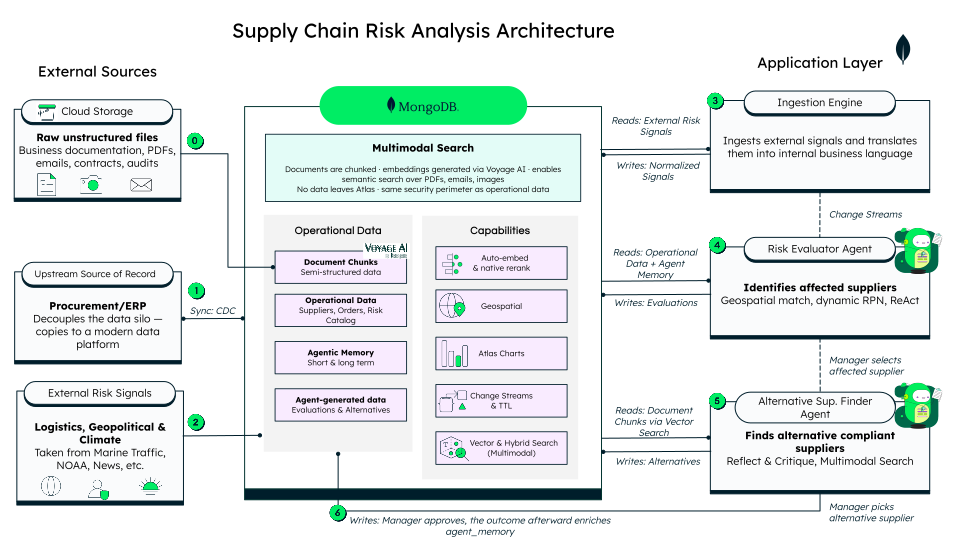
Figure 1. High Level Overview
Step 0: Unstructured Document Ingestion
Store raw, unstructured business documentation, such as PDFs, emails, contracts, and audit reports, from cloud storage directly into MongoDB Atlas. The Voyage AI multimodal embedding model auto-embeds chunked documents in any language to enable secure, in-database multimodal and multilingual search.
Step 1: Decouple from the ERP
An ERP enforces business rules and owns transactional workflows. Leave those rules in the ERP. Stream its supplier and order data into Atlas through Change Data Capture (CDC), and let agents read from that copy instead of querying the ERP directly.
Decoupling allows new capabilities to evolve above the ERP on their own timeline.
Step 2—3: External Risk Signal Ingestion
Pull real-world logistics, geopolitical, and climate data into the operational data layer. This external risk data originates from sources such as MarineTraffic, the National Oceanic and Atmospheric Administration (NOAA), and global news feeds. In this solution, the ingestion engine generates three demo trigger signals per session to initialize the flow.
Process raw external signals through the ingestion engine. The engine translates external disruption events into normalized internal business language and writes structured signals to MongoDB Atlas.
Step 4: Supplier Risk Evaluation (Risk Evaluator Agent)
Trigger the Risk Evaluator Agent when normalized signals land in MongoDB Atlas. The agent reads operational data and agent_memory, performs geospatial
matching ($geoWithin), calculates dynamic RPN, and writes evaluations back to the database.
Step 5: Alternative Supplier Discovery (Alternative Supplier Finder Agent)
Activate the alternative_finder agent when a manager selects an affected supplier. The agent queries document chunks using multimodal vector search, hybrid search ($rankFusion), and native reranking ($rerank) to find compliant alternative suppliers, then writes candidate options back to MongoDB Atlas.
Step 6: Memory Enrichment
The risk_evaluator scores each disruption with a dynamic Risk Priority Number (RPN). Memory feeds directly into that score before the agent finalizes it.
It queries agent_memory twice per assessment: once for the supplier's own history and once for cross-supplier precedent by risk type. The alternative_finder follows the same logic on the sourcing side. It checks a candidate's track record and pulls semantic precedent from similar suppliers before ranking candidates.
Atlas handles both memory structures natively. Memory takes two forms: structured fact ("this exact thing happened") and semantic similarity ("something like this happened"). Most architectures split these across two systems: one database for facts and one vector store for similarity. In Atlas, one collection holds both. An exact find and a $vectorSearch query hit the same documents because structured fields and embedded text live side by side.
Intelligent Supply Hub Workflow
The following swimlane diagram shows how control moves across system layers during a disruption.
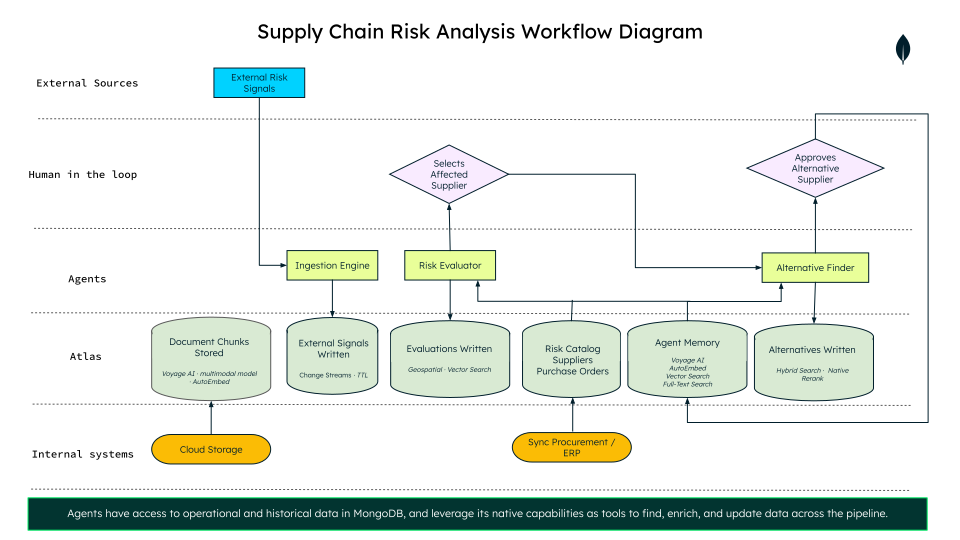
Figure 2. Supply Chain RIsk Analysis Workflow
As external risk signals arrive, the ingestion_engine normalizes them into MongoDB Atlas, triggering the risk_evaluator agent to calculate supplier risk scores automatically. The workflow then pauses at the first human decision point, where a procurement manager reviews flagged risk scores and selects an impacted supplier. This selection activates the alternative_finder agent to retrieve, audit, and rerank replacement candidates from MongoDB Atlas. Finally, at the second human decision point, the manager reviews pre-surfaced, cited compliance documents provided to approve an alternative supplier. This eliminates manual searches across siloed systems, file formats, and foreign languages.
In-Database Multimodal and Multilingual Intelligence
Global supply chain management requires searching unstructured, multi-format business documentation, such as PDF contracts, trade agreements, compliance certificates, and audit reports, written in multiple languages.
MongoDB Atlas handles this complexity by storing Voyage AI multimodal vector embeddings directly alongside operational data to surface critical compliance insights that would otherwise remain in unsearchable document silos:
Atlas Auto-embedding
Chunk and embed unstructured supplier compliance records and contracts, such as PDF contracts, scanned audit reports, and trade agreements, and store them in MongoDB Atlas.
Create a vector search index with the autoEmbed type to enable Automated Embedding on the document chunks. This ensures vector embeddings generate automatically upon data insert or update using the configured Voyage AI model.
db.suppliers.createSearchIndex( "suppliers_autoembed_index", "vectorSearch", { fields: [ { type: "autoEmbed", modality: "text", path: "auto_embed_text", model: "voyage-4" }, { type: "filter", path: "region" }, { type: "filter", path: "product_categories" }, { type: "filter", path: "status" } ] } );
Automated Embedding eliminates external embedding services and complex ETL pipelines while keeping data securely within the MongoDB Atlas security perimeter.
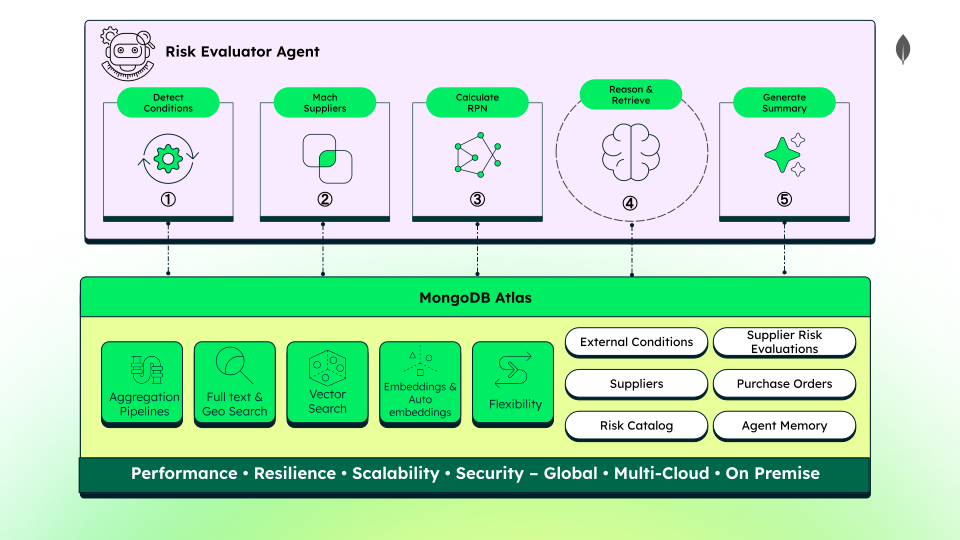
Figure 3. Risk Evaluator Agent
Leverage the aggregation pipeline, search capabilities, and the flexible document model to execute advanced queries on these chunks and perform compliance validation on your ingested data.
Multimodal embeddings search and retrieval
With the document chunks stored in MongoDB Atlas, query unstructured data using hybrid search. Construct a dynamic search query to find replacement partners during a disruption. Combine regional pre-filters with a detailed semantic query string. For example, search for a "packaging materials manufacturer in a tariff-neutral trade zone with active quality certifications and urgent delivery commitments."
Execute this search in a single MongoDB Atlas aggregation pipeline. Use $rankFusion hybrid search to merge vector similarity with full-text search relevance. This hybrid query matches semantic concepts and exact keywords simultaneously.
Chain a native rerank stage ($rerank) after the fusion using a Voyage AI reranking model to improve retrieval accuracy. The in-database cross-encoder evaluates candidate chunks jointly with your query to calculate precise relevance scores. Running reranking in-pipeline keeps sensitive supplier records securely within the database perimeter.
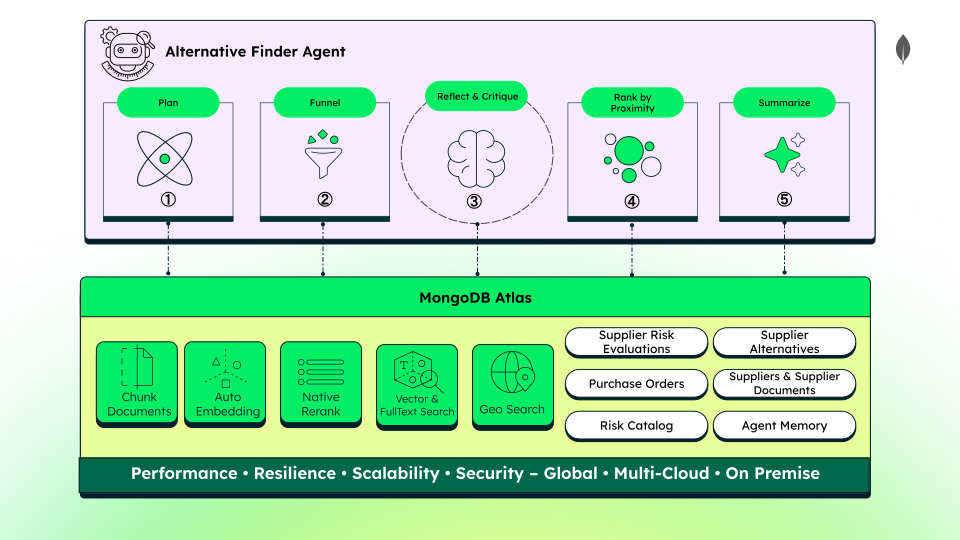
Figure 4. Alternative Finder Supplier Agent
Multilingual intelligence
Search and analyze global supplier documentation in any language without building custom translation pipelines. The Voyage AI multilingual model maps text from different languages into a shared vector space.
Query the database in English to retrieve relevant contracts or certificates written in Arabic, Spanish, Chinese, or Vietnamese. Store these multilingual embeddings natively in MongoDB Atlas to execute cross-lingual semantic searches with near-zero latency.
Consolidate your global supplier documentation into a single multilingual search index to simplify your international compliance workflows and remove translation overhead.
Data Model Approach
Rigid databases force incompatible data formats into flat tables. Real-world supply chain entities change constantly and have messy, evolving structures. A flexible, document-native schema lets the data model evolve at a business pace. Store operational records, vector embeddings, and coordinates natively under a single API. Avoid the developmental downtime of rigid database migrations.
This solution uses eight collections to manage risk and alternative sourcing.
Collection Name | Purpose |
|---|---|
| Captures live external risk signals with TTL expiration. |
| Encodes static Failure Mode and Effects Analysis (FMEA) risk scores and thresholds. |
| Stores master supplier records with GeoJSON locations. |
| Tracks active orders to quantify financial exposure. |
| Holds chunked, auto-embedded supplier contracts and certificates. |
| Stores historical risk episodes for contextual learning. |
| Houses dynamic RPN scores and natural-language risk summaries. |
| Persists ranked candidate shortlists pending human approval. |
For a full overview of the document model, refer to the backend README of the solution. Examine the external_conditions and supplier_documents collections to explore the benefits of the document model.
external_conditions
The external_conditions collection serves as the entry point for real-world risk alerts, storing normalized disruptions. Different risk types coexist in the same collection without enforcing a rigid schema.
The following are the fields that documents share across all risk alerts.
{ "condition_id": "COND-20260505-0941", "risk_type_triggered": "logistics_disruption", "condition_score": 0.76, "has_physical_location": true, "detected_at": "2026-05-05T09:41:00Z", "valid_until": "2026-05-08T09:41:00Z" }
Climate and logistical alerts store precise coordinates for a physical location and impact radius. Coordinates must be a GeoJSON Point object to run geospatial queries on the data. Use $geoWithin to find suppliers located entirely within a specified affected area.
{ // other shared fields "epicentre": { "type": "Point", "coordinates": [114.1095, 22.5229] }, "impact_radius_km": 80, "has_physical_location": true, }
Geopolitical alerts track regional boundaries with an array of affected regions. To query suppliers within affected regions, use the $in operator.
{ // other shared fields "affected_regions": ["CN", "HK"], "has_physical_location": false, }
The ingestion_engine normalizes varied incoming API payloads into the clean document structure shown in the preceding code examples.
Polymorphism allows you to query both signal types simultaneously. Execute unified geo-matching queries using $geoWithin and $in in a single database call. This consolidation simplifies your application logic and prevents performance-draining query divisions.
supplier_documents
The supplier_documents collection houses unstructured business paperwork made searchable. The following document sample illustrates this collection layout:
{ "supplier_id": "SUP-882", "doc_type": "quality_certification", "filename": "certificado_SUP882_2024.pdf", "chunk_index": 2, "chunk_total": 4, "chunk_text": "ISO 9001:2015 and IATF 16949:2016. Valid 2024-11-01 to 2027-10-31...", "page_ref": 1, "valid_until": "2027-10-31T00:00:00Z", "embedding": [/* 1024 dimensions */] }
chunk_text: Stores a text segment of 400 to 600 tokens from raw PDF files. This high-fidelity chunking breaks large contracts into overlapping segments to preserve critical clauses. It keeps unstructured document content stored natively alongside your operational database records.embedding: Stores the 1024-dimension vector generated by Voyage AI. The multilingual model maps multiple languages to a single shared vector space. This alignment lets you query Spanish or German documents using English search strings.valid_until: Tracks compliance certification expiration dates to auto-expire outdated supplier records.
Build the Solution
Deploy the agentic supply chain risk solution.
Prerequisites
Ensure you have the following accounts, keys, and software before you begin:
MongoDB Atlas Account: An Atlas cluster (M10 tier or higher).
Anthropic API Key: An active API key to power LLM reasoning and planning.
Docker Desktop: The application required to run the frontend and backend services.
Configure Atlas Settings
Activate the following Atlas capabilities before you deploy code:
Log in to your MongoDB Atlas account.
Enable the $rerank aggregation stage in your project settings.
Add your project-level Voyage Model API Key to your Atlas project settings.
Configure and Seed the Database
Set up your database, import the seed files, and build the required indexes to run the demo.
Login to MongoDB Atlas and create a database named retail-supply-chain-risk in your Atlas cluster.
Import the five seed JSON files from the docs/setup/collections folder:
Select your new database on the Collections screen.
Click the plus (+) icon or click Create Collection to add each of the five collections.
Select each collection, click Import Data, and upload the respective JSON file.
Create the geospatial and search indexes required to run vector search, hybrid search, and geospatial queries. The index configurations live in the docs/setup/indexes folder. Execute the following steps to create each index.
mongosh "<your-connection-string>" --file suppliers-location-2dsphere.js mongosh "<your-connection-string>" --file external_conditions-epicentre-2dsphere.js mongosh "<your-connection-string>" --file suppliers_autoembed_index.js mongosh "<your-connection-string>" --file agent_memory_autoembed_index.js mongosh "<your-connection-string>" --file supplier_documents_vector_index.js mongosh "<your-connection-string>" --file supplier_documents_fulltext_index.js
Clone the Repository and Configure Environment Variables
Clone the project repository from GitHub.
git clone https://github.com/mongodb-industry-solutions/retail-supply-chain-management.git
Configure the frontend and backend environment variables:
Copy the sample frontend/EXAMPLE.env to a new
.envfile in the same directory. Replace the placeholder values with your configuration details. SetBACKEND_URLtohttp://127.0.0.1:8000.Copy the sample backend/.env.example to a new
.envfile in the same directory. Replace the placeholder values with your configuration details. Add your Anthropic API key asLLM_API_KEY.
Build and Launch the Application
Compile and launch your multi-service environment using Docker Compose or by running the backend and frontend separately.
To launch the application using Docker Compose, run:
make build
To run the services manually, first start the frontend:
cd frontend npm i npm run dev
Then, navigate to the root directory and start the backend:
make uv_init make uv_sync source backend/.venv/bin/activate cd backend uvicorn main:app --reload
Open the frontend dashboard at http://localhost:3000 in your browser. View the interactive API documentation at http://localhost:8000/docs.
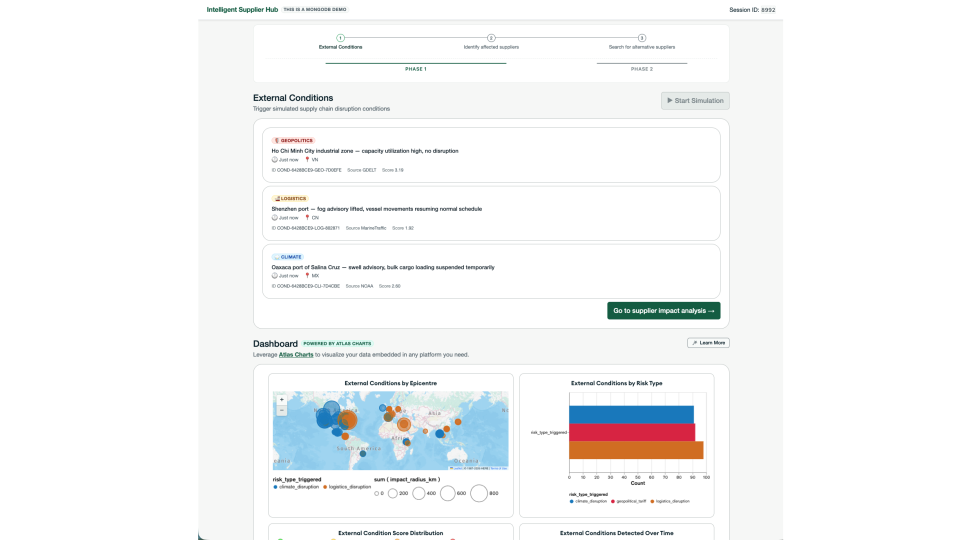
Figure 5. Intelligent Supplier Hub System
Read the user guide to navigate the demo.
Key Learnings
This solution demonstrates several critical architectural patterns for building AI-driven supply chain applications:
Build a Unified Intelligence Layer to Control Cost: Decouple supplier management from rigid legacy systems by creating a Unified Intelligence Layer in MongoDB Atlas. Consolidate operational data, vector embeddings, and agent memory on one platform by syncing data from the ERP using CDC. This structure lets agents read the current state without querying the ERP directly. Read the same document for operational checks and retrieval, then deterministically narrow data using geospatial filters, hybrid search, and reranking before an LLM receives it. Controlling what reaches the model optimizes reasoning performance and reduces execution costs.
Unify Unstructured Data in Multiple Languages: Store unstructured documents such as PDF contracts, emails, and scanned audit reports alongside structured supplier records. Use Voyage AI to embed these diverse formats into a single MongoDB collection. This unified layout enables semantic queries across text and images, simplifying your retrieval architecture without maintaining separate database systems. Additionally, multimodal embedding models enable cross-lingual queries without translation overhead.
Keep Search and Reranking Inside Atlas: Consolidate Vector Search, full-text search, and native reranking in a single database query. Use
$rankFusionto run hybrid search, and chain native$rerankwith Voyage AI directly inside your aggregation pipeline. This eliminates extra network hops, API latency, and custom credential management.
Authors
Florencia Arin, MongoDB
Angie Guemes, MongoDB
Ronan Conlon, MongoDB
Daniel Jamir, MongoDB