Overview
MongoDB C++驱动程序是一个C++包,可用于连接到MongoDB并与部署中存储的数据交互。本指南向您展示如何创建一个应用程序,该程序使用C++驱动程序连接到MongoDB Atlas上托管的MongoDB 集群并查询集群中的数据。
提示
MongoDB Atlas 是完全托管的云数据库服务,旨在托管您的 MongoDB 部署。您可以按照本指南中的步骤创建您的免费(无需信用卡)MongoDB Atlas 部署。
Follow this guide to connect a sample C++ application to a MongoDB Atlas deployment. If you prefer to connect to MongoDB using a different driver or programming language, see our list of official drivers.
下载并安装
安装所有依赖项。
在开始本教程之前,请确保您已在开发环境中安装以下依赖项:
支持C++17 的编译器,例如 GCC 、 Clang 或 Visual Studio
CMake v3.15或更高版本
注意
C++17 之前的配置
尽管C++11 是支持的最低语言版本,但本教程将C++驱动程序配置为使用C++17 标准库,如选择C++17 Polyfill部分所建议。如果要安装 C++17 之前版本配置的驾驶员,设立 CMAKE_CXX_STANDARD 为您的 C++ 版本。然后,驱动程序将自动使用 bsoncxx 库 polyfill 实现来实现所需的 C++17 功能。
配置用于安装的驱动程序。
选择与操作系统相对应的标签页,然后从mongo-cxx-driver-r3.11.1/build目录运行以下命令:
cmake .. \ -DCMAKE_BUILD_TYPE=Release \ -DCMAKE_CXX_STANDARD=17
此命令指示 CMake 将mongocxx安装到/usr/local目录中。
'C:\<path>\cmake.exe' .. \ -G "Visual Studio <version> <year>" -A "x64" \ -DCMAKE_CXX_STANDARD=17 \ -DCMAKE_INSTALL_PREFIX=C:\mongo-cxx-driver \
此命令指示 CMake 将mongocxx安装到C:\mongo-cxx-driver目录中。 替换以下占位符值:
<path>:CMake 可执行文件的路径<version>:您的 Visual Studio 版本号<year>:与 Visual Studio 版本对应的年份
构建并安装驱动程序。
选择与您的操作系统相对应的标签页并运行以下命令以安装驱动程序:
cmake --build . sudo cmake --build . --target install
cmake --build . --config Release cmake --build . --config Debug cmake --install . --config Release cmake --install . --config Debug
注意
Windows构建配置
为了避免由于构建配置冲突而导致Windows链接器错误,前面的命令同时构建并安装 Release 和 Debug 配置。要学习;了解有关这些配置的更多信息,请参阅API和 ABI 版本控制指南中的共享库(仅限 MSVC)。
完成这些步骤后,您就已在计算机上安装了C++驱动程序。
创建 MongoDB 部署
您可以在 MongoDB Atlas 上创建一个免费集群来存储和管理您的数据。MongoDB Atlas 在云端托管和管理您的 MongoDB 数据库。
在Atlas上创建免费MongoDB 部署。
Complete the MongoDB Get Started guide to set up a new Atlas account and load sample data into a new free tier MongoDB deployment.
完成这些步骤后,您就可以在 Atlas 上有一个新的免费集群,并建立数据库用户凭证,以及将示例数据加载到数据库中。
创建连接字符串
您可以通过提供连接 URI(也称为连接字符串)来连接到 MongoDB 部署,它指示驱动程序如何连接到 MongoDB 部署以及连接时的行为方式。
连接字符串包含部署的主机名或 IP 地址和端口、身份验证机制、用户档案(如果适用)以及连接选项。
要连接到未托管在Atlas上的实例或部署,请参阅选择连接目标指南。
查找MongoDB Atlas连接字符串。
To retrieve your connection string for the deployment that you created in the previous step, log into your Atlas account and navigate to the Clusters page under the Database section. Click the Connect button for your new deployment.
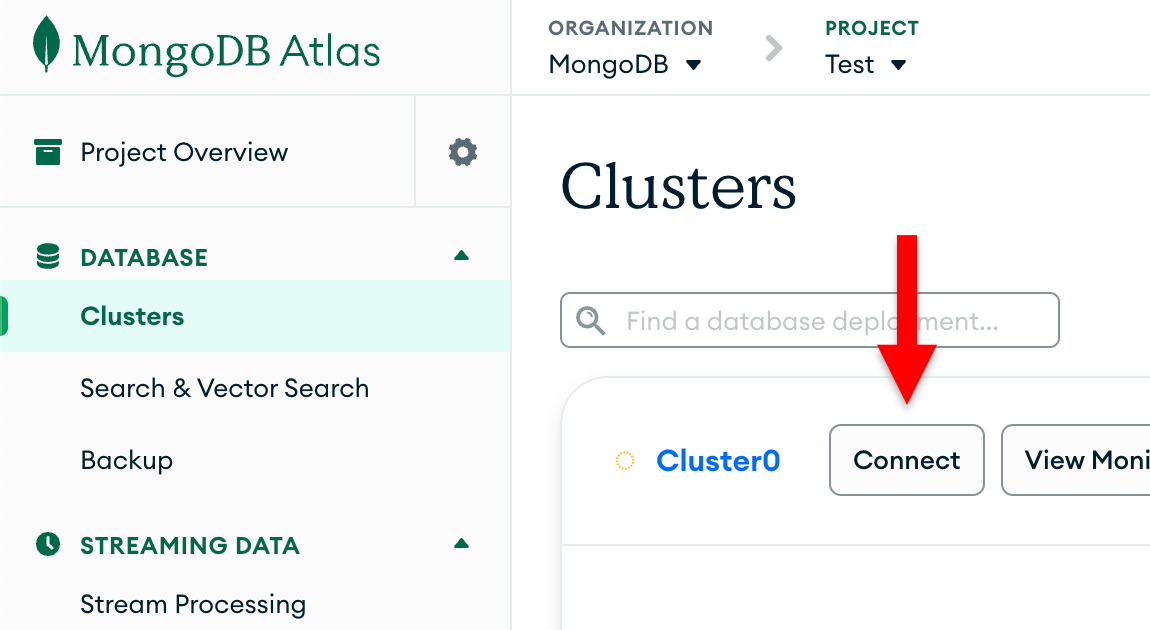
如果您尚未配置数据库用户, MongoDB将提示您创建并配置新用户。
单击 Connect to your application 部分下的 Drivers 按钮,从 Driver 选择菜单中选择“C++”,然后从 Version 选择菜单中选择与您安装的版本最匹配的版本。
确保取消选择 View full code sample 选项以仅查看连接字符串。
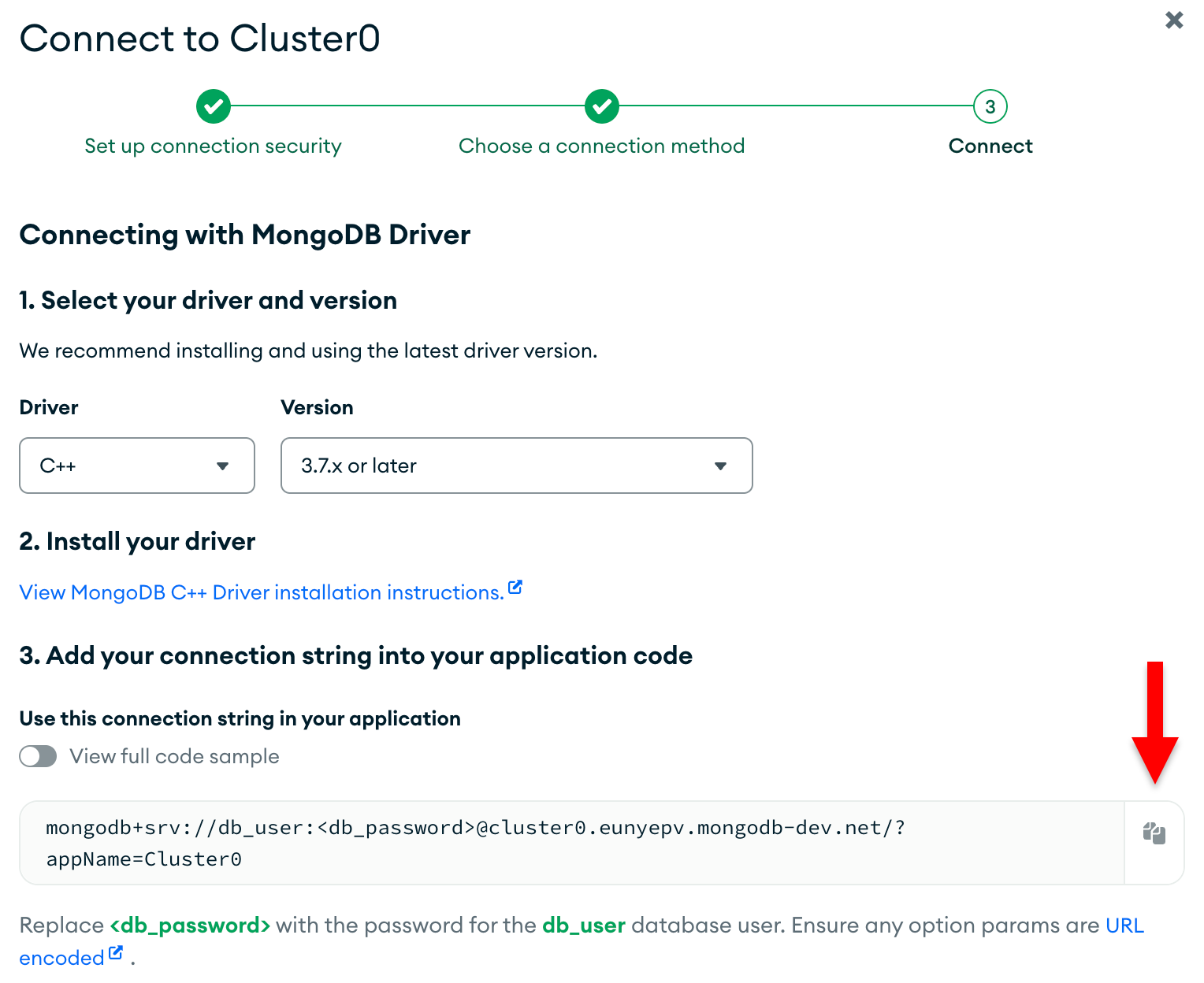
完成这些步骤后,您就拥有了与string Atlas集群对应的连接 。
运行示例查询
创建C++驱动程序应用程序。
将以下代码复制并粘贴到quickstart.cpp文件中,该文件将查询sample_mflix数据库中的movies集合:
#include <cstdint> #include <iostream> #include <vector> #include <bsoncxx/builder/basic/document.hpp> #include <bsoncxx/json.hpp> #include <mongocxx/client.hpp> #include <mongocxx/instance.hpp> #include <mongocxx/uri.hpp> using bsoncxx::builder::basic::kvp; using bsoncxx::builder::basic::make_document; int main() { mongocxx::instance instance; mongocxx::uri uri("<connection string>"); mongocxx::client client(uri); auto db = client["sample_mflix"]; auto collection = db["movies"]; auto result = collection.find_one(make_document(kvp("title", "The Shawshank Redemption"))); std::cout << bsoncxx::to_json(*result) << std::endl; }
指定连接字符串。
Replace the <connection string> placeholder with the connection string that you copied from the Create a Connection String step of this guide.
运行您的C++应用程序。
在shell中,运行以下命令以编译并运行此应用程序:
c++ --std=c++17 quickstart.cpp $(pkg-config --cflags --libs libmongocxx) -o ./app.out ./app.out
提示
MacOS 用户在运行上述命令后可能会看到以下错误:
dyld[54430]: Library not loaded: @rpath/libmongocxx._noabi.dylib
要解决此错误,请使用-Wl,-rpath链接器选项来设立@rpath ,如以下代码所示:
c++ --std=c++17 quickstart.cpp -Wl,-rpath,/usr/local/lib/ $(pkg-config --cflags --libs libmongocxx) -o ./app.out ./app.out
命令行输出包含有关检索到的电影文档的详细信息:
{ "_id" : { "$oid" : "573a1399f29313caabceeb20" }, "plot" : "Two imprisoned men bond over a number of years, finding solace and eventual redemption through acts of common decency.", ... "title" : "The Shawshank Redemption", ...
如果遇到错误或看不到输出,请确保在quickstart.cpp文件中指定了正确的连接字符串并加载了样本数据。
完成这些步骤后,您有一个正常运行的应用程序,它使用驱动程序连接到 MongoDB 部署、对示例数据运行查询并打印结果。
后续步骤
恭喜您完成快速入门教程!
注意
如果您在学习本教程时运行问题,请在MongoDB Stack Overflow页面 或MongoDB Reddit 社区 寻求帮助,或者使用本页面右侧或右下角的 Rate this page标签页提交反馈。
在本教程中,您创建了一个C++应用程序,该应用程序连接到MongoDB Atlas上托管的MongoDB 部署,并检索与查询匹配的文档。
通过以下资源学习有关C++驱动程序的更多信息:
在读取数据部分了解如何执行读取操作。
通过“将数据写入MongoDB ”部分了解如何执行写入操作。