Some aggregation operators, such as $avg, $sum, and $max, appear in more than one context, and each context gives the operator different behavior. For example:
As an expression,
$avgreturns the average of the elements in an array.As an accumulator,
$avgreturns the average of values across a group of documents.As a window function,
$avgreturns the average of values from the documents in a window.
The stage that contains an operator determines its behavior. The same operator name can accept different arguments and return different results depending on where you use it. This page describes the three contexts and how to disambiguate them.
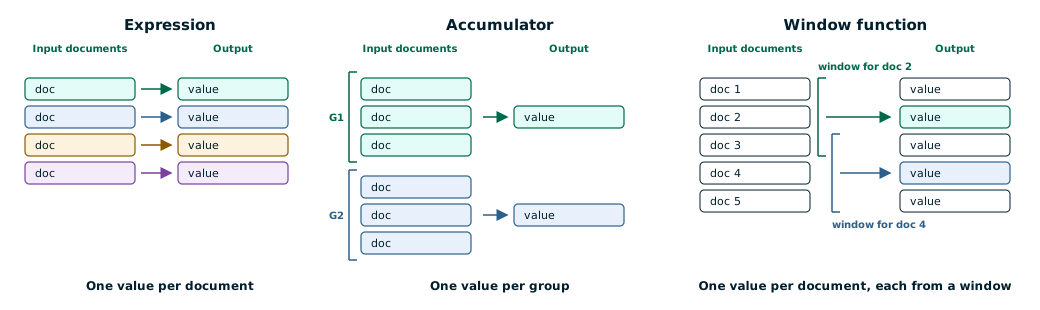
The following diagram conceptualizes how expressions, accumulators, and window functions execute:
The following table summarizes how the three operator types differ.
Operator Type | Behavior | Where you can use it |
|---|---|---|
Expression | Evaluated over each input document and returns one value per document. |
|
Accumulator | Aggregates over a group of input documents and returns one aggregate value per group. |
|
Window function | Evaluated over a window of input documents and returns one value per document. |
|
Expressions
An expression resolves to a value for a single input document. Expressions do not mutate their inputs.
Expression operators accept an array of arguments and have the following generic form:
{ <operator>: [ <argument1>, <argument2> ... ] }If an operator accepts a single argument, you can omit the outer array.
Expressions also provide the arguments for accumulators and window functions. For example, in { $sum: "$price" }, the field path "$price" is an expression.
To learn more, see Expressions.
Accumulators
An accumulator calculates a single aggregated value, such as a sum, maximum, or minimum, across a variable number of input documents. In practical implementations, accumulators maintain state between the documents that they process while executing a grouping operation.
The number of output documents returned by a $group stage is equal to the number of groups. For each of these groups, an accumulator calculates an aggregate value across the group.
You can use accumulators in the aggregation pipeline stages that perform grouping operations:
To learn more, see Accumulators.
Window Functions
A window function returns a value that is based on a window, which is a span of documents defined relative to the current document. You define the window with the partitionBy, sortBy, and window fields of the $setWindowFields stage.
For operators that work as both accumulators and window functions, the difference is what the operator aggregates over and how many values it returns:
As an accumulator, the operator aggregates over a group of documents and returns a single value for the group.
As a window function, the operator aggregates over a window of documents and returns a value for each document.
You can use window functions only in the $setWindowFields stage. $setWindowFields also supports operators that are specific to windows, such as $rank and $shift.
To learn more, see Window Functions.
Example
The examples on this page use data from the sample_mflix dataset. For details on how to load this dataset into your self-managed MongoDB deployment, see Load the Sample Dataset. If you made any modifications to the sample databases, you may need to drop and recreate the databases to run the examples on this page.
The following examples use $sum in all three contexts. Each one returns a different result, which shows how the context determines an operator's behavior.
Expression Example
The following example uses $sum as an expression to add two fields within each document. The pipeline returns one total for each document that it matches.
db.movies.aggregate( [ { $match: { title: { $in: [ "The Godfather", "Inception", "The Dark Knight" ] } } }, { $project: { _id: 0, title: 1, totalAwards: { $sum: [ "$awards.wins", "$awards.nominations" ] } } }, { $sort: { totalAwards: -1 } }] )Accumulator Example
The following example uses $sum as an accumulator to total one field across every document in each group. The pipeline returns one total for each content rating instead of one total for each document.
db.movies.aggregate( [ { $match: { rated: { $in: [ "G", "PG", "PG-13", "R" ] }, "imdb.votes": { $type: "int" } } }, { $group: { _id: "$rated", totalVotes: { $sum: "$imdb.votes" } } }, { $sort: { _id: 1 } }] )Window Function Example
The following example uses $sum as a window function to total one field across a window of documents. The pipeline returns a running total for each document, and that total depends on the document's window.
db.movies.aggregate( [ { $match: { genres: "Musical", year: { $in: [ 2009, 2010 ] }, "imdb.rating": { $type: "double" }, "imdb.votes": { $gt: 0 } } }, { $setWindowFields: { partitionBy: "$year", sortBy: { title: 1 }, output: { cumulativeVotesInYear: { $sum: "$imdb.votes", window: { documents: [ "unbounded", "current" ] } }, rankInYear: { $documentNumber: {} } } } }, { $project: { _id: 0, title: 1, year: 1, "imdb.votes": 1, cumulativeVotesInYear: 1, rankInYear: 1 } }, { $sort: { year: 1, title: 1 } }] )