참고
Vertex AI 확장 기능은 미리보기 버전이며 변경될 수 있습니다. 이 기능에 접근하려면 Google Cloud 담당자에게 문의하세요.
Vertex AI MongoDB Vector Search와 함께 사용하여 RAG를 구현 것 외에도,Vertex AI 확장을 사용하여 Vertex AI 모델을 사용하여 Atlas 와 상호 작용 방법을 추가로 사용자 지정할 수 있습니다. 이 튜토리얼에서는 언어 사용하여 Atlas 에서 실시간 으로 데이터를 쿼리 할 수 있는 Vertex AI 확장을 만듭니다.
배경
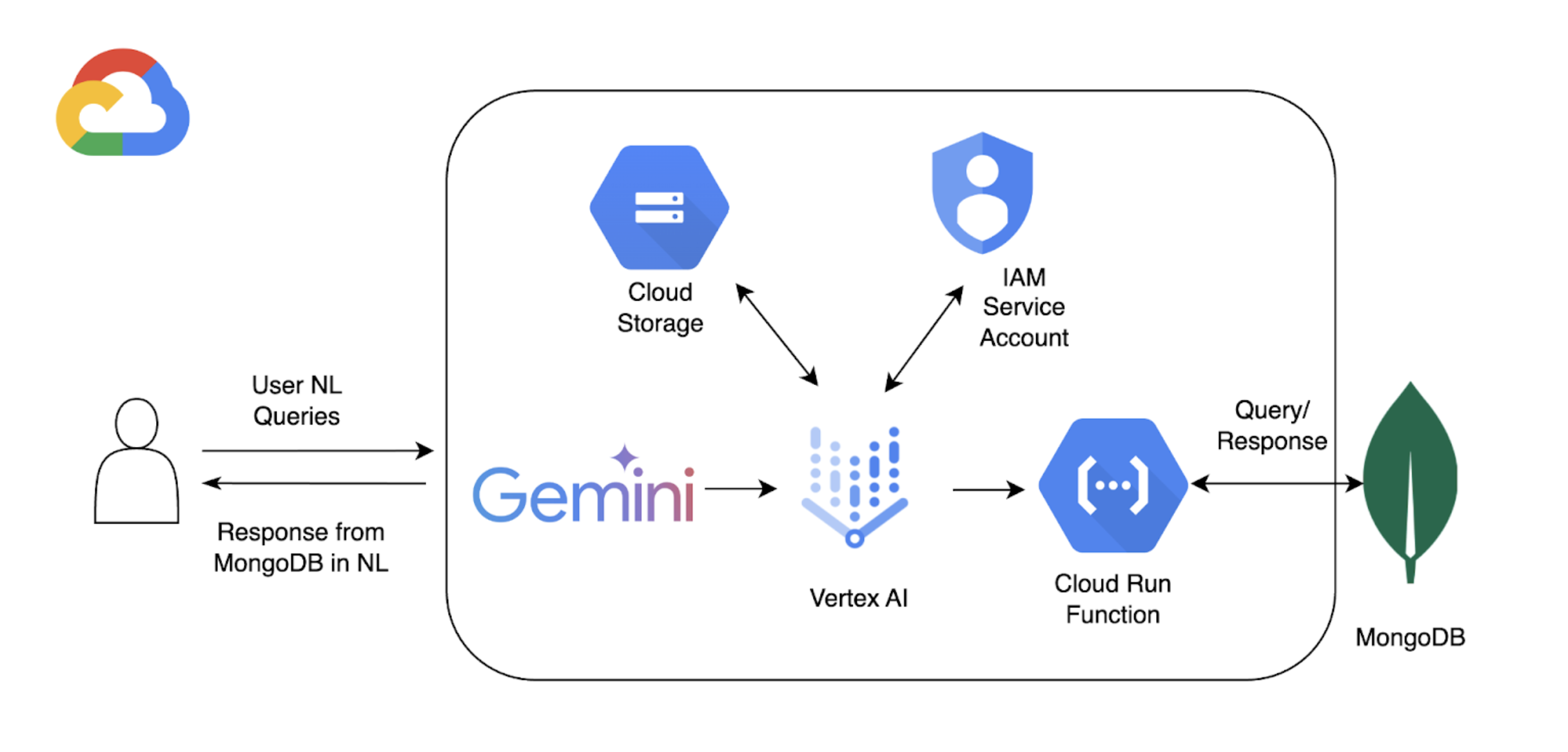
이 튜토리얼에서는 다음 구성 요소를 사용하여 Atlas에서 자연어 쿼리를 활성화합니다.
Google Cloud Platform Vertex AI SDK 를 사용하여 AI 모델을 관리 하고 Vertex AI 에 대한 사용자 지정 확장을 활성화 . 이 튜토리얼에서는 Gemini 1.5 프로 모델.
Google Cloud Run으로 Vertex AI와 Atlas 간의 API 엔드포인트 역할을 하는 함수를 배포합니다.
OpenAPI 3 언어 쿼리가 MongoDB 작업에 매핑되는 방식을 정의하는 MongoDB API 사양입니다. 자세한 학습 은 OpenAPI 사양을 참조하세요.
Vertex AI Extensions 를 사용하면 Vertex AI 의 Atlas 와 실시간 상호 활성화 있으며 언어 쿼리가 처리되는 방식을 구성할 수 있습니다.
MongoDB API 키를 저장 하는Google Cloud Platform Secrets 관리자 .
참고
상세한 코드와 설정 지침은 이 예시의 GitHub 리포지토리를 참조하세요.
전제 조건
시작하기 전에 다음이 필요합니다.
MongoDB Atlas 계정. Google Cloud Platform Marketplace 를 사용하거나 새 계정을 등록하세요.
Google Cloud Platform 프로젝트.
OpenAPI 사양을 저장하기 위한 Google Cloud Platform 스토리지 버킷입니다.
프로젝트에 대해 다음 API가 활성화 되었습니다.
Cloud Build API
Cloud Functions API
Cloud Logging API
클라우드 Pub/Sub API
Colab Enterprise 환경입니다.
Google Cloud 실행 함수 생성
이 섹션에서는 Vertex AI 확장 기능과 Atlas 클러스터 간의 API 엔드포인트 역할을 하는 Google Cloud Run 함수를 생성합니다. 이 함수는 인증을 처리하고, Atlas 클러스터에 연결하며, Vertex AI의 요청에 따라 데이터베이스 작업을 수행합니다.
새 함수를 만듭니다.
Google Cloud 콘솔에서 Cloud Run 페이지를 열고 를 Write a function 클릭합니다.
함수를 구성합니다.
함수를 배포 하려는 함수 이름과 Google Cloud Platform 리전 지정합니다.
Runtime(으)로 제공되는 최신 Python 버전을 선택합니다.
Authentication section에서 Allow unauthenticated invocations를 선택합니다.
나머지 설정에는 기본값 을 사용한 다음 Next을(를) 클릭합니다.
자세한 구성 단계는 Cloud Run 문서를 참조하세요.
함수 코드를 정의합니다.
다음 코드를 해당 파일에 붙여넣습니다.
다음 코드를 붙여넣은 후 <connection-string> 을(를) Atlas 연결 문자열 로 바꿉니다.
<connection-string>을 Atlas 클러스터 또는 로컬 Atlas 배포서버의 연결 문자열로 교체합니다.
연결 문자열은 다음 형식을 사용해야 합니다.
mongodb+srv://<db_username>:<db_password>@<clusterName>.<hostname>.mongodb.net
자세한 학습은 클라이언트 라이브러리를 통해 클러스터에 연결을 참조하세요.
연결 문자열은 다음 형식을 사용해야 합니다.
mongodb://localhost:<port-number>/?directConnection=true
학습 내용은 연결 문자열을 참조하세요.
import functions_framework import os import json from pymongo import MongoClient from bson import ObjectId import traceback from datetime import datetime def connect_to_mongodb(): client = MongoClient("<connection-string>") return client def success_response(body): return { 'statusCode': '200', 'body': json.dumps(body, cls=DateTimeEncoder), 'headers': { 'Content-Type': 'application/json', }, } def error_response(err): error_message = str(err) return { 'statusCode': '400', 'body': error_message, 'headers': { 'Content-Type': 'application/json', }, } # Used to convert datetime object(s) to string class DateTimeEncoder(json.JSONEncoder): def default(self, o): if isinstance(o, datetime): return o.isoformat() return super().default(o) def mongodb_crud(request): client = connect_to_mongodb() payload = request.get_json(silent=True) db, coll = payload['database'], payload['collection'] request_args = request.args op = request.path try: if op == "/findOne": filter_op = payload['filter'] if 'filter' in payload else {} projection = payload['projection'] if 'projection' in payload else {} result = {"document": client[db][coll].find_one(filter_op, projection)} if result['document'] is not None: if isinstance(result['document']['_id'], ObjectId): result['document']['_id'] = str(result['document']['_id']) elif op == "/find": agg_query = [] if 'filter' in payload and payload['filter'] != {}: agg_query.append({"$match": payload['filter']}) if "sort" in payload and payload['sort'] != {}: agg_query.append({"$sort": payload['sort']}) if "skip" in payload: agg_query.append({"$skip": payload['skip']}) if 'limit' in payload: agg_query.append({"$limit": payload['limit']}) if "projection" in payload and payload['projection'] != {}: agg_query.append({"$project": payload['projection']}) result = {"documents": list(client[db][coll].aggregate(agg_query))} for obj in result['documents']: if isinstance(obj['_id'], ObjectId): obj['_id'] = str(obj['_id']) elif op == "/insertOne": if "document" not in payload or payload['document'] == {}: return error_response("Send a document to insert") insert_op = client[db][coll].insert_one(payload['document']) result = {"insertedId": str(insert_op.inserted_id)} elif op == "/insertMany": if "documents" not in payload or payload['documents'] == {}: return error_response("Send a document to insert") insert_op = client[db][coll].insert_many(payload['documents']) result = {"insertedIds": [str(_id) for _id in insert_op.inserted_ids]} elif op in ["/updateOne", "/updateMany"]: payload['upsert'] = payload['upsert'] if 'upsert' in payload else False if "_id" in payload['filter']: payload['filter']['_id'] = ObjectId(payload['filter']['_id']) if op == "/updateOne": update_op = client[db][coll].update_one(payload['filter'], payload['update'], upsert=payload['upsert']) else: update_op = client[db][coll].update_many(payload['filter'], payload['update'], upsert=payload['upsert']) result = {"matchedCount": update_op.matched_count, "modifiedCount": update_op.modified_count} elif op in ["/deleteOne", "/deleteMany"]: payload['filter'] = payload['filter'] if 'filter' in payload else {} if "_id" in payload['filter']: payload['filter']['_id'] = ObjectId(payload['filter']['_id']) if op == "/deleteOne": result = {"deletedCount": client[db][coll].delete_one(payload['filter']).deleted_count} else: result = {"deletedCount": client[db][coll].delete_many(payload['filter']).deleted_count} elif op == "/aggregate": if "pipeline" not in payload or payload['pipeline'] == []: return error_response("Send a pipeline") docs = list(client[db][coll].aggregate(payload['pipeline'])) for obj in docs: if isinstance(obj['_id'], ObjectId): obj['_id'] = str(obj['_id']) result = {"documents": docs} else: return error_response("Not a valid operation") return success_response(result) except Exception as e: print(traceback.format_exc()) return error_response(e) finally: if client: client.close()
Vertex AI 확장 기능 생성
이 섹션에서는 Gemini 1.5 Pro 모델을 사용하여 Atlas에서 데이터에 대한 자연어 쿼리를 가능하게 하는 Vertex AI 확장 기능을 만듭니다. 이 확장 기능은 OpenAPI 사양과 사용자가 생성한 Cloud Run 함수를 사용하여 자연어를 데이터베이스 작업에 매핑하고 Atlas에서 데이터를 쿼리합니다.
이 확장 기능을 구현하려면 Python 코드 스니펫을 개별적으로 실행할 수 있는 대화형 Python 노트북을 사용합니다. 이 튜토리얼에서는 Colab Enterprise 환경에서 mongodb-vertex-ai-extension.ipynb이라는 노트북을 만듭니다.
환경을 설정합니다.
Google Cloud 계정을 인증하고 프로젝트 ID를 설정합니다.
from google.colab import auth auth.authenticate_user("GCP project id") !gcloud config set project {"GCP project id"} 필요한 종속성을 설치합니다.
!pip install --force-reinstall --quiet google_cloud_aiplatform !pip install --force-reinstall --quiet langchain==0.0.298 !pip install --upgrade google-auth !pip install bigframes==0.26.0 커널을 재시작합니다.
import IPython app = IPython.Application.instance() app.kernel.do_shutdown(True) 환경 변수를 설정합니다.
샘플 값을 프로젝트 에 해당하는 올바른 값으로 바꿉니다.
import os # These are sample values; replace them with the correct values that correspond to your project os.environ['PROJECT_ID'] = 'gcp project id' # GCP Project ID os.environ['REGION'] = "us-central1" # Project Region os.environ['STAGING_BUCKET'] = "gs://vertexai_extensions" # GCS Bucket location os.environ['EXTENSION_DISPLAY_HOME'] = "MongoDb Vertex API Interpreter" # Extension Config Display Name os.environ['EXTENSION_DESCRIPTION'] = "This extension makes api call to mongodb to do all crud operations" # Extension Config Description os.environ['MANIFEST_NAME'] = "mdb_crud_interpreter" # OPEN API Spec Config Name os.environ['MANIFEST_DESCRIPTION'] = "This extension makes api call to mongodb to do all crud operations" # OPEN API Spec Config Description os.environ['OPENAPI_GCS_URI'] = "gs://vertexai_extensions/mongodbopenapispec.yaml" # OPEN API GCS URI os.environ['API_SECRET_LOCATION'] = "projects/787220387490/secrets/mdbapikey/versions/1" # API KEY secret location os.environ['LLM_MODEL'] = "gemini-1.5-pro" # LLM Config
Open API 사양을 다운로드하세요.
GitHub에서 Open API 사양을 다운로드하고 Google Cloud Storage 버킷에 YAML 파일을 업로드하세요.
from google.cloud import aiplatform from google.cloud.aiplatform.private_preview import llm_extension PROJECT_ID = os.environ['PROJECT_ID'] REGION = os.environ['REGION'] STAGING_BUCKET = os.environ['STAGING_BUCKET'] aiplatform.init( project=PROJECT_ID, location=REGION, staging_bucket=STAGING_BUCKET, )
Vertex AI 확장을 생성합니다.
다음 매니페스트는 확장 프로그램의 주요 구성 요소를 구성하는 구조화된 JSON 객체 입니다. <service-account> 를 Cloud Run 함수에서 사용하는 서비스 계정 이름으로 바꿉니다.
from google.cloud import aiplatform from vertexai.preview import extensions mdb_crud = extensions.Extension.create( display_name = os.environ['EXTENSION_DISPLAY_HOME'], # Optional. description = os.environ['EXTENSION_DESCRIPTION'], manifest = { "name": os.environ['MANIFEST_NAME'], "description": os.environ['MANIFEST_DESCRIPTION'], "api_spec": { "open_api_gcs_uri": ( os.environ['OPENAPI_GCS_URI'] ), }, "authConfig": { "authType": "OAUTH", "oauthConfig": {"service_account": "<service-account>"} }, }, ) mdb_crud
자연어 쿼리 실행
Vertex AI 의 Extensions 왼쪽 탐색 메뉴에서 를 클릭합니다. 라는 새 확장이 MongoDB Vertex API Interpreter 확장 목록에 나타납니다.
다음 예시는 Atlas에서 데이터 쿼리에 사용할 수 있는 자연어 쿼리 두 가지입니다.
이 예시 에서는 Vertex AI A Corner in Wheat이라는 제목의 특정 영화의 출시하다 연도를 찾으라고 요청합니다. Vertex AI 플랫폼 또는 Colab 노트북을 사용하여 이 언어 쿼리 실행 수 있습니다.
MongoDB Vertex API Interpreter라는 확장 프로그램을 선택하고 다음 자연어 쿼리를 입력하세요.
Find the release year of the movie 'A Corner in Wheat' from VertexAI-POC cluster, sample_mflix, movies
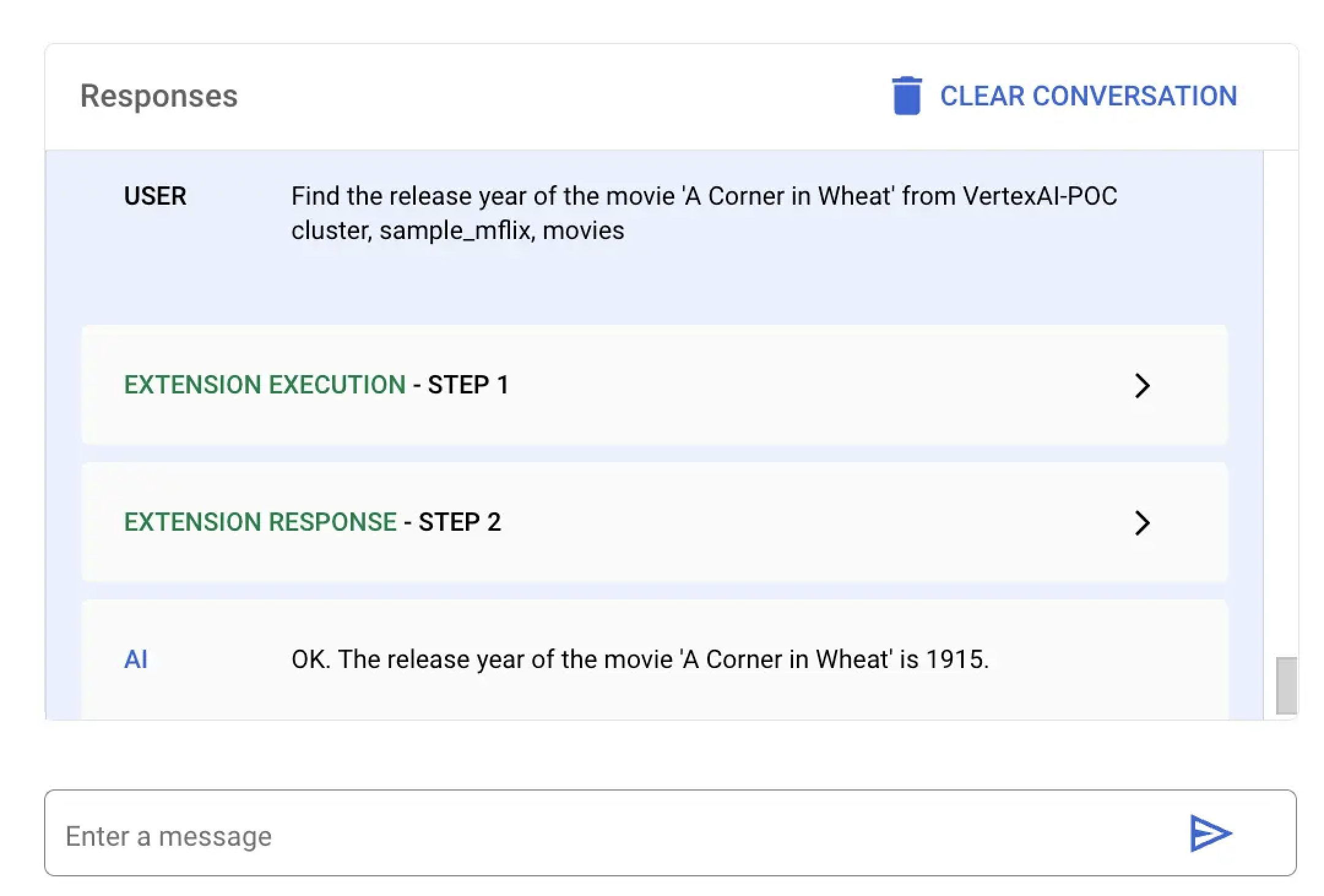
특정 영화의 출시하다 을 찾으려면 mongodb-vertex-ai-extension.ipynb 에 다음 코드를 붙여넣고 실행 .
## Please replace accordingly to your project ## Operation Ids os.environ['FIND_ONE_OP_ID'] = "findone_mdb" ## NL Queries os.environ['FIND_ONE_NL_QUERY'] = "Find the release year of the movie 'A Corner in Wheat' from VertexAI-POC cluster, sample_mflix, movies" ## Mongodb Config os.environ['DATA_SOURCE'] = "VertexAI-POC" os.environ['DB_NAME'] = "sample_mflix" os.environ['COLLECTION_NAME'] = "movies" ### Test data setup os.environ['TITLE_FILTER_CLAUSE'] = "A Corner in Wheat" from vertexai.preview.generative_models import GenerativeModel, Tool fc_chat = GenerativeModel(os.environ['LLM_MODEL']).start_chat() findOneResponse = fc_chat.send_message(os.environ['FIND_ONE_NL_QUERY'], tools=[Tool.from_dict({ "function_declarations": mdb_crud.operation_schemas() })], ) print(findOneResponse)
response = mdb_crud.execute( operation_id = findOneResponse.candidates[0].content.parts[0].function_call.name, operation_params = findOneResponse.candidates[0].content.parts[0].function_call.args ) print(response)
이 예시 에서는 Vertex AI 1924 연도에 개봉된 모든 영화를 찾도록 요청합니다. Vertex AI 플랫폼 또는 Colab 노트북을 사용하여 이 언어 쿼리 실행 수 있습니다.
MongoDB Vertex API Interpreter라는 확장 프로그램을 선택하고 다음 자연어 쿼리를 입력하세요.
give me movies released in year 1924 from VertexAI-POC cluster, sample_mflix, movies
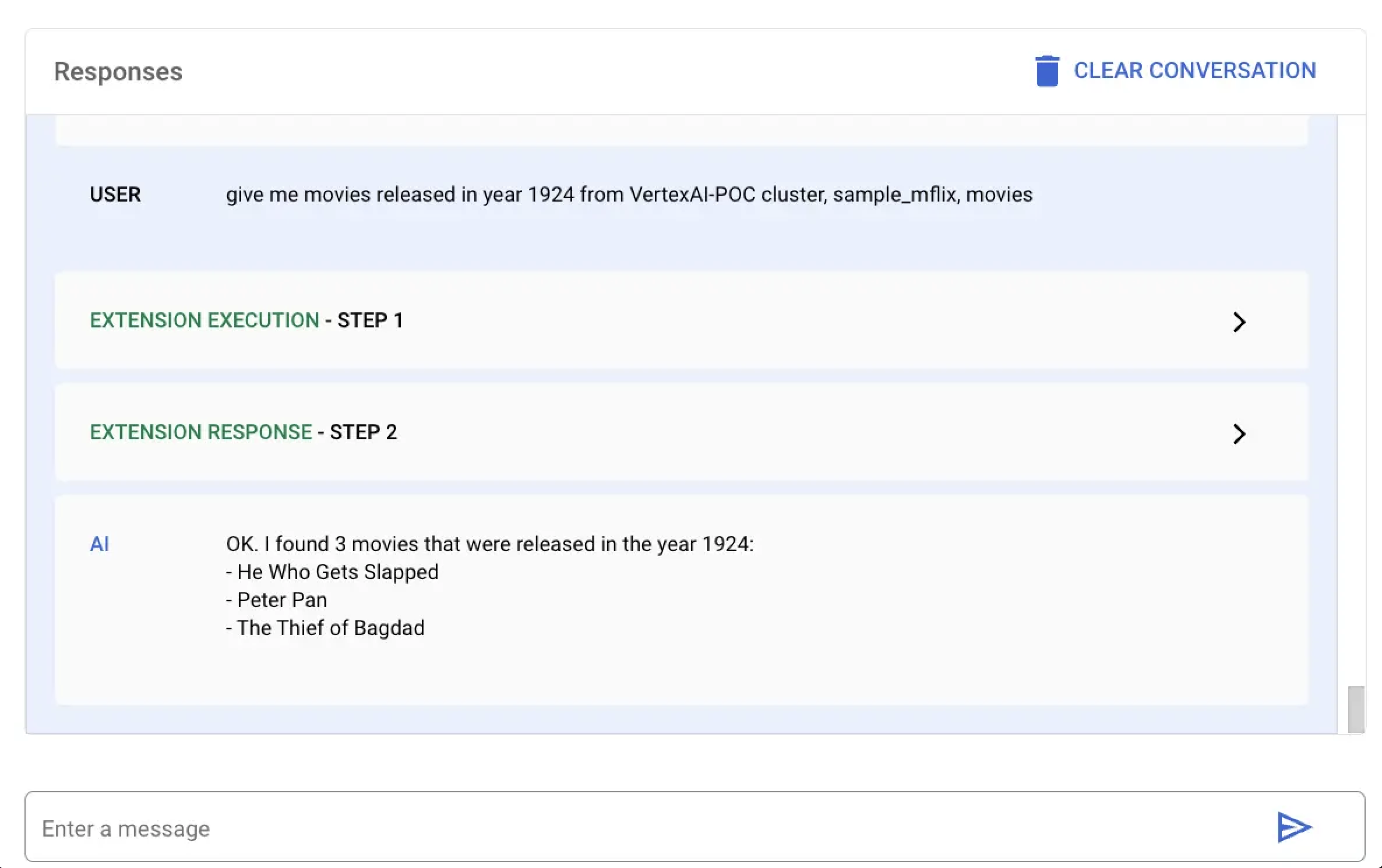
mongodb-vertex-ai-extension.ipynb에 다음 코드를 붙여넣고 실행하여 특정 연도에 개봉된 모든 영화를 조회합니다.
## This is just a sample values please replace accordingly to your project ## Operation Ids os.environ['FIND_MANY_OP_ID'] = "findmany_mdb" ## NL Queries os.environ['FIND_MANY_NL_QUERY'] = "give me movies released in year 1924 from VertexAI-POC cluster, sample_mflix, movies" ## Mongodb Config os.environ['DATA_SOURCE'] = "VertexAI-POC" os.environ['DB_NAME'] = "sample_mflix" os.environ['COLLECTION_NAME'] = "movies" os.environ['YEAR'] = 1924 fc_chat = GenerativeModel(os.environ['LLM_MODEL']).start_chat() findmanyResponse = fc_chat.send_message(os.environ['FIND_MANY_NL_QUERY'], tools=[Tool.from_dict({ "function_declarations": mdb_crud.operation_schemas() })], ) print(findmanyResponse)
response = mdb_crud.execute( operation_id = findmanyResponse.candidates[0].content.parts[0].function_call.name, operation_params = findmanyResponse.candidates[0].content.parts[0].function_call.args ) print(response)