MongoDB proporciona la herramienta mongoimport para importar archivos JSON y CSV a su conjunto de datos principal. Esta guía explica cómo usar de manera efectiva mongoimport para trasladar tus datos a tu base de datos MongoDB.
Antes de comenzar
Siga la Guía de Instalación de Database Tools para instalar
mongoimport.Crea los archivos de ejemplo.
2Crear
.jsonarchivos de ejemplo@' { "tripduration": 602, "starttime": "2019-12-01 00:00:05.5640", "stoptime": "2019-12-01 00:10:07.8180", "start station id": 3382, "start station name": "Carroll St & Smith St", "start station latitude": 40.680611, "start station longitude": -73.99475825, "end station id": 3304, "end station name": "6 Ave & 9 St", "end station latitude": 40.668127, "end station longitude": -73.98377641, "bikeid": 41932, "usertype": "Subscriber", "birth year": 1970, "gender": "male" } '@ | Set-Content -Path ride_01.json @' { "tripduration": 1206, "starttime": "2019-12-01 00:00:10.9630", "stoptime": "2019-12-01 00:20:17.8820", "start station id": 362, "start station name": "Broadway & W 37 St", "start station latitude": 40.75172632, "start station longitude": -73.98753523, "end station id": 500, "end station name": "Broadway & W 51 St", "end station latitude": 40.76228826, "end station longitude": -73.98336183, "bikeid": 18869, "usertype": "Customer", "birth year": 1999, "gender": "male" } '@ | Set-Content -Path ride_02.json @' { "tripduration": 723, "starttime": "2019-12-01 00:00:11.8180", "stoptime": "2019-12-01 00:12:14.8310", "start station id": 146, "start station name": "Hudson St & Reade St", "start station latitude": 40.71625008, "start station longitude": -74.0091059, "end station id": 238, "end station name": "Bank St & Washington St", "end station latitude": 40.7361967, "end station longitude": -74.00859207, "bikeid": 15334, "usertype": "Subscriber", "birth year": 1997, "gender": "male" } '@ | Set-Content -Path ride_03.json @' [ { "tripduration": 602, "starttime": "2019-12-01 00:00:05.5640", "stoptime": "2019-12-01 00:10:07.8180", "start station id": 3382, "start station name": "Carroll St & Smith St", "start station latitude": 40.680611, "start station longitude": -73.99475825, "end station id": 3304, "end station name": "6 Ave & 9 St", "end station latitude": 40.668127, "end station longitude": -73.98377641, "bikeid": 41932, "usertype": "Subscriber", "birth year": 1970, "gender": "male" }, { "tripduration": 1206, "starttime": "2019-12-01 00:00:10.9630", "stoptime": "2019-12-01 00:20:17.8820", "start station id": 362, "start station name": "Broadway & W 37 St", "start station latitude": 40.75172632, "start station longitude": -73.98753523, "end station id": 500, "end station name": "Broadway & W 51 St", "end station latitude": 40.76228826, "end station longitude": -73.98336183, "bikeid": 18869, "usertype": "Customer", "birth year": 1999, "gender": "male" }, { "tripduration": 723, "starttime": "2019-12-01 00:00:11.8180", "stoptime": "2019-12-01 00:12:14.8310", "start station id": 146, "start station name": "Hudson St & Reade St", "start station latitude": 40.71625008, "start station longitude": -74.0091059, "end station id": 238, "end station name": "Bank St & Washington St", "end station latitude": 40.7361967, "end station longitude": -74.00859207, "bikeid": 15334, "usertype": "Subscriber", "birth year": 1997, "gender": "male" } ] '@ | Set-Content -Path rides.json @' 602,"2019-12-01 00:00:05.5640","2019-12-01 00:10:07.8180",3382,"Carroll St & Smith St",40.680611,-73.99475825,3304,"6 Ave & 9 St",40.668127,-73.98377641,41932,"Subscriber",1970,1 1206,"2019-12-01 00:00:10.9630","2019-12-01 00:20:17.8820",362,"Broadway & W 37 St",40.75172632,-73.98753523,500,"Broadway & W 51 St",40.76228826,-73.98336183,18869,"Customer",1999,1 723,"2019-12-01 00:00:11.8180","2019-12-01 00:12:14.8310",146,"Hudson St & Reade St",40.71625008,-74.0091059,238,"Bank St & Washington St",40.7361967,-74.00859207,15334,"Subscriber",1997,1 '@ | Set-Content -Path rides_no_header.json 2Crear
.jsonarchivos de ejemploecho '{ "tripduration": 602, "starttime": "2019-12-01 00:00:05.5640", "stoptime": "2019-12-01 00:10:07.8180", "start station id": 3382, "start station name": "Carroll St & Smith St", "start station latitude": 40.680611, "start station longitude": -73.99475825, "end station id": 3304, "end station name": "6 Ave & 9 St", "end station latitude": 40.668127, "end station longitude": -73.98377641, "bikeid": 41932, "usertype": "Subscriber", "birth year": 1970, "gender": "male" }' > ride_01.json echo '{ "tripduration": 1206, "starttime": "2019-12-01 00:00:10.9630", "stoptime": "2019-12-01 00:20:17.8820", "start station id": 362, "start station name": "Broadway & W 37 St", "start station latitude": 40.75172632, "start station longitude": -73.98753523, "end station id": 500, "end station name": "Broadway & W 51 St", "end station latitude": 40.76228826, "end station longitude": -73.98336183, "bikeid": 18869, "usertype": "Customer", "birth year": 1999, "gender": "male" }' > ride_02.json echo '{ "tripduration": 723, "starttime": "2019-12-01 00:00:11.8180", "stoptime": "2019-12-01 00:12:14.8310", "start station id": 146, "start station name": "Hudson St & Reade St", "start station latitude": 40.71625008, "start station longitude": -74.0091059, "end station id": 238, "end station name": "Bank St & Washington St", "end station latitude": 40.7361967, "end station longitude": -74.00859207, "bikeid": 15334, "usertype": "Subscriber", "birth year": 1997, "gender": "male" }' > ride_03.json echo '[ { "tripduration": 602, "starttime": "2019-12-01 00:00:05.5640", "stoptime": "2019-12-01 00:10:07.8180", "start station id": 3382, "start station name": "Carroll St & Smith St", "start station latitude": 40.680611, "start station longitude": -73.99475825, "end station id": 3304, "end station name": "6 Ave & 9 St", "end station latitude": 40.668127, "end station longitude": -73.98377641, "bikeid": 41932, "usertype": "Subscriber", "birth year": 1970, "gender": "male" }, { "tripduration": 1206, "starttime": "2019-12-01 00:00:10.9630", "stoptime": "2019-12-01 00:20:17.8820", "start station id": 362, "start station name": "Broadway & W 37 St", "start station latitude": 40.75172632, "start station longitude": -73.98753523, "end station id": 500, "end station name": "Broadway & W 51 St", "end station latitude": 40.76228826, "end station longitude": -73.98336183, "bikeid": 18869, "usertype": "Customer", "birth year": 1999, "gender": "male" }, { "tripduration": 723, "starttime": "2019-12-01 00:00:11.8180", "stoptime": "2019-12-01 00:12:14.8310", "start station id": 146, "start station name": "Hudson St & Reade St", "start station latitude": 40.71625008, "start station longitude": -74.0091059, "end station id": 238, "end station name": "Bank St & Washington St", "end station latitude": 40.7361967, "end station longitude": -74.00859207, "bikeid": 15334, "usertype": "Subscriber", "birth year": 1997, "gender": "male" } ]' > rides.json echo '602,"2019-12-01 00:00:05.5640","2019-12-01 00:10:07.8180",3382,"Carroll St & Smith St",40.680611,-73.99475825,3304,"6 Ave & 9 St",40.668127,-73.98377641,41932,"Subscriber",1970,1 1206,"2019-12-01 00:00:10.9630","2019-12-01 00:20:17.8820",362,"Broadway & W 37 St",40.75172632,-73.98753523,500,"Broadway & W 51 St",40.76228826,-73.98336183,18869,"Customer",1999,1 723,"2019-12-01 00:00:11.8180","2019-12-01 00:12:14.8310",146,"Hudson St & Reade St",40.71625008,-74.0091059,238,"Bank St & Washington St",40.7361967,-74.00859207,15334,"Subscriber",1997,1 ' > rides_no_header.json 2Crear
.jsonarchivos de ejemplocat << 'EOF' > ride_01.json { "tripduration": 602, "starttime": "2019-12-01 00:00:05.5640", "stoptime": "2019-12-01 00:10:07.8180", "start station id": 3382, "start station name": "Carroll St & Smith St", "start station latitude": 40.680611, "start station longitude": -73.99475825, "end station id": 3304, "end station name": "6 Ave & 9 St", "end station latitude": 40.668127, "end station longitude": -73.98377641, "bikeid": 41932, "usertype": "Subscriber", "birth year": 1970, "gender": "male" } EOF cat << 'EOF' > ride_02.json { "tripduration": 1206, "starttime": "2019-12-01 00:00:10.9630", "stoptime": "2019-12-01 00:20:17.8820", "start station id": 362, "start station name": "Broadway & W 37 St", "start station latitude": 40.75172632, "start station longitude": -73.98753523, "end station id": 500, "end station name": "Broadway & W 51 St", "end station latitude": 40.76228826, "end station longitude": -73.98336183, "bikeid": 18869, "usertype": "Customer", "birth year": 1999, "gender": "male" } EOF cat << 'EOF' > ride_03.json { "tripduration": 723, "starttime": "2019-12-01 00:00:11.8180", "stoptime": "2019-12-01 00:12:14.8310", "start station id": 146, "start station name": "Hudson St & Reade St", "start station latitude": 40.71625008, "start station longitude": -74.0091059, "end station id": 238, "end station name": "Bank St & Washington St", "end station latitude": 40.7361967, "end station longitude": -74.00859207, "bikeid": 15334, "usertype": "Subscriber", "birth year": 1997, "gender": "male" } EOF cat << 'EOF' > rides.json [ { "tripduration": 602, "starttime": "2019-12-01 00:00:05.5640", "stoptime": "2019-12-01 00:10:07.8180", "start station id": 3382, "start station name": "Carroll St & Smith St", "start station latitude": 40.680611, "start station longitude": -73.99475825, "end station id": 3304, "end station name": "6 Ave & 9 St", "end station latitude": 40.668127, "end station longitude": -73.98377641, "bikeid": 41932, "usertype": "Subscriber", "birth year": 1970, "gender": "male" }, { "tripduration": 1206, "starttime": "2019-12-01 00:00:10.9630", "stoptime": "2019-12-01 00:20:17.8820", "start station id": 362, "start station name": "Broadway & W 37 St", "start station latitude": 40.75172632, "start station longitude": -73.98753523, "end station id": 500, "end station name": "Broadway & W 51 St", "end station latitude": 40.76228826, "end station longitude": -73.98336183, "bikeid": 18869, "usertype": "Customer", "birth year": 1999, "gender": "male" }, { "tripduration": 723, "starttime": "2019-12-01 00:00:11.8180", "stoptime": "2019-12-01 00:12:14.8310", "start station id": 146, "start station name": "Hudson St & Reade St", "start station latitude": 40.71625008, "start station longitude": -74.0091059, "end station id": 238, "end station name": "Bank St & Washington St", "end station latitude": 40.7361967, "end station longitude": -74.00859207, "bikeid": 15334, "usertype": "Subscriber", "birth year": 1997, "gender": "male" } ] EOF cat << 'EOF' > rides_no_header.json 602,"2019-12-01 00:00:05.5640","2019-12-01 00:10:07.8180",3382,"Carroll St & Smith St",40.680611,-73.99475825,3304,"6 Ave & 9 St",40.668127,-73.98377641,41932,"Subscriber",1970,1 1206,"2019-12-01 00:00:10.9630","2019-12-01 00:20:17.8820",362,"Broadway & W 37 St",40.75172632,-73.98753523,500,"Broadway & W 51 St",40.76228826,-73.98336183,18869,"Customer",1999,1 723,"2019-12-01 00:00:11.8180","2019-12-01 00:12:14.8310",146,"Hudson St & Reade St",40.71625008,-74.0091059,238,"Bank St & Washington St",40.7361967,-74.00859207,15334,"Subscriber",1997,1 EOF Encuentra tu cadena de conexión de MongoDB.
Importante
Su cadena de conexión de MongoDB Atlas se asemeja al siguiente ejemplo:
mongodb+srv://myDatabaseUser:D1fficultP%40ssw0rd@cluster0.example.mongodb.net/?retryWrites=true&w=majority
Comenzar con mongoimport
mongoimport es una herramienta de línea de comandos para importar datos de archivos JSON, CSV y TSV a colecciones de MongoDB. mongoimport se puede combinar con otras herramientas de línea de comandos como JQ para la manipulación de JSON, CSVKit para la manipulación de CSV o curl para la descarga dinámica de archivos de datos desde servidores en Internet.
Elige un formato de datos de origen
JSON es tanto un formato de datos jerárquico, como los documentos de MongoDB, como explícito acerca de los tipos de datos que codifica.
Los datos CSV (y TSV) son tabulares y cada fila se importará en MongoDB como un documento separado. Esto significa que estos formatos no pueden admitir datos jerárquicos de la misma manera que un documento MongoDB puede. Al importar datos CSV a MongoDB, mongoimport intenta hacer elecciones sensatas al identificar el tipo de un campo específico. Este comportamiento se puede anular con indicadores o especificación de tipo.
Conecte mongoimport a su base de datos
Usa tu cadena de conexión de MongoDB Atlas para conectar mongoimport a la base de datos test y a la colección test-collection.
mongoimport --uri 'mongodb+srv://myDatabaseUser:D1fficultP%40ssw0rd@cluster0.example.mongodb.net/?retryWrites=true&w=majority' \ --db=test \ --collection=test-collection
La conexión exitosa a tu colección de base de datos se parece a la siguiente:
2025-07-14T10:22:58.317-0400 connected to: mongodb+srv://cluster0.zoikgns.mongodb.net/ 2025-07-14T10:23:01.318-0400 test.test-collection 0B 2025-07-14T10:23:04.318-0400 test.test-collection 0B ...
Después de conectarse a su colección de bases de datos satisfactoriamente, siga los ejemplos para aprender a utilizar mongoimport para importar datos en MongoDB.
Pasos
Los siguientes ejemplos te muestran cómo:
Importar documentos con --archivo
Utiliza la opción --file para especificar la ubicación y el nombre del archivo que contiene los datos a importar a una colección de MongoDB.
El siguiente ejemplo importa el archivo ride_01.json a la nueva colección, test-collection, en la base de datos test proporcionando la ruta del archivo --file=ride_01.json.
mongoimport --uri 'mongodb+srv://myDatabaseUser:D1fficultP%40ssw0rd@cluster0.example.mongodb.net/?retryWrites=true&w=majority' \ --db=test \ --collection=test-collection \ --file=ride_01.json
La importación exitosa se asemeja a lo siguiente:
2025-07-14T11:47:01.303-0400 connected to: mongodb+srv://[**REDACTED**]@cluster0.zoikgns.mongodb.net/?retryWrites=true&w=majority&appName=Cluster0 2025-07-14T11:47:01.391-0400 1 document(s) imported successfully. 0 document(s) failed to import.
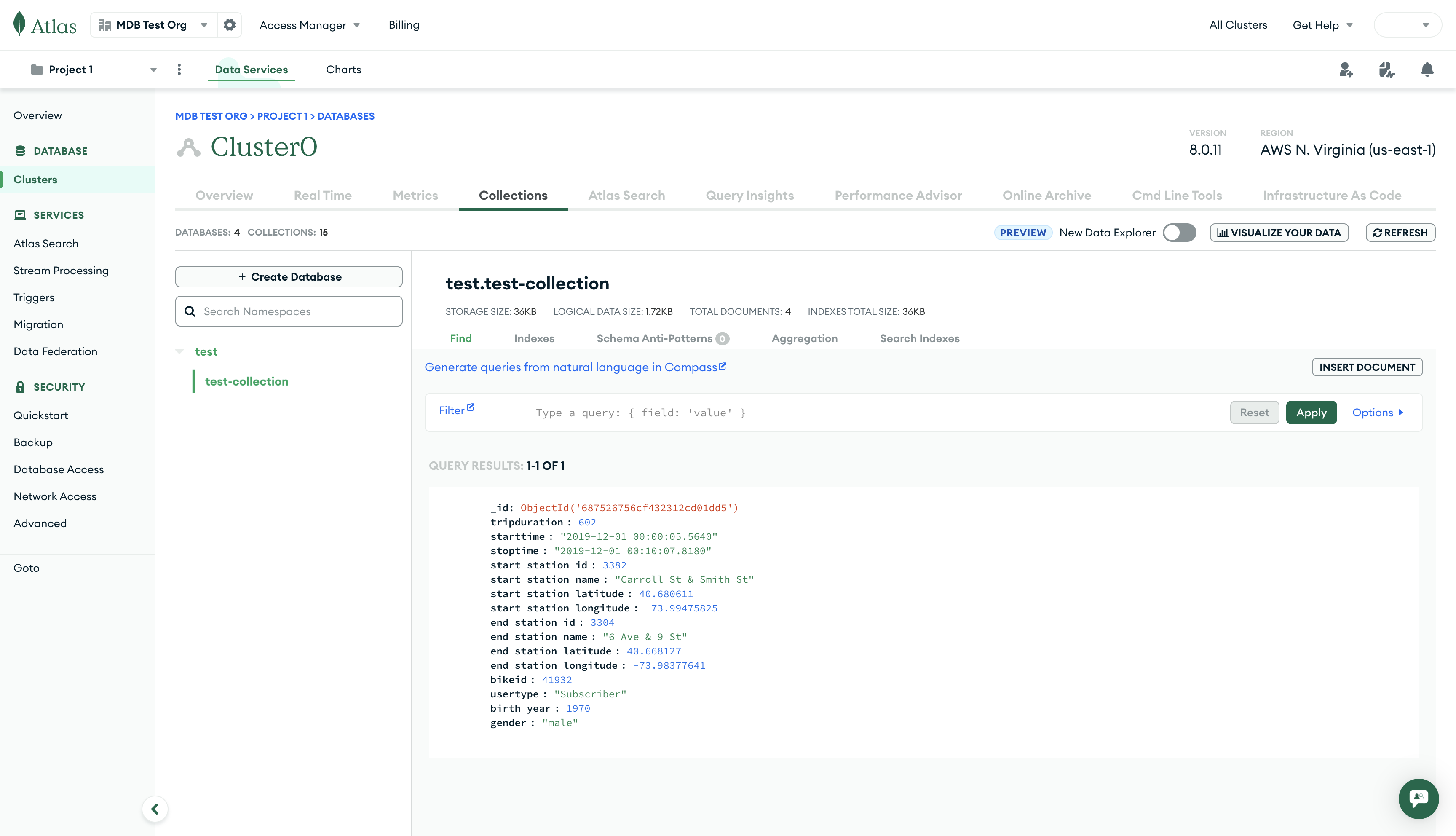
Para ver la importación de datos exitosa, puedes usar la Atlas Interfaz de Usuario.
Nota
Para cada documento importado, MongoDB genera un valor único obligatorio de _id.
Si no se especifica un archivo, mongoimport lee los datos de la entrada estándar (por ejemplo, stdin). El siguiente ejemplo demuestra cómo importar varios documentos canalizándolos a mongoimport, que luego lee los datos de stdin.
echo "{\"bikeid\":\"1234\"}\n{\"bikeid\":\"5678\"}" | mongoimport --uri 'mongodb+srv://myDatabaseUser:D1fficultP%40ssw0rd@cluster0.example.mongodb.net/?retryWrites=true&w=majority' \ --db=test \ --collection=test-collection-stdin
La importación exitosa se asemeja a lo siguiente:
2025-07-14T11:08:08.884-0600 connected to: mongodb+srv://[**REDACTED**]@cluster0.zoikgns.mongodb.net/?retryWrites=true&w=majority&appName=Cluster0 2025-07-14T11:08:09.095-0600 2 document(s) imported successfully. 0 document(s) failed to import.
Importar documentos con canalización
Puedes pipe varios documentos JSON desde otra herramienta, como cat, para importar varios archivos con mongoimport. Desde el directorio que contiene los archivos JSON para importación, puedes ejecutar el siguiente comando para importar los documentos.
cat *_*.json | mongoimport --uri 'mongodb+srv://myDatabaseUser:D1fficultP%40ssw0rd@cluster0.example.mongodb.net/?retryWrites=true&w=majority' \ --db=test \ --collection=test-collection-many
La importación exitosa se asemeja a lo siguiente:
2025-07-21T16:48:23.519-0400 connected to: mongodb+srv://[**REDACTED**]@cluster0.zoikgns.mongodb.net/?retryWrites=true&w=majority&appName=Cluster0 2025-07-21T16:48:23.627-0400 3 document(s) imported successfully. 0 document(s) failed to import.
Import a JSON Array
Para importar un arreglo JSON de documentos, puedes usar la opción --jsonArray para especificar el formato de los datos. Debe especificar la fuente de datos, que puede ser un archivo o una entrada estándar, por separado. El siguiente ejemplo importa el archivo rides.json que contiene un único arreglo JSON.
mongoimport --uri 'mongodb+srv://myDatabaseUser:D1fficultP%40ssw0rd@cluster0.example.mongodb.net/?retryWrites=true&w=majority' \ --db=test \ --collection=test-collection-array \ --file=rides.json \ --jsonArray
La importación exitosa se asemeja a lo siguiente:
2025-07-14T11:48:10.829-0400 connected to: mongodb+srv://[**REDACTED**]@cluster0.zoikgns.mongodb.net/?retryWrites=true&w=majority&appName=Cluster0 2025-07-14T11:48:10.899-0400 3 document(s) imported successfully. 0 document(s) failed to import.
Si no agregas la opción --jsonArray, mongoimport fallará con el error cannot decode array into a Document porque los documentos de MongoDB son comparables a los objetos JSON, no a los arreglos.
Nota
Se puede almacenar un arreglo como valor en un documento, pero un documento no puede ser un arreglo.
Importar tipos específicos de MongoDB con JSON
Ya que MongoDB almacena los datos como BSON, debes utilizar JSON extendido para identificar los campos importados como JSON como BSON types específicos. Esto significa que puedes proporcionar un campo que MongoDB reconoce originalmente como un string en la siguiente estructura anidada para que MongoDB lo reconozca como un tipo date.
"starttime": { "$date": "2019-12-01T00:00:05.5640Z" }
Para transformar tus datos existentes, consulta la sección sobre JQ.
Importar CSV o TSV en una colección con tipos de campo especificados
Si tienes archivos CSV o TSV para importar, usa el --type=csv o --type=tsv, respectivamente, para decirle a mongoimport el formato que debe esperar.
Si tu archivo CSV o TSV tiene una fila de encabezado, utiliza la opción --headerline para indicar a mongoimport que la primera línea no debe importarse como documento.
Dado que los datos CSV y TSV no incluyen información sobre el tipo, puedes resolver esto especificando los tipos de campos cuando llames a mongoimport. La primera forma de proporcionar mongoimport con información de tipo es si se enumeran los nombres de los campos en la línea de comandos con la opción --fields.
mongoimport --uri 'mongodb+srv://myDatabaseUser:D1fficultP%40ssw0rd@cluster0.example.mongodb.net/?retryWrites=true&w=majority' \ --db=test \ --collection=test-field-file \ --file=rides_no_header.csv \ --type=csv \ --fields="tripduration","starttime","stoptime","start station id","start station name","start station latitude","start station longitude","end station id","end station name","end station latitude","end station longitude","bikeid","usertype","birth year","gender"
Otra forma de proporcionar mongoimport con información de tipo es si colocas los nombres de los campos en un archivo, como field_file.txt, y apuntas a él con la opción --fieldFile.
@" tripduration starttime stoptime start station id start station name start station latitude start station longitude end station id end station name end station latitude end station longitude bikeid usertype birth year gender "@ | Set-Content -Path field_file.txt
echo 'tripduration starttime stoptime start station id start station name start station latitude start station longitude end station id end station name end station latitude end station longitude bikeid usertype birth year gender' > field_file.txt
cat << 'EOF' > field_file.txt tripduration starttime stoptime start station id start station name start station latitude start station longitude end station id end station name end station latitude end station longitude bikeid usertype birth year gender EOF
mongoimport --uri 'mongodb+srv://myDatabaseUser:D1fficultP%40ssw0rd@cluster0.example.mongodb.net/?retryWrites=true&w=majority' \ --db=test \ --collection=test-field-file \ --file=rides_no_header.csv \ --type=csv \ --fieldFile=field_file.txt
La importación exitosa para las opciones --fields y --fieldFile se asemeja a lo siguiente:
2025-07-14T11:48:10.829-0400 connected to: mongodb+srv://[**REDACTED**]@cluster0.zoikgns.mongodb.net/?retryWrites=true&w=majority&appName=Cluster0 2025-07-14T11:48:10.899-0400 3 document(s) imported successfully. 0 document(s) failed to import.
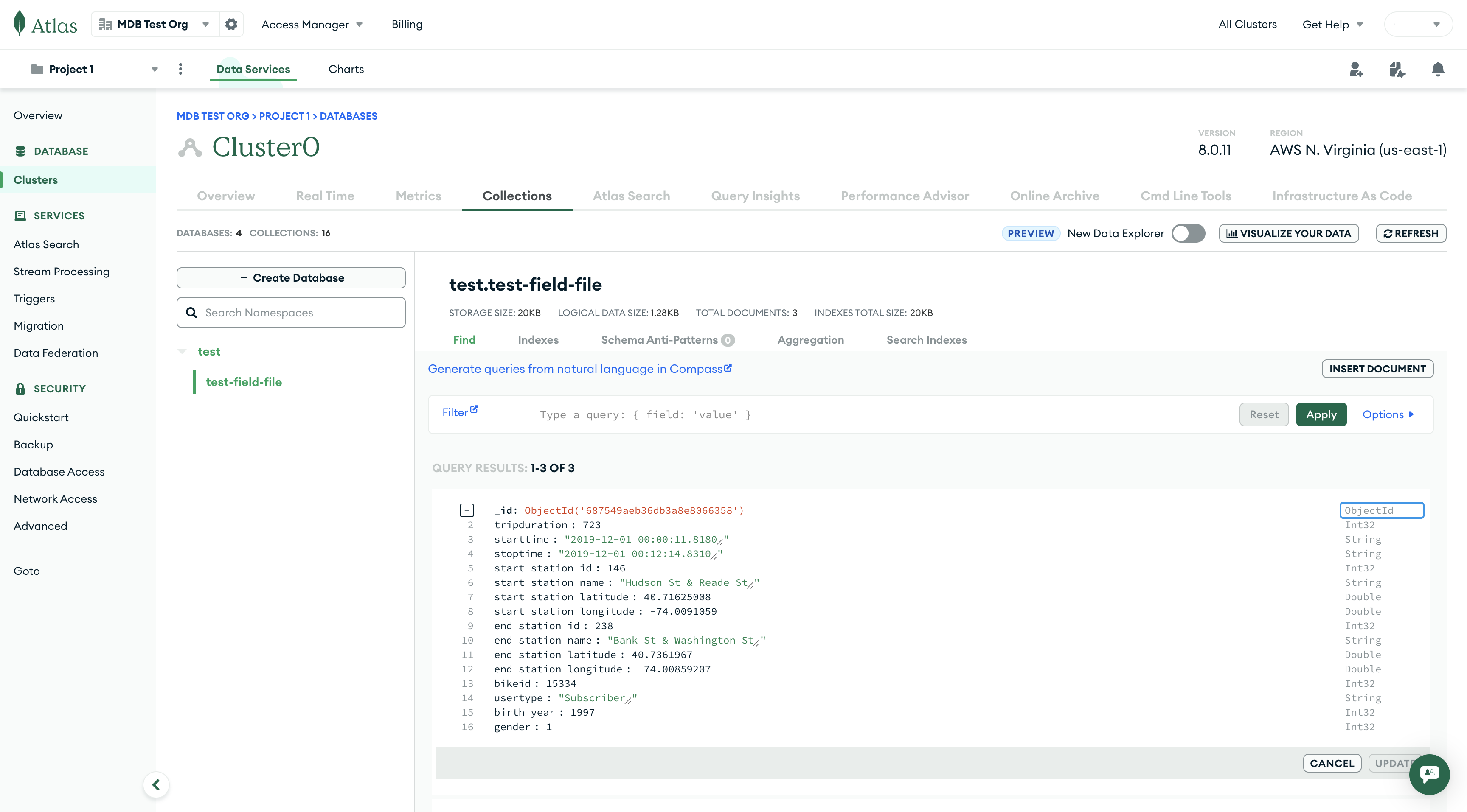
Para ver la importación de datos exitosa, puedes usar la Atlas Interfaz de Usuario.
Importar CSV o TSV en una colección con tipos de campos y de datos especificados
Arriba, puedes ver que mongoimport toma decisiones automáticamente sobre los tipos de datos. En lugar de ello, para especificar el tipo de algunos o todos los campos, se puede utilizar la opción --columnsHaveTypes, o añadir tipos al archivo utilizado con la opción --fieldFile.
@" tripduration.auto() starttime.date(2006-01-02 15:04:05) stoptime.date(2006-01-02 15:04:05) start station id.auto() start station name.auto() start station latitude.auto() start station longitude.auto() end station id.auto() end station name.auto() end station latitude.auto() end station longitude.auto() bikeid.auto() usertype.auto() birth year.auto() gender.auto() "@ | Set-Content -Path field_file_with_types.txt
echo 'tripduration.auto() starttime.date(2006-01-02 15:04:05) stoptime.date(2006-01-02 15:04:05) start station id.auto() start station name.auto() start station latitude.auto() start station longitude.auto() end station id.auto() end station name.auto() end station latitude.auto() end station longitude.auto() bikeid.auto() usertype.auto() birth year.auto() gender.auto()' > field_file_with_types.txt
cat << 'EOF' > field_file_with_types.txt tripduration.auto() starttime.date(2006-01-02 15:04:05) stoptime.date(2006-01-02 15:04:05) start station id.auto() start station name.auto() start station latitude.auto() start station longitude.auto() end station id.auto() end station name.auto() end station latitude.auto() end station longitude.auto() bikeid.auto() usertype.auto() birth year.auto() gender.auto() EOF
mongoimport --uri 'mongodb+srv://myDatabaseUser:D1fficultP%40ssw0rd@cluster0.example.mongodb.net/?retryWrites=true&w=majority' \ --db=test \ --collection=test-field-file \ --file=test-datasets/rides_no_header.csv \ --type=csv \ --fieldFile=field_file_with_types.txt
La importación exitosa se asemeja a lo siguiente:
2025-07-14T11:48:10.829-0400 connected to: mongodb+srv://[**REDACTED**]@cluster0.zoikgns.mongodb.net/?retryWrites=true&w=majority&appName=Cluster0 2025-07-14T11:48:10.899-0400 3 document(s) imported successfully. 0 document(s) failed to import.
Para ver la importación de datos exitosa, puedes usar la Atlas Interfaz de Usuario.
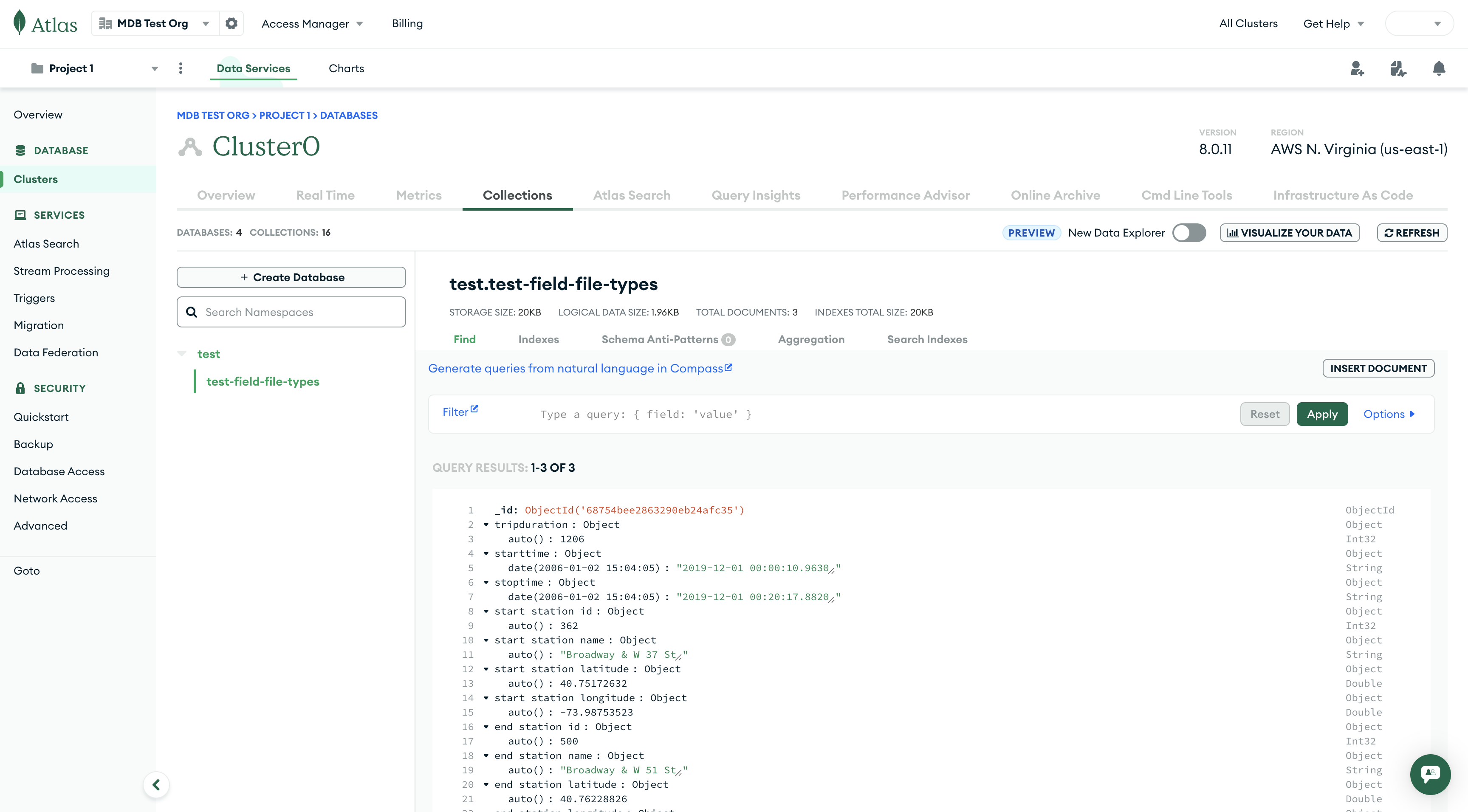
Ahora, puedes ver que mongoimport utiliza los tipos de datos que proporcionas para almacenar el archivo importado.
Herramientas útiles de línea de comandos
Puedes usar otros programas de línea de comando junto con mongoimport para agilizar aún más tu importación de datos.
JQ
JQ es un procesador de datos JSON. Incorpora un potente lenguaje de filtrado y scripting para el filtrado, manipulación y generación de datos JSON. Puedes utilizar una multi-stage pipe para canalizar datos en mongoimport a través de JQ. Para obtener más información sobre cómo utilizar JQ, consulta el Manual de JQ.
CSVKit
CSVKit es una colección de herramientas para filtrar y manipular datos CSV. Las herramientas de CSVKit, como csvgrep, que filtra filas basadas en expresiones, y csvcut, que elimina columnas completas del input CSV, son herramientas útiles para segmentar datos antes de proporcionarlos a mongoimport. Para obtener más información sobre cómo utilizar CSVKit, consulte la Documentación de CSVKit.
Obtén más información
- Consulta nuestra documentación
mongoimportpara obtener más detalles sobre las posibles opciones.