The Kubernetes Operator supports deploying both MongoDB database resources and Ops Manager resources across multiple Kubernetes clusters. This provides geographic redundancy, disaster recovery capabilities, and improved resilience.
Important
You can't convert an existing Ops Manager deployment from single- to multi-cluster topology. You must start over and redeploy if you begin in single-cluster mode. Plan your topology before the initial deployment.
Single- and Multi-Cluster Mode
You can control the mode in which you deploy the MongoDB resources with the Kubernetes Operator with the following settings:
spec.topology— controls the mode for the Ops Manager application.spec.applicationDatabase.topology— controls the mode for the Application Database.
If you set both spec.topology and spec.applicationDatabase.topology to MultiCluster, this enables multi-cluster mode for the Ops Manager resource and its Application Database, as shown in the following example:
spec: topology: MultiCluster applicationDatabase: topology: MultiCluster
In multi-cluster mode, you can start with a single member cluster and scale as needed. Specifically:
Single member cluster start: A deployment can begin with one member cluster.
Minimum Application Database replica set: A minimum 3-member Application Database replica set can run on a single member cluster, then expand across clusters later.
Single |application| instance: A single Ops Manager Application instance can run on one cluster, with additional clusters added later.
In single-cluster mode (the default), omit the topology setting or set it to SingleCluster.
Multi-Cluster Deployment Limitations
The following limitations apply to multi-cluster deployments:
Use Ops Manager versions later than 5.0.7.
Use only secrets for secret storage. HashiCorp Vault isn't supported.
For deployments where the Kubernetes Operator doesn't manage both the
MongoDBOpsManagerandMongoDBresources, you must manually configure KMIP backup encryption settings in Ops Manager.Don't add a ServiceMonitor to
MongoDBMultiClusterresources. Prometheus integration isn't supported.You can't migrate existing single-cluster MongoDB resources to multi-cluster resources.
Differences Between Single and Multi-Cluster Deployments
Capability or Requirement | Single-Cluster | Multi-Cluster |
|---|---|---|
Operator must be in the same cluster as Ops Manager and Application Database | Yes | No |
Service mesh required for Ops Manager and Application Database clusters | No | Yes |
HashiCorp Vault supported | Yes | No |
All backup mechanisms supported | Yes | No. S3-compatible oplog/snapshot only. |
KMIP encryption | Yes | With limitations |
Multi-Cluster MongoDB Database Resource Deployment Diagrams
You can create multi-cluster MongoDB deployments with or without a service mesh.
In both cases, the Kubernetes Operator:
Watches for the
MongoDBMultiClusterspec on the central cluster.Uses the mounted
kubeconfigto communicate with member clusters.Creates ConfigMaps, Secrets, Services, and StatefulSets in each member cluster.
Deploys MongoDB replica set members to the appropriate clusters.
Watches for central cluster and member cluster events.
Reconciles resources to confirm the desired state.
A multi-Kubernetes cluster MongoDB deployment that uses the MongoDB Controllers for Kubernetes Operator consists of one central cluster and one or more member clusters in Kubernetes:
The central cluster has the following role:
Hosts the MongoDB Controllers for Kubernetes Operator
Acts as the control plane for the multi-Kubernetes cluster MongoDB deployment
Hosts the
MongoDBMultiClusterresource spec for the MongoDB replica setHosts Ops Manager, if you deploy Ops Manager with the Kubernetes Operator
Can also host members of the MongoDB replica set
Note
The central cluster is also known as the operator cluster.
Member clusters host the MongoDB replica sets.
Note
If the central cluster fails, you can't use the Kubernetes Operator to change your deployment until you restore access or redeploy the Kubernetes Operator to another cluster. See Disaster Recovery.
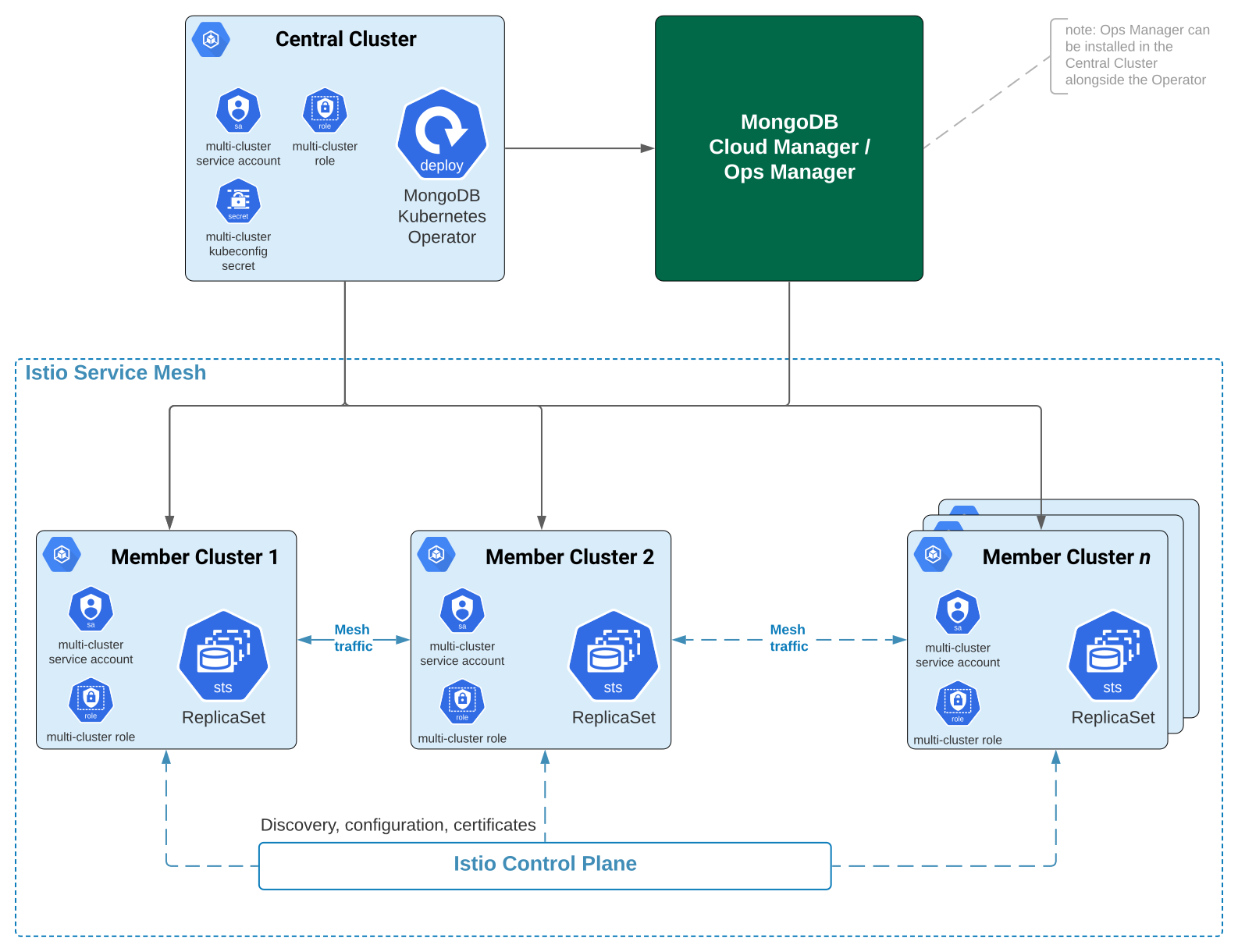
With a Service Mesh
The service mesh manages MongoDB node discovery across clusters and handles inter-member communication. The following diagram illustrates a multi-cluster deployment with a service mesh:
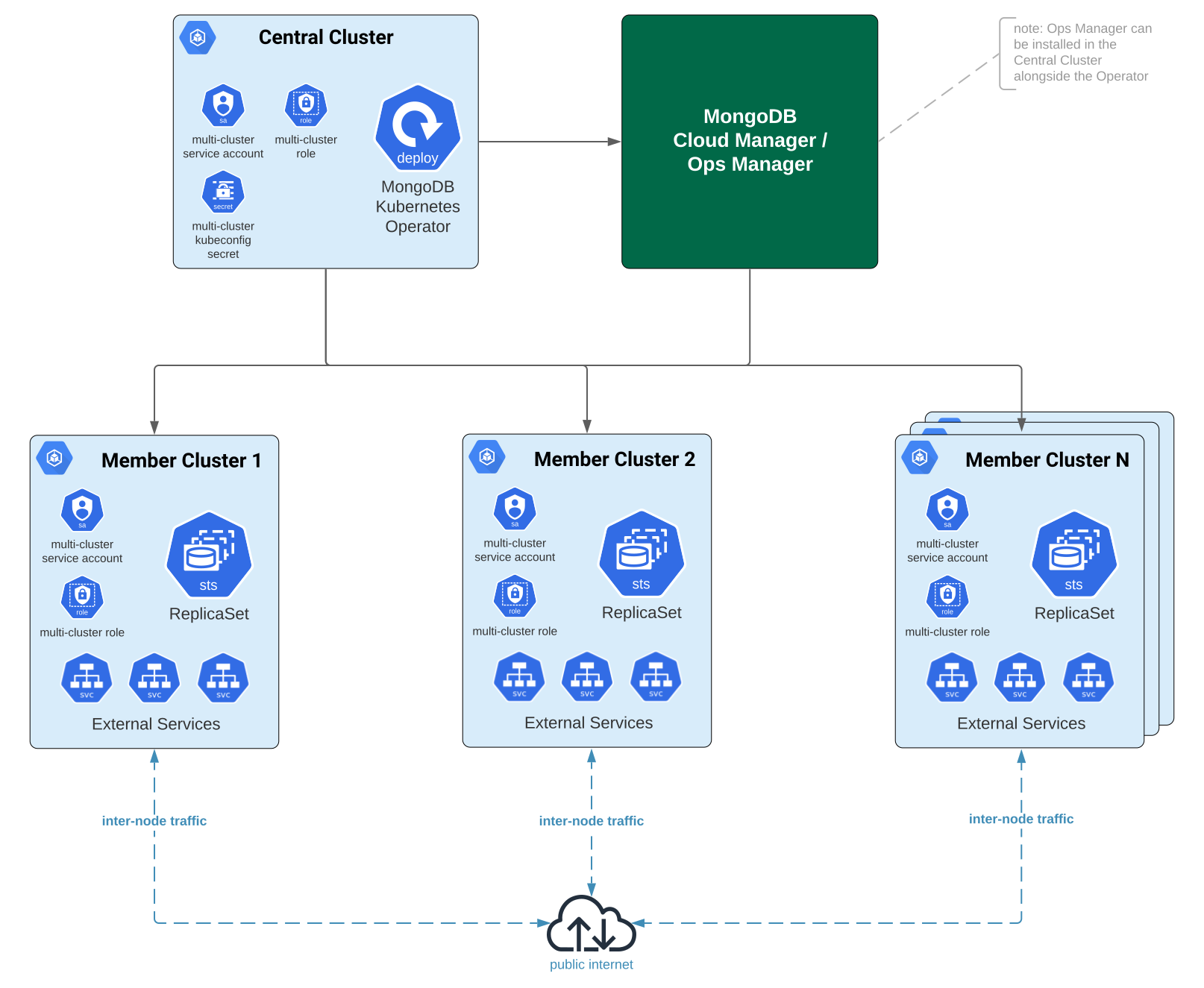
Without a Service Mesh
External domains and DNS zones handle cross-cluster communication. See Enable External Connectivity through External Domains and DNS Zones. The following diagram illustrates a multi-cluster deployment without a service mesh:
Multi-Cluster Ops Manager Resource Deployment Diagram
The following diagram shows the Ops Manager Application, Application Database, and Backup Daemon deployed on multiple Kubernetes clusters:
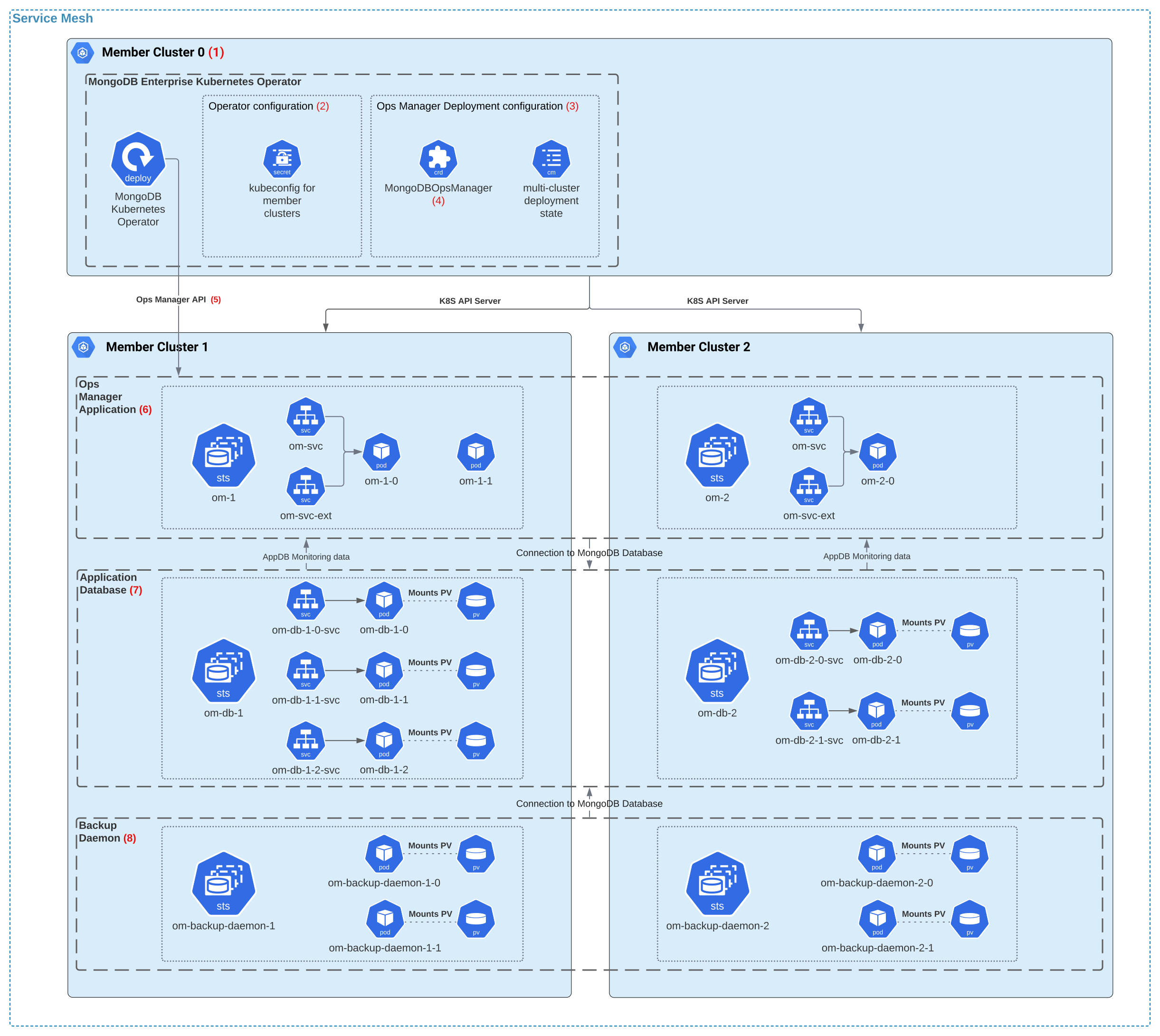
Key elements of a multi-cluster Ops Manager deployment:
Central cluster (for example, Member Cluster 0) stores the
kubeconfigsecret (mongodb-enterprise-operator-multi-cluster-kubeconfig) and cluster-mapping ConfigMaps used to manage all member clusters.Cluster-mapping ConfigMaps track the relationship between cluster names and indexes:
<om_resource_name>-cluster-mapping— mapsspec.clusterSpecListentries to cluster indexes.<om_resource_name>-db-cluster-mapping— mapsspec.applicationDatabase.clusterSpecListentries to cluster indexes.<om_resource_name>-db-member-spec— records replica count per cluster for disaster recovery.
Application StatefulSets are named
<om_resource_name>-<cluster_index>on each cluster. The operator creates aClusterIPservice (<om_resource_name>-svc) containing all local Pods, plus an optionalLoadBalancerservice (<om_resource_name>-svc-ext) for external access.Application Database StatefulSets are named
<om_resource_name>-db-<cluster_index>. Per-Pod services (<om_resource_name>-db-<cluster_index>-<pod_index>-svc) enable individualmongodaddressability across the service mesh.Backup Daemon StatefulSets are named
<om_resource_name>-backup-daemon-<cluster_index>, created ifspec.backup.enabledistrue.
Multi-Cluster Networking
Networking Overview for Multi-Cluster Deployments
The following table describes the types of clients and services that connect to the Ops Manager Application in multi-cluster deployments, and the URLs they use:
Origin | Purpose | URL |
|---|---|---|
Kubernetes Operator | Configures Ops Manager, enables monitoring | Default FQDN |
Kubernetes Operator | Configures a specific MongoDB deployment | Project ConfigMap (from Create One Project Per MongoDB Deployment Using a ConfigMap) |
MongoDB Agent in Application Database | Receives automation configuration from Ops Manager | Headless mode (no Ops Manager connection needed) |
Monitoring Agent in Application Database | Sends monitoring data to Ops Manager | Default FQDN or |
MongoDB Agent in | Receives automation configuration from Ops Manager, including backup and restore instructions | Project ConfigMap |
User | Accesses Ops Manager UI or API | External domain via |
Service Mesh Requirements for Multi-Cluster Ops Manager Deployments
For multi-cluster Ops Manager deployments, add the Kubernetes clusters hosting the Application Database and the Ops Manager Application to the same service mesh. This enables:
Network connectivity between deployed components across clusters.
Cross-cluster DNS resolution for per-Pod service FQDNs.
In addition, we also recommend adding the central cluster to the same service mesh, which allows it to host Ops Manager Application and Application Database instances directly.
Configure the service mesh for the following clusters:
The central cluster (where you install the Kubernetes Operator)
All member Kubernetes clusters hosting Ops Manager Application instances
All member Kubernetes clusters hosting Application Database instances
The service mesh ensures that each Ops Manager instance can connect to every Application Database instance, even across clusters. After deployment, each Ops Manager API endpoint must be able to directly connect to every Application Database member.
Load Balancing for Multi-Cluster Ops Manager Deployments
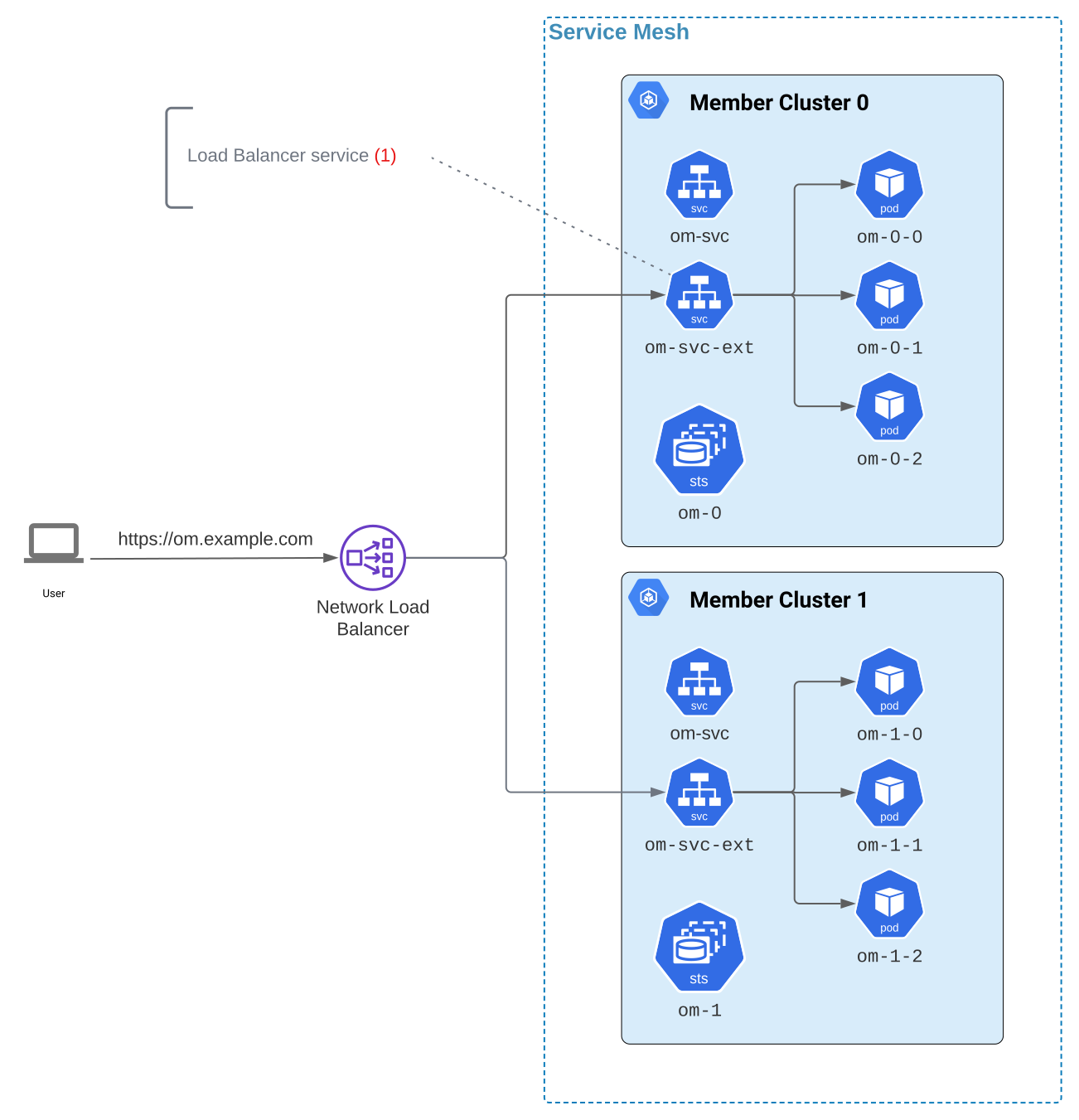
For multi-cluster Ops Manager deployments, each cluster can expose its Ops Manager Application Pods individually using a LoadBalancer-type service. Create this service using spec.externalConnectivity and point an external domain to its external IP address. To learn more about configuring load balancing in multi-cluster deployments, see Service Mesh Requirements for Multi-Cluster Ops Manager Deployments.
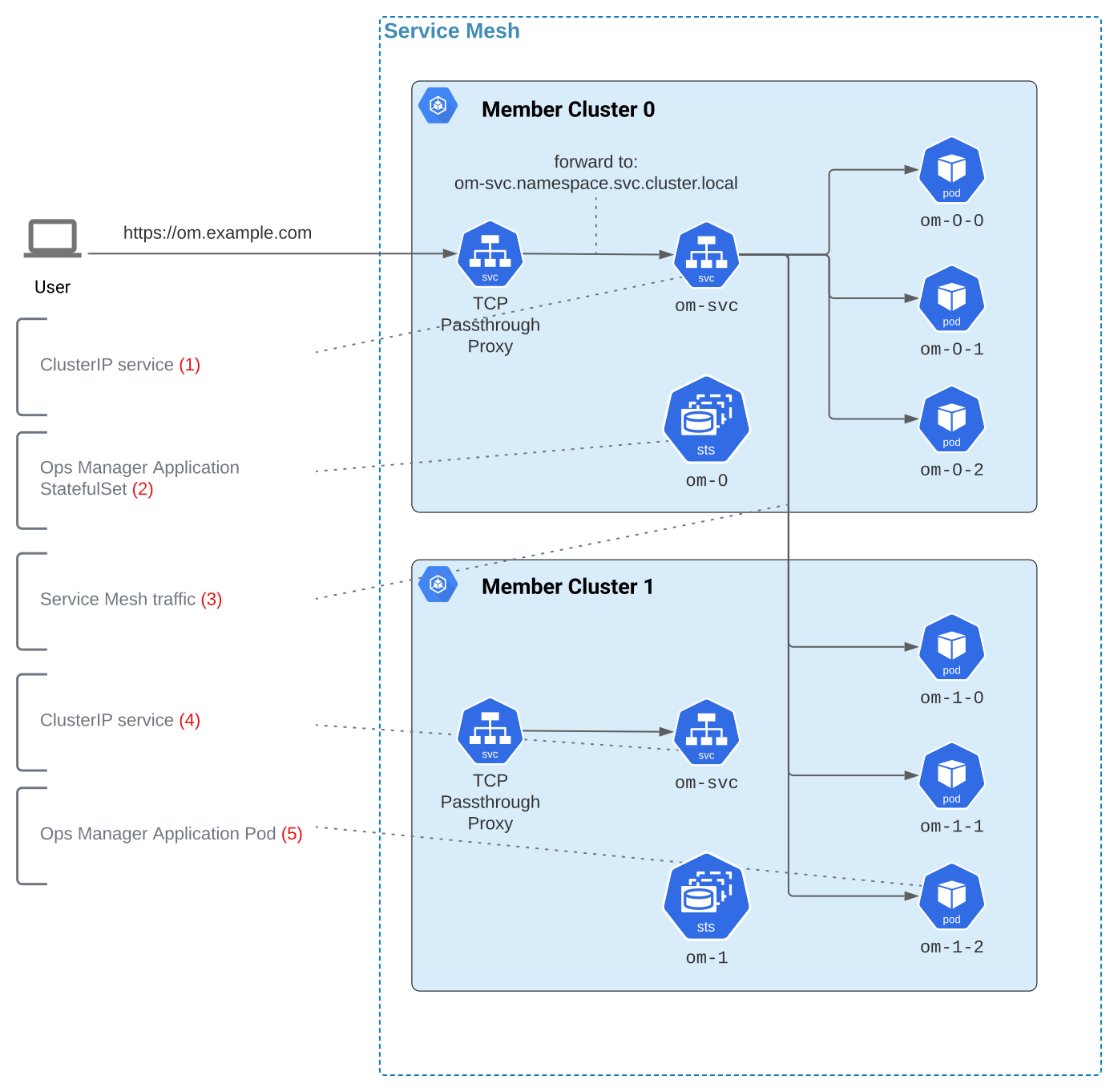
Since the Kubernetes Operator doesn't support cross-cluster load balancing natively, you must configure load balancing externally. The following approaches exist for enabling cross-cluster load balancing for Ops Manager deployments:
- External Load Balancer: Configure an external network load balancer (passthrough proxy) for all clusters hosting the Ops Manager Application. The load balancer forwards traffic to each cluster's
LoadBalancerservice in round-robin fashion. The following diagram illustrates this approach:
- Service Mesh with Proxy: Use the service mesh's cross-cluster load balancing. Deploy a proxy (such as Nginx or HAProxy) on one cluster, expose it externally, and configure TCP passthrough to
<om_resource_name>-svc.<namespace>.svc.cluster.local. The following diagram illustrates this approach:
Multi-Cluster Performance Considerations for Ops Manager Deployments
The geographical distribution of Application Database and Ops Manager instances can impact the performance of the Ops Manager Application and backup/restore processes. See Performance in Multi-Region Deployments.
To maximize the benefits of multi-cluster resilience and availability, deploy all components in the same geographical area when possible.
Sources of possible performance degradation include:
Increased network latency between the Ops Manager Application and the primary Application Database node.
Increased latency between MongoDB database nodes and the Ops Manager Application performing backup jobs.
If you plan geographically distant deployments, contact MongoDB Support for assistance.
Multi-Cluster MongoDB Database Resource Capabilities
The following multi-cluster capabilities use the same procedures as single-cluster deployments:
Connect with DNS SRV Records: Use the
connectionString.standardSrvDNS seed list connection string from the secret that the Kubernetes Operator creates. See Connect to a MongoDB Resource from Inside Kubernetes and select the Using the Kubernetes Secret tab.Manage Security for Database Users: Use the same LDAP, SCRAM, X.509, and OIDC authentication procedures as single-cluster deployments, with the following exceptions:
Multi-cluster procedures apply to replica sets only (sharded clusters aren't supported).
In
mongodbResourceRef, specify the multi-cluster replica set name.
Queryable Backups (Single-Cluster |onprem| Only): If Ops Manager is deployed on a single cluster, you can configure queryable backups. Queryable backups aren't supported for multi-cluster Ops Manager deployments.