MongoDB Controllers for Kubernetes Operator deploys MongoDB Enterprise, Ops Manager, and MongoDB Community to Kubernetes. This page helps you choose a deployment path and an installation method before you install. If you are new to Kubernetes Operator, start with the Quick Start.
Choose Your Deployment Path
Kubernetes Operator supports deployments that range from a local evaluation cluster to production deployments that span several Kubernetes clusters. Choose the path that fits your goal.
Deploys Ops Manager and a MongoDB replica set to a single-node Kind cluster on your local machine. Choose the Quick Start when you want to evaluate Kubernetes Operator end to end, learn how the custom resources fit together, or reproduce a problem locally. It is less ideal when you need a deployment that survives node or cluster loss, because Kind runs one node. | |
Deploys Ops Manager and MongoDB resources to one production Kubernetes cluster. Choose a single-cluster deployment when your availability requirements are met within one Kubernetes cluster, and you want the smallest amount of infrastructure to operate. It is less ideal when you must survive the loss of an entire Kubernetes cluster or region. | |
Deploys one MongoDB deployment across several Kubernetes clusters, with or without a service mesh. Choose a multi-cluster deployment when you need to distribute replica set members across regions or data centers for higher availability and disaster recovery. It is less ideal when you are evaluating Kubernetes Operator, because it requires you to configure and operate multiple Kubernetes clusters. |
To deploy MongoDB Community to Kubernetes, see the MongoDB Community documentation on GitHub. Because of the breadth of configuration options available for MongoDB Enterprise and Ops Manager, this guide covers those deployments.
Choose Your Installation Method
Each method installs the same Kubernetes Operator. To learn more about each method, see Install the MongoDB Controllers for Kubernetes Operator.
Applies the YAML manifests that MongoDB publishes. Choose It is less ideal when you want to set configuration without editing YAML. | |
Installs the Choose Helm when you want to configure the Kubernetes Operator through values instead of manifests, or when you need an option that only Helm exposes, such as watching a subset of namespaces. It is less ideal when your organization doesn't allow Helm. | |
Uses Choose this method when you run OpenShift Container Platform, which requires the It is less ideal for any non-OpenShift Kubernetes distribution. |
How Kubernetes Operator Works
Enterprise MongoDB deployments consist of two distinct resource types: the database itself and an external database management resource responsible for backing up data, automation (deployment, configuration, upgrades), real-time monitoring, and more. This external resource can either be Ops Manager (a self-managed resource) or Cloud Manager (a managed equivalent).
Community MongoDB deployments consist of the database resource only, and do not include an external management resource.
Kubernetes Operator allows you to create these resources and administer all aspects of your deployments in a variety of configurations across one or more Kubernetes clusters according to your specific needs.
Kubernetes Operator is a Kubernetes Controller, which works by effectively extending the native Kubernetes API to include the aforementioned MongoDB elements as custom resources, so that you can define and deploy them with YAML manifests in the same way as any other resources to Kubernetes.
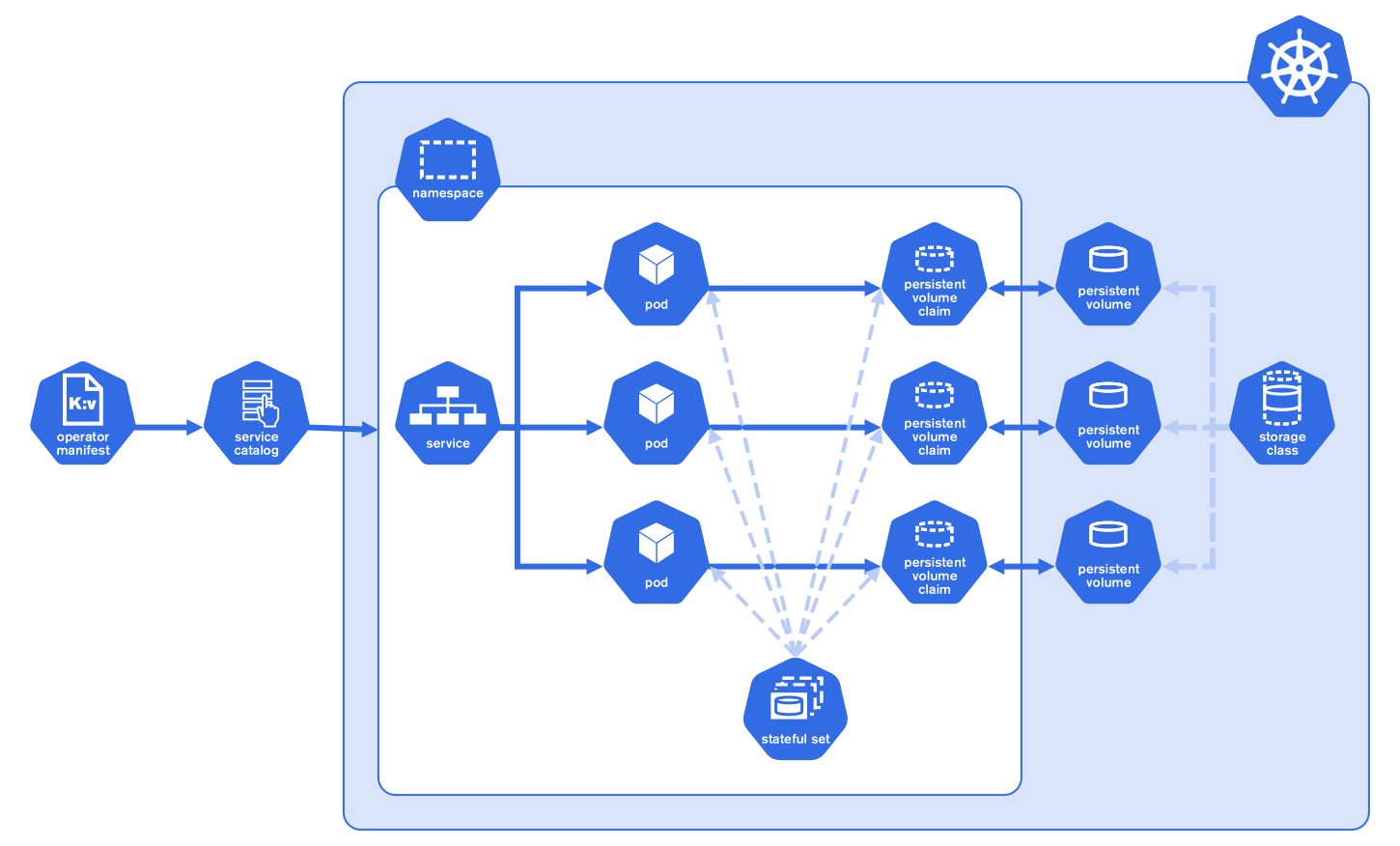
While the MongoDB and Ops Manager custom resources can be deployed as standalone pods, the recommended deployment topology involves deploying the database and Ops Manager as StatefulSets, as illustrated in the diagram above. Moreover, Kubernetes Operator requires the availability of a storageClass in your Kubernetes cluster, available by default in managed clusters, to create the PersistentVolumes responsible for storing and backing up data.
To learn more about the specific system requirements and prerequisites to deploying MongoDB in Kubernetes with Kubernetes Operator, see the Prerequisites page.
The MongoDB Controllers for Kubernetes Operator is an operator that replaces the previous MongoDB Enterprise Kubernetes Operator and MongoDB Community Operator. For more information about the first version of Kubernetes Operator, see the release notes.