In this tutorial, you learn how to evaluate a RAG application. Evaluation helps you choose the right model, ensure that your model's performance translates from prototype to production, and catch performance regressions.
Specifically, you perform the following actions:
Set up the environment.
Download an evaluation dataset.
Create document chunks and embeddings.
Ingest the embeddings into Atlas.
Compare embedding models for retrieval.
Compare completion models for generation.
Measure overall RAG performance.
Track performance over time with MongoDB Charts.
Note
This tutorial focuses on evaluating LLM applications, not LLM models. Evaluating LLM models involves measuring the performance of a given model across different tasks. LLM application evaluation is about evaluating different components of an LLM application, such as prompts and retrievers, as well as the system as a whole.
Work with a runnable version of this tutorial as a Python notebook.
Background
This tutorial uses the RAGAS open-source evaluation framework to measure RAG performance with the following metrics:
Retrieval metrics: Context precision and context recall measure how well your retriever finds relevant information.
Generation metrics: Faithfulness and answer relevance measure how well your LLM generates accurate, relevant responses.
Overall metrics: Answer similarity and answer correctness compare generated answers to ground truth.
To learn more about these metrics, see RAGAS Metrics in the RAGAS documentation.
This tutorial uses the ragas-wikiqa dataset from Hugging Face, which contains approximately 230 general knowledge questions with ground truth answers.
Prerequisites
To complete this tutorial, you must have the following:
A MongoDB Atlas cluster running MongoDB version 6.0.11 or later. Ensure that your IP address is in your project's access list.
An OpenAI API Key to use OpenAI's embedding and chat completion models.
A terminal configured with the following:
Python 3.10 or later.
An environment to run interactive Python notebooks, such as VS Code or Jupyter Notebook.
Set Up the Environment
Set up your credentials
Run the following code in your notebook to set up your MongoDB connection string and OpenAI API key:
import getpass import os from openai import OpenAI MONGODB_URI = getpass.getpass("Enter your MongoDB connection string:") os.environ["OPENAI_API_KEY"] = getpass.getpass("Enter your OpenAI API Key:") openai_client = OpenAI()
Download the Evaluation Dataset
Download the ragas-wikiqa dataset from Hugging Face and convert it to a pandas dataframe:
from datasets import load_dataset import pandas as pd data = load_dataset("explodinggradients/ragas-wikiqa", split="train") df = pd.DataFrame(data)
The dataset contains the following columns:
question: User questionscorrect_answer: Ground truth answerscontext: List of reference texts to answer the questions
Create Document Chunks
Split the reference texts into smaller chunks before embedding:
from langchain.text_splitter import RecursiveCharacterTextSplitter # Split text by tokens using the tiktoken tokenizer text_splitter = RecursiveCharacterTextSplitter.from_tiktoken_encoder( encoding_name="cl100k_base", keep_separator=False, chunk_size=200, chunk_overlap=30 ) def split_texts(texts): chunked_texts = [] for text in texts: chunks = text_splitter.create_documents([text]) chunked_texts.extend([chunk.page_content for chunk in chunks]) return chunked_texts # Split the context field into chunks df["chunks"] = df["context"].apply(lambda x: split_texts(x)) # Aggregate list of all chunks all_chunks = df["chunks"].tolist() docs = [item for chunk in all_chunks for item in chunk]
Tip
Experiment with different chunking strategies when evaluating retrieval. This tutorial focuses on evaluating embedding models.
Create Embeddings and Ingest into MongoDB Charts
Embed the chunked documents and ingest them into Atlas. Create separate collections for each embedding model you want to compare:
Define an embedding function
Create a function to generate embeddings using the OpenAI API:
from typing import List def get_embeddings(docs: List[str], model: str) -> List[List[float]]: """Generate embeddings using the OpenAI API.""" docs = [doc.replace("\n", " ") for doc in docs] response = openai_client.embeddings.create(input=docs, model=model) return [r.embedding for r in response.data]
Ingest embeddings into Atlas
Embed and ingest the chunked documents into Atlas collections:
from pymongo import MongoClient from tqdm.auto import tqdm client = MongoClient(MONGODB_URI) DB_NAME = "ragas_evals" db = client[DB_NAME] batch_size = 128 EVAL_EMBEDDING_MODELS = ["text-embedding-ada-002", "text-embedding-3-small"] for model in EVAL_EMBEDDING_MODELS: embedded_docs = [] print(f"Getting embeddings for the {model} model") for i in tqdm(range(0, len(docs), batch_size)): end = min(len(docs), i + batch_size) batch = docs[i:end] batch_embeddings = get_embeddings(batch, model) batch_embedded_docs = [ {"text": batch[i], "embedding": batch_embeddings[i]} for i in range(len(batch)) ] embedded_docs.extend(batch_embedded_docs) collection = db[model] collection.delete_many({}) collection.insert_many(embedded_docs) print(f"Finished inserting embeddings for the {model} model")
Create vector search indexes
Create a MongoDB Vector Search index for each collection. Use the following
index definition with the index name vector_index:
{ "fields": [ { "numDimensions": 1536, "path": "embedding", "similarity": "cosine", "type": "vector" } ] }
To learn how to create the index, see Create a MongoDB Vector Search Index.
Tip
Both text-embedding-ada-002 and text-embedding-3-small
have 1536 dimensions, so the same index definition works for
both collections.
Compare Embedding Models
To ensure you retrieve the right context for the LLM, compare
different embedding models. This tutorial compares
text-embedding-ada-002 and text-embedding-3-small.
Create a retriever function
Create a function to get a vector store retriever using LangChain and MongoDB Atlas:
from langchain_openai import OpenAIEmbeddings from langchain_mongodb import MongoDBAtlasVectorSearch from langchain_core.vectorstores import VectorStoreRetriever def get_retriever(model: str, k: int) -> VectorStoreRetriever: """ Get a vector store retriever for a given embedding model. Args: model (str): Embedding model to use k (int): Number of results to retrieve Returns: VectorStoreRetriever: A vector store retriever object """ embeddings = OpenAIEmbeddings(model=model) vector_store = MongoDBAtlasVectorSearch.from_connection_string( connection_string=MONGODB_URI, namespace=f"{DB_NAME}.{model}", embedding=embeddings, index_name="vector_index", text_key="text", ) retriever = vector_store.as_retriever( search_type="similarity", search_kwargs={"k": k} ) return retriever
Evaluate the retriever
Use the context_precision and context_recall metrics
from the RAGAS library to evaluate each embedding model:
from datasets import Dataset from ragas import evaluate, RunConfig from ragas.metrics import context_precision, context_recall import nest_asyncio # Allow nested use of asyncio (used by RAGAS) nest_asyncio.apply() for model in EVAL_EMBEDDING_MODELS: data = {"question": [], "ground_truth": [], "contexts": []} data["question"] = QUESTIONS data["ground_truth"] = GROUND_TRUTH retriever = get_retriever(model, 2) # Get relevant documents for the evaluation dataset for i in tqdm(range(0, len(QUESTIONS))): data["contexts"].append( [doc.page_content for doc in retriever.invoke(QUESTIONS[i])] ) # RAGAS expects a Dataset object dataset = Dataset.from_dict(data) # RAGAS runtime settings to avoid hitting OpenAI rate limits run_config = RunConfig(max_workers=4, max_wait=180) result = evaluate( dataset=dataset, metrics=[context_precision, context_recall], run_config=run_config, raise_exceptions=False, ) print(f"Result for the {model} model: {result}")
The evaluation results for the embedding models on the sample dataset are as follows:
Model | Context precision | Context recall |
|---|---|---|
text-embedding-ada-002 | 0.9310 | 0.8561 |
text-embedding-3-small | 0.9116 | 0.8826 |
Based on these results, text-embedding-ada-002 ranks the most
relevant results higher, but text-embedding-3-small retrieves
contexts that are more aligned with the ground truth answers.
For this tutorial, use text-embedding-3-small as the
embedding model.
Compare Completion Models
Now that you have selected the best embedding model, compare completion models for the generation component of your RAG application.
Create a RAG chain
Create a function that builds a RAG chain using LangChain:
from langchain_openai import ChatOpenAI from langchain_core.prompts import ChatPromptTemplate from langchain_core.runnables import RunnablePassthrough from langchain_core.runnables.base import RunnableSequence from langchain_core.output_parsers import StrOutputParser def get_rag_chain(retriever: VectorStoreRetriever, model: str) -> RunnableSequence: """ Create a basic RAG chain. Args: retriever (VectorStoreRetriever): Vector store retriever object model (str): Chat completion model to use Returns: RunnableSequence: A RAG chain """ # Generate context using the retriever, and pass the user question through retrieve = { "context": retriever | (lambda docs: "\n\n".join([d.page_content for d in docs])), "question": RunnablePassthrough(), } template = """Answer the question based only on the following context: \ {context} Question: {question} """ # Define the chat prompt prompt = ChatPromptTemplate.from_template(template) # Define the model for chat completion llm = ChatOpenAI(temperature=0, model=model) # Parse output as a string parse_output = StrOutputParser() # RAG chain rag_chain = retrieve | prompt | llm | parse_output return rag_chain
Evaluate the completion models
Use the faithfulness and answer_relevancy metrics to
evaluate different completion models:
from ragas.metrics import faithfulness, answer_relevancy for model in ["gpt-3.5-turbo-1106", "gpt-3.5-turbo"]: data = {"question": [], "ground_truth": [], "contexts": [], "answer": []} data["question"] = QUESTIONS data["ground_truth"] = GROUND_TRUTH # Use the best embedding model from the retriever evaluation retriever = get_retriever("text-embedding-3-small", 2) rag_chain = get_rag_chain(retriever, model) for i in tqdm(range(0, len(QUESTIONS))): question = QUESTIONS[i] data["answer"].append(rag_chain.invoke(question)) data["contexts"].append( [doc.page_content for doc in retriever.invoke(question)] ) # RAGAS expects a Dataset object dataset = Dataset.from_dict(data) # RAGAS runtime settings to avoid hitting OpenAI rate limits run_config = RunConfig(max_workers=4, max_wait=180) result = evaluate( dataset=dataset, metrics=[faithfulness, answer_relevancy], run_config=run_config, raise_exceptions=False, ) print(f"Result for the {model} model: {result}")
The evaluation results for the completion models on the sample dataset are as follows:
Model | Faithfulness | Answer relevance |
|---|---|---|
gpt-3.5-turbo | 0.9714 | 0.9087 |
gpt-3.5-turbo-1106 | 0.9671 | 0.9105 |
Based on these results, the latest gpt-3.5-turbo produces
more factually consistent results, while the older version
produces answers that are more pertinent to the given prompt.
For this tutorial, use gpt-3.5-turbo as the completion model.
Tip
If you don't want to choose between metrics, consider creating consolidated metrics using a weighted summation, or customize the prompts used for evaluation.
Measure Overall Performance
Evaluate the overall performance of your RAG application using the best-performing models:
from ragas.metrics import answer_similarity, answer_correctness data = {"question": [], "ground_truth": [], "answer": []} data["question"] = QUESTIONS data["ground_truth"] = GROUND_TRUTH # Use the best embedding model from the retriever evaluation retriever = get_retriever("text-embedding-3-small", 2) # Use the best completion model from the generator evaluation rag_chain = get_rag_chain(retriever, "gpt-3.5-turbo") for question in tqdm(QUESTIONS): data["answer"].append(rag_chain.invoke(question)) dataset = Dataset.from_dict(data) run_config = RunConfig(max_workers=4, max_wait=180) result = evaluate( dataset=dataset, metrics=[answer_similarity, answer_correctness], run_config=run_config, raise_exceptions=False, ) print(f"Overall metrics: {result}")
This evaluation shows that the RAG chain produces an answer similarity of 0.8873 and an answer correctness of 0.5922 on the sample dataset.
Analyze Results
To investigate the results further, convert them to a pandas dataframe and filter for low-scoring answers:
result_df = result.to_pandas() result_df[result_df["answer_correctness"] < 0.7]
For a visual analysis, create a heatmap of questions versus metrics:
import seaborn as sns import matplotlib.pyplot as plt plt.figure(figsize=(10, 8)) sns.heatmap( result_df[1:10].set_index("question")[["answer_similarity", "answer_correctness"]], annot=True, cmap="flare", ) plt.show()
The preceding code outputs the following heatmap:

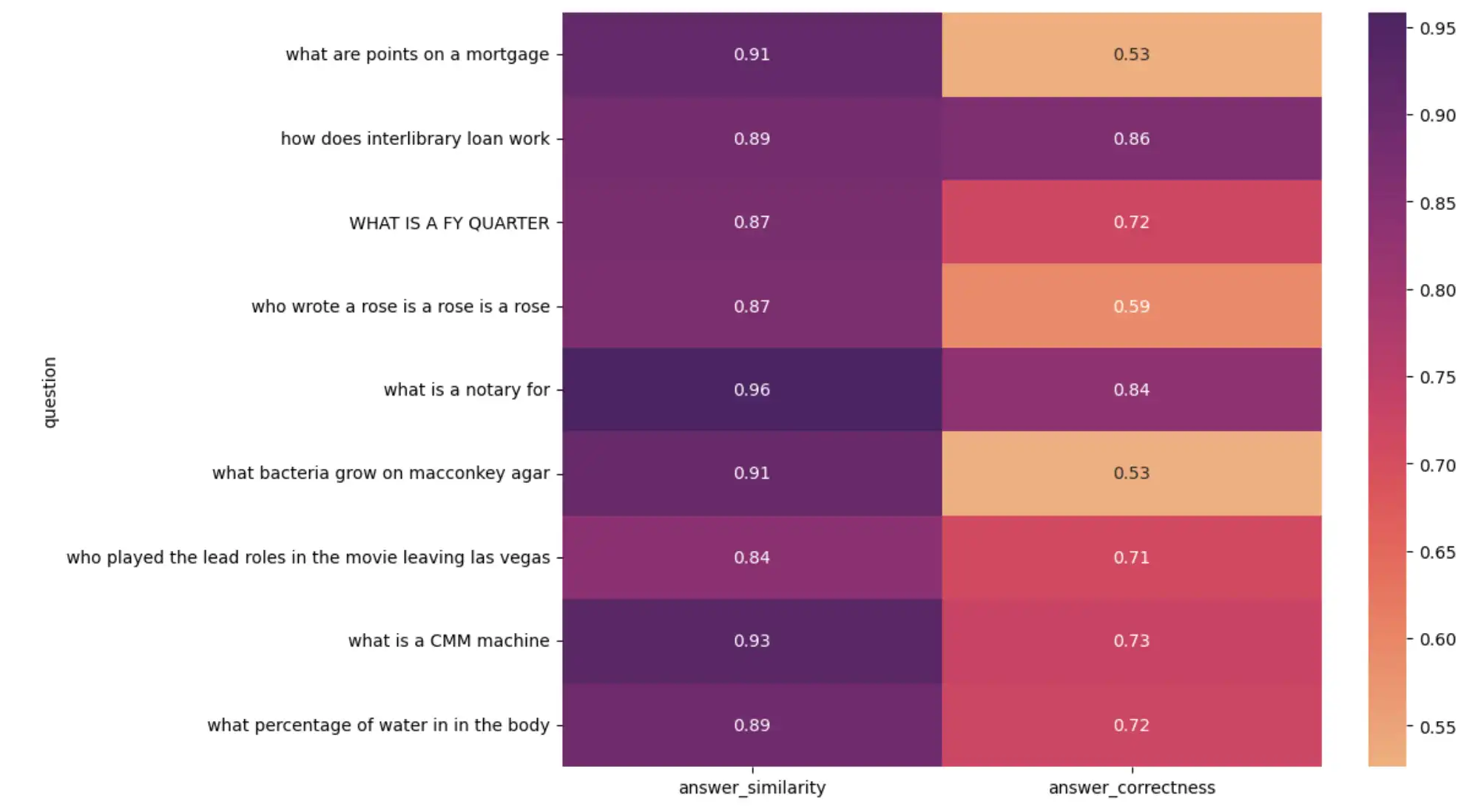
Heatmap visualizing RAG application performance
Upon investigating low-scoring results, you might find:
Some ground-truth answers in the evaluation dataset are incorrect. Although the LLM-generated answer is correct, it doesn't match the ground truth, resulting in a low score.
Some ground-truth answers are full sentences, whereas the LLM-generated answer is a single word or number.
These findings emphasize the importance of spot-checking LLM evaluations and curating accurate evaluation datasets.
Track Performance Over Time
Evaluation should not be a one-time event. Each time you change a component in your system, evaluate the changes to assess how they impact performance. Once your application is in production, monitor performance in real time and detect changes.
Use Charts to monitor the performance of your LLM application. Write evaluation results and any feedback metrics you want to track to an Atlas collection:
from datetime import datetime result["timestamp"] = datetime.now() collection = db["metrics"] collection.insert_one(result)
This code adds a timestamp field to the evaluation result and
writes it to a metrics collection in the ragas_evals database.
The document in Atlas looks like this:
{ "answer_similarity": 0.8873, "answer_correctness": 0.5922, "timestamp": "2024-04-07T23:27:30.655+00:00" }
Create a dashboard in MongoDB Charts to visualize your metrics over time. To learn how to create charts and dashboards, see Build Charts.
Summary
In this tutorial, you learned how to evaluate a RAG application using the RAGAS framework and MongoDB Atlas. You compared embedding models for retrieval, completion models for generation, and measured the overall performance of your application. You also learned how to track performance over time using MongoDB Charts.
To learn more about building RAG applications with MongoDB, see the following resources: