Make the MongoDB docs better! We value your opinion. Share your feedback for a chance to win $100.
MongoDB Branding Shape
Click here >
Docs Menu

Use Vertex AI Extensions for Natural Language MongoDB Queries

Note

Vertex AI Extensions are in preview and subject to change. Contact your Google Cloud representative to learn how to access this feature.

In addition to using Vertex AI with MongoDB Vector Search to implement RAG, you can use Vertex AI Extensions to further customize how you use Vertex AI models to interact with Atlas. In this tutorial, you create a Vertex AI Extension that allows you to query your data in Atlas in real-time by using natural language.
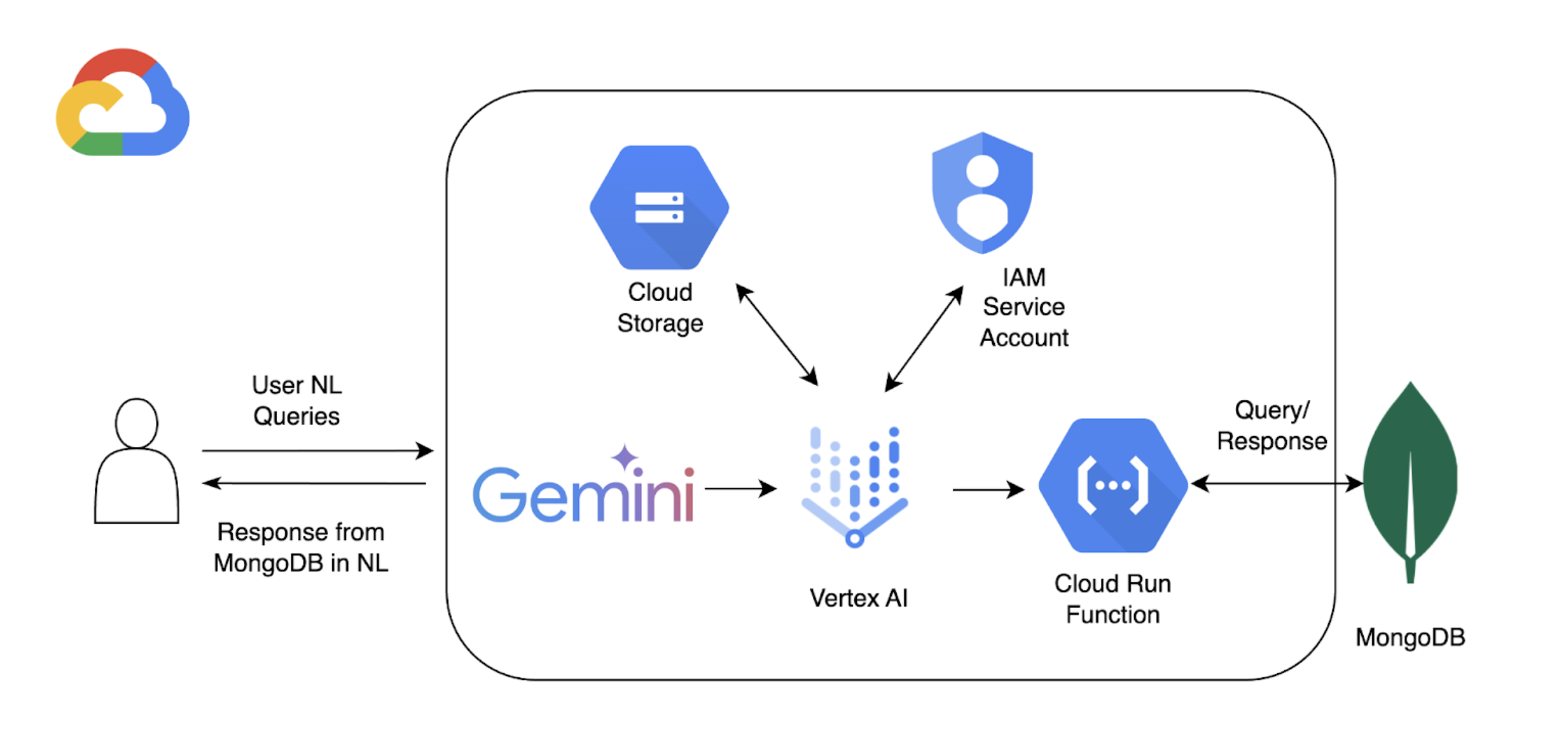
Diagram of workflow with Vertex AI Extensions and MongoDB Atlas

This tutorial uses the following components to enable natural language querying with Atlas:

  • Google Cloud Vertex AI SDK to manage AI models and enable custom extensions for Vertex AI. This tutorial uses the Gemini 1.5 Pro model.

  • Google Cloud Run to deploy a function that serves as an API endpoint between Vertex AI and Atlas.

  • OpenAPI 3 Specification for MongoDB API to define how natural language queries map to MongoDB operations. To learn more, see OpenAPI Specification.

  • Vertex AI Extensions to enable real-time interaction with Atlas from Vertex AI and configure how natural language queries are processed.

  • Google Cloud Secrets Manager to store your MongoDB API keys.

Note

For detailed code and set-up instructions, see the GitHub repository for this example.

Before you start, you must have the following:

In this section, you create a Google Cloud Run function that serves as an API endpoint between Vertex AI Extension and your Atlas cluster. The function handles authentication, connects to your Atlas cluster, and performs database operations based on the requests from Vertex AI.

1

In the Google Cloud console, open the Cloud Run page and click Write a function.

2
  1. Specify a function name and Google Cloud region where you want to deploy your function.

  2. Select the latest Python version available as a Runtime.

  3. In the Authentication section, select Allow unauthenticated invocations.

  4. Use the default values for the remaining settings, and then click Next.

For detailed configuration steps, refer to the Cloud Run documentation.

3

Paste the following code into their respective files:

Copy and paste the following code into your main.py file.

After pasting the following code, replace <connection-string> with your Atlas connection string.

Replace <connection-string> with the connection string for your Atlas cluster or local Atlas deployment.

Your connection string should use the following format:

mongodb+srv://<db_username>:<db_password>@<clusterName>.<hostname>.mongodb.net

To learn more, see Connect to a Cluster via Client Libraries.

Your connection string should use the following format:

mongodb://localhost:<port-number>/?directConnection=true

To learn more, see Connection Strings.

import functions_framework
import os
import json
from pymongo import MongoClient
from bson import ObjectId
import traceback
from datetime import datetime
def connect_to_mongodb():
client = MongoClient("<connection-string>")
return client
def success_response(body):
return {
'statusCode': '200',
'body': json.dumps(body, cls=DateTimeEncoder),
'headers': {
'Content-Type': 'application/json',
},
}
def error_response(err):
error_message = str(err)
return {
'statusCode': '400',
'body': error_message,
'headers': {
'Content-Type': 'application/json',
},
}
# Used to convert datetime object(s) to string
class DateTimeEncoder(json.JSONEncoder):
def default(self, o):
if isinstance(o, datetime):
return o.isoformat()
return super().default(o)
@functions_framework.http
def mongodb_crud(request):
client = connect_to_mongodb()
payload = request.get_json(silent=True)
db, coll = payload['database'], payload['collection']
request_args = request.args
op = request.path
try:
if op == "/findOne":
filter_op = payload['filter'] if 'filter' in payload else {}
projection = payload['projection'] if 'projection' in payload else {}
result = {"document": client[db][coll].find_one(filter_op, projection)}
if result['document'] is not None:
if isinstance(result['document']['_id'], ObjectId):
result['document']['_id'] = str(result['document']['_id'])
elif op == "/find":
agg_query = []
if 'filter' in payload and payload['filter'] != {}:
agg_query.append({"$match": payload['filter']})
if "sort" in payload and payload['sort'] != {}:
agg_query.append({"$sort": payload['sort']})
if "skip" in payload:
agg_query.append({"$skip": payload['skip']})
if 'limit' in payload:
agg_query.append({"$limit": payload['limit']})
if "projection" in payload and payload['projection'] != {}:
agg_query.append({"$project": payload['projection']})
result = {"documents": list(client[db][coll].aggregate(agg_query))}
for obj in result['documents']:
if isinstance(obj['_id'], ObjectId):
obj['_id'] = str(obj['_id'])
elif op == "/insertOne":
if "document" not in payload or payload['document'] == {}:
return error_response("Send a document to insert")
insert_op = client[db][coll].insert_one(payload['document'])
result = {"insertedId": str(insert_op.inserted_id)}
elif op == "/insertMany":
if "documents" not in payload or payload['documents'] == {}:
return error_response("Send a document to insert")
insert_op = client[db][coll].insert_many(payload['documents'])
result = {"insertedIds": [str(_id) for _id in insert_op.inserted_ids]}
elif op in ["/updateOne", "/updateMany"]:
payload['upsert'] = payload['upsert'] if 'upsert' in payload else False
if "_id" in payload['filter']:
payload['filter']['_id'] = ObjectId(payload['filter']['_id'])
if op == "/updateOne":
update_op = client[db][coll].update_one(payload['filter'], payload['update'], upsert=payload['upsert'])
else:
update_op = client[db][coll].update_many(payload['filter'], payload['update'], upsert=payload['upsert'])
result = {"matchedCount": update_op.matched_count, "modifiedCount": update_op.modified_count}
elif op in ["/deleteOne", "/deleteMany"]:
payload['filter'] = payload['filter'] if 'filter' in payload else {}
if "_id" in payload['filter']:
payload['filter']['_id'] = ObjectId(payload['filter']['_id'])
if op == "/deleteOne":
result = {"deletedCount": client[db][coll].delete_one(payload['filter']).deleted_count}
else:
result = {"deletedCount": client[db][coll].delete_many(payload['filter']).deleted_count}
elif op == "/aggregate":
if "pipeline" not in payload or payload['pipeline'] == []:
return error_response("Send a pipeline")
docs = list(client[db][coll].aggregate(payload['pipeline']))
for obj in docs:
if isinstance(obj['_id'], ObjectId):
obj['_id'] = str(obj['_id'])
result = {"documents": docs}
else:
return error_response("Not a valid operation")
return success_response(result)
except Exception as e:
print(traceback.format_exc())
return error_response(e)
finally:
if client:
client.close()

Copy and paste the following code into your requirements.txt file.

functions-framework==3.*
pymongo
pymongo[srv]
4
  1. Rename the Entry Point as mongodb_crud.

  2. Click Deploy to deploy the function.

  3. Copy and store the HTTPS Endpoint for triggering the Cloud Function locally.

  4. Navigate to the Details page for the function and copy and store the service account name used by the function.

In this section, you create a Vertex AI Extension that enables natural language querying on your data in Atlas by using the Gemini 1.5 Pro model. This extension uses an OpenAPI specification and the Cloud Run function you created to map natural language to database operations and query your data in Atlas.

To implement this extension, you use an interactive Python notebook, which allows you to run Python code snippets individually. For this tutorial, you create a notebook named mongodb-vertex-ai-extension.ipynb in an Colab Enterprise environment.

Copy and paste the following code into your notebook.

1
  1. Authenticate your Google Cloud account and set the project ID.

    from google.colab import auth
    auth.authenticate_user("GCP project id")
    !gcloud config set project {"GCP project id"}
  2. Install the required dependencies.

    !pip install --force-reinstall --quiet google_cloud_aiplatform
    !pip install --force-reinstall --quiet langchain==0.0.298
    !pip install --upgrade google-auth
    !pip install bigframes==0.26.0
  3. Restart the kernel.

    import IPython
    app = IPython.Application.instance()
    app.kernel.do_shutdown(True)
  4. Set the environment variables.

    Replace the sample values with the correct values that correspond to your project.

    import os
    # These are sample values; replace them with the correct values that correspond to your project
    os.environ['PROJECT_ID'] = 'gcp project id' # GCP Project ID
    os.environ['REGION'] = "us-central1" # Project Region
    os.environ['STAGING_BUCKET'] = "gs://vertexai_extensions" # GCS Bucket location
    os.environ['EXTENSION_DISPLAY_HOME'] = "MongoDb Vertex API Interpreter" # Extension Config Display Name
    os.environ['EXTENSION_DESCRIPTION'] = "This extension makes api call to mongodb to do all crud operations" # Extension Config Description
    os.environ['MANIFEST_NAME'] = "mdb_crud_interpreter" # OPEN API Spec Config Name
    os.environ['MANIFEST_DESCRIPTION'] = "This extension makes api call to mongodb to do all crud operations" # OPEN API Spec Config Description
    os.environ['OPENAPI_GCS_URI'] = "gs://vertexai_extensions/mongodbopenapispec.yaml" # OPEN API GCS URI
    os.environ['API_SECRET_LOCATION'] = "projects/787220387490/secrets/mdbapikey/versions/1" # API KEY secret location
    os.environ['LLM_MODEL'] = "gemini-1.5-pro" # LLM Config
2

Download the Open API specification from GitHub and upload the YAML file to the Google Cloud Storage bucket.

from google.cloud import aiplatform
from google.cloud.aiplatform.private_preview import llm_extension
PROJECT_ID = os.environ['PROJECT_ID']
REGION = os.environ['REGION']
STAGING_BUCKET = os.environ['STAGING_BUCKET']
aiplatform.init(
project=PROJECT_ID,
location=REGION,
staging_bucket=STAGING_BUCKET,
)
3

The following manifest is a structured JSON object that configures key components for the extension. Replace <service-account> with the service account name used by your Cloud Run function.

from google.cloud import aiplatform
from vertexai.preview import extensions
mdb_crud = extensions.Extension.create(
display_name = os.environ['EXTENSION_DISPLAY_HOME'],
# Optional.
description = os.environ['EXTENSION_DESCRIPTION'],
manifest = {
"name": os.environ['MANIFEST_NAME'],
"description": os.environ['MANIFEST_DESCRIPTION'],
"api_spec": {
"open_api_gcs_uri": (
os.environ['OPENAPI_GCS_URI']
),
},
"authConfig": {
"authType": "OAUTH",
"oauthConfig": {"service_account": "<service-account>"}
},
},
)
mdb_crud
4

Validate the extension and print the operation schema and parameters:

print("Name:", mdb_crud.gca_resource.name)
print("Display Name:", mdb_crud.gca_resource.display_name)
print("Description:", mdb_crud.gca_resource.description)
import pprint
pprint.pprint(mdb_crud.operation_schemas())

In Vertex AI, click Extensions in the left navigation menu. Your new extension named MongoDB Vertex API Interpreter appears in the list of extensions.

The following examples demonstrates two different natural language queries you can use to query your data in Atlas:
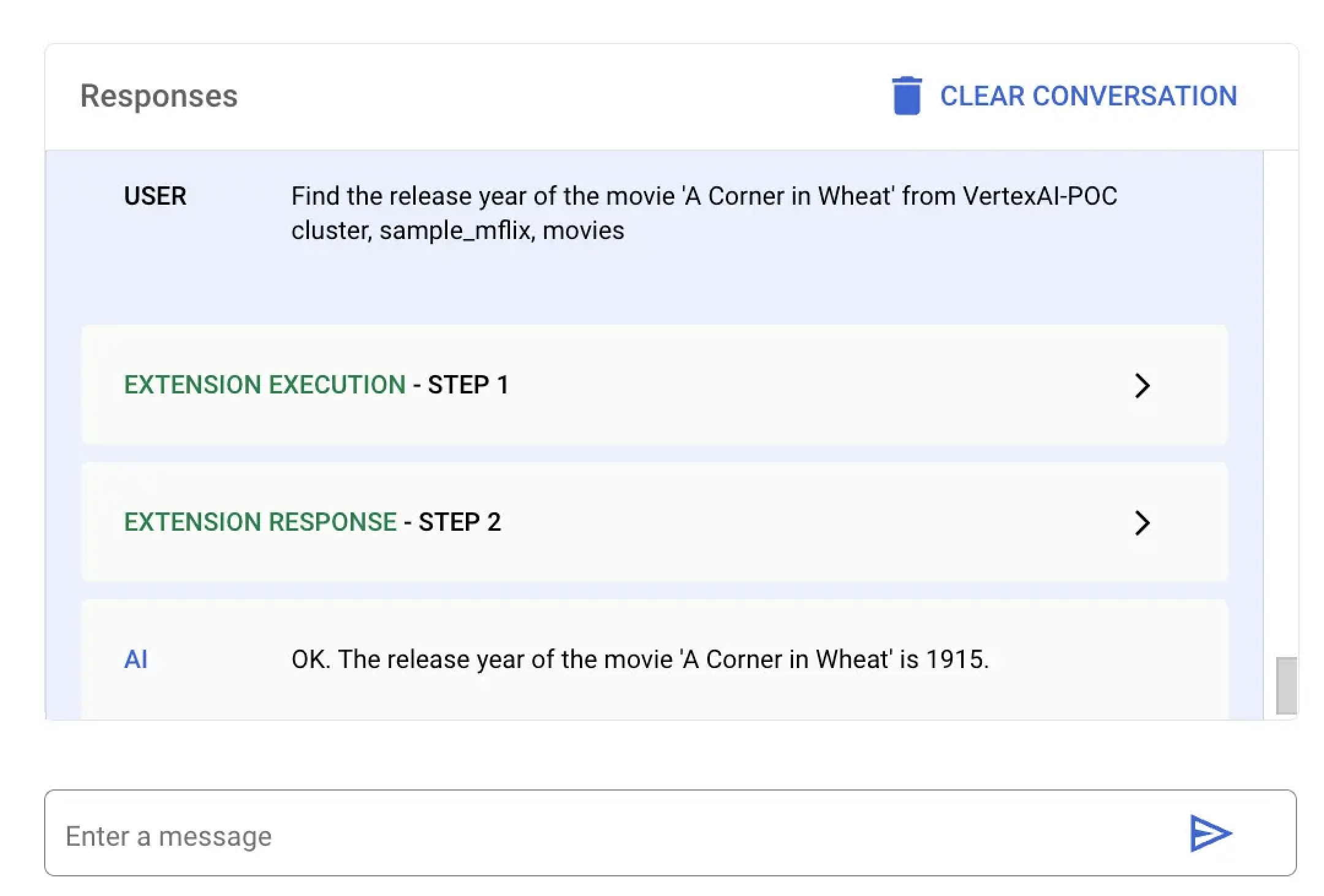
Run a natural language query to find the release date of a specific movie.

In this example, you ask Vertex AI to find the release year of a specific movie titled A Corner in Wheat. You can run this natural language query by using the Vertex AI platform or your Colab notebook:

Select the extension named MongoDB Vertex API Interpreter and enter the following natural language query:

Find the release year of the movie 'A Corner in Wheat' from VertexAI-POC cluster, sample_mflix, movies
Screenshot of the Vertex AI response to the natural language query

Paste and run the following code in mongodb-vertex-ai-extension.ipynb to find the release date of a specific movie:

## Please replace accordingly to your project
## Operation Ids
os.environ['FIND_ONE_OP_ID'] = "findone_mdb"
## NL Queries
os.environ['FIND_ONE_NL_QUERY'] = "Find the release year of the movie 'A Corner in Wheat' from VertexAI-POC cluster, sample_mflix, movies"
## Mongodb Config
os.environ['DATA_SOURCE'] = "VertexAI-POC"
os.environ['DB_NAME'] = "sample_mflix"
os.environ['COLLECTION_NAME'] = "movies"
### Test data setup
os.environ['TITLE_FILTER_CLAUSE'] = "A Corner in Wheat"
from vertexai.preview.generative_models import GenerativeModel, Tool
fc_chat = GenerativeModel(os.environ['LLM_MODEL']).start_chat()
findOneResponse = fc_chat.send_message(os.environ['FIND_ONE_NL_QUERY'],
tools=[Tool.from_dict({ "function_declarations": mdb_crud.operation_schemas()
})],
)
print(findOneResponse)
response = mdb_crud.execute(
operation_id = findOneResponse.candidates[0].content.parts[0].function_call.name,
operation_params = findOneResponse.candidates[0].content.parts[0].function_call.args
)
print(response)

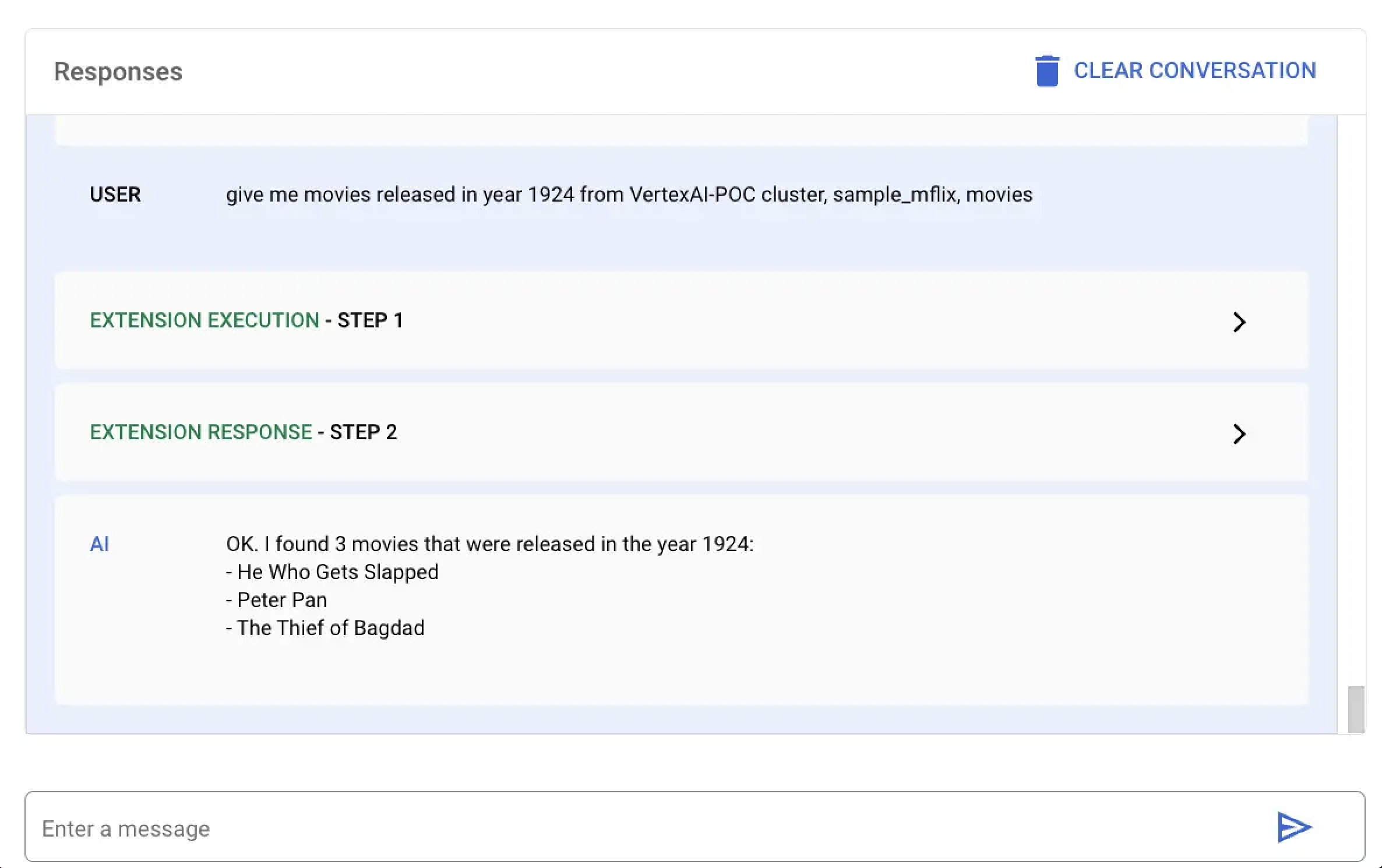
Run a natural language query to find the release date of a specific movie.

In this example, you ask Vertex AI to find all movies released in the year 1924. You can run this natural language query by using the Vertex AI platform or your Colab notebook:

Select the extension named MongoDB Vertex API Interpreter and enter the following natural language query:

give me movies released in year 1924 from VertexAI-POC cluster, sample_mflix, movies
Screenshot of the Vertex AI response to the natural language query

Paste and run the following code in mongodb-vertex-ai-extension.ipynb to find all movies released in a specific year:

## This is just a sample values please replace accordingly to your project
## Operation Ids
os.environ['FIND_MANY_OP_ID'] = "findmany_mdb"
## NL Queries
os.environ['FIND_MANY_NL_QUERY'] = "give me movies released in year 1924 from VertexAI-POC cluster, sample_mflix, movies"
## Mongodb Config
os.environ['DATA_SOURCE'] = "VertexAI-POC"
os.environ['DB_NAME'] = "sample_mflix"
os.environ['COLLECTION_NAME'] = "movies"
os.environ['YEAR'] = 1924
fc_chat = GenerativeModel(os.environ['LLM_MODEL']).start_chat()
findmanyResponse = fc_chat.send_message(os.environ['FIND_MANY_NL_QUERY'],
tools=[Tool.from_dict({ "function_declarations": mdb_crud.operation_schemas()
})],
)
print(findmanyResponse)
response = mdb_crud.execute(
operation_id = findmanyResponse.candidates[0].content.parts[0].function_call.name,
operation_params = findmanyResponse.candidates[0].content.parts[0].function_call.args
)
print(response)