使用以下方法在MongoDB中查询 null 或缺失的字段:
您的编程语言的驱动程序。
➤ 使用右上角的 Select your language(选择语言)下拉菜单,设置以下示例的语言或选择 MongoDB Compass。
MongoDB中的查询运算符以不同方式处理 null 值。
本页提供的操作示例使用 mongosh 中的 db.collection.find()方法查询null值
此页面上的示例使用的是 inventory 集合。连接到 MongoDB 实例中的测试数据库,然后创建 inventory 集合:
本页提供了使用 MongoDB Compass 查询 null 值的操作示例。
此页面上的示例使用的是 inventory 集合。连接到 MongoDB 实例中的测试数据库,然后创建 inventory 集合:
本页提供了使用mongoc_collection_find_with_opts查询null 值的操作示例。
此页面上的示例使用的是 inventory 集合。连接到 MongoDB 实例中的测试数据库,然后创建 inventory 集合:
本页提供了使用MongoDB nullC#驱动程序中的 MongoCollection.Find() 方法查询 值的操作示例。
此页面上的示例使用的是 inventory 集合。连接到 MongoDB 实例中的测试数据库,然后创建 inventory 集合:
本页提供了使用MongoDB nullGo驱动程序中的 Collection.Find 函数查询 值的操作示例。
此页面上的示例使用的是 inventory 集合。连接到 MongoDB 实例中的测试数据库,然后创建 inventory 集合:
本页提供了使用null com.mongodb.reactivestreams查询 值的操作示例。 MongoDB Java Reactive Streams 驱动程序中的客户端方法。
此页面上的示例使用的是 inventory 集合。连接到 MongoDB 实例中的测试数据库,然后创建 inventory 集合:
本页提供了使用null com.mongodb查询 值的操作示例。 MongoDB Java同步驱动程序中的客户端方法。
提示
此驱动程序提供了 com.mongodb.client.model.Filters 辅助方法,以便于创建筛选器文档。此页面中的示例使用这些方法创建筛选器文档。
此页面上的示例使用的是 inventory 集合。连接到 MongoDB 实例中的测试数据库,然后创建 inventory 集合:
本页提供了使用MongoCollection.find()查询null值的操作示例。MongoDB Kotlin协程驱动程序中的方法。
提示
此驱动程序提供了 com.mongodb.client.model.Filters 辅助方法,以便于创建筛选器文档。此页面中的示例使用这些方法创建筛选器文档。
此页面上的示例使用的是 inventory 集合。连接到 MongoDB 实例中的测试数据库,然后创建 inventory 集合:
本页面提供的示例展示了使用 motor.motor_asyncio.AsyncIOMotorCollection.find 方法在 Motor 驱动程序中查询 null 值的操作。
此页面上的示例使用的是 inventory 集合。连接到 MongoDB 实例中的测试数据库,然后创建 inventory 集合:
本页提供的操作示例使用Collection.find()查询null 值MongoDB Node.js驱动程序中的方法。
此页面上的示例使用的是 inventory 集合。连接到 MongoDB 实例中的测试数据库,然后创建 inventory 集合:
本页提供的操作示例使用null MongoDB PHP库MongoDB\\Collection::find() 中的 方法查询 值。
此页面上的示例使用的是 inventory 集合。连接到 MongoDB 实例中的测试数据库,然后创建 inventory 集合:
本页提供了使用 pymongo.collection.Collection.find 方法在 PyMongo Python 驱动程序中查询 null 值的操作示例。
此页面上的示例使用的是 inventory 集合。连接到 MongoDB 实例中的测试数据库,然后创建 inventory 集合:
本页提供的操作示例使用null MongoDB Ruby驱动程序 中的 Mongo::Collection#find() 方法查询 值。
此页面上的示例使用的是 inventory 集合。连接到 MongoDB 实例中的测试数据库,然后创建 inventory 集合:
本页中的示例展示了使用 Collection.find() 方法查询 null 值的操作,方法在 MongoDB Scala 驱动程序中执行查询操作。
此页面上的示例使用的是 inventory 集合。连接到 MongoDB 实例中的测试数据库,然后创建 inventory 集合:
重要
将 null 与MongoDB Shell结合使用来查询MongoDB中的 null 或缺失字段。
重要
将 null 与MongoDB Compass结合使用来查询MongoDB中的 null 或缺失字段。
重要
将 BCON_NULL 与 MongoDB C 驱动程序结合使用,以查询 MongoDB 中的 null 或缺失字段。
重要
将 BsonNull.Value 与 MongoDB C# 驱动程序结合使用,以查询 MongoDB 中的 null 或缺失字段。
重要
将 nil 与 MongoDB Go 驱动程序结合使用,以查询 MongoDB 中的 null 或缺失字段。
重要
将 null 与 Java Reactive Streams 驱动程序结合使用来查询 MongoDB 中的 null 或缺失字段。
重要
将 null 与 Java 驱动程序结合使用来查询 MongoDB 中的 null 或缺失字段。
重要
将 null 与 Kotlin 协程驱动程序结合使用,以查询 MongoDB 中的 null 或缺失字段。
重要
将 None 与 Motor 驱动程序结合使用,以查询 MongoDB 中的 null 或缺失字段。
重要
将 null 与 Node.js 驱动程序结合使用,以查询 MongoDB 中的 null 或缺失字段。
重要
将 null 与 MongoDB PHP 驱动程序结合使用,以查询 MongoDB 中的 null 或缺失字段。
重要
将 None 与 PyMongo Python 驱动程序结合使用,以查询 MongoDB 中的 null 或缺失字段。
重要
将 nil 与 MongoDB Ruby 驱动程序结合使用,以查询 MongoDB 中的 null 或缺失字段。
重要
将 BsonNull() 与MongoDB Scala驱动程序结合使用,以查询MongoDB中的 null 或缺失字段。
db.inventory.insertMany([ { _id: 1, item: null }, { _id: 2 } ])
[ { "_id": 1, "item": null }, { "_id": 2 } ]
有关在 MongoDB Compass 中插入文档的说明,请参阅插入文档。
mongoc_collection_t *collection; mongoc_bulk_operation_t *bulk; bson_t *doc; bool r; bson_error_t error; bson_t reply; collection = mongoc_database_get_collection (db, "inventory"); bulk = mongoc_collection_create_bulk_operation_with_opts (collection, NULL); doc = BCON_NEW ( "_id", BCON_INT64 (1), "item", BCON_NULL); r = mongoc_bulk_operation_insert_with_opts (bulk, doc, NULL, &error); bson_destroy (doc); if (!r) { MONGOC_ERROR ("%s\n", error.message); goto done; } doc = BCON_NEW ("_id", BCON_INT64 (2)); r = mongoc_bulk_operation_insert_with_opts (bulk, doc, NULL, &error); bson_destroy (doc); if (!r) { MONGOC_ERROR ("%s\n", error.message); goto done; } /* "reply" is initialized on success or error */ r = (bool) mongoc_bulk_operation_execute (bulk, &reply, &error); if (!r) { MONGOC_ERROR ("%s\n", error.message); }
var documents = new[] { new BsonDocument { { "_id", 1 }, { "item", BsonNull.Value } }, new BsonDocument { { "_id", 2 } } }; collection.InsertMany(documents);
docs := []any{ bson.D{ {"_id", 1}, {"item", nil}, }, bson.D{ {"_id", 2}, }, } result, err := coll.InsertMany(context.TODO(), docs)
Publisher<Success> insertManyPublisher = collection.insertMany(asList( Document.parse("{'_id': 1, 'item': null}"), Document.parse("{'_id': 2}") ));
collection.insertMany(asList( Document.parse("{'_id': 1, 'item': null}"), Document.parse("{'_id': 2}") ));
collection.insertMany( listOf( Document("_id", 1) .append("item", null), Document("_id", 2) ) )
await db.inventory.insert_many([{"_id": 1, "item": None}, {"_id": 2}])
await db.collection('inventory').insertMany([{ _id: 1, item: null }, { _id: 2 }]);
$insertManyResult = $db->inventory->insertMany([ ['_id' => 1, 'item' => null], ['_id' => 2], ]);
db.inventory.insert_many([{"_id": 1, "item": None}, {"_id": 2}])
client[:inventory].insert_many([{ _id: 1, item: nil }, { _id: 2 }])
collection.insertMany(Seq( Document("""{"_id": 1, "item": null}"""), Document("""{"_id": 2}""") )).execute()
相等筛选器
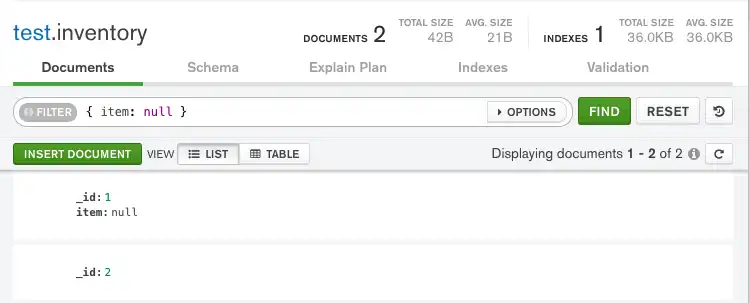
{ item : null }查询会将包含 字段与item null值或不包含 item字段的文档进行匹配。
{ item : null }查询会将包含 字段与item null值或不包含 item字段的文档进行匹配。
{ item, BCON_NULL }查询会将包含 字段与item null值或不包含 item字段的文档进行匹配。
使用 FilterDefinitionBuilder.Eq() 方法的Eq("item", BsonNull.Value) 查询会将包含item 字段与null 值或不包含 item字段的文档进行匹配。
item => nil查询会将包含 字段与item nil值或不包含 item字段的文档进行匹配。
eq("item", null)查询会将包含 字段与item null值或不包含 item字段的文档进行匹配。
eq("item", null)查询会将包含 字段与item null值或不包含 item字段的文档进行匹配。
eq("item", null)查询会将包含 字段与item null值或不包含 item字段的文档进行匹配。
{ item : None }查询会将包含 字段与item null值或不包含 item字段的文档进行匹配。
{ item : null }查询会将包含 字段与item null值或不包含 item字段的文档进行匹配。
[ item => undef ]查询会将包含 字段与item null值或不包含 item字段的文档进行匹配。
{ item : None }查询会将包含 字段与item null值或不包含 item字段的文档进行匹配。
{ item => nil }查询会将包含 字段与item nil值或不包含 item字段的文档进行匹配。
equal("item", BsonNull)查询会将包含 字段与item null值或不包含 item字段的文档进行匹配。
db.inventory.find( { item: null } )

mongoc_collection_t *collection; bson_t *filter; mongoc_cursor_t *cursor; collection = mongoc_database_get_collection (db, "inventory"); filter = BCON_NEW ("item", BCON_NULL); cursor = mongoc_collection_find_with_opts (collection, filter, NULL, NULL);
var filter = Builders<BsonDocument>.Filter.Eq("item", BsonNull.Value); var result = collection.Find(filter).ToList();
cursor, err := coll.Find( context.TODO(), bson.D{ {"item", nil}, })
FindPublisher<Document> findPublisher = collection.find(eq("item", null));
FindIterable<Document> findIterable = collection.find(eq("item", null));
val findFlow = collection .find(eq("item", null))
cursor = db.inventory.find({"item": None})
const cursor = db.collection('inventory').find({ item: null });
$cursor = $db->inventory->find(['item' => null]);
cursor = db.inventory.find({"item": None})
client[:inventory].find(item: nil)
var findObservable = collection.find(equal("item", BsonNull()))
该查询会返回集合中的这两份文档。
非相等过滤器
要查询存在且不为空的字段,请使用 { $ne
: null }过滤。{ item : { $ne : null } }查询匹配存在item 字段且具有非空值的文档。
db.inventory.find( { item: { $ne : null } } )
{ item: { $ne : null } }
filter = BCON_NEW ("item", BCON_NULL); cursor = mongoc_collection_find_with_opts (collection, filter, NULL, NULL);
var filter = Builders<BsonDocument>.Filter.Ne("item", BsonNull.Value); var result = collection.Find(filter).ToList();
cursor, err := coll.Find( context.TODO(), bson.D{ {"item", bson.D{"$ne": nil}}, })
db.inventory.find( { item: { $ne : null} } )
collection.find(ne("item", null));
collection.find(ne("item", null))
cursor = db.inventory.find( { "item": { "$ne": None } } )
const cursor = db.collection('inventory') .find({ item: { $ne : null } });
$cursor = $db->inventory->find(['item' => ['$ne' => null ]]);
cursor = db.inventory.find( { "item": { "$ne": None } } )
client[:inventory].find(item: { '$ne' => nil })
collection.find($ne("item", null));
类型检查
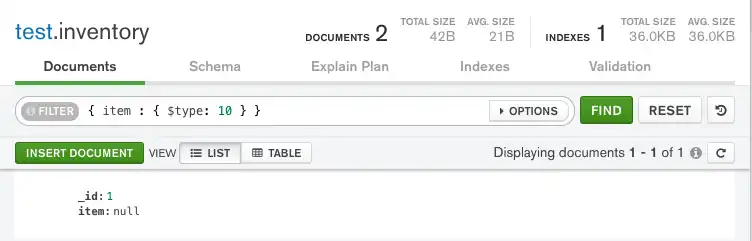
{ item : { $type: 10 } }item查询仅匹配包含具有null 值的 字段的文档。item 字段的值属于BSON类型Null (BSON类型10 ):
{ item : { $type: 10 } }item查询仅匹配包含具有null 值的 字段的文档。item 字段的值属于BSON类型Null (BSON类型10 ):
{ item, { $type, BCON_NULL } }item查询仅匹配包含具有null 值的 字段的文档。item 字段的值属于BSON类型Null (BSON类型10 ):
Type("item", BsonType.Null)使用 FilterDefinitionBuilder.Type() 方法的 查询仅匹配包含item 字段和null 值的文档。item 字段的值为BSON类型Null (BSON类型10 ):
以下查询仅匹配包含 item字段且值为BSON类型Null (BSON类型10 )的文档:
type("item", BsonType.NULL)item查询仅匹配包含具有null 值的 字段的文档。item 字段的值属于BSON类型Null (BSON类型10 ):
type("item", BsonType.NULL)item查询仅匹配包含具有null 值的 字段的文档。item 字段的值属于BSON类型Null (BSON类型10 ):
type("item", BsonType.NULL)item查询仅匹配包含具有null 值的 字段的文档。item 字段的值属于BSON类型Null (BSON类型10 ):
{ item : { $type: 10 } }item查询仅匹配包含具有null 值的 字段的文档。item 字段的值属于BSON类型Null (BSON类型10 ):
{ item : { $type: 10 } }item查询仅匹配包含具有null 值的 字段的文档。item 字段的值属于BSON类型Null (BSON类型10 ):
[ item => [ $type => 10 ] ]item查询仅匹配包含具有null 值的 字段的文档。item 字段的值属于BSON类型Null (BSON类型10 ):
{ item : { $type: 10 } }item查询仅匹配包含具有null 值的 字段的文档。item 字段的值属于BSON类型Null (BSON类型10 ):
{ item => { $type => 10 } }item查询仅匹配包含具有null 值的 字段的文档。item 字段的值属于BSON类型Null (BSON类型10 ):
type("item", BsonType.NULL)item查询仅匹配包含具有null 值的 字段的文档。item 字段的值属于BSON类型Null (BSON类型10 ):
db.inventory.find( { item : { $type: 10 } } )

mongoc_collection_t *collection; bson_t *filter; mongoc_cursor_t *cursor; collection = mongoc_database_get_collection (db, "inventory"); filter = BCON_NEW ( "item", "{", "$type", BCON_INT64 (10), "}"); cursor = mongoc_collection_find_with_opts (collection, filter, NULL, NULL);
var filter = Builders<BsonDocument>.Filter.Type("item", BsonType.Null); var result = collection.Find(filter).ToList();
cursor, err := coll.Find( context.TODO(), bson.D{ {"item", bson.D{ {"$type", 10}, }}, })
findPublisher = collection.find(type("item", BsonType.NULL));
findIterable = collection.find(type("item", BsonType.NULL));
val findFlow = collection .find(type("item", BsonType.NULL))
cursor = db.inventory.find({"item": {"$type": 10}})
const cursor = db.collection('inventory').find({ item: { $type: 10 } });
$cursor = $db->inventory->find(['item' => ['$type' => 10]]);
cursor = db.inventory.find({"item": {"$type": 10}})
client[:inventory].find(item: { '$type' => 10 })
findObservable = collection.find(bsonType("item", BsonType.NULL))
该查询仅返回 item 字段值为 null 的文档。
存在性检查
文档的以下示例查询不包含字段。
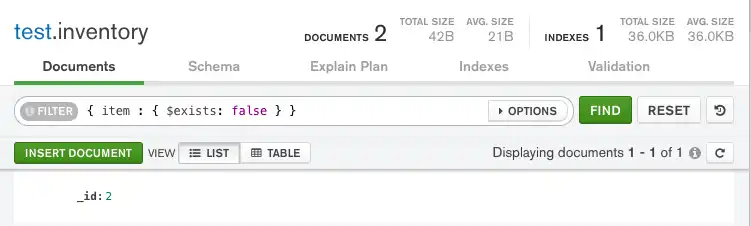
{ item : { $exists: false } } 查询匹配不包含 item 字段的文档:
{ item : { $exists: false } } 查询匹配不包含 item 字段的文档:
{ item, { $exists, BCON_BOOL (false) } } 查询匹配不包含 item 字段的文档:
使用 FilterDefinitionBuilder.Exists() 方法的 Exists("item", false) 查询匹配不包含 item 字段的文档:
bson.D{{"item", bson.D{{"$exists", false}}}} 查询匹配不包含 item 字段的文档:
exists("item", false) 查询匹配不包含 item 字段的文档:
exists("item", false) 查询匹配不包含 item 字段的文档:
exists("item", false) 查询匹配不包含 item 字段的文档:
{ item : { $exists: False } } 查询匹配不包含 item 字段的文档:
{ item : { $exists: false } } 查询匹配不包含 item 字段的文档:
[ item => [ $exists => false ] ] 查询匹配不包含 item 字段的文档:
{ item : { $exists: False } } 查询匹配不包含 item 字段的文档:
{ item => { $exists => false } } 查询匹配不包含 item 字段的文档:
exists("item", exists = false) 查询匹配不包含 item 字段的文档:
db.inventory.find( { item : { $exists: false } } )

mongoc_collection_t *collection; bson_t *filter; mongoc_cursor_t *cursor; collection = mongoc_database_get_collection (db, "inventory"); filter = BCON_NEW ( "item", "{", "$exists", BCON_BOOL (false), "}"); cursor = mongoc_collection_find_with_opts (collection, filter, NULL, NULL);
根据需要调用以下方法,清理所有打开的资源:
var filter = Builders<BsonDocument>.Filter.Exists("item", false); var result = collection.Find(filter).ToList();
cursor, err := coll.Find( context.TODO(), bson.D{ {"item", bson.D{ {"$exists", false}, }}, })
findPublisher = collection.find(exists("item", false));
findIterable = collection.find(exists("item", false));
val findFlow = collection .find(exists("item", false))
cursor = db.inventory.find({"item": {"$exists": False}})
const cursor = db.collection('inventory').find({ item: { $exists: false } });
$cursor = $db->inventory->find(['item' => ['$exists' => false]]);
cursor = db.inventory.find({"item": {"$exists": False}})
client[:inventory].find(item: { '$exists' => false })
findObservable = collection.find(exists("item", exists = false))
该查询仅返回不包含 item 字段的文档。
注意
表达式不支持$exists操作符。要检查表达式中某个字段是否存在,可以使用$type聚合操作符来检查字段的类型是否为 missing。
有关更多信息,请参阅 $type 存在性检查。
使用 MongoDB Atlas 查询 Null 或缺失字段
本节中的示例使用示例训练数据集。要了解如何将示例数据集加载到您的 MongoDB Atlas 部署中,请参阅加载示例数据。
要查询 MongoDB Atlas 中的 null 或缺失字段,请遵循以下步骤:
在MongoDB Atlas用户界面中,转到项目的Clusters 页面。
如果尚未显示,请从导航栏上的 Organizations 菜单中选择包含所需项目的组织。
如果尚未显示,请从导航栏的 Projects 菜单中选择您的项目。
在侧边栏中,单击 Database 标题下的 Clusters。
会显示集群页面。
指定查询筛选文档。
要查找包含 null 或缺失值的文档,请在Filter字段中指定查询筛选器文档。查询筛选器文档使用查询运算符指定搜索条件。
MongoDB中的查询运算符以不同方式处理 null 值。要应用查询过滤,请将以下每个文档复制到 Filter搜索栏中,然后单击 Apply。
使用以下查询过滤匹配包含 description字段和 null 值或不包含 description字段的文档:
{ description : null }
使用以下查询筛选器仅匹配包含 description 字段和 null 值的文档。筛选器指定该字段的值必须是 BSON 类型 Null(BSON 类型 10):
{ description : { $type: 10 } }
使用以下查询筛选器仅匹配不包含 description 字段的文档。只有您之前插入的文档应该会显示:
{ description : { $exists: false } }