行业:媒体、电信
产品和工具: MongoDB Atlas、 MongoDB Vector Search、 MongoDB Atlas Stream Processing
合作伙伴: Voyage AI 、 Azure OpenAI
解决方案概述
当新用户登陆您的新闻站点时,您有几秒钟的时间了解他们在寻找什么,否则他们可能会失去兴趣并离开。这就引入了冷启动问题:如何在没有事先数据的情况下向用户推荐内容?
假设一位匿名用户登录您的站点并点击了三篇文章:
“NVIDIA 打造新型AI芯片”
“台积电扩大亚利桑那州生产”
“英特尔股票因延误而下跌”
简单的关键字搜索只会推荐有关英特尔或亚利桑那州的其他文章。但是,智能系统会识别所有三次点击都与半导体供应链有关。这样一来,即使这些文章不与用户的浏览历史记录股票关键字,它也能推荐“硅谷的未来”等相关文章。
本文中的解决方案构建了一个智能媒体个性化系统,该系统摄取和处理点击流数据,以生成用户兴趣的自然语言摘要,并推荐用户更有可能参与的相关文章。
该解决方案结合了:
Atlas Stream Processing用于实时数据摄取、扩充和 LLM 集成,以从点击流数据中总结用户意图
Atlas Vector Search具有用于语义检索和推荐的自动化 Voyage AI嵌入
参考架构
此架构展示了如何构建AI驱动的媒体推荐引擎,该引擎使用MongoDB Atlas实时摄取、处理和响应用户行为。

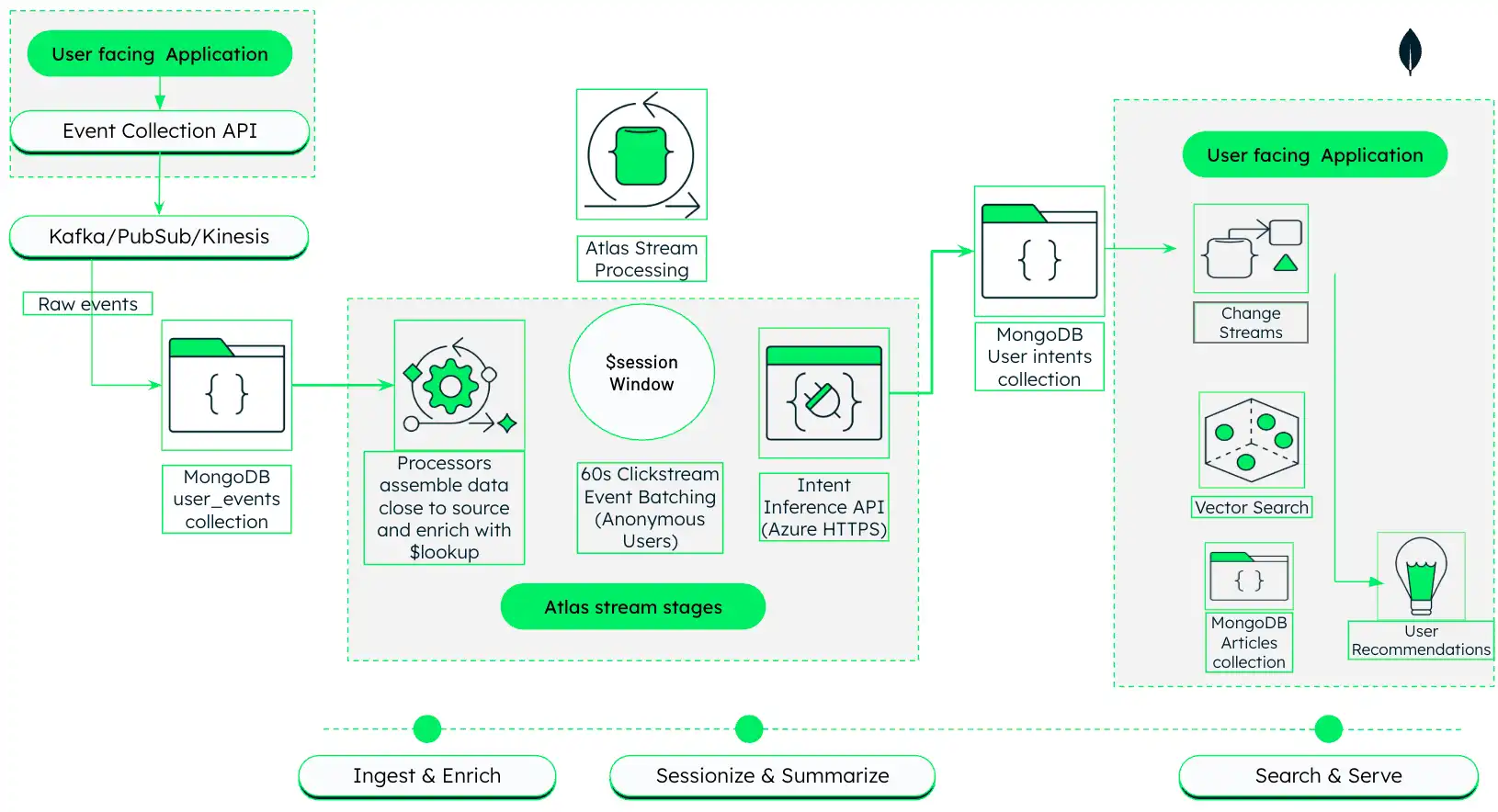
图 1。具有Atlas Stream Processing和MongoDB Vector Search 的AI驱动型媒体个性化架构
此架构分三个阶段运行,以下各部分将详细介绍:
摄取和丰富:从面向用户的应用程序捕获原始点击流事件,并使用Atlas Stream Processing将这些事件与文章元数据实时结合。
会话化和摘要:将相关点击分组为会话,并使用法学硕士生成用户兴趣的自然语言摘要。
搜索和服务:使用生成的摘要来驱动语义向量搜索并返回个性化推荐。
1 阶段:引入和丰富点击流数据
在第一阶段,该解决方案架构使用Atlas Stream Processing从媒体平台获取原始点击流数据,并使用数据库中文章的元数据对其进行丰富。
设置数据源。
此解决方案使用同一MongoDB 集群的 news数据库中的以下两个集合:
articles集合包含有关目录中商品的元数据。在此示例中,该集合位于 ClickstreamCluster集群的 news数据库中。
集合中的每个文档代表一篇文章并包含相关元数据。示例:
{ "_id": { "$oid": "696493bfbc1084032ac0adfe" }, "title": "Ukraine updates, Day 6: ‘We are sacrificing our lives for freedom,’ Zelenskyy gets standing ovation after speech to European parliament", "link": "https://nationalpost.com/news/world/ukraine-updates-day-6-russia-kyiv", "keywords": null, "creator": [ "National Post Wire Services" ], "video_url": null, "description": "Russia escalated shelling overnight of key cities in Ukraine as its troops on the ground move slowly in a large convoy toward the capital, Kyiv", "content": "8:20 a.m. EST — Ukraine's Zelenskyy tells EU: 'Prove that you are with us\" Read More", "pubDate": "2022-03-01 13:45:04", "expire_at": "Wed, 07 Sep 2022 13:45:04 GMT", "image_url": null, "source_id": "nationalpost", "country": [ "canada" ], "category": [ "top" ], "language": "english" }
user_events集合包含从面向用户的应用程序摄取的原始点击流事件。在此示例中,该集合位于 ClickstreamCluster集群的 news数据库中。
您可以使用首选事件集合系统设立点击流数据源。要重新创建参考架构图中所示的方法,请在面向用户的应用程序中实现事件集合API ,以将单击事件发送到Apache Kafka主题。然后,使用MongoDB Kafka Sink Connector 读取点击流主题并写入MongoDB集群的user_events 集合。
每次文章点击都会生成一个事件文档,其中包含 session_id、article_id 和 timestamp 等字段。示例:
{ "_id": { "$oid": "696a1ecd66a51be18fffb8fa" }, "user_id": "user-2", "session_id": "sess-6a0d8837-a5f9-4ef5-8b00-78e9bf7a825c", "timestamp": { "$date": "2026-01-16T16:49:41.208Z" }, "event_type": "read", "article_id": { "$oid": "696493e6bc1084032ac116ed" }, "device": "desktop", "metadata": { "time_on_page": 54, "referral": "https://guzman.com/main/search/listmain.jsp" } }
创建 Stream Processing 工作区。
在Atlas中, Go项目的 Stream Processing 页面。
如果尚未显示,请从导航栏上的 Organizations 菜单中选择包含项目的组织。
如果尚未显示,请从导航栏的 Projects 菜单中选择您的项目。
在侧边栏中,单击 Streaming Data 标题下的 Stream Processing。
此时将显示 Stream Processing 页面。
单击 Create a workspace(连接)。
在 Create a stream processing workspace 页面上,按如下方式配置您的工作区:
Tier:
SP30Provider:
AWSRegion:
us-east-1Workspace Name:
article-personalization
为点击流和文章数据添加连接。
流处理器需要连接到点击流数据和文章元数据才能执行扩充。两个数据源应位于同一Atlas 集群中。
在 Stream Processing 工作区的窗格中,点击Manage。
在Connection Registry标签页中,单击右上角的+ Add Connection 。
在 Edit Connection 页面上,按如下方式配置连接:
连接类型:
Atlas Database连接名称:
usereventsAtlas Cluster:点击流和文章数据所在集群的名称(示例
ClickstreamCluster)执行方式:
Read and write to any database
单击 Save changes 以创建连接。
创建持久流处理器。
创建一个名为 userIntentSummarizer 的流处理器,其中包含从 user_events集合中读取原始点击流事件并使用文章元数据丰富这些事件的阶段。
在Atlas项目的 Stream Processing 页面上,单击流处理工作区窗格中的Manage 。
在JSON editor 中,将以下 JSON定义复制并粘贴到JSON编辑器文本框中,以定义具有以下阶段的名为
userIntentSummarizer的流处理器:$sourceuser_eventsnews:从已连接的点击流集群(userevents连接)的 数据库中的 集合中读取原始点击流事件。$lookup:将原始点击流事件与基于articles字段的article_id集合连接,从而从description、keywords和title字段引入相关文章元数据。$addFields:将descriptionkeywordstitlearticle_details字段中的 、 和 字段投影到事件流的顶层,以便下游阶段轻松访问。$project:投影相关字段以进行下游处理。
{ "$source": { "connectionName": "userevents", "db": "news", "collection": "user_events" } }, { "$lookup": { "from": { "connectionName": "userevents", "db": "news", "coll": "articles" }, "localField": "article_id", "foreignField": "_id", "as": "article_details", "pipeline": [ { "$project": { "_id": 0, "description": 1, "keywords": 1, "title": 1 } } ] } }, { "$addFields": { "description": { "$arrayElemAt": [ "$article_details.description", 0 ] }, "keywords": { "$arrayElemAt": [ "$article_details.keywords", 0 ] }, "title": { "$arrayElemAt": [ "$article_details.title", 0 ] } } }, { "$project": { "userId": 1, "article_id": 1, "eventTime": 1, "event_type": 1, "device": 1, "session_id": 1, "description": 1, "keywords": 1, "title": 1 } }, 单击 Update stream processor 保存更改。
2 阶段:会话化和总结用户行为
在此阶段,我们扩展了流处理器管道,将相关点击群组,并使用 LLM 为每个会话生成描述用户兴趣的自然语言摘要。
将 LLM提供商连接到流处理工作区。
将外部 HTTPS 连接添加到您的 LLM提供商(示例Azure OpenAI),启用流处理器能够直接从管道调用 LLM,从而丰富您的数据:
在 Stream Processing 工作区的窗格中,点击Manage。
在Connection Registry标签页中,单击右上角的+ Add Connection 。
按如下方式配置连接:
连接类型:
HTTPS连接名称:
azureopenaiURL : Azure OpenAI实例的端点URL
标头:将这些键值对添加到标头:
键:
Content-Type,值:application/json键:
api-key,值:您的Azure OpenAI API密钥
$sessionWindow使用 阶段对点击流数据进行会话化。
向流处理器管道添加一个 阶段,以根据指定的会话间隔将相关事件群组到会话中。此解决方案将会话定义为来自同一$sessionWindow 的一系列事件,且不活动间隔时间不超过session_id 60秒。
将此阶段添加到 userIntentSummarizer管道的扩充阶段之后:
{ "$sessionWindow": { "partitionBy": "$session_id", "gap": { "unit": "second", "size": 60 }, "pipeline": [{ "$group": { "_id": "$session_id", "titles": { "$push": "$title" } } }] } }
使用$https 阶段汇总用户会话。
添加 阶段以直接从流处理管道调用 LLM提供商。此解决方案调用Azure OpenAI$https 生成每个会话的自然语言摘要,根据会话中的文章标题描述用户的兴趣。
将此阶段添加到管道的$sessionWindow 阶段之后:
{ "$https": { "connectionName": "azureopenai", "method": "POST", "as": "apiResults", "config": { "parseJsonStrings": true }, "payload": [ { "$project": { "_id": 0, "model": "gpt-4o-mini", "response_format": { "type": "json_object" }, "messages": [ { "role": "system", "content": "You are an analytical assistant that specializes in behavioral summarization. You analyze short-term reading activity and infer user interests without making personal or sensitive assumptions the create a special field called summary. Summary must be a special field in the response. Respond only in JSON format.Return a JSON object with the following keys in this order: \n reasoning: (Internal scratchpad, briefly explain your analysis) \n user_interests: (The list of inferred interests) \n summary: (A concise summary based on the interests above)" }, { "role": "user", "content": { "$toString": "$titles" } } ] } } ] } }
注意
流处理器本身是“智能的”。在数据到达磁盘之前,它会将标题列表转换为语义摘要(示例,“用户正在研究半导体制造物流”)。这与传统的批处理管道有根本的不同,传统的处理管道通常将原始会话数据写入数据库,然后从应用程序服务器调用外部API 。
将会话摘要写入新集合。
将以下阶段添加到管道,以从 LLM 输出中提取摘要并将其写入新集合:
$match:过滤掉 LLM 调用失败并返回错误的任何会话,以避免将不完整的数据写入数据库。$addFields:从summaryLLM 输出中提取 字段并将其添加到文档的顶层。$project:从文档中删除原始 LLM 输出,以减少噪音和存储成本。$mergeuser_intentnews:将生成的文档写入点击流集群(userevents连接)的 数据库中名为 的新集合。此集合中的每个文档代表一个用户会话,并包含用户兴趣的摘要。
{ "$match": { "titles": { "$exists": true }, "apiResults": { "$exists": true } } }, { "$addFields": { "summary": { "$arrayElemAt": [ "$apiResults.choices.message.content.summary", 0 ] } } }, { "$project": { "apiResults": 0 } }, { "$merge": { "into": { "coll": "user_intent", "connectionName": "userevents", "db": "news" } } }
启动流处理器。
当您准备好开始汇总点击流数据时,请在流处理工作区的流处理器列表中单击 userIntentSummarizer 处理器的 Start 图标。
此管道应将文档写入user_intent集合,其中包含捕获用户兴趣的会话摘要。示例:
{ "_id": "sess-6a0d8837-a5f9-4ef5-8b00-78e9bf7a825c", "summary": "The user seems interested in geopolitical developments, especially in the Middle East, US political strategies involving Trump, and legal aspects of government operations.", "titles": [ "Israel and Hamas agree to part of Trump's Gaza peace plan, will free hostages and prisoners", "Top officials from US and Qatar join talks aimed at brokering peace in Gaza", "How Trump secured a Gaza breakthrough", "Ontario's anti-tariff ad is clever, effective and legally sound, experts say", "Shutdown? Trump's been dismantling the government all year", "AP News Summary at 7:58 p.m. EDT" ] }
以下是 流处理器的完整JSON定义,该处理器执行阶段 userIntentSummarizer1和2 中描述的所有操作,包括摄取点击流数据、使用文章元元数据丰富数据、会话化用户行为、调用 LLM 来总结用户意图,并将摘要写入新的集合。
{ "name": "userIntentSummarizer", "pipeline": [ { "$source": { "connectionName": "userevents", "db": "news", "collection": "user_events" } }, { "$lookup": { "from": { "connectionName": "userevents", "db": "news", "coll": "articles" }, "localField": "article_id", "foreignField": "_id", "as": "article_details", "pipeline": [ { "$project": { "_id": 0, "description": 1, "keywords": 1, "title": 1 } } ] } }, { "$addFields": { "description": { "$arrayElemAt": [ "$article_details.description", 0 ] }, "keywords": { "$arrayElemAt": [ "$article_details.keywords", 0 ] }, "title": { "$arrayElemAt": [ "$article_details.title", 0 ] } } }, { "$project": { "userId": 1, "article_id": 1, "eventTime": 1, "event_type": 1, "device": 1, "session_id": 1, "description": 1, "keywords": 1, "title": 1 } }, { "$sessionWindow": { "partitionBy": "$session_id", "gap": { "unit": "second", "size": 60 }, "pipeline": [{ "$group": { "_id": "$session_id", "titles": { "$push": "$title" } } }] } }, { "$https": { "connectionName": "azureopenai", "method": "POST", "as": "apiResults", "config": { "parseJsonStrings": true }, "payload": [ { "$project": { "_id": 0, "model": "gpt-4o-mini", "response_format": { "type": "json_object" }, "messages": [ { "role": "system", "content": "You are an analytical assistant that specializes in behavioral summarization. You analyze short-term reading activity and infer user interests without making personal or sensitive assumptions then create a special field called summary. Summary must be a special field in the response. Respond only in JSON format.Return a JSON object with the following keys in this order: \n reasoning: (Internal scratchpad, briefly explain your analysis) \n user_interests: (The list of inferred interests) \n summary: (A concise summary based on the interests above)" }, { "role": "user", "content": { "$toString": "$titles" } } ] } } ] } }, { "$match": { "titles": { "$exists": true }, "apiResults": { "$exists": true } } }, { "$addFields": { "summary": { "$arrayElemAt": [ "$apiResults.choices.message.content.summary", 0 ] } } }, { "$project": { "apiResults": 0 } }, { "$merge": { "into": { "coll": "user_intent", "connectionName": "userevents", "db": "news" } } } ] }
阶段 3:语义搜索和提供个性化推荐
最后,我们使用MongoDB Vector Search 使用上一阶段生成的会话摘要对文章目录执行语义搜索,以驱动个性化内容推荐。
为语义检索准备文章数据。
在执行语义搜索之前,您需要为文章数据生成向量嵌入。为此,创建一个名为 的MongoDB Vector Search索引,将vector_index description集合的articles 字段索引为autoEmbed 类型。每当在集合中插入或更新文档时,这会指示MongoDB Vector Search 使用自动嵌入自动为description 字段生成向量嵌入。
重要
自动嵌入作为预览功能仅适用于MongoDB Community Edition v8.2 及更高版本。在预览期间,功能和相应的文档可能随时更改。要学习;了解更多信息,请参阅预览功能。
Atlas支持所有版本的MongoDB中的手动嵌入。
description字段作为autoEmbed类型,用于指示MongoDB Vector Search 每当在集合中插入或更新文档时,使用voyage-4-large嵌入模型自动为description字段生成向量嵌入。title字段为filter类型,用于使用该字段中的字符串值对数据进行预筛选,以进行语义搜索。这允许您从搜索结果中排除用户已阅读的文章。
{ "fields": [ { "type": "autoEmbed", "modalitytype": "text", "path": "description", "model": "voyage-4-large" }, { "type": "filter", "path": "title" } ] }
运行语义搜索查询以提供服务个性化推荐。
当用户访问您的站点时,获取其当前会话的摘要,并将其用作针对您的文章目录的向量搜索的查询。由于您在索引上启用了自动嵌入, MongoDB Vector Search 在查询时会自动生成摘要的嵌入,并将其用作有效查询向量。
此示例显示了一个简化的向量搜索查询,该查询使用会话 summary 作为查询向量,并根据 titles字段排除用户已阅读的文章:
[{ "$vectorSearch": { "index": "vector_index", // Vector index with autoEmbed on article descriptions "path": "description", "query": { "text": "<session-summary>" // Session summary from user_intent document }, "numCandidates": 100, "filter": { "title": { "$nin": [<read-titles>] } // Exclude articles the array of titles in the user_intent document } } }]
关键要点
该架构展示了构建现代数据产品方面的几个重要进步:
减少延迟:将 LLM 调用直接嵌入到流处理器中,消除了多个网络跃点和中间持久层。系统近乎实时地将原始点击转换为可操作的意图。
增强的开发者体验:使用基于JSON的MQL定义管道,使已经了解MongoDB查询的团队能够构建高级流媒体和AI驱动的工作负载,而无需学习新的 DSL 或预配外的基础架构。
语义个性化:超越关键字匹配和隔夜批处理作业,构建能够监听、思考和立即响应用户行为的系统。
作者
Vinod Krishnan, MongoDB解决方案架构师
了解详情
要了解Atlas Vector Search如何支持语义搜索并实现实时分析,请访问Atlas Vector Search页面。
要学习;了解MongoDB如何改变媒体运营,请阅读《 AI支持的媒体个性化: MongoDB和 Vector Search》一文。
要了解MongoDB如何支持现代媒体工作流程,请访问MongoDB媒体和娱乐页面。
要学习;了解有关Atlas Stream Processing 的更多信息,请访问Atlas Stream Processing文档。