您可以将MongoDB Atlas与 LangGraph 集成以构建AI代理。本教程演示如何构建AI代理来回答有关MongoDB中示例数据的问题。
具体来说,代理使用该集成来实现代理 RAG和代理内存。它使用语义搜索和全文搜索工具来检索相关信息并回答有关数据的问题。它还通过将对话历史记录和重要交互存储在单独的集合中,使用MongoDB实现短期和长期记忆。
本页上的代码构建了一个完整的示例应用程序。如果您希望逐步学习;了解,还可以将代码作为 Python笔记本 来学习。
先决条件
如要完成本教程,您必须具备以下条件:
以下MongoDB 集群类型之一:
运行MongoDB 版本的Atlas6.0.11 集群,7.0.2 或更高版本。确保您的 IP解决 包含在Atlas项目的 访问权限列表 中。
使用Atlas CLI创建的本地Atlas部署。要学习;了解更多信息,请参阅创建本地Atlas部署。
安装了Search 和 Vector Search的MongoDB Community或 Enterprise集群。
Voyage AI API密钥。要学习;了解更多信息,请参阅API密钥和Python客户端。
OpenAI API密钥。您必须拥有一个具有可用于API请求的积分的 OpenAI 帐户。要学习;了解有关注册 OpenAI 帐户的更多信息,请参阅 OpenAI API网站。
注意
检查 langchain-voyageai 包的要求,确保您使用兼容的Python版本。
设置环境
要设置环境,请完成以下步骤:
初始化项目并安装依赖项。
创建一个新的项目目录,然后安装所需的依赖项:
mkdir langgraph-mongodb-ai-agent cd langgraph-mongodb-ai-agent pip install --quiet --upgrade python-dotenv langgraph langgraph-checkpoint-mongodb langgraph-store-mongodb langchain langchain-mongodb langchain-voyageai langchain-openai pymongo
注意
您的项目将使用以下结构:
langgraph-mongodb-ai-agent ├── .env ├── config.py ├── search-tools.py ├── memory-tools.py ├── agent.py ├── main.py
设置环境变量。
在项目中创建 .env文件并指定以下变量。将占位符值替换为有效的API密钥和MongoDB集群的连接字符串。
VOYAGE_API_KEY = "<voyage-api-key>" OPENAI_API_KEY = "<openai-api-key>" MONGODB_URI = "<connection-string>"
注意
将 <connection-string> 替换为您的 Atlas 集群或本地部署的连接字符串。
连接字符串应使用以下格式:
mongodb+srv://<db_username>:<db_password>@<clusterName>.<hostname>.mongodb.net
要学习;了解更多信息,请参阅通过客户端库连接到集群。
使用MongoDB作为向量数据库
要将MongoDB配置为向量数据库以进行存储和检索,请完成以下步骤:
加载示例数据。
在本教程中,您将使用我们的一个示例数据集作为数据源。如果还没有,请完成将示例数据加载到Atlas 集群的步骤。
具体而言,您将使用 embedded_movies 数据集,该数据集包含有关电影的文档,包括其情节的向量嵌入。
注意
如果您想使用自己的数据,请参阅 LangChain 入门或如何创建向量嵌入,以了解如何将向量嵌入导入 Atlas。
设置向量存储和索引。
在项目中创建一个名为 config.py 的文件。此文件将MongoDB配置为代理的向量存储。它还创建索引以启用对示例数据的向量搜索和全文搜索查询。
import os from pymongo import MongoClient from langchain_mongodb import MongoDBAtlasVectorSearch from langchain_mongodb.index import create_fulltext_search_index from langchain_voyageai import VoyageAIEmbeddings from langchain_openai import ChatOpenAI from dotenv import load_dotenv # Load environment variables load_dotenv() # Get required environment variables MONGODB_URI = os.getenv("MONGODB_URI") if not MONGODB_URI: raise ValueError("MONGODB_URI environment variable is required") # Initialize models embedding_model = VoyageAIEmbeddings( model="voyage-3-large", output_dimension=2048 ) llm = ChatOpenAI("gpt-4o") # MongoDB setup mongo_client = MongoClient(MONGODB_URI) collection = mongo_client["sample_mflix"]["embedded_movies"] # LangChain vector store setup vector_store = MongoDBAtlasVectorSearch.from_connection_string( connection_string=MONGODB_URI, namespace="sample_mflix.embedded_movies", embedding=embedding_model, text_key="plot", embedding_key="plot_embedding_voyage_3_large", relevance_score_fn="dotProduct", ) # Create indexes on startup print("Setting up vector store and indexes...") try: existing_indexes = list(collection.list_search_indexes()) vector_index_exists = any(idx.get('name') == 'vector_index' for idx in existing_indexes) if vector_index_exists: print("Vector search index already exists, skipping creation...") else: print("Creating vector search index...") vector_store.create_vector_search_index( dimensions=2048, # The dimensions of the vector embeddings to be indexed wait_until_complete=60 # Number of seconds to wait for the index to build (can take around a minute) ) print("Vector search index created successfully!") except Exception as e: print(f"Error creating vector search index: {e}") try: fulltext_index_exists = any(idx.get('name') == 'search_index' for idx in existing_indexes) if fulltext_index_exists: print("Search index already exists, skipping creation...") else: print("Creating search index...") create_fulltext_search_index( collection=collection, field="title", index_name="search_index", wait_until_complete=60 # Number of seconds to wait for the index to build (can take around a minute) ) print("Search index created successfully!") except Exception as e: print(f"Error creating search index: {e}")
定义搜索工具
在项目中创建 search_tools.py文件。在此文件中,您可以定义代理用于执行代理 RAG的搜索工具。
plot_search:此工具使用向量存储对象作为检索器。在幕后,检索器运行MongoDB Vector Search查询来检索语义相似的文档。然后,该工具会返回检索到的电影文档的标题和情节。title_search:此工具使用全文搜索检索器来检索与指定电影标题匹配的电影文档。然后,该工具会返回指定电影的剧情。
from langchain.agents import tool from langchain_mongodb.retrievers.full_text_search import MongoDBAtlasFullTextSearchRetriever from config import vector_store, collection def plot_search(user_query: str) -> str: """ Retrieve information on the movie's plot to answer a user query by using vector search. """ retriever = vector_store.as_retriever( search_type="similarity", search_kwargs={"k": 5} # Retrieve top 5 most similar documents ) results = retriever.invoke(user_query) # Concatenate the results into a string context = "\n\n".join([f"{doc.metadata['title']}: {doc.page_content}" for doc in results]) return context def title_search(user_query: str) -> str: """ Retrieve movie plot content based on the provided title by using full-text search. """ # Initialize the retriever retriever = MongoDBAtlasFullTextSearchRetriever( collection=collection, # MongoDB Collection search_field="title", # Name of the field to search search_index_name="search_index", # Name of the MongoDB Search index top_k=1, # Number of top results to return ) results = retriever.invoke(user_query) for doc in results: if doc: return doc.metadata["fullplot"] else: return "Movie not found" # List of search tools SEARCH_TOOLS = [ plot_search, title_search ]
定义内存工具
在项目中创建 memory_tools.py文件。在此文件中,您可以定义代理用于存储和检索跨会话的重要交互以实现长期记忆的工具。
store_memory:此工具使用LangGraph MongoDB存储将重要的交互存储在MongoDB集合中。retrieve_memory:此工具使用 LangGraph MongoDB存储,通过使用语义搜索检索基于查询的相关交互。
from langchain.agents import tool from langgraph.store.mongodb import MongoDBStore, create_vector_index_config from config import embedding_model, MONGODB_URI # Vector search index configuration for memory collection index_config = create_vector_index_config( embed=embedding_model, dims=2048, relevance_score_fn="dotProduct", fields=["content"] ) def save_memory(content: str) -> str: """Save important information to memory.""" with MongoDBStore.from_conn_string( conn_string=MONGODB_URI, db_name="sample_mflix", collection_name="memories", index_config=index_config, auto_index_timeout=60 # Wait a minute for vector index creation ) as store: store.put( namespace=("user", "memories"), key=f"memory_{hash(content)}", value={"content": content} ) return f"Memory saved: {content}" def retrieve_memories(query: str) -> str: """Retrieve relevant memories based on a query.""" with MongoDBStore.from_conn_string( conn_string=MONGODB_URI, db_name="sample_mflix", collection_name="memories", index_config=index_config ) as store: results = store.search(("user", "memories"), query=query, limit=3) if results: memories = [result.value["content"] for result in results] return f"Retrieved memories:\n" + "\n".join(memories) return "No relevant memories found." MEMORY_TOOLS = [save_memory, retrieve_memories]
构建具有持久性的代理
在项目中创建 agent.py文件。在此文件中,您构建用于协调代理工作流程的图表。该代理使用MongoDB Checkpointer 组件来实现短期记忆,允许具有单独历史记录的多个并发对话。
该代理使用以下工作流程来响应查询:
启动:代理接收用户查询。
代理节点:工具绑定的 LLM 会分析查询并确定是否需要工具。
工具节点(如果需要):执行相应的搜索或内存工具。
End:LLM 使用工具的输出生成最终响应。
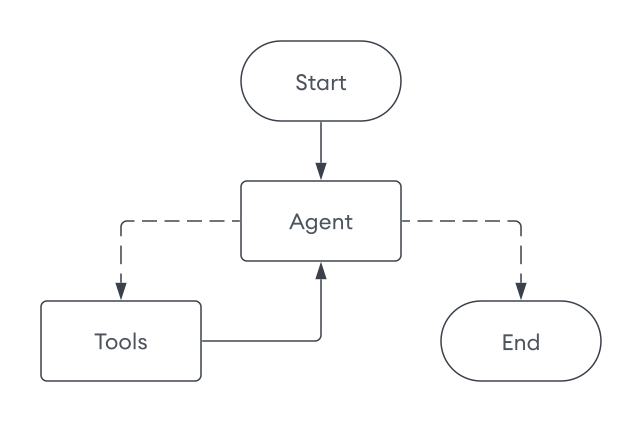
代理实施由多个组件组成:
LangGraphAgent:协调工作流程的主代理类build_graph:构建 LangGraph 工作流程并配置MongoDBSaver检查指针以实现短期内存持久性agent_node:处理消息并决定工具使用的主要决策者tools_node:执行请求的工具并返回结果route_tools:确定工作流程方向的条件路由函数execute:接受用于对话线程跟踪的thread_id参数的主入口点
from typing import Annotated, Dict, List from typing_extensions import TypedDict from langchain_core.prompts import ChatPromptTemplate, MessagesPlaceholder from langchain_core.messages import ToolMessage from langgraph.graph import StateGraph, START, END from langgraph.graph.message import add_messages from langgraph.checkpoint.mongodb import MongoDBSaver from config import llm, mongo_client from search_tools import SEARCH_TOOLS from memory_tools import MEMORY_TOOLS # Define the graph state class GraphState(TypedDict): messages: Annotated[list, add_messages] # Define the LangGraph agent class LangGraphAgent: def __init__(self): # Combine search tools with memory tools self.tools = SEARCH_TOOLS + MEMORY_TOOLS self.tools_by_name = {tool.name: tool for tool in self.tools} # Create prompt template self.prompt = ChatPromptTemplate.from_messages([ ( "system", "You are a helpful AI chatbot." " You are provided with tools to answer questions about movies." " Think step-by-step and use these tools to get the information required to answer the user query." " Do not re-run tools unless absolutely necessary." " If you are not able to get enough information using the tools, reply with I DON'T KNOW." " You have access to the following tools: {tool_names}." ), MessagesPlaceholder(variable_name="messages"), ]) # Provide the tool names to the prompt self.prompt = self.prompt.partial(tool_names=", ".join([tool.name for tool in self.tools])) # Prepare the LLM with tools bind_tools = llm.bind_tools(self.tools) self.llm_with_tools = self.prompt | bind_tools # Build the graph self.app = self._build_graph() def _build_graph(self): """Build and compile the LangGraph workflow.""" # Instantiate the graph graph = StateGraph(GraphState) # Add nodes graph.add_node("agent", self._agent_node) graph.add_node("tools", self._tools_node) # Add edges graph.add_edge(START, "agent") graph.add_edge("tools", "agent") # Add conditional edge graph.add_conditional_edges( "agent", self._route_tools, {"tools": "tools", END: END}, ) # Use the MongoDB checkpointer for short-term memory checkpointer = MongoDBSaver(mongo_client, db_name = "sample_mflix") return graph.compile(checkpointer=checkpointer) def _agent_node(self, state: GraphState) -> Dict[str, List]: """Agent node that processes messages and decides on tool usage.""" messages = state["messages"] result = self.llm_with_tools.invoke(messages) return {"messages": [result]} def _tools_node(self, state: GraphState) -> Dict[str, List]: """Tools node that executes the requested tools.""" result = [] messages = state["messages"] if not messages: return {"messages": result} last_message = messages[-1] if not hasattr(last_message, "tool_calls") or not last_message.tool_calls: return {"messages": result} tool_calls = last_message.tool_calls # Show which tools the agent chose to use tool_names = [tool_call["name"] for tool_call in tool_calls] print(f"🔧 Agent chose to use tool(s): {', '.join(tool_names)}") for tool_call in tool_calls: try: tool_name = tool_call["name"] tool_args = tool_call["args"] tool_id = tool_call["id"] print(f" → Executing {tool_name}") if tool_name not in self.tools_by_name: result.append(ToolMessage(content=f"Tool '{tool_name}' not found", tool_call_id=tool_id)) continue tool = self.tools_by_name[tool_name] observation = tool.invoke(tool_args) result.append(ToolMessage(content=str(observation), tool_call_id=tool_id)) except Exception as e: result.append(ToolMessage(content=f"Tool error: {str(e)}", tool_call_id=tool_id)) return {"messages": result} def _route_tools(self, state: GraphState): """ Uses a conditional_edge to route to the tools node if the last message has tool calls. Otherwise, route to the end. """ messages = state.get("messages", []) if len(messages) > 0: ai_message = messages[-1] else: raise ValueError(f"No messages found in input state to tool_edge: {state}") if hasattr(ai_message, "tool_calls") and len(ai_message.tool_calls) > 0: return "tools" return END def execute(self, user_input: str, thread_id: str) -> str: """Execute the graph with user input.""" input_data = {"messages": [("user", user_input)]} config = {"configurable": {"thread_id": thread_id}} outputs = list(self.app.stream(input_data, config)) # Get the final answer if outputs: final_output = outputs[-1] for _, value in final_output.items(): if "messages" in value and value["messages"]: return value["messages"][-1].content return "No response generated."
提示
要学习;了解有关持久性、短期记忆和MongoDB检查点的更多信息,请参阅以下资源:
运行代理
最后,在项目中创建一个名为 main.py 的文件。此文件运行代理并允许您与其交互。
from agent import LangGraphAgent from config import mongo_client def main(): """LangGraph and MongoDB agent with tools and memory.""" # Initialize agent (indexes are created during config import) agent = LangGraphAgent() thread_id = input("Enter a session ID: ").strip() print("Ask me about movies! Type 'quit' to exit.") try: while True: user_query = input("\nYour question: ").strip() if user_query.lower() == 'quit': break # Get response from agent answer = agent.execute(user_query, thread_id) print(f"\nAnswer: {answer}") finally: mongo_client.close() if __name__ == "__main__": main()
保存项目,然后运行以下命令。当您运行代理时:
代理会初始化向量存储并创建索引(如果尚不存在)。
您可以输入会话ID来启动新会话或继续现有会话。每个会话都是持久的,您可以随时恢复之前的对话。
询问有关电影的问题。该代理会根据您的工具和之前的交互生成响应。
以下输出演示了一个示例交互:
python main.py
Creating vector search index... Vector search index created successfully! Creating search index... Search index created successfully! Enter a session ID: 123 Ask me about movies! Type 'quit' to exit. Your query: What are some movies that take place in the ocean? 🔧 Agent chose to use tool(s): plot_search → Executing plot_search Answer: Here are some movies that take place in the ocean: 1. **20,000 Leagues Under the Sea** - A marine biologist, his daughter, and a mysterious Captain Nemo explore the ocean aboard an incredible submarine. 2. **Deep Rising** - A group of armed hijackers board a luxury ocean liner in the South Pacific Ocean, only to fight man-eating, tentacled sea creatures. ... (truncated) Your query: What is the plot of the Titanic? 🔧 Agent chose to use tool(s): title_search → Executing title_search Answer: The plot of *Titanic* involves the romantic entanglements of two couples aboard the doomed ship's maiden voyage ... (truncated) Your query: What movies are like the movie I just mentioned? 🔧 Agent chose to use tool(s): plot_search → Executing plot_search Answer: Here are some movies similar to *Titanic*: 1. **The Poseidon Adventure** - A group of passengers struggles to survive when their ocean liner capsizes at sea. 2. **Pearl Harbor** - Focused on romance and friendship amidst the backdrop of a historical tragedy, following two best friends and their love lives during wartime. ... (truncated) Your query: I don't like sad movies. 🔧 Agent chose to use tool(s): save_memory → Executing save_memory Answer: Got it—I'll keep that in mind. Let me know if you'd like recommendations that focus more on uplifting or happy themes! (In different session) Enter a session ID: 456 Your query: Recommend me a movie based on what you know about me. 🔧 Agent chose to use tool(s): retrieve_memories → Executing retrieve_memories Answer: Based on what I know about you—you don't like sad movies—I'd recommend a fun, uplifting, or action-packed film. Would you be interested in a comedy, adventure, or family-friendly movie? Your query: Sure! 🔧 Agent chose to use tool(s): plot_search, plot_search, plot_search → Executing plot_search → Executing plot_search → Executing plot_search Answer: Here are some movie recommendations from various uplifting genres that suit your preferences: ### Comedy: 1. **Showtime** (2002): A spoof of buddy cop movies where two very different cops are forced to team up on a new reality-based TV cop show. It's packed with laughs and action! 2. **The Big Bus** (1976): A hilarious disaster film parody featuring a nuclear-powered bus going nonstop from New York to Denver, plagued by absurd disasters. ### Adventure: 1. **Journey to the Center of the Earth** (2008): A scientist, his nephew, and their mountain guide discover a fantastic and dangerous lost world at the earth's core. 2. **Jason and the Argonauts** (1963): One of the most legendary adventures in mythology, brought to life in this epic saga of good versus evil. ### Family-Friendly: 1. **The Incredibles** (2004): A family of undercover superheroes is forced into action to save the world while living in quiet suburban life. 2. **Mary Poppins** (1964): A magical nanny brings joy and transformation to a cold banker's unhappy family. 3. **Chitty Chitty Bang Bang** (1968): A whimsical adventure featuring an inventor, his magical car, and a rescue mission filled with fantasy.